*Parameters* are used to capture and reference values that have been supplied by the end-user during a session. Each parameter has a name and an [entity type](https://docs.cloud.google.com/dialogflow/cx/docs/concept/entity). Unlike raw end-user input, parameters are structured data that can easily be used to perform some logic or generate responses.
## Define, reference, set, and get parameters
There are four general ways in which parameters are used:
- **Define at design-time**: During design-time, you use either the console or the API to define parameters. For example, you can define an intent parameter and use it in a training phrase to indicate end-user input that should be extracted.
- **Reference at design-time**: Parameter references are variables that hold parameter values to be extracted at runtime. During design-time, you use either the console or the API to reference parameters in various data types. For example, you can reference a session parameter in a static fulfillment response for a route.
- **Set at runtime**: At runtime, the Dialogflow CX service, your service that calls the API, and your webhook service can all set parameter values. For example, the Dialogflow CX service sets the value of an intent parameter when an end-user input matches the intent, and the input contains parameter data.
- **Get at runtime**: At runtime, your parameter references contain the parameter values that have been set, and you can use the API or a webhook to get the parameter values. For example, when an intent is matched and your webhook is called, your webhook service receives the parameter values for the intent.
## Parameter naming
The following rules apply to parameter naming:
- Use the following characters: `[A-Z]`, `[a-z]`, `[0-9]`, `.`, `-`, `_`
- Parameter names are case insensitive, so Dialogflow CX treats `Apple` and `apple` as the same parameter. Webhook and API client code should also treat parameter names as case insensitive, because there is no case guarantee for parameter names returned by Dialogflow CX.
- When you create parameters with the same ID or display name in different intents or forms, make sure that the entity type and other settings are the same for all definitions. If the entity type or other parameter settings differ, use unique parameter ID or display name for each definition.
## Parameter value types
Parameter values support multiple value types.
The following [sessions section](https://docs.cloud.google.com/dialogflow/cx/docs/concept/parameter#session-ref) describes
how to reference each parameter value type.
The following types are supported:
| Type | Description |
|---|---|
| Scalar | A single numeric or string value. |
| Composite | A JSON object populated by matching a [composite entity](https://docs.cloud.google.com/dialogflow/cx/docs/concept/entity-options#comp), or by filling of an [intent parameter](https://docs.cloud.google.com/dialogflow/cx/docs/concept/parameter#intent-ref), which contains `original` and `resolved` fields. |
| List | A list of scalar or composite values populated for a parameter configured as a list. See the following **Is List** options. |
## Parameter empty string and null values
You can set string parameter values to `""`,
which sets the parameter to the empty string.
You can set any parameter value to `null`,
which indicates that the parameter has not been set.
## Parameter original values
When text is matched to a particular entity at runtime,
it is often resolved to a value that is more convenient for processing.
For example, the word "apples" in end-user input
may be resolved as "apple" for a fruit entity.
All [value types](https://docs.cloud.google.com/dialogflow/cx/docs/concept/parameter#types) for [intent parameter references](https://docs.cloud.google.com/dialogflow/cx/docs/concept/parameter#intent-ref)
can reference either the original or resolved value.
Only composite value types for [session parameter references](https://docs.cloud.google.com/dialogflow/cx/docs/concept/parameter#session-ref)
can reference the original value.
## Intent parameters
[Intents](https://docs.cloud.google.com/dialogflow/cx/docs/concept/intent)
use parameters to extract data provided by end-users when intents are matched.
The following data is used to define an intent parameter:
- **Name** (also known as **ID** or **Display Name**): A name that identifies the parameter.
- **Entity Type** : The [entity type](https://docs.cloud.google.com/dialogflow/cx/docs/concept/entity) associated with the parameter.
- **Is List**: If true, the parameter is treated as a list of values.
- **Redact in log** : If true, end-user provided parameter data is [redacted](https://docs.cloud.google.com/dialogflow/cx/docs/concept/parameter#redact).
### Define intent parameters
Intent parameters are defined at design-time when creating
[intent data](https://docs.cloud.google.com/dialogflow/cx/docs/concept/intent)
or when
[annotating training phrases](https://docs.cloud.google.com/dialogflow/cx/docs/concept/intent#annot).
### Reference intent parameters
> [!NOTE]
> **Note:** Due to the short-lived lifespan of intent parameter values, it is usually recommended to use [session parameter references](https://docs.cloud.google.com/dialogflow/cx/docs/concept/parameter#session-ref) instead of intent parameter references.
Intent parameter references can be used
in static fulfillment response messages of
[intent routes](https://docs.cloud.google.com/dialogflow/cx/docs/concept/handler#route).
You can reference either the [original value](https://docs.cloud.google.com/dialogflow/cx/docs/concept/parameter#original) or the resolved value.
To reference a parameter for the current matched intent,
use one of the following formats:
```
$intent.params.parameter-id.original
$intent.params.parameter-id.resolved
```
For example,
if the parameter ID is `date`,
you can reference the resolved value as `$intent.params.date.resolved`.
### Set intent parameters
When an end-user input matches an intent at runtime,
any parameter used by an
[annotation](https://docs.cloud.google.com/dialogflow/cx/docs/concept/intent#annot)
for the associated training phrase is set by Dialogflow CX.
The fulfillment for an intent route can use a
[fulfillment parameter preset](https://docs.cloud.google.com/dialogflow/cx/docs/concept/fulfillment#param-preset)
to set an intent parameter value at runtime.
### Get intent parameters
During the conversational turn in which an intent is matched,
your code can access the intent parameter values.
Interactions with the API will return the intent parameter values.
See the `detectIntent` method's `queryResult.parameters` response field
for the `Session` type.
**Select a protocol and version for the Session reference:**
| Protocol | V3 | V3beta1 |
|---|---|---|
| REST | [Session resource](https://docs.cloud.google.com/dialogflow/cx/docs/reference/rest/v3/projects.locations.agents.sessions) | [Session resource](https://docs.cloud.google.com/dialogflow/cx/docs/reference/rest/v3beta1/projects.locations.agents.sessions) |
| RPC | [Session interface](https://docs.cloud.google.com/dialogflow/cx/docs/reference/rpc/google.cloud.dialogflow.cx.v3#google.cloud.dialogflow.cx.v3.Sessions) | [Session interface](https://docs.cloud.google.com/dialogflow/cx/docs/reference/rpc/google.cloud.dialogflow.cx.v3beta1#google.cloud.dialogflow.cx.v3beta1.Sessions) |
| C++ | [SessionsClient](https://googleapis.dev/cpp/google-cloud-dialogflow_cx/latest/classgoogle_1_1cloud_1_1dialogflow__cx_1_1SessionsClient.html) | Not available |
| C# | [SessionsClient](https://docs.cloud.google.com/dotnet/docs/reference/Google.Cloud.Dialogflow.Cx.V3/latest/Google.Cloud.Dialogflow.Cx.V3.SessionsClient) | Not available |
| Go | [SessionsClient](https://docs.cloud.google.com/go/docs/reference/cloud.google.com/go/dialogflow/latest/cx/apiv3#cloud_google_com_go_dialogflow_cx_apiv3_SessionsClient) | Not available |
| Java | [SessionsClient](https://docs.cloud.google.com/java/docs/reference/google-cloud-dialogflow-cx/latest/com.google.cloud.dialogflow.cx.v3.SessionsClient) | [SessionsClient](https://docs.cloud.google.com/java/docs/reference/google-cloud-dialogflow-cx/latest/com.google.cloud.dialogflow.cx.v3beta1.SessionsClient) |
| Node.js | [SessionsClient](https://googleapis.dev/nodejs/dialogflow-cx/latest/v3.SessionsClient.html) | [SessionsClient](https://googleapis.dev/nodejs/dialogflow-cx/latest/v3beta1.SessionsClient.html) |
| PHP | Not available | Not available |
| Python | [SessionsClient](https://docs.cloud.google.com/python/docs/reference/dialogflow-cx/latest/google.cloud.dialogflowcx_v3.services.sessions.SessionsClient) | [SessionsClient](https://docs.cloud.google.com/python/docs/reference/dialogflow-cx/latest/google.cloud.dialogflowcx_v3beta1.services.sessions.SessionsClient) |
| Ruby | Not available | Not available |
Webhook's receive intent parameter values.
See the `intentInfo.parameters` field in the
[Webhook request](https://docs.cloud.google.com/dialogflow/cx/docs/concept/webhook#webhook-request).
## Form parameters
For each page, you can define a
*form* ,
which is a list of parameters
that should be collected from the end-user for the page.
The agent interacts with the end-user for multiple conversation turns,
until it has collected all of the required *form parameters* ,
which are also known as *page parameters* .
The agent collects these parameters in the order defined on the page.
For each required form parameter,
you also provide *prompts* that the agent uses
to request that information from the end-user.
This process is called *form filling*.
For example, you might create a form
that collects the end-user's name
and telephone number for a `Collect Customer Info` page.
The following data is used to define a form parameter:
| Console option name | API field chain | Description |
|---|---|---|
| Display name | `Page.form.parameters[].displayName` | A name that identifies the parameter. |
| Entity type | `Page.form.parameters[].entityType` | The [entity type](https://docs.cloud.google.com/dialogflow/cx/docs/concept/entity) associated with the parameter. |
| Required | `Page.form.parameters[].required` | Indicates whether the parameter is required. Required parameters must be filled before form filling concludes, and the agent will prompt the end-user for values. See the following [Set form parameters](https://docs.cloud.google.com/dialogflow/cx/docs/concept/parameter#form-set) section for details. |
| Default Value (only visible when **Required** is unchecked) | `Page.form.parameters[].defaultValue` | The default value of an optional parameter. See the following [Set form parameters](https://docs.cloud.google.com/dialogflow/cx/docs/concept/parameter#form-set) section for details. |
| Is list | `Page.form.parameters[].isList` | If true, the parameter is treated as a list of values. |
| Redact in log | `Page.form.parameters[].redact` | If true, end-user provided parameter data is [redacted](https://docs.cloud.google.com/dialogflow/cx/docs/concept/parameter#redact). |
| Initial prompt fulfillment | `Page.form.parameters[].fillBehavior.initialPromptFulfillment` | Initial prompts in the form of [fulfillment](https://docs.cloud.google.com/dialogflow/cx/docs/concept/fulfillment) to request a required parameter value from the end-user. See the following [Set form parameters](https://docs.cloud.google.com/dialogflow/cx/docs/concept/parameter#form-set) section for details. |
| Reprompt event handlers | `Page.form.parameters[].fillBehavior.repromptEventHandlers` | These are used when the agent needs to reprompt the end-user to fill the parameter after a failed attempt. See [Form filling reprompt handlers](https://docs.cloud.google.com/dialogflow/cx/docs/concept/parameter#form-reprompt). If no reprompt event handlers are defined, the agent will reprompt with the initial prompts after a failed attempt. |
| DTMF | Not available | See the following [DTMF](https://docs.cloud.google.com/dialogflow/cx/docs/concept/parameter#dtmf) section. |
### Define and manage form parameters
Form parameters are defined at design-time when creating a
[page](https://docs.cloud.google.com/dialogflow/cx/docs/concept/page).
To change the form parameter order with the console,
click the **Parameters** section title on the page,
then drag parameter rows in the parameter table.
To delete a form parameter,
click the **Parameters** section title on the page,
hold your pointer over a parameter,
then click the delete button.
### Reference form parameters
Form parameter references are not used directly.
You can only check the fill status of individual form parameters
or the form as a whole.
You can use these form status references in a
[condition](https://docs.cloud.google.com/dialogflow/cx/docs/reference/condition)
requirement of a
[condition route](https://docs.cloud.google.com/dialogflow/cx/docs/concept/handler#route).
To check whether the current page's complete form is filled,
use the following condition:
```
$page.params.status = "FINAL"
```
To check whether a particular form parameter was filled in the last turn,
use the following condition:
```
$page.params.parameter-id.status = "UPDATED"
```
### Set form parameters
Form parameter values can be set in a variety of ways.
The following subsections describe each mechanism
for setting form parameter values.
#### Default parameter values
You can provide default values for optional form parameters.
When form filling starts,
all unset optional form parameters are set to their default values.
These values can be initialized or overridden by some of the following mechanisms.
If a parameter is required, its default value is ignored.
#### Form filling
> [!NOTE]
> **Note:** You can define page entry fulfillment to inform the end-user that you will be collecting parameter values one by one, however you need to define a prompt for each required parameter separately.
Dialogflow CX automatically sets parameter values
provided by the end-user during form filling.
The agent collects required parameters in the order defined on the page.
The agent prompts the end-user for required values
using the initial prompt fulfillment you provide for each required parameter.
Optional parameters won't trigger prompts.
If a required parameter value is not provided by the end-user
after an agent prompt,
the initial prompt will be repeated unless a different behavior
is defined in the [reprompt handlers](https://docs.cloud.google.com/dialogflow/cx/docs/concept/parameter#form-reprompt).
If there are multiple initial text prompts defined,
the agent behavior is the same as the behavior for any
[fulfillment text responses](https://docs.cloud.google.com/dialogflow/cx/docs/concept/fulfillment#text).
> [!NOTE]
> **Note:** If the end-user provides multiple parameter values in a single conversation turn during form filling, usually only one form parameter is set. However, if the same parameters are defined as [intent parameters](https://docs.cloud.google.com/dialogflow/cx/docs/concept/parameter#intent) in an intent referenced in the same flow, Dialogflow CX may set multiple form parameters in a single conversation turn. This behavior is an optimization of NLU which may or may not occur during a conversation, so this behavior shouldn't be relied on.
#### Intent and session parameter propagation
When a parameter of any type is set at runtime,
the parameter is written to the session and becomes a
[session parameter](https://docs.cloud.google.com/dialogflow/cx/docs/concept/parameter#session).
When a page initially becomes active,
and during its active period,
any form parameter with the same name as a session parameter
is automatically set to the session parameter value.
This can happen with a matched intent parameter in an
[intent route](https://docs.cloud.google.com/dialogflow/cx/docs/concept/handler#route)
or [parameter propagation](https://docs.cloud.google.com/dialogflow/cx/docs/concept/parameter#prop).
Intent and session parameter propagation
is the only mechanism to set optional form parameters
to values from end-user input,
but this mechanism can also set or override required form parameter values.
#### Fulfillment parameter presets
Fulfillment for a route, event handler, or
[form reprompt](https://docs.cloud.google.com/dialogflow/cx/docs/concept/parameter#form-reprompt)
can use a
[fulfillment parameter preset](https://docs.cloud.google.com/dialogflow/cx/docs/concept/fulfillment#param-preset)
to set a form parameter value at runtime.
A fulfillment parameter preset will override a parameter value,
including parameter default values.
#### Webhook parameter setting
Your webhook can set the values of form parameters at runtime.
See the `pageInfo.formInfo.parameterInfo` field in the
[Webhook response](https://docs.cloud.google.com/dialogflow/cx/docs/concept/webhook#webhook-response).
### Get form parameters
Interactions with the API will return the form parameter values.
See the `detectIntent` method's `queryResult.parameters` response field
for the `Session` type.
**Select a protocol and version for the Session reference:**
| Protocol | V3 | V3beta1 |
|---|---|---|
| REST | [Session resource](https://docs.cloud.google.com/dialogflow/cx/docs/reference/rest/v3/projects.locations.agents.sessions) | [Session resource](https://docs.cloud.google.com/dialogflow/cx/docs/reference/rest/v3beta1/projects.locations.agents.sessions) |
| RPC | [Session interface](https://docs.cloud.google.com/dialogflow/cx/docs/reference/rpc/google.cloud.dialogflow.cx.v3#google.cloud.dialogflow.cx.v3.Sessions) | [Session interface](https://docs.cloud.google.com/dialogflow/cx/docs/reference/rpc/google.cloud.dialogflow.cx.v3beta1#google.cloud.dialogflow.cx.v3beta1.Sessions) |
| C++ | [SessionsClient](https://googleapis.dev/cpp/google-cloud-dialogflow_cx/latest/classgoogle_1_1cloud_1_1dialogflow__cx_1_1SessionsClient.html) | Not available |
| C# | [SessionsClient](https://docs.cloud.google.com/dotnet/docs/reference/Google.Cloud.Dialogflow.Cx.V3/latest/Google.Cloud.Dialogflow.Cx.V3.SessionsClient) | Not available |
| Go | [SessionsClient](https://docs.cloud.google.com/go/docs/reference/cloud.google.com/go/dialogflow/latest/cx/apiv3#cloud_google_com_go_dialogflow_cx_apiv3_SessionsClient) | Not available |
| Java | [SessionsClient](https://docs.cloud.google.com/java/docs/reference/google-cloud-dialogflow-cx/latest/com.google.cloud.dialogflow.cx.v3.SessionsClient) | [SessionsClient](https://docs.cloud.google.com/java/docs/reference/google-cloud-dialogflow-cx/latest/com.google.cloud.dialogflow.cx.v3beta1.SessionsClient) |
| Node.js | [SessionsClient](https://googleapis.dev/nodejs/dialogflow-cx/latest/v3.SessionsClient.html) | [SessionsClient](https://googleapis.dev/nodejs/dialogflow-cx/latest/v3beta1.SessionsClient.html) |
| PHP | Not available | Not available |
| Python | [SessionsClient](https://docs.cloud.google.com/python/docs/reference/dialogflow-cx/latest/google.cloud.dialogflowcx_v3.services.sessions.SessionsClient) | [SessionsClient](https://docs.cloud.google.com/python/docs/reference/dialogflow-cx/latest/google.cloud.dialogflowcx_v3beta1.services.sessions.SessionsClient) |
| Ruby | Not available | Not available |
Webhook's receive form parameter values.
See the `pageInfo.formInfo.parameterInfo` field in the
[Webhook request](https://docs.cloud.google.com/dialogflow/cx/docs/concept/webhook#webhook-request).
### Form filling reprompt handlers
Reprompt handlers, also known as
[parameter-level event handlers](https://docs.cloud.google.com/dialogflow/cx/docs/concept/handler#event-parameter),
are used to define complex parameter prompt behavior for required parameters.
For example,
reprompt handlers can be used to alter the prompt
when the end-user fails to provide a value after the initial prompt,
and to transition to another page after N failed attempts.
If no reprompt handlers are defined,
the initial prompt will be used to reprompt the end-user as needed.
If the end-user responds with unexpected input,
a `sys.no-match-*` or `sys.no-input-*` event is invoked,
and any reprompt handlers defined for these events are called.
Like other event handlers, a reprompt handler is a type of
[state handler](https://docs.cloud.google.com/dialogflow/cx/docs/concept/handler)
that can be configured with one or both of:
- A fulfillment to provide an end-user reprompt message and a [parameter preset](https://docs.cloud.google.com/dialogflow/cx/docs/concept/fulfillment#param-preset).
- A transition target to change the current page.
## Session parameters
When a parameter of any type is set at runtime,
the parameter is written to the session
and becomes a *session parameter*.
These parameters are not explicitly defined at design-time.
You can reference these session parameters at any point during a session.
### Reference session parameters
Session parameter references can be used in
the static response messages for the following types of
[fulfillment](https://docs.cloud.google.com/dialogflow/cx/docs/concept/fulfillment):
- Page entry fulfillment
- Route fulfillment
- Event handler fulfillment
- Form prompt fulfillment
- Form reprompt fulfillment
The references can also be used in:
- [Webhook header values](https://docs.cloud.google.com/dialogflow/cx/docs/concept/webhook#auth) for authentication.
- [Flexible webhook requests](https://docs.cloud.google.com/dialogflow/cx/docs/concept/webhook#flexible), for sending parameter values to a webhook.
To reference a session parameter,
use the following formats:
### Scalar
To access a parameter with a scalar entity type:
```
$session.params.parameter-id
```
For example,
if the parameter ID is `date`,
you can reference the value as `$session.params.date`.
### Composite
- To access a member of a parameter with a composite entity type:
```
$session.params.parameter-id.member-name
```
For example,
if the parameter ID is `location`,
you can reference the `zip-code` member value as
`$session.params.location.zip-code`.
- To access the [original value](https://docs.cloud.google.com/dialogflow/cx/docs/concept/parameter#original) of a parameter
with a composite entity type:
```
$session.params.parameter-id.original
```
- To access the full object of a parameter with a composite entity type,
use the
[IDENTITY system function](https://docs.cloud.google.com/dialogflow/cx/docs/reference/system-functions#func-identity).
### List
- To access a complete list of elements:
```
$session.params.parameter-id
```
For example, if the list parameter ID is `colors` and the values extracted
from a user query are `["red", "blue", "yellow"]`, you can reference all
the values as `$session.params.colors`.
- To access the ith element of a list parameter:
```
$session.params.parameter-id[i]
```
For example, if the list parameter ID is `colors`, you can reference
the first value as `$session.params.colors[0]`.
### Set session parameters
When form filling is done,
the filled parameters are written to the session by Dialogflow CX.
Fulfillment for a route, event handler, or
[form reprompt](https://docs.cloud.google.com/dialogflow/cx/docs/concept/parameter#form-reprompt)
can use a
[fulfillment parameter preset](https://docs.cloud.google.com/dialogflow/cx/docs/concept/fulfillment#param-preset)
to set a session parameter value at runtime.
Your webhook can set the values of session parameters at runtime.
See the `sessionInfo.parameters` field in the
[standard webhook response](https://docs.cloud.google.com/dialogflow/cx/docs/concept/webhook#webhook-response)
or see
[flexible webhook response](https://docs.cloud.google.com/dialogflow/cx/docs/concept/webhook#flexible-webhook-response).
Interactions with the API can set session parameter values.
See the `detectIntent` method's `queryParams.parameters` request field
for the `Session` type.
**Select a protocol and version for the Session reference:**
| Protocol | V3 | V3beta1 |
|---|---|---|
| REST | [Session resource](https://docs.cloud.google.com/dialogflow/cx/docs/reference/rest/v3/projects.locations.agents.sessions) | [Session resource](https://docs.cloud.google.com/dialogflow/cx/docs/reference/rest/v3beta1/projects.locations.agents.sessions) |
| RPC | [Session interface](https://docs.cloud.google.com/dialogflow/cx/docs/reference/rpc/google.cloud.dialogflow.cx.v3#google.cloud.dialogflow.cx.v3.Sessions) | [Session interface](https://docs.cloud.google.com/dialogflow/cx/docs/reference/rpc/google.cloud.dialogflow.cx.v3beta1#google.cloud.dialogflow.cx.v3beta1.Sessions) |
| C++ | [SessionsClient](https://googleapis.dev/cpp/google-cloud-dialogflow_cx/latest/classgoogle_1_1cloud_1_1dialogflow__cx_1_1SessionsClient.html) | Not available |
| C# | [SessionsClient](https://docs.cloud.google.com/dotnet/docs/reference/Google.Cloud.Dialogflow.Cx.V3/latest/Google.Cloud.Dialogflow.Cx.V3.SessionsClient) | Not available |
| Go | [SessionsClient](https://docs.cloud.google.com/go/docs/reference/cloud.google.com/go/dialogflow/latest/cx/apiv3#cloud_google_com_go_dialogflow_cx_apiv3_SessionsClient) | Not available |
| Java | [SessionsClient](https://docs.cloud.google.com/java/docs/reference/google-cloud-dialogflow-cx/latest/com.google.cloud.dialogflow.cx.v3.SessionsClient) | [SessionsClient](https://docs.cloud.google.com/java/docs/reference/google-cloud-dialogflow-cx/latest/com.google.cloud.dialogflow.cx.v3beta1.SessionsClient) |
| Node.js | [SessionsClient](https://googleapis.dev/nodejs/dialogflow-cx/latest/v3.SessionsClient.html) | [SessionsClient](https://googleapis.dev/nodejs/dialogflow-cx/latest/v3beta1.SessionsClient.html) |
| PHP | Not available | Not available |
| Python | [SessionsClient](https://docs.cloud.google.com/python/docs/reference/dialogflow-cx/latest/google.cloud.dialogflowcx_v3.services.sessions.SessionsClient) | [SessionsClient](https://docs.cloud.google.com/python/docs/reference/dialogflow-cx/latest/google.cloud.dialogflowcx_v3beta1.services.sessions.SessionsClient) |
| Ruby | Not available | Not available |
### Get session parameters
Interactions with the API will return the session parameter values.
See the `detectIntent` method's `queryResult.parameters` response field
for the `Session` type.
**Select a protocol and version for the Session reference:**
| Protocol | V3 | V3beta1 |
|---|---|---|
| REST | [Session resource](https://docs.cloud.google.com/dialogflow/cx/docs/reference/rest/v3/projects.locations.agents.sessions) | [Session resource](https://docs.cloud.google.com/dialogflow/cx/docs/reference/rest/v3beta1/projects.locations.agents.sessions) |
| RPC | [Session interface](https://docs.cloud.google.com/dialogflow/cx/docs/reference/rpc/google.cloud.dialogflow.cx.v3#google.cloud.dialogflow.cx.v3.Sessions) | [Session interface](https://docs.cloud.google.com/dialogflow/cx/docs/reference/rpc/google.cloud.dialogflow.cx.v3beta1#google.cloud.dialogflow.cx.v3beta1.Sessions) |
| C++ | [SessionsClient](https://googleapis.dev/cpp/google-cloud-dialogflow_cx/latest/classgoogle_1_1cloud_1_1dialogflow__cx_1_1SessionsClient.html) | Not available |
| C# | [SessionsClient](https://docs.cloud.google.com/dotnet/docs/reference/Google.Cloud.Dialogflow.Cx.V3/latest/Google.Cloud.Dialogflow.Cx.V3.SessionsClient) | Not available |
| Go | [SessionsClient](https://docs.cloud.google.com/go/docs/reference/cloud.google.com/go/dialogflow/latest/cx/apiv3#cloud_google_com_go_dialogflow_cx_apiv3_SessionsClient) | Not available |
| Java | [SessionsClient](https://docs.cloud.google.com/java/docs/reference/google-cloud-dialogflow-cx/latest/com.google.cloud.dialogflow.cx.v3.SessionsClient) | [SessionsClient](https://docs.cloud.google.com/java/docs/reference/google-cloud-dialogflow-cx/latest/com.google.cloud.dialogflow.cx.v3beta1.SessionsClient) |
| Node.js | [SessionsClient](https://googleapis.dev/nodejs/dialogflow-cx/latest/v3.SessionsClient.html) | [SessionsClient](https://googleapis.dev/nodejs/dialogflow-cx/latest/v3beta1.SessionsClient.html) |
| PHP | Not available | Not available |
| Python | [SessionsClient](https://docs.cloud.google.com/python/docs/reference/dialogflow-cx/latest/google.cloud.dialogflowcx_v3.services.sessions.SessionsClient) | [SessionsClient](https://docs.cloud.google.com/python/docs/reference/dialogflow-cx/latest/google.cloud.dialogflowcx_v3beta1.services.sessions.SessionsClient) |
| Ruby | Not available | Not available |
Webhook's receive session parameter values.
See the `sessionInfo.parameters` field in the
[Webhook request](https://docs.cloud.google.com/dialogflow/cx/docs/concept/webhook#webhook-request).
### Turn off speech recognition for telephony
In a noisy environment, speech recognition can transcribe background noise as
end-user input. For a telephony integration, these false transcripts can
trigger [no-match events](https://docs.cloud.google.com/dialogflow/cx/docs/concept/handler#event-built-in)
or cut off an end-user who is entering [DTMF](https://docs.cloud.google.com/dialogflow/cx/docs/concept/parameter#dtmf) digits with the keypad.
To accept only DTMF input, set the `telephony_disable_voice_processing` session
parameter to `true`. Starting with the next conversational turn, Dialogflow CX
ignores speech input and processes only DTMF input. This setting stays in effect
for the rest of the session. To turn speech recognition back on, set the
parameter to `false`.
We recommend that you use this parameter as a fallback, not at the start of a
conversation. For example, after the end-user triggers two consecutive no-match
or no-input events, use a
[fulfillment parameter preset](https://docs.cloud.google.com/dialogflow/cx/docs/concept/fulfillment#param-preset)
to set the parameter to `true`, and then prompt the end-user to use the keypad.
Make sure that DTMF is enabled for the parameters that the end-user needs to
provide.
## Parameter propagation
When an end-user input provides a parameter value,
the parameter may be propagated to other levels:
- When an intent parameter is set by an intent match, like-named form parameters for the active page are set to the same value. The entity type of the parameter is dictated by the intent parameter definition.
- When an intent parameter is set by an intent match, or a form parameter is set while filling a form, the parameter becomes a session parameter.
## DTMF for telephony integrations
You can enable and configure DTMF (Dual-tone multi-frequency signaling)
for a parameter.
Once enabled, an end-user for an agent using a telephony
[integration](https://docs.cloud.google.com/dialogflow/cx/docs/concept/integration)
can use the telephone keypad to provide parameter values.
To reduce ambiguity,
DTMF input can be interpreted in both normal and DTMF-specific (recommended) forms:
- The normal form is the keypad values as entered by the end-user. For example, `123#`.
- The DTMF-specific form converts the input to `dtmf_digits_[digits]`, where `[digits]` is the original DTMF digits with `*` replaced with `star` and `#` replaced with `pound`. For example, `123#` is interpreted as `dtmf_digits_123pound`.
When matching entity types for a parameter,
Dialogflow CX will try to match both the normal and DTMF-specific forms.
When an entity type is used for DTMF input,
it is recommended that you define synonyms like `dtmf_digits_123`
to improve NLU matching.
If the DTMF input does not meet the termination condition (either it has
not reached the max digit length or it has not been terminated by the finish
digit), the Dialogflow CX agent will keep waiting for more input. During this
period, if
[no-speech timeout](https://docs.cloud.google.com/dialogflow/cx/docs/concept/agent-settings#settings-speech) is
triggered, the agent will instead invoke a
[no-input event](https://docs.cloud.google.com/dialogflow/cx/docs/concept/handler#event-built-in).
If only a speech utterance is detected,
the agent matches against the speech input.
If both speech and DTMF input are detected,
the speech input is dropped and only the DTMF input is considered.
To enable and customize DTMF for a parameter:
### Console
1. Enable **Advanced settings** from the [agent speech and IVR settings](https://docs.cloud.google.com/dialogflow/cx/docs/concept/agent-settings#settings-speech) if you have not already enabled them.
2. Create a [page parameter](https://docs.cloud.google.com/dialogflow/cx/docs/concept/parameter#form).
3. In the parameter pane, toggle **Enable DTMF** on.
4. Set **Max digits** to the maximum number of digits the end-user can provide for this parameter.
5. Set **Finish digit** to the keypad value that will terminate DTMF input for the parameter. It is common to use `#` for this setting. The finish digit is not added to the Dialogflow CX query on the agent, so if finish digit is # and the input is 123#, then the actual query input will be '123'
When building your agent, you can test DTMF inputs
in the [simulator](https://docs.cloud.google.com/dialogflow/cx/docs/concept/console#simulator-input).
## Flow-scoped parameters
*Flow-scoped parameters* can be defined as
[fulfillment parameter presets](https://docs.cloud.google.com/dialogflow/cx/docs/concept/fulfillment#param-preset)
or [form parameters](https://docs.cloud.google.com/dialogflow/cx/docs/concept/parameter#form).
These parameters can only be referenced while the flow they are defined in
is active, and they are not persisted into the session parameters.
To define or reference a flow-scoped parameter,
use the following syntax:
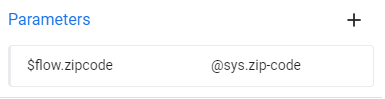
$flow.parameter-name
For example,
if the parameter name is `date`,
you can define or reference the parameter as `$flow.date`.
Note that using a prefix of `$` when defining parameters
is different than other parameter types that don't use `$`
for parameter definitions.
An example flow-scoped parameter definition:
### Flow-scoped parameter value lifetime
> [!NOTE]
> **Note:** If you want to verify that parameter values are retained during a session, it is simpler to use session parameters.
It is uncommon, but in certain advanced cases,
you may need to understand how flow-scoped parameter values are retained
(or discarded)
when a flow becomes inactive, then active again.
Whether flow-scoped parameter values are retained when a flow becomes inactive,
then active again depends on the
[flow stack](https://docs.cloud.google.com/dialogflow/cx/docs/concept/handler#handler-flow-stack)
and flow *instances* on the stack.
- When flow A transitions to flow B using a specific transition target, flow A (parent flow) remains on the stack, flow A retains its flow-scoped parameter values, and a new instance of flow B (child flow) is added to the stack.
- When a child flow transitions back to a parent flow using a [symbolic transition target](https://docs.cloud.google.com/dialogflow/cx/docs/concept/handler#symbolic) (for example, END_FLOW), the child flow is removed from the stack, all child flow-scoped parameter values are discarded, and all parent flow-scoped parameter values are retained.
- Using a series of transitions with specific transition targets, the flow stack can contain multiple instances of one flow type. Each instance of the flow type has unique flow-scoped parameter values. For example: A1 -\> B1 -\> C1 -\> B2, where A, B, and C are flow types, and the numbers denote instances of those flow types. In this example, B1 and B2 are different instances of flow B, and have unique flow-scoped parameters.
Examples:
| Transitions | Outcome |
|---|---|
| Flow A (A1) becomes active. Flow B (B1) becomes active using a specific transition target. Flow B transitions back to the flow A (A1) that initiated it using a symbolic transition target. | Flow A retains the parameter values. |
| Flow A (A1) becomes active. Flow B (B1) becomes active using a specific transition target. Flow B transitions to a new instance of flow A (A2) using a specific transition target. | The new instance of flow A (A2) at the top of the stack does not have access to the parameter values of flow A (A1) at the bottom of the stack. |
| Flow A (A1) becomes active. Flow B (B1) becomes active using a specific transition target. Flow A (A1) becomes active using a symbolic transition target. Flow B (B2) becomes active using a specific transition target. | Flow B (B2) does not retain parameter values that were set while it was active after the second transition (B1). |
## Request-scoped parameters
*Request-scoped parameters* are short-lived parameters created by Dialogflow CX that can only be referenced during the lifecycle of the current request, and are not persisted into the session parameters.
Request-scoped parameters are generated by Dialogflow CX for the following features.
### Built-in parameters
You can access the various data associated with the request using:
| Reference | Description |
|---|---|
| $request.agent-id | The identifier of the [agent](https://docs.cloud.google.com/dialogflow/cx/docs/concept/agent). |
| $request.session-id | The identifier of the [session](https://docs.cloud.google.com/dialogflow/cx/docs/concept/session). |
| $request.project-id | The identifier of the project. |
| $request.location-id | The identifier of the agent location. |
| $request.language | Language code specified in `QueryInput.language_code`. |
| $request.resolved-language | The actual language code used by the agent during processing. The resolved language can be different from the language specified in the request. For example, if the agent only supports "en", while the language specified in the request is "en-US", the resolved language would be "en". |
| $request.user-utterance | The current user utterance specified in the request. |
| $request.last-agent-utterance | The most recent utterance sent by the agent. |
| $request.nlu-confidence-score | The current NLU classification confidence score. |
| $request.end-user-metadata | The [end user metadata](https://docs.cloud.google.com/dialogflow/cx/docs/reference/rest/v3/QueryParameters#FIELDS.end_user_metadata) specified in the request. |
| $request.webhook_status_code | The HTTP status code of the webhook call. |
### Custom Payload
When `QueryParameters.payload` is set, you can access the corresponding parameter using `$request.payload.param-id`.
### Sentiment Analysis
The following sentiment references are available when sentiment analysis is enabled:
| Reference | Type | Description |
|---|---|---|
| $request.sentiment.score | Number | Sentiment score between -1.0 (negative sentiment) and 1.0 (positive sentiment). |
| $request.sentiment.magnitude | Number | Indicates the overall strength of emotion (both positive and negative) between 0.0 and +inf. Unlike score, magnitude is not normalized; each expression of emotion within the end-user input (both positive and negative) contributes to the input's magnitude. Longer inputs may have greater magnitudes. |
| $request.sentiment.succeeded | Boolean | True if sentiment analysis succeeded, false otherwise. |
## Parameter redaction
> [!NOTE]
> **Note:** At this time, only text user input can be redacted.
For any intent or form parameter,
you can enable parameter redaction,
which will redact end-user runtime parameter data from logs
and Dialogflow CX internal storage.
Redacted parameters are shown as `$parameter-name_redacted` in logs.
For example,
consider an end-user input of "My address is *1600 Amphitheatre Parkway* "
that results in an *address* parameter
being sent to "1600 Amphitheatre Parkway".
The logged text will be "My address is $address_redacted".
To enable parameter redaction:
### Console
Check the **Redact in log** checkbox when creating or updating a parameter.
### API
Set the `parameters[].redact` field to true for the `Intent` type.
**Select a protocol and version for the Intent reference:**
| Protocol | V3 | V3beta1 |
|---|---|---|
| REST | [Intent resource](https://docs.cloud.google.com/dialogflow/cx/docs/reference/rest/v3/projects.locations.agents.intents) | [Intent resource](https://docs.cloud.google.com/dialogflow/cx/docs/reference/rest/v3beta1/projects.locations.agents.intents) |
| RPC | [Intent interface](https://docs.cloud.google.com/dialogflow/cx/docs/reference/rpc/google.cloud.dialogflow.cx.v3#google.cloud.dialogflow.cx.v3.Intents) | [Intent interface](https://docs.cloud.google.com/dialogflow/cx/docs/reference/rpc/google.cloud.dialogflow.cx.v3beta1#google.cloud.dialogflow.cx.v3beta1.Intents) |
| C++ | [IntentsClient](https://googleapis.dev/cpp/google-cloud-dialogflow_cx/latest/classgoogle_1_1cloud_1_1dialogflow__cx_1_1IntentsClient.html) | Not available |
| C# | [IntentsClient](https://docs.cloud.google.com/dotnet/docs/reference/Google.Cloud.Dialogflow.Cx.V3/latest/Google.Cloud.Dialogflow.Cx.V3.IntentsClient) | Not available |
| Go | [IntentsClient](https://docs.cloud.google.com/go/docs/reference/cloud.google.com/go/dialogflow/latest/cx/apiv3#cloud_google_com_go_dialogflow_cx_apiv3_IntentsClient) | Not available |
| Java | [IntentsClient](https://docs.cloud.google.com/java/docs/reference/google-cloud-dialogflow-cx/latest/com.google.cloud.dialogflow.cx.v3.IntentsClient) | [IntentsClient](https://docs.cloud.google.com/java/docs/reference/google-cloud-dialogflow-cx/latest/com.google.cloud.dialogflow.cx.v3beta1.IntentsClient) |
| Node.js | [IntentsClient](https://googleapis.dev/nodejs/dialogflow-cx/latest/v3.IntentsClient.html) | [IntentsClient](https://googleapis.dev/nodejs/dialogflow-cx/latest/v3beta1.IntentsClient.html) |
| PHP | Not available | Not available |
| Python | [IntentsClient](https://docs.cloud.google.com/python/docs/reference/dialogflow-cx/latest/google.cloud.dialogflowcx_v3.services.intents.IntentsClient) | [IntentsClient](https://docs.cloud.google.com/python/docs/reference/dialogflow-cx/latest/google.cloud.dialogflowcx_v3beta1.services.intents.IntentsClient) |
| Ruby | Not available | Not available |
Set the `form.parameters[].redact` field to true for the `Page` type.
**Select a protocol and version for the Page reference:**
| Protocol | V3 | V3beta1 |
|---|---|---|
| REST | [Page resource](https://docs.cloud.google.com/dialogflow/cx/docs/reference/rest/v3/projects.locations.agents.flows.pages) | [Page resource](https://docs.cloud.google.com/dialogflow/cx/docs/reference/rest/v3beta1/projects.locations.agents.flows.pages) |
| RPC | [Page interface](https://docs.cloud.google.com/dialogflow/cx/docs/reference/rpc/google.cloud.dialogflow.cx.v3#google.cloud.dialogflow.cx.v3.Pages) | [Page interface](https://docs.cloud.google.com/dialogflow/cx/docs/reference/rpc/google.cloud.dialogflow.cx.v3beta1#google.cloud.dialogflow.cx.v3beta1.Pages) |
| C++ | [PagesClient](https://googleapis.dev/cpp/google-cloud-dialogflow_cx/latest/classgoogle_1_1cloud_1_1dialogflow__cx_1_1PagesClient.html) | Not available |
| C# | [PagesClient](https://docs.cloud.google.com/dotnet/docs/reference/Google.Cloud.Dialogflow.Cx.V3/latest/Google.Cloud.Dialogflow.Cx.V3.PagesClient) | Not available |
| Go | [PagesClient](https://docs.cloud.google.com/go/docs/reference/cloud.google.com/go/dialogflow/latest/cx/apiv3#cloud_google_com_go_dialogflow_cx_apiv3_PagesClient) | Not available |
| Java | [PagesClient](https://docs.cloud.google.com/java/docs/reference/google-cloud-dialogflow-cx/latest/com.google.cloud.dialogflow.cx.v3.PagesClient) | [PagesClient](https://docs.cloud.google.com/java/docs/reference/google-cloud-dialogflow-cx/latest/com.google.cloud.dialogflow.cx.v3beta1.PagesClient) |
| Node.js | [PagesClient](https://googleapis.dev/nodejs/dialogflow-cx/latest/v3.PagesClient.html) | [PagesClient](https://googleapis.dev/nodejs/dialogflow-cx/latest/v3beta1.PagesClient.html) |
| PHP | Not available | Not available |
| Python | [PagesClient](https://docs.cloud.google.com/python/docs/reference/dialogflow-cx/latest/google.cloud.dialogflowcx_v3.services.pages.PagesClient) | [PagesClient](https://docs.cloud.google.com/python/docs/reference/dialogflow-cx/latest/google.cloud.dialogflowcx_v3beta1.services.pages.PagesClient) |
| Ruby | Not available | Not available |
As an alternative, you can
[redact all parameters of a specific entity type](https://docs.cloud.google.com/dialogflow/cx/docs/concept/entity-options#redact).