This advanced example demonstrates how to build a logbook app that uses node.js
for its frontend and MySQL for its backend. The template also creates and
connects an HTTP load balancer that load balances across two zones, and an
autoscaler to automatically scale the app.
HTTP load-balanced deployment resources [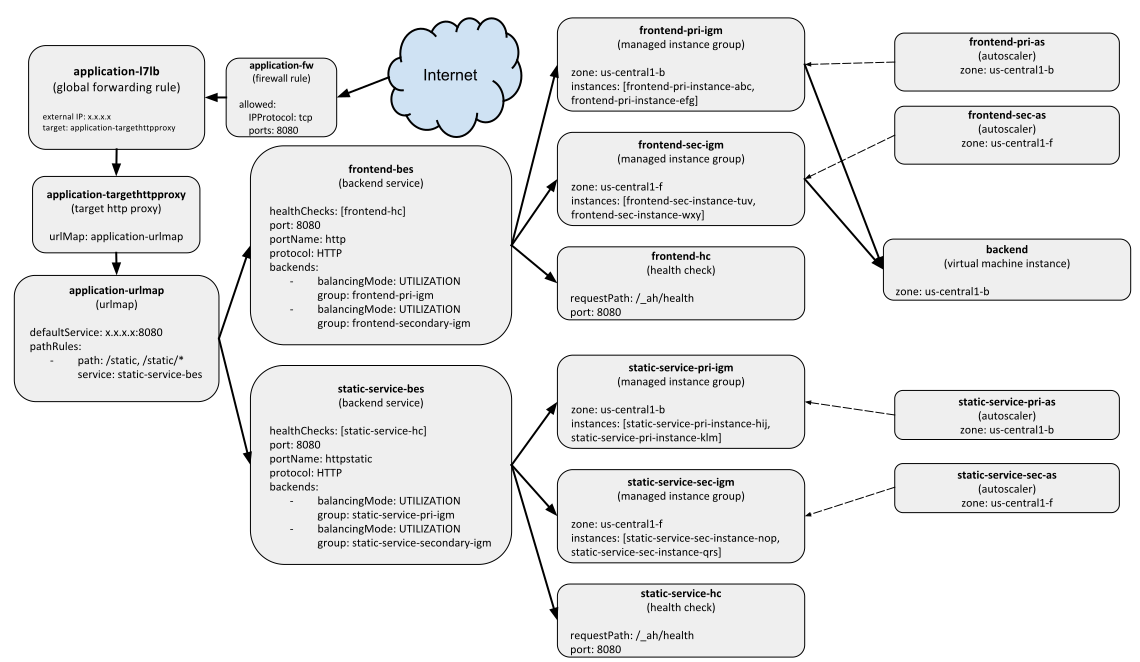](https://docs.cloud.google.com/static/deployment-manager/images/http-load-balanced-diagram.svg)
This example assumes you are familiar with Docker containers, as well as
Compute Engine resources, particularly HTTP load balancing, autoscaling,
managed instance groups, and instance templates.
For more introductory tutorials, refer to
the [Getting started guide](https://docs.cloud.google.com/deployment-manager/docs/manage-cloud-resources-deployment)
or the [Step-by-step guide](https://docs.cloud.google.com/deployment-manager/docs/step-by-step-guide/create-container-deployment).
## Before you begin
- If you want to use the command-line examples in this guide, install the [\`gcloud\` command-line tool](https://docs.cloud.google.com/sdk).
- If you want to use the API examples in this guide, set up [API access](https://docs.cloud.google.com/deployment-manager/docs/reference/latest).
- Familiar with [Compute Engine HTTP load balancing](https://docs.cloud.google.com/compute/docs/load-balancing/http).
- Familiar with [Docker containers](https://www.docker.com/what-docker).
## Creating your templates
This example launches a deployment with several types of resources. To start,
you will create reusable templates that define these resources separately.
Later on, you will use these templates in your final configuration.
At the end of this example, you will have a deployment that contains these
resources:
- A single Compute Engine instance for the backend MySQL virtual machine.
- An instance template that uses a Docker image.
- Two autoscaled managed instance groups in two different zones, running the frontend node.js service.
- Another two autoscaled managed instance group serving static data.
- A health check and a HTTP load balancer to distributed traffic across the respective managed instance groups.
> [!NOTE]
> **Note:** You can write the templates in this example in either Jinja or Python. Deployment Manager offers both versions, but remember to save your template files in the correct file extension in places where you see `[py|jinja]`. For example, `application.py` is a Python template, while `application.jinja` is a Jinja template.
### Creating the backend templates
The backend of this app is a single Compute Engine instance running a MySQL
Docker container. Create a template that defines a Compute Engine instance
that uses a container-optimized image. Name the file `container_vm.[py|jinja]`:
### Jinja
{% from 'container_helper.jinja' import GenerateManifest %}
{% set COMPUTE_URL_BASE = 'https://www.googleapis.com/compute/v1/' %}
resources:
- name: {{ env['name'] }}
type: compute.v1.instance
properties:
zone: {{ properties['zone'] }}
machineType: {{ COMPUTE_URL_BASE }}projects/{{ env['project'] }}/zones/{{ properties['zone'] }}/machineTypes/f1-micro
metadata:
items:
- key: gce-container-declaration
value: |
{{ GenerateManifest(env['name'], properties['port'], properties['dockerImage'], properties['dockerEnv'])|indent(10) }}
disks:
- deviceName: boot
type: PERSISTENT
autoDelete: true
boot: true
initializeParams:
diskName: {{ env['name'] }}-disk
sourceImage: {{ COMPUTE_URL_BASE }}projects/cos-cloud/global/images/{{ properties['containerImage'] }}
networkInterfaces:
- accessConfigs:
- name: external-nat
type: ONE_TO_ONE_NAT
network: {{ COMPUTE_URL_BASE }}projects/{{ env['project'] }}/global/networks/default
serviceAccounts:
- email: default
scopes:
- https://www.googleapis.com/auth/logging.write
- https://www.googleapis.com/auth/monitoring.write
### Python
# Copyright 2016 Google Inc. All rights reserved.
#
# Licensed under the Apache License, Version 2.0 (the "License");
# you may not use this file except in compliance with the License.
# You may obtain a copy of the License at
#
# http://www.apache.org/licenses/LICENSE-2.0
#
# Unless required by applicable law or agreed to in writing, software
# distributed under the License is distributed on an "AS IS" BASIS,
# WITHOUT WARRANTIES OR CONDITIONS OF ANY KIND, either express or implied.
# See the License for the specific language governing permissions and
# limitations under the License.
"""Creates a Container VM with the provided Container manifest."""
from container_helper import GenerateManifest
COMPUTE_URL_BASE = 'https://www.googleapis.com/compute/v1/'
def GlobalComputeUrl(project, collection, name):
return ''.join([COMPUTE_URL_BASE, 'projects/', project,
'/global/', collection, '/', name])
def ZonalComputeUrl(project, zone, collection, name):
return ''.join([COMPUTE_URL_BASE, 'projects/', project,
'/zones/', zone, '/', collection, '/', name])
def GenerateConfig(context):
"""Generate configuration."""
base_name = context.env['name']
# Properties for the container-based instance.
instance = {
'zone': context.properties['zone'],
'machineType': ZonalComputeUrl(context.env['project'],
context.properties['zone'],
'machineTypes',
'f1-micro'),
'metadata': {
'items': [{
'key': 'gce-container-declaration',
'value': GenerateManifest(context)
}]
},
'disks': [{
'deviceName': 'boot',
'type': 'PERSISTENT',
'autoDelete': True,
'boot': True,
'initializeParams': {
'diskName': base_name + '-disk',
'sourceImage': GlobalComputeUrl('cos-cloud',
'images',
context.properties[
'containerImage'])
},
}],
'networkInterfaces': [{
'accessConfigs': [{
'name': 'external-nat',
'type': 'ONE_TO_ONE_NAT'
}],
'network': GlobalComputeUrl(context.env['project'],
'networks',
'default')
}],
'serviceAccounts': [{
'email': 'default',
'scopes': ['https://www.googleapis.com/auth/logging.write']
}]
}
# Resources to return.
resources = {
'resources': [{
'name': base_name,
'type': 'compute.v1.instance',
'properties': instance
}]
}
return resources
The template defines a number of variables, such as the `containerImage` and the
`manifest`, which will be filled in when you define your
[configuration](https://docs.cloud.google.com/deployment-manager/docs/create-advanced-http-load-balanced-deployment#create_your_configuration). This template alone just creates a
single virtual machine (VM) instance.
When you use container images on Compute Engine instances, you also need to
provide a manifest file (different from a Deployment Manager manifest) to
describe to Compute Engine which container image to use. Create a helper
method called `container_helper.[py|jinja]` to dynamically define the container
manifest:
### Jinja
{% macro GenerateManifest(name, port, dockerImage, dockerEnv) -%}
apiVersion: v1
kind: Pod
metadata:
name: {{ name }}
spec:
containers:
- name: {{ name }}
image: {{ dockerImage }}
ports:
- hostPort: {{ port }}
containerPort: {{ port }}
{% if dockerEnv -%}
env:
{% for key, value in dockerEnv.items() -%}
- name: {{ key }}
value: '{{ value }}'
{% endfor -%}
{% endif -%}
{%- endmacro -%}
### Python
# Copyright 2016 Google Inc. All rights reserved.
#
# Licensed under the Apache License, Version 2.0 (the "License");
# you may not use this file except in compliance with the License.
# You may obtain a copy of the License at
#
# http://www.apache.org/licenses/LICENSE-2.0
#
# Unless required by applicable law or agreed to in writing, software
# distributed under the License is distributed on an "AS IS" BASIS,
# WITHOUT WARRANTIES OR CONDITIONS OF ANY KIND, either express or implied.
# See the License for the specific language governing permissions and
# limitations under the License.
"""Helper methods for working with containers in config."""
import six
import yaml
def GenerateManifest(context):
"""Generates a Container Manifest given a Template context.
Args:
context: Template context, which must contain dockerImage and port
properties, and an optional dockerEnv property.
Returns:
A Container Manifest as a YAML string.
"""
env_list = []
if 'dockerEnv' in context.properties:
for key, value in six.iteritems(context.properties['dockerEnv']):
env_list.append({'name': key, 'value': str(value)})
manifest = {
'apiVersion': 'v1',
'kind': 'Pod',
'metadata': {
'name': str(context.env['name'])
},
'spec': {
'containers': [{
'name': str(context.env['name']),
'image': context.properties['dockerImage'],
'ports': [{
'hostPort': context.properties['port'],
'containerPort': context.properties['port']
}],
}]
}
}
if env_list:
manifest['spec']['containers'][0]['env'] = env_list
return yaml.dump(manifest, default_flow_style=False)
### Creating the frontend templates
The frontend of this app runs Node.js and allow users to post messages to the
web page. There will be two managed instance groups that contain two instances
each: a primary managed instance group, and a secondary managed instance group
for load balancing.
To create these frontend templates, use the following instructions.
1. Create an instance template.
You need an Instance Template resource to create a managed instance group,
which is a group of identical VM instances that are centrally managed. This
example creates a managed instance group for the frontend node.js instances,
but first, you must create the Instance Template.
Define a file named `container_instance_template.[py|jinja]`:
### Jinja
{% from 'container_helper.jinja' import GenerateManifest %}
{% set IT_NAME = env['name'] + '-it' %}
resources:
- name: {{ IT_NAME }}
type: compute.v1.instanceTemplate
properties:
properties:
metadata:
items:
- key: gce-container-declaration
value: |
{{ GenerateManifest(env['name'], properties['port'],properties['dockerImage'], properties['dockerEnv'])|indent(12) }}
machineType: f1-micro
disks:
- deviceName: boot
boot: true
autoDelete: true
mode: READ_WRITE
type: PERSISTENT
initializeParams:
sourceImage: https://www.googleapis.com/compute/v1/projects/cos-cloud/global/images/{{ properties['containerImage'] }}
networkInterfaces:
- accessConfigs:
- name: external-nat
type: ONE_TO_ONE_NAT
network: https://www.googleapis.com/compute/v1/projects/{{ env['project'] }}/global/networks/default
serviceAccounts:
- email: default
scopes:
- https://www.googleapis.com/auth/logging.write
- https://www.googleapis.com/auth/monitoring.write
outputs:
- name: instanceTemplateSelfLink
value: $(ref.{{ IT_NAME }}.selfLink)
### Python
# Copyright 2016 Google Inc. All rights reserved.
#
# Licensed under the Apache License, Version 2.0 (the "License");
# you may not use this file except in compliance with the License.
# You may obtain a copy of the License at
#
# http://www.apache.org/licenses/LICENSE-2.0
#
# Unless required by applicable law or agreed to in writing, software
# distributed under the License is distributed on an "AS IS" BASIS,
# WITHOUT WARRANTIES OR CONDITIONS OF ANY KIND, either express or implied.
# See the License for the specific language governing permissions and
# limitations under the License.
"""Creates a Container VM with the provided Container manifest."""
from container_helper import GenerateManifest
def GenerateConfig(context):
"""Generates configuration."""
image = ''.join(['https://www.googleapis.com/compute/v1/',
'projects/cos-cloud/global/images/',
context.properties['containerImage']])
default_network = ''.join(['https://www.googleapis.com/compute/v1/projects/',
context.env['project'],
'/global/networks/default'])
instance_template = {
'name': context.env['name'] + '-it',
'type': 'compute.v1.instanceTemplate',
'properties': {
'properties': {
'metadata': {
'items': [{
'key': 'gce-container-declaration',
'value': GenerateManifest(context)
}]
},
'machineType': 'f1-micro',
'disks': [{
'deviceName': 'boot',
'boot': True,
'autoDelete': True,
'mode': 'READ_WRITE',
'type': 'PERSISTENT',
'initializeParams': {'sourceImage': image}
}],
'networkInterfaces': [{
'accessConfigs': [{
'name': 'external-nat',
'type': 'ONE_TO_ONE_NAT'
}],
'network': default_network
}],
'serviceAccounts': [{
'email': 'default',
'scopes': ['https://www.googleapis.com/auth/logging.write']
}]
}
}
}
outputs = [{'name': 'instanceTemplateSelfLink',
'value': '$(ref.' + instance_template['name'] + '.selfLink)'}]
return {'resources': [instance_template], 'outputs': outputs}
2. Create an autoscaled managed instance group.
Now that you have an instance template, you can define a template that uses
the instance template to create an autoscaled managed instance group.
Create a new file named `autoscaled_group.[py|jinja]` with the following
contents:
### Jinja
resources:
- name: {{ env["name"] }}-igm
type: compute.v1.instanceGroupManager
properties:
zone: {{ properties["zone"] }}
targetSize: {{ properties["size"] }}
baseInstanceName: {{ env["name"] }}-instance
instanceTemplate: {{ properties["instanceTemplate"] }}
- name: {{ env["name"] }}-as
type: compute.v1.autoscaler
properties:
zone: {{ properties["zone"] }}
target: $(ref.{{ env["name"] }}-igm.selfLink)
autoscalingPolicy:
maxNumReplicas: {{ properties["maxSize"] }}
### Python
# Copyright 2016 Google Inc. All rights reserved.
#
# Licensed under the Apache License, Version 2.0 (the "License");
# you may not use this file except in compliance with the License.
# You may obtain a copy of the License at
#
# http://www.apache.org/licenses/LICENSE-2.0
#
# Unless required by applicable law or agreed to in writing, software
# distributed under the License is distributed on an "AS IS" BASIS,
# WITHOUT WARRANTIES OR CONDITIONS OF ANY KIND, either express or implied.
# See the License for the specific language governing permissions and
# limitations under the License.
"""Creates autoscaled, network LB IGM running specified docker image."""
def GenerateConfig(context):
"""Generate YAML resource configuration."""
# NOTE: Once we can specify the port/service during creation of IGM,
# we will wire it up here.
name = context.env['name']
resources = [{
'name': name + '-igm',
'type': 'compute.v1.instanceGroupManager',
'properties': {
'zone': context.properties['zone'],
'targetSize': context.properties['size'],
'baseInstanceName': name + '-instance',
'instanceTemplate': context.properties['instanceTemplate']
}
}, {
'name': name + '-as',
'type': 'compute.v1.autoscaler',
'properties': {
'zone': context.properties['zone'],
'target': '$(ref.' + name + '-igm.selfLink)',
'autoscalingPolicy': {
'maxNumReplicas': context.properties['maxSize']
}
}
}]
return {'resources': resources}
Create the corresponding schema file:
### Jinja
# Copyright 2016 Google Inc. All rights reserved.
#
# Licensed under the Apache License, Version 2.0 (the "License");
# you may not use this file except in compliance with the License.
# You may obtain a copy of the License at
#
# http://www.apache.org/licenses/LICENSE-2.0
#
# Unless required by applicable law or agreed to in writing, software
# distributed under the License is distributed on an "AS IS" BASIS,
# WITHOUT WARRANTIES OR CONDITIONS OF ANY KIND, either express or implied.
# See the License for the specific language governing permissions and
# limitations under the License.
info:
title: Autoscaled, network LB IGM template
author: Google
description: Creates an autoscaled Instance Group Manager running the specified Docker image
version: 1.0
required:
- zone
- instanceTemplate
properties:
zone:
type: string
description: Zone in which this VM will run
instanceTemplate:
type: string
description: URL for the instance template to use for IGM
size:
type: integer
default: 1
description: Initial size of the Managed Instance Group
maxSize:
type: integer
default: 1
description: Maximum size the Managed Instance Group will be autoscaled to
### Python
# Copyright 2016 Google Inc. All rights reserved.
#
# Licensed under the Apache License, Version 2.0 (the "License");
# you may not use this file except in compliance with the License.
# You may obtain a copy of the License at
#
# http://www.apache.org/licenses/LICENSE-2.0
#
# Unless required by applicable law or agreed to in writing, software
# distributed under the License is distributed on an "AS IS" BASIS,
# WITHOUT WARRANTIES OR CONDITIONS OF ANY KIND, either express or implied.
# See the License for the specific language governing permissions and
# limitations under the License.
info:
title: Autoscaled, network LB IGM template
author: Google
description: Creates an autoscaled Instance Group Manager running the specified Docker image
version: 1.0
required:
- zone
- instanceTemplate
properties:
zone:
type: string
description: Zone in which this VM will run
instanceTemplate:
type: string
description: URL for the instance template to use for IGM
size:
type: integer
default: 1
description: Initial size of the Managed Instance Group
maxSize:
type: integer
default: 1
description: Maximum size the Managed Instance Group will be autoscaled to
3. Create resources using these templates.
Up to this point, you defined base templates that determine the properties
of your resources. Using these templates, define the setup of your frontend.
Create a new file named `service.[py|jinja]` with the following contents:
### Jinja
resources:
- name: {{ env["name"] }}
type: container_instance_template.jinja
properties:
port: {{ properties["port"] }}
dockerEnv: {{ properties["dockerEnv"] }}
dockerImage: {{ properties["dockerImage"] }}
containerImage: {{ properties["containerImage"] }}
- name: {{ env["name"] }}-pri
type: autoscaled_group.jinja
properties:
zone: {{ properties["primaryZone"] }}
size: {{ properties["primarySize"] }}
maxSize: {{ properties["maxSize"] }}
port: {{ properties["port"] }}
service: {{ properties["service"] }}
baseInstanceName: {{ env["name"] }}-instance
instanceTemplate: $(ref.{{ env["name"] }}-it.selfLink)
- name: {{ env["name"] }}-sec
type: autoscaled_group.jinja
properties:
zone: {{ properties["secondaryZone"] }}
size: {{ properties["secondarySize"] }}
maxSize: {{ properties["maxSize"] }}
port: {{ properties["port"] }}
service: {{ properties["service"] }}
baseInstanceName: {{ env["name"] }}-instance
instanceTemplate: $(ref.{{ env["name"] }}-it.selfLink)
- name: {{ env["name"] }}-hc
type: compute.v1.httpHealthCheck
properties:
port: {{ properties["port"] }}
requestPath: /_ah/health
- name: {{ env["name"] }}-bes
type: compute.v1.backendService
properties:
port: {{ properties["port"] }}
portName: {{ properties["service"] }}
backends:
- name: {{ env["name"] }}-primary
group: $(ref.{{ env["name"] }}-pri-igm.instanceGroup)
- name: {{ env["name"] }}-secondary
group: $(ref.{{ env["name"] }}-sec-igm.instanceGroup)
healthChecks: [ $(ref.{{ env["name"] }}-hc.selfLink) ]
### Python
# Copyright 2016 Google Inc. All rights reserved.
#
# Licensed under the Apache License, Version 2.0 (the "License");
# you may not use this file except in compliance with the License.
# You may obtain a copy of the License at
#
# http://www.apache.org/licenses/LICENSE-2.0
#
# Unless required by applicable law or agreed to in writing, software
# distributed under the License is distributed on an "AS IS" BASIS,
# WITHOUT WARRANTIES OR CONDITIONS OF ANY KIND, either express or implied.
# See the License for the specific language governing permissions and
# limitations under the License.
"""Creates primary/secondary zone autoscaled IGM running specified container."""
def GenerateConfig(context):
"""Generate YAML resource configuration."""
name = context.env['name']
resources = [{
'name': name,
'type': 'container_instance_template.py',
'properties': {
'port': context.properties['port'],
'dockerEnv': context.properties['dockerEnv'],
'dockerImage': context.properties['dockerImage'],
'containerImage': context.properties['containerImage']
}
}, {
'name': name + '-pri',
'type': 'autoscaled_group.py',
'properties': {
'zone': context.properties['primaryZone'],
'size': context.properties['primarySize'],
'maxSize': context.properties['maxSize'],
'port': context.properties['port'],
'service': context.properties['service'],
'baseInstanceName': name + '-instance',
'instanceTemplate': '$(ref.' + name + '-it.selfLink)'
}
}, {
'name': name + '-sec',
'type': 'autoscaled_group.py',
'properties': {
'zone': context.properties['secondaryZone'],
'size': context.properties['secondarySize'],
'maxSize': context.properties['maxSize'],
'port': context.properties['port'],
'service': context.properties['service'],
'baseInstanceName': name + '-instance',
'instanceTemplate': '$(ref.' + name + '-it.selfLink)'
}
}, {
'name': name + '-hc',
'type': 'compute.v1.httpHealthCheck',
'properties': {
'port': context.properties['port'],
'requestPath': '/_ah/health'
}
}, {
'name': name + '-bes',
'type': 'compute.v1.backendService',
'properties': {
'port': context.properties['port'],
'portName': context.properties['service'],
'backends': [{
'name': name + '-primary',
'group': '$(ref.' + name + '-pri-igm.instanceGroup)'
}, {
'name': name + '-secondary',
'group': '$(ref.' + name + '-sec-igm.instanceGroup)'
}],
'healthChecks': ['$(ref.' + name + '-hc.selfLink)']
}
}]
return {'resources': resources}
Create the corresponding schema file:
### Jinja
# Copyright 2016 Google Inc. All rights reserved.
#
# Licensed under the Apache License, Version 2.0 (the "License");
# you may not use this file except in compliance with the License.
# You may obtain a copy of the License at
#
# http://www.apache.org/licenses/LICENSE-2.0
#
# Unless required by applicable law or agreed to in writing, software
# distributed under the License is distributed on an "AS IS" BASIS,
# WITHOUT WARRANTIES OR CONDITIONS OF ANY KIND, either express or implied.
# See the License for the specific language governing permissions and
# limitations under the License.
info:
title: Autoscaled IGM
author: Google
description: Creates primary/secondary zone autoscaled IGM running specified container.
version: 1.0
imports:
- path: autoscaled_group.jinja
- path: ../../common/jinja/container_instance_template.jinja
name: container_instance_template.jinja
required:
- port
- service
- primaryZone
- secondaryZone
- dockerImage
properties:
primarySize:
type: integer
default: 1
description: The size of the primary autoscaled IGM
secondarySize:
type: integer
default: 0
description: The size of the secondary autoscaled IGM
maxSize:
type: integer
default: 1
description: The maximum size of the IGM
containerImage:
type: string
default: family/cos-stable
description: The container image to be used
dockerEnv:
type: object
default: {}
description: The container environment variables
dockerImage:
type: string
description: the docker image to be used
port:
type: integer
description: Port to expose on the container as well as on the load balancer (e.g., 8080)
service:
type: string
description: Name of the service the port exposes for loadbalancing (backendService) purposes
primaryZone:
type: string
description: Primary Zone in which to run the service
secondaryZone:
type: string
description: Secondary Zone in which to run the service
### Python
# Copyright 2016 Google Inc. All rights reserved.
#
# Licensed under the Apache License, Version 2.0 (the "License");
# you may not use this file except in compliance with the License.
# You may obtain a copy of the License at
#
# http://www.apache.org/licenses/LICENSE-2.0
#
# Unless required by applicable law or agreed to in writing, software
# distributed under the License is distributed on an "AS IS" BASIS,
# WITHOUT WARRANTIES OR CONDITIONS OF ANY KIND, either express or implied.
# See the License for the specific language governing permissions and
# limitations under the License.
info:
title: Autoscaled IGM
author: Google
description: Creates primary/secondary zone autoscaled IGM running specified container.
version: 1.0
imports:
- path: autoscaled_group.py
- path: ../../common/python/container_instance_template.py
name: container_instance_template.py
required:
- port
- service
- primaryZone
- secondaryZone
- dockerImage
properties:
primarySize:
type: integer
default: 1
description: The size of the primary autoscaled IGM
secondarySize:
type: integer
default: 0
description: The size of the secondary autoscaled IGM
maxSize:
type: integer
default: 1
description: The maximum size of the IGM
containerImage:
type: string
default: family/cos-stable
description: The container image to be used
dockerEnv:
type: object
default: {}
description: The container environment variables
dockerImage:
type: string
description: the docker image to be used
port:
type: integer
description: Port to expose on the container as well as on the load balancer (e.g., 8080)
service:
type: string
description: Name of the service the port exposes for loadbalancing (backendService) purposes
primaryZone:
type: string
description: Primary Zone in which to run the service
secondaryZone:
type: string
description: Secondary Zone in which to run the service
Let's break down what this template is creating:
1. Two managed instance groups, one primary and one secondary.
The template uses the `autoscaled_group.[py|jinja]` template to create
a primary and secondary autoscaled managed instance group.
2. Next, the template creates a backend service and health checker. A
backend service is required for HTTP load balancing, and it defines
the serving capacity of the instance groups in that backend service.
In this case, the primary and secondary managed instance groups are
part of this backend, and the
[default properties](https://docs.cloud.google.com/compute/docs/reference/latest/backendServices)
of the backend service apply.
By default, a backend service performs load balancing based on
CPU utilization of the associated instance groups, but you can also
load balance based on requests per second (RPS).
**Note:** A health check is always
required when creating a backend service.
### Creating a unifying template
Lastly, create a unifying template that combines both the backend and frontend
templates. Create a new file named `application.[py|jinja]`:
### Jinja
{% set BACKEND = env["deployment"] + "-backend" %}
{% set FRONTEND = env["deployment"] + "-frontend" %}
{% set STATIC_SERVICE = env["deployment"] + "-static-service" %}
{% set APPLICATION = env["deployment"] + "-application" %}
{% set APPLICATION_PORT = 8080 %}
{% set LB_PORT = 8080 %}
{% set MYSQL_PORT = 8080 %}
{% set CONTAINER_IMAGE = "family/cos-stable" %}
resources:
- name: {{ BACKEND }}
type: container_vm.jinja
properties:
zone: {{ properties["primaryZone"] }}
dockerImage: {{ properties["backendImage"] }}
containerImage: {{ CONTAINER_IMAGE }}
port: {{ MYSQL_PORT }}
- name: {{ FRONTEND }}
type: service.jinja
properties:
primaryZone: {{ properties["primaryZone"] }}
primarySize: 2
secondaryZone: {{ properties["secondaryZone"] }}
secondarySize: 0
dockerImage: {{ properties["frontendImage"] }}
containerImage: {{ CONTAINER_IMAGE }}
port: {{ APPLICATION_PORT }}
service: http
# If left out will default to 1
maxSize: 20
# Define the variables that are exposed to container as env variables.
dockerEnv:
SEVEN_SERVICE_MYSQL_PORT: {{ MYSQL_PORT }}
SEVEN_SERVICE_PROXY_HOST: $(ref.{{ BACKEND }}.networkInterfaces[0].networkIP)
- name: {{ STATIC_SERVICE }}
type: service.jinja
properties:
primaryZone: {{ properties["primaryZone"] }}
primarySize: 2
secondaryZone: {{ properties["secondaryZone"] }}
secondarySize: 0
dockerImage: {{ properties["staticImage"] }}
containerImage: {{ CONTAINER_IMAGE }}
port: {{ APPLICATION_PORT }}
service: httpstatic
# If left out will default to 1
maxSize: 20
- name: {{ APPLICATION }}-urlmap
type: compute.v1.urlMap
properties:
defaultService: $(ref.{{ FRONTEND }}-bes.selfLink)
hostRules:
- hosts: ["*"]
pathMatcher: pathmap
pathMatchers:
- name: pathmap
defaultService: $(ref.{{ FRONTEND }}-bes.selfLink)
pathRules:
- paths: ["/static", "/static/*"]
service: $(ref.{{ STATIC_SERVICE }}-bes.selfLink)
- name: {{ APPLICATION }}-targetproxy
type: compute.v1.targetHttpProxy
properties:
urlMap: $(ref.{{ APPLICATION }}-urlmap.selfLink)
- name: {{ APPLICATION }}-l7lb
type: compute.v1.globalForwardingRule
properties:
IPProtocol: TCP
portRange: {{ LB_PORT }}
target: $(ref.{{ APPLICATION }}-targetproxy.selfLink)
- name: {{ APPLICATION }}-fw
type: compute.v1.firewall
properties:
allowed:
- IPProtocol: TCP
ports: [ {{ LB_PORT }} ]
sourceRanges: [ 0.0.0.0/0 ]
### Python
# Copyright 2016 Google Inc. All rights reserved.
#
# Licensed under the Apache License, Version 2.0 (the "License");
# you may not use this file except in compliance with the License.
# You may obtain a copy of the License at
#
# http://www.apache.org/licenses/LICENSE-2.0
#
# Unless required by applicable law or agreed to in writing, software
# distributed under the License is distributed on an "AS IS" BASIS,
# WITHOUT WARRANTIES OR CONDITIONS OF ANY KIND, either express or implied.
# See the License for the specific language governing permissions and
# limitations under the License.
"""Create appplication template with back-end and front-end templates."""
def GenerateConfig(context):
"""Generate configuration."""
backend = context.env['deployment'] + '-backend'
frontend = context.env['deployment'] + '-frontend'
static_service = context.env['deployment'] + '-static-service'
application = context.env['deployment'] + '-application'
container_image = 'family/cos-stable'
application_port = 8080
lb_port = 8080
mysql_port = 8080
resources = [{
'name': backend,
'type': 'container_vm.py',
'properties': {
'zone': context.properties['primaryZone'],
'dockerImage': context.properties['backendImage'],
'containerImage': container_image,
'port': mysql_port
}
}, {
'name': frontend,
'type': 'service.py',
'properties': {
'primaryZone': context.properties['primaryZone'],
'primarySize': 2,
'secondaryZone': context.properties['secondaryZone'],
'secondarySize': 0,
'dockerImage': context.properties['frontendImage'],
'containerImage': container_image,
'port': application_port,
'service': 'http',
# If left out will default to 1
'maxSize': 20,
# Define the variables that are exposed to container as env variables.
'dockerEnv': {
'SEVEN_SERVICE_MYSQL_PORT': mysql_port,
'SEVEN_SERVICE_PROXY_HOST': '$(ref.' + backend
+ '.networkInterfaces[0].networkIP)'
}
}
}, {
'name': static_service,
'type': 'service.py',
'properties': {
'primaryZone': context.properties['primaryZone'],
'primarySize': 2,
'secondaryZone': context.properties['secondaryZone'],
'secondarySize': 0,
'dockerImage': context.properties['staticImage'],
'containerImage': container_image,
'port': application_port,
'service': 'httpstatic',
# If left out will default to 1
'maxSize': 20
}
}, {
'name': application + '-urlmap',
'type': 'compute.v1.urlMap',
'properties': {
'defaultService': '$(ref.' + frontend + '-bes.selfLink)',
'hostRules': [{
'hosts': ['*'],
'pathMatcher': 'pathmap'
}],
'pathMatchers': [{
'name': 'pathmap',
'defaultService': '$(ref.' + frontend + '-bes.selfLink)',
'pathRules': [{
'paths': ['/static', '/static/*'],
'service': '$(ref.' + static_service + '-bes.selfLink)'
}]
}]
}
}, {
'name': application + '-targetproxy',
'type': 'compute.v1.targetHttpProxy',
'properties': {
'urlMap': '$(ref.' + application + '-urlmap.selfLink)'
}
}, {
'name': application + '-l7lb',
'type': 'compute.v1.globalForwardingRule',
'properties': {
'IPProtocol': 'TCP',
'portRange': lb_port,
'target': '$(ref.' + application + '-targetproxy.selfLink)'
}
}, {
'name': application + '-fw',
'type': 'compute.v1.firewall',
'properties': {
'allowed': [{
'IPProtocol': 'TCP',
'ports': [lb_port]
}],
'sourceRanges': ['0.0.0.0/0']
}
}]
return {'resources': resources}
Create a corresponding schema file:
### Jinja
# Copyright 2016 Google Inc. All rights reserved.
#
# Licensed under the Apache License, Version 2.0 (the "License");
# you may not use this file except in compliance with the License.
# You may obtain a copy of the License at
#
# http://www.apache.org/licenses/LICENSE-2.0
#
# Unless required by applicable law or agreed to in writing, software
# distributed under the License is distributed on an "AS IS" BASIS,
# WITHOUT WARRANTIES OR CONDITIONS OF ANY KIND, either express or implied.
# See the License for the specific language governing permissions and
# limitations under the License.
info:
title: Application Template
author: Google
description: Create application template with back-end and front-end templates
version: 1.0
imports:
- path: service.jinja
- path: ../../common/jinja/container_vm.jinja
name: container_vm.jinja
required:
- primaryZone
- secondaryZone
- backendImage
- frontendImage
- staticImage
properties:
primaryZone:
type: string
description: Primary Zone in which to run the service
secondaryZone:
type: string
description: Secondary Zone in which to run the service
backendImage:
type: string
description: Docker image to use in the backend
frontendImage:
type: string
description: Docker image to use in the frontend service
staticImage:
type: string
description: Docker image to use in the static service
### Python
# Copyright 2016 Google Inc. All rights reserved.
#
# Licensed under the Apache License, Version 2.0 (the "License");
# you may not use this file except in compliance with the License.
# You may obtain a copy of the License at
#
# http://www.apache.org/licenses/LICENSE-2.0
#
# Unless required by applicable law or agreed to in writing, software
# distributed under the License is distributed on an "AS IS" BASIS,
# WITHOUT WARRANTIES OR CONDITIONS OF ANY KIND, either express or implied.
# See the License for the specific language governing permissions and
# limitations under the License.
info:
title: Application Template
author: Google
description: Create application template with back-end and front-end templates
version: 1.0
imports:
- path: service.py
- path: ../../common/python/container_vm.py
name: container_vm.py
required:
- primaryZone
- secondaryZone
- backendImage
- frontendImage
- staticImage
properties:
primaryZone:
type: string
description: Primary Zone in which to run the service
secondaryZone:
type: string
description: Secondary Zone in which to run the service
backendImage:
type: string
description: Docker image to use in the backend
frontendImage:
type: string
description: Docker image to use in the frontend service
staticImage:
type: string
description: Docker image to use in the static service
In addition to the frontend and backend, the template also defines
some additional resources:
1. A static service with primary and secondary managed instance groups. This
static service serves a webpage located at the `/static` path in your app.
2. A URL Map resource. HTTP load balancing requires a URL map to map the
different URLs to correct paths. In this case, the default path, indicated by
the `defaultService` property, is the backend service that you created
earlier. If a user navigates to `/static`, the URL map will map that path to
the static service, as defined in the `pathMatchers` section.
3. A global forwarding rule and target HTTP proxy. Since the app is being load
balanced across two separate zones, you will need a global forwarding rule
that serves a single external IP address. In addition, a target HTTP proxy is
required for the HTTP load balancing setup.
4. A firewall rule that allows traffic through port 8080.
## Creating your configuration
Now that you have your templates and related schemas ready, you can create a
configuration that deploys these resources. Create a configuration file named
`application.yaml` with the following contents, and replace `ZONE_TO_RUN` and
`SECONDARY_ZONE_TO_RUN` with the primary and secondary zones of your choice.
### Jinja
# Copyright 2016 Google Inc. All rights reserved.
#
# Licensed under the Apache License, Version 2.0 (the "License");
# you may not use this file except in compliance with the License.
# You may obtain a copy of the License at
#
# http://www.apache.org/licenses/LICENSE-2.0
#
# Unless required by applicable law or agreed to in writing, software
# distributed under the License is distributed on an "AS IS" BASIS,
# WITHOUT WARRANTIES OR CONDITIONS OF ANY KIND, either express or implied.
# See the License for the specific language governing permissions and
# limitations under the License.
# Launches an autoscaled, load-balanced frontend in two zones running nodejs
# for serving traffic using L7 loadbalancing. Also launches a single MySQL
# container instance, wires the two together using references, and passes
# them as env variables to the underlying frontend Docker containers.
#
# NOTE: Due to the fact that IGM does not allow specifying service/port to
# created IG, you must run the following commands after creation of the
# template:
#
# export DEPLOYMENT=
# export PRIMARY_ZONE=
# export SECONDARY_ZONE=
#
# gcloud compute instance-groups unmanaged set-named-ports ${DEPLOYMENT}-frontend-pri-igm \
# --named-ports http:8080,httpstatic:8080 \
# --zone ${PRIMARY_ZONE}
#
# gcloud compute instance-groups unmanaged set-named-ports ${DEPLOYMENT}-frontend-sec-igm \
# --named-ports http:8080,httpstatic:8080 \
# --zone ${SECONDARY_ZONE}
#
# Then to see the IP that exposes the application, you can do:
# gcloud compute forwarding-rules list | grep application-${DEPLOYMENT}-l7lb
imports:
- path: application.jinja
resources:
- name: nodejs
type: application.jinja
properties:
primaryZone: ZONE_TO_RUN
secondaryZone: SECOND_ZONE_TO_RUN
backendImage: gcr.io/deployment-manager-examples/mysql
frontendImage: gcr.io/deployment-manager-examples/nodejsservice
staticImage: gcr.io/deployment-manager-examples/nodejsservicestatic
### Python
# Copyright 2016 Google Inc. All rights reserved.
#
# Licensed under the Apache License, Version 2.0 (the "License");
# you may not use this file except in compliance with the License.
# You may obtain a copy of the License at
#
# http://www.apache.org/licenses/LICENSE-2.0
#
# Unless required by applicable law or agreed to in writing, software
# distributed under the License is distributed on an "AS IS" BASIS,
# WITHOUT WARRANTIES OR CONDITIONS OF ANY KIND, either express or implied.
# See the License for the specific language governing permissions and
# limitations under the License.
# Launches an autoscaled, load-balanced frontend in two zones running nodejs
# for serving traffic using L7 loadbalancing. Also launches a single MySQL
# container instance, wires the two together using references, and passes
# them as env variables to the underlying frontend Docker containers.
#
# NOTE: Due to the fact that IGM does not allow specifying service/port to
# created IG, you must run the following commands after creation of the
# template:
#
# export DEPLOYMENT=
# export PRIMARY_ZONE=
# export SECONDARY_ZONE=
#
# gcloud compute instance-groups unmanaged set-named-ports ${DEPLOYMENT}-frontend-pri-igm \
# --named-ports http:8080,httpstatic:8080 \
# --zone ${PRIMARY_ZONE}
#
# gcloud compute instance-groups unmanaged set-named-ports ${DEPLOYMENT}-frontend-sec-igm \
# --named-ports http:8080,httpstatic:8080 \
# --zone ${SECONDARY_ZONE}
#
# Then to see the IP that exposes the application, you can do:
# gcloud compute forwarding-rules list | grep application-${DEPLOYMENT}-l7lb
imports:
- path: application.py
resources:
- name: nodejs
type: application.py
properties:
primaryZone: ZONE_TO_RUN
secondaryZone: SECOND_ZONE_TO_RUN
backendImage: gcr.io/deployment-manager-examples/mysql
frontendImage: gcr.io/deployment-manager-examples/nodejsservice
staticImage: gcr.io/deployment-manager-examples/nodejsservicestatic
## Deploying your configuration
Now, let's deploy your resources. Using the Google Cloud CLI, run the
following command, optionally choosing to replace `advanced-configuration-l7`
with a deployment name of your choice. Keep in mind that your deployment name
will automatically be used to name the resources.
In this example, the deployment name is `advanced-configuration-l7`. If you opt
to change the deployment name, make sure to use that deployment name in all
of the following examples.
gcloud deployment-manager deployments create advanced-configuration-l7 --config application.yaml
The response should look similar to the following resources:
```
Waiting for create operation-1469468950934-5387966d431f0-49b11bc4-1421b2f0...done.
Create operation operation-1469468950934-5387966d431f0-49b11bc4-1421b2f0 completed successfully.
NAME TYPE STATE ERRORS
advanced-configuration-l7-application-fw compute.v1.firewall COMPLETED []
advanced-configuration-l7-application-l7lb compute.v1.globalForwardingRule COMPLETED []
advanced-configuration-l7-application-targetproxy compute.v1.targetHttpProxy COMPLETED []
advanced-configuration-l7-application-urlmap compute.v1.urlMap COMPLETED []
advanced-configuration-l7-backend compute.v1.instance COMPLETED []
advanced-configuration-l7-frontend-bes compute.v1.backendService COMPLETED []
advanced-configuration-l7-frontend-hc compute.v1.httpHealthCheck COMPLETED []
advanced-configuration-l7-frontend-it compute.v1.instanceTemplate COMPLETED []
advanced-configuration-l7-frontend-pri-as compute.v1.autoscaler COMPLETED []
advanced-configuration-l7-frontend-pri-igm compute.v1.instanceGroupManager COMPLETED []
advanced-configuration-l7-frontend-sec-as compute.v1.autoscaler COMPLETED []
advanced-configuration-l7-frontend-sec-igm compute.v1.instanceGroupManager COMPLETED []
advanced-configuration-l7-static-service-bes compute.v1.backendService COMPLETED []
advanced-configuration-l7-static-service-hc compute.v1.httpHealthCheck COMPLETED []
advanced-configuration-l7-static-service-it compute.v1.instanceTemplate COMPLETED []
advanced-configuration-l7-static-service-pri-as compute.v1.autoscaler COMPLETED []
advanced-configuration-l7-static-service-pri-igm compute.v1.instanceGroupManager COMPLETED []
advanced-configuration-l7-static-service-sec-as compute.v1.autoscaler COMPLETED []
advanced-configuration-l7-static-service-sec-igm compute.v1.instanceGroupManager COMPLETED []
```
## Adding service labels
Next, specify the appropriate
[service labels](https://docs.cloud.google.com/compute/docs/instance-groups#specifying_service_endpoints)
for your managed instance groups. Service labels are metadata used by the load
balancing service to group resources.
To add service labels, run the following commands, matching the primary and
secondary zones to the zones you selected in your deployment configuration file:
gcloud compute instance-groups unmanaged set-named-ports advanced-configuration-l7-frontend-pri-igm \
--named-ports http:8080,httpstatic:8080 \
--zone [PRIMARY_ZONE]
gcloud compute instance-groups unmanaged set-named-ports advanced-configuration-l7-frontend-sec-igm \
--named-ports http:8080,httpstatic:8080 \
--zone [SECONDARY_ZONE]
## Testing your configuration
To test your configuration, get the external IP address that is serving
traffic by querying the forwarding rule:
```
gcloud compute forwarding-rules list | grep advanced-configuration-l7-l7lb
advanced-configuration-l7-l7lb 107.178.249.126 TCP advanced-configuration-l7-targetproxy
```
In this case, the external IP is `107.178.249.126`.
In a browser, visit the external IP address at port 8080. For example,
if your external IP is `107.178.249.126`, the URL would be:
http://107.178.249.126:8080
> [!NOTE]
> **Note:** It may take a couple minutes for your deployment to completely start up. If you see an error when visiting this URL, wait a couple of minutes and try again.
You should see a blank page, which is expected. Next, post a message to the
page. Go to the following URL:
http://107.178.249.126:8080?msg=hello_world!
You will see confirmation that your message was added. Navigate back to the
main URL and now the page should have the message:
hello_world!
You can also visit the static page you created, or check the health of your app,
by visiting the following URLs:
# Static web page
http://107.178.249.126:8080/static
# Health check
http://107.178.249.126:8080/_ah/health
Congratulations, you've deployed your configuration successfully.
## (Optional) Creating Docker images
Docker allows you to automate and run software inside containers. Containers
allow you to isolate different services within containers that can all run
on a single Linux instance.
This example used some existing Docker images, but you can also create
your own versions of these Docker images. You can find the instructions for
creating the MySQL backend images and the Node.js frontend images in the
[Creating your resource templates](https://docs.cloud.google.com/deployment-manager/docs/create-advanced-deployment#creating_your_resource_templates)
section.
To create the Docker image that serves the static webpage:
1. Create a new VM instance with a container-optimized image:
gcloud compute instances create docker-playground \
--image-family container-vm \
--image-project google-containers \
--zone us-central1-a \
--machine-type f1-micro
2. Connect to the instance:
gcloud compute ssh --zone us-central1-a docker-playground
3. Create a file named `Dockerfile` with the following contents:
FROM node:latest
RUN mkdir /var/www/
ADD service.js /var/www/service.js
WORKDIR /var/www/
RUN npm install mysql
CMD ["node", "service.js"]
4. Create a file named `service.js` with the following contents:
var http = require('http');
var url = require('url');
console.log('Started static node server')
http.createServer(function (req, res) {
reqUrl = url.parse(req.url, true);
res.useChunkedEncodingByDefault = false;
res.writeHead(200, {'Content-Type': 'text/html'});
if (reqUrl.pathname == '/_ah/health') {
res.end('ok');
} else if (reqUrl.pathname == '/exit') {
process.exit(-1)
} else {
res.end('static server');
}
}).listen(8080, '0.0.0.0');
console.log('Static server running at http://127.0.0.1:8080/');
5. Build the Docker image, replacing `username` with your Docker Hub username.
If you do not have a Docker Hub username,
[create one](https://hub.docker.com/account/signup/)
first before building the Docker image.
sudo docker build --no-cache -t username/nodejsservicestatic .
6. Push the images to the Docker repository:
sudo docker push username/nodejsservicestatic
Now you have the Docker images to run Node.js and MySQL. You can actually see
these images on the
[repository](https://registry.hub.docker.com/) by searching
for the image names. To try the images out, you can replace all instances of
`gcr.io/deployment-manager-examples/mysql` and
`gcr.io/deployment-manager-examples/nodejsservice` with your respective images.
## Next steps
Once you've completed this sample, you can:
- Continue to build off of this example by creating a more robust webpage, or adding more services to the web server.
- Read more about [configurations](https://docs.cloud.google.com/deployment-manager/docs/configuration) or [deployments](https://docs.cloud.google.com/deployment-manager/docs/deployments).
- Try creating your own configurations.