In this tutorial, you deploy an example logbook app that uses Node.js for its
frontend and MySQL for its backend. At the end of the tutorial, your deployment
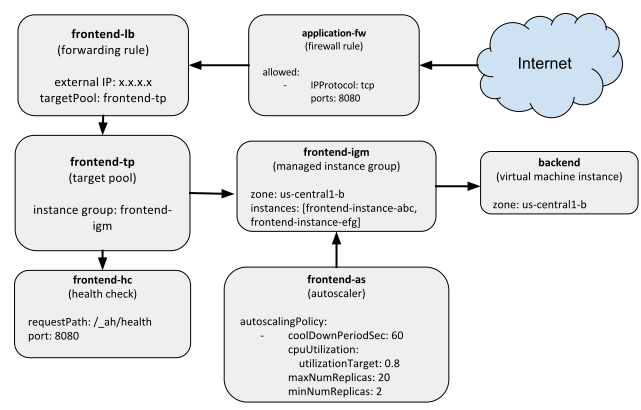
has the following resources:
[](https://docs.cloud.google.com/static/deployment-manager/images/network-load-balanced-diagram.svg)
If you are new to Deployment Manager, see the
[Quickstart](https://docs.cloud.google.com/deployment-manager/docs/manage-cloud-resources-deployment)
or the [Step-by-Step Guide](https://docs.cloud.google.com/deployment-manager/docs/step-by-step-guide)
tutorials.
## Before you begin
- If you want to use the command-line examples in this guide, install the [\`gcloud\` command-line tool](https://docs.cloud.google.com/sdk).
- If you want to use the API examples in this guide, set up [API access](https://docs.cloud.google.com/deployment-manager/docs/reference/latest).
- Read an overview of [Compute Engine network load balancing](https://docs.cloud.google.com/compute/docs/load-balancing/network).
- Read an overview of [Docker containers](https://www.docker.com/what-docker).
## Creating your resource templates
This example launches a deployment that contains a variety of Google Cloud
resources. To start, you create templates that define these resources
separately. Later, you call these templates in your final configuration. Your
deployment contains these resources:
- A Compute Engine instance that hosts a MySQL database for the app.
- An instance template for frontend instances, which uses a Docker image for the Node.js app.
- A managed instance group, which uses the instance template to create two frontend instances.
- An autoscaler, which starts or stops additional frontend instances based on incoming traffic.
- A health check, which checks whether the frontend instances are available to do work.
- A network load balancer with a forwarding rule.
- A target pool for the managed instance group.
### Creating the template for the MySQL backend
The backend of this app is a single Compute Engine instance running
a MySQL Docker container. The `container_vm.py` template defines a
Compute Engine instance that can run Docker containers. To ensure that the
template follows the correct structure and contains all of the required
properties, you also need a schema file.
Copy the template below, or download it from the GitHub repository:
# Copyright 2016 Google Inc. All rights reserved.
#
# Licensed under the Apache License, Version 2.0 (the "License");
# you may not use this file except in compliance with the License.
# You may obtain a copy of the License at
#
# http://www.apache.org/licenses/LICENSE-2.0
#
# Unless required by applicable law or agreed to in writing, software
# distributed under the License is distributed on an "AS IS" BASIS,
# WITHOUT WARRANTIES OR CONDITIONS OF ANY KIND, either express or implied.
# See the License for the specific language governing permissions and
# limitations under the License.
"""Creates a Container VM with the provided Container manifest."""
from container_helper import GenerateManifest
COMPUTE_URL_BASE = 'https://www.googleapis.com/compute/v1/'
def GlobalComputeUrl(project, collection, name):
return ''.join([COMPUTE_URL_BASE, 'projects/', project,
'/global/', collection, '/', name])
def ZonalComputeUrl(project, zone, collection, name):
return ''.join([COMPUTE_URL_BASE, 'projects/', project,
'/zones/', zone, '/', collection, '/', name])
def GenerateConfig(context):
"""Generate configuration."""
base_name = context.env['name']
# Properties for the container-based instance.
instance = {
'zone': context.properties['zone'],
'machineType': ZonalComputeUrl(context.env['project'],
context.properties['zone'],
'machineTypes',
'f1-micro'),
'metadata': {
'items': [{
'key': 'gce-container-declaration',
'value': GenerateManifest(context)
}]
},
'disks': [{
'deviceName': 'boot',
'type': 'PERSISTENT',
'autoDelete': True,
'boot': True,
'initializeParams': {
'diskName': base_name + '-disk',
'sourceImage': GlobalComputeUrl('cos-cloud',
'images',
context.properties[
'containerImage'])
},
}],
'networkInterfaces': [{
'accessConfigs': [{
'name': 'external-nat',
'type': 'ONE_TO_ONE_NAT'
}],
'network': GlobalComputeUrl(context.env['project'],
'networks',
'default')
}],
'serviceAccounts': [{
'email': 'default',
'scopes': ['https://www.googleapis.com/auth/logging.write']
}]
}
# Resources to return.
resources = {
'resources': [{
'name': base_name,
'type': 'compute.v1.instance',
'properties': instance
}]
}
return resources
[Download the schema file for the template](https://raw.githubusercontent.com/GoogleCloudPlatform/deploymentmanager-samples/master/examples/v2/common/python/container_vm.py.schema).
The template has some undefined properties, such as `containerImage`, which are
defined in later templates.
When you use container images on Compute Engine instances, you also need to
provide a manifest file that describes which container image to use. Create a
helper method called `container_helper.py` to dynamically define the container
manifest:
# Copyright 2016 Google Inc. All rights reserved.
#
# Licensed under the Apache License, Version 2.0 (the "License");
# you may not use this file except in compliance with the License.
# You may obtain a copy of the License at
#
# http://www.apache.org/licenses/LICENSE-2.0
#
# Unless required by applicable law or agreed to in writing, software
# distributed under the License is distributed on an "AS IS" BASIS,
# WITHOUT WARRANTIES OR CONDITIONS OF ANY KIND, either express or implied.
# See the License for the specific language governing permissions and
# limitations under the License.
"""Helper methods for working with containers in config."""
import six
import yaml
def GenerateManifest(context):
"""Generates a Container Manifest given a Template context.
Args:
context: Template context, which must contain dockerImage and port
properties, and an optional dockerEnv property.
Returns:
A Container Manifest as a YAML string.
"""
env_list = []
if 'dockerEnv' in context.properties:
for key, value in six.iteritems(context.properties['dockerEnv']):
env_list.append({'name': key, 'value': str(value)})
manifest = {
'apiVersion': 'v1',
'kind': 'Pod',
'metadata': {
'name': str(context.env['name'])
},
'spec': {
'containers': [{
'name': str(context.env['name']),
'image': context.properties['dockerImage'],
'ports': [{
'hostPort': context.properties['port'],
'containerPort': context.properties['port']
}],
}]
}
}
if env_list:
manifest['spec']['containers'][0]['env'] = env_list
return yaml.dump(manifest, default_flow_style=False)
### Creating the template for the Node.js frontend
The frontend of the app runs Node.js, and lets users post messages to the web
page. The frontend runs on a group of virtual machine instances, supported by
an autoscaler and a load balancer. To create frontend templates, use the
following instructions.
1. Create an *instance template* resource.
You need an instance template to create a managed instance group,
which is a group of identical virtual machine (VM) instances that you
control as a single entity.
Create a file named `container_instance_template.py`, and download the
schema for the template:
# Copyright 2016 Google Inc. All rights reserved.
#
# Licensed under the Apache License, Version 2.0 (the "License");
# you may not use this file except in compliance with the License.
# You may obtain a copy of the License at
#
# http://www.apache.org/licenses/LICENSE-2.0
#
# Unless required by applicable law or agreed to in writing, software
# distributed under the License is distributed on an "AS IS" BASIS,
# WITHOUT WARRANTIES OR CONDITIONS OF ANY KIND, either express or implied.
# See the License for the specific language governing permissions and
# limitations under the License.
"""Creates a Container VM with the provided Container manifest."""
from container_helper import GenerateManifest
def GenerateConfig(context):
"""Generates configuration."""
image = ''.join(['https://www.googleapis.com/compute/v1/',
'projects/cos-cloud/global/images/',
context.properties['containerImage']])
default_network = ''.join(['https://www.googleapis.com/compute/v1/projects/',
context.env['project'],
'/global/networks/default'])
instance_template = {
'name': context.env['name'] + '-it',
'type': 'compute.v1.instanceTemplate',
'properties': {
'properties': {
'metadata': {
'items': [{
'key': 'gce-container-declaration',
'value': GenerateManifest(context)
}]
},
'machineType': 'f1-micro',
'disks': [{
'deviceName': 'boot',
'boot': True,
'autoDelete': True,
'mode': 'READ_WRITE',
'type': 'PERSISTENT',
'initializeParams': {'sourceImage': image}
}],
'networkInterfaces': [{
'accessConfigs': [{
'name': 'external-nat',
'type': 'ONE_TO_ONE_NAT'
}],
'network': default_network
}],
'serviceAccounts': [{
'email': 'default',
'scopes': ['https://www.googleapis.com/auth/logging.write']
}]
}
}
}
outputs = [{'name': 'instanceTemplateSelfLink',
'value': '$(ref.' + instance_template['name'] + '.selfLink)'}]
return {'resources': [instance_template], 'outputs': outputs}
[Download the schema file for the template](https://raw.githubusercontent.com/GoogleCloudPlatform/deploymentmanager-samples/master/examples/v2/common/python/container_instance_template.py.schema).
2. Create an autoscaler, managed instance group, and load balancer.
Next, create another template that uses the `container_instance_template.py`
template and creates the rest of your frontend resources, including
an autoscaler, load balancer, and managed instance group.
This template includes the following resources:
1. An *instance template* using the `container_instance_template.py`
template.
2. A *managed instance group* using the instance template, and an *autoscaler*
that references the managed instance group. Using references ensures that
Deployment Manager creates the resources in a specific order. In this
case, the managed instance group is created before the autoscaler.
3. A *network load balancer* that contains the following resources:
- A forwarding rule with a single external IP address exposed to the Internet.
- A target pool containing the managed instance group you created earlier.
- A health check to attach to the target pool.
Create a file named `frontend.py`, and download the schema for the template:
# Copyright 2016 Google Inc. All rights reserved.
#
# Licensed under the Apache License, Version 2.0 (the "License");
# you may not use this file except in compliance with the License.
# You may obtain a copy of the License at
#
# http://www.apache.org/licenses/LICENSE-2.0
#
# Unless required by applicable law or agreed to in writing, software
# distributed under the License is distributed on an "AS IS" BASIS,
# WITHOUT WARRANTIES OR CONDITIONS OF ANY KIND, either express or implied.
# See the License for the specific language governing permissions and
# limitations under the License.
"""Creates autoscaled, network LB IGM running specified docker image."""
def GenerateConfig(context):
"""Generate YAML resource configuration."""
# Pull the region out of the zone
region = context.properties['zone'][:context.properties['zone'].rfind('-')]
name = context.env['name']
resources = [{
'name': name,
'type': 'container_instance_template.py',
'properties': {
'port': context.properties['port'],
'dockerEnv': context.properties['dockerEnv'],
'dockerImage': context.properties['dockerImage'],
'containerImage': context.properties['containerImage']
}
}, {
'name': name + '-igm',
'type': 'compute.v1.instanceGroupManager',
'properties': {
'zone': context.properties['zone'],
'targetSize': context.properties['size'],
'targetPools': ['$(ref.' + name + '-tp.selfLink)'],
'baseInstanceName': name + '-instance',
'instanceTemplate': '$(ref.' + name + '-it.selfLink)'
}
}, {
'name': name + '-as',
'type': 'compute.v1.autoscaler',
'properties': {
'zone': context.properties['zone'],
'target': '$(ref.' + name + '-igm.selfLink)',
'autoscalingPolicy': {
'maxNumReplicas': context.properties['maxSize']
}
}
}, {
'name': name + '-hc',
'type': 'compute.v1.httpHealthCheck',
'properties': {
'port': context.properties['port'],
'requestPath': '/_ah/health'
}
}, {
'name': name + '-tp',
'type': 'compute.v1.targetPool',
'properties': {
'region': region,
'healthChecks': ['$(ref.' + name + '-hc.selfLink)']
}
}, {
'name': name + '-lb',
'type': 'compute.v1.forwardingRule',
'properties': {
'region': region,
'portRange': context.properties['port'],
'target': '$(ref.' + name + '-tp.selfLink)'
}
}]
return {'resources': resources}
[Download the schema file for the template](https://raw.githubusercontent.com/GoogleCloudPlatform/deploymentmanager-samples/master/examples/v2/nodejs/python/frontend.py.schema).
### Creating a unifying template
Finally, create a template that brings together both the back-end
and frontend templates. Create a file named `nodejs.py` with the following
contents:
# Copyright 2016 Google Inc. All rights reserved.
#
# Licensed under the Apache License, Version 2.0 (the "License");
# you may not use this file except in compliance with the License.
# You may obtain a copy of the License at
#
# http://www.apache.org/licenses/LICENSE-2.0
#
# Unless required by applicable law or agreed to in writing, software
# distributed under the License is distributed on an "AS IS" BASIS,
# WITHOUT WARRANTIES OR CONDITIONS OF ANY KIND, either express or implied.
# See the License for the specific language governing permissions and
# limitations under the License.
"""Create nodejs template with the back-end and front-end templates."""
def GenerateConfig(context):
"""Generate configuration."""
backend = context.env['deployment'] + '-backend'
frontend = context.env['deployment'] + '-frontend'
firewall = context.env['deployment'] + '-application-fw'
application_port = 8080
mysql_port = 3306
resources = [{
'name': backend,
'type': 'container_vm.py',
'properties': {
'zone': context.properties['zone'],
'dockerImage': 'gcr.io/qwiklabs-resources/mysql',
'containerImage': 'family/cos-stable',
'port': mysql_port,
'dockerEnv': {
'MYSQL_ROOT_PASSWORD': 'mypassword'
}
}
}, {
'name': frontend,
'type': 'frontend.py',
'properties': {
'zone': context.properties['zone'],
'dockerImage': 'gcr.io/qwiklabs-resources/nodejsservice',
'port': application_port,
# Define the variables that are exposed to container as env variables.
'dockerEnv': {
'SEVEN_SERVICE_MYSQL_PORT': mysql_port,
'SEVEN_SERVICE_PROXY_HOST': '$(ref.' + backend
+ '.networkInterfaces[0].networkIP)'
},
# If left out will default to 1
'size': 2,
# If left out will default to 1
'maxSize': 20
}
}, {
'name': firewall,
'type': 'compute.v1.firewall',
'properties': {
'allowed': [{
'IPProtocol': 'TCP',
'ports': [application_port]
}],
'sourceRanges': ['0.0.0.0/0']
}
}]
return {'resources': resources}
[Download the schema file for the template](https://raw.githubusercontent.com/GoogleCloudPlatform/deploymentmanager-samples/master/examples/v2/nodejs/python/nodejs.py.schema).
Note that the frontend of your app is named `env["deployment"]-frontend`, and
that your backend is also named similarly. When you deploy the app,
Deployment Manager will automatically replace `env["deployment"]` with the
deployment name.
## Creating your configuration
After you have all the templates ready, you can create a configuration that will
be used to deploy your resources. Create a configuration file named
`nodejs.yaml` with the following contents:
# Copyright 2016 Google Inc. All rights reserved.
#
# Licensed under the Apache License, Version 2.0 (the "License");
# you may not use this file except in compliance with the License.
# You may obtain a copy of the License at
#
# http://www.apache.org/licenses/LICENSE-2.0
#
# Unless required by applicable law or agreed to in writing, software
# distributed under the License is distributed on an "AS IS" BASIS,
# WITHOUT WARRANTIES OR CONDITIONS OF ANY KIND, either express or implied.
# See the License for the specific language governing permissions and
# limitations under the License.
# Launches an autoscaled, load-balanced frontend running nodejs for serving
# traffic. Also launches a single MySQL container instance, wires the two
# together using references, and passes them as env variables to the underlying
# frontend Docker containers.
imports:
- path: nodejs.py
resources:
- name: nodejs
type: nodejs.py
properties:
zone: ZONE_TO_RUN
Replace `ZONE_TO_RUN` with the zone where you want your resources, such as
`us-central1-a`.
## Deploying your resources
Now, deploy your resources. Using the Google Cloud CLI, run:
gcloud deployment-manager deployments create advanced-configuration --config nodejs.yaml
When the deployment is complete, Deployment Manager shows a summary of the
resources created, similar to the following:
Waiting for create operation-1468522101491-5379cf2344539-5961abe8-a500190c...done.
Create operation operation-1468522101491-5379cf2344539-5961abe8-a500190c completed successfully.
NAME TYPE STATE ERRORS
advanced-configuration-application-fw compute.v1.firewall COMPLETED []
advanced-configuration-backend compute.v1.instance COMPLETED []
advanced-configuration-frontend-as compute.v1.autoscaler COMPLETED []
advanced-configuration-frontend-hc compute.v1.httpHealthCheck COMPLETED []
advanced-configuration-frontend-igm compute.v1.instanceGroupManager COMPLETED []
advanced-configuration-frontend-it compute.v1.instanceTemplate COMPLETED []
advanced-configuration-frontend-lb compute.v1.forwardingRule COMPLETED []
advanced-configuration-frontend-tp compute.v1.targetPool COMPLETED []
## Testing the app
To test your app, first get the external IP address that is serving traffic, by
querying the forwarding rule:
```
$ gcloud compute forwarding-rules describe advanced-configuration-frontend-lb --region us-central1
IPAddress: 104.154.81.44
IPProtocol: TCP
creationTimestamp: '2016-07-14T11:48:37.228-07:00'
description: ''
id: '9033201246750269546'
kind: compute#forwardingRule
name: advanced-configuration-frontend-lb
portRange: 8080-8080
region: https://www.googleapis.com/compute/v1/projects/myproject/regions/us-central1
selfLink: https://www.googleapis.com/compute/v1/projects/myproject/regions/us-central1/forwardingRules/advanced-configuration-frontend-lb
target: https://www.googleapis.com/compute/v1/projects/myproject/regions/us-central1/targetPools/advanced-configuration-frontend-tp
```
In this case, the external IP is `104.154.81.44`.
Next, in a browser, visit the external IP address with port 8080. For example,
if your external IP address is `104.154.81.44`, the URL would be:
http://104.154.81.44:8080
You should see a blank page, which is expected. Next, post a message to the
page. Go to the following URL:
http://104.154.81.44:8080?msg=hellothere!
You will see confirmation that your message was added. Navigate back to the
main URL, and the page should now have the message:
hellothere!
You now have a deployed app that can log messages sent to it.
## Next steps
After you've completed this sample, you can:
- Build on this example by deploying instances with your own Docker containers. If you want to modify the Docker containers used in this tutorial, edit the [Dockerfiles in the GitHub repository](https://github.com/GoogleCloudPlatform/deploymentmanager-samples/tree/master/examples/v2/nodejs/dockerfiles).
- See more example deployments in the [Deployment Manager GitHub
repository](https://github.com/GoogleCloudPlatform/deploymentmanager-samples/tree/master/examples/v2).
- Read more about [templates](https://docs.cloud.google.com/deployment-manager/docs/configuration/templates/create-basic-template) and [deployments](https://docs.cloud.google.com/deployment-manager/docs/deployments).