


默认情况下,Managed Service for Apache Spark 会静态加密客户内容。Managed Service for Apache Spark 会为您处理加密,您无需执行任何其他操作。此选项称为“Google 默认加密”。
如果您想要控制加密密钥,则可以将 Cloud KMS 中客户管理的加密密钥 (CMEK) 与集成 CMEK 的服务(包括 Managed Service for Apache Spark)搭配使用。使用 Cloud KMS 密钥时,您可以控制其保护级别、位置、轮替时间表、使用和访问权限以及加密边界。 使用 Cloud KMS 还可让您跟踪密钥使用情况、查看审核日志以及控制密钥生命周期。 这样您就可以在 Cloud KMS 中控制和管理用于保护数据的对称密钥加密密钥 (KEK),而不是由 Google 拥有和管理这些密钥。
使用 CMEK 设置资源后,访问 Managed Service for Apache Spark 资源的体验与使用 Google 默认加密功能类似。如需详细了解加密选项,请参阅客户管理的加密密钥 (CMEK)。
使用 CMEK
按照本部分中的步骤操作,使用 CMEK 加密 Managed Service for Apache Spark 写入永久性磁盘和 Managed Service for Apache Spark 暂存桶的数据。
您可以使用 Cloud Key Management Service 创建和管理密钥环和密钥,也可以使用 Cloud KMS Autokey 简化密钥环和密钥的自动创建流程。
使用 Cloud KMS Autokey
- 在包含项目的文件夹中启用 Autokey。
- 创建密钥句柄。
创建密钥句柄时,请将
dataproc.googleapis.com/Batch或dataproc.googleapis.com/Session指定为--resource-type。Autokey 会生成密钥并将其分配给密钥句柄。 - 按照下文手动创建和使用密钥部分中的第 4 步和第 5 步,向服务账号授予权限并配置批处理或会话工作负载。提交工作负载时,请在
kmsKey字段中指定密钥句柄资源名称,而不是密钥资源名称。
手动创建和使用密钥
按照以下步骤手动创建 Cloud KMS 密钥,并将其与 Managed Service for Apache Spark 搭配使用。
复制资源名称。
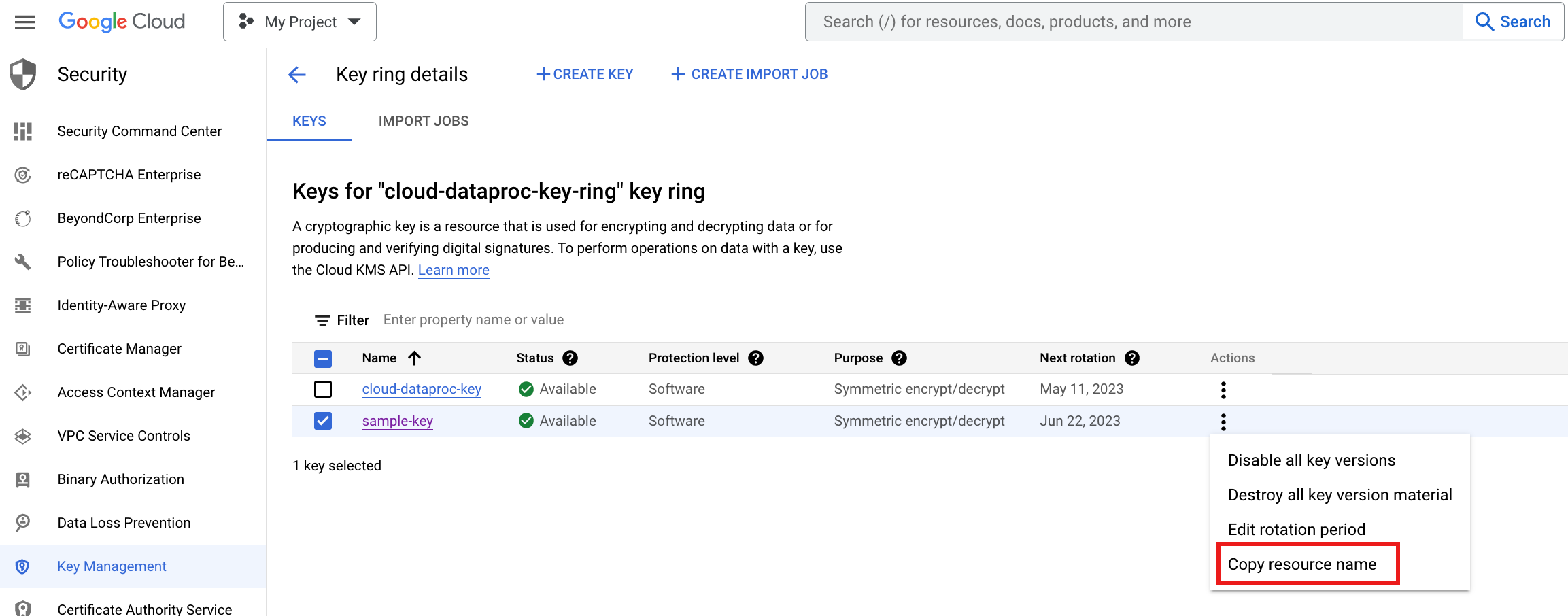
projects/PROJECT_ID/locations/REGION/keyRings/KEY_RING_NAME/cryptoKeys/KEY_NAME
让 Compute Engine、Managed Service for Apache Spark 和 Cloud Storage 服务代理服务账号能够使用您的密钥:
- 如需将 Cloud KMS CryptoKey Encrypter/Decrypter 角色分配给 Compute Engine 服务代理服务账号,请参阅使用 Cloud KMS 密钥保护资源> 必需的角色。如果此服务账号未列在 Google Cloud 控制台的 IAM 页面上,请点击包括 Google 提供的角色授予以列出该账号。
将 Cloud KMS CryptoKey Encrypter/Decrypter 角色分配给 Managed Service for Apache Spark Service Agent 服务账号。您可以使用 Google Cloud CLI 分配角色:
 gcloud projects add-iam-policy-binding KMS_PROJECT_ID \
 --member serviceAccount:service-PROJECT_NUMBER@dataproc-accounts.iam.gserviceaccount.com \
 --role roles/cloudkms.cryptoKeyEncrypterDecrypter
替换以下内容:
KMS_PROJECT_ID:运行 Cloud KMS 的 Google Cloud 项目的 ID。此项目也可以是运行 Managed Service for Apache Spark 资源的项目。PROJECT_NUMBER:运行 Managed Service for Apache Spark 资源的 Google Cloud 项目的项目编号(而非项目 ID)。在运行 Managed Service for Apache Spark 资源的项目中启用 Cloud KMS API。
如果 Managed Service for Apache Spark Service Agent 角色未附加到 Managed Service for Apache Spark Service Agent 服务账号,请将
serviceusage.services.use权限添加到附加到 Managed Service for Apache Spark Service Agent 服务账号的自定义角色。如果 Managed Service for Apache Spark Service Agent 角色已附加到 Managed Service for Apache Spark Service Agent 服务账号,则可以跳过此步骤。按照相应步骤在存储桶中添加密钥。
当您提交批处理工作负载时:
- 在批处理
kmsKey参数中指定您的密钥。 - 在批处理
stagingBucket参数中指定 Cloud Storage 存储桶的名称。
- 在批处理
当您创建交互式会话或会话模板时:
- 在会话
kmsKey参数中指定您的密钥。 - 在会话
stagingBucket参数中指定 Cloud Storage 存储桶的名称。
- 在会话