

本文档介绍了如何自动调节 Managed Service for Apache Spark 批量工作负载。由于 Spark 配置选项的数量以及评估这些选项对工作负载的影响的难度,因此优化 Spark 工作负载以提高性能和弹性可能具有挑战性。Managed Service for Apache Spark 自动调节功能提供了一种替代手动工作负载配置的方法,它会根据 Spark 优化最佳实践和对工作负载运行(称为“同类群组”)的分析,自动将 Spark 配置设置应用于重复性 Spark 工作负载。
注册 Managed Service for Apache Spark 自动调节功能
如需注册以获取本页介绍的 Managed Service for Apache Spark 自动调节 预览版 的使用权限,请填写并提交 Managed Service for Apache Spark 预览版访问权限申请 注册表单。表单获得批准后,表单中列出的项目便可使用预览版功能。
福利
Managed Service for Apache Spark 自动调节功能可提供以下优势:
- 自动优化:自动调节效率低下的 Managed Service for Apache Spark 批量和 Spark 配置,从而缩短 作业运行时间。
- 历史学习:从重复运行中学习,应用针对您的工作负载量身定制的建议 。
自动调节同类群组
自动调节功能适用于批量工作负载的重复执行(同类群组)。
您在提交批量工作负载时指定的同类群组名称会将其标识为重复性工作负载的连续运行之一。
自动调节功能按如下方式应用于批量工作负载同类群组:
自动调节功能会计算并应用于工作负载的第二个及后续同类群组。自动调节功能不会应用于重复性工作负载的首次运行,因为 Managed Service for Apache Spark 自动调节功能会使用工作负载历史记录进行优化。
自动调节功能不会追溯应用于正在运行的工作负载,而只会应用于新提交的工作负载。
自动调节功能会通过分析同类群组统计信息来学习并随着时间的推移而改进。 为了让系统收集足够的数据,我们建议您至少在五次运行中启用自动调节功能。
同类群组名称:建议使用有助于
识别重复性工作负载类型的同类群组名称。例如,您可以将 daily_sales_aggregation 用作计划工作负载的同类群组名称,该工作负载运行每日销售额汇总任务。
自动调节场景
在适用情况下,自动调节功能会自动选择并执行以下 scenarios 或目标,以优化批量工作负载:
- 扩缩:Spark 自动扩缩配置设置。
- 联接优化:Spark 配置设置,用于优化 SQL 广播 联接性能。
使用 Managed Service for Apache Spark 自动调节功能
您可以使用 控制台、Google Cloud CLI 或 Dataproc API,或者 Cloud 客户端库,在批量工作负载上启用 Managed Service for Apache Spark 自动调节功能。 Google Cloud
控制台
如需在每次提交周期性批量工作负载时启用 Managed Service for Apache Spark 自动调节功能,请执行以下步骤:
在 Google Cloud 控制台中,前往 Managed Service for Apache Spark 批量 页面。
如需创建批量工作负载,请点击创建 。
在自动调节 部分中:
切换启用 按钮,为 Spark 工作负载启用自动调节功能。
同类群组:填写同类群组名称,该名称会将批量标识为一系列重复性工作负载之一。自动调节功能会应用于使用此同类群组名称提交的第二个及后续工作负载。例如,对于运行每日销售额汇总任务的计划批量工作负载,请指定
daily_sales_aggregation作为同类群组名称。
根据需要填写创建批量 页面的其他部分,然后点击提交 。如需详细了解这些字段,请参阅 提交批量工作负载。
gcloud
如需在每次提交周期性批量工作负载时启用 Managed Service for Apache Spark 自动调节功能,请在本地终端窗口或在Cloud Shell中运行以下 gcloud CLIgcloud dataproc batches submit命令。
gcloud dataproc batches submit COMMAND \
    --region=REGION \
    --cohort=COHORT \
    --autotuning-scenarios=auto  \
    other arguments ...
替换以下内容:
API
如需在每次提交周期性批量工作负载时启用 Managed Service for Apache Spark 自动调节功能,请提交包含以下字段的 batches.create 请求:
RuntimeConfig.cohort:同类群组名称,该名称会将批量标识为一系列重复性工作负载之一。自动调节功能会应用于使用此同类群组名称提交的第二个及后续工作负载。例如,对于运行每日销售额汇总任务的计划批量工作负载,请指定daily_sales_aggregation作为同类群组名称。AutotuningConfig.scenarios:指定AUTO以在 Spark 批量工作负载上启用自动调节功能。
示例:
...
runtimeConfig:
  cohort: COHORT_NAME
  autotuningConfig:
    scenarios:
    - AUTO
...
Java
试用此示例之前,请按照 Java 设置说明进行操作,这些说明位于 Managed Service for Apache Spark 快速入门:使用客户端库中。如需了解详情,请参阅 Managed Service for Apache Spark Java API 参考文档。
如需向 Managed Service for Apache Spark 进行身份验证,请设置应用默认凭据。如需了解详情,请参阅 为本地开发环境设置身份验证。
如需在每次提交周期性批量工作负载时启用 Managed Service for Apache Spark 自动调节功能,请使用包含以下字段的 CreateBatchRequest 调用 BatchControllerClient.createBatch :
Batch.RuntimeConfig.cohort:同类群组名称,该名称会将批量标识为一系列重复性工作负载之一。自动调节功能会应用于使用此同类群组名称提交的第二个及后续工作负载。例如,对于运行每日销售额汇总任务的计划批量工作负载,您可以指定daily_sales_aggregation作为同类群组名称。Batch.RuntimeConfig.AutotuningConfig.scenarios:指定AUTO以在 Spark 批量工作负载上启用自动调节功能。
示例:
...
Batch batch =
  Batch.newBuilder()
    .setRuntimeConfig(
      RuntimeConfig.newBuilder()
        .setCohort("daily_sales_aggregation")
        .setAutotuningConfig(
          AutotuningConfig.newBuilder()
            .addScenarios(Scenario.AUTO))
    ...
  .build();

batchControllerClient.createBatch(
    CreateBatchRequest.newBuilder()
        .setParent(parent)
        .setBatchId(batchId)
        .setBatch(batch)
        .build());
...
如需使用该 API,您必须使用 google-cloud-dataproc 客户端库版本 4.43.0 或更高版本。您可以使用以下配置之一将该库添加到您的项目中。
Maven
<dependencies>
 <dependency>
   <groupId>com.google.cloud</groupId>
   <artifactId>google-cloud-dataproc</artifactId>
   <version>4.43.0</version>
 </dependency>
</dependencies>
Gradle
implementation 'com.google.cloud:google-cloud-dataproc:4.43.0'
SBT
libraryDependencies += "com.google.cloud" % "google-cloud-dataproc" % "4.43.0"
Python
试用此示例之前,请按照 Python 设置说明进行操作,具体请参阅 Managed Service for Apache Spark 快速入门:使用 客户端库。 如需了解详情,请参阅 Managed Service for Apache Spark Python API 参考文档。
如需向 Managed Service for Apache Spark 进行身份验证,请设置应用默认凭据。如需了解详情,请参阅 为本地开发环境设置身份验证。
如需在每次提交周期性批量工作负载时启用 Managed Service for Apache Spark 自动调节功能,请使用包含以下字段的 Batch 调用 BatchControllerClient.create_batch :
batch.runtime_config.cohort:同类群组名称,该名称 会将批量标识为一系列重复性工作负载之一。 自动调节功能会应用于使用此同类群组名称提交的第二个及后续工作负载。例如,对于运行每日销售额汇总任务的计划批量工作负载,您可以指定daily_sales_aggregation作为同类群组名称。batch.runtime_config.autotuning_config.scenarios:指定AUTO以在 Spark 批量工作负载上启用自动调节功能。
示例:
# Create a client
client = dataproc_v1.BatchControllerClient()

# Initialize request argument(s)
batch = dataproc_v1.Batch()
batch.pyspark_batch.main_python_file_uri = "gs://bucket/run_tpcds.py"
batch.runtime_config.cohort = "daily_sales_aggregation"
batch.runtime_config.autotuning_config.scenarios = [
    Scenario.AUTO
]

request = dataproc_v1.CreateBatchRequest(
    parent="parent_value",
    batch=batch,
)

# Make the request
operation = client.create_batch(request=request)
如需使用该 API,您必须使用 google-cloud-dataproc 客户端库版本 5.10.1
或更高版本。如需将其添加到您的项目中,您可以使用以下要求:
google-cloud-dataproc>=5.10.1
Airflow
您可以使用 Airflow 安排提交每个周期性批量工作负载,而无需手动提交每个自动调节的批量同类群组。为此, 请使用 BatchControllerClient.create_batch Batch 调用 BatchControllerClient.create_batch:
batch.runtime_config.cohort:同类群组名称,该名称 会将批量标识为一系列重复性工作负载之一。 自动调节功能会应用于使用此同类群组名称提交的第二个及后续工作负载。例如,对于运行每日销售额汇总任务的计划批量工作负载,您可以指定daily_sales_aggregation作为同类群组名称。batch.runtime_config.autotuning_config.scenarios:指定AUTO以在 Spark 批量工作负载上启用自动调节功能。
示例:
create_batch = DataprocCreateBatchOperator(
    task_id="batch_create",
    batch={
        "pyspark_batch": {
            "main_python_file_uri": PYTHON_FILE_LOCATION,
        },
        "environment_config": {
            "peripherals_config": {
                "spark_history_server_config": {
                    "dataproc_cluster": PHS_CLUSTER_PATH,
                },
            },
        },
        "runtime_config": {
            "cohort": "daily_sales_aggregation",
            "autotuning_config": {
                "scenarios": [
                    Scenario.AUTO,
                ]
            }
        },
    },
    batch_id="BATCH_ID",
)
如需使用该 API,您必须使用 google-cloud-dataproc 客户端库版本 5.10.1
或更高版本。您可以使用以下 Airflow 环境要求:
google-cloud-dataproc>=5.10.1
如需在 Cloud Composer 中更新软件包,请参阅 为 Cloud Composer 安装 Python 依赖项 。
查看自动调节更改
如需查看 Managed Service for Apache Spark 自动调节对批量工作负载的更改,
请运行
gcloud dataproc batches describe
命令。
示例:gcloud dataproc batches describe 输出类似于以下内容:
...
runtimeInfo:
  propertiesInfo:
    # Properties set by autotuning.
    autotuningProperties:
      spark.dataproc.sql.broadcastJoin.hints:
        annotation: Converted 1 Sort-Merge Joins to Broadcast Hash Join
        value: v2;Inner,<hint>
      spark.dynamicAllocation.initialExecutors:
        annotation: Adjusted Initial executors based on stages submitted in first
          2 minutes to 9
        overriddenValue: '2'
        value: '9'
      spark.dynamicAllocation.maxExecutors:
        annotation: Tuned Max executors to 11
        overriddenValue: '5'
        value: '11'
      spark.dynamicAllocation.minExecutors:
        annotation: Changed Min executors to 9
        overriddenValue: '2'
        value: '9'
...
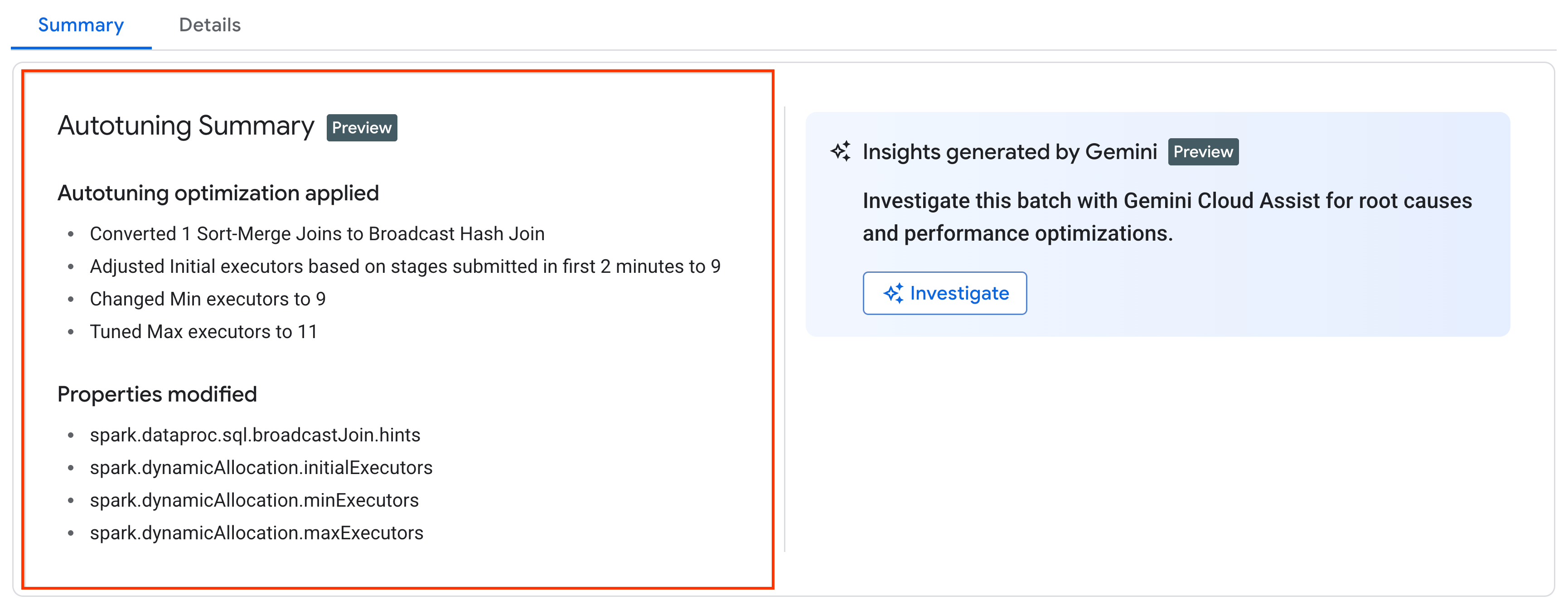
您可以在控制台的 Google Cloud 批量详情 页面上的摘要 标签页中,查看应用于正在运行、 已完成或失败的工作负载的最新自动调节更改。
价格
在非公开预览期间,Managed Service for Apache Spark 自动调节功能免费提供。标准 Managed Service for Apache Spark 价格 适用。