


Knowledge Catalog 发现智能体是一款 AI 赋能的助理,可根据 Knowledge Catalog 搜索功能提高复杂自然语言查询的搜索相关性。通过优化查询理解和公式,它提供的结果比标准 Knowledge Catalog Search API 更准确。此功能至关重要,尤其对于复杂或冗长的查询而言更是如此。
使用场景
发现智能体为以下场景提供了丰富的对话式体验:
- 复杂或组合的意图和限制条件: 处理具有多个条件的搜索请求,例如在
us-central1中查找数据集,但排除 BigQuery 中的资源。 - 面向业务的搜索: 根据意图和业务背景发现数据资产,而不是匹配确切的技术术语。
- 多轮探索: 通过对话式对话优化搜索,以缩小结果范围。
发现智能体基于 Knowledge Catalog 语义搜索 构建,可为您提供开箱即用的混合搜索。当您需要处理高意图搜索(当您知道特定资源或列时)、低延迟要求或零设置混合搜索时,可以继续直接使用 Knowledge Catalog 语义搜索。
工作原理
发现智能体会执行以下步骤来响应搜索查询:
- 分析输入以了解意图,理解查询,生成多个搜索变体,并将术语映射到元数据过滤器。
- 使用 Knowledge Catalog 语义搜索来搜索资源。
- 根据相关性对合并后的结果进行排名。
下图详细介绍了该过程:
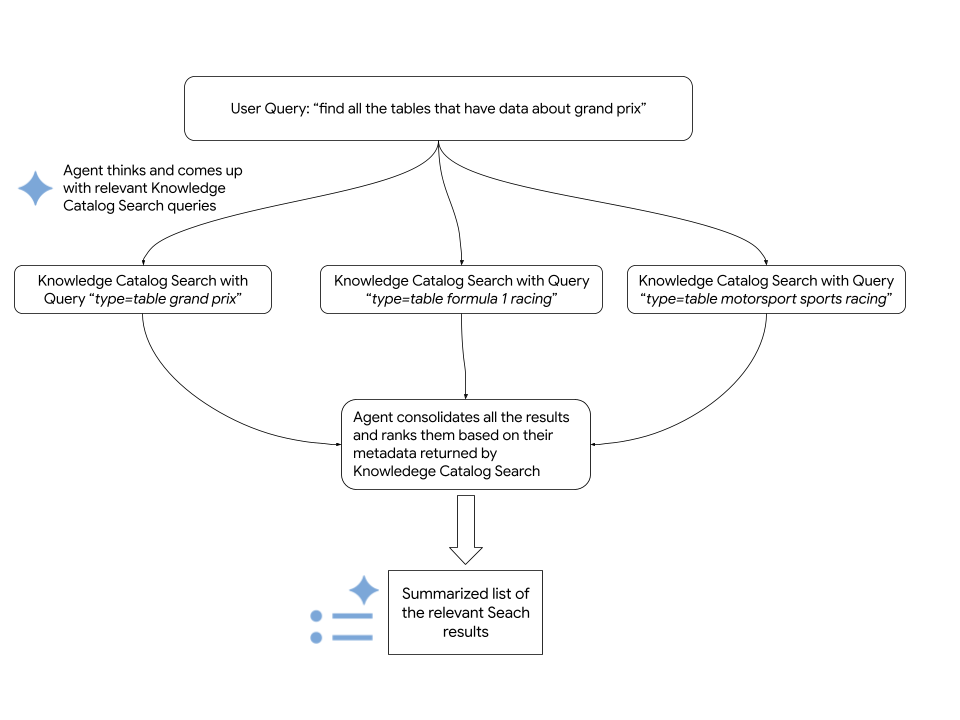
该智能体依赖于 Knowledge Catalog Search API 来提取相关 Google Cloud 资源。以下代码段展示了该智能体如何调用 Knowledge Catalog 语义搜索:
      # Configure the request parameters for the
      # call to Knowledge Catalog Semantic Search API.
      endpoint = "dataplex.googleapis.com"

      client = dataplex_v1.CatalogServiceClient(
          client_options={"api_endpoint": endpoint}
      )

      location = "global"
      consumer_project_id = "my-gcp-project"
      parent_name = f"projects/{consumer_project_id}/locations/{location}"

      # Call Knowledge Catalog Semantic Search API.
      response = client.search_entries(
          request={
              "name": parent_name,
              "query": query,
              "page_size": 50,
              "semantic_search": True,
          }
      )

      # Call Knowledge Catalog LookupContext for each search result
      # to retrieve rich, LLM-ready metadata.
      entries = []
      for result in response.results:
          entry_name = result.dataplex_entry.name

          # Prepare the LookupContext request for the specific resource
          lookup_request = {
              "name": parent_name,
              "resources": [entry_name]
          }

          # Call the LookupContext API
          lookup_response = client.lookup_context(request=lookup_request)

          # Extract the rich context YAML to share with the agent
          entries.append({
              "entry_name": entry_name,
              "context": lookup_response.context
          })

      return {"results": entries}
准备工作
如需运行 Knowledge Catalog 发现智能体,请确保满足以下要求:
所需角色
如需获得使用发现智能体所需的权限,请让您的管理员为您授予 Google Cloud 项目的以下 IAM 角色 iam.gserviceaccount.com:
- Dataplex Viewer (
roles/dataplex.viewer) - Vertex AI User (
roles/aiplatform.user) - Service Usage Consumer (
roles/serviceusage.serviceUsageConsumer)
如需详细了解如何授予角色,请参阅管理对项目、文件夹和组织的访问权限。
这些预定义角色包含 使用发现智能体所需的权限。如需查看所需的确切权限,请展开所需权限部分:
所需权限
如需使用发现智能体,您需要拥有以下权限:
-
dataplex.projects.search -
aiplatform.endpoints.predict -
serviceusage.services.use
启用 API
如需使用 Knowledge Catalog 发现智能体,请在您的项目中启用以下 API:Knowledge Catalog API、Vertex AI API 和 Service Usage API。
启用 API 所需的角色
如需启用 API,您需要拥有 serviceusage.services.enable 权限。如果您创建了项目,则可能已通过所有者角色 (roles/owner) 拥有此权限。否则,您可以通过 Service Usage Admin 角色 (roles/serviceusage.serviceUsageAdmin) 获得此权限。了解如何授予角色。
设置环境
如需为发现智能体设置开发环境,请执行以下操作:
克隆
dataplex-labs代码库。git clone https://github.com/GoogleCloudPlatform/dataplex-labs.git切换到智能体目录:
cd dataplex-labs/knowledge_catalog_discovery_agent创建并激活 Python 虚拟环境,然后安装 文件中列出的
requirements.txt依赖项:google-adk(智能体开发套件)google-cloud-dataplex(Knowledge Catalog Python 客户端)google-api-core
  python3 -m venv /tmp/kcsearch

  source /tmp/kcsearch/bin/activate

  pip3 install -r requirements.txt
使用以下命令设置环境变量:
export GOOGLE_CLOUD_PROJECT=PROJECT_ID
export GOOGLE_GENAI_USE_VERTEXAI=True
替换以下内容:
PROJECT_ID,替换为您的项目 ID
以根智能体的身份运行发现智能体
如需直接以根智能体的身份运行发现智能体,请执行以下操作:
- 在
knowledge_catalog_discovery_agent文件夹中的agent.py文件中,将discovery_agent变量重命名为root_agent。 使用
adk run命令运行智能体:adk run path/to/agent/parent/folder替换以下内容:
path/to/agent/parent/folder,替换为包含智能体文件夹的父目录。例如,如果您的智能体位于knowledge_catalog_discovery_agent/中,请从agents/目录运行adk run。
以智能体工具的身份运行发现智能体
如需将发现智能体集成到更大的自定义智能体(例如 my_custom_agent)中,请执行以下操作:
设置项目结构以包含发现智能体模块:
my_custom_agent/
├── agent.py
└── knowledge_catalog_discovery_agent/
    ├── SKILL.md
    ├── agent.py
    ├── tools.py
    └── utils.py
在自定义智能体的
agent.py文件中,导入发现智能体并将其用作智能体工具。请参阅以下示例:root_agent = llm_agent.Agent( model=google_llm.Gemini(model=GEMINI_MODEL), name="my_custom_agent", instruction=( "You are a Custom Agent. Your goal is to help users understand" " their data landscape, evaluate data assets, and derive insights" " from available resources. **IMPORTANT**: You should use the" " `knowledge_catalog_discovery_agent` to search for and discover" " data assets. For best results, pass in the Natural Language user'" " query as is to the `knowledge_catalog_discovery_agent`. Once assets" " are found, you should analyze their metadata, compare them, and" " provide recommendations or summaries to the user to help them make" " decisions. Focus on general metadata summary and comparison." ), tools=[ agent_tool.AgentTool(discovery_agent), ], )使用
adk run命令运行智能体:adk run path/to/agent/parent/folder替换以下内容:
path/to/agent/parent/folder,替换为包含my_custom_agent/文件夹的父目录。例如,如果您的智能体位于agents/my_custom_agent/中,请从agents/目录运行adk run。
后续步骤
- 了解 Knowledge Catalog 的搜索语法。
- 详细了解 智能体开发套件。
- 尝试其他 Knowledge Catalog 使用场景。