You can use the `RunInference` API to build pipelines that contain multiple models. Multi-model
pipelines are useful for tasks such as A/B testing and building ensembles to
solve business problems that require more than one ML model.
## Use multiple models
The following code examples show how to use the `RunInference` transform to add
multiple models to your pipeline.
When you build pipelines with multiple models, you can use one of two patterns:
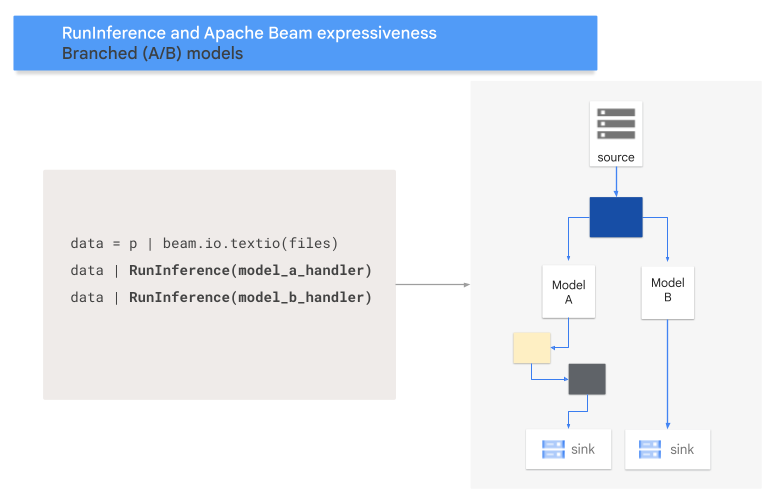
- **A/B branch pattern:** One portion of the input data goes to one model, and the rest of the data goes to a second model.
- **Sequence pattern:** The input data traverses two models, one after the other.
### A/B pattern
The following code shows how to add an A/B pattern to your pipeline with the
`RunInference` transform.
with pipeline as p:
data = p | 'Read' >> beam.ReadFromSource('a_source')
model_a_predictions = data | RunInference(MODEL_HANDLER_A)
model_b_predictions = data | RunInference(MODEL_HANDLER_B)
MODEL_HANDLER_A and MODEL_HANDLER_B are the model
handler setup code.
The following diagram provides a visual presentation of this process.
### Sequence pattern
The following code shows how to add a sequence pattern to your pipeline with the
`RunInference` transform.
with pipeline as p:
data = p | 'Read' >> beam.ReadFromSource('A_SOURCE')
model_a_predictions = data | RunInference(MODEL_HANDLER_A)
model_b_predictions = model_a_predictions | beam.Map(some_post_processing) | RunInference(MODEL_HANDLER_B)
MODEL_HANDLER_A and MODEL_HANDLER_B are the model
handler setup code.
The following diagram provides a visual presentation of this process.

## Map models to keys
You can load multiple models and map them to keys by using a
[keyed model handler](https://beam.apache.org/documentation/ml/about-ml/#use-a-keyed-modelhandler-object).
Mapping models to keys makes it possible to use different
models in the same `RunInference` transform.
The following example uses a keyed model handler that
loads one model by using CONFIG_1 and a second model by using CONFIG_2.
The pipeline uses the model associated with CONFIG_1 to run inference
on examples associated with KEY_1.
The model associated with CONFIG_2 runs inference on
examples associated with KEY_2 and KEY_3.
from apache_beam.ml.inference.base import KeyedModelHandler
keyed_model_handler = KeyedModelHandler([
KeyModelMapping(['KEY_1'], PytorchModelHandlerTensor(CONFIG_1)),
KeyModelMapping(['KEY_2', 'KEY_3'], PytorchModelHandlerTensor(CONFIG_2))
])
with pipeline as p:
data = p | beam.Create([
('KEY_1', torch.tensor([[1,2,3],[4,5,6],...])),
('KEY_2', torch.tensor([[1,2,3],[4,5,6],...])),
('KEY_3', torch.tensor([[1,2,3],[4,5,6],...])),
])
predictions = data | RunInference(keyed_model_handler)
For a more detailed example, see
[Run ML inference with multiple differently-trained models](https://docs.cloud.google.com/dataflow/docs/notebooks/per_key_models).
### Manage memory
When you load multiple models at the same time, you might encounter out of memory
errors (OOMs). When you use a keyed model handler,
Apache Beam doesn't automatically limit the number of models loaded into memory. When the
models don't all fit into memory, an out of memory error occurs, and the pipeline fails.
To avoid this issue, use the `max_models_per_worker_hint` parameter to limit the
number of models that are loaded into memory at the same time. The following example
uses a keyed model handler with the `max_models_per_worker_hint` parameter.
Because the `max_models_per_worker_hint` parameter value is set to `2`,
the pipeline loads a maximum of two models on each SDK worker process at the same time.
mhs = [
KeyModelMapping(['KEY_1'], PytorchModelHandlerTensor(CONFIG_1)),
KeyModelMapping(['KEY_2', 'KEY_3'], PytorchModelHandlerTensor(CONFIG_2)),
KeyModelMapping(['KEY_4'], PytorchModelHandlerTensor(CONFIG_3)),
KeyModelMapping(['KEY_5', 'KEY_5', 'KEY_6'], PytorchModelHandlerTensor(CONFIG_4)),
]
keyed_model_handler = KeyedModelHandler(mhs, max_models_per_worker_hint=2)
When designing your pipeline, make sure the workers have enough memory for both the
models and the pipeline transforms. Because the memory used by the models might
not be released immediately, to avoid OOMs, include an additional memory buffer.
If you have many models and use a low value with the `max_models_per_worker_hint`
parameter, you might encounter memory thrashing. Memory thrashing occurs when
excessive execution time is used to swap models in and out of memory. To avoid
this issue, include a
[`GroupByKey`](https://beam.apache.org/documentation/transforms/python/aggregation/groupbykey/)
transform in the pipeline before the inference step. The `GroupByKey` transform
ensures that elements with the same key and model are located on the same worker.
## Learn more
- Read about [Multi-model pipelines](https://beam.apache.org/documentation/ml/multi-model-pipelines/) in the Apache Beam documentation
- [Run ML inference with multiple differently-trained models](https://docs.cloud.google.com/dataflow/docs/notebooks/per_key_models).
- Run an [interactive notebook in Colab](https://colab.sandbox.google.com/github/apache/beam/blob/master/examples/notebooks/beam-ml/run_inference_multi_model.ipynb).