This page describes how to find and resolve out of memory (OOM) errors in
Dataflow.
## Find out of memory errors
To determine if your pipeline is running out of memory, use one
of the following methods.
- On the **Jobs details** page, in the **Logs** pane, [view the **Diagnostics** tab](https://docs.cloud.google.com/dataflow/docs/guides/logging#diagnostics). This tab displays errors related to memory issues and how often the errors occur.
- In the [Dataflow monitoring interface](https://docs.cloud.google.com/dataflow/docs/guides/using-monitoring-intf), use the [**Memory utilization** chart](https://docs.cloud.google.com/dataflow/docs/guides/using-monitoring-intf#memory-use) to monitor worker memory capacity and usage.
- On the **Jobs details** page, in the **Logs** pane, select **Worker logs** to find out-of-memory errors in worker logs.
- Out-of-memory errors might also appear in system logs. To view these,
[navigate to Logs Explorer](https://docs.cloud.google.com/dataflow/docs/guides/logging#logging) and
use the following query:
resource.type="dataflow_step"
resource.labels.job_id="JOB_ID"
"out of memory" OR "OutOfMemory" OR "Shutting down JVM"
Replace JOB_ID with the ID of your job.
- For Java jobs, the Java Memory Monitor periodically reports garbage collection
metrics. If the fraction of CPU time used for garbage collection exceeds a
threshold of 50% for an extended period of time, the SDK harness fails. You
might see an error similar to the following example:
Shutting down JVM after 8 consecutive periods of measured GC thrashing. Memory is used/total/max = ...
This error can occur when physical memory is still available, and usually
indicates that the memory usage of the pipeline is inefficient. To resolve
this issue, [optimize your pipeline](https://docs.cloud.google.com/dataflow/docs/guides/troubleshoot-oom#optimize).
The Java Memory Monitor is configured by the
[`MemoryMonitorOptions`](https://beam.apache.org/releases/javadoc/current/org/apache/beam/sdk/options/MemoryMonitorOptions.html)
interface.
If your job has high memory usage or out of memory errors, follow the recommendations
on this page to optimize memory usage or to increase the amount of memory
available.
## Resolve out of memory errors
Changes to your Dataflow pipeline might resolve out of memory
errors or reduce memory usage. Possible changes include the following actions:
- [Optimize your pipeline](https://docs.cloud.google.com/dataflow/docs/guides/troubleshoot-oom#optimize)
- [Reduce the number of threads](https://docs.cloud.google.com/dataflow/docs/guides/troubleshoot-oom#reduce-threads)
- [Use a machine type with more memory per vCPU](https://docs.cloud.google.com/dataflow/docs/guides/troubleshoot-oom#memory-per-vcpu)
The following diagram shows the Dataflow troubleshooting workflow described in this page.
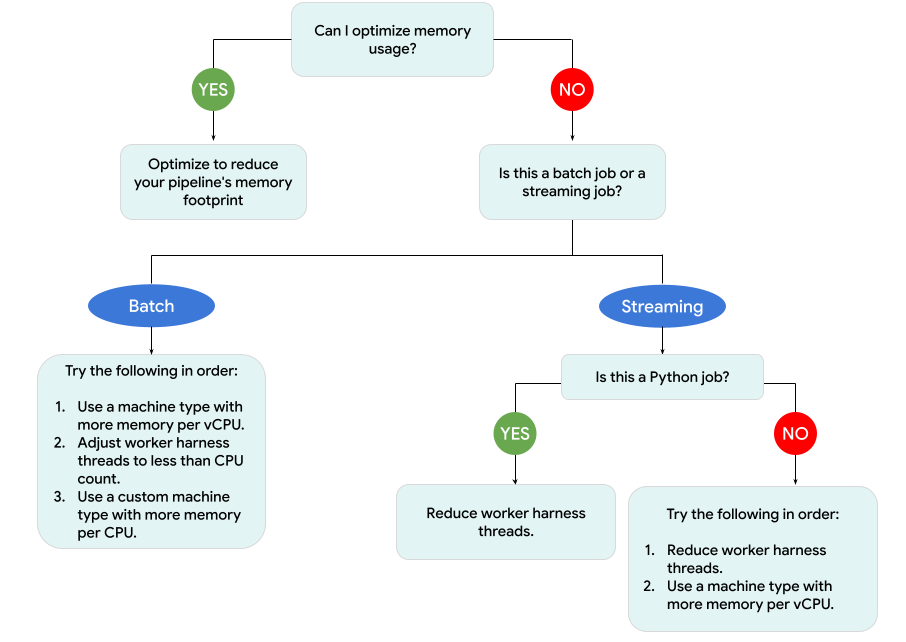
Try the following mitigations:
- If possible, optimize your pipeline to reduce memory usage.
- If the job is a batch job, try the following steps in the order listed:
1. Use a machine type with more memory per vCPU.
2. Reduce the number of threads to less than the vCPU count per worker.
3. Use a custom machine type with more memory per vCPU.
- If the job is a streaming job that uses Python, reduce the number of threads to less than 12.
- If the job is a steaming job that uses Java or Go, try the following:
1. Reduce the number of threads to less than 500 for jobs that use the Portable Runner, or less than 300 for jobs that don't use the Portable Runner.
2. Use a machine type with more memory.
### Optimize your pipeline
Several pipeline operations can cause out of memory errors. This section provides
options for reducing the memory usage of your pipeline. To identify the pipeline
stages that consume the most memory,
[use Cloud Profiler to monitor pipeline performance](https://cloud.google.com/dataflow/docs/guides/profiling-a-pipeline).
You can use the following best practices to optimize your pipeline:
- [Use Apache Beam built-in I/O connectors for reading files](https://docs.cloud.google.com/dataflow/docs/guides/troubleshoot-oom#use-beam)
- [Redesign operations when using `GroupByKey` PTransforms](https://docs.cloud.google.com/dataflow/docs/guides/troubleshoot-oom#groupbykey)
- [Reduce ingress data from external sources](https://docs.cloud.google.com/dataflow/docs/guides/troubleshoot-oom#reduce-data)
- [Share objects across threads](https://docs.cloud.google.com/dataflow/docs/guides/troubleshoot-oom#share-objects)
- [Use memory-efficient element representations](https://docs.cloud.google.com/dataflow/docs/guides/troubleshoot-oom#memory-efficient)
- [Reduce the size of side inputs](https://docs.cloud.google.com/dataflow/docs/guides/troubleshoot-oom#side-input-size)
- [Use Apache Beam splittable DoFns](https://beam.apache.org/blog/splittable-do-fn/)
#### Use Apache Beam built-in I/O connectors for reading files
Don't open large files inside a `DoFn`. To read files, use
[Apache Beam built-in I/O connectors](https://beam.apache.org/documentation/io/built-in/).
Files opened in a `DoFn` must fit into memory. Because multiple `DoFn` instances run
concurrently, large files opened in `DoFn`s can cause out of memory errors.
#### Redesign operations when using `GroupByKey` PTransforms
When you use a `GroupByKey` PTransform in Dataflow, the resulting
per key and per window values are processed on a single thread. Because this data
is passed as a stream from the Dataflow backend service to the
workers, it doesn't need to fit in worker memory. However, if the values are
collected in memory, the processing logic might cause out of memory errors.
For example, if you have a key that contains data for a window, and you add the
key values to an in-memory object, such as a list, out of memory errors might
occur. In this scenario, the worker might not have sufficient memory capacity to
hold all of the objects.
For more information about `GroupByKey` PTransforms, see the Apache Beam
[Python `GroupByKey`](https://beam.apache.org/documentation/transforms/python/aggregation/groupbykey/)
and [Java `GroupByKey`](https://beam.apache.org/documentation/transforms/python/aggregation/groupbykey/)
documentation.
The following list contains suggestions for designing your pipeline to minimize
memory consumption when using `GroupByKey` PTransforms.
- To reduce the amount of data per key and per window, avoid keys with many values, also known as hot keys.
- To reduce the amount of data collected per-window, use a smaller window size.
- If you're using values of a key in a window to calculate a number, use a [`Combine` transform](https://beam.apache.org/documentation/programming-guide/#combine). Don't do the calculation in a single `DoFn` instance after collecting the values.
- Filter values or duplicates before processing. For more information, see the [Python `Filter`](https://beam.apache.org/documentation/transforms/python/elementwise/filter/) and the [Java `Filter`](https://beam.apache.org/documentation/transforms/java/elementwise/filter/) transform documentation.
#### Reduce ingress data from external sources
If you're making calls to an external API or a database for data enrichment,
the returned data must fit into worker memory.
If you're batching calls, using a `GroupIntoBatches` transform is recommended.
If you encounter out of memory errors, reduce the batch size. For more information
about grouping into batches, see the
[Python `GroupIntoBatches`](https://beam.apache.org/documentation/transforms/python/aggregation/groupintobatches/)
and the [Java `GroupIntoBatches`](https://beam.apache.org/documentation/transforms/java/aggregation/groupintobatches/)
transform documentation.
#### Share objects across threads
Sharing an in-memory data object across `DoFn` instances can improve space and
access efficiency. Data objects created in any method of the `DoFn`, including
`Setup`, `StartBundle`, `Process`, `FinishBundle`, and `Teardown`, are invoked
for each `DoFn`. In Dataflow, each worker might have several `DoFn`
instances. For more efficient memory usage, pass a data object as a singleton to
share it across several `DoFn`s. For more information, see the blog post
[Cache reuse across `DoFn`s](https://medium.com/google-cloud/cache-reuse-across-dofns-in-beam-a34a926db848).
#### Use memory-efficient element representations
Evaluate whether you can use representations for `PCollection`
elements that use less memory. When using coders in your pipeline, consider not
only encoded but also decoded `PCollection` element representations. Sparse
matrixes can often benefit from this type of optimization.
#### Reduce the size of side inputs
If your `DoFn`s use side inputs, reduce the size of the side input. For side
inputs that are collections of elements, consider using iterable views, such as
[`AsIterable`](https://beam.apache.org/releases/javadoc/current/org/apache/beam/sdk/transforms/View.AsIterable.html)
or [`AsMultimap`](https://beam.apache.org/releases/javadoc/current/org/apache/beam/sdk/transforms/View.AsMultimap.html), instead of views that materialize the entire side input at the same time, such as
[`AsList`](https://beam.apache.org/releases/javadoc/current/org/apache/beam/sdk/transforms/View.AsList.html).
### Reduce the number of threads
You can increase the memory available per thread by reducing the maximum number
of threads that run `DoFn` instances. This change reduces parallelism but
makes more memory available for each `DoFn`.
The following table shows the default number of threads that
Dataflow creates:
| Job type | Python SDK | Java/Go SDKs |
|---|---|---|
| Batch | 1 thread per vCPU | 1 thread per vCPU |
| Streaming with the Portable Runner (previously called Runner v2) | 12 threads per vCPU | 500 threads per worker VM |
| Streaming without the Portable Runner (previously called Runner v2) | 12 threads per vCPU | 300 threads per worker VM |
To reduce the number of Apache Beam SDK threads, set the following
[pipeline option](https://docs.cloud.google.com/dataflow/docs/reference/pipeline-options#resource_utilization):
### Java
Use the `--numberOfWorkerHarnessThreads` pipeline option.
### Python
Use the `--number_of_worker_harness_threads` pipeline option.
### Go
Use the `--number_of_worker_harness_threads` pipeline option.
For batch jobs, set the value to a number that is less than the number of vCPUs.
For streaming jobs, start by reducing the value to half of the default. If this
step does not mitigate the issue, continue reducing the value by half, observing
the results at each step. For example, when using Python, try the values 6, 3,
and 1.
### Use a machine type with more memory per vCPU
To select a worker with more memory per vCPU, use one of the following methods.
- Use a high-memory machine type in the [general-purpose machine
family](https://docs.cloud.google.com/compute/docs/general-purpose-machines). High-memory machine types have higher memory per vCPU than the standard machine types. Using a high memory machine type both increases the memory available to each worker and the memory available per thread, because the number of vCPUs remains the same. As a result, using a high-memory machine type can be a cost effective way to select a worker with more memory per vCPU.
- For more flexibility when specifying the number of vCPUs and the amount of memory, you can use [a custom machine
type](https://docs.cloud.google.com/compute/docs/instances/creating-instance-with-custom-machine-type). With custom machine types, you can increase memory in 256 MB increments. These machine types are priced differently than standard machine types.
- Some machine families let you use [extended memory](https://docs.cloud.google.com/compute/docs/instances/creating-instance-with-custom-machine-type#extendedmemory) custom machine types. Extended memory enables a higher memory-per-vCPU ratio. The cost is higher. Examples of custom machine types with extended memory include `n2-custom-1-19456-ext` and `n2-custom-8-317440-ext`.
To set worker types, use the following pipeline option. For more information,
see [Setting pipeline options](https://docs.cloud.google.com/dataflow/docs/guides/setting-pipeline-options)
and [Pipeline options](https://docs.cloud.google.com/dataflow/docs/reference/pipeline-options).
### Java
Use the `--workerMachineType` pipeline option.
### Python
Use the `--machine_type` pipeline option.
### Go
Use the `--worker_machine_type` pipeline option.
### Use only one Apache Beam SDK process
For Python streaming pipelines and Python pipelines that use the Portable Runner, you can
force Dataflow to start only one Apache Beam SDK process per
worker.
Before trying this option, first try to resolve the issue using the other
methods. To configure Dataflow worker VMs to start only one
containerized Python process, use the following [pipeline
option](https://docs.cloud.google.com/dataflow/docs/reference/pipeline-options#resource_utilization):
`--experiments=no_use_multiple_sdk_containers`
With this configuration, Python pipelines create one Apache Beam SDK process
per worker. This configuration prevents the shared objects and data from being
replicated multiple times for each Apache Beam SDK process. However, it
limits the efficient use of the compute resources available on the worker.
Reducing the number of Apache Beam SDK processes to one does not necessarily
reduce the total number of threads started on the worker. In addition, having
all the threads on a single Apache Beam SDK process might cause slow
processing or cause the pipeline to get stuck. Therefore, you might also have to
reduce the number of threads, as described in the [Reduce the number of
threads](https://docs.cloud.google.com/dataflow/docs/guides/troubleshoot-oom#reduce-threads) section in this page.
You can also force workers to use only one Apache Beam SDK process by using a machine type
with only one vCPU.
## Understand Dataflow memory usage
To troubleshoot out of memory errors, it's helpful to understand how
Dataflow pipelines use memory.
When Dataflow runs a pipeline, the processing is distributed
across multiple Compute Engine virtual machines (VMs), often called workers.
Workers process work items from the Dataflow service
and delegate the work items to Apache Beam SDK processes. An Apache Beam
SDK process creates instances
of `DoFn`s. `DoFn` is an Apache Beam SDK class that defines a distributed
processing function.
Dataflow launches several threads on each worker, and the memory
of each worker is shared across all the threads. A thread is a single
executable task running within a larger process. The default number of
threads depends on multiple factors and varies between batch and streaming jobs.
If your pipeline needs more memory than the default amount of memory
available on the workers, you might encounter out of memory errors.
Dataflow pipelines primarily use worker memory in three ways:
- [Worker operational memory](https://docs.cloud.google.com/dataflow/docs/guides/troubleshoot-oom#operational-memory)
- [SDK process memory](https://docs.cloud.google.com/dataflow/docs/guides/troubleshoot-oom#sdk-process-memory)
- [`DoFn` memory usage](https://docs.cloud.google.com/dataflow/docs/guides/troubleshoot-oom#dofn)
### Worker operational memory
Dataflow workers need memory for their operating systems and system
processes. Worker memory usage is typically no larger than 1 GB. Usage
is typically less than 1 GB.
- Various processes on the worker use memory to ensure that your pipeline is in working order. Each of these processes might reserve a small amount of memory for its operation.
- When your pipeline doesn't use Streaming Engine, additional worker processes use memory.
### SDK process memory
Apache Beam SDK processes might create objects and data that are shared between threads
within the process, referred to on this page as SDK shared objects and data.
Memory usage from these SDK shared objects and data is referred to as SDK
process memory. The following list includes examples of SDK shared objects and data:
- Side inputs
- Machine learning models
- In-memory singleton objects
- Python objects created with the [`apache_beam.utils.shared`](https://beam.apache.org/releases/pydoc/current/apache_beam.utils.shared.html) module
- Data loaded from external sources, such as Cloud Storage or BigQuery
Streaming jobs that don't use Streaming Engine store side inputs in memory.
For Java and Go pipelines, each worker has one copy of the side input. For Python
pipelines, each Apache Beam SDK process has one copy of the side input.
Streaming jobs that use Streaming Engine have a side input size limit of
80 MB. Side inputs are stored outside of worker memory.
Memory usage from SDK shared objects and data grows linearly with
the number of Apache Beam SDK processes. In Java and Go pipelines, one Apache Beam SDK process is started
per worker. In Python pipelines, one Apache Beam SDK process is started per vCPU.
SDK shared objects and data are reused across threads within the same Apache Beam SDK process.
### `DoFn` memory usage
`DoFn` is an Apache Beam SDK class that defines a distributed processing function.
Each worker can run concurrent `DoFn` instances. Each thread runs one `DoFn`
instance. When evaluating total memory usage, calculating working set size, or
the amount of memory necessary for an application to continue working, might be
helpful. For example, if an individual `DoFn` uses
a maximum of 5 MB of memory and a worker has 300 threads, then `DoFn` memory
usage could peak at 1.5 GB, or the number of bytes of memory multiplied by
the number of threads. Depending on how workers are using memory, a spike in memory
usage could cause workers to run out of memory.
It's hard to estimate how many instances of a
[DoFn](https://beam.apache.org/releases/javadoc/current/org/apache/beam/sdk/transforms/DoFn.html)
Dataflow creates. The number depends on various factors, such as
the SDK, the machine type, and other variables. In addition, the DoFn might be
used by multiple threads in succession. The Dataflow service does
not guarantee how many times a `DoFn` is invoked, nor does it guarantee the
exact number of `DoFn` instances created over the course of a pipeline. However,
the following table gives some insight into the level of parallelism you can
expect and estimates an upper bound on the number of `DoFn` instances.
### Beam Python SDK
| | Batch | Streaming without Streaming Engine | Streaming Engine |
| Parallelism | 1 process per vCPU 1 thread per process 1 thread per vCPU | 1 process per vCPU 12 threads per process 12 threads per vCPU | 1 process per vCPU 12 threads per process 12 threads per vCPU |
| Maximum number of concurrent `DoFn` instances (All of these numbers are subject to change at any time.) | 1 `DoFn` per thread 1 `DoFn` per vCPU | 1 `DoFn` per thread 12 `DoFn` per vCPU | 1 `DoFn` per thread 12 `DoFn` per vCPU |
|---|---|---|---|
### Beam Java/Go SDK
| | Batch | Streaming Appliance and Streaming Engine without the Portable Runner | Streaming Engine with the Portable Runner |
| Parallelism | 1 process per worker VM 1 thread per vCPU | 1 process per worker VM 300 threads per process 300 threads per worker VM | 1 process per worker VM 500 threads per process 500 threads per worker VM |
| Maximum number of concurrent `DoFn` instances (All of these numbers are subject to change at any time.) | 1 `DoFn` per thread 1 `DoFn` per vCPU | 1 `DoFn` per thread 300 `DoFn` per worker VM | 1 `DoFn` per thread 500 `DoFn` per worker VM |
|---|---|---|---|
For example, when using the Python SDK with an `n1-standard-2`
Dataflow worker, the following applies:
- Batch jobs: Dataflow launches one process per vCPU (two in this case). Each process uses one thread, and each thread creates one `DoFn` instance.
- Streaming jobs with Streaming Engine: Dataflow starts one process per vCPU (two total). However, each process can spawn up to 12 threads, each with its own DoFn instance.
When you design complex pipelines, it's important to understand the
[`DoFn` lifecycle](https://beam.apache.org/documentation/programming-guide/#pardo).
Ensure your `DoFn` functions are serializable, and avoid modifying the element
argument directly within them.
When you have a multi-language pipeline, and more than one Apache Beam SDK is
running on the worker, the worker uses the lowest degree of thread-per-process
parallelism possible.
### Java, Go, and Python differences
Java, Go, and Python manage processes and memory differently. As a result, the approach
that you should take when troubleshooting out of memory errors varies based on
whether your pipeline uses Java, Go, or Python.
#### Java and Go pipelines
In Java and Go pipelines:
- Each worker starts one Apache Beam SDK process.
- SDK shared objects and data, like side inputs and caches, are shared among all threads on the worker.
- The memory used by SDK shared objects and data does not usually scale based on the number of vCPUs on the worker.
#### Python pipelines
In Python pipelines:
- Each worker starts one Apache Beam SDK process per vCPU.
- SDK shared objects and data, like side inputs and caches, are shared among all threads within each Apache Beam SDK process.
- The total number of threads on the worker scales linearly based on the number of vCPUs. As a result, the memory used by SDK shared objects and data grows linearly with the number of vCPUs.
- Threads performing the work are distributed across processes. New units of work are assigned either to a process with no work items, or to the process with the fewest work items assigned at that time.