The *right fitting* feature uses
[Apache Beam resource hints](https://beam.apache.org/documentation/runtime/resource-hints/)
to customize worker resources for a pipeline. The ability to target multiple
different resources to specific pipeline steps provides additional pipeline
flexibility and capability, and potential cost savings. You can apply more
costly resources to pipeline steps that require them, and less costly resources
to other pipeline steps. Use right fitting to specify resource requirements for
an entire pipeline or for specific pipeline steps.
## Support and limitations
- Resource hints are supported with the Apache Beam Java and Python SDKs, versions 2.31.0 and later.
- Right fitting is supported with batch pipelines.
- Right fitting is supported with streaming pipelines with [Horizontal Autoscaling](https://docs.cloud.google.com/dataflow/docs/horizontal-autoscaling) enabled.
- You can enable it by setting the [`--experiments=enable_streaming_rightfitting` pipeline option](https://docs.cloud.google.com/dataflow/docs/reference/pipeline-options).
- When you use right fitting, keep Horizontal Autoscaling enabled. If you
[disable Horizontal Autoscaling](https://docs.cloud.google.com/dataflow/docs/horizontal-autoscaling#disable),
your job might run with lower parallelism than expected. To limit the number
of workers that your job uses, set the `maxNumWorkers` or `max_num_workers`
[pipeline option](https://docs.cloud.google.com/dataflow/docs/reference/pipeline-options#resource_utilization)
instead.
- Right fitting supports [Dataflow Prime](https://docs.cloud.google.com/dataflow/docs/guides/enable-dataflow-prime).
- Right fitting doesn't support FlexRS.
- When you use right fitting, don't use the `worker_accelerator`
[service option](https://docs.cloud.google.com/dataflow/docs/reference/service-options).
- When you use [Vertical Autoscaling](https://docs.cloud.google.com/dataflow/docs/vertical-autoscaling), Auto VM Selection isn't supported.
## Enable right fitting
To turn on right fitting, use one or more of the
[available resource hints](https://docs.cloud.google.com/dataflow/docs/guides/right-fitting#available_resource_hints) in your pipeline. When you use a
resource hint in your pipeline, right fitting is automatically enabled. For
more information, see the
[Use resource hints](https://docs.cloud.google.com/dataflow/docs/guides/right-fitting#use_resource_hints) section of this document.
## Available resource hints
The following resource hints are available.
| Resource hint | Description |
|---|---|
| `min_ram` | The minimum amount of RAM in gigabytes to allocate to workers. Dataflow uses this value as a lower limit when allocating memory to new workers (horizontal scaling) or to existing workers (vertical scaling). For example: `min_ram=RAM_VALUEGB` - Replace RAM_VALUE with the **minimum** value of worker memory that your pipeline or pipeline step requires. - `min_ram` is an aggregate, per-worker specification. It isn't a per-vCPU specification. For example, if you set `min_ram=15GB`, Dataflow sets the aggregate memory available across all vCPUs in the worker to at least 15 GB. > [!NOTE] > **Note:** If you use this resource hint for steps that don't require accelerators, [Auto VM Selection](https://docs.cloud.google.com/dataflow/docs/guides/right-fitting#auto_vm_selection) is enabled automatically. |
| `cpu_count` | The number of vCPUs to allocate per worker. When you use this resource hint, Dataflow selects machine types that have the specified number of vCPUs and meet memory requirements. For example: `cpu_count=CPU_VALUE` - Replace CPU_VALUE with the integer number of vCPUs that your pipeline or pipeline step requires per worker. > [!NOTE] > **Note:** If you use this resource hint for steps that don't require accelerators, [Auto VM Selection](https://docs.cloud.google.com/dataflow/docs/guides/right-fitting#auto_vm_selection) is enabled automatically. |
| `accelerator` | A user-supplied allocation of GPUs that lets you control the use and cost of GPUs in your pipeline and its steps. Specify the type and number of GPUs to attach to Dataflow workers as parameters to the flag. For example: `accelerator="type:GPU_TYPE;count:GPU_COUNT;machine_type:MACHINE_TYPE;CONFIGURATION_OPTIONS"` - Replace GPU_TYPE with the type of GPU to use. For a list of GPU types that are supported with Dataflow, see [Dataflow support for GPUs](https://docs.cloud.google.com/dataflow/docs/gpu/gpu-support#availability). - Replace GPU_COUNT with the number of GPUs to use. - Optional: Replace MACHINE_TYPE with the type of machine to use with your GPUs. - The machine type must be compatible with the GPU type selected. For details about GPU types and their compatible machine types, see [GPU platforms](https://docs.cloud.google.com/compute/docs/gpus). - If you specify a machine type both in the `accelerator` resource hint and in the worker machine type [pipeline option](https://docs.cloud.google.com/dataflow/docs/reference/pipeline-options#worker-level_options), then the pipeline option is ignored during right fitting. - To use NVIDIA GPUs with Dataflow, set the `install-nvidia-driver` [configuration option](https://docs.cloud.google.com/dataflow/docs/gpu/use-gpus#drivers). - Both the `default` and `latest` driver version options are supported. - The driver version option must be the same across the entire pipeline, including if it is omitted. Mixing no driver version with the `default` driver version is not supported. For more information about using GPUs, see [GPUs with Dataflow](https://docs.cloud.google.com/dataflow/docs/gpu). |
### Auto VM Selection for worker machine types
When you use `min_ram` or `cpu_count` resource hints for pipeline steps that
don't require accelerators,
[Auto VM Selection](https://docs.cloud.google.com/dataflow/docs/guides/auto-vm-selection) is enabled automatically.
With Auto VM Selection, workers are provisioned from a selection of compatible machine types that meet your pipeline requirements, maximizing reliability and capacity availability.
For detailed information about how Auto VM Selection works, its limitations, and recommendations regarding storage types, see [Auto VM Selection](https://docs.cloud.google.com/dataflow/docs/guides/auto-vm-selection).
## Resource hint nesting
Resource hints are applied to the pipeline transform hierarchy as follows:
- `min_ram`: The value on a transform is evaluated as the largest `min_ram` hint value among the values that are set on the transform itself and all of its parents in the transform's hierarchy.
- Example: If an inner transform hint sets `min_ram` to 16 GB, and the outer transform hint in the hierarchy sets `min_ram` to 32 GB, a hint of 32 GB is used for all steps in the entire transform.
- Example: If an inner transform hint sets `min_ram` to 16 GB, and the outer transform hint in the hierarchy sets `min_ram` to 8 GB, a hint of 8 GB is used for all steps in the outer transform that are not in the inner transform, and a 16 GB hint is used for all steps in the inner transform.
- `accelerator`: The innermost value in the transform's hierarchy takes precedence.
- Example: If an inner transform `accelerator` hint is different from an outer transform `accelerator` hint in a hierarchy, the inner transform `accelerator` hint is used for the inner transform.
Hints that are set for the entire
pipeline are treated as if they are set on a separate outermost transform.
## Use resource hints
You can set resource hints on the entire pipeline or on pipeline steps.
### Pipeline resource hints
You can set resource hints on the entire pipeline when you run the pipeline
from the command line.
### gcloud
> [!NOTE]
> **Note:** Setting resource hints at job launch is only supported for Flex Templates.
To set resource hints when running a pipeline with a Flex Template, use the
`--additional-pipeline-options` flag with the
[`gcloud dataflow flex-template run` command](https://docs.cloud.google.com/sdk/gcloud/reference/dataflow/flex-template/run).
The pipeline option name depends on the SDK language. For example, for resource hints:
- For Java pipelines, use `resourceHints`.
- For Python pipelines, use `resource_hints`.
The following example demonstrates how to set resource hints when running a
Java Flex Template pipeline:
gcloud dataflow flex-template run JOB_NAME \
--template-file-gcs-location="gs://TEMPLATE_LOCATION" \
--region="REGION" \
--additional-pipeline-options=resourceHints=min_ram=RAM_VALUEGB \
--additional-pipeline-options=resourceHints=cpu_count=CPU_VALUE \
--parameters ...
The following example demonstrates how to set resource hints when running a
Python Flex Template pipeline:
gcloud dataflow flex-template run JOB_NAME \
--template-file-gcs-location="gs://TEMPLATE_LOCATION" \
--region="REGION" \
--additional-pipeline-options=resource_hints=min_ram=RAM_VALUEGB \
--additional-pipeline-options=resource_hints=cpu_count=CPU_VALUE \
--parameters ...
### Java
To set up your Java environment, see [Create a Dataflow pipeline using Java](https://docs.cloud.google.com/dataflow/docs/guides/create-pipeline-java).
The following example demonstrates how to set resource hints when running a
Java pipeline:
mvn -Pdataflow-runner compile exec:java \
-Dexec.mainClass=com.example.MyPipeline \
-Dexec.args="--runner=DataflowRunner \
--resourceHints=min_ram=RAM_VALUEGB \
--resourceHints=cpu_count=CPU_VALUE \
..."
### Python
To set up your Python environment, see the
[Python tutorial](https://docs.cloud.google.com/dataflow/docs/guides/create-pipeline-python).
The following example demonstrates how to set resource hints when running a
Python pipeline:
python my_pipeline.py \
--runner=DataflowRunner \
--resource_hints=min_ram=RAM_VALUEGB \
--resource_hints=cpu_count=CPU_VALUE \
...
> [!NOTE]
> **Note:** When right fitting is enabled, pipeline resource hints take precedence over the machine type specified in pipeline options. To ensure the machine type option is used, remove any pipeline resource hints option.
### Pipeline step resource hints
You can set resource hints on pipeline steps (transforms) programmatically.
### Java
To install the Apache Beam SDK for Java, see
[Install the Apache Beam SDK](https://docs.cloud.google.com/dataflow/docs/guides/installing-beam-sdk).
You can set resource hints programmatically on pipeline transforms by using the
[`ResourceHints` class](https://github.com/apache/beam/blob/master/sdks/java/core/src/main/java/org/apache/beam/sdk/transforms/resourcehints/ResourceHints.java#L37).
The following example demonstrates how to set resource hints programmatically
on pipeline transforms.
pcoll.apply(MyCompositeTransform.of(...)
.setResourceHints(
ResourceHints.create()
.withMinRam("15GB")
.withCpuCount(8)
.withAccelerator(
"type:nvidia-l4;count:1;install-nvidia-driver")))
pcoll.apply(ParDo.of(new BigMemFn())
.setResourceHints(
ResourceHints.create()
.withMinRam("30GB")
.withCpuCount(16)))
To programmatically set resource hints on the entire pipeline, use the
[`ResourceHintsOptions` interface](https://github.com/apache/beam/blob/master/sdks/java/core/src/main/java/org/apache/beam/sdk/transforms/resourcehints/ResourceHintsOptions.java#L30).
### Python
To install the Apache Beam SDK for Python, see
[Install the Apache Beam SDK](https://docs.cloud.google.com/dataflow/docs/guides/installing-beam-sdk).
You can set resource hints programmatically on pipeline transforms by using the
[`PTransforms.with_resource_hints` class](https://github.com/apache/beam/blob/dd20b4fd7547d5421eeae7ef0d1d62c3e3d6727a/sdks/python/apache_beam/transforms/ptransform.py#L421).
For more information, see the
[`ResourceHint` class](https://github.com/apache/beam/blob/master/sdks/python/apache_beam/transforms/resources.py#L51).
The following example demonstrates how to set resource hints programmatically
on pipeline transforms.
pcoll | MyPTransform().with_resource_hints(
min_ram="4GB",
cpu_count=8,
accelerator="type:nvidia-tesla-l4;count:1;install-nvidia-driver")
pcoll | beam.ParDo(BigMemFn()).with_resource_hints(
min_ram="30GB",
cpu_count=16)
To set resource hints on the entire pipeline, use the `--resource_hints`
pipeline option when you run your pipeline. For an example, see
[Pipeline resource hints](https://docs.cloud.google.com/dataflow/docs/guides/right-fitting#pipeline_resource_hints).
### Go
Resource hints aren't supported in Go.
### Multiple accelerator support
Within a pipeline, different transforms can have different accelerator
configurations. These include configurations that require different machine
types. These transform-level accelerator configurations take precedence over the
pipeline-level configuration if one was provided.
## Right fitting and fusion
In some cases, transforms set with different resource hints can be executed on
workers in the same worker pool, as part of the process of
[fusion optimization](https://docs.cloud.google.com/dataflow/docs/pipeline-lifecycle#fusion_optimization).
When transforms are fused, Dataflow executes them in an
environment that satisfies the union of resource hints set on the transforms.
In some cases, this includes the entire pipeline.
When resource hints can't be merged, fusion doesn't occur. For example, resource
hints for different GPUs aren't mergeable, so those transforms aren't fused.
You can also prevent fusion by adding an operation to your pipeline that forces
Dataflow to materialize an intermediate `PCollection`. This is
especially useful when trying to isolate expensive resources like GPUs or high
memory machines from slow or computationally expensive steps which don't need
those special resources. In those cases, it may be helpful to force a fusion
break between the slow CPU-bound steps and the steps which need the expensive
GPUs or high memory machines and pay the cost of materialization associated with
breaking fusion. To learn more, see
[Prevent fusion](https://docs.cloud.google.com/dataflow/docs/pipeline-lifecycle#prevent_fusion).
## Streaming right fitting
For streaming jobs, you can enable right fitting by setting the [`--experiments=enable_streaming_rightfitting` pipeline option](https://docs.cloud.google.com/dataflow/docs/reference/pipeline-options).
Right fitting may improve the performance of your pipeline if it involves stages with different resource requirements.
### Example: Pipeline with CPU-intensive stage and GPU-requiring stage
An example pipeline that may benefit from right fitting is one that executes a CPU-intensive stage, followed by a GPU-requiring stage. Without right fitting, a single GPU worker pool will need to be configured to execute all pipeline stages, including the CPU-intensive stage. This may lead to under-utilization of the GPU resources when the worker pool is executing the CPU-intensive stage.
If right fitting is enabled and a Resource Hint is applied to the GPU-requiring step, the pipeline will create two separate pools, so that the CPU-intensive stage is executed by the CPU worker pool, and the GPU-requiring stage is executed by the GPU worker pool.
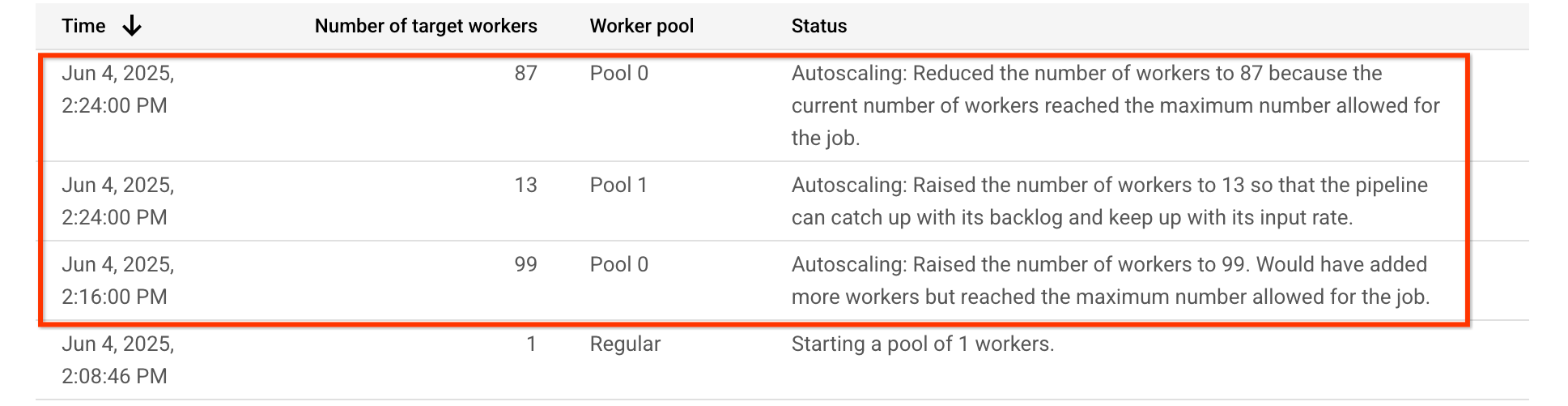
For this example pipeline, the autoscaling table shows that the worker pool executing the CPU-intensive stage, `Pool 0`, is initially upscaled to 99 workers, and later downscaled to 87 workers. The worker pool executing the GPU-requiring stage, `Pool 1`, is upscaled to 13 workers:
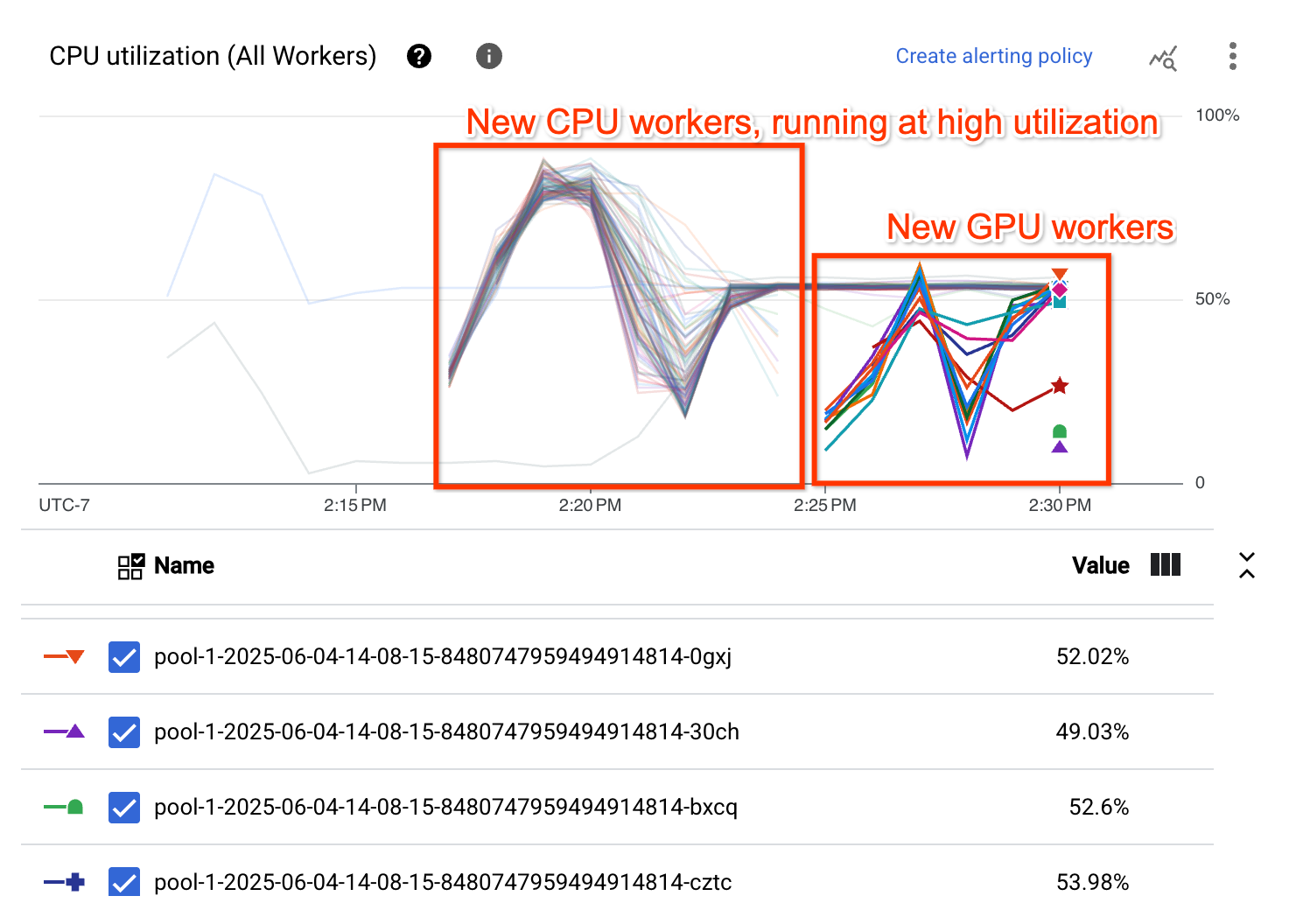
The CPU Utilization graph shows that workers in both worker pools are demonstrating overall high CPU utilization:
## Troubleshoot right fitting
This section provides instructions for troubleshooting common issues related to
right fitting.
### Invalid configuration
When you try to use right fitting, the following error occurs:
Workflow failed. Causes: One or more operations had an error: 'operation-OPERATION_ID':
[UNSUPPORTED_OPERATION] 'CPU_VALUE vCpus with RAM_VALUE MiB memory is
an invalid configuration for GPU_COUNT count of 'GPU_TYPE' in family 'MACHINE_TYPE'.'.
This error occurs when the GPU type selected isn't compatible with the machine type
selected. To resolve this error, select a compatible GPU type and machine
type. For compatibility details, see [GPU platforms](https://docs.cloud.google.com/compute/docs/gpus).
### Verify right fitting
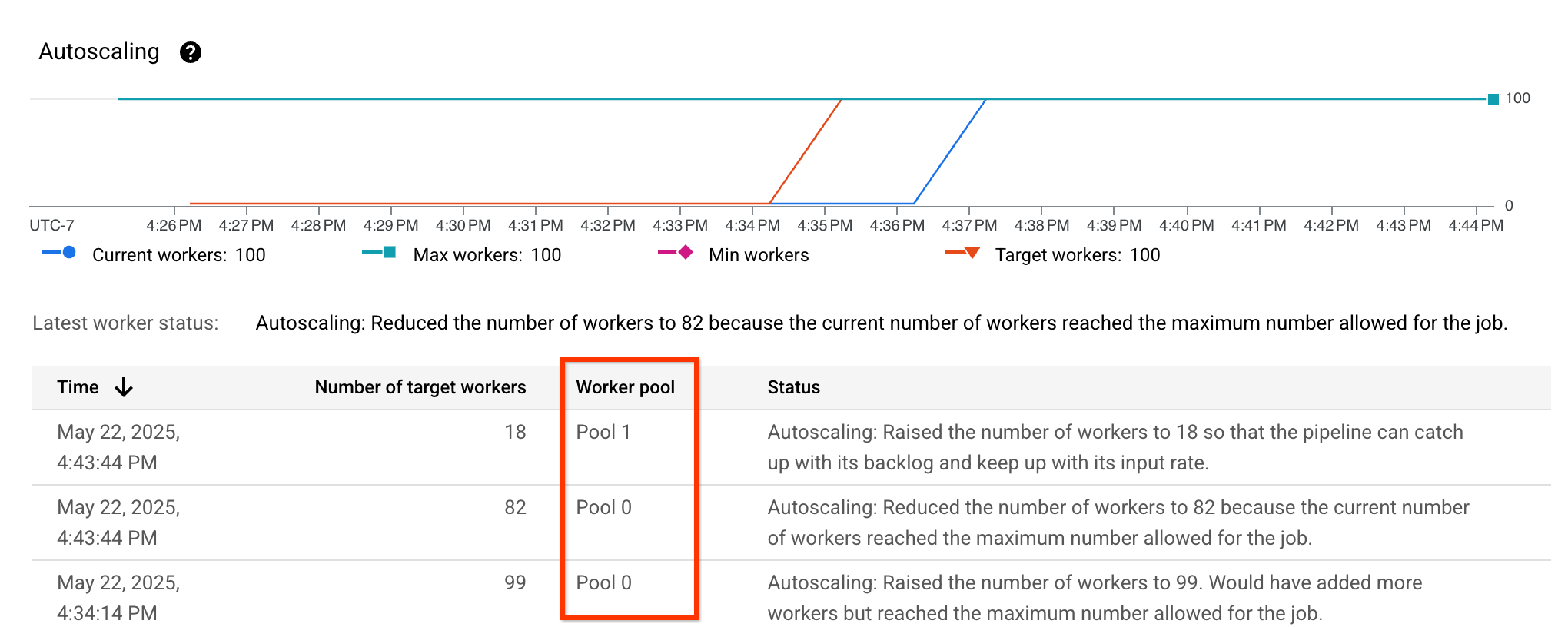
You can verify that right fitting is enabled by viewing the [autoscaling metrics](https://docs.cloud.google.com/dataflow/docs/guides/autoscaling-metrics) and verifying that the `Worker pool` column is visible and lists different pools:
### Streaming right fitting performance
Streaming pipelines with right fitting enabled might not always perform better than pipelines without right fitting enabled. For example:
1. The pipeline is using more workers
2. The system latency is higher, or the throughput is lower
3. The worker pool sizes are changing more frequently, or are not stabilizing
If you observe this for your pipeline, you can disable right fitting by removing the [`--experiments=enable_streaming_rightfitting` pipeline option](https://docs.cloud.google.com/dataflow/docs/reference/pipeline-options). Also, streaming pipelines with right fitting enabled using accelerator Resource Hints might use more accelerators than is deisirable. If you observe this for your pipeline, you can configure a maximum number of accelerators used by the pipeline by setting the [`--experiments=max_num_accelerators=MAX_NUM_ACCELERATORS` pipeline option](https://docs.cloud.google.com/dataflow/docs/reference/pipeline-options).