

Conversion workspaces help you convert the schema and objects from your source database into the SQL syntax that is compatible with your destination database. This page provides an overview of Database Migration Service conversion workspaces:
Conversion overviews provide a cross-section of your schema conversion progress.
Objects supported by the deterministic code and schema conversion lists SQL Server objects supported for deterministic schema conversion.
Interactive SQL editor describes what objects you can modify directly in the conversion workspace editor.
Gemini-powered conversion features looks at how you can integrate generative AI support to expedite the schema conversion process.
Conversion mapping files section provides an overview of customization directives you can use to override the rules of deterministic schema conversion.
Conversion progress overviews
Conversion workspaces robust overview information, where you can gain insights into the total number of outstanding or solved conversion issues, Gemini-assisted augmentations, and the general health of your conversion process.
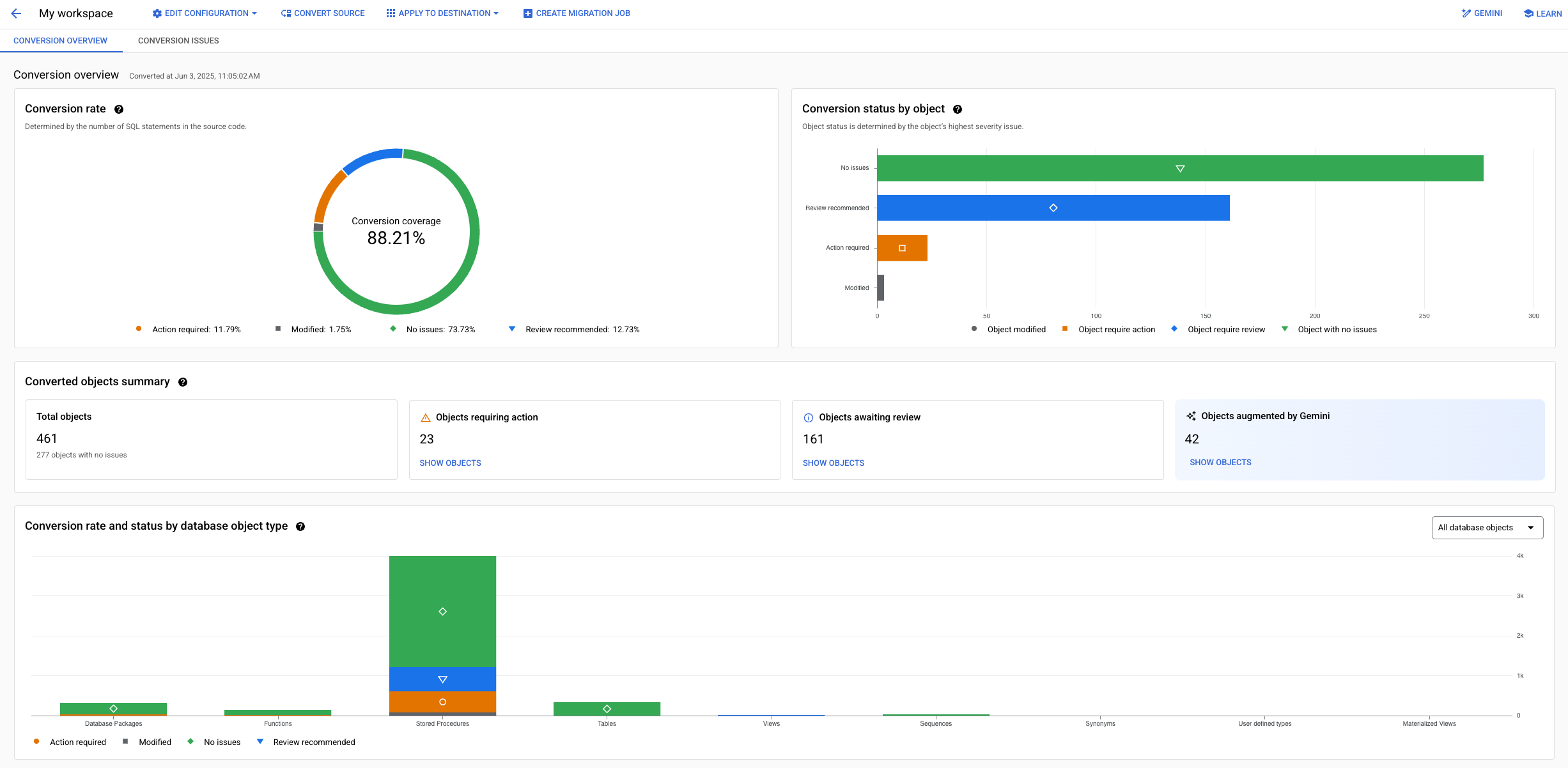
You can use this view to filter objects in your schema by type, issue severity, actions needed, or conversion status.

For more information about using conversion overviews to inspect conversion results, see Work with conversion workspaces.
Deterministic code and schema conversion
When you create a conversion workspace, Database Migration Service immediately performs the initial schema conversion using a set of deterministic conversion rules where specific SQL Server data types and objects are mapped to specific PostgreSQL data types and objects. This process supports a very specific subset of available SQL Server database objects.
Unsupported objects
The deterministic SQL conversion comes with certain limitations. If your source database includes objects that aren't supported by the deterministic schem conversion rules, you can convert them by:
The following data types aren't supported, and aren't replicated to the destination:
SQL_VARIANTHIERARCHYIDGEOMETRYGEOGRAPHY
Additionally, Database Migration Service replicates user-defined data types, but only
stores the base data type from which you derive your user-defined types.
For example, if you define a USERNAME data type based on the VARCHAR(50)
data type, the data is stored in the destination as VARCHAR(50).
Supported objects
Deterministic code and conversion provides support for the following SQL Server database objects:
Supported SQL Server schema elements
- Constraints
- Indexes (only indexes which are created in the same schema as their table)
- Sequences
- User Defined Types
- Synonyms
- Tables
- Schemas
- Views
- Indexed Views
Supported SQL Server code elements
- Triggers (table level only)
- Procedures
- Functions
Interactive SQL editor
The interactive SQL editor lets you modify converted PostgreSQL syntax directly in Database Migration Service. You can use it to fix conversion issues or adjust the schema to better fit your needs. Some objects can't be modified in the built-in editor.
Editable SQL Server objects
After you convert source database code and schema, you can use the interactive editor to modify the generated SQL for certain types of objects. The following SQL Server objects are supported by the editor:
- Table triggers (requires permission)
- Functions
- Procedures
- Synonyms
- Views
- Indexed Views
- Constraints
- Indexes
- Sequences
Additionally, some objects are converted but not available for editing directly inside Database Migration Service. To modify such objects, you need to perform the updates directly on the destination database after you apply the converted schema and code.
Objects that aren't supported for editing:
- User-defined object types
- Tables
- Schemas
Accelerate code and schema conversion with Gemini
Database Migration Service integrates Gemini for Google Cloud into the conversion workspaces to help you speed up and improve the conversion process in the following areas:
Enhance the deterministic conversion results with Gemini-powered auto-conversion to use the power of AI to significantly reduce the number of manual adjustments needed in your PostgreSQL code.
Ensure the quality and functional equivalence of your converted code with Gemini-powered quality assessments. These assessments analyze the converted code, providing feedback on its correctness and functionality compared to the source code.
Provide code explainability features with the conversion assistant: a set of dedicated prompts that can help you better understand the conversion logic, propose fixes for conversion issues, or optimize converted code.
Expedite applying fixes for conversion issues with Gemini code conversion suggestions: a mechanism where the Gemini model can learn as you fix conversion issues and suggest changes to other faulty objects in the workspace.
For more information about Gemini-powered conversion, see the following pages:
Conversion mapping files
You can customize the conversion logic with a conversion mapping file. The conversion mapping file is a text file contains precise instructions (referred to as conversion directives) for how your SQL Server objects should be converted into PostgreSQL objects.
Supported conversion directives
Database Migration Service supports the following conversion directives for conversion mapping files:
EXPORT_SCHEMA
EXPORT_SCHEMA is a mandatory directive for all conversion
mapping files. Database Migration Service requires this instruction to ensure
that your source schemas are converted to the correct destination schemas.
Make sure your conversion mapping files include this line:
EXPORT_SCHEMA 1
SCHEMA
Database Migration Service must be able to determine which schema contains
the objects that should be modified with your conversion directives.
The SCHEMA directive causes all other customization directives
provided in your file to apply to objects in this particular schema.
- When you use this directive, other schemas contained in your database are also converted, but their objects aren't subject to any modifications.
- If you include this directive in the conversion mapping file, all customizations are applied only to objects contained in this specific schema.
- If you skip this directive, you must provide fully-qualified object names
that include the schema name for objects modified by other conversion directives.
For example, instead of using
SOURCE_TABLE_NAMEfor theREPLACE_TABLESdirective, you would need to use"SCHEMA_NAME.SOURCE_TABLE_NAME". - To customize objects in different schemas, try the following:
- Create separate conversion mapping files for other schemas, and upload them to the conversion workspace.
- Use fully-qualified object names that include the schema name for
objects that reside in different schemas than the one you provide
to the
SCHEMAdirective.
Use the following format:
SCHEMA SCHEMA_NAME
Where SCHEMA_NAME is the name of your schema in the source database.
CASE_HANDLING
By default, Database Migration Service converts all object names to lowercase.
You can use the CASE_HANDLING directive to modify this
behavior.
- This directive is unaffected by the
SCHEMAdirective. It works globally, and affects all objects in the conversion workspace. - The
RENAME_*,MOVE_*, andREPLACE_*directives take precedence over theCASE_HANDLINGdirective and rename your objects exactly, regardless of theCASE_HANDLINGproperty. - If this directive exists in multiple configuration files with conflicting values, Database Migration Service raises an error during schema import.
Use the following format:
CASE_HANDLING OPTION
Where OPTION can be one of the following:
UPPERCASE: Converts all object names to uppercase.LOWERCASE: Converts all object names to lowercase (default behavior).PRESERVE_ORIGINAL: Keeps the original casing from the source schema. This is useful if your applications use case-sensitive identifiers.
Example:
CASE_HANDLING PRESERVE_ORIGINAL
GENERATE_MISSING_PK
Tables without primary keys don't promise consistent replication. Database Migration Service migrates only tables that have primary keys. By default, Database Migration Service conversion workspaces automatically create any missing primary keys in the destination tables when you convert your source code and schema.
You can control the automatic primary key generation with the
GENERATE_MISSING_PK directive. To disable automatic key
generation, set this directive to 0.
Example:
GENERATE_MISSING_PK 0
This directive affects all objects in a specific conversion workspace. It isn't possible to disable automatic primary key generation only for a specific table.
Database Migration Service can only migrate tables that have primary key constraints in their converted PostgreSQL versions. If you disable the automatic primary key generation, you need to manually create primary keys or unique constraints in the converted tables in the destination database after you apply the converted schema. Expand the following sections for sample SQL commands.
Create primary keys using existing columns
Your table might already have a logical primary key based on a column or a combination of columns. For example, there might be columns with a unique constraint or index configured. Use these columns to generate a new primary key for tables in your source database. For example:
ALTER TABLE TABLE_NAME
ADD PRIMARY KEY (COLUMN_NAME);
Create a primary key using all columns
If you don't have a pre-existing constraint that could serve as a primary key, create primary keys using all columns of the table. Make sure that you don't exceed the maximum length of the primary key allowed by your PostgreSQL cluster. For example:
ALTER TABLE TABLE_NAME
ADD PRIMARY KEY (COLUMN_NAME_1, COLUMN_NAME_2, COLUMN_NAME_3, ...);
When creating a composite primary key like this, you need to explicitly list all column names you want to use. It's not possible to use a statement to retrieve all column names for this purpose.
Renaming Objects (RENAME_*)
You can rename different database objects during conversion. Database Migration Service automatically updates all code references (in views, stored procedures, functions, etc.) to use the new names.
General syntax
RENAME_OBJECT_TYPE SOURCE_NAME1:DESTINATION_NAME1 SOURCE_NAME2:DESTINATION_NAME2 ...
Important considerations
-
The
RENAME_*directives are case-sensitive for the destination object name and take precedence over theCASE_HANDLINGdirective. For example, if you use both directives:SCHEMA MySchema CASE_HANDLING PRESERVE_ORIGINAL # Destination objects are renamed exactly # to 'SoMe_tAbLe' and 'RenamedView', respecting the case # despite the CASE_HANDLING directive RENAME_TABLES some_table:SoMe_tAbLe RENAME_VIEWS MyView:RenamedView
-
For the
SOURCE_NAME, always refer to the original object name, even if you use other directives such asMOVE_*. For example, if you want to rename one of your view objects and move it to a new schema, refer to the original view name for both directives:RENAME_VIEWS MyView:MyRenamedView MOVE_VIEWS MyView:MyOtherSchema
- The
RENAME_TABLESdirective overrides theREPLACE_TABLESdirective in a single file. If you want to both rename and move a table, we recommend you use theMOVE_*directive instead. -
The full format of the
SOURCE_NAMEvariable depends on whether you also use theSCHEMAdirective:- With
SCHEMAdirective: Use unqualified names, for exampleMyTable. - Without
SCHEMAdirective: Use fully qualified names, for exampleMySchema.MyTable.
- With
Supported RENAME_* directives
RENAME_SCHEMA: Renames a schema.
A single configuration file can contain only oneRENAME_SCHEMAdirective. If theSCHEMAdirective is provided,RENAME_SCHEMAcan rename only that particular schema.RENAME_TABLES: Renames tables. Overrides theREPLACE_TABLESin the same file.RENAME_COLUMNS: Renames columns within tables. Overrides theREPLACE_COLSdirective in the same file. Use the following format:RENAME_COLUMNS TABLE1.SRC_COL:DEST_COL TABLE2.SRC_COL:DEST_COL
If you use the
SCHEMAdirective, use unqualified table names. If you don't use theSCHEMAdirective, include the fully qualified table names, such as SCHEMA.TABLE1.RENAME_VIEWSRENAME_MATERIALIZED_VIEWSRENAME_SEQUENCESRENAME_FUNCTIONSRENAME_STORED_PROCEDURESRENAME_TRIGGERSRENAME_USER_DEFINED_TYPESAvailable alias:
RENAME_UDTS.
Moving Objects (MOVE_*)
You can move objects to different schemas in the destination database. This is useful for reorganizing your database structure during migration. Database Migration Service automatically updates all code references in views, stored procedures, functions, etc.
General syntax
MOVE_OBJECT_TYPE SOURCE_NAME1:DESTINATION_SCHEMA1 SOURCE_NAME2:DESTINATION_SCHEMA2 ...
Important considerations
-
For the
SOURCE_NAME, always refer to the original object name, even if you use other directives such asRENAME_*. For example, if you want to rename one of your view objects and move it to a new schema, refer to the original view name for both directives:RENAME_VIEWS MyView:MyRenamedView MOVE_VIEWS MyView:MyOtherSchema
- The directive expects only the
DESTINATION_SCHEMAname, not the full object name. -
The full format of the
SOURCE_NAMEvariable depends on whether you also use theSCHEMAdirective:- With
SCHEMAdirective: Use unqualified names, for exampleMyTable. - Without
SCHEMAdirective: Use fully qualified names, for exampleMySchema.MyTable.
- With
Supported MOVE_* directives
MOVE_TABLES: Moves tables to a different schema. Takes precedence overREPLACE_TABLESfor schema changes in a single configuration file.MOVE_VIEWSMOVE_MATERIALIZED_VIEWSMOVE_SEQUENCESMOVE_FUNCTIONSMOVE_STORED_PROCEDURESMOVE_USER_DEFINED_TYPESAvailable alias:
MOVE_UDTS.
Example: Reorganizing schemas
SCHEMA LegacyApp

# Moves the 'LegacyApp.Users' and 'LegacyApp.Orders' tables
# to the 'data' schema.
MOVE_TABLES Users:data Orders:data

# Moves the 'LegacyApp.CreateUser' and 'LegacyApp.ProcessOrder'
# stored procedures to the 'api' schema
MOVE_STORED_PROCEDURES CreateUser:api ProcessOrder:api

# Moves the 'LegacyApp.SalesSummary' views to the 'reporting' schema
MOVE_VIEWS SalesSummary:reporting
DATA_TYPE
You can use this directive to explicitly map any data type between SQL Server and PostgreSQL syntax. This directive expects a list of mappings separated by commas. The whole definition must be provided on a single line. Use the following format:
DATA_TYPE SQLSERVER_DATA_TYPE1:PGSQL_DATA_TYPE1,SQLSERVER_DATA_TYPE2:PGSQL_DATA_TYPE2...
Where SQLSERVER_DATA_TYPE and PGSQL_DATA_TYPE are data types supported by their respective SQL Server and PostgreSQL versions you use in your migration. For information on supported versions, see Scenario overview.
Example:
DATA_TYPE REAL:double precision,SMALLINT:integer
For more information on SQL Server and PostgreSQL data types, see:
- SQL Server data types in the Microsoft SQL Server documentation.
- PostgreSQL data types in the PostgreSQL documentation.
MODIFY_TYPE
The MODIFY_TYPE directive lets you control to what data type
Database Migration Service converts a specific column in your source table.
This directive expects a list of mappings separated by commas.
Use the following format:
MODIFY_TYPE SOURCE_TABLE_NAME1:COLUMN_NAME:EXPECTED_END_RESULT_DATA_TYPE,SOURCE_TABLE_NAME2:COLUMN_NAME:EXPECTED_END_RESULT_DATA_TYPE...
Where:
- SOURCE_TABLE_NAME is the name of the table that contains the column where you want to change the data type.
- COLUMN_NAME is the name of the column for which you want the converted data type to be different than the source data type.
- EXPECTED_END_RESULT_DATA_TYPE is the PostgreSQL data type that you want the converted column to use.
Example:
MODIFY_TYPE events:dates_and_times:DATETIME,users:pseudonym:TEXT
PG_INTEGER_TYPE
By default, Database Migration Service attempts to convert your source
SQL Server numeric types to their portable ANSI standard equivalents
(INTEGER, SMALLINT, DECIMAL).
Use the PG_INTEGER_TYPE directive to instruct Database Migration Service
to convert your source SQL Server numeric types to
PostgreSQL-specific data types.
Use the following format:
PG_INTEGER_TYPE 1
DEFAULT_NUMERIC
If you use the PG_INTEGER_TYPE directive,
Database Migration Service converts DECIMAL without
specified precision points into the PostgreSQL BIGINT
type. To change this behavior, use the DEFAULT_NUMERIC
directive and specify what data type should be used for
DECIMAL types without specified precision points.
Use the following format:
DEFAULT_NUMERIC POSTGRESQL_NUMERIC_DATA_TYPE
Where POSTGRESQL_NUMERIC_DATA_TYPE is one of the
following: integer, smallint, bigint.
Example:
DEFAULT_NUMERIC integer
REPLACE_COLS
You can use the REPLACE_COLS directive to rename columns
in your converted schema. This directive expects a list of mappings separated by commas.
Use the following format:
REPLACE_COLS SOURCE_TABLE_NAME1(SOURCE1_TABLE1_COLUMN_NAME1:DESTINATION_TABLE1_COLUMN_NAME1,SOURCE_TABLE1_COLUMN_NAME2:DESTINATION_TABLE1_COLUMN_NAME2),SOURCE_TABLE_NAME2(SOURCE_TABLE2_COLUMN_NAME1:DESTINATION_TABLE2_COLUMN_NAME1,SOURCE_TABLE2_COLUMN_NAME2:DESTINATION_TABLE2_COLUMN_NAME2)...
Where:
- SOURCE_TABLE_NAME is the name of the table
that contains the column whose name you want to change.
If you don't use the SCHEMA
directive, make sure you use the fully qualified table name:
SCHEMA_NAME.SOURCE_TABLE_NAME - SOURCE_COLUMN_NAME is the name of the column in your source whose name you want to change.
- DESTINATION_COLUMN_NAME is the new name you for the column you want to use in the converted schema.
Example:
REPLACE_COLS events(dates_and_times:event_dates),users(pseudonym:nickname)
REPLACE_TABLES
You can use the REPLACE_TABLES directive to rename tables
in your converted schema. This directive expects a list of mappings separated
by spaces. Use the following format:
REPLACE_TABLES SOURCE_TABLE_NAME1:DESTINATION_TABLE_NAME1 SOURCE_TABLE_NAME2:DESTINATION_TABLE_NAME2
Where:
- SOURCE_TABLE_NAME is the name of the source table you want to rename in the converted schema.
- DESTINATION_TABLE_NAME is the new name for the table you want to use in the converted schema.
If you don't use the SCHEMA directive, make sure you use the fully qualified table names in quotes for both source and destination variables:
"SCHEMA_NAME.SOURCE_TABLE_NAME""SCHEMA_NAME.DESTINATION_TABLE_NAME"
Example:
REPLACE_TABLES "events:login_events" "users:platform_users"
You can also use this directive to move tables between schemas by adding the schema prefix to the new table name. This mechanism can be used regardless of how you use the SCHEMA directive for the whole conversion file. For example:
REPLACE_TABLES "events:NEW_SCHEMA_NAME.login_events"
Sample conversion mapping file
See the following code for an example a conversion mapping file that uses all supported conversion directives:
EXPORT_SCHEMA 1
SCHEMA root

# Preserve original casing for all objects
CASE_HANDLING PRESERVE_ORIGINAL

# Data type conversions
PG_INTEGER_TYPE 1
DEFAULT_NUMERIC integer
DATA_TYPE REAL:double precision,SMALLINT:integer
MODIFY_TYPE events:dates_and_times:DATETIME

# Renaming objects using the RENAME_* directives
# These allow case-sensitive destination names
RENAME_TABLES events:LoginEvents users:PlatformUsers
RENAME_COLUMNS events.dates_and_times:EventDates users.pseudonym:Nickname
RENAME_VIEWS InternalReport:FinInternalReport

# Moving objects to new schemas using the MOVE_* directives
MOVE_TABLES audit_log:archive
MOVE_VIEWS InternalReport:reporting
The results of using this file are as follows:
EXPORT_SCHEMA 1is a required directive.SCHEMA rootcauses the other directives to apply to objects within therootschema, unless fully qualified names are used.CASE_HANDLING PRESERVE_ORIGINALensures that all object names from the sourcerootschema retain their original casing in the destination (unless overridden by aRENAME_*directive).PG_INTEGER_TYPE 1makes Database Migration Service convert all SQL Server numeric data types found in tables in therootschema to PostgreSQL-specific types instead of ANSI portable numeric types.DEFAULT_NUMERICcauses Database Migration Service to convertDECIMALvalues that don't have a specified precision point into PostgreSQLINTEGERtype. This only applies toDECIMALvalues found in tables in therootschema.DATA_TYPE REAL:double precision,SMALLINT:integercauses Database Migration Service to convert specific numeric types in tables in therootschema in the following manner:REALvalues are converted into PostgreSQLDOUBLE PRECISION.SMALLINTvalues are converted into PostgreSQLINTEGER.
MODIFY_TYPEdirective causes Database Migration Service to convert the data in thedates_and_timescolumn in theeventssource table specifically to the PostgreSQLDATETIMEtype, regardless of the actual source column format.RENAME_TABLES events:LoginEvents users:PlatformUsersrenames tables, preserving the specified case:- The
eventstable is renamed toLoginEvents. - The
userstable is renamed toPlatformUsers.
- The
RENAME_COLUMNS events.dates_and_times:EventDates user.pseudonym:Nicknamerenames columns, preserving the specified case in the destination:- In the
LoginEventstable (original nameevents), columndates_and_timesis renamed toEventDates. - In the
PlatformUsers(original nameusers), columnpseudonymis renamed toNickname.
- In the
RENAME_VIEWS InternalReport:FinInternalReportrenames the viewInternalReporttoFinInternalReport.MOVE_TABLES audit_log:archivemoves theaudit_logtable from therootschema to thearchiveschema.MOVE_VIEWS InternalReport:reportingmoves theInternalReportview to thereportingschema. This view is also renamed toFinInternalReportbecause of theRENAME_VIEWSdirective. Database Migration Service handles the dependency: the object is first renamed, then moved.
What's next
To learn about using conversion workspaces, see:
To get a complete, step-by-step migration walkthrough, see SQL Server to Cloud SQL for PostgreSQL migration guide.