

Database Migration Service collects and displays migration job metrics that represent the health and progress of your data migration process. This page describes the following areas associated with migration job metrics:
Metrics available on the migration job details page covers the observability information you can view directly in Database Migration Service on the migration job details page.
Metrics available in Cloud Monitoring describes all metrics related to migration job performance, including the metrics surfaced from the Cloud SQL destination instance.
Metrics available on the migration job details page
The migration job details page shows diagrams and tables that can help you understand the current state and progress of your migration job. You can view metrics for all databases included in your migration job or only the databases that you selected for migration.
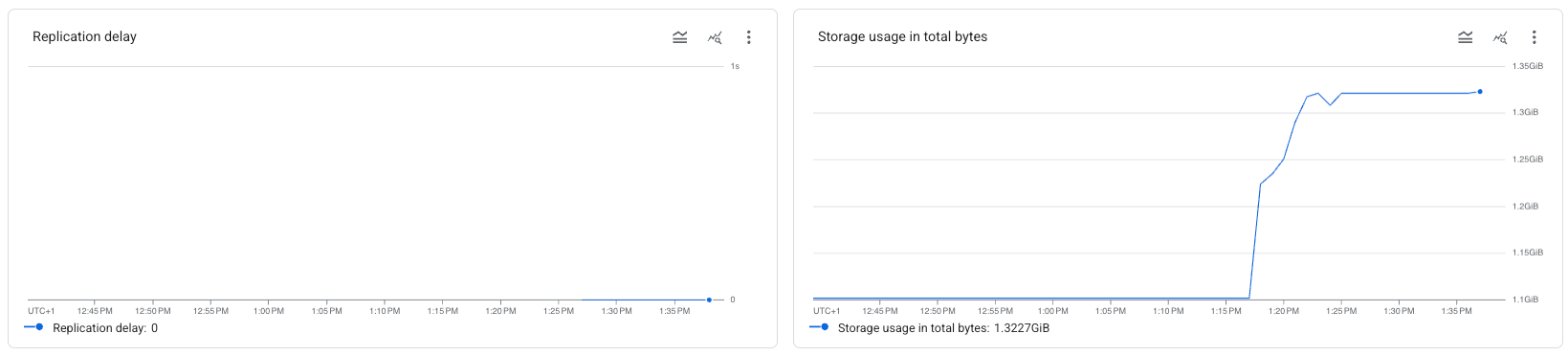
Expand the following sections to learn more about each diagram and its associated metric.
Total destination storage usage
The Total destination storage usage diagram uses the Cloud SQL
database/disk/bytes_used
metric to show how much data (in bytes) is stored in all the databases in your destination
Cloud SQL instance. You can use this information to estimate the progress
of your migration job.
This metric is only available in the aggregated view. You can't filter the total disk usage per database.
Replication delay
The Replication delay diagram uses the Cloud SQL
per_database/postgresql/external_sync/replication_byte_lag
metric to show how many bytes the destination database is behind the
source database.
Use this metric when you consider performing a promotion of a continuous migration. Replication delay should be zero at the time of the promotion in order to avoid data loss. Note that this metric is only relevant in the change data capture (CDC) phase. For more information on job promotion, see Promote a migration.
This metric is available for each database included in your migration job, and in the aggregated view where it shows a summary for all databases included in your migration job.
View metrics on the migration job details page
To view metric diagrams on the migration job details page, perform the following steps:
- In the Google Cloud console, go to the Migration jobs page.
- In the Jobs tab, click the display name of your migration job.
The migration job details page opens.
- In the Databases section, you can view the name and status of each database included in your migration job.
- Click the Monitoring tab to see the metrics diagrams.
- You can use the View menu to show aggregated data for all databases included in your migration job, or filter the information for specific databases.
- You can also view each diagram directly in Cloud Monitoring. Click More chart options > View in Metrics Explorer.
Metrics available in Cloud Monitoring
The following table describes migration job metrics you can use to create charts in Metrics Explorer for PostgreSQL migrations. For more information, see the complete Database Migration Service metrics reference.
You can also use the
Cloud SQL cloudsql/database/disk/bytes_used metric
and compare it with the total size of your source databases to estimate
the migration job progress.
| Metric type Launch stage Display name |
|
|---|---|
| Kind, Type, Unit Monitored resources |
Description Labels |
migration_
BETA
Initial replication sync complete |
|
GAUGE, BOOL, datamigration.googleapis.com/MigrationJob |
Whether all databases on the destination DB instance have completed the initial sync and are replicating changes from the source.
database: Database name.
|
migration_
BETA
Max lag bytes of the migration job data |
|
GAUGE, INT64, By
datamigration.googleapis.com/MigrationJob |
Current replication lag, aggregated across all of the migration job's data. Sampled every 60 seconds. After sampling, data is not visible for up to 180 seconds.
database: Database name.
|
migration_
BETA
Max lag in seconds of the migration job data |
|
GAUGE, INT64, s
datamigration.googleapis.com/MigrationJob |
Current replication lag, aggregated across all of the migration job's data. Sampled every 60 seconds. After sampling, data is not visible for up to 180 seconds.
database: Database name.
|