

You can migrate MySQL databases to Cloud SQL for MySQL instances with Database Migration Service. Database Migration Service uses the native MySQL replication capabilities to replicate data from your source database to the destination Cloud SQL for MySQL instance.
This page provides an overview of the key Database Migration Service features for homogeneous MySQL migrations:
Supported source and destination lists all MySQL versions supported by Database Migration Service.
Migration data flow provides an end-to-end overview of how your data moves in Google Cloud during the migration process.
Monitoring gives an introduction for logs and metrics that can help you observe the progress and health of your migration job.
Supported source and destination databases
You can use Database Migration Service to migrate between the same MySQL version, or from earlier versions of MySQL to later versions supported in Cloud SQL.
The following table lists all supported MySQL source and destination database offerings. For the full list of exact versions and cross-version support, see Versions support.
| Source databases | Destination databases |
|---|---|
| Amazon RDS | Cloud SQL for MySQL |
| Amazon Aurora | |
| Microsoft Azure Database for MySQL | |
| Self-managed MySQL
(on premises or on any cloud VM that you fully control) |
Migration data flow
For homogeneous MySQL migrations to Cloud SQL, Database Migration Service connects to the destination Cloud SQL instance and then manages the migration process on its behalf. It's the destination instance that establishes the connection to your source instance, but Database Migration Service oversees the process.
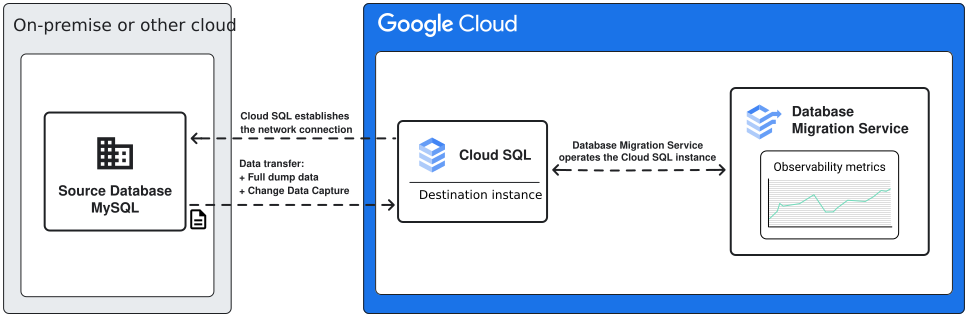
For homogeneous MySQL migrations to Cloud SQL, Database Migration Service supports continuous and one-time migration flows. With continuous migrations, your data is first loaded from a full dump, and then continuously updated based on data change information surfaced from database log files.
For a detailed walkthrough of all migration types and phases, see Migration types and phases.
Monitoring
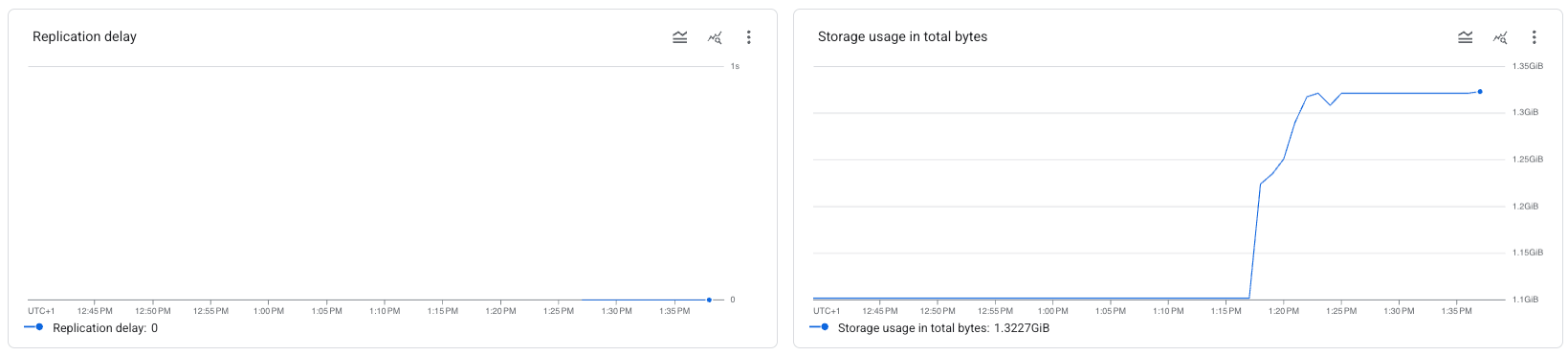
Database Migration Service provides extensive logging and observability capabilities to help you monitor the migration progress. These features include real-time diagnostics for replication delay, as well as detailed logs for Cloud SQL for MySQL destination instance health and migration job state.
For more details, see Migration job metrics.
What's next
To learn more about MySQL data and feature support in Database Migration Service, see Known limitations.
To get a complete, step-by-step migration walkthrough, see Get started with Cloud SQL for MySQL migrations.