This page provides an overview of concepts associated with configuring network connectivity for homogeneous MySQL migrations to Cloud SQL for MySQL:
Network components describes the end-to-end network configuration for homogeneous MySQL migrations.
Method availability explains which methods are available depending on your scenario.
Method comparison provides a comparison table for available connectivity methods.
Dedicated section for each available connectivity method:
IP allowlist describes network connectivity to the public IP of your source database.
Reverse-SSH tunnel provides an overview for dedicated Secure Shell (SSH) tunnels.
Private connectivity with Private Service Connect interfaces describes how to connect to your source private IP with network attachments.
For Cloud SQL for MySQL sources only: Specialized VPC peering describes a networking method tailored for migrating between two PSA Cloud SQL instances.
Private connectivity with VPC peering describes how you can establish a connection to the private IP of your source database over peered VPC networks.
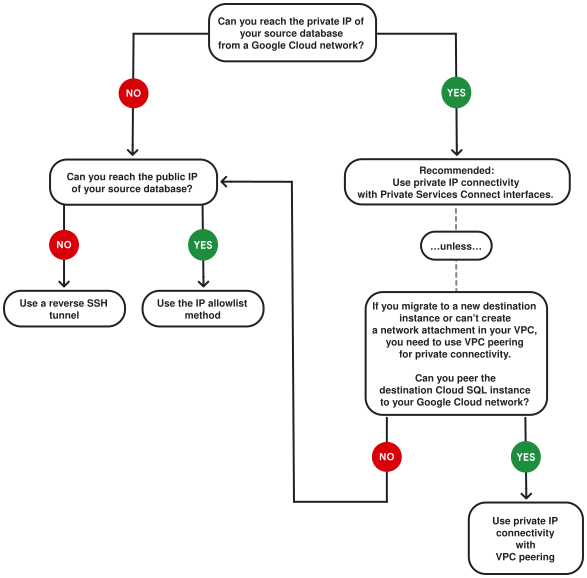
After you familiarize yourself with different connectivity methods and their requirements, you can use the decision tree diagram to pick the right solution for your scenario.
Network components involved in the migration process
For homogeneous MySQL migrations to Cloud SQL, Database Migration Service connects to the destination Cloud SQL instance and then manages the migration process on its behalf. It's the destination instance that establishes the connection to your source instance, but Database Migration Service oversees the process.
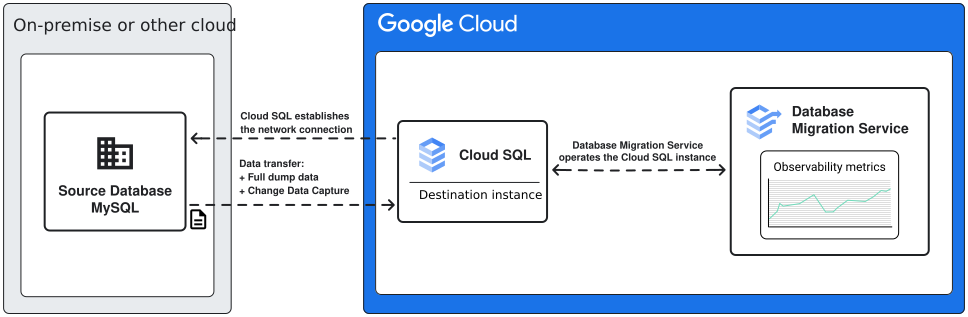
When you plan the network connectivity setup for your migration, it's important to carefully consider the infrastructure requirements, including what limitations your networking decisions might introduce to the end state of the migrated database instance. For example, if you want to use a private connection for your network connectivity, you need use a destination Cloud SQL instance with private IP enabled. You can later disable the private IP on your Cloud SQL instance.
Connectivity methods availability
Different connectivity methods are available for different source databases depending on whether you are migrating to a new or to an existing destination instance. The following table provides an overview of which scenario supports which method:
| Source database offering | Methods for migrations to new destination instances | Methods for migrations to existing destination instances |
|---|---|---|
| Self-hosted, Amazon Aurora, Amazon RDS, Microsoft Azure SQL Managed Instance | IP allowlist, reverse-SSH tunnel, VPC peering | IP allowlist, reverse-SSH tunnel, VPC peering (requires a PSA destination instance), PSC interfaces (requires a PSC-enabled destination instance) |
| Cloud SQL for MySQL | IP allowlist (not recommended), Specialized VPC peering | IP allowlist (not recommended), Specialized VPC peering, PSC interfaces (requires a PSC-enabled destination instance) |
Connectivity methods comparison
Every connectivity method comes with different benefits and requirements. Use the following tables to compare them at a glance, and then learn more details in the sections dedicated for each method.
| Networking method | Advantages | Disadvantages |
|---|---|---|
| IP allowlist |
|
|
| Reverse-SSH tunnel |
|
|
| Private Service Connect interfaces |
|
|
| For Cloud SQL for MySQL sources only: Specialized VPC peering | This connectivity method is specialized for migrating between PSA Cloud SQL for MySQL instances without using a shared VPC. | Requires that both instances are PSA instances with a private IP enabled. Not supported for PSC-enabled destinations. |
| Private connectivity with Virtual Private Cloud peering | The connection is established to the private IP address of your source database over VPC peerings. If your VPC doesn't have enough peering quota, it might be difficult to use this connectivity method. For most scenarios where you migrate from a Cloud SQL for MySQL source, we recommend that you use Private connectivity with Private Service Connect interfaces instead. |
|
IP allowlist for source database connectivity
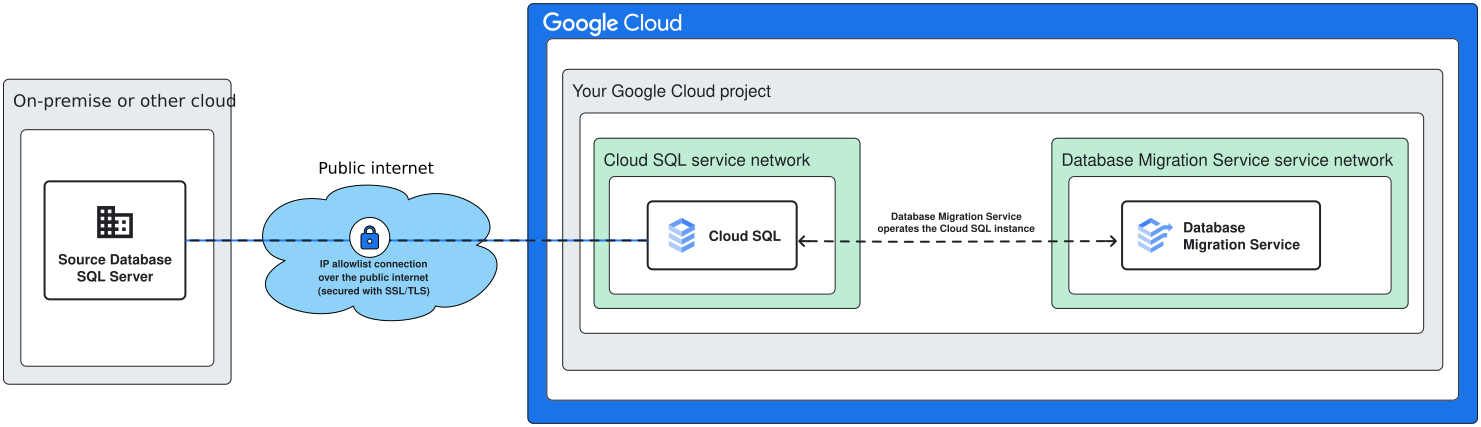
When you use the IP allowlist connectivity method, Cloud SQL attempts to establish a connection to a publicly available IP address of your source database server.
Requirements for IP allowlist connectivity
At a high level, to use this connectivity method you need to ensure the following:
You must expose your source database IP address to the public internet (either directly, or with a publicly recognized hostname through a Domain Name Server (DNS)).
Your destination Cloud SQL instance must have a public IP enabled. You need to allow incoming connections from the outbound public IP of the destination instance.
Configure IP allowlist connectivity
Configuring public IP connectivity requires different steps depending on you source database type. For more information, see:
Configure IP allowlist connectivity for Amazon RDS and Amazon Aurora sources
Configure IP allowlist connectivity for Microsoft Azure SQL Managed Instance sources
Configure IP allowlist connectivity for Cloud SQL for MySQL sources
Reverse-SSH tunnel database connectivity
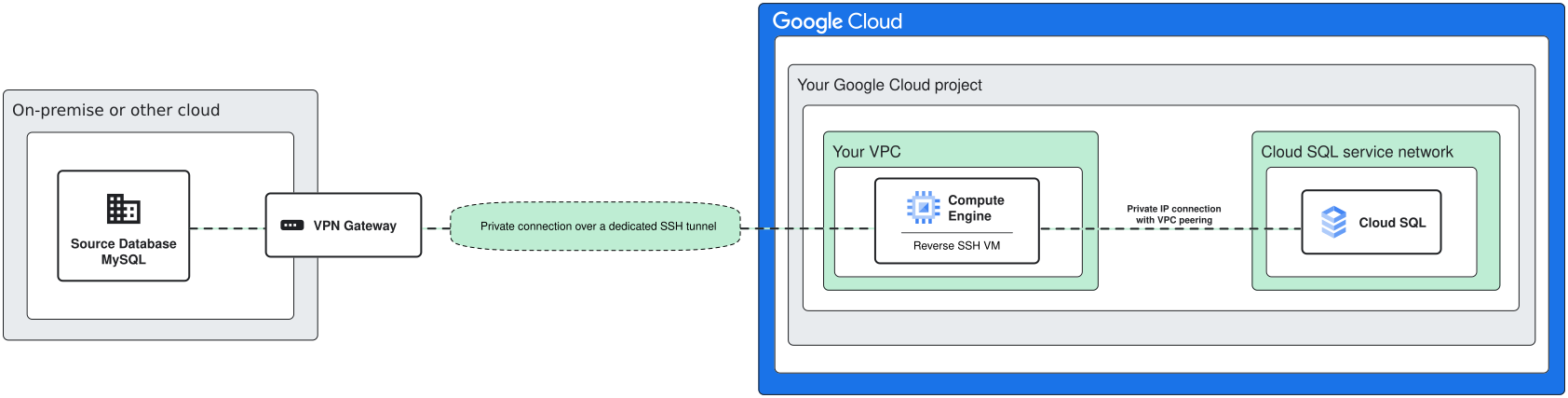
This connectivity method is a mixture of public and private network connectivity. The connection itself is established through Secure Shell (SSH) ports to the public IP address of the tunnel host server. Once the connection is active, all traffic travels over a secure tunnel to the private IP address of your source database.
For Cloud SQL sources or self-hosted solutions that reside inside inside Google Cloud, we recommend that you use private connectivity with Private Service Connect interfaces or private connectivity with Virtual Private Cloud peering methods.
Requirements for reverse-SSH tunnels
To create the connection, you need to expose SSH ports to the public internet on your tunnel server (also known as the bastion host). When connectivity is established, all traffic is routed through the private tunnel connection.
This method requires additional network components:
- A Virtual Machine (VM) in Google Cloud to serve as the reverse-SSH machine.
- An additional machine on your network that has connectivity to the source database.
Configure reverse-SSH tunnel connectivity
Database Migration Service can generate a setup script to create the reverse-SSH VM, but the full end-to-end process is different depending on you source database type. For more information, see Configure reverse-SSH connectivity
Private connectivity with Private Service Connect interfaces
This connectivity method lets you connect to the private IP of your source database without consuming VPC peering quota. Private Service Connect interfaces are the recommended method for private IP connectivity, but they are only available when you migrate to an existing instance.
When you use Private Service Connect interfaces, your destination instance doesn't consume more peering quota. Instead, it leverages the Private Service Connect interface to reach the Virtual Private Cloud where the private IP of your source database can be reached. Depending on your network architecture, you might need to use additional components such as Cloud VPN or Cloud Interconnect.
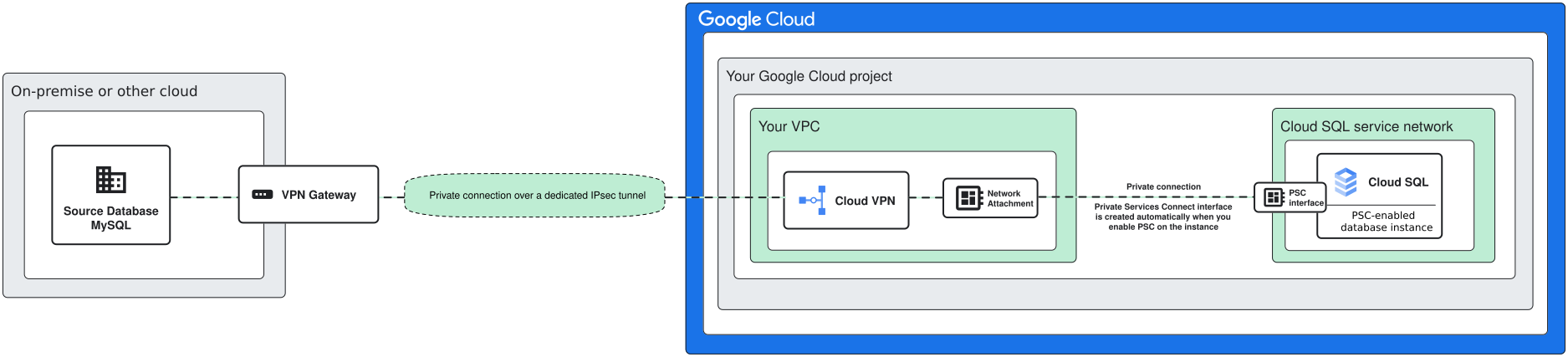
For migrations from Cloud SQL for MySQL instances, your source instance needs to be enabled for Private Services Access and peered with the Virtual Private Cloud where you create the network attachment, but the destination Cloud SQL for MySQL instance doesn't consume more peering quota. Instead, it leverages the Private Service Connect interface.
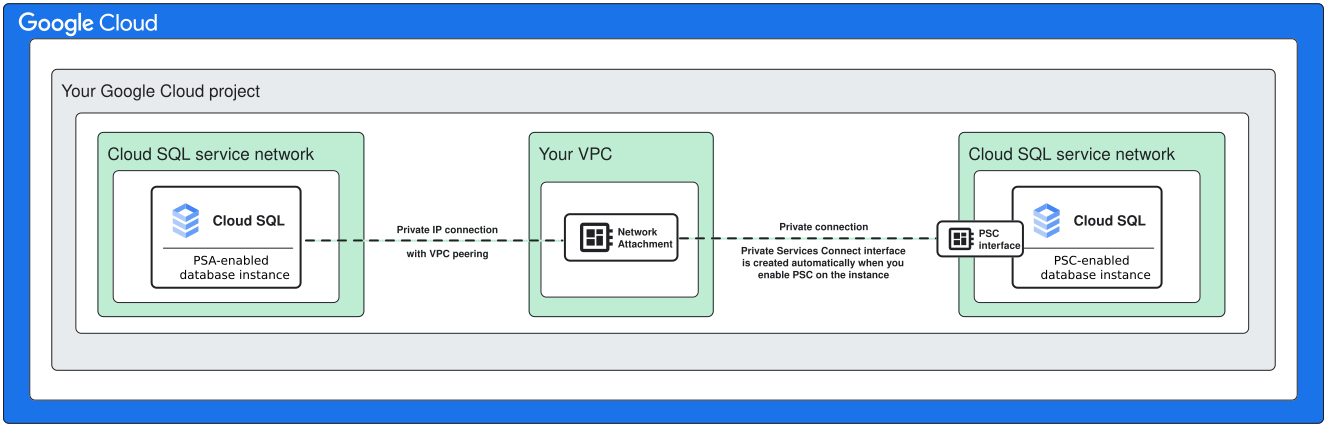
Requirements for Private Service Connect interfaces
This connectivity method requires the following:
Your destination database instance must be a Cloud SQL for MySQL instance with PSC enabled.
You need to have a Virtual Private Cloud network with private services access enabled.
This is the network where you create the network attachment. The IP of your source database must be reachable from that Virtual Private Cloud. For example, for Cloud SQL for MySQL sources, this is the network that you peer with the PSA-enabled source Cloud SQL instance.
Configure private IP connectivity with Private Service Connect interfaces
To use private IP connectivity with Private Service Connect interfaces, your source database private IP must be reachable from your Virtual Private Cloud. Depending on your network architecture, you might need to use additional components such as Cloud VPN or Cloud Interconnect.
To learn more about configuring private IP connectivity for different database sources, see:
Cloud SQL for MySQL sources only: specialized VPC peering
This method is dedicated for migrations between PSA Cloud SQL for MySQL instances. In standard networking scenarios, connecting two Cloud SQL instances with Virtual Private Cloud peering requires that you use a shared VPC. For homogeneous MySQL migrations with Database Migration Service, you can connect two PSA instances without using a shared VPC.
Requirements for specialized VPC peering
This connectivity method requires the following:
Your source database instance must be a Cloud SQL for MySQL instance with PSA enabled.
Your destination database instance must be a Cloud SQL for MySQL instance with PSA enabled.
You need to have a Virtual Private Cloud network with private services access enabled.
This is the network that Database Migration Service peers with the destination Cloud SQL instance. You need to have enough space to allocate the required IP ranges.
Configure private IP connectivity specialized VPC peering
To learn more about configuring specialized VPC peering for source PSA Cloud SQL for MySQL instances, see Configure specialized Virtual Private Cloud peering for Cloud SQL for MySQL.
Private connectivity with VPC peering
This method lets you connect to your source through the private IP addresses in your Virtual Private Cloud (VPC). You don't need to expose any interfaces to the public internet to use this method, but it requires that your source database IP address or hostname can be reached from your Google Cloud VPC. For sources that reside outside Google Cloud, you might need additional network components, such as Cloud VPN or Cloud Interconnect.
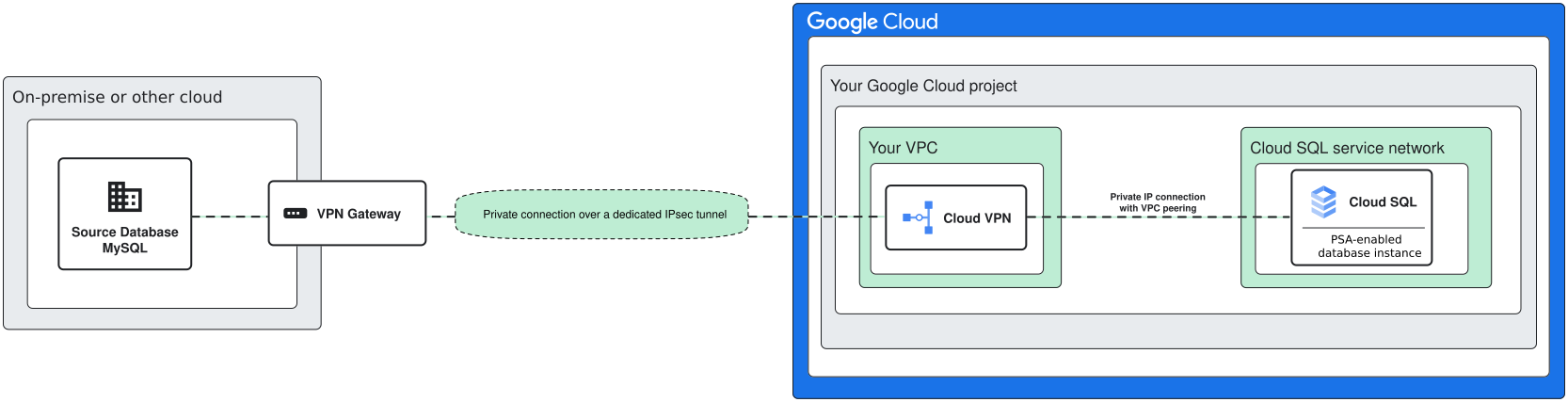
Requirements for private IP connectivity with VPC peering
Private IP connectivity with VPC peering requires the following:
- You need to have a Virtual Private Cloud network with private services access enabled. The private IP of your source database must be reachable in that network.
Configure private IP connectivity with VPC peering
To use private IP connectivity with Virtual Private Cloud peering, your source database private IP must be reachable from your Virtual Private Cloud. Depending on your network architecture, you might need to use additional components such as Cloud VPN or Cloud Interconnect.
To learn more about configuring private IP connectivity for different database sources, see:
You need Cloud VPN or Cloud Interconnect to create the connection to the private IP of your source database.
Network connectivity decision tree
When you are familiar with all supported connectivity methods and their requirements, you can follow the questions in the diagram to help you pick the right connectivity method for your scenario.