

For homogeneous MySQL migrations to Cloud SQL, Database Migration Service connects to the destination Cloud SQL instance and then manages the migration process on its behalf. It's the destination instance that establishes the connection to your source instance, but it's Database Migration Service that oversees the process.
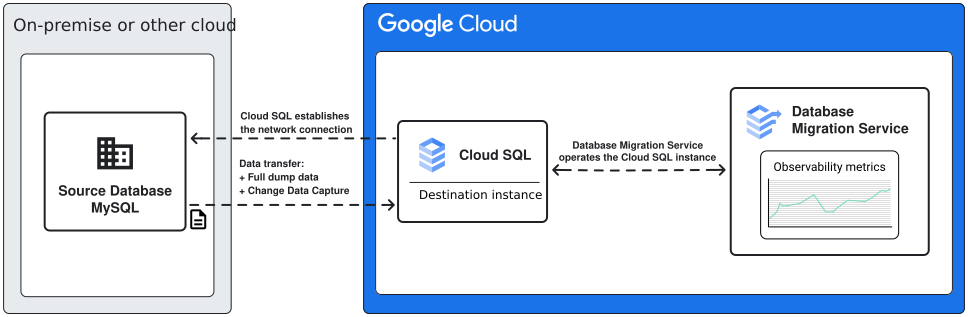
For homogeneous MySQL migrations to Cloud SQL, Database Migration Service supports continuous and one-time migration flows. With continuous migrations, your data is first loaded from a full dump, and then continuously updated based on data change information surfaced from database log files. At a high level, migration phases progress as follows:
One-time migrations
-
When you create the migration job, Database Migration Service creates a temporary orchestration instance to manage replication and turns your destination Cloud SQL into a Cloud SQL replica. There are no additional costs associated with this orchestration instance.
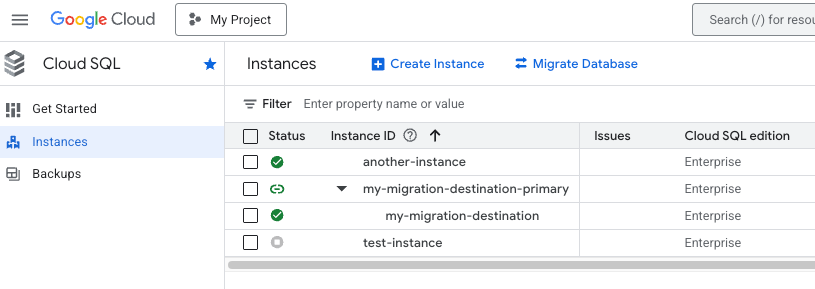
Figure 2. Destination instance displayed under the temporary orchestration instance in the Google Cloud console.
When you start the migration job, Database Migration Service begins the full dump phase. For one-time migrations, this is the only migration phase.
During full dump, Database Migration Service connects to your source instance, reads the contents of the databases you selected for migration, and then loads the data to the destination instance.
For one-time migrations, we recommend that you disable writes on the source database during the full dump phase. This way you can avoid avoid losing data created after the migration process starts.
You can also provide your own dump files for Database Migration Service. Note that any data that was added to the database after you created the dump files isn't going to be migrated. The network connection to your database is still established for consistency checks.
- When the full dump phase is over, Database Migration Service automatically promotes the destination database and completes the migration. At that point, you can switch your application to use the new destination database.
Continuous migrations
-
When you create the migration job, Database Migration Service creates a temporary orchestration instance to manage replication and turns your destination Cloud SQL into a Cloud SQL replica. There are no additional costs associated with this orchestration instance.
Figure 2. Destination instance displayed under the temporary orchestration instance in the Google Cloud console.
When you start the migration job, Database Migration Service begins the full dump phase.
During full dump, Database Migration Service connects to your source instance, reads the contents of the databases you selected for migration, and then loads the data to the destination instance.
You can also provide your own dump files for Database Migration Service. Note that any data that was added to the database after you created the dump files isn't going to be migrated. The network connection to your database is still established for consistency checks.
-
For continuous migrations, when the full dump phase is over, Database Migration Service switches to the CDC phase. During CDC, Database Migration Service keeps monitoring your source databases for changes, and then continuously replicates them on the destination instance.
In the CDC phase, Database Migration Service doesn't copy actual data from your source tables: instead, it reads information extracted from database log files to replicate changes in the destination. You can stop the ongoing replication and promote the migration job when you want to switch your application so that it uses your destination instance as the production database.
What's next
To learn more about MySQL data and feature support in Database Migration Service, see Known limitations.
To get a complete, step-by-step migration walkthrough, see Get started with Cloud SQL for MySQL migrations.