

This page describes quick-start migrations for homogeneous PostgreSQL
migrations to Cloud SQL for PostgreSQL and AlloyDB for PostgreSQL.
Quick-start migrations are a lightweight continuous migration flow for homogeneous
PostgreSQL scenarios that streamline the migration process with
features like automated networking, embedded discovery, fast replication
(based on pgnative), and more. This page describes quick-start migrations for
homogeneous PostgreSQL migrations to Cloud SQL for PostgreSQL and
AlloyDB for PostgreSQL:
- Overview provides the high-level description of what quick-start migrations are and how you can use them to enhance your migration experience.
- Guides and supported scenarios contains links to step-by-step instructions for all quick-start migration flows.
- Network connectivity explains the unique architecture employed by Database Migration Service in quick-start migrations.
- Limitations describe known limitations and caveats to keep in mind when you follow quick-start migrations.
Overview
With quick-start migrations, Database Migration Service can automatically set up everything you need to migrate sources that have a private IP assigned in a VPC network, such as self-managed databases on Compute Engine or Cloud SQL for PostgreSQL instances. Key highlights of quick-start migrations include:
pgnativereplication: The native replication mechanism lets you migrate without installing extra PostgreSQL extensions or demoting the destination instance. Other databases on your destination instance remain operational, without any interruptions to your traffic.- Simplified networking: Database Migration Service automatically handles network connectivity over private IPs. In quick-start migrations, all the required resources (private connectivity configuration, the network attachment and its subnet) are automatically created to enable connections over Private Service Connect interfaces. For more information, see the Network connectivity section.
- Embedded discovery: You can start, manage, and monitor migrations directly in your destination Cloud SQL or AlloyDB for PostgreSQL instances with the Database Migration Service observability features.
The following table summarizes key differences between quick-start and standard homogeneous PostgreSQL migrations:
| Feature | Standard migrations (pglogical) | Quick-start migrations (native replication) |
|---|---|---|
| Extension installation | Required. You must install and configure the pglogical extension on your source database. |
Not required. |
| Destination instance state | Must be empty and demoted (for Cloud SQL) or in bootstrapping mode (for AlloyDB for PostgreSQL). | Can be a live instance with active traffic to other databases (not being migrated). |
| Network connectivity | Supports complex scenarios with Private Service Connect interfaces, Virtual Private Cloud peering, reverse SSH tunnels, and public IP connectivity. | Uses fully private connections with Private Service Connect interfaces to abstract the networking setup. You don't need to configure your source database for connectivity, the only requirement is that it has a private IP assigned in a VPC network. |
| Tables without primary keys | Not supported. All tables must have primary keys. | Supported. You can replicate tables without primary keys by setting
the replica identity to INDEX or FULL.
|
| Parallel migration jobs | Not supported. You can only run one migration job per source database instance. | Supported. You can run multiple migration jobs in parallel, with each job migrating different databases from the same source. |
| Destination object ownership | Objects are owned by the postgres user. |
Objects are owned by the migration user generated by Database Migration Service (if using the Google Cloud console) or the user you supply (if using Google Cloud CLI). |
Guides and supported scenarios
Quick-start migrations for homogeneous PostgreSQL facilitate continuous homogeneous migrations to new or existing Cloud SQL for PostgreSQL or AlloyDB for PostgreSQL destinations. This migration flow is best suited for migrating from sources that have a private IP address in your Google Cloud Virtual Private Cloud (VPC) network, such as self-managed databases on Compute Engine, or Cloud SQL for PostgreSQL instances enabled for private networking. Sources hosted outside Google Cloud might need additional network components (such as a Cloud VPN connection) so that they can be reached at a private IP address within your VPC network.
You can begin your quick-start migration journey in multiple places in the Google Cloud console:
- The Google Cloud console for Cloud SQL for PostgreSQL and AlloyDB for PostgreSQL, where you begin the quick-start migration directly from your instance or cluster. For more information, see:
- Database Migration Service, where you can create a new destination cluster or instance as you configure the quick-start migration. For more information, see:
Network connectivity
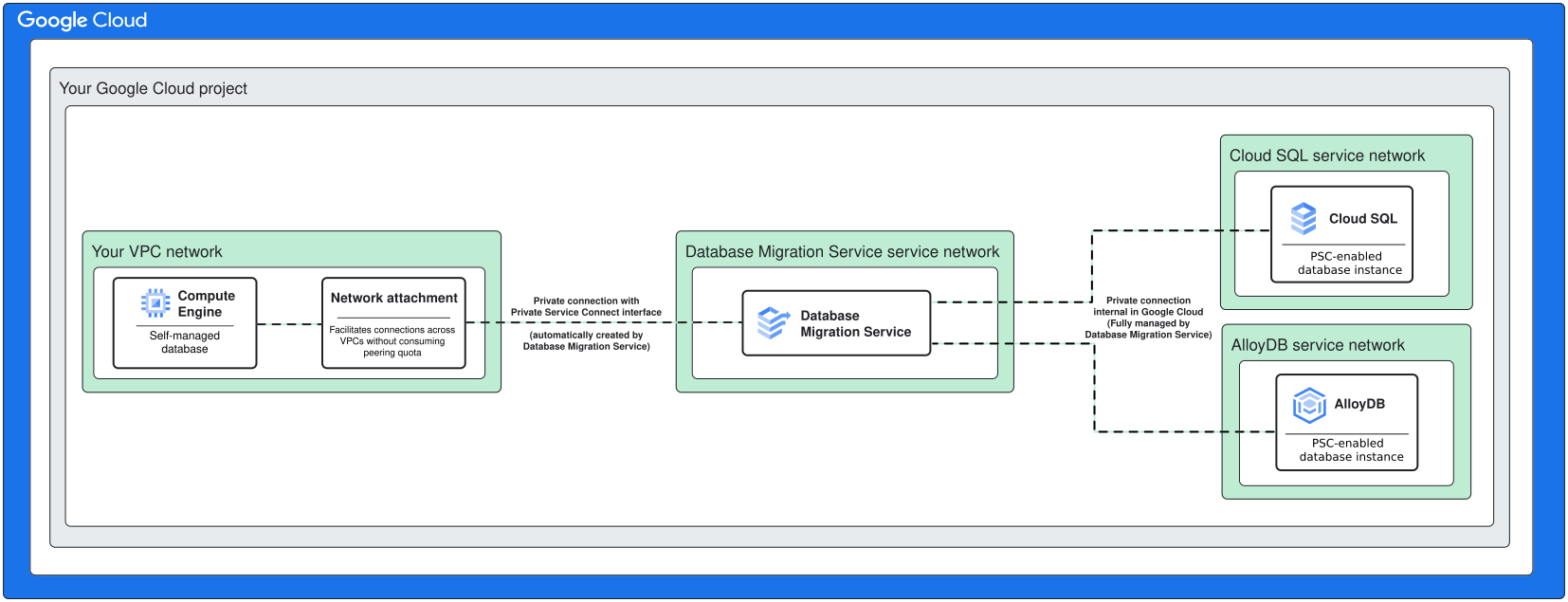
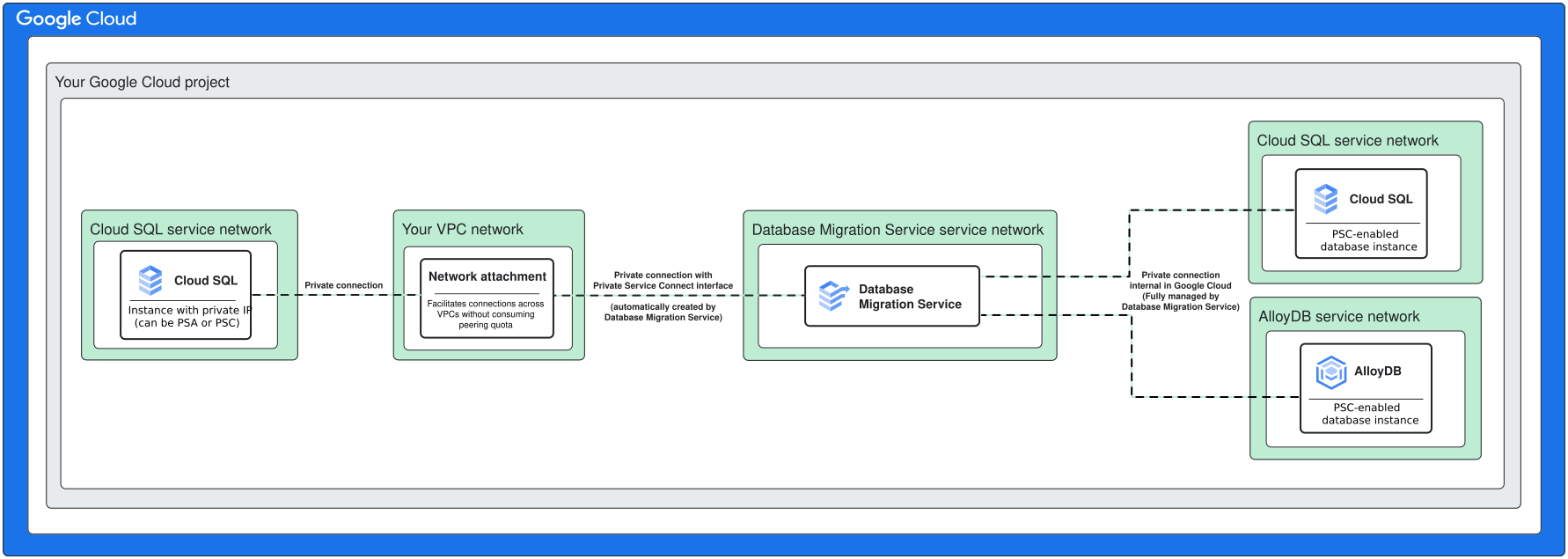
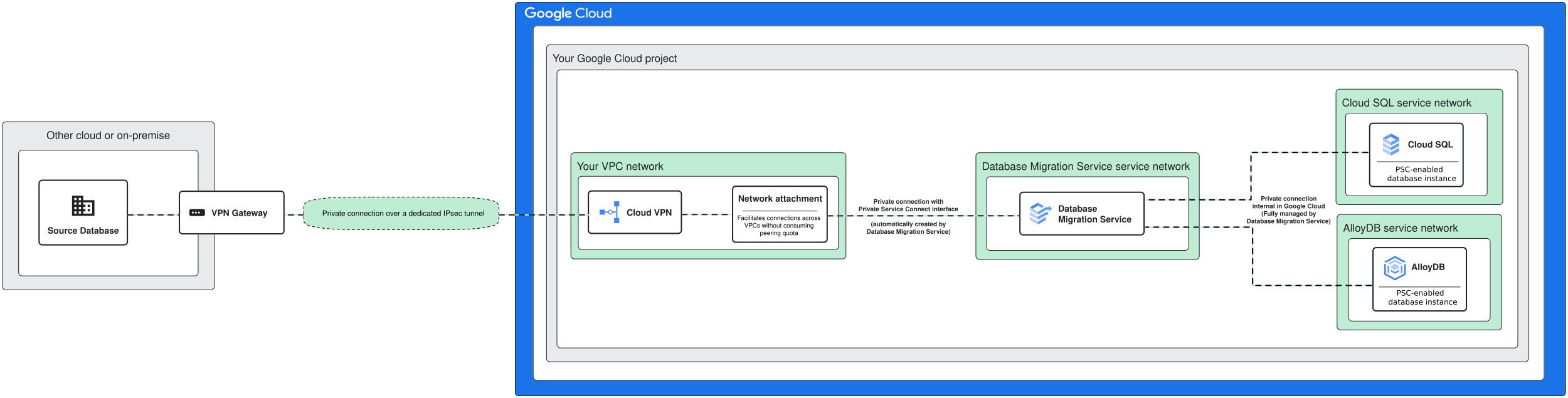
At a high-level, quick-start migrations use a different networking architecture from standard homogeneous migrations. Database Migration Service and the destination Cloud SQL for PostgreSQL or AlloyDB for PostgreSQL instances are service producers that reside in their own dedicated networks (known as service networks), outside the VPC networks that you use in your Google Cloud project.

Database Migration Service fully facilitates both source and destination connectivity for quick-start migrations.
For source database connectivity, quick-start migrations use Private Service Connect interfaces. This connectivity method requires that your source instance has a private IP address in your Google Cloud VPC network. Self-managed databases on Compute Engine or Cloud SQL for PostgreSQL instances can usually can meet this requirement out of the box. Sources hosted outside Google Cloud might need additional network components (such as a Cloud VPN connection) so that they can be reached at a private IP address within your VPC network.
For destination database connectivity, Database Migration Service fully manages the network communication to Cloud SQL for PostgreSQL instances or AlloyDB for PostgreSQL clusters. The only requirement is that your destination is enabled for Private Service Connect, but no further configuration is needed.
Source connectivity to self-hosted databases on Compute Engine
When you migrate from a self-hosted databases on Compute Engine, Database Migration Service creates the network attachment in the same VPC network where you have your VM.
Source connectivity to Cloud SQL for PostgreSQL
When you migrate from a Cloud SQL for PostgreSQL instance, Database Migration Service creates the network attachment in the VPC network where your instance has a private IP assigned. This IP can be a result of a Private Services Access (PSA) or Private Service Connect configuration. For more information, see Private IP configuration in the Cloud SQL documentation.
Source connectivity to databases outside Google Cloud
When you migrate from a database hosted outside Google Cloud, you need additional network components to ensure that your database has a private IP address assigned in your Google Cloud VPC network (for example a VPC network). Database Migration Service creates the network attachment in the VPC network where your instance has a private IP assigned.
Limitations
The following limitations apply to quick-start migrations. If your migration scenario requires the use of any unsupported features, we recommend you follow the standard migration flow instead. For more information, see Migrate to Cloud SQL for PostgreSQL or Migrate to AlloyDB for PostgreSQL documentation pages.
Quick-start migrations don't support migrating from PostgreSQL versions
9.6or lower.Empty databases (that is, databases that only have system schemas) aren't supported.
Identity and Access Management (IAM) authentication for destination instances or clusters isn't supported. When you use quick-start migrations for a new destination, Database Migration Service connects as the default
postgresuser. If you migrate to an existing destination, Database Migration Service creates a dedicatedcloudsqlsuperuseroralloydbsuperuseraccount and uses it to connect to the destination. For more information about IAM, see IAM authentication in the Cloud SQL documentation or Manage IAM authentication in the AlloyDB for PostgreSQL documentation.The source database must have a private IP address assigned in your VPC network. Database Migration Service connects to the source database using Private Service Connect interfaces (network attachments). Public IP connectivity isn't supported for quick-start migrations.
Only Private Service Connect-enabled destinations are supported. PSA Cloud SQL for PostgreSQL or AlloyDB for PostgreSQL instances aren't supported as migration destinations.
SSL encryption options for source connections only support
noneandrequiredvariants for quick-start migrations.Homogeneous MySQL or SQL Server migrations aren't supported for quick-start migrations.
Advanced features, such as customized data dump parallelism settings aren't supported.
Only continuous migrations are supported.
Quick-start migrations can accommodate up to 50 databases per migration job. You don't have to migrate all databases in your source database server. Database Migration Service lets you select which databases you want to migrate.
For tables without primary keys, only
INSERToperations are replicated by default during the Change Data Capture (CDC) phase. To replicateUPDATEandDELETEoperations, you must set the table's replica identity toFULLorUSING INDEX. Exact steps are covered in the quick-start migration guides.Standard migration fidelity limitations apply. For more information, see Migration fidelity in AlloyDB for PostgreSQL migrations, Migration fidelity in Cloud SQL for PostgreSQL migrations.