# Integration with LiveRamp
This page describes the required configurations to bring data from LiveRamp
as a data source of the marketing workload of Cortex Framework Data Foundation.
LiveRamp is a data collaboration platform that helps businesses
connect, control, and activate their data to improve customer experiences
and drive better business outcomes. Cortex Framework offers the
tools and platform to analyze it, combine it with other data sources, and
use AI to gain deeper insights and optimize your marketing strategy.
The following diagram describes how LiveRamp data source is
available through the marketing workload of Cortex Framework Data Foundation:
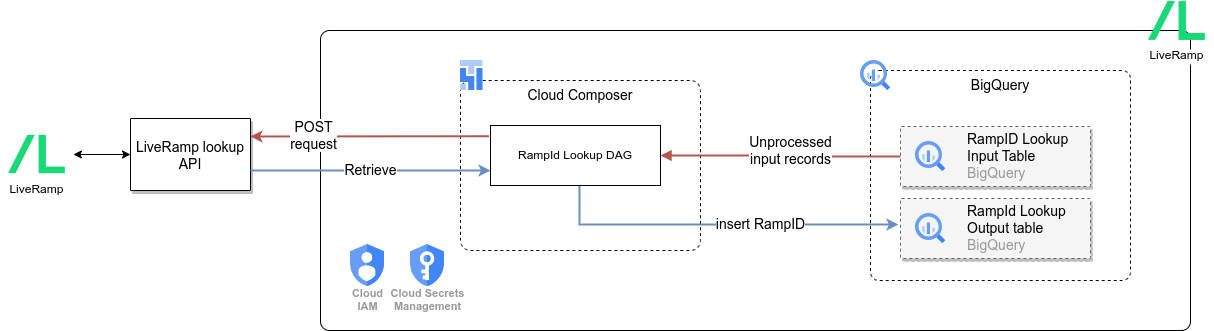
**Figure 1**. LiveRamp data source.
> [!NOTE]
> **Note:** For accessing configuration files, analytical views and models for the LiveRamp data source, see the [data source directory](https://github.com/GoogleCloudPlatform/cortex-data-foundation/tree/main/src/marketing/src/LiveRamp).
## Configuration file
The [`config.json`](https://github.com/GoogleCloudPlatform/cortex-data-foundation/blob/main/config/config.json) file configures the settings required to connect to data sources for transferring
data from various workloads. This file contains the following parameters for LiveRamp:
"marketing": {
"deployLiveRamp": true,
"LiveRamp": {
"datasets": {
"cdc": ""
}
}
}
The following table describes the value for each LiveRamp parameter:
|---|---|---|---|
| **Parameter** | **Meaning** | **Default Value** | **Description** |
| `marketing.LiveRamp` | Deploy LiveRamp | `true` | Execute the deployment for LiveRamp data source. |
| `marketing.LiveRamp.datasets.cdc` | CDC dataset for LiveRamp | | CDC dataset for LiveRamp. |
## API connection
Cortex Framework Data Foundation enables Identity Resolution by
[integrating with LiveRamp](https://docs.liveramp.com/identity/en/identity-resolution.html).Cortex Frameworks can perform
[RampID lookup](https://docs.liveramp.com/connect/en/rampid-methodology.html),
which allow businesses to identify known audiences or customer segments from
their CRM systems.
RampID is an identifier generated by LiveRamp's API using Personally
Identifiable Information (PII) like
email, phone number, and name. This RampID allows businesses to identify and
consolidate records across multiple systems, such as audiences of
different campaigns. By integrating with LiveRamp, businesses can
improve their ability to identify and target their audiences, leading to
more effective and personalized marketing campaigns.
[LiveRamp Identity Resolution Retrieval API](https://developers.liveramp.com/rampid-api/reference/getting-started)
lets businesses to programmatically resolve PII data to
individuals. Cortex Framework uses LiveRamp's
[Lookup Endpoint](https://developers.liveramp.com/rampid-api/docs/the-lookup-endpoint-1)
by sending hashed PII data over the API call.
## Input and output tables
After [deploying Cortex Framework](https://docs.cloud.google.com/cortex/docs/v6/deployment),
the system creates the following two BigQuery tables in
relevant dataset provided in `config.json`.
### `rampid_lookup_input` table
The `rampid_lookup_input` table is the input for the RampID Lookup process.
|---|---|---|---|---|
| **Column** | **Data Type** | **Description** | **Example** | **Primary Key** |
| id | STRING | Unique ID of this record. | "123" | Yes |
| segment_name | STRING | Name of audience/CRM/Customer segment. | "High Value" | No |
| source_system_name | STRING | Source system where the record came from. | "Salesforce" | No |
| name | STRING | Customer Name | "John Doe" | No |
| email | STRING | Customer Email | "example@example.com" | No |
| phone_number | STRING | Customer Phone | "1234567890" | No |
| postal_code | STRING | Customer postal code | "12345" | No |
| is_processed | BOOL | Indicates if a record is already processed. For new records, populate this with FALSE. System updates this to TRUE once it's processed. | FALSE | No |
| load_timestamp | TIMESTAMP | Timestamp when the record was inserted in the system. This is purely for audit purpose. | "2020-01-01 00:00:00 UTC" | No |
| processed_timestamp | TIMESTAMP | Timestamp when system performed API Lookup for this record. This is always populated by system. | "2020-01-01 00:00:00 UTC" | No |
The `rampid_lookup_input` table needs to be populated on a periodic basis
(based on your business needs) with your customer's PII details like.
Cortex Framework does not provide an automated way to do so, but it
provides a sample script `https://github.com/GoogleCloudPlatform/cortex-data-foundation/tree/main/src/marketing/src/LiveRamp/src/ddls/samples/populate_rampid_lookup_input.sql` that shows how you could populate this table using data in your
Salesforce system already deployed with Cortex Framework. You can use
this file as a guide in case your data comes from another system.
Ensure you don't have duplicate entries in the `rampid_lookup_input` table
(for example, the same individual is present multiple times with same PII information,
even if their `ID` might be different). Cortex Framework Lookup DAG would
fail if a segment contains many duplicate entries. This is enforced by
LiveRamp APIs.
### The `rampid_lookup` table
The `rampid_lookup` table is an output table containing RampIDs for each
segment in the input record. LiveRamp by design does not allow to map RampID
to an individual record.
|---|---|---|
| **Column** | **Data Type** | **Description** |
| segment_name | STRING | Segment name from input table. |
| ramp_id | STRING | LiveRamp RampID |
| record stamp | TIMESTAMP | Timestamp when this RampID lookup was performed. |
LiveRamp RampIDs [can change over a period of time](https://docs.liveramp.com/connect/en/interpreting-rampid,-liveramp-s-people-based-identifier.html#idm45078819449264_body),
for the same individual. This means, you need to perform a fresh lookup for
already processed data from time to time. Cortex Framework provides a
sample script `https://github.com/GoogleCloudPlatform/cortex-data-foundation/tree/main/src/marketing/src/LiveRamp/src/ddls/samples/clean_up_segment_matching.sql`
that shows how you can do this at a segment level. This way, you can reset
a whole segment, and the system would perform a lookup for that segment and
give you up to date RampIDs.
The `rampid_lookup` (output table) might contain slightly less number of
records compared to the input table. This is by design, as
Cortex Framework tries to debug the input records using PII details
to ensure LiveRamp API lookup does not fail.
## Account authentication
1. [Contact LiveRamp](https://liveramp.com/contact/) to obtain authentication credentials. This should include **Client ID** and **Client Secret**.
2. Create a secret using Secret Manager with name
`cortex-framework-liveramp`, and use the following as value. See instructions
in [Secret-Manager](https://docs.cloud.google.com/secret-manager/docs/create-secret-quickstart) documentation.
{
'client_id':'CLIENT_ID',
'client_secret':'CLIENT_SECRET',
'grant_type':'client_credentials'
}
Replace the following:
- 'CLIENT_ID' with the client ID obtained from step 1.
- 'CLIENT_SECRET' with the client secret obtained from step 1.
## Managed Airflow connections
Create the following connections in Managed Airflow. See more details in the
[Manage Airflow connections documentation](https://docs.cloud.google.com/composer/docs/how-to/managing/connections).
|---|---|
| **Connection Name** | **Purpose** |
| `liveramp_cdc_bq` | For LiveRamp API \> CDC dataset transfer |
## Configuration
The `config.ini` file controls some behavior of the Managed Airflow DAG,
as well as how LiveRamp APIs are consumed. Configure the [`LiveRamp/src/pipelines/config.ini`](https://github.com/GoogleCloudPlatform/cortex-data-foundation/tree/main/src/marketing/src/LiveRamp/src/pipelines/config.ini) file
based on your needs. While these parameters are already described in the file,
pay attention to `liveramp_api_base_url`. This parameter by default points
to LiveRamp's production API URL, for testing purposes, you might need to
point it to the staging version, depending on your setup.
## What's next?
- For more information about other data sources and workloads, see [Data sources and workloads](https://docs.cloud.google.com/cortex/docs/v6/data-sources-and-workloads).
- For more information about the steps for deployment in production environments, see [Cortex Framework Data Foundation deployment prerequisites](https://docs.cloud.google.com/cortex/docs/v6/deployment-prerequisites).