

CX Insights 會使用每個專案的服務帳戶,在分析期間存取客戶專案中的資源,例如 Google Cloud 儲存空間 bucket 中的音訊和轉錄稿檔案。首次存取任何使用者資源時,系統會自動建立每個專案的服務帳戶。根據預設,系統會自動授予服務帳戶專案的某些預設存取權,例如 Google Cloud 儲存空間存取權。
建立第一個對話後,您應該會在專案的 IAM 設定中看到服務帳戶權限。如果不小心移除或未看到服務帳戶權限,可以手動授予正確的權限。帳戶一律採用 service-<project_number>@gcp-sa-contactcenterinsights. 格式。
如要手動變更帳戶的權限,請前往 CX Insights 控制台的 IAM 面板,並授予該使用者 contactcenterinsights.serviceAgent 權限。您也可以為服務帳戶授予精細權限,但如果權限過多,可能會導致不穩定。
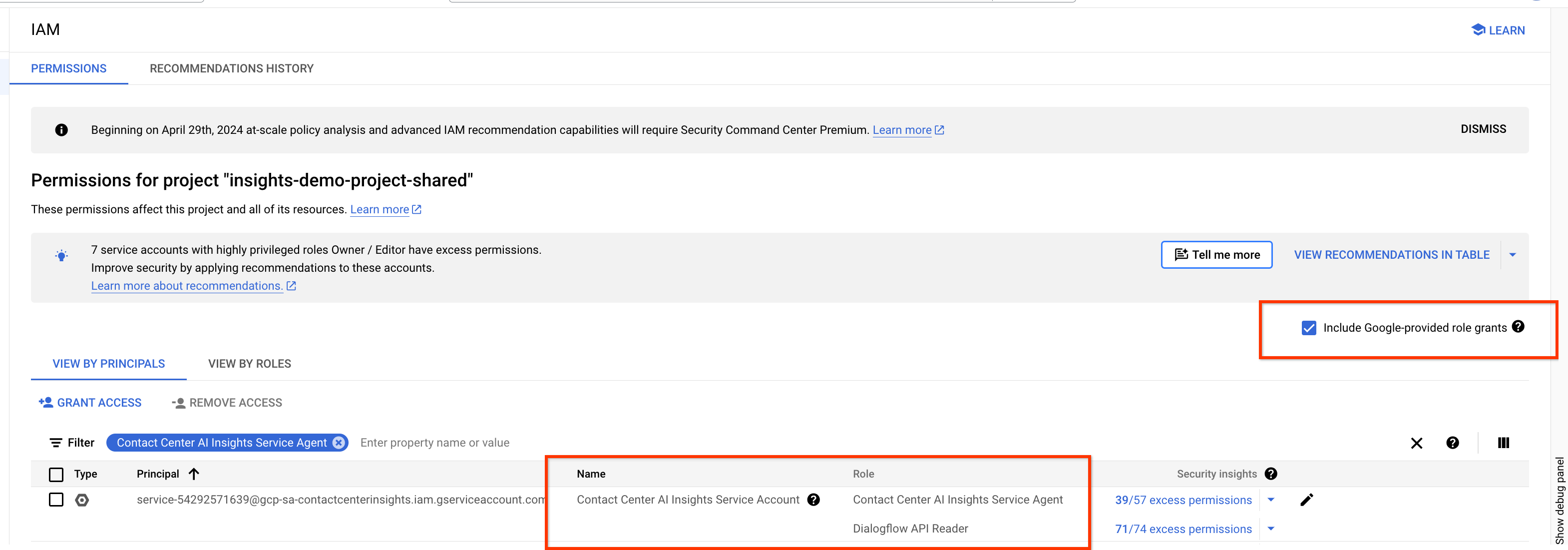
如果看到類似下列內容的錯誤訊息,請先確認 CX Insights 服務帳戶是否已存在於 IAM 設定中。
"message": "IAM permission 'dialogflow.participants.suggest' on 'projects/<project>/locations/global/conversations/fake_conversation_id/participants/fake_participant_id' denied."
然後確認已勾選「包含 Google 提供的角色授權」:
匯出音訊
如要將 Agent Assist 或 Dialogflow 的音訊匯出至 CX Insights,請確認 service-<project_number>@gcp-sa-dialogflow. 具有 dialogflow.serviceAgent 角色。
手動建立服務代理
您可以使用下列指令建立 Customer Experience Insights 服務代理:
gcloud beta services identity create --service=contactcenterinsights.googleapis.com --project=<project_id>