If access to your protected resources isn't managed by Google Cloud's
IAM---for example, the resources are stored in another cloud
service, on-premises, or on a local device such as a mobile phone---you can
still authenticate a Confidential Space workload to the device or system that
provides access to those resources, otherwise known as a *relying party*.
To do so, the relying party must receive an attestation token from an
attestation service, such as Google Cloud Attestation, with a custom audience and
optional nonces. When requesting an attestation token like this, the relying
party might need to perform their own token validation before granting access to
resources.
The documentation that follows covers the concepts involved in using
Confidential Space with resources outside of Google Cloud, including
[instructions to integrate your Confidential Space workloads with AWS resources](https://docs.cloud.google.com/confidential-computing/confidential-space/docs/connect-external-resources#integrate-aws).
For an end-to-end walkthrough, see the
[codelab](https://codelabs.developers.google.com/confidential-space-pki#0).
## Attestation token flow
Attestation tokens are requested by the workload on behalf of a relying party
and returned by an attestation service. Depending on your needs, you can define
a custom audience and optionally provide nonces.
### Unencrypted
For ease of understanding the token retrieval process, the flow presented
here doesn't use encryption. In practice, we recommend you encrypt
communications with TLS.
The following diagram shows the flow:
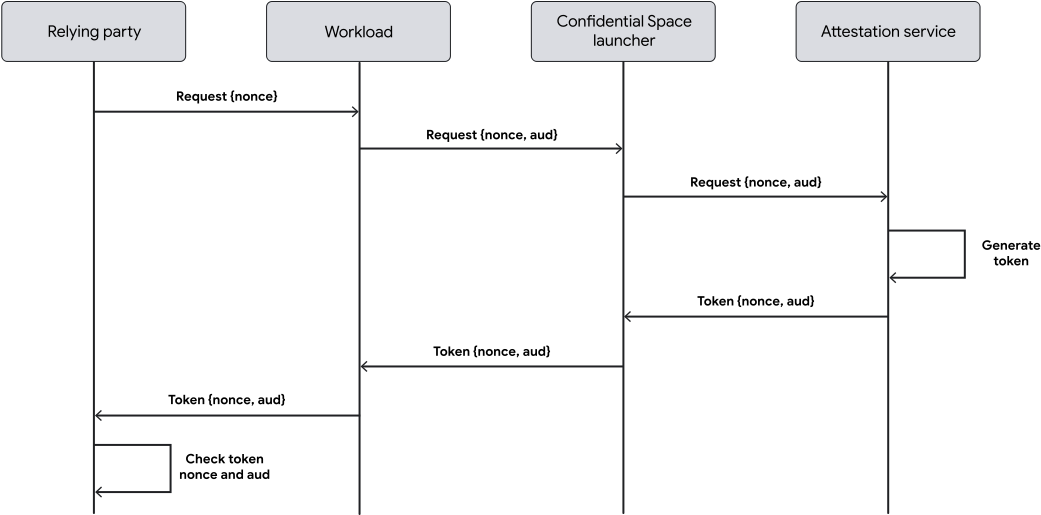
1. The relying party sends a token request to the workload, with optional
nonces that it has generated.
2. The workload determines the audience, adds the audience to the request,
and sends the request to the Confidential Space launcher.
3. The launcher sends the request to the attestation service.
4. The attestation service generates a token that contains the specified
audience and optional nonces.
5. The attestation service returns the token to the launcher.
6. The launcher returns the token to the workload.
7. The workload returns the token to the relying party.
8. The relying party verifies the claims, including the audience and
optional nonces.
### Encrypted with TLS
An unencrypted flow leaves the request vulnerable to
[machine in the middle attacks](https://csrc.nist.gov/glossary/term/man_in_the_middle_attack).
Because a nonce isn't bound to the data output or a TLS session, an
attacker can intercept the request and impersonate the workload.
To help prevent this type of attack, you can set up a TLS session between
the relying party and workload and use the
[TLS exported key material (EKM)](https://www.rfc-editor.org/rfc/rfc5705.html)
as a nonce. The TLS exported key material binds the attestation to the TLS
session and confirms that the attestation request was sent through a secured
channel. This process is also known as
[channel binding](https://www.rfc-editor.org/rfc/rfc5929.html).
> [!NOTE]
> **Note:** You can use a similar flow when you want to bind any type of data to an attestation token. Data binding lets you prove how data was generated and the conditions under which it was generated.
The following diagram shows the flow using channel binding:
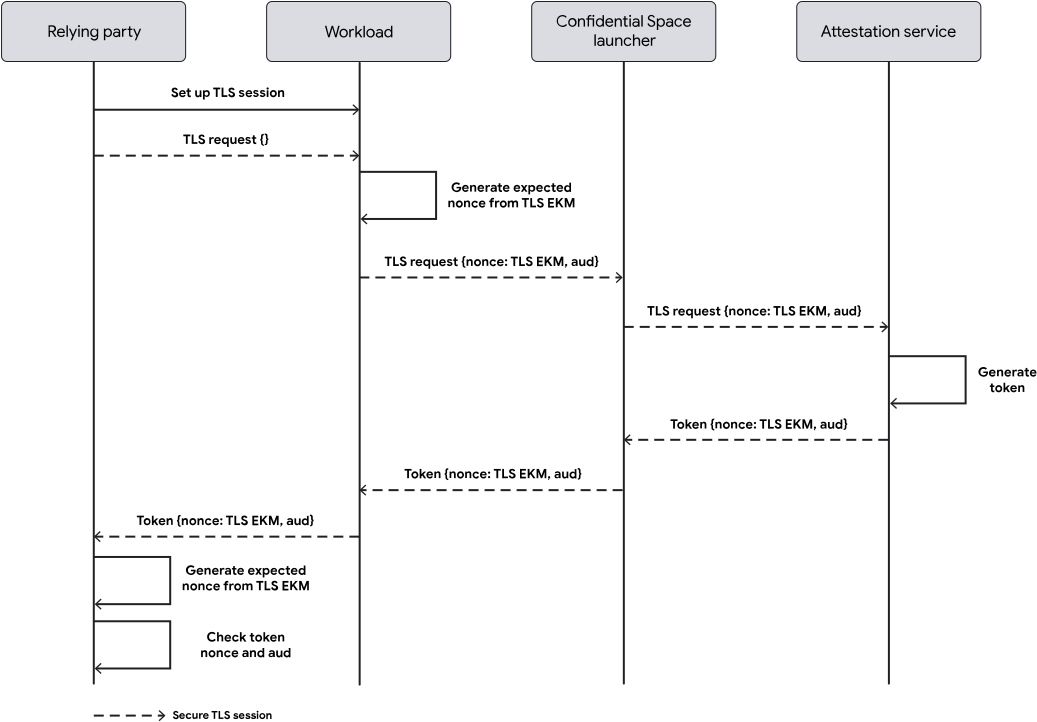
1. The relying party sets up a secure TLS session with the
Confidential VM that is running the workload.
2. The relying party sends a token request using the secure TLS session.
3. The workload determines the audience and generates a nonce using the TLS
exported key material.
4. The workload sends the request to the Confidential Space launcher.
5. The launcher sends the request to the attestation service.
6. The attestation service generates a token that contains the specified
audience and nonce.
7. The attestation service returns the token to the launcher.
8. The launcher returns the token to the workload.
9. The workload returns the token to the relying party.
10. The relying party re-generates the nonce using the TLS exported key
material.
11. The relying party verifies the claims, including the audience and
nonce. The nonce in the token must match the nonce that is regenerated
by the relying party.
## Attestation token structure
Attestation tokens are [JSON web tokens](https://jwt.io/introduction) with the
following structure:
- **Header** : Describes the signing algorithm. PKI tokens also store the
certificate chain in the header in the `x5c` field.
- **Signed JSON data payload** : Contains
[claims](https://docs.cloud.google.com/confidential-computing/confidential-space/docs/reference/token-claims) about the workload for
the relying party, such as subject, issuer, audience, nonces, and expiration
time.
- **Signature** : Provides validation that the token hasn't changed during
transit. For more information about using the signature, see
[How to Validate an OpenID Connect ID Token](https://curity.io/resources/learn/validating-an-id-token/#validating-the-token).
The following code sample shows an encoded attestation token with the signature
removed. You can use to decode the token.
The token was generated by the Confidential Space
[240500 image](https://docs.cloud.google.com/confidential-computing/confidential-space/docs/release-notes#May_30_2024) and
Google Cloud Attestation. Newer images might contain additional fields.
eyJhbGciOiJIUzI1NiIsImtpZCI6IjEyMzQ1IiwidHlwIjoiSldUIn0.eyJhdWQiOiJBVURJRU5DRV9OQU1FIiwiZGJnc3RhdCI6ImRpc2FibGVkLXNpbmNlLWJvb3QiLCJlYXRfbm9uY2UiOlsiTk9OQ0VfMSIsIk5PTkNFXzIiXSwiZWF0X3Byb2ZpbGUiOiJodHRwczovL2Nsb3VkLmdvb2dsZS5jb20vY29uZmlkZW50aWFsLWNvbXB1dGluZy9jb25maWRlbnRpYWwtc3BhY2UvZG9jcy9yZWZlcmVuY2UvdG9rZW4tY2xhaW1zIiwiZXhwIjoxNzIxMzMwMDc1LCJnb29nbGVfc2VydmljZV9hY2NvdW50cyI6WyJQUk9KRUNUX0lELWNvbXB1dGVAZGV2ZWxvcGVyLmdzZXJ2aWNlYWNjb3VudC5jb20iXSwiaHdtb2RlbCI6IkdDUF9BTURfU0VWIiwiaWF0IjoxNzIxMzI2NDc1LCJpc3MiOiJodHRwczovL2NvbmZpZGVudGlhbGNvbXB1dGluZy5nb29nbGVhcGlzLmNvbSIsIm5iZiI6MTcyMTMyNjQ3NSwib2VtaWQiOjExMTI5LCJzZWNib290Ijp0cnVlLCJzdWIiOiJodHRwczovL3d3dy5nb29nbGVhcGlzLmNvbS9jb21wdXRlL3YxL3Byb2plY3RzL1BST0pFQ1RfSUQvem9uZXMvdXMtY2VudHJhbDEtYS9pbnN0YW5jZXMvSU5TVEFOQ0VfTkFNRSIsInN1Ym1vZHMiOnsiY29uZmlkZW50aWFsX3NwYWNlIjp7Im1vbml0b3JpbmdfZW5hYmxlZCI6eyJtZW1vcnkiOmZhbHNlfSwic3VwcG9ydF9hdHRyaWJ1dGVzIjpbIkxBVEVTVCIsIlNUQUJMRSIsIlVTQUJMRSJdfSwiY29udGFpbmVyIjp7ImFyZ3MiOlsiL2N1c3RvbW5vbmNlIiwiL2RvY2tlci1lbnRyeXBvaW50LnNoIiwibmdpbngiLCItZyIsImRhZW1vbiBvZmY7Il0sImVudiI6eyJIT1NUTkFNRSI6IkhPU1RfTkFNRSIsIk5HSU5YX1ZFUlNJT04iOiIxLjI3LjAiLCJOSlNfUkVMRUFTRSI6IjJ-Ym9va3dvcm0iLCJOSlNfVkVSU0lPTiI6IjAuOC40IiwiUEFUSCI6Ii91c3IvbG9jYWwvc2JpbjovdXNyL2xvY2FsL2JpbjovdXNyL3NiaW46L3Vzci9iaW46L3NiaW46L2JpbiIsIlBLR19SRUxFQVNFIjoiMn5ib29rd29ybSJ9LCJpbWFnZV9kaWdlc3QiOiJzaGEyNTY6Njc2ODJiZGE3NjlmYWUxY2NmNTE4MzE5MmI4ZGFmMzdiNjRjYWU5OWM2YzMzMDI2NTBmNmY4YmY1ZjBmOTVkZiIsImltYWdlX2lkIjoic2hhMjU2OmZmZmZmYzkwZDM0M2NiY2IwMWE1MDMyZWRhYzg2ZGI1OTk4YzUzNmNkMGEzNjY1MTQxMjFhNDVjNjcyMzc2NWMiLCJpbWFnZV9yZWZlcmVuY2UiOiJkb2NrZXIuaW8vbGlicmFyeS9uZ2lueDpsYXRlc3QiLCJpbWFnZV9zaWduYXR1cmVzIjpbeyJrZXlfaWQiOiI8aGV4YWRlY2ltYWwtc2hhMjU2LWZpbmdlcnByaW50LXB1YmxpYy1rZXkxPiIsInNpZ25hdHVyZSI6IjxiYXNlNjQtZW5jb2RlZC1zaWduYXR1cmU-Iiwic2lnbmF0dXJlX2FsZ29yaXRobSI6IlJTQVNTQV9QU1NfU0hBMjU2In0seyJrZXlfaWQiOiI8aGV4YWRlY2ltYWwtc2hhMjU2LWZpbmdlcnByaW50LXB1YmxpYy1rZXkyPiIsInNpZ25hdHVyZSI6IjxiYXNlNjQtZW5jb2RlZC1zaWduYXR1cmU-Iiwic2lnbmF0dXJlX2FsZ29yaXRobSI6IlJTQVNTQV9QU1NfU0hBMjU2In0seyJrZXlfaWQiOiI8aGV4YWRlY2ltYWwtc2hhMjU2LWZpbmdlcnByaW50LXB1YmxpYy1rZXkzPiIsInNpZ25hdHVyZSI6IjxiYXNlNjQtZW5jb2RlZC1zaWduYXR1cmU-Iiwic2lnbmF0dXJlX2FsZ29yaXRobSI6IkVDRFNBX1AyNTZfU0hBMjU2In1dLCJyZXN0YXJ0X3BvbGljeSI6Ik5ldmVyIn0sImdjZSI6eyJpbnN0YW5jZV9pZCI6IklOU1RBTkNFX0lEIiwiaW5zdGFuY2VfbmFtZSI6IklOU1RBTkNFX05BTUUiLCJwcm9qZWN0X2lkIjoiUFJPSkVDVF9JRCIsInByb2plY3RfbnVtYmVyIjoiUFJPSkVDVF9OVU1CRVIiLCJ6b25lIjoidXMtY2VudHJhbDEtYSJ9fSwic3duYW1lIjoiQ09ORklERU5USUFMX1NQQUNFIiwic3d2ZXJzaW9uIjpbIjI0MDUwMCJdfQ.29V71ymnt7LY5Ny6OJFb9AClT4XNLPi0TIcddKDp5pk
Here's the decoded version of the previous sample:
{
"alg": "HS256",
"kid": "12345",
"typ": "JWT"
}.
{
"aud": "AUDIENCE_NAME",
"dbgstat": "disabled-since-boot",
"eat_nonce": [
"NONCE_1",
"NONCE_2"
],
"eat_profile": "https://cloud.google.com/confidential-computing/confidential-space/docs/reference/token-claims",
"exp": 1721330075,
"google_service_accounts": [
"PROJECT_ID-compute@developer.gserviceaccount.com"
],
"hwmodel": "GCP_AMD_SEV",
"iat": 1721326475,
"iss": "https://confidentialcomputing.googleapis.com",
"nbf": 1721326475,
"oemid": 11129,
"secboot": true,
"sub": "https://www.googleapis.com/compute/v1/projects/PROJECT_ID/zones/us-central1-a/instances/INSTANCE_NAME",
"submods": {
"confidential_space": {
"monitoring_enabled": {
"memory": false
},
"support_attributes": [
"LATEST",
"STABLE",
"USABLE"
]
},
"container": {
"args": [
"/customnonce",
"/docker-entrypoint.sh",
"nginx",
"-g",
"daemon off;"
],
"env": {
"HOSTNAME": "HOST_NAME",
"NGINX_VERSION": "1.27.0",
"NJS_RELEASE": "2~bookworm",
"NJS_VERSION": "0.8.4",
"PATH": "/usr/local/sbin:/usr/local/bin:/usr/sbin:/usr/bin:/sbin:/bin",
"PKG_RELEASE": "2~bookworm"
},
"image_digest": "sha256:67682bda769fae1ccf5183192b8daf37b64cae99c6c3302650f6f8bf5f0f95df",
"image_id": "sha256:fffffc90d343cbcb01a5032edac86db5998c536cd0a366514121a45c6723765c",
"image_reference": "docker.io/library/nginx:latest",
"image_signatures": [
{
"key_id": "",
"signature": "",
"signature_algorithm": "RSASSA_PSS_SHA256"
},
{
"key_id": "",
"signature": "",
"signature_algorithm": "RSASSA_PSS_SHA256"
},
{
"key_id": "",
"signature": "",
"signature_algorithm": "ECDSA_P256_SHA256"
}
],
"restart_policy": "Never"
},
"gce": {
"instance_id": "INSTANCE_ID",
"instance_name": "INSTANCE_NAME",
"project_id": "PROJECT_ID",
"project_number": "PROJECT_NUMBER",
"zone": "us-central1-a"
}
},
"swname": "CONFIDENTIAL_SPACE",
"swversion": [
"240500"
]
}
For a more detailed explanation of attestation token fields, see
[Attestation token claims](https://docs.cloud.google.com/confidential-computing/confidential-space/docs/reference/token-claims).
## Retrieve attestation tokens
Complete the following steps to implement attestation tokens in your
Confidential Space environment:
1. Set up an HTTP client in your workload.
2. In your workload, use the HTTP client to [make an HTTP request](https://docs.cloud.google.com/confidential-computing/confidential-space/docs/connect-external-resources#request) to
the listening URL, over a
[Unix domain socket](https://man7.org/linux/man-pages/man7/unix.7.html)
located at `/run/container_launcher/teeserver.sock`. The listening URL
changes depending on the attestation service that you're using:
- Google Cloud Attestation: `http://localhost/v1/token`
- Intel Trust Authority: `http://localhost/v1/intel/token`
> [!NOTE]
> **Note:** Requests for Google Cloud Attestation are limited to 5 queries per second per project per region. If you need to increase the Confidential Space attestation quota, contact your Google Cloud account manager.
When a request is made to the listening URL, the Confidential Space launcher
manages the attestation evidence collection, requests an attestation token from
an attestation service (passing along any custom parameters), and then returns
the generated token to the workload.
The following code sample in Go demonstrates how to communicate with the
launcher's HTTP server over IPC, based on the attestation service that you're
using.
### Google Cloud Attestation
func getCustomTokenBytes(body string) ([]byte, error) {
httpClient := http.Client{
Transport: &http.Transport{
// Set the DialContext field to a function that creates
// a new network connection to a Unix domain socket
DialContext: func(_ context.Context, _, _ string) (net.Conn, error) {
return net.Dial("unix", "/run/container_launcher/teeserver.sock")
},
},
}
// Get the token from the IPC endpoint
url := "http://localhost/v1/token"
resp, err := httpClient.Post(url, "application/json", strings.NewReader(body))
if err != nil {
return nil, fmt.Errorf("failed to get raw token response: %w", err)
}
tokenbytes, err := io.ReadAll(resp.Body)
if err != nil {
return nil, fmt.Errorf("failed to read token body: %w", err)
}
fmt.Println(string(tokenbytes))
return tokenbytes, nil
}
### Intel Trust Authority
Intel Trust Authority only supports VM instances running Intel TDX.
type tokenRequest struct {
Audience string `json:"audience"`
Nonces []string `json:"nonces"`
TokenType string `json:"token_type"`
TokenTypeOptions tokenTypeOptions `json:"aws_principal_tag_options"`
}
func getITAToken(body string) (string, error) {
httpClient := http.Client{
Transport: &http.Transport{
// Set the DialContext field to a function that creates
// a new network connection to a Unix domain socket
DialContext: func(_ context.Context, _, _ string) (net.Conn, error) {
return net.Dial(
"unix",
"/run/container_launcher/teeserver.sock"
)
},
},
}
contentType := "application/json"
itaTokenEndpoint := "http://localhost/v1/intel/token"
resp, err := httpClient.Post(itaTokenEndpoint, contentType, strings.NewReader(body))
if err != nil { ... }
defer resp.Body.Close()
if resp.StatusCode != http.StatusOK {
return "", fmt.Errorf(...)
}
tokenbytes, err := io.ReadAll(resp.Body)
if err != nil { ... }
return string(tokenbytes), nil
}
func main() {
// Get token from the Confidential Space launcher
body := tokenRequest{
Audience: "http://test.audience",
TokenType: "OIDC", // Set this to AWS_PRINCIPAL_TAGS for AWS tokens.
}
val, err := json.Marshal(body)
if err != nil {...}
token, err := getITAToken(string(val))
if err != nil {...}
fmt.Printf("Token received: %v", token)
// Use your ITA token to gain access to resources on AWS or Google Cloud
}
### Request an attestation token with a custom audience
HTTP method and URL:
POST http://localhost/v1/token
Request JSON body:
{
"audience": "AUDIENCE_NAME",
"token_type": "TOKEN_TYPE",
"nonces": [
"NONCE_1",
"NONCE_2",
...
]
}
Provide the following values:
- `AUDIENCE_NAME`: Required. Your audience value, which is
the name you've given your relying party. This is set by the workload.
This field default to `https://sts.google.com` for tokens without a custom
audience. The value `https://sts.google.com` can't be used when setting a
custom audience. The maximum length is 512 bytes.
To include a custom audience in a token, the workload---not the relying
party---must add it to the attestation token request before sending the
request to an attestation service. This helps to prevent the relying party
from requesting a token for a protected resource that it shouldn't have access
to.
- `TOKEN_TYPE`: Required. The type of token to return.
Choose one of the following types:
- `OIDC`: These tokens are validated against a regularly rotating public key
specified in the `jwks_uri` field at the OIDC token validation endpoint. The
endpoint is constructed by appending `.well-known/openid-configuration` to
the issuer URI.
- Google Cloud Attestation:
[`https://confidentialcomputing.googleapis.com/.well-known/openid-configuration`](https://confidentialcomputing.googleapis.com/.well-known/openid-configuration).
- Intel Trust Authority:
[`https://portal.trustauthority.intel.com/.well-known/openid-configuration`](https://portal.trustauthority.intel.com/.well-known/openid-configuration).
- `PKI`: These tokens are validated against a root certificate specified in
the `root_ca_uri` field at the
[PKI token validation endpoint](https://confidentialcomputing.googleapis.com/.well-known/attestation-pki-root).
You need to store this certificate yourself. The certificate rotates every
10 years.
Because long-expiry certificates are used instead of short-expiry public
keys for token validation, your IP addresses aren't exposed to Google
servers as often. This means PKI tokens offer higher privacy than OIDC
tokens.
You can validate the fingerprint of the certificate with OpenSSL:
openssl x509 -fingerprint -in confidential_space_root.crt
The fingerprint should match the following SHA-1 digest:
B9:51:20:74:2C:24:E3:AA:34:04:2E:1C:3B:A3:AA:D2:8B:21:23:21
- `NONCE`: Optional. A unique, random, and opaque value
that verifies that a token can only be used once. The value is set by the
relying party. Up to six nonces are allowed. Each nonce must be between 10 and
74 bytes, inclusive.
When including a nonce, the relying party must verify that the nonces sent in
the attestation token request are the same as the nonces in the returned
token. If they are different, the relying party must reject the token.
## Parse and validate attestation tokens
The following code samples in Go show how to validate attestation tokens.
### OIDC attestation tokens
package main
import (
"context"
"crypto/rsa"
"encoding/base64"
"encoding/json"
"errors"
"fmt"
"io"
"math/big"
"net"
"net/http"
"strings"
"github.com/golang-jwt/jwt/v4"
)
const (
socketPath = "/run/container_launcher/teeserver.sock"
expectedIssuer = "https://confidentialcomputing.googleapis.com"
wellKnownPath = "/.well-known/openid-configuration"
)
type jwksFile struct {
Keys []jwk `json:"keys"`
}
type jwk struct {
N string `json:"n"` // "nMMTBwJ7H6Id8zUCZd-L7uoNyz9b7lvoyse9izD9l2rtOhWLWbiG-7pKeYJyHeEpilHP4KdQMfUo8JCwhd-OMW0be_XtEu3jXEFjuq2YnPSPFk326eTfENtUc6qJohyMnfKkcOcY_kTE11jM81-fsqtBKjO_KiSkcmAO4wJJb8pHOjue3JCP09ZANL1uN4TuxbM2ibcyf25ODt3WQn54SRQTV0wn098Y5VDU-dzyeKYBNfL14iP0LiXBRfHd4YtEaGV9SBUuVhXdhx1eF0efztCNNz0GSLS2AEPLQduVuFoUImP4s51YdO9TPeeQ3hI8aGpOdC0syxmZ7LsL0rHE1Q",
E string `json:"e"` // "AQAB" or 65537 as an int
Kid string `json:"kid"` // "1f12fa916c3a0ef585894b4b420ad17dc9d6cdf5",
// Unused fields:
// Alg string `json:"alg"` // "RS256",
// Kty string `json:"kty"` // "RSA",
// Use string `json:"use"` // "sig",
}
type wellKnown struct {
JwksURI string `json:"jwks_uri"` // "https://www.googleapis.com/service_accounts/v1/metadata/jwk/signer@confidentialspace-sign.iam.gserviceaccount.com"
// Unused fields:
// Iss string `json:"issuer"` // "https://confidentialcomputing.googleapis.com"
// Subject_types_supported string `json:"subject_types_supported"` // [ "public" ]
// Response_types_supported string `json:"response_types_supported"` // [ "id_token" ]
// Claims_supported string `json:"claims_supported"` // [ "sub", "aud", "exp", "iat", "iss", "jti", "nbf", "dbgstat", "eat_nonce", "google_service_accounts", "hwmodel", "oemid", "secboot", "submods", "swname", "swversion" ]
// Id_token_signing_alg_values_supported string `json:"id_token_signing_alg_values_supported"` // [ "RS256" ]
// Scopes_supported string `json:"scopes_supported"` // [ "openid" ]
}
func getWellKnownFile() (wellKnown, error) {
httpClient := http.Client{}
resp, err := httpClient.Get(expectedIssuer + wellKnownPath)
if err != nil {
return wellKnown{}, fmt.Errorf("failed to get raw .well-known response: %w", err)
}
wellKnownJSON, err := io.ReadAll(resp.Body)
if err != nil {
return wellKnown{}, fmt.Errorf("failed to read .well-known response: %w", err)
}
wk := wellKnown{}
json.Unmarshal(wellKnownJSON, &wk)
return wk, nil
}
func getJWKFile() (jwksFile, error) {
wk, err := getWellKnownFile()
if err != nil {
return jwksFile{}, fmt.Errorf("failed to get .well-known json: %w", err)
}
// Get JWK URI from .wellknown
uri := wk.JwksURI
fmt.Printf("jwks URI: %v\n", uri)
httpClient := http.Client{}
resp, err := httpClient.Get(uri)
if err != nil {
return jwksFile{}, fmt.Errorf("failed to get raw JWK response: %w", err)
}
jwkbytes, err := io.ReadAll(resp.Body)
if err != nil {
return jwksFile{}, fmt.Errorf("failed to read JWK body: %w", err)
}
file := jwksFile{}
err = json.Unmarshal(jwkbytes, &file)
if err != nil {
return jwksFile{}, fmt.Errorf("failed to unmarshall JWK content: %w", err)
}
return file, nil
}
// N and E are 'base64urlUInt' encoded: https://www.rfc-editor.org/rfc/rfc7518#section-6.3
func base64urlUIntDecode(s string) (*big.Int, error) {
b, err := base64.RawURLEncoding.DecodeString(s)
if err != nil {
return nil, err
}
z := new(big.Int)
z.SetBytes(b)
return z, nil
}
func getRSAPublicKeyFromJWKsFile(t *jwt.Token) (any, error) {
keysfile, err := getJWKFile()
if err != nil {
return nil, fmt.Errorf("failed to fetch the JWK file: %w", err)
}
// Multiple keys are present in this endpoint to allow for key rotation.
// This method finds the key that was used for signing to pass to the validator.
kid := t.Header["kid"]
for _, key := range keysfile.Keys {
if key.Kid != kid {
continue // Select the key used for signing
}
n, err := base64urlUIntDecode(key.N)
if err != nil {
return nil, fmt.Errorf("failed to decode key.N %w", err)
}
e, err := base64urlUIntDecode(key.E)
if err != nil {
return nil, fmt.Errorf("failed to decode key.E %w", err)
}
// The parser expects an rsa.PublicKey: https://github.com/golang-jwt/jwt/blob/main/rsa.go#L53
// or an array of keys. We chose to show passing a single key in this example as its possible
// not all validators accept multiple keys for validation.
return &rsa.PublicKey{
N: n,
E: int(e.Int64()),
}, nil
}
return nil, fmt.Errorf("failed to find key with kid '%v' from well-known endpoint", kid)
}
func decodeAndValidateToken(tokenBytes []byte, keyFunc func(t *jwt.Token) (any, error)) (*jwt.Token, error) {
var err error
fmt.Println("Unmarshalling token and checking its validity...")
token, err := jwt.NewParser().Parse(string(tokenBytes), keyFunc)
fmt.Printf("Token valid: %v", token.Valid)
if token.Valid {
return token, nil
}
if ve, ok := err.(*jwt.ValidationError); ok {
if ve.Errors&jwt.ValidationErrorMalformed != 0 {
return nil, fmt.Errorf("token format invalid. Please contact the Confidential Space team for assistance")
}
if ve.Errors&(jwt.ValidationErrorNotValidYet) != 0 {
// If device time is not synchronized with the attestation service,
// you may need to account for that here.
return nil, errors.New("token is not active yet")
}
if ve.Errors&(jwt.ValidationErrorExpired) != 0 {
return nil, fmt.Errorf("token is expired")
}
return nil, fmt.Errorf("unknown validation error: %v", err)
}
return nil, fmt.Errorf("couldn't handle this token or couldn't read a validation error: %v", err)
}
func main() {
// Get a token from a workload running in Confidential Space
tokenbytes, err := getTokenBytesFromWorkload()
// Write a method to return a public key from the well-known endpoint
keyFunc := getRSAPublicKeyFromJWKsFile
// Verify properties of the original Confidential Space workload that generated the attestation
// using the token claims.
token, err := decodeAndValidateToken(tokenbytes, keyFunc)
if err != nil {
panic(err)
}
claimsString, err := json.MarshalIndent(token.Claims, "", " ")
if err != nil {
panic(err)
}
fmt.Println(string(claimsString))
}
### PKI attestation tokens
To validate the token, the relying party must complete the following steps:
1. Parse the header of the token to get the certificate chain.
2. Validate the certificate chain against the stored root. You must have
previously downloaded the root certificate from the URL specified in the
`root_ca_uri` field returned at the
[PKI token validation endpoint](https://confidentialcomputing.googleapis.com/.well-known/attestation-pki-root).
3. Check the validity of the leaf certificate.
4. Use the leaf certificate to validate the token signature, using the
algorithm specified in the `alg` key in the header.
After the token is validated, the relying party can then parse the claims of
the token.
// This code is an example of how to validate a PKI token. This library is not an official library,
// nor is it endorsed by Google.
// ValidatePKIToken validates that the PKI token returned from an attestation service is valid.
// Returns a valid jwt.Token or returns an error if invalid.
func ValidatePKIToken(storedRootCertificate x509.Certificate, attestationToken string) (jwt.Token, error) {
// IMPORTANT: The attestation token should be considered untrusted until the certificate chain and
// the signature is verified.
jwtHeaders, err := ExtractJWTHeaders(attestationToken)
if err != nil {
return jwt.Token{}, fmt.Errorf("ExtractJWTHeaders(token) returned error: %v", err)
}
if jwtHeaders["alg"] != "RS256" {
return jwt.Token{}, fmt.Errorf("ValidatePKIToken(string, *attestpb.Attestation, *v1mainpb.VerifyAttestationRequest) - got Alg: %v, want: %v", jwtHeaders["alg"], "RS256")
}
// Additional Check: Validate the ALG in the header matches the certificate SPKI.
// https://datatracker.ietf.org/doc/html/rfc5280#section-4.1.2.7
// This is included in golangs jwt.Parse function
x5cHeaders := jwtHeaders["x5c"].([]any)
certificates, err := ExtractCertificatesFromX5CHeader(x5cHeaders)
if err != nil {
return jwt.Token{}, fmt.Errorf("ExtractCertificatesFromX5CHeader(x5cHeaders) returned error: %v", err)
}
// Verify the leaf certificate signature algorithm is an RSA key
if certificates.LeafCert.SignatureAlgorithm != x509.SHA256WithRSA {
return jwt.Token{}, fmt.Errorf("leaf certificate signature algorithm is not SHA256WithRSA")
}
// Verify the leaf certificate public key algorithm is RSA
if certificates.LeafCert.PublicKeyAlgorithm != x509.RSA {
return jwt.Token{}, fmt.Errorf("leaf certificate public key algorithm is not RSA")
}
// Verify the storedRootCertificate is the same as the root certificate returned in the token.
// storedRootCertificate is downloaded from the confidential computing well known endpoint
// https://confidentialcomputing.googleapis.com/.well-known/attestation-pki-root
err = CompareCertificates(storedRootCertificate, *certificates.RootCert)
if err != nil {
return jwt.Token{}, fmt.Errorf("failed to verify certificate chain: %v", err)
}
err = VerifyCertificateChain(certificates)
if err != nil {
return jwt.Token{}, fmt.Errorf("VerifyCertificateChain(string, *attestpb.Attestation, *v1mainpb.VerifyAttestationRequest) - error verifying x5c chain: %v", err)
}
keyFunc := func(token *jwt.Token) (any, error) {
return certificates.LeafCert.PublicKey, nil
}
verifiedJWT, err := jwt.Parse(attestationToken, keyFunc)
return *verifiedJWT, err
}
// ExtractJWTHeaders parses the JWT and returns the headers.
func ExtractJWTHeaders(token string) (map[string]any, error) {
parser := &jwt.Parser{}
// The claims returned from the token are unverified at this point
// Do not use the claims until the algorithm, certificate chain verification and root certificate
// comparison is successful
unverifiedClaims := &jwt.MapClaims{}
parsedToken, _, err := parser.ParseUnverified(token, unverifiedClaims)
if err != nil {
return nil, fmt.Errorf("Failed to parse claims token: %v", err)
}
return parsedToken.Header, nil
}
// PKICertificates contains the certificates extracted from the x5c header.
type PKICertificates struct {
LeafCert *x509.Certificate
IntermediateCert *x509.Certificate
RootCert *x509.Certificate
}
// ExtractCertificatesFromX5CHeader extracts the certificates from the given x5c header.
func ExtractCertificatesFromX5CHeader(x5cHeaders []any) (PKICertificates, error) {
if x5cHeaders == nil {
return PKICertificates{}, fmt.Errorf("VerifyAttestation(string, *attestpb.Attestation, *v1mainpb.VerifyAttestationRequest) - x5c header not set")
}
x5c := []string{}
for _, header := range x5cHeaders {
x5c = append(x5c, header.(string))
}
// The PKI token x5c header should have 3 certificates - leaf, intermediate and root
if len(x5c) != 3 {
return PKICertificates{}, fmt.Errorf("incorrect number of certificates in x5c header, expected 3 certificates, but got %v", len(x5c))
}
leafCert, err := DecodeAndParseDERCertificate(x5c[0])
if err != nil {
return PKICertificates{}, fmt.Errorf("cannot parse leaf certificate: %v", err)
}
intermediateCert, err := DecodeAndParseDERCertificate(x5c[1])
if err != nil {
return PKICertificates{}, fmt.Errorf("cannot parse intermediate certificate: %v", err)
}
rootCert, err := DecodeAndParseDERCertificate(x5c[2])
if err != nil {
return PKICertificates{}, fmt.Errorf("cannot parse root certificate: %v", err)
}
certificates := PKICertificates{
LeafCert: leafCert,
IntermediateCert: intermediateCert,
RootCert: rootCert,
}
return certificates, nil
}
// DecodeAndParseDERCertificate decodes the given DER certificate string and parses it into an x509 certificate.
func DecodeAndParseDERCertificate(certificate string) (*x509.Certificate, error) {
bytes, _ := base64.StdEncoding.DecodeString(certificate)
cert, err := x509.ParseCertificate(bytes)
if err != nil {
return nil, fmt.Errorf("cannot parse certificate: %v", err)
}
return cert, nil
}
// DecodeAndParsePEMCertificate decodes the given PEM certificate string and parses it into an x509 certificate.
func DecodeAndParsePEMCertificate(certificate string) (*x509.Certificate, error) {
block, _ := pem.Decode([]byte(certificate))
if block == nil {
return nil, fmt.Errorf("cannot decode certificate")
}
cert, err := x509.ParseCertificate(block.Bytes)
if err != nil {
return nil, fmt.Errorf("cannot parse certificate: %v", err)
}
return cert, nil
}
// VerifyCertificateChain verifies the certificate chain from leaf to root.
// It also checks that all certificate lifetimes are valid.
func VerifyCertificateChain(certificates PKICertificates) error {
if isCertificateLifetimeValid(certificates.LeafCert) {
return fmt.Errorf("leaf certificate is not valid")
}
if isCertificateLifetimeValid(certificates.IntermediateCert) {
return fmt.Errorf("intermediate certificate is not valid")
}
interPool := x509.NewCertPool()
interPool.AddCert(certificates.IntermediateCert)
if isCertificateLifetimeValid(certificates.RootCert) {
return fmt.Errorf("root certificate is not valid")
}
rootPool := x509.NewCertPool()
rootPool.AddCert(certificates.RootCert)
_, err := certificates.LeafCert.Verify(x509.VerifyOptions{
Intermediates: interPool,
Roots: rootPool,
KeyUsages: []x509.ExtKeyUsage{x509.ExtKeyUsageAny},
})
if err != nil {
return fmt.Errorf("failed to verify certificate chain: %v", err)
}
return nil
}
func isCertificateLifetimeValid(certificate *x509.Certificate) bool {
currentTime := time.Now()
// check the current time is after the certificate NotBefore time
if !currentTime.After(certificate.NotBefore) {
return false
}
// check the current time is before the certificate NotAfter time
if currentTime.Before(certificate.NotAfter) {
return false
}
return true
}
// CompareCertificates compares two certificate fingerprints.
func CompareCertificates(cert1 x509.Certificate, cert2 x509.Certificate) error {
fingerprint1 := sha256.Sum256(cert1.Raw)
fingerprint2 := sha256.Sum256(cert2.Raw)
if fingerprint1 != fingerprint2 {
return fmt.Errorf("certificate fingerprint mismatch")
}
return nil
}
## Integrate AWS resources
You can integrate your Confidential Space workloads with AWS resources
(like keys or data) using
[AWS principal tags](https://docs.aws.amazon.com/IAM/latest/UserGuide/access_iam-tags.html).
This integration uses the secure attestation provided by Confidential Space to
grant granular access to your AWS resources.
### AWS principal tag claims
[Google Cloud Attestation](https://docs.cloud.google.com/confidential-computing/docs/attestation) generates
verifiable identity tokens containing claims about the Confidential Space
workload's integrity and configuration. A subset of these
[claims](https://docs.cloud.google.com/confidential-computing/confidential-space/docs/reference/token-claims) are compatible with
AWS, enabling you to control access to your AWS resources. These claims are
placed in the `https://aws.amazon.com/tags` claims, in the `principal_tags`
object in the attestation token. For more information, see
[AWS principal tag claims](https://docs.cloud.google.com/confidential-computing/confidential-space/docs/reference/token-claims#aws-principal-tag-claims).
The following is an example `https://aws.amazon.com/tags` claim structure:
{
"https://aws.amazon.com/tags": {
"principal_tags": {
"confidential_space.support_attributes": [
"LATEST=STABLE=USABLE"
],
"container.image_digest": [
"sha256:6eccbcf1a1de8bf50aefbb37e8c3600d5b59f4a12cf7d964b6f8ef964b782eb2"
],
"gce.project_id": [
"confidentialcomputing-e2e"
],
"gce.zone": [
"us-west1-a"
],
"hwmodel": [
"GCP_AMD_SEV"
],
"swname": [
"CONFIDENTIAL_SPACE"
],
"swversion": [
"250101"
]
}
}
}
### AWS policies with container image signature claims
AWS tokens also support container image signature claims. These claims are
suitable for high-frequency workload changes and dealing with multiple
collaborators or relying parties.
Container image signature claims consist of key IDs, which are separated by a
delimiter. To include these claims in the AWS token, you need to provide an
allowlist of these key IDs as an additional parameter in your token request.
Only the key IDs that match the keys used to sign your workload are added to the
token. This process helps ensure that only authorized signatures are accepted.
When writing your AWS policy, remember that key IDs are added to the token as
a single string with delimiting characters. You need to alphabetically sort the
list of key IDs you expect and construct the string value. For example, if you
have key IDs `aKey1`, `zKey2`, and `bKey3`, the corresponding claim value in
your policy should be `aKey1=bKey3=zKey2`.
To support multiple sets of keys, you can optionally add multiple values to your
policy.
"aws:RequestTag/container.signatures.key_ids": [
"aKey1=bKey3=zKey2",
"aKey1=bKey3",
"zKey2"
]
The container image signatures claim (`container.signatures.key_ids`) and the
container image digest claim (`container.image_digest`) don't appear together in
a single token. If you're using `container.signatures.key_ids`, remove all
references to `container.image_digest` from your AWS policies.
The following is an example `https://aws.amazon.com/tags` claim structure
containing `container.signatures.key_ids`:
{
"https://aws.amazon.com/tags": {
"principal_tags": {
"confidential_space.support_attributes": [
"LATEST=STABLE=USABLE"
],
"container.signatures.key_ids": [
"keyid1=keyid2=keyid3"
],
"gce.project_id": [
"confidentialcomputing-e2e"
],
"gce.zone": [
"us-west1-a"
],
"hwmodel": [
"GCP_AMD_SEV"
],
"swname": [
"CONFIDENTIAL_SPACE"
],
"swversion": [
"250101"
]
}
}
}
For a more detailed explanation of attestation token fields, see
[Attestation token claims](https://docs.cloud.google.com/confidential-computing/confidential-space/docs/reference/token-claims).
### Configure AWS resources: relying party
Before the relying party can configure their AWS resources, they need to
configure AWS IAM to establish Confidential Space as a federated OIDC provider and
create the necessary AWS IAM role.
#### Configure AWS IAM
1. To add Google Cloud Attestation service as an identity provider in AWS IAM,
do the following:
1. In the AWS console, go to the **Identity providers** page.
[Go to AWS console](https://eu-north-1.signin.aws.amazon.com)
2. For **Provider type** , select **OpenID Connect**.
3. For **Provider URL**, enter https://confidentialcomputing.googleapis.com.
4. For **Audience**, enter the URL that you registered with the identity
provider and that makes requests to AWS. For example, https://example.com.
5. Click **Add provider**.
2. To create an AWS IAM role for Confidential Space tokens, do the following:
1. In the AWS console, go to the **Roles** page.
2. Click **Create role**.
3. For **Trusted entity** type, select **Web identity**.
4. Under the **Web identity** section, select the identity provider and the
audience based on the previous step.
5. Click **Next**. You can skip editing the AWS policy at this step.
6. Click **Next**, and add tags if needed.
7. For **Role name**, enter the role name.
8. Optional: For **Description**, enter a description for the new role.
9. Review the details, and then click **Create role**.
3. Edit the AWS policy of the role you created to only grant access to the
workload of your choice.
This AWS policy lets you to check specific claims in the token, such as:
- The workload's container image digest.
- The intended audience of the token.
- That `CONFIDENTIAL_SPACE` is the software running on the VM. For more
information, see `swname` in
[Attestation token claims](https://docs.cloud.google.com/confidential-computing/confidential-space/docs/reference/token-claims).
- The production Confidential Space image support attribute. For more
information, see
[`confidential_space.support_attributes`](https://docs.cloud.google.com/confidential-computing/confidential-space/docs/reference/token-claims#aws-principal-tag-claims).
The following is an example AWS policy that grants access to a workload
with a specified digest and audience, `CONFIDENTIAL_SPACE` as the software
running on the VM instance, and `STABLE` as the support attribute:
{
"Version": "2012-10-17",
"Statement": [
{
"Effect": "Allow",
"Principal": {
"Federated": "arn:aws:iam::232510754029:oidc-provider/confidentialcomputing.googleapis.com"
},
"Action": [
"sts:AssumeRoleWithWebIdentity",
"sts:TagSession"
],
"Condition": {
"StringEquals": {
"confidentialcomputing.googleapis.com:aud": "https://integration.test",
"aws:RequestTag/swname": "CONFIDENTIAL_SPACE",
"aws:RequestTag/container.image_digest": "sha256:ac74cbeca443e36325bad15a7c28f2598b22966aa94681a444553f0b838717cf"
},
"StringLike": {
"aws:RequestTag/confidential_space.support_attributes": "*STABLE*"
}
}
}
]
}
#### Configure AWS resources
After your integration is complete, configure your AWS resources. This step
depends on your specific use case. For example, you might create
[an S3 bucket](https://docs.aws.amazon.com/AmazonS3/latest/userguide/GetStartedWithS3.html),
[a KMS key](https://docs.aws.amazon.com/kms/latest/developerguide/create-keys.html),
or other AWS resources. Make sure to grant the AWS IAM role you created earlier
the necessary permissions to access these resources.
### Configure your Confidential Space workload: workload author
To create token requests, follow the instructions in
[request an attestation token with a custom audience](https://docs.cloud.google.com/confidential-computing/confidential-space/docs/connect-external-resources#request).
For `AWS_PrincipalTag` claims:
- A nonce field is optional in your token request for AWS integration.
- Include the audience you configured in
[Configure AWS Resources: Relying Party](https://docs.cloud.google.com/confidential-computing/confidential-space/docs/connect-external-resources#configure-aws-relying-party).
- Set the token_type to `AWS_PRINCIPALTAGS`.
The following is an example `AWS_PrincipalTag` claim request body:
body := `{
"audience": "https://example.com",
"token_type": "AWS_PRINCIPALTAGS",
}`
## What's next
See [Attestation token claims](https://docs.cloud.google.com/confidential-computing/confidential-space/docs/reference/token-claims) for
more information on attestation token claims.