


- 如需了解有关 Compute Reliability Insights 的概念性信息,请参阅 Compute Reliability Insights 概览。
查找建议
Compute Reliability Insights 在以下位置提供 Compute Engine 风险和建议列表:
Active Assist,可通过控制台、
gcloud和 API 访问。借助 Risk Insights API,您可以直接访问 Compute Engine 可靠性风险、影响详情以及工作负载的补救措施。
计算可靠性数据分析使用 Google Cloud 上的Recommender 服务,为您提供有关 Google Cloud 资源的建议。
开始使用
本部分介绍了如何开始使用 Compute Reliability Insights,包括前提步骤和您可以执行的常见任务。
准备工作
如需查看可靠性风险和建议,您必须完成以下前提步骤。
确认 API 访问权限
如需使用 Compute Engine 可靠性风险 API,您需要获得 API 访问权限。
访问权限是在项目级提供的,并且要求您在给定项目中启用 Compute Engine API。
启用 Recommender 服务
如需使用 Google Cloud 控制台或 gcloud CLI 启用 Recommender 服务,请参阅启用 Recommender API。
设置权限
如需使用 Compute Reliability Insights 来降低风险,您必须拥有必要的 IAM 权限,具体取决于任务。
管理推荐状态
您需要具备这些常规权限才能在 Active Assist 中查看、关闭或更新任何可靠性建议的状态。
| 任务 | 建议的预定义角色 | 精细权限(适用于自定义角色) |
|---|---|---|
| 在 Active Assist 中关闭项目级建议。 | roles/recommender.editor |
roles/recommender.editor |
| 更新 Active Assist 中的项目级建议。 | roles/recommender.editor |
recommender.computeReliabilityRiskRecommendations.update |
| 有权浏览 Google Cloud 资源。 | 至少 roles/viewer(或具有更多权限的角色,例如 roles/editor、roles/owner) |
|
| 查看 Compute Engine 资源,但无法修改其中存储的数据。 | roles/compute.viewer |
|
| 在 Recommendation Hub 中查看项目级建议。 | roles/recommender.viewer |
|
| 查看全球 DNS 指标日志 | roles/logging.viewer |
应用特定风险缓解措施
应用建议需要特定权限,具体取决于风险类型。如需允许 Active Assist 对您的资源执行实际的缓解措施更改,请确保您拥有以下权限。
| 任务 | 建议的预定义角色 | 精细权限(适用于自定义角色) |
|---|---|---|
| 设置通用实例元数据,以降低全球 DNS 可靠性风险。 | roles/compute.admin |
compute.projects.setCommonInstanceMetadataiam.serviceAccounts.actAs |
自定义角色示例
gcloud iam roles create UseComputeReliabilityInsight --project=my-project \
--description="Grant permissions for Compute Reliability Insight" \
--permissions=serviceusage.services.use,\
iam.serviceAccounts.actAs,\
compute.projects.setCommonInstanceMetadata,\
recommender.computeReliabilityRiskRecommendations.update,\
compute.reliabilityRisks.get
查看建议并据此采取行动
Active Assist 由不同的推荐器提供支持。建议是根据每天进行一次的系统扫描自动生成的。如果您拒绝某项建议,即使自上次扫描以来配置未发生变化,该建议也不会再次显示。如需详细了解所有可用的 Recommender,请参阅什么是 Active Assist 和 Active Assist 快速入门指南。
在 Active Assist 中,Compute reliability risks Recommender 是指 Compute Reliability Insights 发现的风险。您可以使用 API、gcloud 和界面查看这些风险。您可以在 Active Assist 中执行以下操作:
- 查看所有风险(仅提供全球 DNS 风险)。
- 查看特定风险的详细信息。
- 采纳或拒绝风险建议。
查看 Compute Engine 中的风险
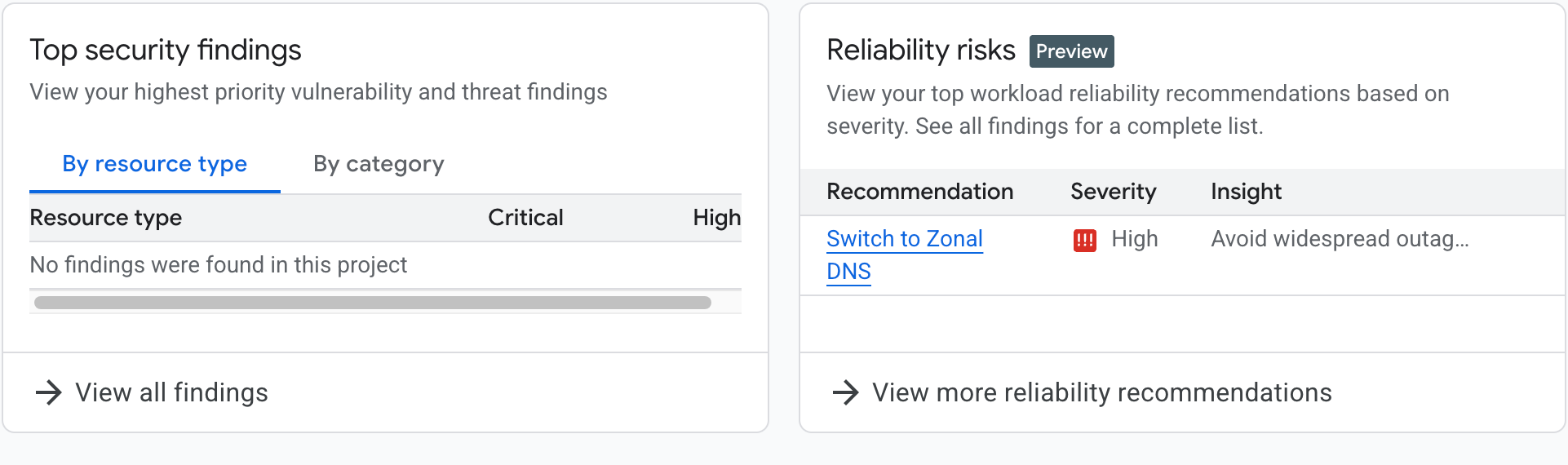
在 Compute Engine 首页(概览页面)的优化建议部分中,系统会显示“可靠性风险”卡片。如果您的项目的内部 DNS 设置为全球 DNS,则该卡片会包含有关全球 DNS 风险的信息,并提示您采取行动。
在卡片中,您可以点击改用可用区级 DNS 详细了解风险,也可以点击查看更多可靠性建议,查看所有可靠性风险(目前只有全球 DNS 风险),如下图所示。
查看所有建议
您可以使用Google Cloud 控制台或 gcloud CLI 查看 Compute Engine 可靠性洞见发现的风险。
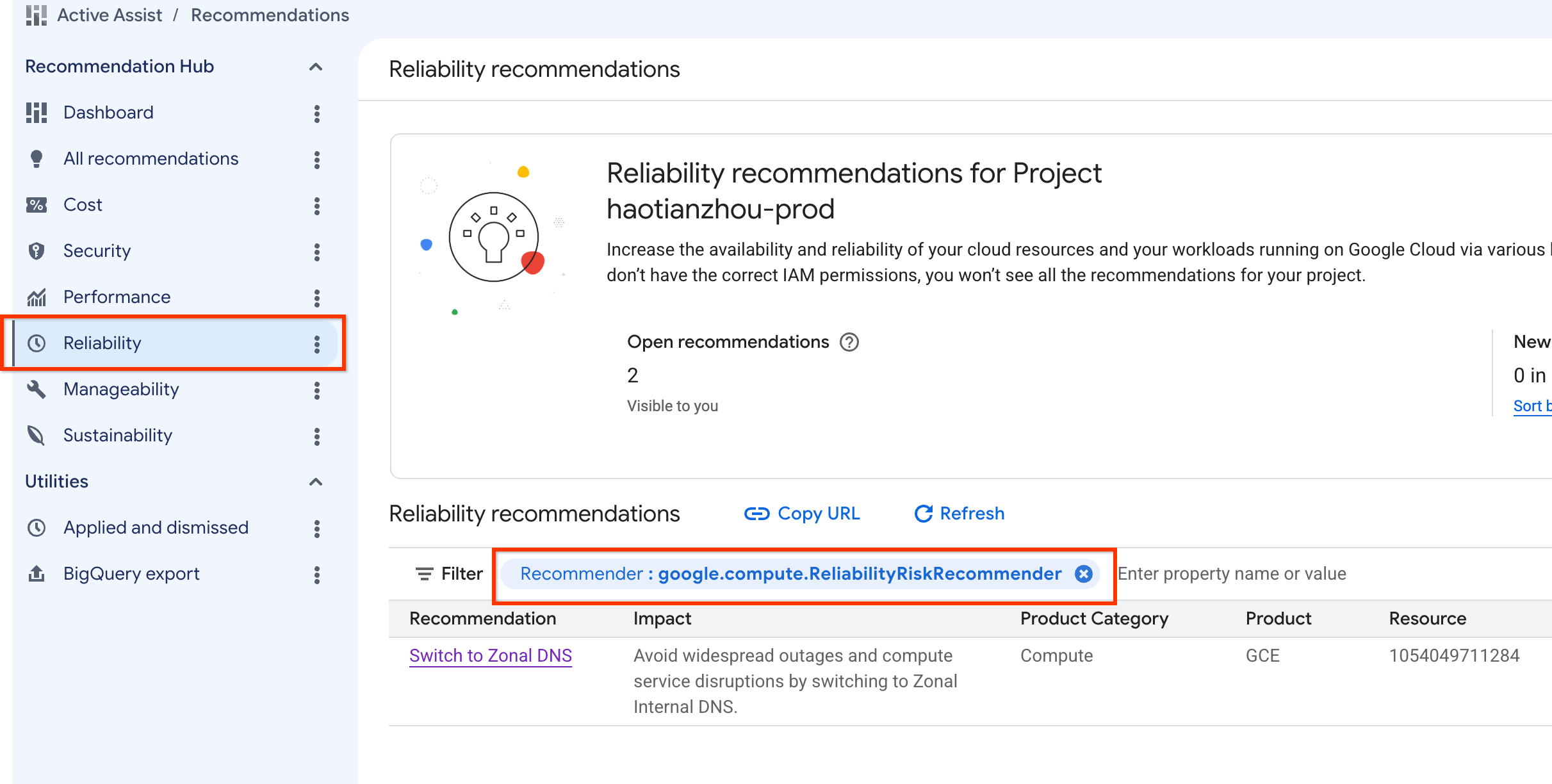
使用 Google Cloud 控制台
- 前往 Active Assist。
- 确保已选择您要查看的正确项目、文件夹或组织。
- 在右侧导航面板中,选择“可靠性”。
- 如需查看所有计算可靠性数据分析,请将 Recommender 过滤条件设置为
google.compute.ReliabilityRiskRecommender。
使用 gcloud
使用 gcloud recommender recommendations list 命令并指定 Compute 可靠性数据分析 Recommender,以查看所有风险,语法如下:
gcloud recommender recommendations list \
      --recommender=google.compute.ReliabilityRiskRecommender\
      --project=[PROJECT_ID] \
      --location=global \
      (--format=[yaml/json/text])
例如:
gcloud recommender recommendations list --project=foo --location=global --recommender=google.compute.ReliabilityRiskRecommender
对于各项建议,响应都包括以下字段(采用不同的形式):
| 字段 | 说明 |
|---|---|
RECOMMENDATION_ID |
所显示 建议的唯一标识符。例如, e3762bcb-421f-42d6-9ecf-9c0bd8262014 |
PRIMARY_IMPACT_CATEGORY |
建议的主要类别: 例如, RELIABILITY。 |
RECOMMENDATION_STATE |
建议的当前状态。例如, ACTIVE |
LAST_REFRESH_TIME |
上次刷新建议的时间。 例如, 2025-03-10T06:59:59Z |
PRIORITY |
分配给 建议的优先级。例如 P1。 |
RECOMMENDER_SUBTYPE |
生成建议的推荐器的具体子类型。 例如 GLOBAL_DNS |
DESCRIPTION |
建议的人类可读说明。例如,通过解决 Compute Engine 资源上的错误配置来提高工作负载 可靠性 |
答案
RECOMMENDATION_ID                     PRIMARY_IMPACT_CATEGORY  RECOMMENDATION_STATE  LAST_REFRESH_TIME     PRIORITY  RECOMMENDER_SUBTYPE  DESCRIPTION
e3762bcb-421f-42d6-9ecf-9c0bd8262014  RELIABILITY              ACTIVE                2025-03-10T06:59:59Z  P1        GLOBAL_DNS           Improve workload reliability by addressing misconfigurations on Compute Engine resources.
使用 API
curl \
    -H "Authorization: Bearer $(gcloud auth print-access-token)"  \
    -H "x-goog-user-project: [PROJECT_ID]" \
    "https://recommender.googleapis.com/v1/projects/[PROJECT_ID]/locations/global/recommenders/google.compute.ReliabilityRiskRecommender/recommendations"
例如: API 请求
curl \
    -H "Authorization: Bearer $(gcloud auth print-access-token)"  \
    -H "x-goog-user-project: foo" \
    "https://recommender.googleapis.com/v1/projects/foo/locations/global/recommenders/google.compute.ReliabilityRiskRecommender/recommendations"
对于各项建议,响应都包括以下字段:
| 字段 | 说明 |
|---|---|
| name | 建议的唯一名称。例如, projects/1054049711284/locations/global/recommenders/google.compute.ReliabilityRiskRecommender/recommendations/e3762bcb-421f-42d6-9c0bd8262014 |
| 说明 | 建议的人类可读说明。例如,通过解决 Compute Engine 资源上的错误配置来提高工作负载 可靠性 |
| lastRefreshTime | 上次刷新建议的时间。 例如,2025-03-10T06:59:59Z |
| primaryImpact | 建议的主要类别: 例如,可靠性。 |
| 内容 | 详细的推荐内容。 |
| stateInfo | 建议的当前状态。 例如,ACTIVE |
| recommenderSubtype | 生成建议的推荐器的具体子类型。 例如,GLOBAL_DNS |
| associatedInsights | 与此 建议相关联的可靠性风险数据分析。 |
| 优先级 | 分配给 建议的优先级。例如,P1 |
| targetResources | 相应建议所针对的资源。 |
如需了解详情,请参阅 Recommender 文档。
API 响应
{
  "recommendations": [
    {
      "name": "projects/1054049711284/locations/global/recommenders/google.compute.ReliabilityRiskRecommender/recommendations/e3762bcb-421f-42d6-9ecf-9c0bd8262014",
      "description": "Improve workload reliability by addressing misconfigurations on Compute Engine resources.",
      "lastRefreshTime": "2025-03-10T06:59:59Z",
      "primaryImpact": {
        "category": "RELIABILITY"
      },
      "content": {
        "overview": {
          "RecommendationMessage": "Your compute engine instances are vulnerable to cross-regional outages because they use global internal dns names by default. Google recommends migrating to zonal DNS to isolate registration failures to a single zone. Based on the last 30 days of DNS usage, your project is ready to migrate. %nMore information at: /compute/docs/networking/migrate-to-zonal-dns#migrate-ready-projects",
          "totalQueriesIncompatibleWithZonalDns": 0
        }
      },
      "stateInfo": {
        "state": "ACTIVE"
      },
      "etag": "\"19bbb3610996035f\"",
      "recommenderSubtype": "GLOBAL_DNS",
      "associatedInsights": [
        {
          "insight": "projects/1054049711284/locations/global/insightTypes/google.compute.ReliabilityRiskInsight/insights/74506608-5104-4aa6-a4e4-5ffd4dbb55cc"
        }
      ],
      "priority": "P1",
      "targetResources": [
        "//cloud.googleapis.com/projects/1054049711284"
      ]
    }
  ]
}
查看特定建议的详细信息
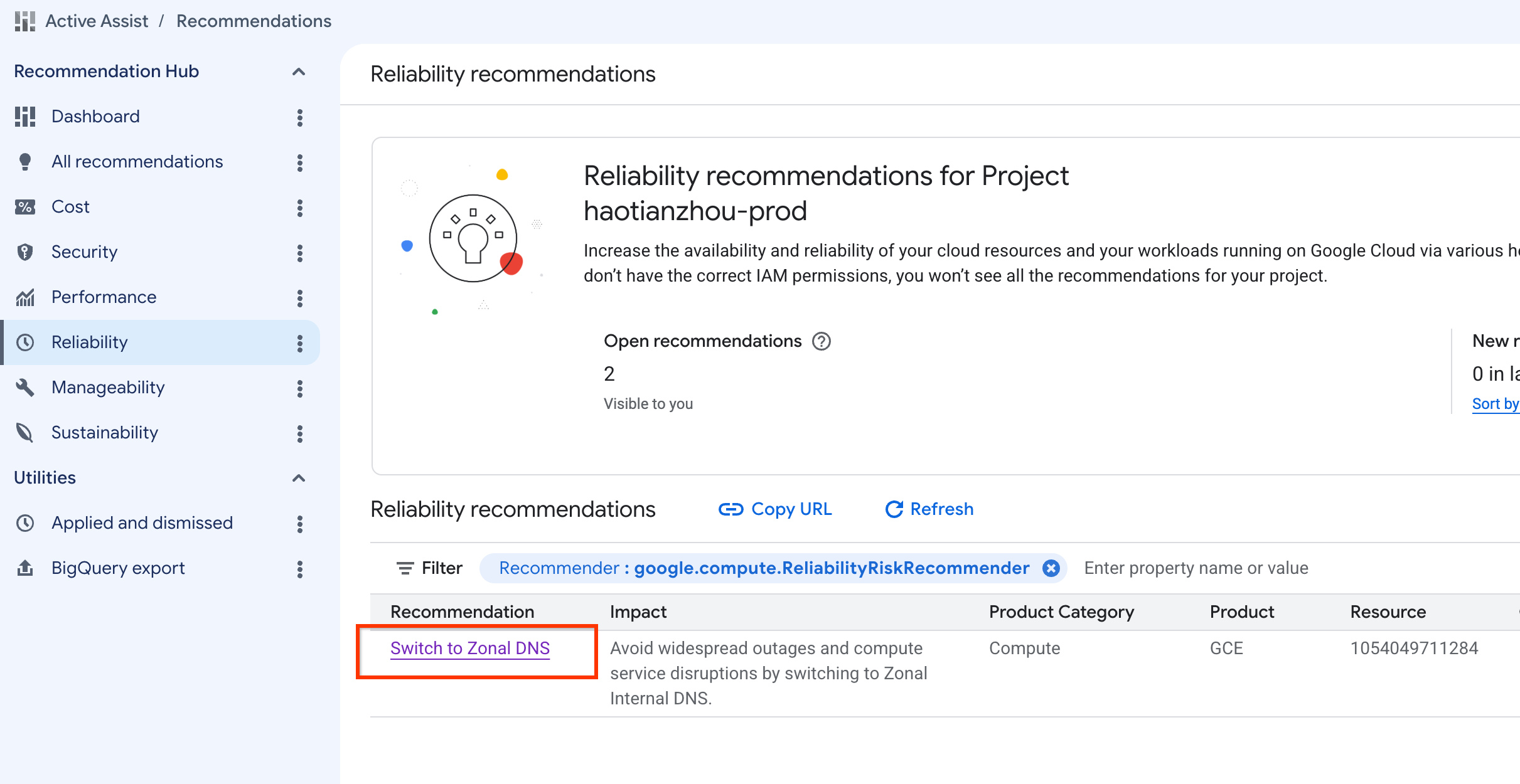
您可以使用 Google Cloud 控制台或gcloud查看特定风险的详细信息。
使用 Google Cloud 控制台
- 前往 Active Assist。
- 确保已选择您要查看的正确项目、文件夹或组织。
- 在右侧导航面板中,选择“可靠性”。
- 如需查看所有计算可靠性数据分析,请将 Recommender 过滤条件设置为
google.compute.ReliabilityRiskRecommender。 - 选择建议标题即可查看详情。
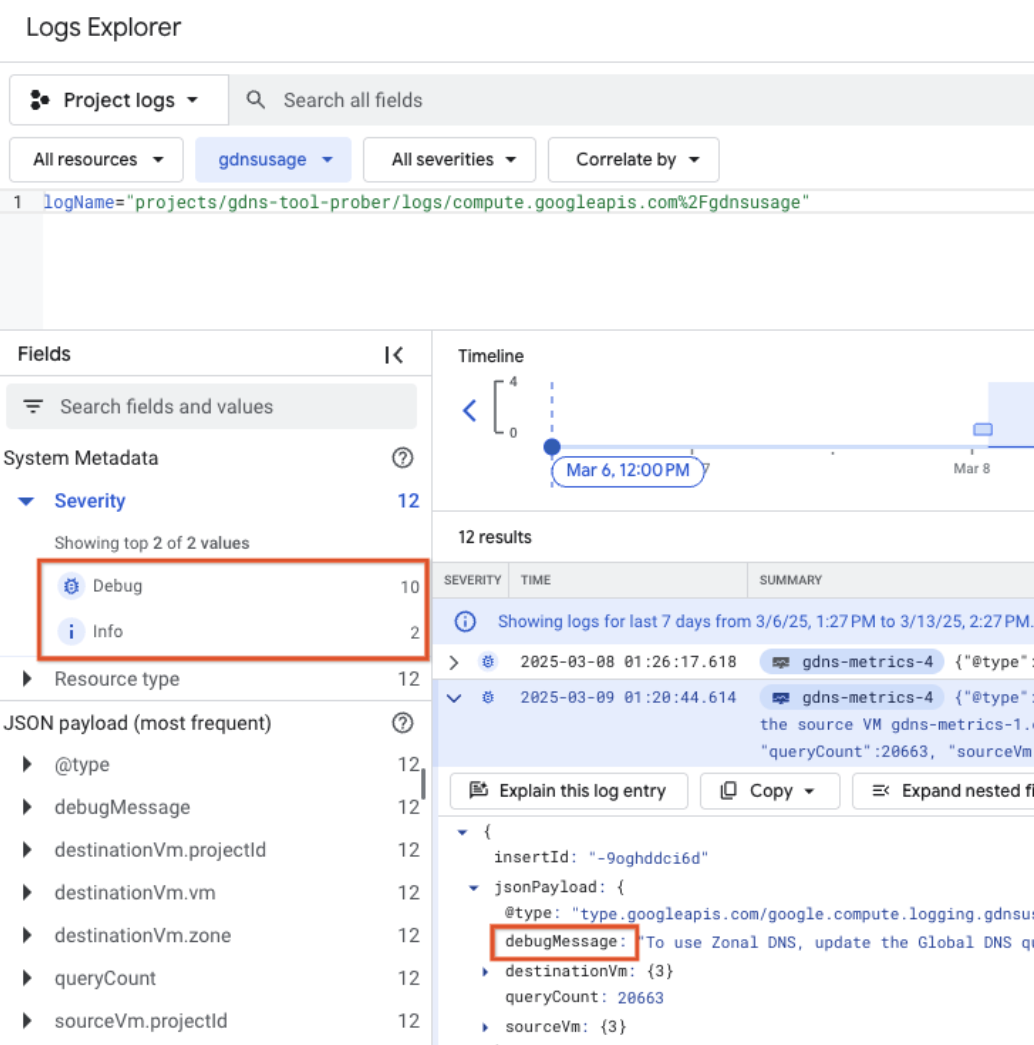
DNS 使用情况日志
DNS 查询日志(1-30 天)显示调试信息(迁移后可能失败的查询)和信息性条目。您必须解决所有调试条目,才能启用区域级 DNS 迁移。
使用 gcloud
使用 gcloud recommender recommendations describe 命令指定:
- 计算可靠性数据洞见 Recommender
- 您要查看详细信息的风险的建议 ID。
gcloud recommender recommendations describe \
      [RECOMMENDATION_ID] \
      --recommender=google.compute.ReliabilityRiskRecommender \
      --project=[PROJECT_ID] \
      --location=global \
      (--format=[yaml/json/text])
gcloud recommender recommendations describe e3762bcb-421f-42d6-9ecf-9c0bd8262014 --project=foo --location=global --recommender=google.compute.ReliabilityRiskRecommender
对于各项建议,响应都包括以下字段:
| 字段 | 说明 |
|---|---|
| 数据分析 | 与此 建议相关联的可靠性风险数据分析。 |
| 内容 | 详细的推荐内容(包括RecommendationMessage)。 |
| 说明 | 建议的直观易懂的说明。 例如,通过解决 Compute Engine 资源上的 配置错误来提高工作负载可靠性 |
| etag | 相应建议的 ETag |
| lastRefreshTime | 上次刷新建议的时间。例如, 2025-03-10T06:59:59Z |
| name | 建议的唯一名称。例如, projects/1054049711284/locations/global/recommenders/google.compute.ReliabilityRiskRecommender/recommendations/e3762bcb-421f-42d6-9ecf-9c0bd8262014 |
| primaryImpact | 建议的主要类别:例如, 可靠性。 |
| 优先级 | 分配给建议的优先级。 例如,P1 |
| recommenderSubtype | 生成建议的推荐器的具体子类型。 例如,GLOBAL_DNS |
| stateInfo | 建议的当前状态。例如, ACTIVE |
| targetResources | 相应建议所针对的资源。 |
答案
associatedInsights:
- insight: projects/1054049711284/locations/global/insightTypes/google.compute.ReliabilityRiskInsight/insights/74506608-5104-4aa6-a4e4-5ffd4dbb55cc
content:
  overview:
    RecommendationMessage: 'Your compute engine instances are vulnerable to cross-regional
      outages because they use global internal dns names by default. Google recommends
      migrating to zonal DNS to isolate registration failures to a single zone. Based
      on the last 30 days of DNS usage, your project is ready to migrate. %nMore information
      at: /compute/docs/networking/migrate-to-zonal-dns#migrate-ready-projects'
    totalQueriesIncompatibleWithZonalDns: 0
description: Improve workload reliability by addressing misconfigurations on Compute
  Engine resources.
etag: '"19bbb3610996035f"'
lastRefreshTime: '2025-03-10T06:59:59Z'
name: projects/1054049711284/locations/global/recommenders/google.compute.ReliabilityRiskRecommender/recommendations/e3762bcb-421f-42d6-9ecf-9c0bd8262014
primaryImpact:
  category: RELIABILITY
priority: P1
recommenderSubtype: GLOBAL_DNS
stateInfo:
  state: ACTIVE
targetResources:
- //cloud.googleapis.com/projects/1054049711284
使用 API
curl \
    -H "Authorization: Bearer $(gcloud auth print-access-token)"  \
    -H "x-goog-user-project: [PROJECT_ID]" \
    "https://recommender.googleapis.com/v1/projects/[PROJECT_ID]/locations/global/recommenders/google.compute.ReliabilityRiskRecommender/recommendations/[RECOMMENDATION_ID]"
如需了解详情,请参阅 Recommender 文档。 例如:
- 使用在查看所有风险 API 操作中捕获的名称字段末尾的标识符。
API 请求
curl \
    -H "Authorization: Bearer $(gcloud auth print-access-token)"  \
    -H "x-goog-user-project: foo" \
    "https://recommender.googleapis.com/v1/projects/foo/locations/global/recommenders/google.compute.ReliabilityRiskRecommender/recommendations/e3762bcb-421f-42d6-9ecf-9c0bd8262014"
对于各项建议,响应都包括以下字段:
| 字段 | 说明 |
|---|---|
| name | 建议的唯一名称。例如, projects/1054049711284/locations/global/recommenders/google.compute.ReliabilityRiskRecommender/recommendations/e3762bcb-421f-42d6-9ecf-9c0bd8262014 |
| 说明 | 建议的人类可读说明。例如,通过解决 Compute Engine 资源上的错误配置来提高工作负载 的可靠性 |
| lastRefreshTime | 上次刷新建议的时间。 例如,2025-03-10T06:59:59Z |
| primaryImpact | 建议的主要类别: 例如,可靠性。 |
| 内容 | 详细的推荐内容。 |
| stateInfo | 建议的当前状态。 例如,ACTIVE |
| etag | 相应建议的 ETag |
| recommenderSubtype | 生成相应建议的推荐器的具体子类型。 例如,GLOBAL_DNS |
| associatedInsights | 与此 建议关联的可靠性风险数据分析。 |
| 优先级 | 分配给 建议的优先级。例如,P1 |
| targetResources | 相应建议所针对的资源。 |
API 响应
{
  "name": "projects/1054049711284/locations/global/recommenders/google.compute.ReliabilityRiskRecommender/recommendations/e3762bcb-421f-42d6-9ecf-9c0bd8262014",
  "description": "Improve workload reliability by addressing misconfigurations on Compute Engine resources.",
  "lastRefreshTime": "2025-03-10T06:59:59Z",
  "primaryImpact": {
    "category": "RELIABILITY"
  },
  "content": {
    "overview": {
      "RecommendationMessage": "Your compute engine instances are vulnerable to cross-regional outages because they use global internal dns names by default. Google recommends migrating to zonal DNS to isolate registration failures to a single zone. Based on the last 30 days of DNS usage, your project is ready to migrate. %nMore information at: /compute/docs/networking/migrate-to-zonal-dns#migrate-ready-projects",
      "totalQueriesIncompatibleWithZonalDns": 0
    }
  },
  "stateInfo": {
    "state": "ACTIVE"
  },
  "etag": "\"19bbb3610996035f\"",
  "recommenderSubtype": "GLOBAL_DNS",
  "associatedInsights": [
    {
      "insight": "projects/1054049711284/locations/global/insightTypes/google.compute.ReliabilityRiskInsight/insights/74506608-5104-4aa6-a4e4-5ffd4dbb55cc"
    }
  ],
  "priority": "P1",
  "targetResources": [
    "//cloud.googleapis.com/projects/1054049711284"
  ]
}
采纳或拒绝建议
如需应用或忽略风险建议,您可以使用 Google Cloud 控制台或 gcloud CLI 和 API。
使用 Google Cloud 控制台
- 完成查看特定风险的详细信息后,前往“风险洞察”页面。
- 选择屏幕底部的应用建议或关闭。
- 对于已准备好迁移的项目,点击应用建议即可直接将项目切换为使用可用区级 DNS。
- 如果您选择忽略此建议,仍可使用已应用和已忽略部分中的恢复按钮恢复该建议。
使用 gcloud 和 API
如需根据风险建议和 gcloud API 说明采取行动,请参阅更改建议的状态。
如需了解建议的常见状态,请参阅常见问题解答。
以下示例仅展示了如何将建议标记为已关闭
使用 gcloud
***RECOMMENDATION_ID和*** ETAG 可以使用 gcloud describe 或 recommender api get 找到
gcloud recommender recommendations mark-dismissed [RECOMMENDATION_ID] --project=foo --location=global --recommender=google.compute.ReliabilityRiskRecommender --etag=[ETAG]
例如:
gcloud recommender recommendations mark-dismissed e3762bcb-421f-42d6-9ecf-9c0bd8262014 --project=foo --location=global --recommender=google.compute.ReliabilityRiskRecommender --etag='"19bbb3610996035f"'
答案
stateInfo.state changed to DISMISSED

- insight: projects/1054049711284/locations/global/insightTypes/google.compute.ReliabilityRiskInsight/insights/74506608-5104-4aa6-a4e4-5ffd4dbb55cc
content:
  overview:
    RecommendationMessage: 'Your compute engine instances are vulnerable to cross-regional outages because they use global internal dns names by default. Google recommends migrating to zonal DNS to isolate registration failures to a single zone. Based on the last 30 days of DNS usage, your project is ready to migrate. %nMore information at: /compute/docs/networking/migrate-to-zonal-dns#migrate-ready-projects'
    totalQueriesIncompatibleWithZonalDns: 0
description: Improve workload reliability by addressing misconfigurations on Compute
  Engine resources.
etag: '"288946d3c1b931ca"'
lastRefreshTime: '2025-03-10T06:59:59Z'
name: projects/1054049711284/locations/global/recommenders/google.compute.ReliabilityRiskRecommender/recommendations/e3762bcb-421f-42d6-9ecf-9c0bd8262014
primaryImpact:
  category: RELIABILITY
priority: P1
recommenderSubtype: GLOBAL_DNS
stateInfo:
  state: DISMISSED
targetResources:
- //cloud.googleapis.com/projects/1054049711284
使用 API
curl -X POST \
   -H "Content-Type: application/json" \
   -H "Authorization: Bearer $(gcloud auth print-access-token)"  \
   -H "x-goog-user-project: [PROJECT_ID]" \
   --data-binary @- \
   https://recommender.googleapis.com/v1/projects/[PROJECT_ID]/locations/global/recommenders/google.compute.ReliabilityRiskRecommender/recommendations/[RECOMMENDATION_ID]:markDismissed \
<< EOM
{
 "etag": "[ETAG]"
}
EOM
API 请求
curl -X POST \
   -H "Content-Type: application/json" \
   -H "Authorization: Bearer $(gcloud auth print-access-token)"  \
   -H "x-goog-user-project: foo" \
   --data-binary @- \
   https://recommender.googleapis.com/v1/projects/foo/locations/global/recommenders/google.compute.ReliabilityRiskRecommender/recommendations/e3762bcb-421f-42d6-9ecf-9c0bd8262014:markDismissed \
<< EOM
{
 "etag": "\"82897e60f606f71b\""
}
EOM
API 响应
{
  "name": "projects/1054049711284/locations/global/recommenders/google.compute.ReliabilityRiskRecommender/recommendations/e3762bcb-421f-42d6-9ecf-9c0bd8262014",
  "description": "Improve workload reliability by addressing misconfigurations on Compute Engine resources.",
  "lastRefreshTime": "2025-03-10T06:59:59Z",
  "primaryImpact": {
    "category": "RELIABILITY"
  },
  "content": {
    "overview": {
      "RecommendationMessage": "Your compute engine instances are vulnerable to cross-regional outages because they use global internal dns names by default. Google recommends migrating to zonal DNS to isolate registration failures to a single zone. Based on the last 30 days of DNS usage, your project is ready to migrate. %nMore information at: /compute/docs/networking/migrate-to-zonal-dns#migrate-ready-projects",
      "totalQueriesIncompatibleWithZonalDns": 0
    }
  },
  "stateInfo": {
    "state": "DISMISSED"
  },
  "etag": "\"410b7e8d4f682979\"",
  "recommenderSubtype": "GLOBAL_DNS",
  "associatedInsights": [
    {
      "insight": "projects/1054049711284/locations/global/insightTypes/google.compute.ReliabilityRiskInsight/insights/74506608-5104-4aa6-a4e4-5ffd4dbb55cc"
    }
  ],
  "priority": "P1",
  "targetResources": [
    "//cloud.googleapis.com/projects/1054049711284"
  ]
}
使用 Compute ReliabilityRisks API 查看计算可靠性数据分析
借助 Compute ReliabilityRisks API,您可以执行以下两项操作:
- 检索可靠性风险列表:您可以指定参数来根据需要过滤列表。
- 详细了解工作负载中存在的特定风险:这有助于您了解特定风险的影响。
- 状态持久性:Compute ReliabilityRisks API 会报告项目资源的实际风险状态。即使您在 Active Assist 中关闭了某项建议,在风险得到缓解之前,Compute ReliabilityRisks API 仍会继续返回该风险。
- 扫描频率:系统不会实时评估风险,而是每天扫描一次。如果您采取措施来缓解风险,系统会在第二天扫描后显示更新后的状态。
以下名称用于标识第一个暴露的可靠性风险:global-dns
获取风险
检索项目中指定风险的详细信息。
使用 API
curl -H "Authorization: Bearer $(gcloud auth print-access-token)" https://compute.googleapis.com/compute/projects/[PROJECT_ID]/global/reliabilityRisks/[RISK_NAME]
| 字段 | 说明 |
|---|---|
PROJECT_ID |
用户指定的项目名称。 |
RISK_NAME |
风险的名称(目前仅支持 global-dns) |
API 请求
curl -H "Authorization: Bearer $(gcloud auth print-access-token)" https://compute.googleapis.com/compute/projects/foo/global/reliabilityRisks/global-dns
API 响应
{
   "kind": "compute#reliabilityRisk",
   "name": "global-dns",
   "id": "4799391202061532594",
   "details": {
       "globalDnsInsight": {
           "projectDefaultIsGlobalDns": true,
           "totalQueryCount": "0",
           "incompatibleQueryCount": "0",
           "queryObservationWindow": "2592000s"
       },
       "type": "GLOBAL_DNS",
       "severity": "HIGH",
       "lastUpdateTimestamp": "2025-02-24T07:59:59Z",
       "duration": "893857.067964s"
   },
   "recommendation": {
       "content": "Your compute engine instances are vulnerable to cross-regional outages because they use global internal dns names by default. Google recommends migrating to zonal DNS to isolate registration failures to a single zone. Based on the last 30 days of DNS usage, your project is ready to migrate.",
       "referenceUrl": "/compute/docs/networking/migrate-to-zonal-dns#migrate-ready-projects"
   }
}
Your compute engine instances are vulnerable to cross-regional outages because
they use global internal dns names by default. Google recommends migrating to
zonal DNS to isolate registration failures to a single zone. Based on the last
30 days of DNS usage, your project recently made DNS queries that are
incompatible with zonal DNS. Fix those queries and then migrate your project
to zonal dns.
/compute/docs/networking/migrate-to-zonal-dns#fix-queries
如果您没有获取或列出可靠性风险所需的权限,则会收到 PERMISSION_DENIED 错误。
响应包括以下字段:
| 字段 | 子字段 | 说明 |
|---|---|---|
name |
风险的名称。 | |
id |
风险的唯一标识符。 | |
details |
globalDnsInsight |
globalDns 具体风险洞见。 |
type |
风险类型。 | |
severity |
Compute Engine 确定的工作负载风险级别。 | |
lastupdateTimestamp |
上次更新风险信息时的时间戳。 | |
duration |
风险持续时间。 | |
recommendation |
content |
有关如何缓解风险的建议。 |
referenceUrl |
指向详细风险建议或缓解指南的链接。 |
列出风险
检索工作负载中存在的所有风险的列表。
使用 API
API 请求:
curl -H "Authorization: Bearer $(gcloud auth print-access-token)" https://compute.googleapis.com/compute/projects/[PROJECT_ID]/global/reliabilityRisks
| 字段 | 说明 |
|---|---|
PROJECT_ID |
用户指定的项目名称。 |
API 请求:
curl -H "Authorization: Bearer $(gcloud auth print-access-token)" https://compute.googleapis.com/compute/projects/foo/global/reliabilityRisks
如果您没有列出活动所需的权限,则会收到 PERMISSION_DENIED 错误。
API 响应:
{
   "id": "projects/foo/global/reliabilityRisks",
   "items": [
       {
           "kind": "compute#reliabilityRisk",
           "name": "global-dns",
           "id": "4799391202061532594",
           "details": {
               "globalDnsInsight": {
                   "projectDefaultIsGlobalDns": true,
                   "totalQueryCount": "0",
                   "incompatibleQueryCount": "0",
                   "queryObservationWindow": "2592000s"
               },
               "type": "GLOBAL_DNS",
               "severity": "HIGH",
               "lastUpdateTimestamp": "2025-02-24T07:59:59Z",
               "duration": "893857.067964s"
           },
           "recommendation": {
               "content": "Your compute engine instances are vulnerable to cross-regional outages because they use global internal dns names by default. Google recommends migrating to zonal DNS to isolate registration failures to a single zone. Based on the last 30 days of DNS usage, your project is ready to migrate.",
               "referenceUrl": "/compute/docs/networking/migrate-to-zonal-dns#migrate-ready-projects"
           }
       }
   ],
   "selfLink": "https://www.googleapis.com/compute/projects/panourgias-prod/global/reliabilityRisks",
   "etag": "YYYY"
}
风险严重程度和优先级
本部分详细介绍了 Compute Engine 如何确定可靠性风险的严重程度和优先级。
应用建议后,项目中的所有实例(现有实例、新实例和所有服务中的实例)都将使用可用区级 DNS 名称,并使用特定于可用区的 DNS 解析。
常见问题解答
为什么我的项目在“可靠性风险”卡片中显示两条不同的消息?
卡片中会显示不同的消息,具体取决于迁移准备情况。
如果项目已准备好迁移,Active Assist 详细信息面板中会显示一个按钮,供您迁移到可用区级 DNS。如果项目尚未准备好迁移,您必须查看 DNS 日志,了解不兼容的查询的调试消息,以便在迁移之前更新这些查询。
风险建议详情页面上的每个字段有何含义?
| 字段 | 说明 |
|---|---|
Resources impacted |
受所显示风险影响的项目资源 |
Project internal DNS default is global DNS |
如果项目设置为全球 DNS,则为 True;如果项目已设置为可用区级 DNS,则为 False |
Total global DNS query count |
过去 30 天内的全球 DNS 查询次数。 |
Severity |
基于风险在发生事件时的影响的评分。 |
Total global DNS queries incompatible with zonal DNS |
过去 30 天内无法使用可用区级 DNS 解析的内部 DNS 查询次数 |
DNS usage logs |
所选项目中的 30 天内部 DNS 日志。这些日志会根据源虚拟机和目标虚拟机对进行汇总,并包含每对虚拟机的调试消息。 |
如需详细了解 Severity,请参阅风险严重程度和优先级。
如何确认已成功应用建议?
在 Active Assist 中,应用建议后,您可以通过检查内部 DNS 设置来验证更改。
您应该会看到 VmDnsSetting 设置为 ZonalOnly 值。
如何监控建议是否对我的项目产生了影响?
Google 内部 DNS 基础设施不包含用于提供 DNS 解析日志的服务。不过,您可以通过观察应用级行为来验证迁移后 DNS 解析是否成功。
**为什么 APPLY_RECOMMENDATION 按钮显示为灰色且无法点击?**
您需要 compute.projects.setCommonInstanceMetadata 和 recommender.computeReliabilityRiskRecommendations.update 权限。尝试使用 gcloud 命令创建自定义角色。
建议状态有哪些不同的选项?
| 州/省/直辖市/自治区 | 说明 |
|---|---|
| 有效 | 有效建议(原始状态) |
| 已声明 | 将建议标记为“已占用”,表示您打算将建议的更改应用于关联的资源。 |
| 已拒绝 | 将建议标记为已忽略,以表示您不打算将建议的更改应用于关联的资源,或者您不想继续看到该建议 |
| 失败 | 未能应用建议。 |
| 成功 | 已成功应用建议。 |
为什么“可靠性建议”信息中心是空的?
如果您的项目、文件夹或组织中未检测到任何可靠性风险,建议列表将为空。对于过去 7 天内创建的项目或包含非活跃虚拟机的项目,信息中心也可能为空,因为流水线需要更多遥测数据才能生成建议。
为什么在我缓解风险后,系统仍会显示建议?
在您缓解风险后, Google Cloud 控制台和 API 最长可能会在 24 小时内继续显示相关建议。这是因为提取流水线每 24 小时运行一次,以清除已解决的建议。
为什么在使用 API 时会看到 403 或 PERMISSION_DENIED 错误?
在初始推出期间,如果标准角色(Viewer 或编辑者)未完全更新,API 可能会返回 Error 403 或 PERMISSION_DENIED。如需解决此问题,请创建一个包含 compute.reliabilityRisks.get 权限的自定义 IAM 角色,并将其授予用户或服务账号。