Regional Persistent Disk and Hyperdisk Balanced High Availability are storage options that let you implement high availability (HA) services in Compute Engine. Regional Persistent Disk and Hyperdisk Balanced High Availability synchronously replicate data between two zones in the same region and ensure HA for disk data for up to one zonal failure.
## Building high availability services with regional disks
This section explains how you can build HA services with
regional Persistent Disk or
Hyperdisk Balanced High Availability disks.
### Design considerations
Before you start designing a HA service, understand the characteristics
of the application, the file system, and the operating system. These
characteristics are the basis for the design and can rule out various
approaches. For example, if an application does not support application-level
replication, some corresponding design options are not applicable.
Similarly, if the application, the file system, or the operating system are not
crash tolerant, then using
regional Persistent Disk or
Hyperdisk Balanced High Availability disks, or even zonal disk snapshots, might not be
an option. *Crash tolerance* is defined as the ability to recover from an
abrupt termination without losing or corrupting data
that was already committed to a disk prior to the crash.
Consider the following when designing for high availability:
- The effect on the application of using Hyperdisk Balanced High Availability, regional Persistent Disk, or other solutions.
- Disk write performance.
- The service recovery time objective - how quickly your service must recover from a zonal outage and the SLA requirements.
- The cost to build a resilient and reliable service architecture.
- For more information about region-specific considerations, see [Geography and regions](https://docs.cloud.google.com/docs/geography-and-regions#regions_and_zones).
In terms of cost, use the following options for synchronous and
asynchronous application replication:
- **Use two instances of the database and VM.** In this case the following
items determine the total cost:
- VM instance costs
- Persistent Disk or Hyperdisk costs
- Costs of maintaining application replication
- **Use a single VM with synchronously replicated disks.** To achieve high
availability with a
regional
Persistent Disk or Hyperdisk Balanced High Availability disk, use the same VM instance
and disk components as the previous option, but also include a synchronously
replicated disk.
Regional Persistent Disks and Hyperdisk Balanced High Availability disks are double the
cost per byte compared to zonal disks because they are replicated in two
zones.
However, using synchronously replicated disks might reduce
your maintenance cost because the data is automatically written to two
replicas without the requirement of maintaining application replication.
- **Don't start the secondary VM until failover is required.** You can reduce
host costs even more by starting the secondary VM only on demand during
failover rather than maintaining the VM as an active standby VM.
### Compare cost, performance, and resiliency
The following table highlights the trade-offs in cost, performance, and
resiliency for the different service architectures.
| HA service architecture | Zonal disk snapshots | Application level synchronous | Application level asynchronous | Regional disks |
| Protects against application, VM, zone failure^\*^ | Yes | Yes | Yes | Yes |
| Mitigation against application corruption (Example: application crash-intolerance) | Yes | No^†^ | No^†^ | No |
| Cost | **$** | **$$** - Two instances of the database or VM running, application replication setup and maintenance, cross zone networking. | **$$** - Two instances of the database or VM running, application replication setup and maintenance, cross zone networking. | **$1.5x - $$** - The costs are the same as application replication if you use an active standby VM. You can achieve a lower cost by spinning up a backup VM on demand during failover. There is no charge for cross zone networking between disk replicas. |
| Application performance | - No effect | - Trade-off on application performance with synchronous replication | - No effect | - No effect for most applications |
| Suited for application with low RPO requirement (Very low tolerance for data loss) | No - Data loss depending on when the snapshot was taken | Yes - No data loss^‡^ | No - Data loss because replication is asynchronous | Yes - No data loss |
| Storage recovery time from disaster^#^ | - O(minutes) | - O(seconds) | - O(seconds) | - O(seconds)---to force attach the disk to a standby VM instance |
|---|---|---|---|---|
^\*^ Using regional disks or snapshots is not sufficient to protect from and mitigate against failures and corruptions. Your application, file system, and possibly other software components must be crash consistent or use some sort of [quiescing](https://wikipedia.org/wiki/Quiesce).
^†^ The replication of some applications provides
mitigation against some application corruptions. For example, MySQL primary
application corruption doesn't cause its replica VM instances to become
corrupted as well. Review your application's documentation for details.
^‡^ Data loss means unrecoverable loss of data
committed to persistent storage. Any non-committed data is still lost.
^#^ Failover performance doesn't include file system check and application recovery and load after failover.
## Building HA database services using regional disks
This section covers high level concepts for building HA solutions
for stateful database services (MySQL, Postgres, etc.) using
Compute Engine with
Regional Persistent Disks and Hyperdisk Balanced High Availability disks.
If there are broad outages in Google Cloud, for example, if a whole region
becomes unavailable, your application might become unavailable. Depending on
your needs, consider
[cross-regional replication techniques](https://docs.cloud.google.com/architecture/disaster-recovery#how_to_leverage_zones_and_regions_to_achieve_reliability)
or
[Asynchronous Replication](https://docs.cloud.google.com/compute/docs/disks/async-pd/about)
for even higher availability.
Database HA configurations typically have at least two VM instances. Preferably
these VM instances are part of one or more managed instance groups:
- A primary VM instance in the primary zone
- A standby VM instance in a secondary zone
A primary VM instance has at least two disks: a boot disk, and a
regional disk. The regional disk contains database data and any other mutable
data that should be preserved to another zone in case of an outage.
A standby VM instance requires a separate boot disk to be able to recover from
configuration-related outages, which could result from an operating system
upgrade, for example.
The primary and standby VM instances are configured to use a load balancer with
the traffic directed to the primary VM based on health check signals. The
[disaster recovery scenario for data](https://docs.cloud.google.com/solutions/dr-scenarios-for-data)
outlines other failover configurations, which might be more appropriate for
your scenario.
### Challenges with database replication
The following table lists some common challenges with setting up and managing
application synchronous or semi-synchronous replication (like MySQL) and how
they compare to synchronous disk replication with
Regional Persistent Disk
and Hyperdisk Balanced High Availability disks.
| Challenges | Application synchronous or semi-synchronous replication | Synchronous disk replication |
| Maintaining stable replication between primary and failover replica. | There are a number of things that could go wrong and cause a VM instance to fall out of HA mode: 1. Misconfiguration of replication parameters such as SSL certificate mismatch or missing ACL on the primary side. 2. High load on primary VM instance causing failover replica to be unable to keep up. 3. Bugs causing replication issues such as application issues, OS misconfiguration, or Docker failure. 4. Infrastructure failures like CPU contention, frozen VM, or intermediate network interruption. | Storage failures are handled by Regional Persistent Disk and Hyperdisk Balanced High Availability disks. This happens transparently to the application except for a possible fluctuation in the disk's performance. There must be user-defined health checks to reveal any application or VM issues and trigger failover. |
| The end-to-end failover time is longer than expected. | The time taken for the failover operation doesn't have an upper bound. Waiting for all transactions to be replayed (step 2 above) could take an arbitrarily long time, depending on the schema and the load on the database. | Regional Persistent Disk and Hyperdisk Balanced High Availability disks provide synchronous replication, so the failover time is bounded by the sum of the following latencies: 1. Creation of a secondary VM, unless there is already a standby VM instance available. 2. Force attaching a regional disk. 3. Application initialization. |
| Split-brain | To avoid [split-brain](https://wikipedia.org/wiki/Split-brain_(computing)), both approaches require provisions to ensure that there is only one primary at a time. ||
|---|---|---|
## Sequence of read and write operations to disks
In determining the read and write sequences, or the order in which data is read
from and written to disk, the majority of the work is done by the disk driver in
your VM. As a user, you don't have to deal with the replication semantics, and
can interact with the file system as usual. The underlying driver handles the
sequence for reading and writing.
By default, a Compute Engine VM with
Regional Persistent Disk or
Hyperdisk Balanced High Availability operates in full replication mode, where requests
to read or write from disk are sent to both replicas.
In full replication mode, the following occurs:
- When writing, a write request tries to write to both replicas and acknowledges when both writes succeed.
- When reading, the VM sends a read request to both replicas, and returns the results from the one that succeeds. If the read request times out, another read request is sent.
If a replica falls behind or fails to acknowledge that the read or write
requests completed, then the
[replica state](https://docs.cloud.google.com/compute/docs/disks/about-regional-persistent-disk#zonal_replica_state)
is updated.
## Health checks
The [health checks](https://docs.cloud.google.com/compute/docs/load-balancing/health-checks) used by the
load balancer are implemented by the health check agent. The health check agent
serves two purposes:
1. The health check agent resides within the primary and secondary VMs to monitor the VM instances and communicate with the load balancer to direct traffic. This works best when configured with [instance groups](https://docs.cloud.google.com/compute/docs/instance-groups/creating-groups-of-managed-instances#monitoring_groups).
2. The health check agent syncs with the application-specific regional control plane and makes failover decisions based on control plane behavior. The control plane must be in a zone that differs from the VM instance whose health it is monitoring.
The health check agent itself must be fault tolerant. For example, notice that,
in the image that follows, the control plane is separated from the primary VM
instance, which resides in zone `us-central1-a`, while the standby VM resides
in zone `us-central1-f`.
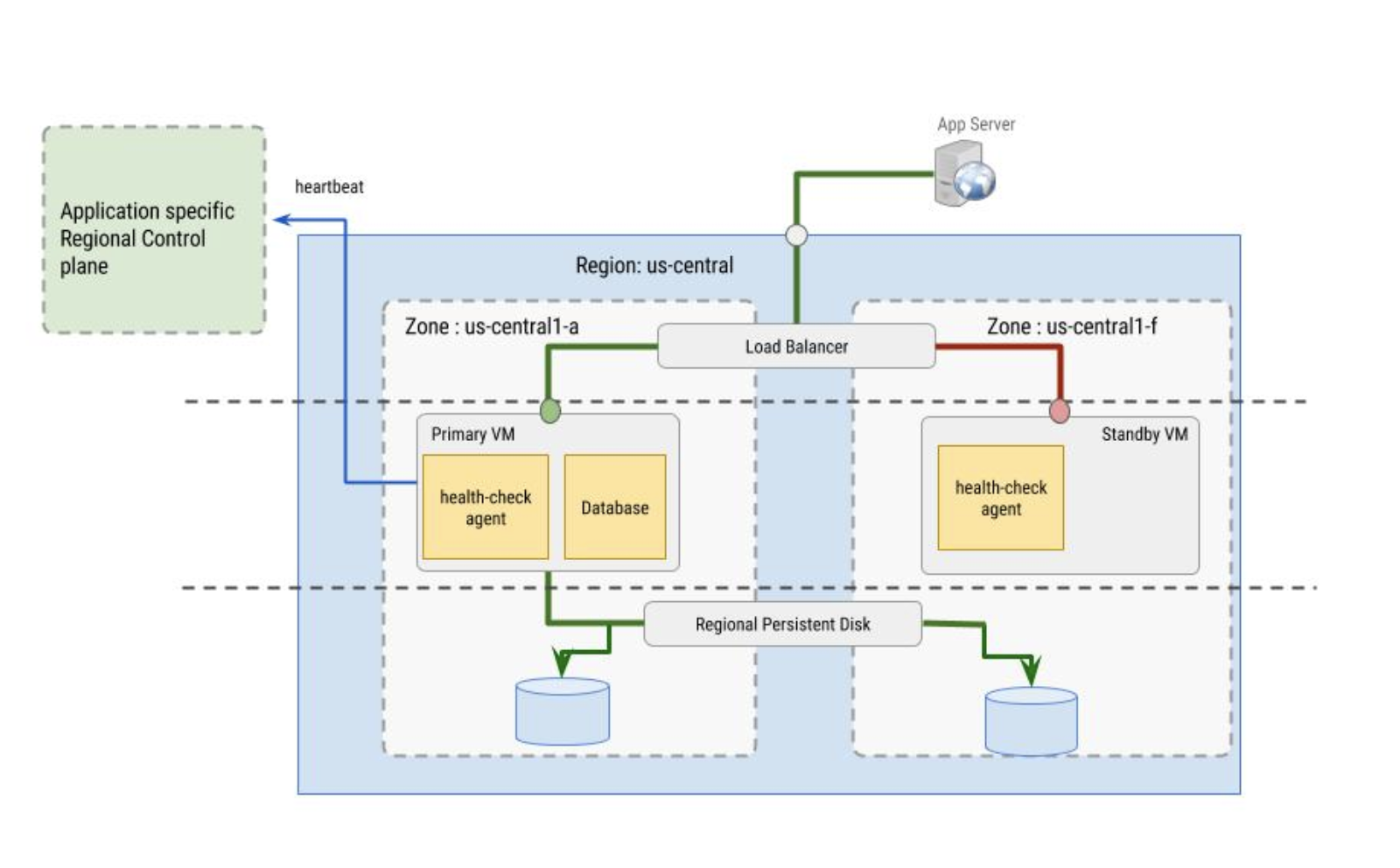
*The health check agent's role in primary and standby VM instances.*
## What's next
- Learn how to [create and manage regional disks](https://docs.cloud.google.com/compute/docs/disks/regional-persistent-disk).
- Learn about [Asynchronous Replication](https://docs.cloud.google.com/compute/docs/disks/async-pd/about).
- Learn how to [configure a SQL Server failover cluster instance for disks in multi-writer mode](https://docs.cloud.google.com/compute/docs/instances/sql-server/configure-failover-cluster-instance-pd-multi-writer).
- Learn how to [build scalable and resilient web applications on Google Cloud](https://docs.cloud.google.com/architecture/scalable-and-resilient-apps).
- Review the [disaster recovery planning guide](https://docs.cloud.google.com/architecture/dr-scenarios-planning-guide).