**Managed Airflow (Gen 3)** \| [Managed Airflow (Gen 2)](https://docs.cloud.google.com/composer/docs/composer-2/known-issues.md.txt "View this page for Managed Airflow (Gen 2)") \| [Managed Airflow (Legacy Gen 1)](https://docs.cloud.google.com/composer/docs/composer-1/known-issues.md.txt "View this page for Managed Airflow (Legacy Gen 1)")
This page lists known Managed Airflow issues. For information about
issue fixes, see [Release notes](https://docs.cloud.google.com/composer/docs/release-notes.md.txt).
## First DAG run for an uploaded DAG file has several failed tasks
When you upload a DAG file, sometimes the first few tasks from the first DAG
run for it fail with the `Unable to read remote log...` error. This
problem happens because the DAG file is synchronized between your
environment's bucket, Airflow workers, and Airflow schedulers of your
environment. If the scheduler gets the DAG file and schedules it to be executed
by a worker, and if the worker does not have the DAG file yet, then the task
execution fails.
To mitigate this issue, environments with Airflow 2 are configured to perform
two retries for a failed task by default. If a task fails, it is retried twice
with 5 minute intervals.
## Managed Airflow shouldn't be impacted by Apache Log4j 2 Vulnerability (CVE-2021-44228)
In response to [Apache Log4j 2 Vulnerability (CVE-2021-44228)](http://cloud.google.com/log4j2-security-advisory),
Managed Airflow has conducted a detailed investigation
and we believe that Managed Airflow is not vulnerable to this exploit.
## Airflow UI might sometimes not re-load a plugin once it is changed
If a plugin consists of many files that import other modules, then the
Airflow UI might not be able to recognize the fact that a plugin should be
re-loaded. In such a case,
[restart the Airflow web server](https://docs.cloud.google.com/composer/docs/composer-3/access-airflow-web-interface.md.txt#restarting) of your
environment.
## Error 504 when accessing the Airflow UI
You can get the `504 Gateway Timeout` error when accessing the Airflow UI. This error can have several causes:
- Transient communication issue. In this case, attempt to access the Airflow UI
later. You can also
[restart the Airflow web server](https://docs.cloud.google.com/composer/docs/composer-3/access-airflow-web-interface.md.txt#restarting).
- (Managed Airflow (Gen 3) only) Connectivity issue. If Airflow UI is permanently
unavailable, and timeout or 504 errors are generated, make sure that your
environment can access `*.composer.googleusercontent.com`.
- (Managed Airflow (Gen 2) only) Connectivity issue. If Airflow UI is permanently
unavailable, and timeout or 504 errors are generated, make sure that your
environment can access `*.composer.cloud.google.com`. If you use
Private Google Access and send traffic over
`private.googleapis.com` Virtual IPs, or VPC Service Controls and
send traffic over `restricted.googleapis.com` Virtual IPs, make sure that
your Cloud DNS is configured also for
`*.composer.cloud.google.com` domain names.
- Unresponsive Airflow web server. If the error 504
persists, but you can still access the Airflow UI at certain times, then
the Airflow web server might be unresponsive because it's overwhelmed.
Attempt to [increase the scale and performance parameters](https://docs.cloud.google.com/composer/docs/composer-3/scale-environments.md.txt)
of the web server.
## Error 502 when accessing Airflow UI
The error `502 Internal server exception` indicates that Airflow UI cannot
serve incoming requests. This error can have several causes:
- Transient communication issue. Try to access Airflow UI later.
- Failure to start the web server. In order to start, the web server requires
configuration files to be synchronized first. Check web server logs for
log entries that look similar to: `GCS sync exited with 1: gcloud storage cp gs:///airflow.cfg /home/airflow/gcs/airflow.cfg.tmp` or
`GCS sync exited with 1: gcloud storage cp gs:///env_var.json.cfg /home/airflow/gcs/env_var.json.tmp`.
If you see these errors, check if files mentioned in error messages
are still present in the environment's bucket.
In case of their accidental removal (for example, because a retention
policy was configured), you can restore them:
1. Set a new environment variable in your environment. You can use
use any variable name and value.
2. Override an Airflow configuration option. You can use a non-existent
Airflow configuration option.
## Error 500 when accessing the Airflow UI after overriding \[webserver\]analytics_tool
In environments with Airflow 2, if you [override](https://docs.cloud.google.com/composer/docs/composer-3/override-airflow-configurations.md.txt) the
`[webserver]analytics_tool` Airflow configuration option to route anonymous
Airflow UI usage data to an analytics service (such as
Google Analytics, Segment, MetaRouter, or Matomo), accessing the
Airflow UI after the environment update succeeds might return a
`(500) Internal Server Error` response, with one of the following errors in the
Airflow web server logs:
airflow.exceptions.AirflowConfigException: section/key [webserver/analytics_id] not found in config
airflow.exceptions.AirflowConfigException: section/key [webserver/analytics_url] not found in config
When `[webserver]analytics_tool` is set in Airflow 2, the Airflow web server
requires companion analytics options in the `[webserver]` section to also be
defined when rendering the Airflow UI.
In Airflow 3, `[webserver]analytics_tool`, `[webserver]analytics_id`, and
`[webserver]analytics_url` configuration options are removed.
**Solutions:**
- Remove the [override](https://docs.cloud.google.com/composer/docs/composer-3/override-airflow-configurations.md.txt) for the `[webserver]analytics_tool` Airflow configuration option, or
- Specify all required Airflow configuration options together:
- `[webserver]analytics_tool`
- `[webserver]analytics_id`
- `[webserver]analytics_url` (required in Airflow 2.9 and later, even if your analytics tool doesn't use a custom URL)
## Hovering over task instance in Tree view throws uncaught TypeError
In Airflow 2, the Tree view in the Airflow UI might sometimes not work
properly when a non-default timezone is used. As a workaround for this
issue,
[configure the timezone explicitly](https://airflow.apache.org/docs/apache-airflow/stable/timezone.html)
in the Airflow UI.
## Empty folders in Scheduler and Workers
Managed Airflow does not actively remove empty folders from Airflow
workers and schedulers. Such entities might be created as a result of the
environment bucket synchronization process when these folders existed in the
bucket and were eventually removed.
**Recommendation**: Adjust your DAGs so they are prepared to skip such empty
folders.
Such entities are eventually removed from local storages of Airflow schedulers
and workers when these components are restarted (for example, as a result of
scaling down or maintenance operations in your environment's cluster).
## Support for Kerberos
Managed Airflow does not support
[Airflow Kerberos configuration](https://airflow.apache.org/docs/apache-airflow/stable/security/kerberos.html).
## Support for compute classes in Managed Airflow (Gen 2) and Managed Airflow (Gen 3)
Managed Airflow (Gen 3) and Managed Airflow (Gen 2) support only *general-purpose*
[compute class](https://docs.cloud.google.com/kubernetes-engine/docs/concepts/autopilot-compute-classes#when-to-use).
It means that running Pods that request other compute classes (such as
*Balanced* or *Scale-Out*) is not possible.
The *general-purpose* class allows for running Pods requesting up to 110 GB of
memory and up to 30 CPU (as described in
[Compute Class Max Requests](https://docs.cloud.google.com/kubernetes-engine/docs/concepts/autopilot-resource-requests.md.txt#min-max-requests).
If you want to use ARM-based architecture or require more CPU and Memory, then
you must use a different compute class, which is not supported within
Managed Airflow (Gen 3) and Managed Airflow (Gen 2) clusters.
**Recommendation** : Use `GKEStartPodOperator` to run Kubernetes Pods on
a different cluster that supports the selected compute class. If you
run custom Pods requiring a different compute class, then they also must run
on a non-Managed Airflow cluster.
## It's not possible to reduce Cloud SQL storage
Managed Airflow uses Cloud SQL to run Airflow database. Over
time, disk storage for the Cloud SQL instance might grow because the disk
is scaled up to fit the data stored by Cloud SQL operations when
Airflow database grows.
It's not possible to scale down the Cloud SQL disk size.
As a workaround, if you want to use the smallest Cloud SQL disk
size, you can re-create Managed Airflow environments
with [snapshots](https://docs.cloud.google.com/composer/docs/composer-3/save-load-snapshots.md.txt).
## Database Disk usage metric doesn't reduce after removing records from Cloud SQL
Relational databases, such as Postgres or MySQL, don't physically remove rows
when they're deleted or updated. Instead, it marks them as "dead tuples" to
maintain data consistency and avoid blocking concurrent transactions.
Both MySQL and Postgres implement mechanisms of reclaiming space after deleted
records.
While it's possible to force the database to reclaim unused disk space, this
is a resource hungry operation which additionally locks the database making
Managed Airflow unavailable. Therefore it's recommended to rely on the
building mechanisms for reclaiming the unused space.
## Access blocked: Authorization Error
If this issue affects a user, the
**Access blocked: Authorization Error** dialog contains the
`Error 400: admin_policy_enforced` message.
If the **API Controls** \> **Unconfigured third-party apps**
\> **Don't allow users to access any third-party apps** option is
enabled in Google Workspace and the Apache Airflow in
Managed Airflow app is not explicitly allowed, users are not able to
access the Airflow UI unless they explicitly allow the application.
To allow access, perform steps provided in
[Allow access to Airflow UI in Google Workspace](https://docs.cloud.google.com/composer/docs/composer-3/access-control.md.txt#airflow-ui-access-google-workspace).
## Login loop when accessing the Airflow UI
This issue might have the following causes:
- If Chrome Enterprise Premium [Context-Aware Access bindings](https://docs.cloud.google.com/chrome-enterprise-premium/docs/securing-console-and-apis) are used with
access levels that rely on device attributes, and the Apache Airflow in
Managed Airflow app is not exempted, then it's not possible to
access the Airflow UI because of a login loop. To allow access, perform
steps provided in
[Allow access to Airflow UI in Context-Aware Access bindings](https://docs.cloud.google.com/composer/docs/composer-3/access-control.md.txt#airflow-ui-access-caa-bindings).
- If [ingress rules](https://docs.cloud.google.com/vpc-service-controls/docs/ingress-egress-rules.md.txt) are configured in a
VPC Service Controls perimeter that protects the project, and the ingress rule
that allows access to the Managed Airflow service uses
`ANY_SERVICE_ACCOUNT` or `ANY_USER_ACCOUNT` identity type, then users can't
access the Airflow UI, ending up in a login loop. For more information
about addressing this scenario, see
[Allow access to Airflow UI in VPC Service Controls ingress rules](https://docs.cloud.google.com/composer/docs/composer-3/access-control.md.txt#airflow-ui-access-vpcsc-ingress-rules).
## The /data folder is not available in Airflow web server
In Managed Airflow (Gen 2) and Managed Airflow (Gen 3), the Airflow web server is meant to be mostly read-only component and Managed Airflow does not synchronize the `data/` folder
to this component.
Sometimes, you might want to share common files between all Airflow
components, including the Airflow web server.
**Solution:**
- Wrap the files to be shared with the web server into a PYPI module and
install it as a regular PYPI package. After the PYPI module is installed
in the environment, the files are added to the images of Airflow
components and are available to them.
- Add files to the `plugins/` folder. This folder is synchronized to
the Airflow web server.
## Non-continuous DAG parse times and DAG bag size diagrams in monitoring
Non-continuous DAG parse times and DAG bag size diagrams on the monitoring
dashboard indicate problems with long DAG parse times (more than 5 minutes).
[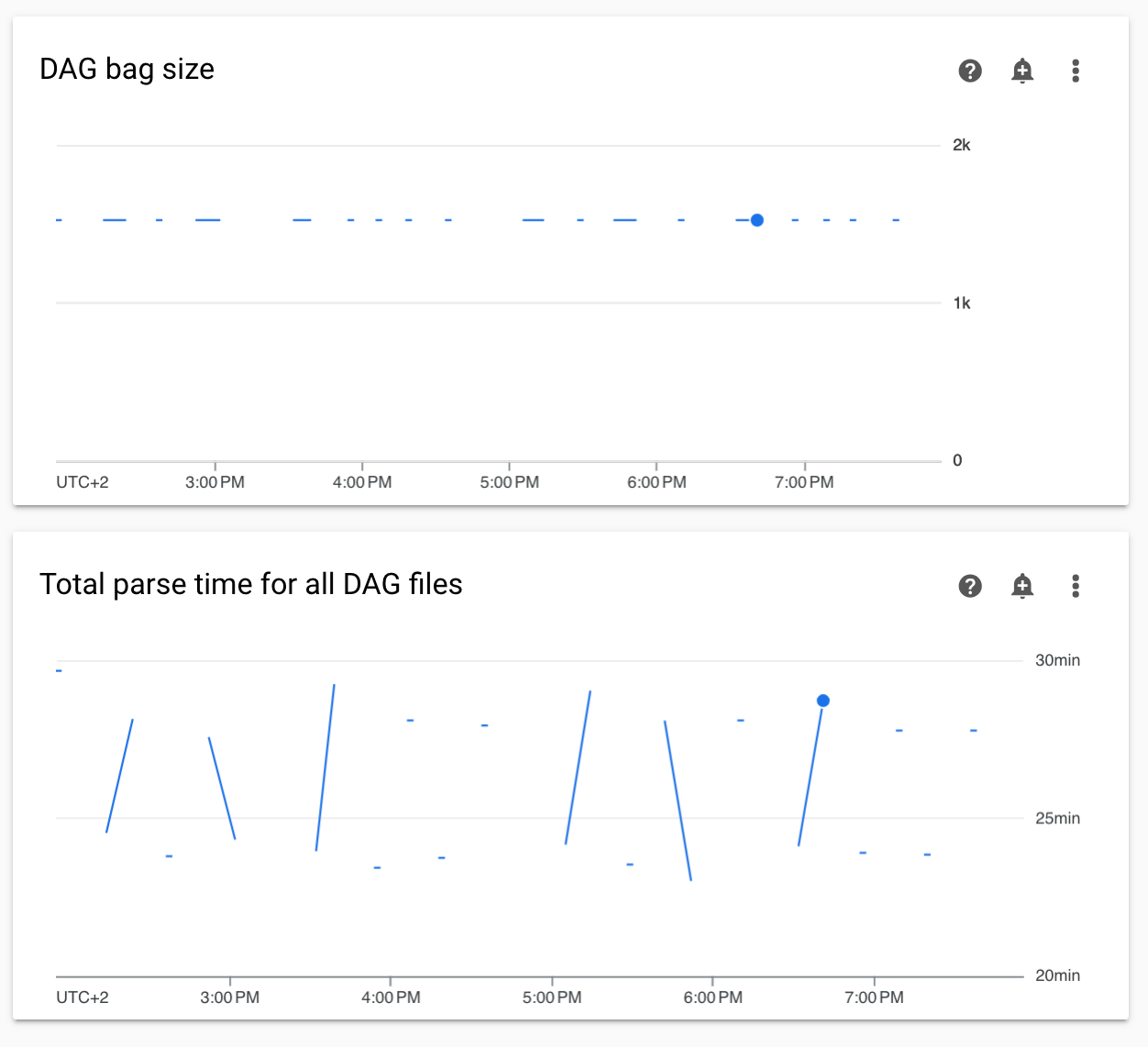](https://docs.cloud.google.com/static/composer/docs/images/composer-non-continuous-dag-parse-times.png) **Figure 1.** Non-continuous DAG parse times and DAG bag size graphs (click to enlarge)
**Solution:**
We recommend keeping total DAG parse time under 5 minutes. To reduce DAG
parsing time, follow [DAG writing guidelines](https://docs.cloud.google.com/composer/docs/composer-3/write-dags.md.txt#guidelines).
## Task logs appear with delays
**Symptom:**
- In Managed Airflow (Gen 3), Airflow task logs do not appear immediately and are delayed for a few minutes.
- You might find `Logs not found for Cloud Logging filter` messages in the Airflow logs
**Cause:**
If your environment runs a large number of tasks at the same time, task logs
can be delayed because the environment's infrastructure size is not enough to
process all logs fast enough.
**Solutions:**
- Consider increasing the environment's infrastructure size to increase performance.
- Distribute DAG runs over time, so that tasks are not executed at the same time.
## Increased startup times for KubernetesPodOperator and KubernetesExecutor
Pods created with KubernetesPodOperator and tasks executed with
KubernetesExecutor experience increased startup times. Managed Airflow
team is working on a solution and will announce when the issue is resolved.
**Workarounds:**
- Launch Pods with more CPU.
- If possible, optimize images (less layers, smaller size).
## Environment is in the ERROR state after the project's billing account was deleted or deactivated, or the Cloud Composer API was disabled
Managed Airflow environments affected by these problems are
non-recoverable:
- After the project's billing account was deleted or deactivated, even if another account was linked later.
- After the Cloud Composer API [was disabled](https://docs.cloud.google.com/composer/docs/composer-3/enable-composer-service.md.txt) in the project, even if it was enabled later.
You can do the following to address the problem:
- You still can access data stored in your environment's buckets, but the
environments themselves are no longer usable. You can create a new
Managed Airflow environment and then transfer your DAGs and data.
- If you want to perform any of the operations that make your environments
non-recoverable, make sure to back up your data, for example, by
[creating an environment's snapshot](https://docs.cloud.google.com/composer/docs/composer-3/save-load-snapshots.md.txt). In this way,
you can create another environment and transfer its data by loading this
snapshot.
## Logs for Airflow tasks aren't collected if \[core\]execute_tasks_new_python_interpreter is set to True
Managed Airflow doesn't collect logs for Airflow tasks if the
[`[core]execute_tasks_new_python_interpreter`](https://airflow.apache.org/docs/apache-airflow/stable/configurations-ref.html#execute-tasks-new-python-interpreter)
Airflow configuration option is set to `True`.
**Possible solution:**
- Remove the [override](https://docs.cloud.google.com/composer/docs/composer-3/override-airflow-configurations.md.txt) for this configuration option, or set its value to `False`.
## Error while removing Network Attachment when an environment is deleted
If several environments that share the same network attachment are deleted at
the same time, some deletion operations fail with an error.
**Symptoms:**
The following error is generated:
Got error while removing Network Attachment:
The reported error code can be `Bad request: is not ready`, or
`Precondition failed: Invalid fingerprint`.
**Possible workarounds:**
- Delete environments that use the same network attachment one by one.
- [Disable connection to a VPC network](https://docs.cloud.google.com/composer/docs/composer-3/change-networking-type.md.txt#disconnect) for your
environments before deleting them. We recommend this workaround for
automated environment deletion.
## Degraded environment performance in several google-api-core package versions
### Versions from 2.28.0 to 2.30.2
The `google-api-core` preinstalled package versions from 2.28.0 to 2.30.2 might
cause degraded environment performance, which can result in longer times to
execute a task and longer times to move a task from the queued to the executing
state.
Base container images for the affected builds are now patched, so newly created
environments aren't affected. Only existing environments that haven't refreshed
their container images since November 4, 2026 remain affected.
Affected [Managed Airflow (Gen 3) builds](https://docs.cloud.google.com/composer/docs/composer-versions.md.txt#images-composer-3):
- composer-3-airflow-3.1.7-build.0 to composer-3-airflow-3.1.7-build.5
- composer-3-airflow-3.1.0-build.5 to composer-3-airflow-3.1.0-build.10
- composer-3-airflow-2.11.1-build.0
- composer-3-airflow-2.10.5-build.22 to composer-3-airflow-2.10.5-build.33
- composer-3-airflow-2.9.3-build.42 to composer-3-airflow-2.9.3-build.53
Affected [Managed Airflow (Gen 2) builds](https://docs.cloud.google.com/composer/docs/composer-versions.md.txt#images-composer-2):
- composer-2.16.10-airflow-2.11.1
- composer-2.16.0-airflow-2.10.5 to composer-2.16.10-airflow-2.10.5
- composer-2.16.0-airflow-2.9.3 to composer-2.16.10-airflow-2.9.3
**Solutions**:
To mitigate this issue in an existing environment, upgrade to an image released
on or after November 6, 2026 (which includes `google-api-core` 2.43.1), upgrade
to one of the following builds (which include `google-api-core` 2.27.0), or
follow the self-service mitigation steps in
[Versions from 2.30.3 to 2.43.0 on Python 3.11](https://docs.cloud.google.com/composer/docs/composer-3/known-issues.md.txt#google-api-core-2-30-3-to-2-43-0):
- composer-3-airflow-2.11.1-build.1
- composer-3-airflow-2.10.5-build.34
- composer-3-airflow-2.9.3-build.54
- composer-2.16.11-airflow-2.11.1
- composer-2.16.11-airflow-2.10.5
- composer-2.16.11-airflow-2.9.3
> [!NOTE]
> **Note:** On Python 3.11, `google-api-core` versions 2.30.3 to 2.43.0 also cause a deprecation-check performance issue starting October 24, 2026; see [Versions from 2.30.3 to 2.43.0 on Python 3.11](https://docs.cloud.google.com/composer/docs/composer-3/known-issues.md.txt#google-api-core-2-30-3-to-2-43-0).
### Versions from 2.30.3 to 2.43.0 on Python 3.11
Starting October 24, 2026, `google-api-core` package versions 2.30.3 to 2.43.0
(as well as 2.28.0 to 2.30.2) run a Python 3.11 deprecation check that scans
installed package metadata whenever a Google Cloud client library is imported
in a new Python subprocess.
In Managed Airflow environments that run Python 3.11, this
behavior can degrade performance, especially in environments that have many
DAGs, frequent short-running tasks, or data lineage integration enabled.
**Status**:
- **Fixed in November 6, 2026 and later releases** : `composer-3-airflow-3.3.1-build.6`, `composer-3-airflow-3.2.2-build.10`, `composer-3-airflow-2.11.1-build.23`, `composer-2.17.17-airflow-2.11.1`, and later images preinstall `google-api-core` 2.43.1, which fixes this issue.
- **Patched base images for earlier builds** : Base container images for all affected builds listed in this section have been patched across all regions. **Newly created environments aren't affected**, even if you create them with an earlier build.
- **Existing environments**: Environments created before November 5, 2026 keep using previously cached container images until refreshed through scheduled maintenance or one of the mitigation steps in this section.
Symptoms include the following:
- Increased DAG parsing times and higher CPU usage on Airflow DAG processors.
- Longer task execution times and higher CPU usage on Airflow workers.
- Frequent `FutureWarning` log entries from `google/api_core/_python_version_support.py` stating that Python 3.11 support ends on 2027-10-24.
Prior to the image refresh, this issue affected Python 3.11 environments where
`google-api-core` version 2.30.3 to 2.43.0 was preinstalled or installed
manually, including the following builds.
Affected [Managed Airflow (Gen 3) builds](https://docs.cloud.google.com/composer/docs/composer-versions.md.txt#images-composer-3):
- composer-3-airflow-3.3.1-build.0 to composer-3-airflow-3.3.1-build.5
- composer-3-airflow-3.2.2-build.0 to composer-3-airflow-3.2.2-build.9
- composer-3-airflow-3.1.8-build.0 to composer-3-airflow-3.1.8-build.4
- composer-3-airflow-3.1.7-build.7 to composer-3-airflow-3.1.7-build.13
- composer-3-airflow-2.11.1-build.3 to composer-3-airflow-2.11.1-build.22
- composer-3-airflow-2.10.5-build.36 to composer-3-airflow-2.10.5-build.52
Affected [Managed Airflow (Gen 2) builds](https://docs.cloud.google.com/composer/docs/composer-versions.md.txt#images-composer-2):
- composer-2.17.0-airflow-2.11.1 to composer-2.17.16-airflow-2.11.1
- composer-2.17.0-airflow-2.10.5 to composer-2.17.13-airflow-2.10.5
**Mitigation for existing environments**:
- **Fast path in `asia-east1`, `asia-northeast2`, `europe-central2`,
`me-central1`, `northamerica-northeast1`, and `us-south1`** : If your
environment has already completed a scheduled maintenance window,
[set or update](https://docs.cloud.google.com/composer/docs/composer-3/set-environment-variables.md.txt#set-existing) a placeholder environment variable
to restart Airflow workloads on patched compute infrastructure:
```bash
gcloud composer environments update ENVIRONMENT_NAME \
--location LOCATION \
--update-env-variables=COMPOSER_RELOAD=1
```
After the operation finishes, check your environment logs. If
`FutureWarning` entries from `google/api_core/_python_version_support.py`
continue to appear in newly started workloads (for example, if scheduled
maintenance hasn't run yet or your project uses VPC Service Controls), apply one
of the options for all regions.
> [!NOTE]
> **Note:** In `europe-north1`, `europe-west3`, `us-east1`, and `us-west2`, scheduled maintenance automatically restarts non-worker Airflow workloads (such as schedulers and DAG processors) onto patched images. To update Airflow workers immediately as well, apply one of the following options.
- **All regions**: Choose one of the following options:
- **Option 1: Upgrade your environment** . [Upgrade](https://docs.cloud.google.com/composer/docs/composer-3/upgrade-environments.md.txt) to an
unaffected build such as `composer-3-airflow-3.3.1-build.6`,
`composer-3-airflow-3.2.2-build.10`,
`composer-3-airflow-2.11.1-build.23`, or any newer patched build.
- **Option 2: Trigger a PyPI package update** (requires PyPI repository
access). [Update an existing custom PyPI package or install an
additional package](https://docs.cloud.google.com/composer/docs/composer-3/install-python-dependencies) to rebuild your environment image from
the patched base image and restart all Airflow workloads.
On `composer-3-airflow-3.3.1-build.0` through `build.5`,
`composer-3-airflow-3.2.2-build.1` through `build.9`, and
`composer-3-airflow-3.1.8-build.3` through `build.4`, you can install
`google-api-core>=2.43.1`. Don't install `google-api-core>=2.43.1` on
earlier Airflow 3 builds (`3.2.2-build.0`, `3.1.8-build.0` through
`build.2`, `3.1.7`, `3.1.0`) or earlier Airflow 2 builds because it
requires `opentelemetry-api>=1.44.0` and causes dependency conflicts;
trigger another PyPI package update instead.
- **Option 3 (alternative workaround without upgrading or changing PyPI
packages)** : Apply a `sitecustomize.py` runtime patch. Use this option if,
for example, your environment uses VPC Service Controls without PyPI
repository access and you can't upgrade immediately:
1. Download
[sitecustomize.py](https://github.com/GoogleCloudPlatform/python-docs-samples/blob/main/composer/tools/google_api_core_workaround/sitecustomize.py)
from GitHub.
> [!IMPORTANT]
> **Important:** Don't modify the file to include the words `airflow` or `dag` (including in comments), so that Airflow's DAG discovery safe mode ignores it.
2. Upload `sitecustomize.py` to the `dags/patches` folder in your
environment's bucket.
3. [Set the `PYTHONPATH` environment variable](https://docs.cloud.google.com/composer/docs/composer-3/set-environment-variables.md.txt#set-existing) to
`/home/airflow/gcs/dags/patches`.
If `PYTHONPATH` is already set, then prepend
`/home/airflow/gcs/dags/patches:` to the existing value. Example:
`/home/airflow/gcs/dags/patches:PREVIOUS_PYTHONPATH_VALUE`
**Cleanup:** After you upgrade your environment or rebuild its image using
the preceding steps, you can remove the `PYTHONPATH` override and delete
`dags/patches/sitecustomize.py`.
## TI is no longer in the running state and task should terminate and Task Not Found errors in Airflow 3
Airflow 3 has two issues issues related to the scheduler losing task state
during scheduler restarts:
- 409 Conflict status: A race condition in schedulers causes duplicate task
instance scheduling (
[#59378](https://github.com/apache/airflow/issues/59378), resolved in
[#60330](https://github.com/apache/airflow/pull/60330)).
This issue is fixed in Airflow 3.2.2.
- 404 Not Found error: Airflow workers lose track of task instances during a
regular scheduler loop restart, which happens after the scheduler reaches
`[scheduler]num_runs`. This changes the existing task instance IDs and
generates subsequent 404 errors from a worker that isn't aware of the
change (
[#53140](https://github.com/apache/airflow/issues/53140),
[#60330](https://github.com/apache/airflow/pull/60330#issuecomment-4087499991), resolved in
[#61631](https://github.com/apache/airflow/pull/61631)).
This issue is fixed in Airflow 3.3.1.
**Symptoms**
- 409 Conflict: A restarted scheduler's orphan cleanup state marks active
tasks as `FAILED`, causing the workers to abnormally terminate:
Server indicated the task shouldn't be running anymore [supervisor]
detail={'detail': {'reason': 'not_running', 'message': 'TI is no longer in
the running state and task should terminate', 'current_state': 'scheduled'}} status_code=409 ti_id=UUID('...')
- 404 Not Found: A restarted scheduler loses task states and fails active
worker pulse checks:
Server indicated the task shouldn't be running anymore [detail={'detail':
{'reason': 'not_found', 'message': 'Task Instance not found'}}]
[status_code=404] [ti_id=...]
**Solution:**
- Both issues are fixed in Airflow version 3.3.1 and later. [Upgrade](https://docs.cloud.google.com/composer/docs/composer-3/upgrade-environments.md.txt) your environment to a version that uses Airflow 3.3.1.
**Possible workarounds:**
- It isn't possible to completely mitigate the problem in versions of
Airflow earlier than 3.3.1. Any external event that causes a single
scheduler to unexpectedly restart will trigger 404 and 409 (in Airflow
versions earlier than 3.2.2). Examples
of such events are auto-upgrades of nodes in your environment's cluster, OOM
conditions in Pods, or high memory and CPU consumption by schedulers.
- Scaling your environment down to one scheduler and [setting](https://docs.cloud.google.com/composer/docs/composer-3/override-airflow-configurations.md.txt)
the `[scheduler]num_runs` configuration option to `-1` mitigates
the cause of race conditions in schedulers.
For a highly resilient (Highly Available) environment, it isn't possible to
reduce the number of schedulers to one. You can still set the
`[scheduler]num_runs` to `-1`.
- Make sure that memory and CPU consumption by the scheduler are well within the
available [resource limits](https://docs.cloud.google.com/composer/docs/composer-3/scale-environments.md.txt).
## What's next
- [Troubleshooting environment creation](https://docs.cloud.google.com/composer/docs/composer-3/troubleshooting-environment-creation.md.txt)
- [Troubleshooting DAGs](https://docs.cloud.google.com/composer/docs/composer-3/troubleshooting-dags.md.txt)
- [Troubleshooting Airflow scheduler issues](https://docs.cloud.google.com/composer/docs/composer-3/troubleshooting-scheduling.md.txt)