**Managed Airflow (Gen 3)** \| [Managed Airflow (Gen 2)](https://docs.cloud.google.com/composer/docs/composer-2/configure-shared-vpc "View this page for Managed Airflow (Gen 2)") \| [Managed Airflow (Legacy Gen 1)](https://docs.cloud.google.com/composer/docs/composer-1/configure-shared-vpc "View this page for Managed Airflow (Legacy Gen 1)")
This page describes the Shared VPC network and host project
requirements for Managed Airflow.
[Shared VPC](https://docs.cloud.google.com/vpc/docs/shared-vpc) enables organizations to establish
budgeting and access control boundaries at the project level while
allowing for secure and efficient communication using
[private IPs](https://docs.cloud.google.com/composer/docs/composer-2/private-ip-environments) across those boundaries.
In the Shared VPC configuration, Managed Service for Apache Airflow can invoke
services hosted in other Google Cloud projects in the same organization
without exposing services to the public internet.
## Guidelines for Shared VPC
[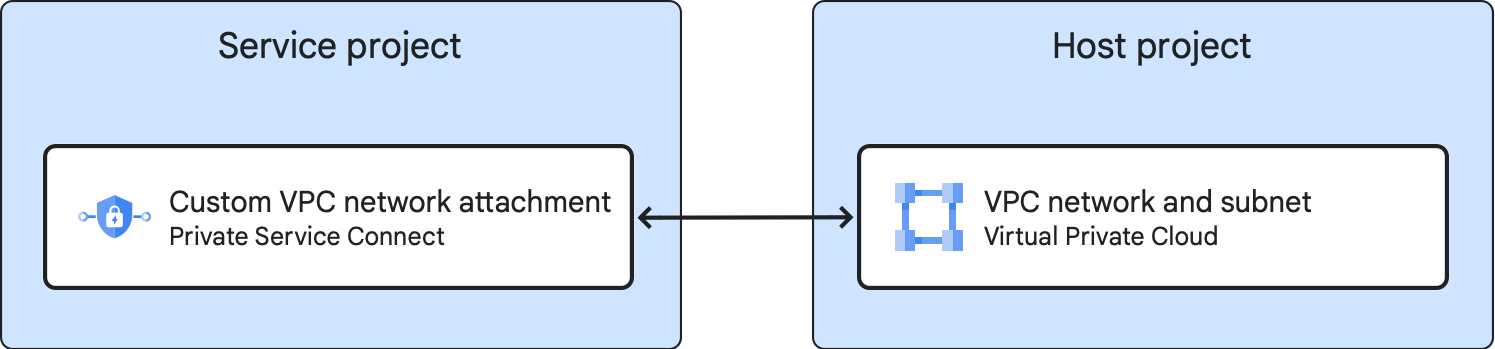](https://docs.cloud.google.com/static/composer/docs/images/composer-3-service-host-projects.png) **Figure 1.** Service and host projects for Managed Airflow (Gen 3) (click to enlarge)
- Shared VPC requires that you designate a *host project* to which
networks and subnetworks belong and a *service project*, which is attached
to the host project.
When Managed Airflow participates in a Shared VPC,
the Managed Airflow environment is in the service project.
- Make sure that Managed Airflow environment's internal IP range
and your VPC network ranges
[do not have conflicts](https://docs.cloud.google.com/composer/docs/composer-3/connect-vpc-network#internal-range).
- Managed Airflow (Gen 3) has
[a limitation of one transitive DNS hop](https://docs.cloud.google.com/composer/docs/composer-3/connect-vpc-network#vpc-peering-limitations), make
sure that your DNS configuration allows for that.
- Managed Airflow (Gen 3) doesn't support a user-defined
[`.internal` DNS zone](https://docs.cloud.google.com/compute/docs/internal-dns). If you create a DNS zone for
`.internal`, it won't be possible to reach that zone.
## Preparation
1. [Find the following project IDs and project numbers](https://docs.cloud.google.com/kubernetes-engine/docs/how-to/cluster-shared-vpc#finding_your_project_ids_and_numbers):
- Host project: The project that contains the Shared VPC network.
- Service project: The project that contains the Managed Airflow environment.
> [!IMPORTANT]
> **Important:** If you want to protect your environment with VPC Service Controls, then make sure that both host and service projects are located in the same service perimeter For more information, see [Perimeters for environments with Shared VPC and CMEK](https://docs.cloud.google.com/composer/docs/composer-3/configure-vpc-sc#shared-vpc-cmek-perimeters).
2. [Prepare your organization](https://docs.cloud.google.com/vpc/docs/provisioning-shared-vpc#prepare_your_organization).
## Configure the service project
If Managed Airflow environments were never created in the service
project, then provision the Composer Service Agent Account
**in the service project**:
gcloud beta services identity create --service=composer.googleapis.com
## Configure the host project
Configure the host project as described further.
> [!CAUTION]
> **Caution:** Do all of the described actions **in the host project**. For example, if you add roles to a service account from the service project, assign them in the host project's IAM configuration.
### Configure networking resources
Choose one of the following options:
- Option 1.
[Create a new VPC network and a subnet](https://docs.cloud.google.com/vpc/docs/create-modify-vpc-networks#create-custom-network).
- Option 2.
[Create a subnet in an existing VPC network](https://docs.cloud.google.com/vpc/docs/create-modify-vpc-networks#add-subnets).
- Option 3. Use an existing VPC network and a subnet.
### Set up Shared VPC and attach the service project
1. If not already done,
[Set up Shared VPC](https://docs.cloud.google.com/vpc/docs/provisioning-shared-vpc#enable-shared-vpc-host). If
you already have set up Shared VPC, skip to the next step.
2. [Attach the service project](https://docs.cloud.google.com/vpc/docs/provisioning-shared-vpc#create-shared), which you
use to host Managed Airflow environments.
When attaching a project, leave the default VPC Network permissions
in place.
### Grant permissions to the Composer Service Agent account
> [!WARNING]
> **Warning:** On this and next steps, when editing permissions, keep the existing account roles. Add another role to an account instead of replacing an existing role.
In the host project:
1. Edit permissions for the Composer Service Agent account,
`service-SERVICE_PROJECT_NUMBER@cloudcomposer-accounts.iam.gserviceaccount.com`)
2. Add another role, **Composer Shared VPC Agent**
(`composer.sharedVpcAgent`) at the project level.
## Conclusion
You've completed the Shared VPC network configuration for both
service and host projects.
Now you can connect new and existing environments in the service project to the
host project's VPC network. You can use one of the following approaches:
- Connect an environment to a Shared VPC network. Managed Airflow creates a new network attachment for the environment.
- Create a network attachment in the service project, connect it to a Shared VPC network, and connect one or more environments to this network attachment.
For instructions and more information about differences between the two
described approaches, see
[Connect a VPC network to your environment](https://docs.cloud.google.com/composer/docs/composer-3/connect-vpc-network).
## What's next
- [Connect a VPC network to your environment](https://docs.cloud.google.com/composer/docs/composer-3/connect-vpc-network).
- [Create a Managed Airflow environment](https://docs.cloud.google.com/composer/docs/composer-3/create-environments).