[Managed Airflow (Gen 3)](https://docs.cloud.google.com/composer/docs/composer-3/use-gke-operator "View this page for Managed Airflow (Gen 3)") \| **Managed Airflow (Gen 2)** \| [Managed Airflow (Legacy Gen 1)](https://docs.cloud.google.com/composer/docs/composer-1/use-gke-operator "View this page for Managed Airflow (Legacy Gen 1)")
This page describes how to use the Google Kubernetes Engine operators to create
clusters in Google Kubernetes Engine and to launch [Kubernetes Pods](https://kubernetes.io/docs/concepts/workloads/pods/) in those
clusters.
Google Kubernetes Engine operators run Kubernetes Pods in a specified cluster,
which can be a separate cluster that is not related to your environment.
In comparison, `KubernetesPodOperator` [runs Kubernetes Pods](https://docs.cloud.google.com/composer/docs/composer-2/use-kubernetes-pod-operator)
in the cluster of your environment.
This page walks you through an example DAG that creates a Google Kubernetes Engine
cluster with the `GKECreateClusterOperator`, uses the `GKEStartPodOperator`
with the following configurations, and then deletes it with
the `GKEDeleteClusterOperator` afterward:
- [Minimal configuration](https://docs.cloud.google.com/composer/docs/composer-2/use-gke-operator#minimal-config): Sets only the required parameters.
- [Template configuration](https://docs.cloud.google.com/composer/docs/composer-2/use-gke-operator#template-config): Uses parameters that you can template with Jinja.
- [Pod affinity configuration](https://docs.cloud.google.com/composer/docs/composer-2/use-gke-operator#affinity-config): Limits the available nodes to schedule Pods on.
- [Full configuration](https://docs.cloud.google.com/composer/docs/composer-2/use-gke-operator#full-config): Includes all configurations.
## Before you begin
> [!CAUTION]
> **Caution:** If you launch Pods in your environment's cluster, don't use Managed Airflow namespaces (`composer-*`) other than `composer-user-workloads`. These namespaces can change during environment upgrade operations. This might cause your DAGs to stop working.
## GKE operator configuration
To follow along with this example, put the entire `gke_operator.py`
file in your environment's `dags/` folder or
[add the relevant code](https://docs.cloud.google.com/composer/docs/composer-2/manage-dags) to a DAG.
## Create a cluster
The code shown here creates a Google Kubernetes Engine cluster with two node pools,
`pool-0` and `pool-1`, each of which has one node. If needed, you can set
other parameters from the [Google Kubernetes Engine API](https://docs.cloud.google.com/kubernetes-engine/docs/reference/rest) as part of the `body`.
We recommend using regional clusters. Zonal clusters are more exposed to zonal
failures. For example, you might want to use the `us-central1` region for your
cluster instead of the `us-central1-a` zone.
For more information about region-specific considerations, see
[Geography and regions](https://docs.cloud.google.com/docs/geography-and-regions#regions_and_zones).
Before the release of `apache-airflow-providers-google` version 5.1.0,
it was not possible to pass the `node_pools` object in
the `GKECreateClusterOperator`. If you use Airflow 2, make sure that your
environment uses `apache-airflow-providers-google` version 5.1.0 or later. You
can [install a newer version](https://docs.cloud.google.com/composer/docs/composer-2/install-python-dependencies#install-pypi) of this PyPI
package by specifying `apache-airflow-providers-google` and `>=5.1.0` as the
required version.
# TODO(developer): update with your values
PROJECT_ID = "my-project-id"
# It is recommended to use regional clusters for increased reliability
# though passing a zone in the location parameter is also valid
CLUSTER_REGION = "us-west1"
CLUSTER_NAME = "example-cluster"
CLUSTER = {
"name": CLUSTER_NAME,
"node_pools": [
{"name": "pool-0", "initial_node_count": 1},
{"name": "pool-1", "initial_node_count": 1},
],
}
create_cluster = GKECreateClusterOperator(
task_id="create_cluster",
project_id=PROJECT_ID,
location=CLUSTER_REGION,
body=CLUSTER,
)
## Launch workloads in the cluster
The following sections explain each `GKEStartPodOperator` configuration
in the example. For information about each configuration variable, see
the [Airflow reference for GKE operators](https://airflow.apache.org/docs/apache-airflow-providers-google/stable/operators/cloud/kubernetes_engine.html).
from airflow import models
from airflow.providers.google.cloud.operators.kubernetes_engine import (
GKECreateClusterOperator,
GKEDeleteClusterOperator,
GKEStartPodOperator,
)
from airflow.utils.dates import days_ago
from kubernetes.client import models as k8s_models
with models.DAG(
"example_gcp_gke",
schedule=None, # Override to match your needs
start_date=days_ago(1),
tags=["example"],
) as dag:
# TODO(developer): update with your values
PROJECT_ID = "my-project-id"
# It is recommended to use regional clusters for increased reliability
# though passing a zone in the location parameter is also valid
CLUSTER_REGION = "us-west1"
CLUSTER_NAME = "example-cluster"
CLUSTER = {
"name": CLUSTER_NAME,
"node_pools": [
{"name": "pool-0", "initial_node_count": 1},
{"name": "pool-1", "initial_node_count": 1},
],
}
create_cluster = GKECreateClusterOperator(
task_id="create_cluster",
project_id=PROJECT_ID,
location=CLUSTER_REGION,
body=CLUSTER,
)
kubernetes_min_pod = GKEStartPodOperator(
# The ID specified for the task.
task_id="pod-ex-minimum",
# Name of task you want to run, used to generate Pod ID.
name="pod-ex-minimum",
project_id=PROJECT_ID,
location=CLUSTER_REGION,
cluster_name=CLUSTER_NAME,
# Entrypoint of the container, if not specified the Docker container's
# entrypoint is used. The cmds parameter is templated.
cmds=["echo"],
# The namespace to run within Kubernetes, default namespace is
# `default`.
namespace="default",
# Docker image specified. Defaults to hub.docker.com, but any fully
# qualified URLs will point to a custom repository. Supports private
# gcr.io images if the Composer Environment is under the same
# project-id as the gcr.io images and the service account that Composer
# uses has permission to access the Google Container Registry
# (the default service account has permission)
image="marketplace.gcr.io/google/ubuntu2204",
)
kubernetes_template_ex = GKEStartPodOperator(
task_id="ex-kube-templates",
name="ex-kube-templates",
project_id=PROJECT_ID,
location=CLUSTER_REGION,
cluster_name=CLUSTER_NAME,
namespace="default",
image="bash",
# All parameters below are able to be templated with jinja -- cmds,
# arguments, env_vars, and config_file. For more information visit:
# https://airflow.apache.org/docs/apache-airflow/stable/macros-ref.html
# Entrypoint of the container, if not specified the Docker container's
# entrypoint is used. The cmds parameter is templated.
cmds=["echo"],
# DS in jinja is the execution date as YYYY-MM-DD, this docker image
# will echo the execution date. Arguments to the entrypoint. The docker
# image's CMD is used if this is not provided. The arguments parameter
# is templated.
arguments=["{{ ds }}"],
# The var template variable allows you to access variables defined in
# Airflow UI. In this case we are getting the value of my_value and
# setting the environment variable `MY_VALUE`. The pod will fail if
# `my_value` is not set in the Airflow UI.
env_vars={"MY_VALUE": "{{ var.value.my_value }}"},
)
kubernetes_affinity_ex = GKEStartPodOperator(
task_id="ex-pod-affinity",
project_id=PROJECT_ID,
location=CLUSTER_REGION,
cluster_name=CLUSTER_NAME,
name="ex-pod-affinity",
namespace="default",
image="perl",
cmds=["perl"],
arguments=["-Mbignum=bpi", "-wle", "print bpi(2000)"],
# affinity allows you to constrain which nodes your pod is eligible to
# be scheduled on, based on labels on the node. In this case, if the
# label 'cloud.google.com/gke-nodepool' with value
# 'nodepool-label-value' or 'nodepool-label-value2' is not found on any
# nodes, it will fail to schedule.
affinity={
"nodeAffinity": {
# requiredDuringSchedulingIgnoredDuringExecution means in order
# for a pod to be scheduled on a node, the node must have the
# specified labels. However, if labels on a node change at
# runtime such that the affinity rules on a pod are no longer
# met, the pod will still continue to run on the node.
"requiredDuringSchedulingIgnoredDuringExecution": {
"nodeSelectorTerms": [
{
"matchExpressions": [
{
# When nodepools are created in Google Kubernetes
# Engine, the nodes inside of that nodepool are
# automatically assigned the label
# 'cloud.google.com/gke-nodepool' with the value of
# the nodepool's name.
"key": "cloud.google.com/gke-nodepool",
"operator": "In",
# The label key's value that pods can be scheduled
# on.
"values": [
"pool-1",
],
}
]
}
]
}
}
},
)
kubernetes_full_pod = GKEStartPodOperator(
task_id="ex-all-configs",
name="full",
project_id=PROJECT_ID,
location=CLUSTER_REGION,
cluster_name=CLUSTER_NAME,
namespace="default",
image="perl:5.34.0",
# Entrypoint of the container, if not specified the Docker container's
# entrypoint is used. The cmds parameter is templated.
cmds=["perl"],
# Arguments to the entrypoint. The docker image's CMD is used if this
# is not provided. The arguments parameter is templated.
arguments=["-Mbignum=bpi", "-wle", "print bpi(2000)"],
# The secrets to pass to Pod, the Pod will fail to create if the
# secrets you specify in a Secret object do not exist in Kubernetes.
secrets=[],
# Labels to apply to the Pod.
labels={"pod-label": "label-name"},
# Timeout to start up the Pod, default is 120.
startup_timeout_seconds=120,
# The environment variables to be initialized in the container
# env_vars are templated.
env_vars={"EXAMPLE_VAR": "/example/value"},
# If true, logs stdout output of container. Defaults to True.
get_logs=True,
# Determines when to pull a fresh image, if 'IfNotPresent' will cause
# the Kubelet to skip pulling an image if it already exists. If you
# want to always pull a new image, set it to 'Always'.
image_pull_policy="Always",
# Annotations are non-identifying metadata you can attach to the Pod.
# Can be a large range of data, and can include characters that are not
# permitted by labels.
annotations={"key1": "value1"},
# Optional resource specifications for Pod, this will allow you to
# set both cpu and memory limits and requirements.
# Prior to Airflow 2.3 and the cncf providers package 5.0.0
# resources were passed as a dictionary. This change was made in
# https://github.com/apache/airflow/pull/27197
# Additionally, "memory" and "cpu" were previously named
# "limit_memory" and "limit_cpu"
# resources={'limit_memory': "250M", 'limit_cpu': "100m"},
container_resources=k8s_models.V1ResourceRequirements(
limits={"memory": "250M", "cpu": "100m"},
),
# If true, the content of /airflow/xcom/return.json from container will
# also be pushed to an XCom when the container ends.
do_xcom_push=False,
# List of Volume objects to pass to the Pod.
volumes=[],
# List of VolumeMount objects to pass to the Pod.
volume_mounts=[],
# Affinity determines which nodes the Pod can run on based on the
# config. For more information see:
# https://kubernetes.io/docs/concepts/configuration/assign-pod-node/
affinity={},
)
delete_cluster = GKEDeleteClusterOperator(
task_id="delete_cluster",
name=CLUSTER_NAME,
project_id=PROJECT_ID,
location=CLUSTER_REGION,
)
create_cluster >> kubernetes_min_pod >> delete_cluster
create_cluster >> kubernetes_full_pod >> delete_cluster
create_cluster >> kubernetes_affinity_ex >> delete_cluster
create_cluster >> kubernetes_template_ex >> delete_cluster
### Minimal configuration
To launch a Pod in your GKE cluster with
the `GKEStartPodOperator`, only the `project_id`, `location`, `cluster_name`,
`name`, `namespace`, `image`, and `task_id` options are required.
When you place the following code snippet in a DAG, the `pod-ex-minimum` task
succeeds as long as the previously listed parameters are defined and valid.
# TODO(developer): update with your values
PROJECT_ID = "my-project-id"
# It is recommended to use regional clusters for increased reliability
# though passing a zone in the location parameter is also valid
CLUSTER_REGION = "us-west1"
CLUSTER_NAME = "example-cluster"
kubernetes_min_pod = GKEStartPodOperator(
# The ID specified for the task.
task_id="pod-ex-minimum",
# Name of task you want to run, used to generate Pod ID.
name="pod-ex-minimum",
project_id=PROJECT_ID,
location=CLUSTER_REGION,
cluster_name=CLUSTER_NAME,
# Entrypoint of the container, if not specified the Docker container's
# entrypoint is used. The cmds parameter is templated.
cmds=["echo"],
# The namespace to run within Kubernetes, default namespace is
# `default`.
namespace="default",
# Docker image specified. Defaults to hub.docker.com, but any fully
# qualified URLs will point to a custom repository. Supports private
# gcr.io images if the Composer Environment is under the same
# project-id as the gcr.io images and the service account that Composer
# uses has permission to access the Google Container Registry
# (the default service account has permission)
image="marketplace.gcr.io/google/ubuntu2204",
)
### Template configuration
Airflow supports using
[Jinja Templating](https://airflow.apache.org/docs/apache-airflow/stable/tutorial.html#templating-with-jinja).
You must declare the required variables (`task_id`, `name`, `namespace`,
and `image`) with the operator. As shown in the following example, you can
template all other parameters with Jinja, including `cmds`, `arguments`,
and `env_vars`.
Without changing the DAG or your environment, the `ex-kube-templates` task
fails. Set an Airflow variable called `my_value` to make this DAG succeed.
To set `my_value` with `gcloud` or the Airflow UI:
### gcloud
Enter the following command:
gcloud composer environments run ENVIRONMENT \
--location LOCATION \
variables set -- \
my_value example_value
Replace:
- `ENVIRONMENT` with the name of the environment.
- `LOCATION` with the region where the environment is located.
### Airflow UI
In the Airflow UI:
1. In the toolbar, select **Admin \> Variables**.
2. On the **List Variable** page, click **Add a new record**.
3. On the **Add Variable** page, enter the following information:
- Key:`my_value`
- Val: `example_value`
4. Click **Save**.
Template configuration:
# TODO(developer): update with your values
PROJECT_ID = "my-project-id"
# It is recommended to use regional clusters for increased reliability
# though passing a zone in the location parameter is also valid
CLUSTER_REGION = "us-west1"
CLUSTER_NAME = "example-cluster"
kubernetes_template_ex = GKEStartPodOperator(
task_id="ex-kube-templates",
name="ex-kube-templates",
project_id=PROJECT_ID,
location=CLUSTER_REGION,
cluster_name=CLUSTER_NAME,
namespace="default",
image="bash",
# All parameters below are able to be templated with jinja -- cmds,
# arguments, env_vars, and config_file. For more information visit:
# https://airflow.apache.org/docs/apache-airflow/stable/macros-ref.html
# Entrypoint of the container, if not specified the Docker container's
# entrypoint is used. The cmds parameter is templated.
cmds=["echo"],
# DS in jinja is the execution date as YYYY-MM-DD, this docker image
# will echo the execution date. Arguments to the entrypoint. The docker
# image's CMD is used if this is not provided. The arguments parameter
# is templated.
arguments=["{{ ds }}"],
# The var template variable allows you to access variables defined in
# Airflow UI. In this case we are getting the value of my_value and
# setting the environment variable `MY_VALUE`. The pod will fail if
# `my_value` is not set in the Airflow UI.
env_vars={"MY_VALUE": "{{ var.value.my_value }}"},
)
### Pod Affinity Configuration
When you configure the `affinity` parameter in the `GKEStartPodOperator`, you
control what nodes to schedule Pods on, such as nodes only in a particular
node pool. When you created your cluster, you created two node pools named
`pool-0` and `pool-1`. This operator dictates that Pods must run only in
`pool-1`.
[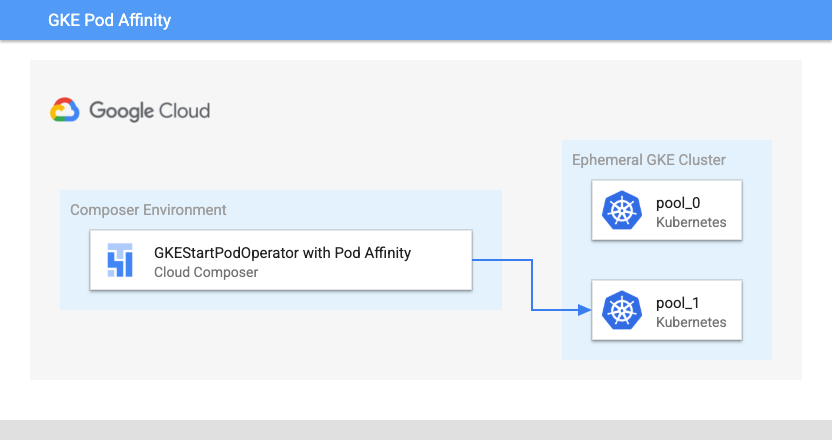](https://docs.cloud.google.com/static/composer/docs/images/architecture-gke-pod-affinity.png) Managed Airflow Kubernetes Pod Launch Location with Pod Affinity (click to enlarge)
# TODO(developer): update with your values
PROJECT_ID = "my-project-id"
# It is recommended to use regional clusters for increased reliability
# though passing a zone in the location parameter is also valid
CLUSTER_REGION = "us-west1"
CLUSTER_NAME = "example-cluster"
kubernetes_affinity_ex = GKEStartPodOperator(
task_id="ex-pod-affinity",
project_id=PROJECT_ID,
location=CLUSTER_REGION,
cluster_name=CLUSTER_NAME,
name="ex-pod-affinity",
namespace="default",
image="perl",
cmds=["perl"],
arguments=["-Mbignum=bpi", "-wle", "print bpi(2000)"],
# affinity allows you to constrain which nodes your pod is eligible to
# be scheduled on, based on labels on the node. In this case, if the
# label 'cloud.google.com/gke-nodepool' with value
# 'nodepool-label-value' or 'nodepool-label-value2' is not found on any
# nodes, it will fail to schedule.
affinity={
"nodeAffinity": {
# requiredDuringSchedulingIgnoredDuringExecution means in order
# for a pod to be scheduled on a node, the node must have the
# specified labels. However, if labels on a node change at
# runtime such that the affinity rules on a pod are no longer
# met, the pod will still continue to run on the node.
"requiredDuringSchedulingIgnoredDuringExecution": {
"nodeSelectorTerms": [
{
"matchExpressions": [
{
# When nodepools are created in Google Kubernetes
# Engine, the nodes inside of that nodepool are
# automatically assigned the label
# 'cloud.google.com/gke-nodepool' with the value of
# the nodepool's name.
"key": "cloud.google.com/gke-nodepool",
"operator": "In",
# The label key's value that pods can be scheduled
# on.
"values": [
"pool-1",
],
}
]
}
]
}
}
},
)
### Full Configuration
This example shows all the variables that you can configure in
the `GKEStartPodOperator`. You don't need to modify the code for
the `ex-all-configs` task to succeed.
For details on each variable, see
the [Airflow reference for GKE operators](https://airflow.apache.org/docs/apache-airflow-providers-google/stable/operators/cloud/kubernetes_engine.html).
# TODO(developer): update with your values
PROJECT_ID = "my-project-id"
# It is recommended to use regional clusters for increased reliability
# though passing a zone in the location parameter is also valid
CLUSTER_REGION = "us-west1"
CLUSTER_NAME = "example-cluster"
kubernetes_full_pod = GKEStartPodOperator(
task_id="ex-all-configs",
name="full",
project_id=PROJECT_ID,
location=CLUSTER_REGION,
cluster_name=CLUSTER_NAME,
namespace="default",
image="perl:5.34.0",
# Entrypoint of the container, if not specified the Docker container's
# entrypoint is used. The cmds parameter is templated.
cmds=["perl"],
# Arguments to the entrypoint. The docker image's CMD is used if this
# is not provided. The arguments parameter is templated.
arguments=["-Mbignum=bpi", "-wle", "print bpi(2000)"],
# The secrets to pass to Pod, the Pod will fail to create if the
# secrets you specify in a Secret object do not exist in Kubernetes.
secrets=[],
# Labels to apply to the Pod.
labels={"pod-label": "label-name"},
# Timeout to start up the Pod, default is 120.
startup_timeout_seconds=120,
# The environment variables to be initialized in the container
# env_vars are templated.
env_vars={"EXAMPLE_VAR": "/example/value"},
# If true, logs stdout output of container. Defaults to True.
get_logs=True,
# Determines when to pull a fresh image, if 'IfNotPresent' will cause
# the Kubelet to skip pulling an image if it already exists. If you
# want to always pull a new image, set it to 'Always'.
image_pull_policy="Always",
# Annotations are non-identifying metadata you can attach to the Pod.
# Can be a large range of data, and can include characters that are not
# permitted by labels.
annotations={"key1": "value1"},
# Optional resource specifications for Pod, this will allow you to
# set both cpu and memory limits and requirements.
# Prior to Airflow 2.3 and the cncf providers package 5.0.0
# resources were passed as a dictionary. This change was made in
# https://github.com/apache/airflow/pull/27197
# Additionally, "memory" and "cpu" were previously named
# "limit_memory" and "limit_cpu"
# resources={'limit_memory': "250M", 'limit_cpu': "100m"},
container_resources=k8s_models.V1ResourceRequirements(
limits={"memory": "250M", "cpu": "100m"},
),
# If true, the content of /airflow/xcom/return.json from container will
# also be pushed to an XCom when the container ends.
do_xcom_push=False,
# List of Volume objects to pass to the Pod.
volumes=[],
# List of VolumeMount objects to pass to the Pod.
volume_mounts=[],
# Affinity determines which nodes the Pod can run on based on the
# config. For more information see:
# https://kubernetes.io/docs/concepts/configuration/assign-pod-node/
affinity={},
)
## Delete the cluster
The code shown here deletes the cluster that was created at the beginning of
the guide.
delete_cluster = GKEDeleteClusterOperator(
task_id="delete_cluster",
name=CLUSTER_NAME,
project_id=PROJECT_ID,
location=CLUSTER_REGION,
)
## What's next
- [Use the `KubernetesPodOperator`](https://docs.cloud.google.com/composer/docs/composer-2/use-kubernetes-pod-operator)
- [Manage dags](https://docs.cloud.google.com/composer/docs/composer-2/manage-dags)