[Managed Airflow (Gen 3)](https://docs.cloud.google.com/composer/docs/composer-3/troubleshooting-triggerer "View this page for Managed Airflow (Gen 3)") \| **Managed Airflow (Gen 2)** \| Managed Airflow (Legacy Gen 1)
This page provides troubleshooting steps and information for common
issues with the Airflow triggerer.
## Blocking operations in trigger
Asynchronous tasks might occasionally become blocked in triggerers.
In most cases, the problems come from insufficient triggerer resources
or issues with custom asynchronous operator code.
[Triggerer logs](https://docs.cloud.google.com/composer/docs/composer-2/view-logs#streaming) surface any warning messages that can
help you identify root causes of decreased triggerer performance. There are two
significant warnings to look for.
1. Async thread blocked:
Triggerer's async thread was blocked for 1.2 seconds, likely due to the
highly utilized environment.
This warning signals issues with performance because of a high volume of
asynchronous tasks.
**Solution**: To address this issue:
- [Adjust triggerer parameters](https://docs.cloud.google.com/composer/docs/composer-2/scale-environments#triggerer-parameters) to allocate more resources to the triggerers or increase the number of triggerers in your environment.
- Reduce the number of deferred tasks that are executed at the same time.
Even though triggerers handle deferrable tasks, Airflow workers that are
responsible for starting and eventually completing each task. If you are
adjusting the number of triggerers, consider also
[scaling the number of your worker instances](https://docs.cloud.google.com/composer/docs/composer-2/scale-environments#worker-parameters).
2. A specific task blocked the async thread:
WARNING - Executing result=None> took 0.401
second
This warning points to a specific piece of operator code executed by
Managed Service for Apache Airflow. Triggers by design rely on the `asyncio` library for
running operations in the background. A custom implementation of a trigger
can fail to properly adhere to `asyncio` contracts (for example, because of
incorrect usage of `await` and `async` keywords in Python code).
**Solution**: Inspect the code reported by the warning and check if the
asynchronous operation is properly implemented.
## Too many triggers
The number of deferred tasks is visible in the `task_count` metric which is
also displayed on the [Monitoring dashboard](https://docs.cloud.google.com/composer/docs/composer-2/use-monitoring-dashboard) of your
environment. Each trigger creates some resources such as connections to
external resources, which consume memory.
[](https://docs.cloud.google.com/static/composer/docs/images/composer-2-triggerer-running-and-queued-tasks.png) **Figure 1.** Deferred tasks displayed on the Monitoring dashboard (click to enlarge)
Graphs of memory and CPU consumption indicate that insufficient resources cause
restarts because the liveness probe fails because of missing heartbeats:
[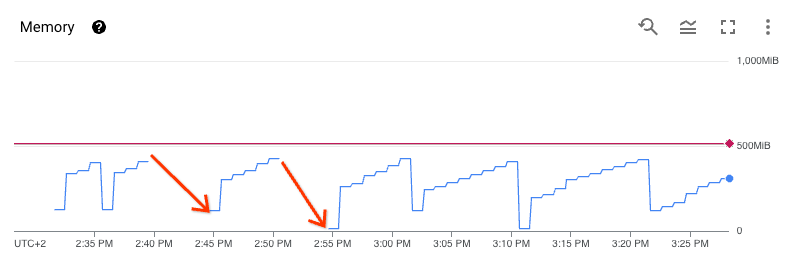](https://docs.cloud.google.com/static/composer/docs/images/composer-2-triggerer-restarts.png) **Figure 1.** Triggerer restarts because of insufficient resources (click to enlarge)
**Solution**: To address this issue:
- [Adjust triggerer parameters](https://docs.cloud.google.com/composer/docs/composer-2/scale-environments#triggerer-parameters) to allocate more resources to the triggerers or increase the number of triggerers in your environment.
- Reduce the number of deferred tasks that are executed at the same time.
## Crash of an Airflow worker during the callback execution
After the trigger finishes the execution, the control returns to an Airflow
worker, which runs a callback method using an execution slot. This phase is
controlled by Celery Executor and therefore the corresponding configuration and
resource limits apply (such as `parallelism` or `worker_concurrency`).
If the callback method fails in the Airflow worker, the worker fails, or the
worker that runs the method restarts, then the task is marked as `FAILED`. In
this case, the retry operation re-executes the entire task, not only the
callback method.
## Infinite loop in a trigger
It is possible to implement a custom trigger operator in such a way that it
entirely blocks the main triggerer loop, so that only the one broken trigger is
executed at the time. In this case, a warning
[is generated in the triggerer logs](https://docs.cloud.google.com/composer/docs/composer-2/view-logs#streaming) after the
problematic trigger is finished.
## Trigger class not found
Because the DAGs folder is not synchronized with the Airflow triggerer, the
inlined trigger code is missing when the trigger is executed. The error is
generated in the logs of the failed task:
ImportError: Module "PACKAGE_NAME" does not define a "CLASS_NAME" attribute/
class
**Solution** : [Import the missing code from PyPI](https://docs.cloud.google.com/composer/docs/composer-2/install-python-dependencies).
## Warning message about the triggerer in the Airflow UI
In some cases after the triggerer is disabled, you might see the following
warning message in the [Airflow UI](https://docs.cloud.google.com/composer/docs/composer-2/access-airflow-web-interface).
The triggerer does not appear to be running. Last heartbeat was received
4 hours ago. Triggers will not run, and any deferred operator will remain
deferred until it times out or fails.
Airflow can show this message because incomplete triggers remain in the Airflow
database. This message usually means that the triggerer was disabled before all
triggers were completed in your environment.
You can view all triggers that are running in the environment by checking the
**Browse** \> **Triggers** page in the Airflow UI. The `Admin` role
is required.
**Solutions**:
- [Enable the triggerer](https://docs.cloud.google.com/composer/docs/composer-2/scale-environments#triggerer-parameters) again and wait for deferred tasks to complete.
- [Access the Airflow database](https://docs.cloud.google.com/composer/docs/composer-2/access-airflow-database) and delete incomplete triggers manually.
## Tasks remain in the deferred state after the triggerer is disabled
When the triggerer is disabled, tasks that are already in the deferred state
remain in this state until the timeout is reached. This timeout can be
infinite, depending on the Airflow and DAG configuration.
Use one of the following solutions:
- Manually mark the tasks as failed.
- Enable the triggerer to complete the tasks.
We recommend to disable the triggerer only if your environment does not run any
deferred operators or tasks, and all deferred tasks are completed.
## What's next
- [Airflow triggerer metrics](https://docs.cloud.google.com/composer/docs/composer-2/monitor-environments#airflow-metrics)
- [Airflow triggerer logs](https://docs.cloud.google.com/composer/docs/composer-2/view-logs#streaming)