[Managed Airflow (Gen 3)](https://docs.cloud.google.com/composer/docs/composer-3/environment-architecture "View this page for Managed Airflow (Gen 3)") \| **Managed Airflow (Gen 2)** \| [Managed Airflow (Legacy Gen 1)](https://docs.cloud.google.com/composer/docs/composer-1/environment-architecture "View this page for Managed Airflow (Legacy Gen 1)")
This page describes the architecture of Managed Airflow environments.
## Environment architecture configurations
Managed Airflow (Gen 2) environments can have the following architecture
configurations:
- [Public IP architecture](https://docs.cloud.google.com/composer/docs/composer-2/environment-architecture#public-ip)
- [Private IP architecture](https://docs.cloud.google.com/composer/docs/composer-2/environment-architecture#private-ip-psc)
- [Highly resilient Private IP architecture](https://docs.cloud.google.com/composer/docs/composer-2/environment-architecture#private-ip-high-resilience)
## Customer and tenant projects
When you create an environment, Managed Airflow distributes the
environment's resources between a tenant and a customer project:
- *Customer project* is a Google Cloud project where you create your
environments. You can create more than one environment in a single customer
project.
- *Tenant project* is a Google-managed [tenant project](https://docs.cloud.google.com/service-infrastructure/docs/glossary#tenant) and
belongs to the Google.com organization. The tenant project provides unified
access control and an additional layer of data security to your
environment. Each Managed Airflow environment has its own tenant
project.
## Environment components
A Managed Airflow environment consists of environment components.
An *environment component* is an element of a managed Airflow infrastructure
that runs on Google Cloud, as a part of your environment. Environment
components run either in the tenant or in the customer project of
your environment.
### Environment's cluster
*Environment's cluster* is an [Autopilot](https://docs.cloud.google.com/kubernetes-engine/docs/concepts/types-of-clusters#modes) mode
[VPC-native](https://docs.cloud.google.com/kubernetes-engine/docs/concepts/types-of-clusters#vpc-clusters) Google Kubernetes Engine cluster of your
environment:
> [!CAUTION]
> **Caution:** Do not introduce changes in the environment's cluster. Clusters for Managed Airflow and workloads deployed into them are managed by Google. It is possible to change the configuration of your environment's cluster, but doing so might break your environment. If you delete an environment's cluster, it cannot be restored; you must delete the environment and create a new environment.
By default, Managed Airflow enables
[node auto-upgrades](https://docs.cloud.google.com/kubernetes-engine/docs/how-to/node-auto-upgrades) and [node auto-repair](https://docs.cloud.google.com/kubernetes-engine/docs/how-to/node-auto-repair)
to protect your environment's cluster from security vulnerabilities. These
operations happen during maintenance windows that you specify for your
environment.
### Environment's bucket
*Environment's bucket* is a [Cloud Storage bucket](https://docs.cloud.google.com/composer/docs/composer-2/cloud-storage)
that stores DAGs, plugins, data dependencies, and Airflow logs. Environment's
bucket is located in the customer project.
When you [upload your DAG files](https://docs.cloud.google.com/composer/docs/composer-2/manage-dags) to the `/dags` folder in your
environment's bucket, Managed Airflow synchronizes the DAGs to Airflow components of your environment.
### Airflow web server
*Airflow web server* runs the Airflow UI of your environment.
Managed Airflow provides access to the interface based on user
identities and IAM policy bindings defined for users.
### Airflow database
*Airflow database* is a [Cloud SQL instance](https://docs.cloud.google.com/sql/docs/introduction)
that runs in the tenant project of your environment. It hosts the Airflow
metadata database.
To protect sensitive connection and workflow information,
Managed Airflow allows database access only to
the [service account](https://docs.cloud.google.com/composer/docs/composer-2/access-control#service-account) of your environment.
### Other airflow components
Other Airflow components that run in your environment are:
- *Airflow schedulers* parse DAG definition files, schedule DAG runs
based on the schedule interval, and queues tasks for execution by
Airflow workers.
In Managed Airflow (Gen 2)
Airflow DAG processors run as a part of scheduler components.
- *Airflow triggerers* asynchronously monitor all deferred tasks in your
environment. If you set the number of triggerers in your environment above
zero, then you can use
[deferrable operators in your DAGs](https://docs.cloud.google.com/composer/docs/composer-2/use-deferrable-operators).
- *Airflow workers* execute tasks that are scheduled by Airflow
schedulers.
The minimum and maximum number of workers in your environment changes
dynamically depending on the number of tasks in the queue.
## Public IP environment architecture
[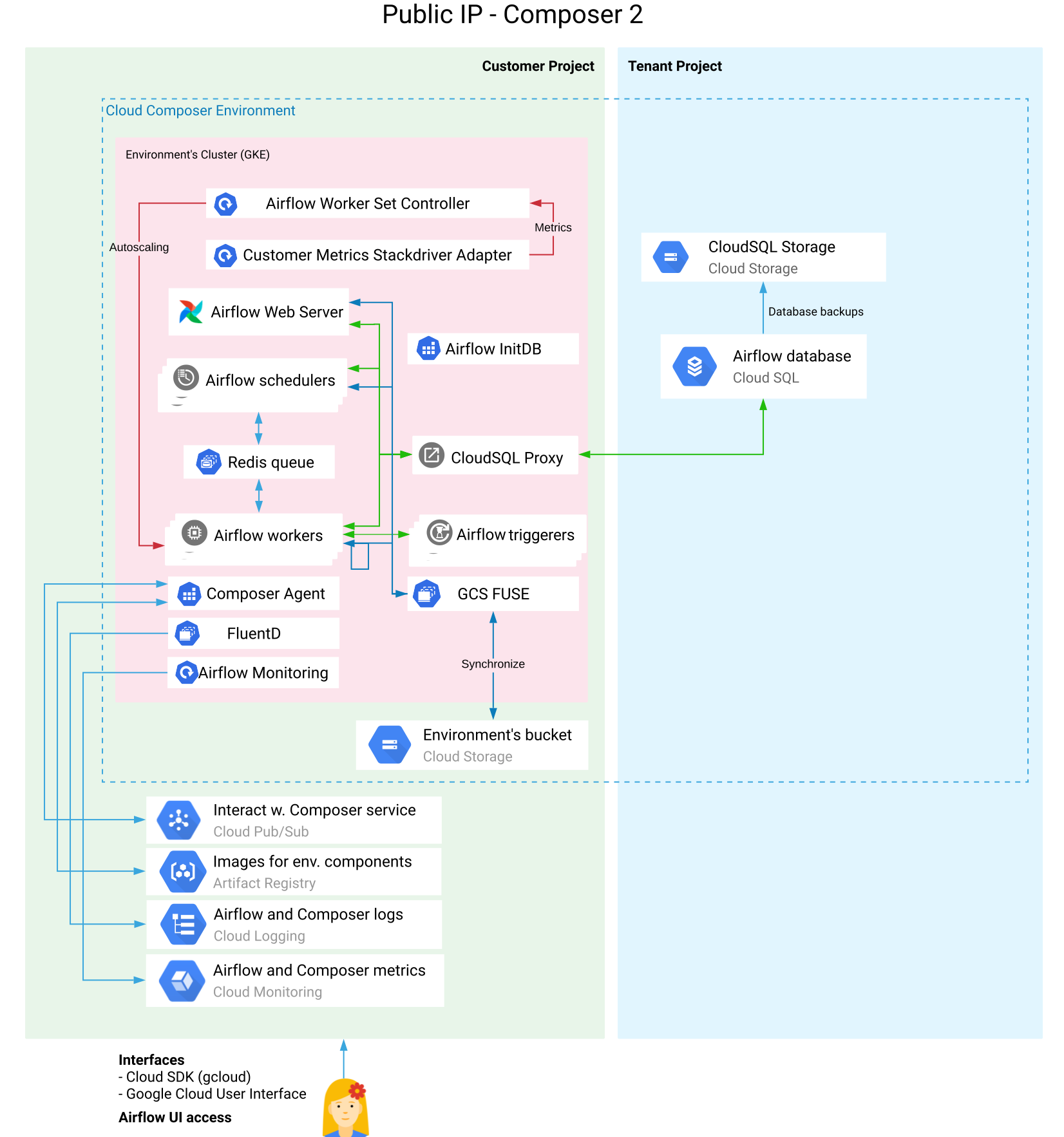](https://docs.cloud.google.com/static/composer/docs/images/composer-2-public-ip-architecture.svg) **Figure 1.** Public IP environment architecture (click to enlarge)
In a Public IP environment architecture for Managed Airflow (Gen 2):
- The tenant project hosts a Cloud SQL instance and Cloud SQL storage.
- The customer project hosts all other components of the environment.
- Airflow schedulers and workers in the customer project communicate with the Airflow database through a Cloud SQL proxy instance located in the customer project.
## Private IP environment architecture
[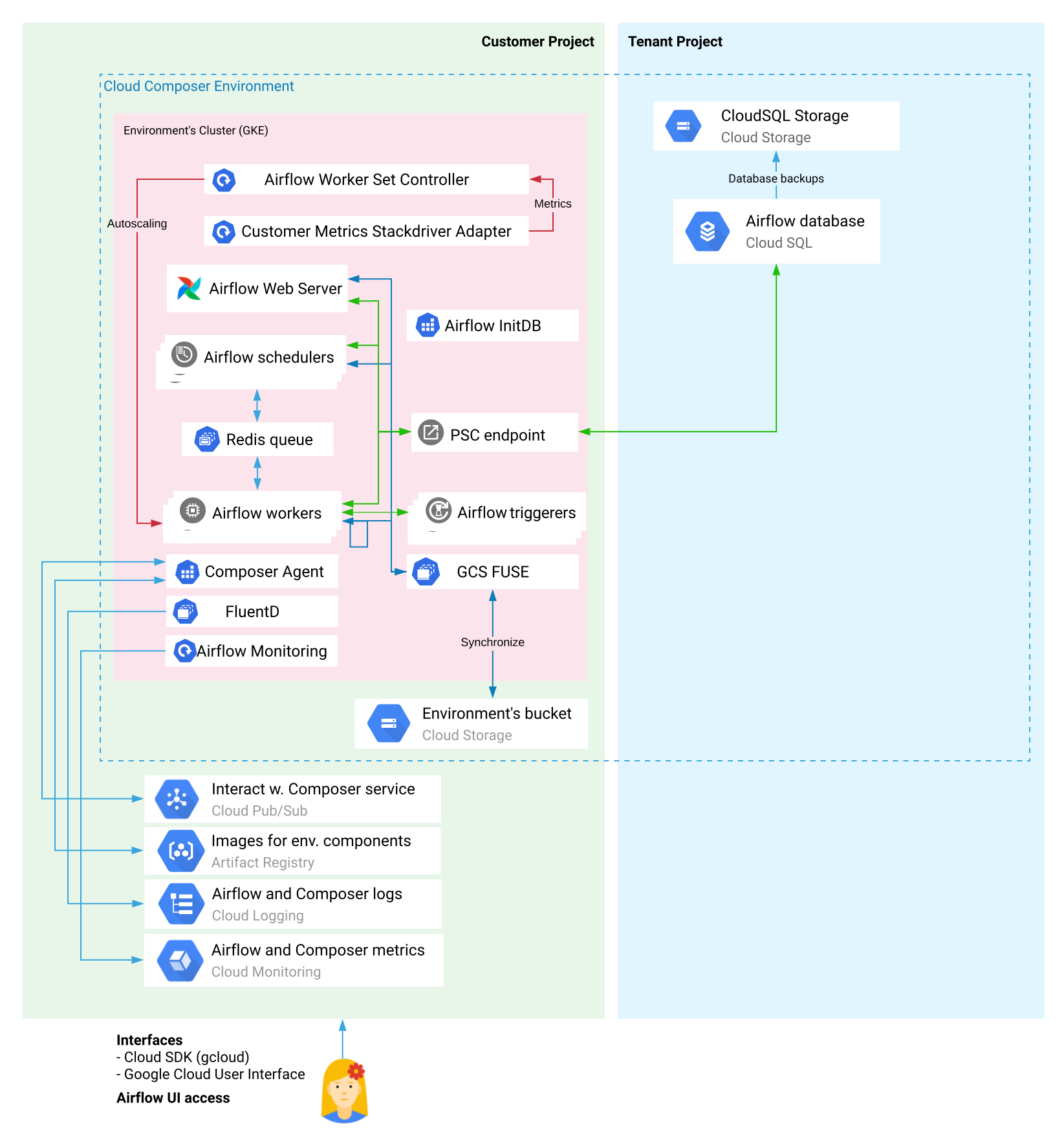](https://docs.cloud.google.com/static/composer/docs/images/composer-2-private-ip-psc-architecture.svg) **Figure 2.** Private IP Managed Airflow environment resources in the tenant project and the customer project (click to enlarge)
By default, Managed Airflow (Gen 2)
[uses Private Service Connect](https://docs.cloud.google.com/composer/docs/composer-2/configure-private-service-connect), so that your
Private IP environments communicate internally without the use of VPC
peerings. It's also possible to use VPC peerings instead of
Private Service Connect in your environment. This is a
non-default option.
In the Private IP environment architecture:
- The tenant project hosts a Cloud SQL instance and Cloud SQL storage.
- The customer project hosts all other components of the environment.
- Airflow schedulers and workers connect to the Airflow database through the configured [PSC endpoint](https://docs.cloud.google.com/vpc/docs/configure-private-service-connect-services#create-endpoint).
> [!NOTE]
> **Note:** If the [Domain Restricted Sharing (DRS) organizational policy](https://docs.cloud.google.com/resource-manager/docs/organization-policy/org-policy-constraints) is enabled in your project, Managed Airflow (Gen 2) still uses the Private IP architecture. Only Managed Airflow (Legacy Gen 1) uses a different type of architecture when DRS is enabled.
## Highly resilient Private IP architecture
[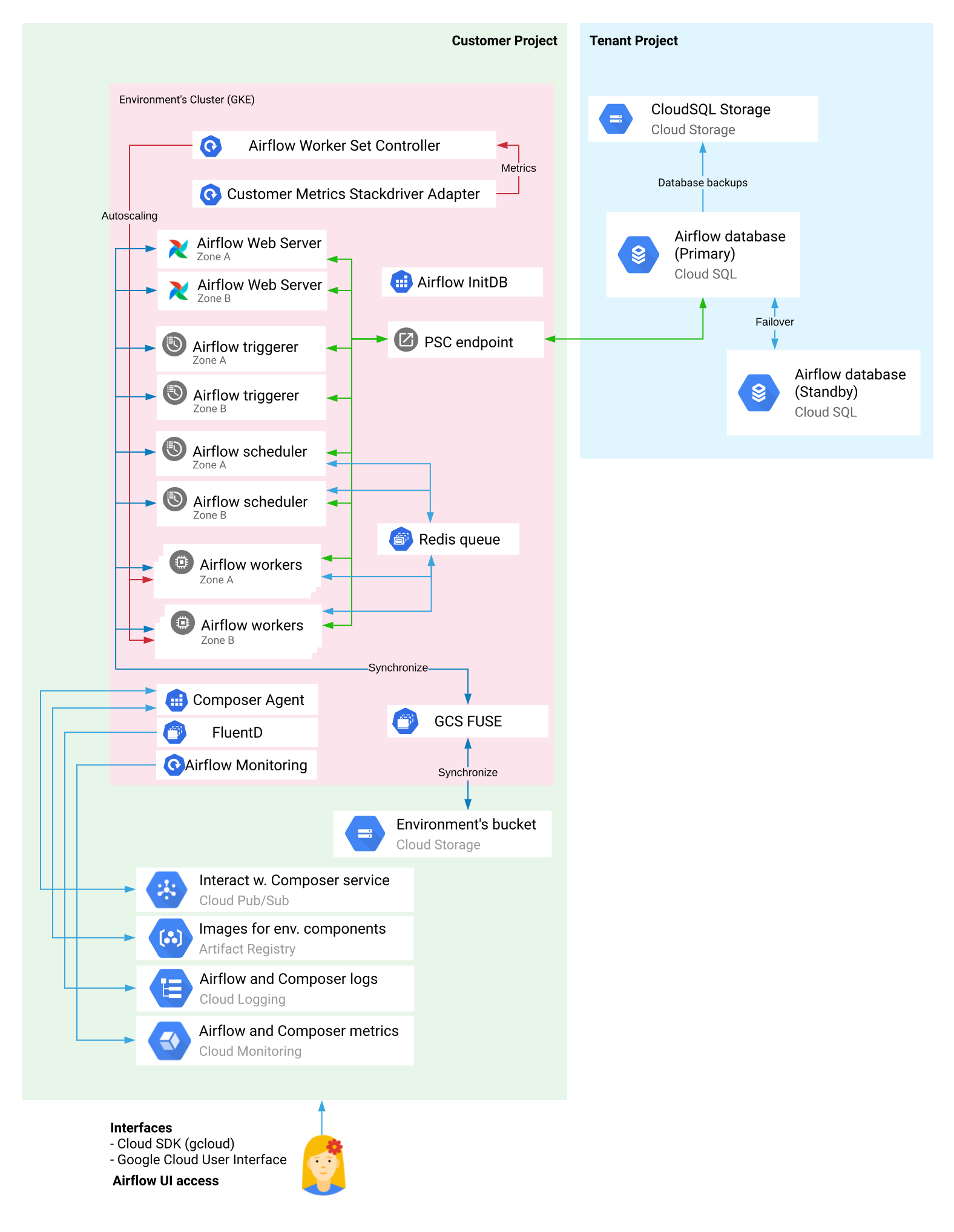](https://docs.cloud.google.com/static/composer/docs/images/composer-2-private-ip-psc-high-resilience-architecture.svg) **Figure 3.** Highly resilient Private IP Managed Airflow environment resources in the tenant project and the customer project (click to enlarge)
Highly resilient (Highly Available) Managed Airflow environments are
multi-zonal environments that use built-in redundancy and failover
mechanisms that reduce the environment's susceptibility to zonal failures and
single point of failure outages.
In this type of Private IP environment:
- A Cloud SQL component of your environment has a primary instance and a standby instance that are distributed between zones.
- Your environment runs two Airflow schedulers, two web servers, and if triggerers are used, a minimum of two (up to ten total) triggerers. These pairs of components run in two separate zones.
- The minimum number of workers is set to two, and your environment's cluster distributes worker instances between zones. In case of a zonal outage, affected worker instances are rescheduled in a different zone.
## Integration with Cloud Logging and Cloud Monitoring
Managed Airflow integrates with Cloud Logging and
Cloud Monitoring of your Google Cloud project, so that you have a
central place to view [Airflow and DAG logs](https://docs.cloud.google.com/composer/docs/composer-2/view-logs).
Cloud Monitoring collects and ingests metrics, events, and metadata
from Managed Airflow to
[generate insights through dashboards and charts](https://docs.cloud.google.com/composer/docs/composer-2/monitor-environments).
Because of the streaming nature of Cloud Logging, you can view logs emitted by Airflow components immediately instead of waiting for Airflow logs to appear in the Cloud Storage bucket of your environment.
To limit the number of logs in your Google Cloud project,
you can [stop all logs ingestion](https://docs.cloud.google.com/logging/docs/exclusions#stop-logs). Do not
disable Logging.
## What's next
- [Create an environment](https://docs.cloud.google.com/composer/docs/composer-2/create-environments)
- [Versioning overview](https://docs.cloud.google.com/composer/docs/composer-versioning-overview)