[Managed Airflow (Gen 3)](https://docs.cloud.google.com/composer/docs/composer-3/known-issues.md.txt "View this page for Managed Airflow (Gen 3)") \| [Managed Airflow (Gen 2)](https://docs.cloud.google.com/composer/docs/composer-2/known-issues.md.txt "View this page for Managed Airflow (Gen 2)") \| **Managed Airflow (Legacy Gen 1)**
This page lists known Managed Airflow issues. For information about
issue fixes, see [Release notes](https://docs.cloud.google.com/composer/docs/release-notes.md.txt).
Some issues affect earlier versions, and can be fixed by
[upgrading your environment](https://docs.cloud.google.com/composer/docs/composer-1/upgrade-environments.md.txt).
## Non-RFC 1918 address ranges are partially supported for Pods and Services
Managed Airflow depends on GKE to deliver support
for non-RFC 1918 addresses for Pods and Services. Only the following
list of Non-RFC 1918 ranges is supported in Managed Airflow:
- 100.64.0.0/10
- 192.0.0.0/24
- 192.0.2.0/24
- 192.88.99.0/24
- 198.18.0.0/15
- 198.51.100.0/24
- 203.0.113.0/24
- 240.0.0.0/4
## Airflow UI does not show tasks logs when DAG Serialization is on in Composer 1.10.2 and Composer 1.10.3
Enabling [DAG serialization](https://docs.cloud.google.com/composer/docs/composer-1/dag-serialization.md.txt) in environments
using Composer versions 1.10.2 and 1.10.3 prevents logs from showing in the
Airflow web server. Upgrade to version 1.10.4 (or later) to fix this issue.
## Intermittent Task Failure during scheduling in Managed Airflow
The issue is seen in the Airflow scheduler for the task instance during the
execution of a task. However, the logs don't explain the cause of task failure
and the Airflow worker and Airflow scheduler looked relatively healthy.
The error message on the Airflow scheduler might look like this:
Executor reports task instance finished (failed) although the
task says its queued. (Info: None) Was the task killed externally?
Or there might be an error on the Airflow Worker similar to following error
message:
Log file is not found: gs://$BUCKET_NAME/logs/$DAG_NAME/$TASK_NAME/
2023-01-25T05:01:17.044759+00:00/1.log.
The task might not have been executed or worker executing it might have
finished abnormally (e.g. was evicted).
To ensure robustness against such errors stemming from a longstanding issue in
[Airflow](https://github.com/apache/airflow/issues/10790), it is strongly
advised to proactively implement appropriate retry strategies at both the task
and DAG levels. By incorporating these measures, the system can effectively
mitigate the impact of these errors, thereby enhancing the overall reliability
and resilience of the workflow.
## GKE Workload Identity Federation for GKE is not supported
In Managed Airflow (Legacy Gen 1), you can't enable
[Workload Identity Federation for GKE](https://docs.cloud.google.com/kubernetes-engine/docs/how-to/workload-identity.md.txt) for
Managed Airflow environment clusters. As a result, you might see the
`WORKLOAD_IDENTITY_DISABLED` finding in Security Command Center.
## Environment labels added during an update are not fully propagated
When you update environment labels, they aren't applied to
Compute Engine VMs in the environment's cluster. As a workaround, you
can apply the labels manually.
## Airflow tasks logs are unavailable in the Airflow web server after upgrading from Airflow 1.9.0 to Airflow 1.10.x
Airflow 1.10.x introduced backwards-incompatible changes to the naming
convention for log files. Zone information is now added to the log names for
Airflow tasks.
Airflow 1.9.0 stores and expects the log names to be in the following format:
`BUCKET/logs/DAG/2020-03-30T10:29:06/1.log`
Airflow 1.10.x stores and expects the log names to be in the following format:
`BUCKET/logs/DAG/2020-03-30T10:29:06+00:00/1.log`
As a result, if you upgrade from Airflow 1.9.0 to Airflow 1.10.x
and would like to read the log for a task executed with Airflow 1.9.0,
the Airflow Web server will show the following error message:
`Unable to read remote log from BUCKET/logs/DAG/2020-03-30T10:29:06+00:00/1.log`
**Workaround:** Rename the logs generated by Airflow 1.9.0 in
the Cloud Storage bucket using the format:
`BUCKET/logs/DAG/2020-03-30T10:29:06+00:00/1.log`
## Cannot create Managed Airflow environments with the organization policy constraints/compute.disableSerialPortLogging enforced
Managed Airflow environment creation fails if
the `constraints/compute.disableSerialPortLogging` organization policy is
enforced on the target project.
> [!NOTE]
> **Note:** This issue only occurs for clusters created before the [Managed Airflow November 9th 2020 release](https://docs.cloud.google.com/composer/docs/release-notes.md.txt#November_09_2020). Managed Airflow environments created after November 9th 2020 have all GKE cluster nodes created with `serial-logging-enable=false` which prevents this issue from occurring.
**Diagnosis**
To determine if you're impacted by this issue, follow this procedure:
Go the GKE menu in
Google Cloud console.
[Visit the GKE menu](https://console.cloud.google.com/kubernetes/list)
Then, select your newly created cluster. Check for the following error:
Not all instances running in IGM after 123.45s.
Expect . Current errors:
[CONDITION_NOT_MET]: Instance '' creation failed:
Constraint constraints/compute.disableSerialPortLogging violated for
project .
**Workarounds**:
1. Disable the organization policy on the project where the Managed Airflow environment will be created.
An organization policy can always be disabled at the project level even if the parent
resources (organization or folder) has it enabled. See the
[Customizing policies for boolean constraints page](https://docs.cloud.google.com/resource-manager/docs/organization-policy/creating-managing-policies#creating_and_editing_policies) for more details.
2. Use exclusion filters
Using an exclusion filter for [serial port logs](https://docs.cloud.google.com/compute/docs/instances/viewing-serial-port-output#exclusion_filters).
accomplishes the same goal as the disabling the org policy,
as there will be serial console logs in Logging.
For more details, see the [Exclusion filters](https://docs.cloud.google.com/logging/docs/exclusions#exclusion-filters)
page.
## Usage of Deployment Manager to manage Google Cloud resources protected by VPC Service Controls
Managed Airflow (Legacy Gen 1) and Managed Airflow (Gen 2) versions 2.0.x use
Deployment Manager to create components of
Managed Airflow environments.
In December 2020, you may have received information that you may need to perform
additional VPC Service Controls configuration to be able to use
Deployment Manager to manage resources protected by
VPC Service Controls.
We would like to clarify that **no action** is required on your side
if you are using Managed Airflow and you **are not** using
Deployment Manager directly to manage Google Cloud resources mentioned in the Deployment Manager's announcement.
## Deployment Manager displays information about an unsupported feature
You might see the following warning in the Deployment Manager
tab:
The deployment uses actions, which are an unsupported feature. We recommend
that you avoid using actions.
For Deployment Manager's deployments owned by
Managed Airflow, you can ignore this warning.
## Cannot delete an environment after its cluster is deleted
This issue applies to Managed Airflow (Legacy Gen 1) and Managed Airflow (Gen 2) versions 2.0.x.
If you delete your environment's GKE cluster before the
environment itself, then attempts to delete your environment result in the
following error:
Got error "" during CP_DEPLOYMENT_DELETING [Rerunning Task. ]
To delete an environment when its cluster is already deleted:
1. In the Google Cloud console, go to the **Deployment Manager**
page.
[Go to Deployment Manager](https://console.cloud.google.com/dm/deployments)
2. Find all deployments marked with labels:
- `goog-composer-environment:`
- `goog-composer-location:`.
You should see two deployments that are marked with the described labels:
- A deployment named `---sd`
- A deployment named `addons-`
3. Manually delete resources that are still listed in these two deployments
and exist in the project (for example, Pub/Sub topics and
subscriptions). To do so:
1. Select the deployments.
2. Click **Delete**.
3. Select the **Delete 2 deployments and all resources created by them,
such as VMs, load balancers and disks** option and
click **Delete all**.
The deletion operation fails, but the leftover resources are deleted.
4. Delete the deployments using one of these options:
- In Google Cloud console, select both deployments again.
Click **Delete** , then select the
**Delete 2 deployments, but keep resources created by them** option.
- Run a gcloud command to delete the deployments with the `ABANDON` policy:
```bash
gcloud deployment-manager deployments delete addons- \
--delete-policy=ABANDON
gcloud deployment-manager deployments delete ---sd \
--delete-policy=ABANDON
```
5. [Delete your Managed Airflow environment](https://docs.cloud.google.com/composer/docs/composer-1/delete-environments.md.txt).
## Warnings about duplicate entries of 'echo' task belonging to the 'echo-airflow_monitoring' DAG
You might see the following entry in the Airflow logs:
in _query db.query(q) File "/opt/python3.6/lib/python3.6/site-packages/MySQLdb/
connections.py", line 280, in query _mysql.connection.query(self, query)
_mysql_exceptions.IntegrityError: (1062, "Duplicate entry
'echo-airflow_monitoring-2020-10-20 15:59:40.000000' for key 'PRIMARY'")
You can ignore these log entries, because this error doesn't impact Airflow
DAG and task processing.
We work on improving Managed Airflow service to remove these warnings
from Airflow logs.
## Environment creation fails in projects with Identity-Aware Proxy APIs added to the VPC Service Controls perimeter
> [!NOTE]
> **Note:** This issue affects all versions of Managed Airflow (Legacy Gen 1).
In projects with VPC Service Controls enabled,
the `cloud-airflow-prod@system.gserviceaccount.com` account requires explicit
access in your security perimeter to create environments.
To create environments, you can use one of the following solutions:
- Don't add **Cloud Identity-Aware Proxy API** and
**Identity-Aware Proxy TCP API** to the security perimeter.
- Add the `cloud-airflow-prod@system.gserviceaccount.com` service account
[as the member of your security perimeter](https://docs.cloud.google.com/access-context-manager/docs/create-basic-access-level.md.txt#members-example)
by using the following configuration in the YAML conditions file:
```yaml
- members:
- serviceAccount:cloud-airflow-prod@system.gserviceaccount.com
```
## Managed Airflow (Legacy Gen 1) environment creation fails when the compute.requireOsLogin policy is enabled
If `compute.requireOsLogin` policy is set to `true` in your project, then
Managed Airflow (Legacy Gen 1) v1 environment creation operations fails.
To create Managed Airflow (Legacy Gen 1) environments, disable this policy in your
project.
For more information about this organizational policy, see
[Organization policy constraints](https://docs.cloud.google.com/resource-manager/docs/organization-policy/org-policy-constraints).
## Managed Airflow environment creation or upgrade fails when the compute.vmExternalIpAccess policy is disabled
This issue applies to Managed Airflow (Legacy Gen 1) and Managed Airflow (Gen 2) environments.
Managed Airflow-owned GKE clusters configured in
the Public IP mode require external connectivity for their VMs. Because of this,
the `compute.vmExternalIpAccess` policy cannot forbid the creation of VMs
with external IP addresses. For more information about this organizational
policy, see
[Organization policy constraints](https://docs.cloud.google.com/resource-manager/docs/organization-policy/org-policy-constraints).
## Managed Airflow (Legacy Gen 1) environment creation fails when the compute.vmCanIpForward policy is disabled
Managed Airflow (Legacy Gen 1) environments created in the non-VPC-Native (using alias IP)
mode require this policy to allow the creation of VMs with the enabled IP
Forwarding feature. For more information about this organizational policy, see
[Organization policy constraints](https://docs.cloud.google.com/resource-manager/docs/organization-policy/org-policy-constraints).
## First DAG run for an uploaded DAG file has several failed tasks
When you upload a DAG file, sometimes the first few tasks from the first DAG
run for it fail with the `Unable to read remote log...` error. This
problem happens because the DAG file is synchronized between your
environment's bucket, Airflow workers, and Airflow schedulers of your
environment. If the scheduler gets the DAG file and schedules it to be executed
by a worker, and if the worker does not have the DAG file yet, then the task
execution fails.
To mitigate this issue, environments with Airflow 2 are configured to perform
two retries for a failed task by default. If a task fails, it is retried twice
with 5 minute intervals.
To mitigate this this problem in Airflow 1, [override](https://docs.cloud.google.com/composer/docs/composer-1/override-airflow-configurations.md.txt)
the `[core]default_task_retries` Airflow configuration option and set it to a
number greater than or equal to `2`.
## Task fails with 'OSError: \[Errno 5\] Input/output error' in Airflow 1.10.15 or earlier versions
A bug in Airflow 1 versions causes tasks to be put to the environment's task
queue twice in some rare cases.
Sometimes it can lead to a race condition on the log file, and a subsequent
task failure. Tasks fail with `OSError: [Errno 5] Input/output error` in
Cloud Logging and
`Task is in the 'running' state which is not a valid state for execution.`
in the task attempt log.
This bug is fixed in Airflow 2. If you encounter this issue in Airflow 1
in a long-running task,
[increase the value](https://docs.cloud.google.com/composer/docs/composer-1/override-airflow-configurations.md.txt)
of the `[celery_broker_transport_options]visibility_timeout` Airflow
configuration option (the default value is `604800` for Composer 1.17.0,
`21600` for older environments). For short-running tasks, consider adding
additional retries to the affected tasks or migrating your environment to
Airflow 2.
## Managed Service for Apache Spark and Dataflow operators fail with Negsignal.SIGSEGV
This is an intermittent issue of `grcpio` library, when used from a Celery
worker. This issue affects Airflow 1.10.14 and later versions.
The workaround is to change the `grpcio` polling strategy by
[adding the following environment variable](https://docs.cloud.google.com/composer/docs/composer-1/set-environment-variables.md.txt)
to your environment: `GRPC_POLL_STRATEGY=epoll1`. This workaround is already
applied in Managed Airflow 1.17.1 and later versions.
## Announcements about the removal of support for deprecated Beta APIs from GKE versions
Managed Airflow manages underlying Managed Airflow-owned
GKE clusters. Unless you explicitly use such APIs in your
DAGs and your code, you can ignore announcements about GKE
API deprecations. Managed Airflow takes care of any migrations, if
necessary.
## Managed Airflow shouldn't be impacted by Apache Log4j 2 Vulnerability (CVE-2021-44228)
In response to [Apache Log4j 2 Vulnerability (CVE-2021-44228)](http://cloud.google.com/log4j2-security-advisory),
Managed Airflow has conducted a detailed investigation
and we believe that Managed Airflow is not vulnerable to this exploit.
## Airflow workers or schedulers might experience issues when accessing the environment's Cloud Storage bucket
Managed Airflow uses gcsfuse to access the `/data` folder in the
environment's bucket and to save Airflow task logs to the `/logs` directory (if
enabled). If gcsfuse is overloaded or the environment's bucket is unavailable,
you might experience Airflow task instance failures and see
`Transport endpoint is not connected` errors in Airflow logs.
**Solutions:**
- Disable [saving logs to the environment's bucket](https://docs.cloud.google.com/composer/docs/composer-2/enable-saving-logs-to-environment-bucket.md.txt). This option is already disabled by default if an environment is created using Managed Airflow 2.8.0 or later versions.
- Upgrade to Managed Airflow 2.8.0 or later version.
- Reduce [`[celery]worker_concurrency`](https://docs.cloud.google.com/composer/docs/composer-2/optimize-environments.md.txt#synchronization_of_task_logs) and increase number of Airflow workers instead.
- Reduce the amount of logs produced in DAG's code.
- Follow [recommendations and best practices](https://docs.cloud.google.com/composer/docs/composer-1/write-dags.md.txt) for implementing DAGs and enable task retries.
## Airflow UI might sometimes not re-load a plugin once it is changed
If a plugin consists of many files that import other modules, then the
Airflow UI might not be able to recognize the fact that a plugin should be
re-loaded. In such a case,
[restart the Airflow web server](https://docs.cloud.google.com/composer/docs/composer-1/access-airflow-web-interface.md.txt#restarting) of your
environment.
## Intermittent issues when communicating to the environment's database
This known issue applies only to Managed Airflow (Legacy Gen 1).
Some earlier Managed Airflow (Legacy Gen 1) environments (1.16.3 or earlier) created before
August 12, 2021 might experience transient issues related to communication to
the Airflow database.
If you experience this issue then in the Airflow tasks logs you will see
the following error message:
"Can't connect to MySQL server on 'airflow-sqlproxy-service.default.svc.cluster.local' (104)"
Managed Airflow team works on resolving this problem. In the meantime,
if you believe that you are highly impacted by this issue you can do the
following to mitigate it:
1. In Google Cloud console, go to the **Environment Configuration** page
of the impacted Managed Airflow environments.
2. Follow the **view cluster details** link to navigate
to the environment's underlying GKE cluster.
3. Navigate to the **Nodes** tab and click the **default-pool** visible in **Node Pools** section.
[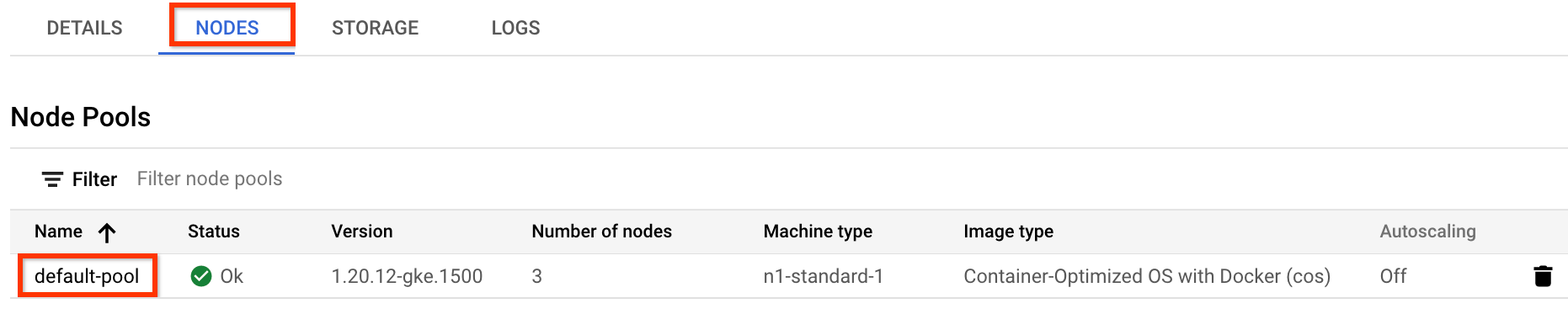](https://docs.cloud.google.com/static/composer/docs/images/runtime-nodepool.png) **Figure 1.** default-pool in the list of Node pools (click to enlarge)
4. Click **Edit** at the top of the page.
5. Change the image type to be **Container-Optimized OS with containerd** and
save the configuration:
[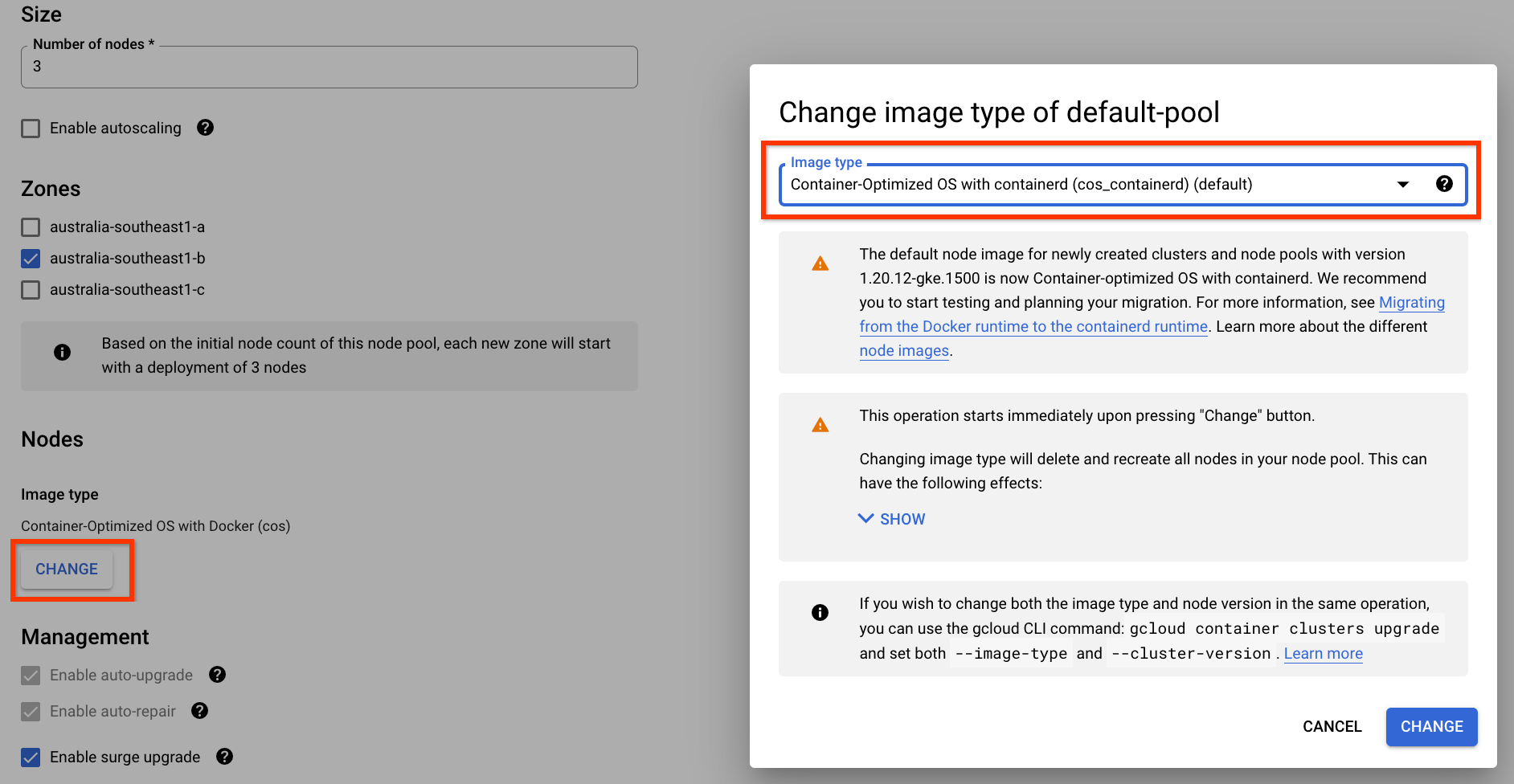](https://docs.cloud.google.com/static/composer/docs/images/docker-containerd-runtime.png) **Figure 2.** Change Node Pool image type from Docker to containerd (click to enlarge)
6. Once the change is submitted, your **default-pool** node pool will be
reconfigured to use containerd as its container runtime. Some of your
Airflow tasks might fail while the node pool is reconfiguring. If those
tasks have retries configured, they will be re-run by Airflow once the
operation on the node pool has completed.
## Error 504 when accessing the Airflow UI
You can get the `504 Gateway Timeout` error when accessing the Airflow UI. This error can have several causes:
- Transient communication issue. In this case, attempt to access the Airflow UI
later. You can also
[restart the Airflow web server](https://docs.cloud.google.com/composer/docs/composer-1/access-airflow-web-interface.md.txt#restarting).
- (Managed Airflow (Gen 3) only) Connectivity issue. If Airflow UI is permanently
unavailable, and timeout or 504 errors are generated, make sure that your
environment can access `*.composer.googleusercontent.com`.
- (Managed Airflow (Gen 2) only) Connectivity issue. If Airflow UI is permanently
unavailable, and timeout or 504 errors are generated, make sure that your
environment can access `*.composer.cloud.google.com`. If you use
Private Google Access and send traffic over
`private.googleapis.com` Virtual IPs, or VPC Service Controls and
send traffic over `restricted.googleapis.com` Virtual IPs, make sure that
your Cloud DNS is configured also for
`*.composer.cloud.google.com` domain names.
- Unresponsive Airflow web server. If the error 504
persists, but you can still access the Airflow UI at certain times, then
the Airflow web server might be unresponsive because it's overwhelmed.
Attempt to [increase the scale and performance parameters](https://docs.cloud.google.com/composer/docs/composer-1/scale-environments.md.txt)
of the web server.
## Error 502 when accessing Airflow UI
The error `502 Internal server exception` indicates that Airflow UI cannot
serve incoming requests. This error can have several causes:
- Transient communication issue. Try to access Airflow UI later.
- Failure to start the web server. In order to start, the web server requires
configuration files to be synchronized first. Check web server logs for
log entries that look similar to: `GCS sync exited with 1: gcloud storage cp gs:///airflow.cfg /home/airflow/gcs/airflow.cfg.tmp` or
`GCS sync exited with 1: gcloud storage cp gs:///env_var.json.cfg /home/airflow/gcs/env_var.json.tmp`.
If you see these errors, check if files mentioned in error messages
are still present in the environment's bucket.
In case of their accidental removal (for example, because a retention
policy was configured), you can restore them:
1. Set a new environment variable in your environment. You can use
use any variable name and value.
2. Override an Airflow configuration option. You can use a non-existent
Airflow configuration option.
## Airflow UI in Airflow 2.2.3 or earlier versions is vulnerable to CVE-2021-45229
As pointed out in [CVE-2021-45229](https://nvd.nist.gov/vuln/detail/CVE-2021-45229),
the "Trigger DAG with config" screen was susceptible to XSS attacks
through the `origin` query argument.
**Recommendation**: Upgrade to the latest Managed Airflow version
that supports Airflow 2.2.5.
## DAG triggering through private networks using Cloud Run functions
Triggering DAGs with Cloud Run functions through private networks with
the use of VPC Connector is not supported by Managed Airflow.
**Recommendation** : Use Cloud Run functions to publish messages on
Pub/Sub. Such events can actuate Pub/Sub Sensors to trigger Airflow DAGs or implement an approach based on [deferrable operators](https://docs.cloud.google.com/composer/docs/composer-2/use-deferrable-operators.md.txt).
## Empty folders in Scheduler and Workers
Managed Airflow does not actively remove empty folders from Airflow
workers and schedulers. Such entities might be created as a result of the
environment bucket synchronization process when these folders existed in the
bucket and were eventually removed.
**Recommendation**: Adjust your DAGs so they are prepared to skip such empty
folders.
Such entities are eventually removed from local storages of Airflow schedulers
and workers when these components are restarted (for example, as a result of
scaling down or maintenance operations in your environment's cluster).
## Support for Kerberos
Managed Airflow does not support
[Airflow Kerberos configuration](https://airflow.apache.org/docs/apache-airflow/stable/security/kerberos.html).
## Support for Google Campaign Manager 360 Operators
Google Campaign Manager Operators in Managed Airflow versions earlier
than 2.1.13 are based on the Campaign Manager 360 v3.5 API that is deprecated
and its sunset date is
[May 1, 2023](https://developers.google.com/doubleclick-advertisers/deprecation).
If you use Google Campaign Manager operators, then upgrade your environment
to Managed Airflow version 2.1.13 or later.
## Support for Google Display and Video 360 Operators
Google Display and Video 360 Operators in Managed Airflow versions
earlier than 2.1.13 are based on the Display and Video 360 v1.1 API that is
deprecated and its sunset date is April 27, 2023.
If you use Google Display and Video 360 operators, then upgrade your environment
to Managed Airflow version 2.1.13 or later. In addition to that,
you might need to change your DAGs because because some of
the Google Display and Video 360 operators are deprecated and replaced with
new ones.
- `GoogleDisplayVideo360CreateReportOperator` is now deprecated. Instead, use `GoogleDisplayVideo360CreateQueryOperator`. This operator returns `query_id` instead of `report_id`.
- `GoogleDisplayVideo360RunReportOperator` is now deprecated. Instead, use `GoogleDisplayVideo360RunQueryOperator`. This operator returns `query_id` and `report_id` instead of only `report_id`, and requires `query_id` instead of `report_id` as a parameter.
- To check if a report is ready, use the new `GoogleDisplayVideo360RunQuerySensor` sensor that uses `query_id` and `report_id` parameters. The deprecated `GoogleDisplayVideo360ReportSensor` sensor required only `report_id`.
- `GoogleDisplayVideo360DownloadReportV2Operator` now requires both `query_id` and `report_id` parameters.
- In `GoogleDisplayVideo360DeleteReportOperator` there are no changes that can affect your DAGs.
## Secondary Range name restrictions
> [!NOTE]
> **Note:** The `gke-.*-(pods|services)-.*` naming convention is reserved for auto-created GKE cluster secondary ranges. You can't use secondary range names in this format while creating Managed Airflow instances.
## CVE-2023-29247 (Task instance details page in the UI is vulnerable to a stored XSS)
Airflow UI in Airflow versions from 2.0.x to 2.5.x is vulnerable to
[CVE-2023-29247](https://nvd.nist.gov/vuln/detail/CVE-2023-29247).
> [!NOTE]
> **Note:** Managed Airflow version 2.4.2 fixes this issue in Airflow versions 2.4.3 and 2.5.3. We recommend to update your environment to Managed Airflow 2.4.2 or later version. This issue does not affect Airflow 2.6.x and later versions.
If you use an earlier version of Managed Airflow than 2.4.2 and
suspect that your environment might be vulnerable to the exploit, please read
the following description and possible solutions.
In Managed Airflow, access to the Airflow UI is
[protected with IAM](https://docs.cloud.google.com/composer/docs/composer-1/access-control.md.txt)
and [Airflow UI access control](https://docs.cloud.google.com/composer/docs/composer-1/airflow-rbac.md.txt).
This means that in order to exploit the Airflow UI vulnerability, attackers
first need to gain access to your project along with the necessary
IAM permissions and roles.
Solution:
- Verify IAM permissions and roles in your project, including
[Managed Service for Apache Airflow roles assigned to individual users](https://docs.cloud.google.com/composer/docs/composer-1/access-control.md.txt).
Make sure that only approved users can access Airflow UI.
- Verify roles assigned to users through the
[Airflow UI access control](https://docs.cloud.google.com/composer/docs/composer-1/airflow-rbac.md.txt)
mechanism (this is a separate mechanism that provides more granular access
to Airflow UI). Make sure that only approved users can access
Airflow UI and that all new users are registered with a proper role.
- Consider additional hardening with [VPC Service Controls](https://docs.cloud.google.com/composer/docs/composer-1/configure-vpc-sc.md.txt).
## It's not possible to reduce Cloud SQL storage
Managed Airflow uses Cloud SQL to run Airflow database. Over
time, disk storage for the Cloud SQL instance might grow because the disk
is scaled up to fit the data stored by Cloud SQL operations when
Airflow database grows.
It's not possible to scale down the Cloud SQL disk size.
As a workaround, if you want to use the smallest Cloud SQL disk
size, you can re-create Managed Airflow environments
with [snapshots](https://docs.cloud.google.com/composer/docs/composer-1/save-load-snapshots.md.txt).
## Database Disk usage metric doesn't reduce after removing records from Cloud SQL
Relational databases, such as Postgres or MySQL, don't physically remove rows
when they're deleted or updated. Instead, it marks them as "dead tuples" to
maintain data consistency and avoid blocking concurrent transactions.
Both MySQL and Postgres implement mechanisms of reclaiming space after deleted
records.
While it's possible to force the database to reclaim unused disk space, this
is a resource hungry operation which additionally locks the database making
Managed Airflow unavailable. Therefore it's recommended to rely on the
building mechanisms for reclaiming the unused space.
## Task instances that succeeded in the past marked as FAILED
In some circumstances and rare scenarios, Airflow task instances that succeeded
in the past can be marked as `FAILED`.
If it happens, usually it was either triggered by an environment update or
upgrade operation, or by GKE maintenance.
**Note:** the issue itself doesn't indicate any problem in the environment and
it doesn't cause any actual failures in task execution.
The issue is fixed in Managed Airflow version 2.6.5 or later.
## Non-continuous DAG parse times and DAG bag size diagrams in monitoring
Non-continuous DAG parse times and DAG bag size diagrams on the monitoring
dashboard indicate problems with long DAG parse times (more than 5 minutes).
[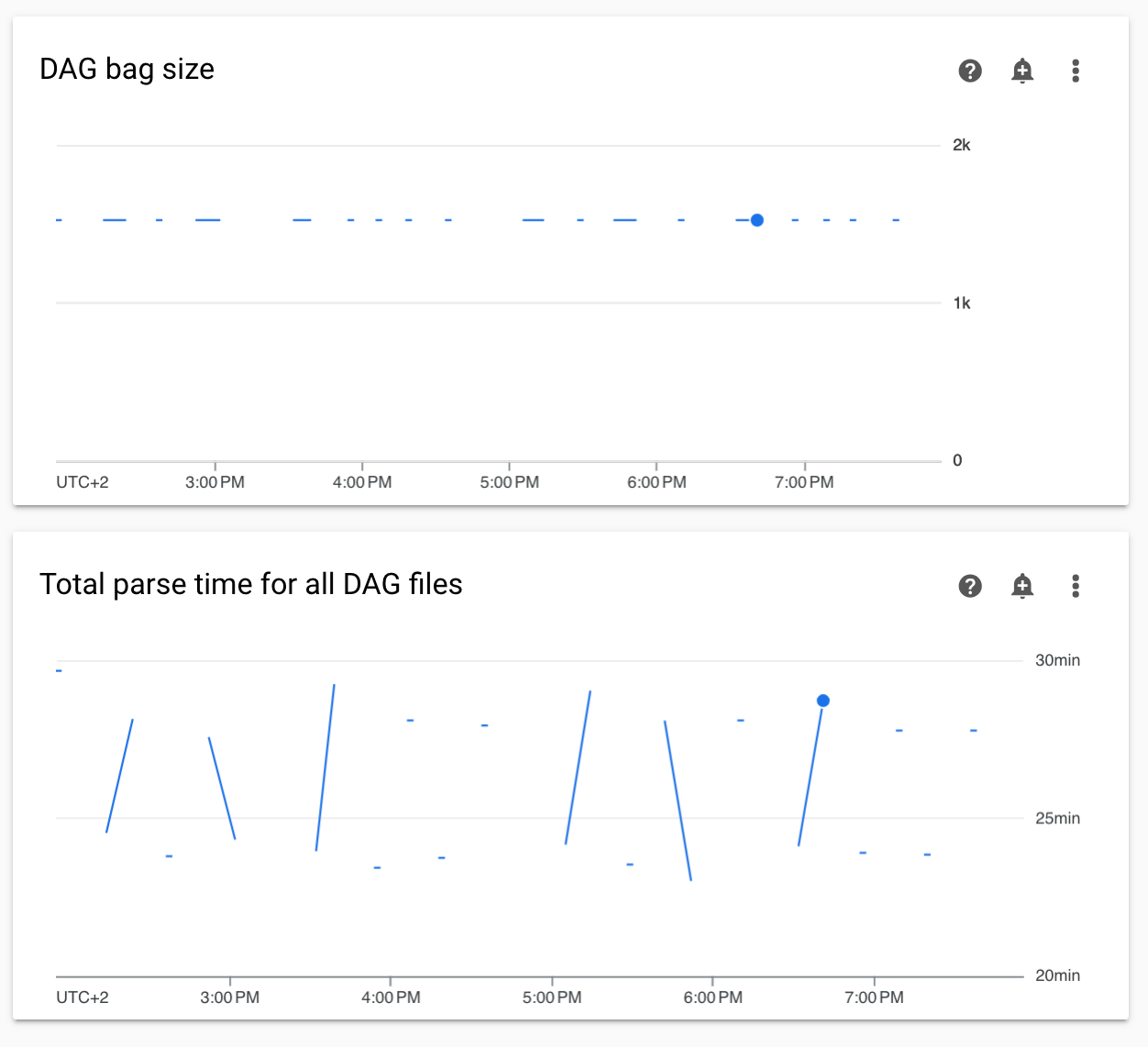](https://docs.cloud.google.com/static/composer/docs/images/composer-non-continuous-dag-parse-times.png) **Figure 3.** Non-continuous DAG parse times and DAG bag size graphs (click to enlarge)
**Solution:**
We recommend keeping total DAG parse time under 5 minutes. To reduce DAG
parsing time, follow [DAG writing guidelines](https://docs.cloud.google.com/composer/docs/composer-1/write-dags.md.txt#guidelines).
## Switching the environment's cluster to GKE Enterprise Edition is not supported
This note applies to Managed Airflow 1 and Managed Airflow 2.
Managed Airflow environment's GKE cluster is created
within GKE Standard Edition.
As of December 2024, Managed Airflow service doesn't support creating
Managed Airflow environments with clusters in the Enterprise Edition.
Managed Airflow environments were not tested with GKE
Enterprise Edition and it has a different billing model.
> [!CAUTION]
> **Caution:** **Don't upgrade Managed Airflow clusters to
> the Enterprise Edition.** Managed Airflow environments weren't tested with the Enterprise Edition and you might incur additional charges after upgrading to it. If you upgrade your environment's cluster to the Enterprise Edition, **it won't be supported by Google**.
Further communication related to GKE Standard Edition
versus the Enterprise edition will be done in Q2 2025.
## Environment is in the ERROR state after the project's billing account was deleted or deactivated, or the Cloud Composer API was disabled
Managed Airflow environments affected by these problems are
non-recoverable:
- After the project's billing account was deleted or deactivated, even if another account was linked later.
- After the Cloud Composer API [was disabled](https://docs.cloud.google.com/composer/docs/composer-1/enable-composer-service.md.txt) in the project, even if it was enabled later.
You can do the following to address the problem:
- You still can access data stored in your environment's buckets, but the
environments themselves are no longer usable. You can create a new
Managed Airflow environment and then transfer your DAGs and data.
- If you want to perform any of the operations that make your environments
non-recoverable, make sure to back up your data, for example, by
[creating an environment's snapshot](https://docs.cloud.google.com/composer/docs/composer-1/save-load-snapshots.md.txt). In this way,
you can create another environment and transfer its data by loading this
snapshot.
## Warnings about Pod Disruption Budget for environment clusters
You can see the following warnings in the GKE UI for
Managed Airflow environment clusters:
GKE can't perform maintenance because the Pod Disruption Budget allows
for 0 Pod evictions. Update the Pod Disruption Budget.
A StatefulSet is configured with a Pod Disruption Budget but without readiness
probes, so the Pod Disruption Budget isn't as effective in gauging application
readiness. Add one or more readiness probes.
It is not possible to eliminate these warnings. We work on stopping these
warnings from being generated.
**Possible solutions:**
- Ignore these warnings until the issue is fixed.
## A field value in an Airflow connection cannot be removed
**Cause:**
The Apache Airflow user interface has a limitation where it's not possible to
update connection fields to empty values. When you attempt to do so, the system
reverts to the previously saved settings.
**Possible solutions:**
While Apache Airflow version 2.10.4 includes a permanent fix, a temporary workaround exists for users on earlier versions. This involves deleting the connection and then recreating it, specifically leaving the required fields empty. The command-line interface is the recommended approach for deleting the connection:
gcloud composer environments run ENVIRONMENT_NAME \
--location LOCATION \
connections delete -- \
CONNECTION_ID
After deleting the connection, [recreate it using the Airflow UI](https://airflow.apache.org/docs/apache-airflow/stable/howto/connection.html#creating-a-connection-with-the-ui), ensuring that the fields you intend to leave empty are indeed left blank. You can also create the connection by running the [`connections add`](https://airflow.apache.org/docs/apache-airflow/stable/cli-and-env-variables-ref.html#add) Airflow CLI command [with Google Cloud CLI](https://docs.cloud.google.com/composer/docs/composer-1/manage-airflow-connections.md.txt#airflow-cli).
## Logs for Airflow tasks aren't collected if \[core\]execute_tasks_new_python_interpreter is set to True
Managed Airflow doesn't collect logs for Airflow tasks if the
[`[core]execute_tasks_new_python_interpreter`](https://airflow.apache.org/docs/apache-airflow/stable/configurations-ref.html#execute-tasks-new-python-interpreter)
Airflow configuration option is set to `True`.
**Possible solution:**
- Remove the [override](https://docs.cloud.google.com/composer/docs/composer-1/override-airflow-configurations.md.txt) for this configuration option, or set its value to `False`.
## What's next
- [Troubleshooting environment creation](https://docs.cloud.google.com/composer/docs/composer-1/troubleshooting-environment-creation.md.txt)
- [Troubleshooting DAGs](https://docs.cloud.google.com/composer/docs/composer-1/troubleshooting-dags.md.txt)
- [Troubleshooting Airflow scheduler issues](https://docs.cloud.google.com/composer/docs/composer-1/troubleshooting-scheduling.md.txt)