# QRadar
This document provides guidance on how to integrate QRadar with
Google SecOps.
> [!NOTE]
> **Note:** This integration uses one or more open source components. You can download a copy of the full source code of this integration from the [storage bucket](https://storage.googleapis.com/csoar_public_integrations/QRadar.zip).
## Supported QRadar deployments
This integration supports both on-premises and cloud QRadar deployments.
## Network access to QRadar
API access from Google Security Operations to QRadar: Allow traffic over port 443
(HTTPS) or as configured in your environment.
## Set QRadar permissions
When you create a dedicated Google SecOps user and security profile in QRadar (as outlined in the following steps), you gain more granular control over permissions. This approach is optional, but recommended.
A QRadar integration can also function using an existing administrator account.
### Create a Google SecOps user {:.hide-from-toc}
1. In QRadar, click the top left icon.
2. Go to **Admin** and click **Users**.
3. Click **New** and fill in the information to create a new Admin user.
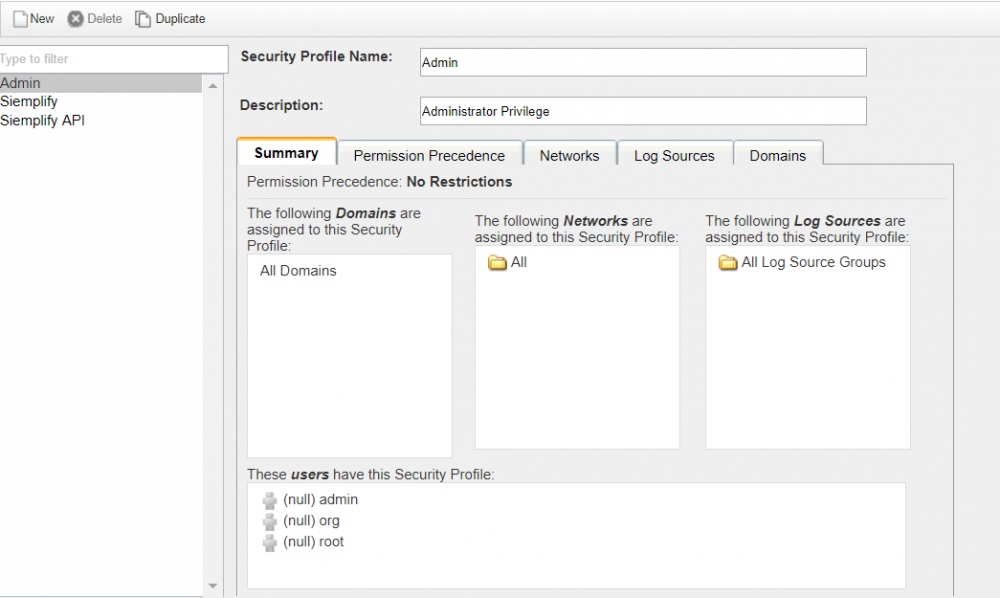
### Create a Google SecOps security profile
1. Go to **Admin \> User Management \> Security Profiles**.
2. Create a profile with the following settings:
- Permission Precedence: No Restrictions
- Log Sources: All Log Source Groups
- Network: All
- Domains: All Domains
### Deploy changes
Click **Deploy** in the screen.
### Create an Authorized Service to access the API
1. Go to **Admin \> User Management \> Authorized
Services**.
2. Create a service with the following settings:
- Service Name: Siemplify_Application_User
- User Role: admin
- Security Profile: admin
- Expiry Date: No Expiry
3. Copy the generated authentication key and use it in the
Google SecOps integration settings (Deployment Wizard).
## Configure QRadar integration in Google SecOps
For detailed instructions on how to configure an integration in
Google SecOps, see [Configure
integrations](https://docs.cloud.google.com/chronicle/docs/soar/respond/integrations-setup/configure-integrations).
### Integration parameters
Use the following parameters to configure the integration:
| Parameter name | Type | Default value | Is mandatory | Description |
|---|---|---|---|---|
| Instance Name | String | N/A | No | Name of the Instance you intend to configure integration for. |
| Description | String | N/A | No | Description of the Instance. |
| Api Root | String | https://`IP_ADDRESS` | Yes | The URL path that points to the QRadar server. |
| Api Token | Password | N/A | Yes | The API security token for authentication. |
| API Version | String | N/A | No | The API version used. |
| Run Remotely | Checkbox | Unchecked | No | Check the field in order to run the configured integration remotely. Once checked, the option appears to select the remote user (agent). |
> [!NOTE]
> **Note:** You can make changes at a later stage if needed. Once configured, the Instances can be used in Playbooks. For detailed information on configuring and supporting multiple instances, see [Supporting multiple instances](https://docs.cloud.google.com/chronicle/docs/soar/respond/integrations-setup/supporting-multiple-instances).
## Actions
### Similar Flows Query
#### Description
Execute a predefined AQL query to find flows related to the specified
Google SecOps IP address entity.
#### Parameters
| Parameter name | Type | Default value | Is mandatory | Description |
|---|---|---|---|---|
| Time Delta In Minutes | Integer | 10 | No | Fetch flows for the last x minutes. The parameter accepts numeric values for example, 10. |
| Flows Limit To Fetch | Integer | 23 | Yes | Limit flows that the action can return. The parameter accepts numeric values for example, 10. |
| Fields To Display | String | N/A | No | Fields to fetch from the flow in addition to predefined ones. If not set, the action returns predefined fields for the flow. |
| Source IP Address Field Name | String | N/A | No | Fields that represents Source IP Address Field of the flow. |
| Destination IP Address Field Name | String | N/A | No | Fields that represents Destination IP Address Field of the flow. |
#### Playbook use case example
Get information from QRadar about flows registered for the specific IP address
for the last x minutes.
#### Run on
This action runs on the IP Address entity.
#### Action results
##### Script result
| Script result name | Value options | Example |
|---|---|---|
| is_success | True/False | is_success:False |
##### JSON result
{
"flows": [
{
"destinationflags": 27,
"destinationpackets": 5.0,
"sourcebytes": 522.0,
"protocolid": 6,
"sourceip": "195.200.72.148",
"destinationbytes": 571.0,
"lastpackettime": 1585057251000,
"sourceflags": 27,
"sourcepackets": 5.0,
"qid": 53268795,
"flowtype": 0,
"destinationip": "37.28.155.22",
"firstpackettime": 1585057224000,
"category": 18448,
"source hostname": null,
"destination hostname": null
},
{
"destinationflags": null,
"destinationpackets": 0.0,
"sourcebytes": 78.0,
"protocolid": 17,
"sourceip": "195.200.72.148",
"destinationbytes": 0.0,
"lastpackettime": 1585057220000,
"sourceflags": null,
"sourcepackets": 1.0,
"qid": 53258563,
"flowtype": 0,
"destinationip": "8.8.8.8",
"firstpackettime": 1585057177000,
"category": 18438,
"source hostname": null,
"destination hostname": null
},
...
]
}
##### Case wall
| Result type | Description | Type |
|---|---|---|
| Output message\* | **The action should not fail, nor should it stop a playbook execution:** - *If the action found similar flows: *"Similar flows were found for the following entities: {entityList}" - *If the action didn't find similar flows for a subset of entities: * "The following entities were processed successfully, but no similar flows were found for them: {entityList}" - *If the action didn't find similar flows for all the provided entities: *"No similar flows were found." - *If the action has a non-critical error processing subset of entities: *"Failed processing of the following entities: {entityList}"" **The action should fail and stop playbook execution:** - *If failed to connect: *"Failed to execute action, the error is {o}""".format(exception.stacktrace)" | General |
| Table | **Similar flows for entity:** {0}".format(Siemplify.entity.identifier) **Headers:...** | Entity |
### Similar Events Query
#### Description
Execute a predefined AQL query to find events related to the specified
Google SecOps IP address, Hostname, or Username entities.
#### Parameters
| Parameter name | Type | Default value | Is mandatory | Description |
|---|---|---|---|---|
| Time Delta In Minutes | Integer | 10 | No | Fetch flows for the last x minutes. The parameter accepts numeric values for example, 10. |
| Events Limit To Fetch | Integer | 25 | Yes | Limit events that the action can return. The parameter accepts numeric value, for example, 25. |
| Fields To Display | CSV | N/A | No | Fields to fetch from the event in addition to predefined ones. If not set, the action returns predefined fields for the event. |
| Hostname Field Name | String | N/A | No | Field that represents Hostname Field of the event. |
| Source IP Address Field Name | String | N/A | No | Fields that represents Source IP Address Field of the flow. |
| Destination IP Address Field Name | String | N/A | No | Fields that represents Destination IP Address Field of flow. |
| Username Field Name | String | N/A | No | Fields that represents Username Field of event. |
#### Use cases example
Get information from QRadar about events registered for the specified entity for
the last x minutes.
#### Run on
This action runs on the following entities:
- IP Address
- Hostname
- User
#### Action results
##### Script result
| Script result name | Value options | Example |
|---|---|---|
| is_success | True/False | is_success:False |
##### JSON result
{
"events": [
{
"starttime": 1585288010745,
"protocolid": 255,
"sourceip": "10.0.100.250",
"logsourceid": 62,
"qid": 18750001,
"sourceport": 0,
"eventcount": 1,
"magnitude": 10,
"identityip": "0.0.0.0",
"destinationip": "10.0.100.250",
"destinationport": 0,
"category": 10008,
"username": null,
"hostname": null
},
...
]
}
##### Case wall
| Result type | Description | Type |
|---|---|---|
| Output message\* | **The action should not fail, nor should it stop a playbook execution:** - *If the action found similar flows: *"Similar flows were found for the following entities: {entityList}" - *If the action didn't find similar flows for a subset of entities: *"The following entities were processed successfully, but no similar flows were found for them: {entityList}" - *If the action didn't find similar flows for all the provided entities: *"No similar flows were found." - *If the action has a non-critical error processing subset of entities: *"Failed processing of the following entities: {entityList}"" **The action should fail and stop playbook execution:** - *If failed to connect: *"Failed to execute action, the error is {o}""".format(exception.stacktrace)" | General |
| Table | **Similar flows for entity:** {0}".format(Siemplify.entity.identifier) **Headers:...** | Entity |
### QRadar AQL Search
#### Description
Run an arbitrary AQL query against the QRadar instance. The action returns an
output in CSV format.
#### Parameters
| Parameter name | Type | Default value | Is mandatory | Description |
|---|---|---|---|---|
| Query Format | String | N/A | Yes | Query format to execute for example, "Select \* from flows limit 10 last 10 minutes". |
#### Action results
##### Script result
| Script result name | Value options | Example |
|---|---|---|
| results | N/A | N/A |
##### JSON result
{
"events": [
{
"username": "None",
"category": 4003,
"starttime": 1548682790158,
"destinationip": "1.1.1.1",
"eventcount": 13,
"qid": 20257872,
"magnitude": 3,
"destinationport": 53,
"protocolid": 17,
"sourceport": 50597,
"identityip": "1.1.1.1",
"sourceip": "1.1.1.1",
"logsourceid": 71
}, {
"username": "None",
"category": 8053,
"starttime": 1548682800217,
"destinationip": "1.1.1.1",
"eventcount": 1,
"qid": 20280296,
"magnitude": 3,
"destinationport": 443,
"protocolid": 6,
"sourceport": 49230,
"identityip": "1.1.1.1",
"sourceip": "1.1.1.1",
"logsourceid": 71
}
]
}
##### Case wall
| Result type | Description | Type |
|---|---|---|
| Output message\* | **The Action shouldn't fail, nor should it stop a playbook execution** - *If the action found data: *"Found data for query." - *If the action didn't find data: *"No data found for query." **The action should fail and stop a playbook execution:** - *If failed to connect: *"Failed to execute action, the error is {o}".format(exception.stacktrace) | General |
| Table | "Query results" Headers:... | General |
### Ping
#### Description
Test connectivity to a QRadar instance.
#### Parameters
N/A
#### Intended use cases
Testing that access to the target system is successful or not with parameters,
provided at the integration configuration on the Google SecOps
Content Hub page.
#### Action results
##### Script result
| Script result name | Value options | Example |
|---|---|---|
| is_success | True/False | is_success:False |
##### Case wall
| Result type | Description | Type |
|---|---|---|
| Output message\* | **The action shouldn't fail, nor should it stop a playbook execution.** - *If connected successfully: *"Connected successfully" **The action should fail and stop a playbook execution:** - *If failed to connect: *"Failed to connect to a QRadar instance, the error is {o}".format(exception.stacktrace) | General |
### Lookup for a Value in Reference set
#### Description
Check if a value is listed in a specific reference set.
#### Parameters
| Parameter name | Type | Default value | Is mandatory | Description |
|---|---|---|---|---|
| Name | String | N/A | Yes | The name of the reference set to check a value. |
| Value | String | N/A | Yes | The value to check in a referenced set. |
#### Playbook use case example
An IP is found malicious in playbook run, check if it is listed in the
Malicious_IPs reference set.
#### Run on
This action doesn't run on the Google SecOps entities.
#### Action results
##### Script result
| Script result name | Value options | Example |
|---|---|---|
| is_success | True/False | is_success:False |
##### JSON result
{
"timeout_type": "FIRST_SEEN",
"number_of_elements": 1,
"data": [
{
"last_seen": 1611149814345,
"first_seen": 1611149814345,
"source": "admin",
"value": "192.168.10.230",
"domain_id": null
}
],
"creation_time": 1440695740583,
"name": "Critical Assets",
"namespace": "SHARED",
"element_type": "IP",
"collection_id": 20
}
##### Case wall
| Result type | Description | Type |
|---|---|---|
| Output message\* | **This action should not fail and not stop playbook execution:** - *If no errors are reported: * *If value is found: *"Found {value} in the reference set." *If value is not found: *"Could not find value in the reference set." - *If errors are reported (is_success=False): *"Failed to lookup {value} in the reference set." **This action should fail and stop playbook execution:** - *If a fatal error, like wrong credentials, no connection to the server, or other is reported: *"Error executing "Lookup for a value in a reference set" action. Reason: {0}".format(error.Stacktrace) | General |
### Lookup for a Value in Reference Map
#### Description
Check if a value is listed in a specific reference map.
#### Parameters
| Parameter name | Type | Default value | Is mandatory | Description |
|---|---|---|---|---|
| Name | String | N/A | Yes | The name of the reference map to check a value. |
| Value | String | N/A | Yes | The value to check in a referenced map. |
#### Playbook use case example
Check if a username is allowed to access a given IP based on reference map
values.
#### Run on
This action doesn't run on the Google SecOps entities.
#### Action results
##### Script result
| Script result name | Value options | Example |
|---|---|---|
| is_success | True/False | is_success:False |
##### JSON result
{
"data": {
"1001": {
"last_seen": 1583903726952,
"first_seen": 1583903726952,
"source": "reference data api",
"value": "jack"
}
}
}
##### Case wall
| Result type | Description | Type |
|---|---|---|
| Output message\* | **This action should not fail and not stop playbook execution:** - *If no errors:* *If value was found: *"Found {value} in reference map." *If value was not found: *"Could not find value in the reference map." - *If errors (is_success=False):* "Failed to lookup {value} in the reference set." **This action should fail and stop playbook execution:** - *If a fatal error, like wrong credentials, no connection to the server, or other is reported: * "Error executing "Lookup for a value in a reference map" action. Reason: {0}".format(error.Stacktrace) | General |
### Lookup for a Value in Reference Map of sets
#### Description
Check if a value is listed in a specific reference map of sets.
#### Parameters
| Parameter name | Type | Default value | Is mandatory | Description |
|---|---|---|---|---|
| Name | String | N/A | Yes | The name of the reference map of sets to check a value. |
| Value | String | N/A | Yes | The value to check in a referenced map of sets. |
#### Use cases example
Check if a username is allowed to access a given IP based on reference map of
setvalues.
#### Run on
This action runs on the Google SecOps entities.
#### Action results
##### Script result
| Script result name | Value options | Example |
|---|---|---|
| is_success | True/False | is_success:False |
##### JSON result
"data": {
"192.168.1.1": [
{
"last_seen": 1583912905418,
"first_seen": 1583912905418,
"source": "reference data api",
"value": "jack, john, huey"
},
{
"last_seen": 1583913398524,
"first_seen": 1583913398524,
"source": "reference data api",
"value": "zz"
},
{
"last_seen": 1583913639025,
"first_seen": 1583913639025,
"source": "reference data api",
"value": "jane"
}
]
}
##### Case wall
| Result type | Description | Type |
|---|---|---|
| Output message\* | **This action should not fail and not stop playbook execution:** - *If no errors:* *If value was found: *"Found value in reference map of sets." *If value was not found: *"Could not find value {value} in the reference map of sets." - *If errors (is_success=False):* "Failed to lookup {value} in the reference map of sets." **This action should fail and stop playbook execution:** - *If a fatal error, like wrong credentials, no connection to the server, or other is reported: *"Error executing "Lookup for a value in a reference map of sets" action. Reason: {0}".format(error.Stacktrace) | General |
### Lookup for a Value in Reference Tables
#### Description
Check if a value is listed in a specific reference table.
#### Parameters
| Parameter name | Type | Default value | Is mandatory | Description |
|---|---|---|---|---|
| Name | String | N/A | Yes | The name of the reference table to check a value. |
| Value | String | N/A | Yes | The value to check in a referenced table. |
#### Run on
This action runs on all entities.
#### Action results
##### Script result
| Script result name | Value options | Example |
|---|---|---|
| is_success | True/False | is_success:False |
##### JSON result
{
"data": {
"Source_IP": {
"port": {
"last_seen": 1583933682283,
"first_seen": 1583933682283,
"source": "reference data api",
"value": "8080"
}
},
"192.168.1.1": {
"port": {
"last_seen": 1583990995600,
"first_seen": 1583990995600,
"source": "reference data api",
"value": "8080"
}
}
}
}
##### Case wall
| Result type | Description | Type |
|---|---|---|
| Output message\* | **This action should not fail and not stop playbook execution:** - *If no errors:* *If value is found: *"Found value in reference Table." *If value is not found: *"Could not find value in the reference tables." **This action should fail and stop playbook execution:** - *If error: *"Error executing "Lookup for a value in a reference tables" action. Reason: {0}".format(error.Stacktrace)" | General |
### Lookup for a Key in Reference Map
#### Description
Check if a key is listed in a specific reference map.
#### Parameters
| Parameter name | Type | Default value | Is mandatory | Description |
|---|---|---|---|---|
| Name | String | N/A | Yes | The name of the reference map to check a value. |
| Key | String | N/A | Yes | The key to check in a reference map. |
#### Use cases example
Check if a username is allowed to access a given IP based on reference map
values.
#### Run on
This action doesn't run on entities.
#### Action results
##### Script result
| Script result name | Value options | Example |
|---|---|---|
| is_success | True/False | is_success:False |
##### JSON result
{
"data": {
"1001": {
"last_seen": 1583903726952,
"first_seen": 1583903726952,
"source": "reference data api",
"value": "jack"
}
}
}
##### Case wall
| Result type | Description | Type |
|---|---|---|
| Output message\* | **This action should not fail and not stop playbook execution:** - *If no errors:* *If key is found: *"Found {key} in reference map." *If key is not found: *"Could not find key {key} in the reference map." - *If errors (is_success=False): *"Failed to lookup {key} in the reference set." **This action should fail and stop playbook execution:** - *If a fatal error, like wrong credentials, no connection to the server, or other is reported: * "Error executing "Lookup for a value in a reference map" action. Reason: {0}".format(error.Stacktrace) | General |
### Lookup for a Key in Reference Map of sets
#### Description
Check if a key is listed in a specific reference map of sets.
#### Parameters
| Parameter name | Type | Default value | Is mandatory | Description |
|---|---|---|---|---|
| Name | String | N/A | Yes | The name of the reference map of sets to check a value. |
| Key | String | N/A | Yes | The key to check in a referenced map of sets. |
#### Use cases example
Check if a username is allowed to access a given IP based on reference map of
set values.
#### Run on
This action doesn't run on entities.
#### Action results
##### Script result
| Script result name | Value options | Example |
|---|---|---|
| is_success | True/False | is_success:False |
##### JSON result
"data": {
"192.168.1.1": [
{
"last_seen": 1583912905418,
"first_seen": 1583912905418,
"source": "reference data api",
"value": "jack, john, huey"
},
{
"last_seen": 1583913398524,
"first_seen": 1583913398524,
"source": "reference data api",
"value": "zz"
},
{
"last_seen": 1583913639025,
"first_seen": 1583913639025,
"source": "reference data api",
"value": "jane"
}
]
}
##### Case wall
| Result type | Description | Type |
|---|---|---|
| Output message\* | **This action should not fail and not stop playbook execution:** - *If no errors:* *If key is found: *"Found key {key} in reference map of sets." *If key is not found: *"Could not find key {key} in the reference map of sets." - *If errors (is_success=False): *"Failed to lookup {key} in the reference map of sets." **This action should fail and stop playbook execution:** - *If a fatal error, like wrong credentials, no connection to the server, or other is reported: * "Error executing "Error executing "Lookup for a value in a reference map of sets" action. Reason: {0}".format(error.Stacktrace) | General |
### List Reference Sets
#### Description
List reference sets available in QRadar.
#### Parameters
| Parameter name | Type | Default value | Is mandatory | Description |
|---|---|---|---|---|
| Fields To Return | String | N/A | No | Specify the fields that should be returned by the action. If nothing is provided, the action returns all available fields by default. The parameter accepts multiple values separated by comma. |
| Filter Condition | String | N/A | No | Specify a filter condition to return only specific elements, for example: element_type = IP |
| Number Of Elements To Return | Integer | 25 | Yes | Specify a maximum number of elements to return by the action. |
#### Use cases example
List available elements for the reference.
#### Run on
This action doesn't run on entities.
#### Action results
##### Script result
| Script result name | Value options | Example |
|---|---|---|
| is_success | True/False | is_success:False |
##### JSON result
[
{
"name": "Critical Assets",
"element_type": "IP"
},
{
"name": "Asset Reconciliation IPv4 Blocklist",
"element_type": "IP"
},
{
"name": "Proxy Servers",
"element_type": "IP"
}
]
##### Case wall
| Result type | Description | Type |
|---|---|---|
| Output message\* | **This action should not fail and not stop playbook execution:** - *If no errors: * *If data is returned:*"Action completed successfully and returned data." *If nothing is found, for example filter value provided doesn't exist: *Action completed successfully but didn't return any data." - *If errors, such as wrong syntax provided are reported (is_success=False): *"Failed to execute action due to errors (0).format(error text)" **This action should fail and stop playbook execution:** - *If a fatal error, like wrong credentials, no connection to the server, or other is reported: * "Error executing action. Reason: {0}".format(error.Stacktrace) | General |
### List Reference Maps
#### Description
List reference maps available in QRadar.
#### Parameters
| Parameter name | Type | Default value | Is mandatory | Description |
|---|---|---|---|---|
| Fields To Return | String | N/A | No | Specify the fields that should be returned by the action. If nothing is provided, the action returns all available fields by default. This parameter accepts multiple values separated by comma. |
| Filter Condition | String | N/A | No | Specify a filter condition to return only specific elements, for example: element_type = ALNIC |
| Number Of Elements To Return | Integer | 25 | Yes | Specify a maximum number of elements to return by the action. |
#### Use cases example
List available elements for the reference.
#### Run on
This action doesn't run on entities.
#### Action results
##### Script result
| Script result name | Value options | Example |
|---|---|---|
| is_success | True/False | is_success:False |
##### JSON result
[
{
"name": "User1",
"element_type": "ALNIC"
},
{
"name": "User",
"element_type": "ALNIC"
}
]
##### Case wall
| Result type | Description | Type |
|---|---|---|
| Output message\* | **This action should not fail and not stop playbook execution:** - *If no errors:* *If data is returned: *"Action completed successfully and returned data." *If nothing is found, for example filter value provided doesn't exist: *"Action completed successfully but didn't return any data." - *If errors, such as wrong syntax provided is reported (is_success=False): *"Failed to execute action due to errors (0).format(error text)" **Action should fail and stop playbook execution:** - *If a fatal error, like wrong credentials, no connection to the server, or other is reported: *"Error executing action. Reason: {0}".format(error.Stacktrace) | General |
### List Reference Maps of Sets
#### Description
List reference maps of sets available in QRadar.
#### Parameters
| Parameter name | Type | Default value | Is mandatory | Description |
|---|---|---|---|---|
| Fields To Return | String | N/A | No | Specify the fields that should be returned by the action. If nothing is provided, the action returns all available fields by default. This parameter accepts multiple values separated by comma. |
| Filter Condition | String | N/A | No | Specify a filter condition to return only specific elements, for example: element_type = ALN |
| Number Of Elements To Return | Integer | 25 | Yes | Specify a maximum numbers of elements to return by the action. |
#### Use cases example
List available elements for the reference.
#### Run on
This action doesn't run on entities.
#### Action results
##### Script result
| Script result name | Value options | Example |
|---|---|---|
| is_success | True/False | is_success:False |
##### JSON result
[
{
"name": "CorrelatedAttackMap",
"element_type": "ALN"
},
{
"name": "TestMapOfSets",
"element_type": "ALN"
}
]
##### Case wall
| Result type | Description | Type |
|---|---|---|
| Output message\* | **This action should not fail and not stop playbook execution:** - *If no errors:* *If data is returned: *"Action completed successfully and returned data." *If nothing is found, for example filter value provided doesn't exist: *"Action completed successfully but didn't return any data." - *If errors, such as wrong syntax provided are reported (is_success=False): *"Failed to execute action due to errors (0).format(error text)" **Action should fail and stop playbook execution:** - *If a fatal error, like wrong credentials, no connection to the server, other is reported: *"Error executing action. Reason: {0}".format(error.Stacktrace) | General |
### List Reference Tables
#### Description
List reference tables available in QRadar.
#### Parameters
| Parameter name | Type | Default value | Is mandatory | Description |
|---|---|---|---|---|
| Fields To Return | String | N/A | No | Specify the fields that should be returned by the action. If nothing is provided, the action return all available fields by default. The parameter accepts multiple values separated by comma. |
| Filter Condition | String | N/A | No | Specify a filter condition to return only specific elements, for example: element_type = ALN |
| Number Of Elements To Return | Integer | 25 | Yes | Specify a maximum number of elements to return by the action. |
#### Use cases example
List available elements for the reference.
#### Run on
This action doesn't run on entities.
#### Action results
##### Script result
| Script result name | Value options | Example |
|---|---|---|
| is_success | True/False | is_success:False |
##### JSON result
[
{
"name": "TestTable2",
"element_type": "ALN"
},
{
"name": "TestTable3",
"element_type": "ALN"
}
]
##### Case wall
| Result type | Description | Type |
|---|---|---|
| Output message\* | **This action should not fail and not stop playbook execution:** - *If no errors: * *If data is returned: *"Action completed successfully and returned data." *If nothing is found, for example filter value provided doesn't exist: *"Action completed successfully but didn't return any data." - *If errors, such as wrong syntax provided (is_success=False): *"Failed to execute action due to errors (0).format(error text)" **This action should fail and stop playbook execution:** - *If a fatal error, like wrong credentials, no connection to server, or other is reported: *"Error executing action. Reason: {0}".format(error.Stacktrace) | General |
### Add Offense Note
#### Description
Add a note to a QRadar offense.
#### Parameters
| Parameter name | Type | Default value | Is mandatory | Description |
|---|---|---|---|---|
| Offense ID | Integer | N/A | Yes | Offense ID to add a note to. |
| Note Text | String | N/A | Yes | Note text to add to offense. |
#### Playbook use cases example
Add a note on QRadar offense from Google SecOps.
#### Run on
This action doesn't run on entities.
#### Action results
##### Script result
| Script result name | Value options | Example |
|---|---|---|
| is_success | True/False | is_success:False |
##### Case wall
| Result type | Description | Type |
|---|---|---|
| Output message\* | **This action should not fail and not stop playbook execution:** - *If successful: *"Added a note to offense {0}".format(offense_id)" - *If is_success=False, for example internal error happened on QRadar side: *"Failed to add a note to offense {0}".format(offense_id)" - **Action should fail and stop playbook execution:** - *If a critical error, like wrong credentials or lost connectivity is reported: *"Failed to connect to the QRadar server! Error is {0}".format(exception.stacktrace) | General |
### Update Offense
#### Description
Update QRadar Offense.
#### Parameters
| Parameter Display Name | Type | Default value | Is mandatory | Description |
|---|---|---|---|---|
| Offense ID | Integer | N/A | Yes | Offense ID to update. |
| Assigned To | String | N/A | No | User login to assign the offense to. |
| Status | DDL | " " | No | New status of the offense. |
| Closing Reason | String | N/A | No | If offense status is set to closed, you need to provide a QRadar closing reason. |
| Follow Up | Checkbox | Checkbox Unchecked | No | Specify whether offense should be marked as a follow up. |
| Protected | Checkbox | Checkbox Unchecked | No | Specify whether offense should be marked as protected. |
#### Playbook use cases example
Update QRadar offense back from Google SecOps to keep QRadar offense
status in sync with Google SecOps.
#### Run on
This action doesn't run on entities.
#### Action results
##### Script result
| Script result name | Value options | Example |
|---|---|---|
| is_success | True/False | is_success:False |
##### JSON result
{
"last_persisted_time": 1611143659000,
"username_count": 0,
"description": "Web\n",
"rules": [
{
"id": 100555,
"type": "CRE_RULE"
}
],
"event_count": 0,
"flow_count": 4,
"assigned_to": "admin",
"security_category_count": 1,
"follow_up": true,
"source_address_ids": [
50
],
"source_count": 1,
"inactive": true,
"protected": true,
"closing_user": null,
"destination_networks": [
"other"
],
"source_network": "other",
"category_count": 1,
"close_time": null,
"remote_destination_count": 1,
"start_time": 1610451749000,
"magnitude": 0,
"last_updated_time": 1610451887000,
"credibility": 0,
"id": 93,
"categories": [
"Web"
],
"severity": 0,
"policy_category_count": 0,
"log_sources": [],
"closing_reason_id": null,
"device_count": 0,
"first_persisted_time": 1610451722000,
"offense_type": 1,
"relevance": 0,
"domain_id": 0,
"offense_source": "37.28.155.22",
"local_destination_address_ids": [],
"local_destination_count": 0,
"status": "OPEN"
}
##### Case wall
| Result type | Description | Type |
|---|---|---|
| Output message\* | **This action should not fail and not stop playbook execution:** - *If successful: *"Offense {0} was updated".format(offense_id)" - *If is_success=False, for example no offenses with provided ID are found: *"Fail to update offense for provided id {0}".format(offense_id)" **This action should fail and stop playbook execution:** - *If a critical error, like wrong credentials or lost connectivity is reported: *"Failed to connect to the QRadar server! Error is {0}".format(exception.stacktrace) | General |
### Get Rule MITRE Coverage
#### Description
Get MITRE details about rules in QRadar using the Use Case Manager application.
#### Parameters
| Parameter name | Type | Default value | Is mandatory | Description |
|---|---|---|---|---|
| Rule Names | CSV | | Yes | Specify a comma-separated list of rule names for which the action should return MITRE details. |
| Create Insight | Boolean | True | No | If enabled, the action creates an insight containing information about MITRE coverage of the rules. |
#### Run on
This action doesn't run on entities.
#### Action results
##### Script result
| Script result name | Value options | Example |
|---|---|---|
| is_success | True/False | is_success:False |
##### JSON result
[{
"rulename": "Excessive Database Connections"
"id": "SYSTEM-1431",
"has_ibm_default": true,
"last_updated": 1591634177302,
"mapping": {
"Discovery": {
"confidence": "medium",
"user_override": false,
"enabled": true,
"ibm_default": true,
"id": "TA0007",
"techniques": {}
},
"Initial Access": {
"confidence": "low",
"user_override": false,
"enabled": true,
"ibm_default": true,
"id": "TA0001",
"techniques": {}
}
},
"min-mitre-version": 7
}
}]
##### Case wall
| Result type | Description | Type |
|---|---|---|
| Output message\* | **This action should not fail nor stop a playbook execution:** - *If found at least one rule (is_success=true): *"Successfully found MITRE coverage for the following rules in QRadar Use Case Manager: {rule name}\\n." - *If not found at least one rule (is_success=true): *"Action didn't find MITRE coverage for the following rules in QRadar Use Case Manager: {rule name}\\n." - *If no rules are found (is_success=false): *"No MITRE coverage was found for the provided rules in QRadar Use Case Manager." **This action should fail and stop a playbook execution:** - *If a fatal error, like wrong credentials, no connection to the server, or other is reported: *"Error executing action "Get Rule MITRE Coverage". Reason: {0}''.format(error.Stacktrace) - *If the 404 status code is reported in the response: *"Error executing action "Get Rule MITRE Coverage". Reason: Use Case Manager is not installed.' | General |
| Case Wall Table | **Table Name:**MITRE Coverage **Table Columns:** - Rule Name - Mapping | |
### QRadar Simple AQL Search
#### Description
Execute an AQL query based on parameters in QRadar.
#### Parameters
| Parameter name | Type | Default value | Is mandatory | Description |
|---|---|---|---|---|
| Table Name | DDL | Flows Possible values: - Flows - Events | Yes | Specify the table that should be queried. |
| Fields To Return | CSV | \* | No | Specify the fields to return. If nothing is provided, the action returns all fields. Wildcard is also supported. |
| Where Filter | String | | No | Specify the WHERE filter for the query that needs to be executed. You don't need to provide time filter, limiting and sorting. Also, you don't need to provide WHERE string in the payload. |
| Time Frame | DDL | Last Hour Possible Values: - Last Hour - Last 6 Hours - Last 24 Hours - Last Week - Last Month - Custom | No | Specify the time frame for the results. If "Custom" is selected, you also need to provide "Start Time". |
| Start Time | String | | No | Specify the start time for the results. This parameter is mandatory, if "Custom" is selected for the "Time Frame" parameter. Format: ISO 8601. Example: 2021-04-23T12:38Z |
| End Time | String | | No | Specify the end time for the results. Format: ISO 8601. If nothing is provided and "Custom" is selected for the "Time Frame" parameter then this parameter uses current time. |
| Sort Field | String | | No | Specify the parameter that should be used for sorting. |
| Sort Order | DDL | ASC Possible Values: - ASC - DESC | No | Specify the order of sorting. Requires the "Sort Field" parameter to be provided. |
| Max Results To Return | Integer | 50 | No | Specify the number of results to return. |
#### Action results
##### Script result
| Script result name | Value options | Example |
|---|---|---|
| results | N/A | N/A |
##### JSON result
{
"events": [
{
"username": "None",
"category": 4003,
"starttime": 1548682790158,
"destinationip": "1.1.1.1",
"eventcount": 13,
"qid": 20257872,
"magnitude": 3,
"destinationport": 53,
"protocolid": 17,
"sourceport": 50597,
"identityip": "1.1.1.1",
"sourceip": "1.1.1.1",
"logsourceid": 71
}, {
"username": "None",
"category": 8053,
"starttime": 1548682800217,
"destinationip": "1.1.1.1",
"eventcount": 1,
"qid": 20280296,
"magnitude": 3,
"destinationport": 443,
"protocolid": 6,
"sourceport": 49230,
"identityip": "1.1.1.1",
"sourceip": "1.1.1.1",
"logsourceid": 71
}
]
}
##### Case wall
| Result type | Description | Type |
|---|---|---|
| Output message\* | **This action should not fail nor stop a playbook execution:** - *If found at least some data (is_success=true): *"Successfully retrieved results for the query "{constructed query}" in QRadar.". - *If no results are found (is_success=false): *"No results found for the query {constructed query} in QRadar". **This action should fail and stop a playbook execution:** - *If a fatal error, like wrong credentials, no connection to the server, or other is reported: *"Error executing action "QRadar Simple AQL Search". Reason: {0}''.format(error.Stacktrace) - *If there are errors in the query and the 422 status code is reported: *"Error executing action "QRadar Simple AQL Search". Reason: {message}''.format(error.Stacktrace) | General |
| Case Wall Table | **Table Name:**Results | |
## Connectors
> [!WARNING]
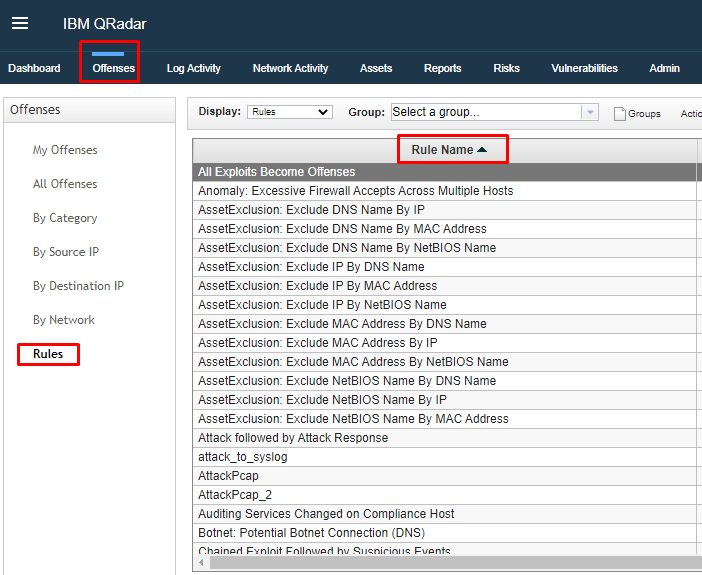
> **Warning:** The rule names that you need to add to the dynamic list are case sensitive, and have to match exactly the rules from the Rules page on QRadar.
To learn more about configuring connectors in Google SecOps,
see [Ingest your data (connectors)](https://docs.cloud.google.com/chronicle/docs/soar/ingest/connectors/ingest-your-data-connectors).
> [!NOTE]
> **Note:** To prevent data loss, connectors utilize **Event Flattening** . If a raw alert contains a list of entities (such as multiple email addresses, hostnames, or IP addresses), connectors automatically flatten them into separate, unique events.
>
> For example, a single raw alert containing three different email addresses is ingested as three
> separate events, each containing one distinct email address.
>
> This process ensures that every entity is correctly indexed as a unique asset, making it fully
> searchable and actionable in playbooks.
### QRadar Correlation Events Connector V2
#### Description
Recommended connector. Fetches QRadar offenses and forms Google SecOps
alerts for each QRadar rule added to dynamic list in Google SecOps.
Connector fetches only the offenses for rules that are added to
Google SecOps dynamic list. Connector requires minimum QRadar API
version 10.1. Connector creates Google SecOps alerts based on the rule
name of QRadar offense, not the offense name.
#### Connector prerequisites
1. **QRadar Indexes for required fields.** The QRadar New Correlation Events
Connector V2 connector uses additional fields for the events associated
with the following offenses: logsource_id, creEventList, Custom Rule
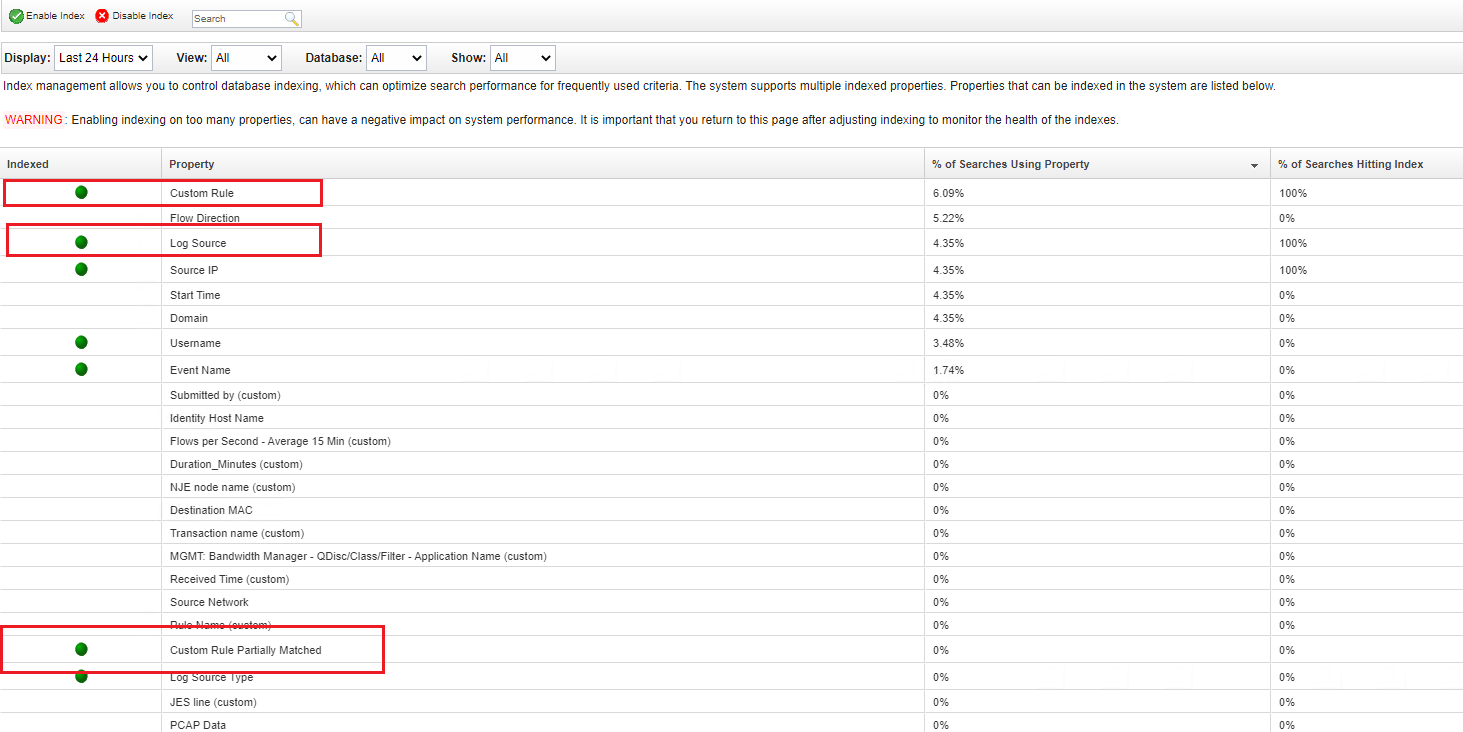
Partially Matched. Those fields should be indexed by default in QRadar, but
it is required to make sure that these indexes are currently enabled. To
check if they are enabled, in the QRadar Web UI go to **Admin \>
Index Management**. In the opened window you will find the following
indexes, make sure they are enabled:
- Custom Rule
- Log Source
- Custom Rule Partially Matched
For more information, see [Index management](https://www.ibm.com/docs/en/qsip/7.4?topic=tasks-index-management).
2. **Max Days Backwards Recommendations** The Max Days Backwards connector
parameter value should be used with caution. QRadar offenses can have a lot
of events, and trying to fetch those by the connector can cause excessive
load on QRadar server and/or requests timeouts. Because of it, it's
recommended to set the Max Days Backwards parameter to small enough values
to make sure that connector is able to query QRadar for events for the
configured period.
#### Connector usage notes
Note the following when using the connector:
1. QRadar Correlation Events Connector v2 keeps track of every event ingested
per offense. To do that, it calculates a hash sum of events using all event
data (every field for event returned by the QRadar API) and uses it as a
unique identifier of the event for the offense. As a result, events that
have every field identical aren't ingested for the offense. The first event
is ingested and added to the related offense. However, the following ones
are discarded as duplicates. The aforementioned is caused by the QRadar
architecture as events in QRadar don't have unique identifiers.
2. QRadar Correlation Events Connector v2 creates alerts based on the
dynamic list rules that are present for the offense, not for the offenses
themselves. As a result, if an event in the offense is flagged by multiple
dynamic list rules, this event is added to multiple Google SecOps
alerts for the related dynamic list rules.
IBM QRadar uses rules to monitor the events and flows in your network to
detect security threats. When the events and flows meet the test criteria, which
is defined in the rules, an offense is created to show that a security attack or
policy breach is suspected.
> [!NOTE]
> **Note:** Google SecOps will ingest offenses and events from QRadar, not the flows.
New connector ingests offenses into Google SecOps based only on
matched rules. These rules are user-defined and need to be added to the dynamic
list to ensure that Google SecOps only ingests offenses that are relevant
to the user. Therefore, once a new offense is created, the connector checks the
rules that triggered the offense (rule filtering was introduced on QRadar API
version 9+). If the rules are part of the dynamic list, the connector prepares the offense
for ingestion.
#### Connector use case
**Investigate an offense**
IBM QRadar uses rules to monitor the events and flows in your network to
detect security threats. When the events and flows meet the test criteria that
is defined in the rules, an offense is created to show that a security attack or
policy breach is suspected. But, knowing that an offense occurred is only the
first step. Identifying how it happened, where it happened, and who did it
requires some investigation.
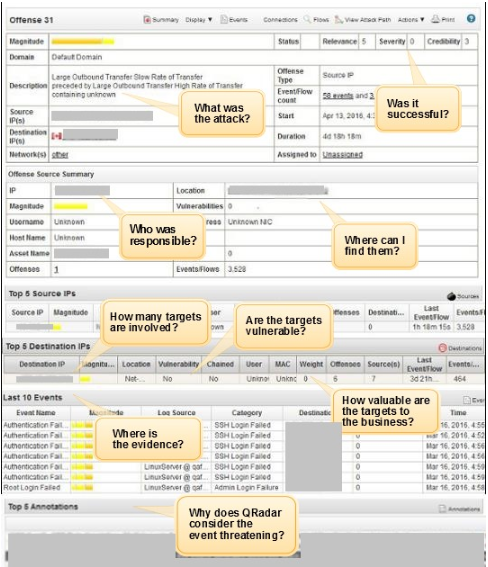
The Offense Summary window helps you begin your offense investigation by
providing context to help you understand what happened and determine how to
isolate and resolve the problem.
#### Connector parameters
Use the following parameters to configure the connector:
| Parameter name | Type | Default Value | Description |
|---|---|---|---|
| Product Field Name | String | N/A | Describes the name of the field where the product name is stored. |
| Event Field Name | String | N/A | Describes the name of the field where the event name is stored. |
| Environment Field Name | String | domain_name | Describes the name of the field where the environment name is stored. If environment field isn't found, environment is "". |
| Environment Regex Pattern | String | .\* | A regex pattern to run on the value found in the "Environment Field Name" field. |
| API Root | String | https://`IP_ADDRESS`:port | The QRadar server address. |
| API Token | String | N/A | The API authentication token. |
| API Version | String | 10.1 | The QRadar API version to be used, the Connector supports API version starting from 10.1. |
| Domain Filter | String (CSV) | N/A | Specify QRadar domains from which offenses should be ingested. If no values are provided, the connector will ingest offenses from all domains. Parameter accepts multiple values as a comma separated string. |
| Events Limit per Siemplify Alert | Integer | 25 | Max number of events to fetch per Google SecOps Alert per Cycle. Can be increased to make connector run faster, if for the specified offense padding period, large numbers of events are constantly returned. |
| Connector Events Page Size | Integer | 100 | The size of the page that connector will use to process events in batches. |
| Max Offenses per Cycle | Integer | 10 | Max offenses to process per connector run. Avoid setting a value lower than 10 to ensure optimal performance. |
| Script Timeout (Seconds) | Integer | 300 | Timeout limit for the python process running the current script. |
| Max Days Backwards | Integer | 5 | Max amount of days to fetch offenses data backwards. |
| Offenses Padding Period | Integer | 60 | Time frame in minutes to fetch offenses in minutes. |
| Events Padding Period | Integer | 1 | Time frame in days to fetch events data. |
| Custom Fields | String | N/A | Custom fields that are configured by the user at the QRadar, values are comma-separated. Example: Field A, Field B |
| What Value to use for the Name Field of Siemplify Alert? | String | custom_rule | Specify what format to follow to generate names for the alerts created by the connector. Possible values are: custom_rule or offense_description |
| What Value to use for the Rule Generator Field of Siemplify Alert? | String | custom_rule | Specify what format to follow to fill the rule_generator field for the alerts created by the connector. Possible values are: custom_rule or offense_description |
| Create "Cannot Fetch Events for the Offense" Cases? | Checkbox | Checked | If checked, the connector will create "Cannot fetch events for the offense" warning cases if the connector can't fetch events for the updated offenses during the offenses padding period. |
| Proxy Server Addresses | String | N/A | Proxy server address. |
| Proxy Username | String | N/A | Proxy username. |
| Proxy Password | Password | N/A | Proxy password. |
| Events Limit per Qradar Offense Rule | Integer | 100 | Specify a limit for the number of events that should be ingested per a single rule in QRadar offense. No new events are ingested to the offense for the related QRadar rule once this limit is reached. Example: 100 |
| Events Limit for Connector to Query in One Connector Run | Integer | N/A | Specify a limit for the number of events that a single offense connector should query from QRadar in one connector execution. Example: 100. Note that the value specified in the parameter can't be lower than the value specified in the Events Limit per QRadar Offense Rule parameter. Additionally, because of how the connector fetches events, events that are older and outside the limit aren't fetched to Google SecOps. The connector fetches the newest events until the limit specified in the Events Limit per QRadar Offense Rule parameter is reached. |
| Use allowlist as a blocklist | Checkbox | Unchecked | If enabled, dynamic list is used as a blocklist. |
| Disable Overflow | Checkbox | Unchecked | If enabled, the connector overflow mechanism isn't checked for the created alerts, the "overflow" alerts aren't created, and the connector tries to fetch all offenses returned from the QRadar. |
| Qradar Offense Rules Re-Sync Timer | Integer | 10 | Specify in minutes how often the connector should resync QRadar offense rules list. If the parameter is not set or is set to 0, the connector resyncs every run. |
| Ignore 0.0.0.0 Hostname Lookup | Checkbox | Unchecked | If selected, the connector does not fetch hostnames for 0.0.0.0 addresses. This is only supported for QRadar API version 10.1 and higher. |
#### Connector rules
##### Blocklist and dynamic list
The connector is ingesting offenses into Google SecOps based on
matched rules. These rules are user defined and added to a dynamic list to ensure
that Google SecOps only ingest offenses that are of interest/important
to the user.
| RuleType (Dynamic list or blocklist) | RuleName (string) |
|---|---|
| Dynamic list | Local: SSH or Telnet Detected on Non-Standard Port |
| Dynamic list | Multiple Login Failures from the Same Source |
##### Proxy support
The connector supports proxy.
##### Encrypted Communications
The connector supports encrypted communications (SSL/TLS).
##### Unicode support
The connector supports Unicode encoding for the alerts processed.
### QRadar Offenses Connector
> [!TIP]
> **Tip:** If you want to change the *Events Limit per Rule* parameter, you need to create a new connector. This parameter can't be changed for an already working connector.
#### Description
QRadar offenses connector used to fetch offenses and create
Google SecOps alerts based on the QRadar offenses themselves, in
opposite how other integration's connectors do it based on the QRadar rule
names. Connector has a limit of how many events in total it will fetch per
QRadar offense, after reaching that limit new events will not be ingested.
Connector uses Google SecOps dynamic list, but by default if no
dynamic list rules are set, it will fetch all offenses returned from the QRadar
API. Connector requires QRadar API version 10.1 or higher.
Connector can be considered as an easier to configure and use version that can
be utilized if there is no need to track and ingest all QRadar offense events
and ingest them to Google SecOps (as integration correlation
connectors do).
#### Connector parameters
Use the following parameters to configure the connector:
| Parameter name | Type | Default value | Is mandatory | Description |
|---|---|---|---|---|
| Product Field Name | String | N/A | Yes | Describes the name of the field where the product name is stored. |
| Event Field Name | String | N/A | Yes | Describes the name of the field where the event name is stored. |
| Environment Field Name | String | domain_name | No | Describes the name of the field where the environment name is stored. If environment field isn't found, environment is "". |
| Environment Regex Pattern | String | .\* | No | A regex pattern to run on the value found in the "Environment Field Name" field. |
| API Root | String | https://`IP_ADDRESS`:port | Yes | The API server address. |
| API Token | String | N/A | Yes | The API authentication token. |
| API Version | String | 10.1 | Yes | The QRadar API version to be used, the Connector supports API version starting from 10.1. |
| Total limit of events per offense | Integer | 100 | Yes | Specify how many events per QRadar offense should be ingested in total by connector, after reaching that limit new events will not be ingested for the offense. |
| Events Limit per Qradar Offence Rule | Integer | N/A | No | Specify an optional limit for how many events should be ingested per single rule in QRadar offense, no new events will be ingested to the offense for the related QRadar rule once this limit is reached. Limit can't be bigger than "Total limit of events per offense". |
| Connector Events Page Size | Integer | 100 | Yes | The size of the page that connector will use to process events in batches. |
| Max Offenses per Cycle | Integer | 10 | Yes | Max offenses to process per connector run. Avoid setting a value lower than 10 to ensure optimal performance. |
| Script Timeout (Seconds) | Integer | 300 | Yes | Timeout limit for the python process running the current script. |
| Max Days Backwards | Integer | 5 | No | Max amount of days to fetch offenses data backwards |
| Offenses Padding Period | Integer | 60 | Yes | Time frame in minutes to fetch offenses in minutes. |
| Events Padding Period | Integer | 1 | Yes | Time frame in days to fetch events data. |
| Custom Fields | String | N/A | No | Custom fields that are configured by the user at the QRadar, comma separated, eg. Field A, Field B. |
| Domain Filter | String | N/A | No | Specify QRadar domains from which offenses should be ingested. If no values are provided, the connector will ingest offenses from all domains. Parameter accepts multiple values as a comma separated string. |
| Magnitude Filter | Integer | N/A | No | Specify an offense magnitude to ingest, offenses with the magnitude equal or bigger than provided will be ingested to Google SecOps. |
| What Value to use for the Name Field of Siemplify Alert? | String | custom_alert_name | No | Specify what format to follow to generate names for the alerts created by the connector. Possible values are: custom_alert_name or offense_description. |
| Use allowlist as a blocklist | Checkbox | Unchecked | No | If enabled, the dynamic list will be used as a blocklist. If the checkbox is not enabled and no dynamic list rules are set, the connector will fetch all offenses returned from the QRadar API. |
| Disable Overflow | Checkbox | Unchecked | No | If enabled, connector overflow mechanism will not be checked for the created alerts - "overflow" alerts will not be created, connector will try to fetch all offenses returned from QRadar. |
| Proxy Server Addresses | String | | No | Proxy server address. |
| Proxy Username | String | N/A | No | Proxy username. |
| Proxy Password | Password | N/A | No | Proxy password. |
| Qradar Offense Rules Re-Sync Timer | Integer | 10 | No | Specify in minutes how often the connector should resync Qradar offense rules list. If the parameter is not set or is set to 0, the connector resyncs every run. |
| Timestamp Field | String | last_updated_time | No | Specify which timestamp field to use for identifying offenses with recent changes. Possible values are: `last_persisted_time` (Supported from API v14.0) or `last_updated_time` (Supported from API v10.1). |
#### Connector rules
##### Proxy Support
The connector supports proxy.
### QRadar Baseline Offenses Connector
The connector fetches offenses and creates Google SecOps alerts based on the names of QRadar offenses.
The connector creates a single Google SecOps alert per QRadar offense, and doesn't create additional Google SecOps alerts when new events from QRadar appear.
The connector uses the Google SecOps dynamic list. By default, if no dynamic list rules are set, the connector fetches all offenses returned from the Qradar API.
> [!NOTE]
> **Note:** The connector requires QRadar API version 10.1 or later.
#### Connector parameters
| Parameters ||
|---|---|
| Product Field Name | **Required** The name of the field where the product name is stored. |
| Event Field Name | **Required** The name of the field where the event name is stored. |
| Environment Field Name | *Optional* The name of the field where the environment name is stored. If the environment field isn't found, the environment is set to `""`. |
| Environment Regex Pattern | *Optional* A regular expression pattern to run on the value found in the `Environment Field Name` field. Default value is `.*` |
| API Root | **Required** The API server address. |
| API Token | **Required** The API authentication token. |
| API Version | **Required** The QRadar API version. The Connector supports API versions 10.1 and later. |
| Total limit of events per offense | **Required** Specifies how many events per QRadar offense should be ingested in total by connector. After reaching the set limit, new events will not be ingested for the offense. Default value is 100. |
| Events Limit per QRadar Offense Rule | *Optional* Specifies an optional limit for a quantity of events that should be ingested per single rule into a QRadar offense. No new events are ingested into the offense for the related QRadar rule once the limit set by this parameter is reached. **Important:** The limit cannot exceed the `Total limit of events per offense` parameter value. |
| Connector Events Page Size | **Required** The size of the page that connector uses to process events in batches. Default value is 100. |
| Max Offenses per Cycle | **Required** Max offenses to process per connector run. Avoid setting a value lower than 10 to ensure optimal performance. Default value is 10. |
| Script Timeout (Seconds) | **Required** The timeout limit for the python process running the current script. Default value is 300 seconds. |
| Max Days Backwards | *Optional* Max amount of days from which to fetch the offenses data. Default value is 5 days. |
| Offenses Padding Period | **Required** Time frame in minutes to fetch offenses. Default value is 60 minutes. |
| Events Padding Period | **Required** Time frame in days to fetch events data. Default value is one day. |
| Custom Fields | *Optional* Custom comma-separated fields configured by the user in QRadar, such as `Field A, Field B`. |
| Domain Filter | *Optional* Specifies QRadar domains to ingest offenses from. If no values are provided, the connector ingests offenses from all domains. The parameter accepts multiple values as a comma-separated string. |
| Magnitude Filter | *Optional* Specifies an offense magnitude to ingest. Offenses with the magnitude equal to or greater than provided will be ingested to Google SecOps. |
| What Value to use for the Name Field of Siemplify Alert? | *Optional* Specifies what format to follow to generate names for the alerts created by the connector. Default value is `custom_alert_name`. Possible values: - `custom_alert_name` - `offense_description`
|
| Use dynamic list as a blocklist | *Optional* If checked, the dynamic list is used as a blocklist. If the checkbox is unchecked and no dynamic list rules are set, the connector fetches all offenses returned from the QRadar API. Unchecked by default. |
| Disable Overflow | *Optional* If enabled, the connector overflow mechanism will not be checked for the created alerts so the "overflow" alerts will not be created and the connector will fetch all offenses returned from QRadar. Unchecked by default. |
| Proxy Server Addresses | *Optional* The proxy server address. |
| Proxy Username | *Optional* The proxy username. |
| Proxy Password | *Optional* The proxy password. |
| Qradar Offense Rules Re-Sync Timer | *Optional* Specifies the interval in minutes for the connector to resync the QRadar offense rules list. If the parameter is not set or is set to 0, the connector resyncs every run. Default value is 10 minutes. |
| Create SOAR alerts for offenses with 0 events | *Optional* If checked, for offenses fetched with no events, the connector creates a Google SecOps alert using the QRadar offense data for both alert and event. Unchecked by default. |
| Offenses Creation Timer (minutes) | *Optional* Specifies how long the connector waits before fetching events data for a newly created QRadar offense. If the connector failed to get the events after the timer had run out and the `Create SOAR alerts if failed to get events for it?` parameter is enabled, the connector uses the fallback to create a Google SecOps alert and event from the same QRadar offense data. |
#### Connector rules
The connector supports Proxy.
#### Connector events
The example of an event is as follows:
{
"events": [
{
"CREName": null,
"CREDescription": null,
"EventName": "WinCollect Info",
"EventDescription": "WinCollect Info",
"rulename_creEventList": [
"Destination Asset Weight is Low",
"Source Asset Weight is Low",
"Events from Windows Host - Second Rule",
"Context is Local to Local"
],
"partialmatchlist": [],
"qid": 63500003,
"category": 8052,
"sourceHostname": null,
"destinationHostname": null,
"creEventList": [
100205,
100211,
100409,
100199
],
"credibility": 5,
"destinationMAC": "01:23:45:ab:cd:ef",
"destinationIP": "192.0.2.1",
"destinationPort": 0,
"destinationv6": "2001:db8:1:1:1:1:1:1",
"deviceTime": 1583158321000,
"deviceProduct": "WinCollect",
"domainID": 0,
"duration": 10000,
"endTime": 1583165521106,
"eventCount": 1,
"eventDirection": "L2L",
"processorId": 8,
"hasIdentity": false,
"hasOffense": true,
"highLevelCategory": 8000,
"isCREEvent": false,
"magnitude": 6,
"utf8_payload": "<13>Mar 02 16:12:01 DESKTOP IBM|WinCollect|src=DESKTOP\tos=Windows 10 (Build 18363 64-bit)\tdst=\tsev=3\tlog=Code.SSLConfigServerConnection\tmsg=ApplicationHeartbeat",
"postNatDestinationIP": "198.51.100.255",
"postNatDestinationPort": 0,
"postNatSourceIP": "198.51.100.1",
"postNatSourcePort": 0,
"preNatDestinationIP": "198.0.2.255",
"preNatDestinationPort": 0,
"preNatSourceIP": "192.0.2.255",
"preNatSourcePort": 0,
"protocolName": "Reserved",
"protocolID": 255,
"relevance": 9,
"severity": 3,
"sourceIP": "192.0.2.1",
"sourceMAC": "ab:cd:ef:01:23:45",
"sourcePort": 0,
"sourcev6": "2001:db8:2:2:2:2:2:2",
"startTime": 1583165521106,
"isunparsed": false,
"userName": null
}
]
}
## Jobs
### SyncCloseOffenses
#### Description
Closes related QRadar offenses for closed Google SecOps alerts.
#### Parameters
| Parameter name | Type | Default value | Is mandatory | Description |
|---|---|---|---|---|
| Api Root | String | https://`IP_ADDRESS` | Yes | The URL path that points to the QRadar server. |
| Api Token | Password | N/A | Yes | The API security token for authentication. |
| API Version | String | N/A | No | The API version used. |
| Days Backwards | Integer | N/A | No | Days backwards to get offenses for. |
**Need more help?** [Get answers from Community members and Google SecOps professionals.](https://security.googlecloudcommunity.com/)