# Office 365 Cloud App Security
This document provides guidance on how to integrate Office 365 Cloud App Security with
Google SecOps.
## Use Cases
1. Monitor alerts from Office 365 environment
2. Use CloudApp Security data for the investigation of security incidents.
## Configure Office 365 Cloud App Security to work with Google Security Operations
To make API requests, you must be able to authenticate yourself using a Cloud
App Security API token. This token will be included in the header when Cloud App
Security makes API requests.
1. To obtain your security API token, sign in to the [Microsoft Cloud App
Security portal](https://portal.cloudappsecurity.com/).
2. In the **Settings** menu, select **Security extensions** and then **API
tokens**.
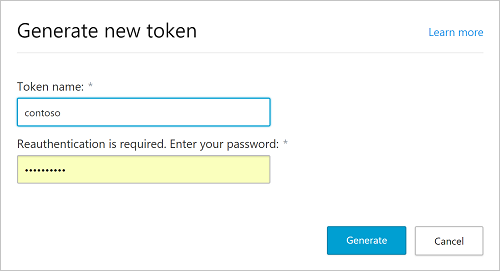
3. Click the plus button to generate a new token and provide a name to identify
the token in the future. Click **Next**.
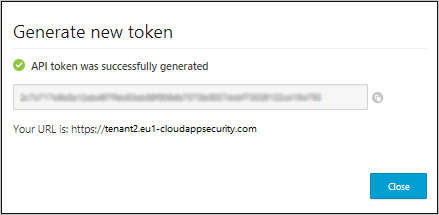
4. After you generate a new token, you'll be provided with a new URL to use to
access the Cloud App Security portal.
> [!NOTE]
> **Note:** For more information on API tokens, see [Microsoft official
> Guide](https://docs.microsoft.com/en-us/cloud-app-security/api-tokens#generate-a-token).
## Configure Office 365 Cloud App Security integration in Google SecOps
For detailed instructions on how to configure an integration in
Google SecOps, see [Configure
integrations](https://docs.cloud.google.com/chronicle/docs/soar/respond/integrations-setup/configure-integrations).
### Integration parameters
Use the following parameters to configure the integration:
| Parameter Display Name | Type | Default Value | Is Mandatory | Description |
|---|---|---|---|---|
| Instance Name | String | N/A | No | Name of the Instance you intend to configure integration for. |
| Description | String | N/A | No | Description of the Instance. |
| Cloud App Security portal URL | String | N/A | Yes | URL address of the Cloud App Security Portal. |
| Cloud App Security API token | String | N/A | Yes | A parameter to specify Cloud App Security API token to connect to the API. For more information, see API tokens: https://go.microsoft.com/fwlink/?linkid=851419 |
| Run Remotely | Checkbox | Unchecked | No | Check the field in order to run the configured integration remotely. Once checked, the option appears to select the remote user (agent). |
> [!NOTE]
> **Note:** You can make changes at a later stage if needed. Once configured, the Instances can be used in Playbooks. For detailed information on configuring and supporting multiple instances, please see [Supporting multiple instances](https://docs.cloud.google.com/chronicle/docs/soar/respond/integrations-setup/supporting-multiple-instances).
## Actions
### Bulk Resolve Alert
#### Description
The action is used to resolve one or more alerts once they are investigated and
risk mitigated.
#### Parameters
| **Parameter Display Name** | **Type** | **Default Value** | Is Mandatory | **Description** |
|---|---|---|---|---|
| Alert ID | String | N/A | Yes | Alert Unique Identifier. Can take multiple IDs that are comma-separated. |
| Comment | String | Resolved | No | A comment to explain why alerts are resolved. |
#### Use cases
The Office 365 Cloud App Security raises an alert about an impossible travel. The
user investigates the alert and is unable to identify the user that has logged
in from an unknown location. The user decides to suspend the user that has been
used to log in until further notice. The user, therefore, proceeds to resolve
the alert.
Steps in Google SecOps:
1. Alert is ingested by the connector into the system.
2. The user opens the alert and is unable to confirm the usernames of users involved and the locations they are logging from after an investigation.
3. Dissatisfied with the user identity and log-on location, the user suspends the user and sets the alert as resolved.
#### Run On
This action doesn't run on entities.
#### Action Results
##### Entity Enrichment
N/A
##### Insights
N/A
##### Script Result
| **Script Result Name** | **Value Options** | **Example** |
|---|---|---|
| is_success | True/False | is_success:False |
##### JSON Result
N/A
##### Case Wall
| Result Type | Value / Description | Type |
|---|---|---|
| Output message\* | *If successful:* 'The following alerts were resolved successfully:{Alert IDs} *If errors:* 'Some errors occurred. Please check log.' *If unsuccessful:* 'No alerts were resolved' | General |
### Dismiss Alert
#### Description
The action is used to dismiss an alert in cloud app security, that is not
considered interesting or relevant.
#### Parameters
| **Parameter Display Name** | **Type** | **Default Value** | Is Mandatory | **Description** |
|---|---|---|---|---|
| Alert ID | String | N/A | Yes | Alert Unique Identifier. The parameter takes a single alert IDs. |
| Comment | String | N/A | No | A comment to explain why an alert is dismissed. |
#### Use cases
Two different users sign into Office 365 Cloud App Security using the same
account from two different countries. This results in the system raising an
alert that an impossible travel have happened. However, these two users are
already known and confirmed making the alert irrelevant. The alert is therefore,
dismissed.
Steps in Google SecOps:
1. Alert is ingested by connector into the system.
2. The user opens the alert and investigates to confirm the usernames of users involved and the locations they are logging from.
3. Satisfied with their identity and location, the user dismisses the alert.
#### Run On
This action doesn't run on entities.
#### Action Results
##### Script Result
| **Script Result Name** | **Value Options** | **Example** |
|---|---|---|
| is_success | True/False | is_success:False |
##### JSON Result
N/A
##### Case Wall
| Result Type | Value / Description | Type |
|---|---|---|
| Output message\* | *If successful:* 'The following alert was dismissed successfully:{Alert ID}
*If errors:* 'Some errors occurred. Please check log.' *If unsuccessful:* 'No alerts were dismissed' | General |
### Get IP Related Activities
#### Description
The action is used to view activities related to an IP.
#### Parameters
| **Parameter Display Name** | **Type** | **Default Value** | Is Mandatory | **Description** |
|---|---|---|---|---|
| Activity Display Limit | String | 10 | No | Limit on the number of activities to display. |
| Product Name | String | ALL | No | Product list where the user can select an app connected to cloudapp security to enable them to get IP related activities of a specific selected app. The product name is to be converted/mapped to the product code in the action filters. Eg. if Office 365 is selected should be converted to 11161. |
| Time Frame | String | 24 | Yes | Specify the value to fetch the number of activities that occurred according to the specified value of hours ago. |
#### Use cases
The system raises an alert about an "activity from an infrequent country". The
IP address involved in the activity is indicated in the alert, and the user
would like to check more activity about this IP involved to assist in
investigation.
Steps in Google SecOps:
1. System receives alert.
2. From the alert event the user obtains more enrichments from event data and decides to investigate the IP address used.
3. The user looks for IP enrichment to check the previous activities it got involved in.
#### Run On
This action runs on the IP Address entity.
#### Action Results
##### Entity Enrichment
| **Enrichment Field Name** | **Logic - When to apply** |
|---|---|
| uid | Returns if it exists in JSON result |
| eventRouting | Returns if it exists in JSON result |
| appName | Returns if it exists in JSON result |
| eventType | Returns if it exists in JSON result |
| internals | Returns if it exists in JSON result |
| aadTenantId | Returns if it exists in JSON result |
| session | Returns if it exists in JSON result |
| createdRaw | Returns if it exists in JSON result |
| userAgent | Returns if it exists in JSON result |
| resolvedActor | Returns if it exists in JSON result |
| description | Returns if it exists in JSON result |
| instantiation | Returns if it exists in JSON result |
| severity | Returns if it exists in JSON result |
| saasId | Returns if it exists in JSON result |
| location | Returns if it exists in JSON result |
| timestampRaw | Returns if it exists in JSON result |
| eventTypeValue | Returns if it exists in JSON result |
| description_id | Returns if it exists in JSON result |
| timestamp | Returns if it exists in JSON result |
| eventTypeName | Returns if it exists in JSON result |
| user | Returns if it exists in JSON result |
| appId | Returns if it exists in JSON result |
| device | Returns if it exists in JSON result |
| description_metadata | Returns if it exists in JSON result |
| classifications | Returns if it exists in JSON result |
| created | Returns if it exists in JSON result |
| entityData | Returns if it exists in JSON result |
| tenantId | Returns if it exists in JSON result |
| instantiationRaw | Returns if it exists in JSON result |
| confidenceLevel | Returns if it exists in JSON result |
| mainInfo | Returns if it exists in JSON result |
##### Script Result
| **Script Result Name** | **Value Options** | **Example** |
|---|---|---|
| is_success | True/False | is_success:False |
##### JSON Result
[
{
"EntityResult": [
{
"uid": "88814735_1574155880562_520d653579254156823c4f21fe09a522",
"eventRouting":
{
"auditing": true
},
"appName": "Microsoft Cloud App Security",
"eventType": 917504,
"internals":
{
"otherIPs": ["8.8.8.8"]
},
"aadTenantId": "d48f52ca-5b1a-4708-8ed0-ebb98a26a46a",
"session":
{
"sessionId": "ad0bd5e207f2aaa97e7438ec2f6086310e2577842e711cb2a101b724d83ddd83"
},
"createdRaw": 1574156346552,
"userAgent":
{
"major": "78",
"family": "CHROME",
"nativeBrowser": false,
"os": "mac_os",
"typeName": "Browser",
"version": "78.0.3904.97",
"deviceType": "DESKTOP",
"browser": "CHROME",
"type": "Browser",
"operatingSystem":
{
"name": "OS X",
"family": "Mac OS"
},
"minor": "0",
"name": "Chrome"
},
"resolvedActor":
{
"resolved": true,
"name": "User Name - Test User Spec",
"tags": ["5da46fb69eb3f06b037b409a"],
"instanceId": "0",
"saasId": "11161",
"role": "4",
"objType": "23",
"id": "8ef1de18-71c0-4a88-88da-019c1fbf1308"
},
"description": "Log on",
"instantiation": 1574156346470,
"severity": "INFO",
"saasId": 20595,
"location":
{
"category": 0,
"city": "SomeCity",
"countryCode": "AM",
"region": "SomeCity",
"longitude": 11.1111,
"anonymousProxy": false,
"regionCode": "ER",
"isSatelliteProvider": false,
"latitude": 11.1111,
"categoryValue": "NONE",
"organizationSearchable": "GNC-Alfa CJSC"
},
"timestampRaw": 1574155880562,
"eventTypeValue": "EVENT_ADALLOM_LOGIN",
"description_id": "EVENT_DESCRIPTION_LOGIN",
"timestamp": 1574155880562,
"eventTypeName": "EVENT_CATEGORY_LOGIN",
"user":
{
"userName": "SomeCity",
"userTags": ["5da46fb69eb3f06b037b409a"]
},
"appId": 20595,
"device":
{
"userAgent": "Mozilla/5.0 (Macintosh; Intel Mac OS X 10_15_1) AppleWebKit/537.36 (KHTML, like Gecko) Chrome/78.0.3904.97 Safari/537.36",
"clientIP": "8.8.8.8",
"countryCode\": "AM"
},
"description_metadata":
{
"dash": " ",
"colon": " ",
"event_category": "Log on"
},
"classifications": ["access"],
"created": 1574156346552,
"entityData":
{
"1": null,
"0":
{
"resolved": true,
"displayName": "User Name - Test User Spec",
"id":
{
"saas": 11161, "inst": 0,
"id": "SomeCity"
}},
"2":
{
"resolved": true,
"displayName": "User Name - Test User Spec",
"id":
{
"saas": 11161,
"inst": 0,
"id": "8ef1de18-71c0-4a88-88da-019c1fbf1308"
}}},
"tenantId": 88814735,
"instantiationRaw": 1574156346470,
"confidenceLevel": 30,
"mainInfo":
{
"eventObjects": [
{
"resolved": true,
"name": "User Name - Test User Spec",
"tags": [],
"instanceId": 0,
"saasId": 11161,
"role": 4,
"objType": 21,
"link": -407163459,
"id": "SomeCity"
}, {
"resolved": true,
"name": "User Name - Test User Spec",
"tags": ["5da46fb69eb3f06b037b409a"],
"instanceId": 0,
"saasId": 11161,
"role": 4,
"objType": 23,
"link": -407163459,
"id": "8ef1de18-71c0-4a88-88da-019c1fbf1308"
}],
"rawOperationName": "login",
"activityResult":
{
"isSuccess": true
},
"type": "login",
"prettyOperationName": "login"
},
"_id": "88814735_1574155880562_520d653579254156823c4f21fe09a522",
"genericEventType": "ENUM_ACTIVITY_GENERIC_TYPE_LOGIN"
}],
"Entity": "7.7.7.7"
}
]
##### Case Wall
| Result type | Value/Description | Type |
|---|---|---|
| Output message\* | *If successful:* 'User related activities for the following user were fetched:{username}' *If errors:* 'Some errors occurred. Please check log.' *If unsuccessful:* 'No alert related activities were found' | General |
| Table | **Columns:** Activity, User, Location, IP Address, Device, Date | General |
### Get User Related Activities
#### Description
The action is used to view activities related to a user. The username of the
user is used in this action.
#### Parameters
| **Parameter Display Name** | **Type** | **Default Value** | Is Mandatory | **Description** |
|---|---|---|---|---|
| Activity Display Limit | String | 10 | No | Limit on the number of activities to display. |
| Time Frame | String | 24 | Yes | Specify the value to fetch the number of activities that occurred according to the specified value of hours ago. |
| Product Name | String | ALL | No | Product list where the user can select an app connected to cloudapp security to enable them to get user related activities of a specific selected app. The product name is to be converted/mapped to the product code in the action filters Eg. if Office 365 is selected should be converted to 11161. |
#### Use cases
The system raises an alert about an "activity from an infrequent country". The
username involved is noted and the user would like to check more activity about
the username involved to assist in investigation.
Steps in Google SecOps:
1. System receives alert.
2. From the alert event the user obtains more enrichments with username of the user which will aid in investigating the anomalous activity.
3. The user looks for user enrichment in terms of previous activities the user is involved in.
#### Run On
This action runs on the User entity.
#### Action Results
##### Entity Enrichment
| **Enrichment Field Name** | **Logic - When to apply** |
|---|---|
| uid | Returns if it exists in JSON result |
| eventRouting | Returns if it exists in JSON result |
| appName | Returns if it exists in JSON result |
| eventType | Returns if it exists in JSON result |
| internals | Returns if it exists in JSON result |
| aadTenantId | Returns if it exists in JSON result |
| session | Returns if it exists in JSON result |
| createdRaw | Returns if it exists in JSON result |
| userAgent | Returns if it exists in JSON result |
| resolvedActor | Returns if it exists in JSON result |
| description | Returns if it exists in JSON result |
| instantiation | Returns if it exists in JSON result |
| severity | Returns if it exists in JSON result |
| saasId | Returns if it exists in JSON result |
| location | Returns if it exists in JSON result |
| timestampRaw | Returns if it exists in JSON result |
| eventTypeValue | Returns if it exists in JSON result |
| description_id | Returns if it exists in JSON result |
| timestamp | Returns if it exists in JSON result |
| eventTypeName | Returns if it exists in JSON result |
| user | Returns if it exists in JSON result |
| appId | Returns if it exists in JSON result |
| device | Returns if it exists in JSON result |
| description_metadata | Returns if it exists in JSON result |
| classifications | Returns if it exists in JSON result |
| created | Returns if it exists in JSON result |
| entityData | Returns if it exists in JSON result |
| tenantId | Returns if it exists in JSON result |
| instantiationRaw | Returns if it exists in JSON result |
| confidenceLevel | Returns if it exists in JSON result |
| mainInfo | Returns if it exists in JSON result |
##### Script Result
| **Script Result Name** | **Value Options** | **Example** |
|---|---|---|
| is_success | True/False | is_success:False |
##### JSON Result
[
{
"EntityResult": [
{
"uid": "88814735_1574244328290_714fdcea1316483e88072f0f2a068ec7",
"eventRouting":
{
"auditing": true,
"adminEvent": true
},
"appName": "Microsoft Cloud App Security",
"eventType": 917544,
"internals":
{
"otherIPs": ["8.8.8.8"]
},
"aadTenantId": "d48f52ca-5b1a-4708-8ed0-ebb98a26a46a",
"session":
{
"sessionId": "e3b0c44298fc1c149afbf4c8996fb92427ae41e4649b934ca495991b7852b855"
},
"createdRaw": 1574244328339,
"userAgent":
{
"nativeBrowser": false,
"family": "UNKNOWN",
"os": "OTHER",
"typeName": "Unknown",
"deviceType": "OTHER",
"browser": "UNKNOWN",
"type": "Unknown",
"operatingSystem":
{
"name": "Unknown",
"family": "Unknown"
},
"name": "Unknown"
},
"resolvedActor":
{
"resolved": true,
"name": "User Name - Test User Spec",
"tags": ["5da46fb69eb3f06b037b409a"],
"instanceId": "0",
"saasId": "11161",
"role": "4",
"objType": "23",
"id": "8ef1de18-71c0-4a88-88da-019c1fbf1308"
},
"description": "Dismiss alert Impossible travel activity",
"instantiation": 1574244328322,
"severity": "INFO",
"saasId": 20595,
"location":
{
"category": 0,
"countryCode": "CY",
"longitude": 33.0,
"anonymousProxy": false,
"isSatelliteProvider": false,
"latitude": 11.0,
"categoryValue": "NONE",
"organizationSearchable": "SomeOrganization Ltd."
},
"adallom":
{
"alertSeverityValue": 1,
"count": 1,
"sendFeedback": false,
"feedback": " ",
"alertDate": "2019-11-13T14:29:06.0520000Z",
"title": "Impossible travel activity",
"alertTypeId": 15859716,
"handledByUser": "some@address2.email",
"alertSeverity": 1,
"alertBulk": false,
"alertMongoId": "5dcc13ab47654055292459d7",
"alertTitle": "Impossible travel activity",
"contact_email": " ",
"allowContact": false,
"licenses": ["AdallomDiscovery",
"AdallomStandalone",
"AdallomForO365",
"AdallomForAATP"],
"isBulkDismissed": false,
"dismissId": "5dd50fe869d303b914d188ca",
"alertTimestamp": 1573655346052,
"alertUid": "VelocityDetection|88814735_11161_0_8ef1de18-71c0-4a88-88da-019c1fbf1308|[2019-11-13]_[(SK,US)]",
"alertScore": "32",
"alertActor": "11161|0|8ef1de18-71c0-4a88-88da-019c1fbf1308"
},
"timestampRaw": 1574244328290,
"eventTypeValue": "EVENT_ADALLOM_ALERT_DISMISSED",
"tags": ["000000110000000000000000"],
"description_id": "EVENT_ADALLOM_ALERT_DISMISSED",
"timestamp": 1574244328290,
"eventTypeName": "EVENT_CATEGORY_DISMISS_ALERT",
"user":
{
"userName": "some@address2.email",
"userTags": ["5da46fb69eb3f06b037b409a"]
},
"appId": 20595,
"device":
{
"userAgent": "unknown",
"clientIP": "8.8.8.8",
"countryCode": "CY"
},
"description_metadata":
{
"adallom_title": "Impossible travel activity"
},
"classifications": [],
"created": 1574244328339,
"entityData":
{
"1": null,
"0":
{
"resolved": true,
"displayName": "User Name - Test User Spec",
"id":
{
"saas": 11161,
"inst": 0,
"id": "some@address2.email"
}},
"2":
{
"resolved": true,
"displayName": "User Name - Test User Spec",
"id":
{
"saas": 11161,
"inst": 0,
"id": "8ef1de18-71c0-4a88-88da-019c1fbf1308"
}}},
"tenantId": 88814735,
"instantiationRaw": 1574244328322,
"mainInfo":
{
"eventObjects": [
{
"resolved": true,
"name": "User Name - Test User Spec",
"tags": [],
"instanceId": 0,
"saasId": 11161,
"role": 4,
"objType": 21,
"link": -407163459,
"id": "some@address2.email"
}, {
"resolved": true,
"name": "User Name - Test User Spec",
"tags": ["5da46fb69eb3f06b037b409a"],
"instanceId": 0,
"saasId": 11161,
"role": 4,
"objType": 23,
"link": -407163459,
"id": "8ef1de18-71c0-4a88-88da-019c1fbf1308"
}],
"type": "unknown"
},
"_id": "88814735_1574244328290_714fdcea1316483e88072f0f2a068ec7",
"genericEventType": "ENUM_ACTIVITY_GENERIC_TYPE_UNKNOWN"
},
"Entity": "some@email.address"
}
]
##### Case Wall
| **Result Type** | **Value / Description** | **Type** |
|---|---|---|
| Output message\* | *If successful:* Alert related activities for the following ip were fetched:{ip}' *If errors:* 'Some errors occurred. Please check log.'
*If unsuccessful:* 'No alert related activities were found' | General |
| Table | **Columns:** Activity, User, Location, IP Address, Device, Date | General |
### Ping
#### Description
The action is used to test connectivity.
#### Parameters
N/A
#### Use cases
The user changes system configurations and would like to test if the
connectivity with the new configurations is successful.
Steps in Google SecOps:
1. Modify System configurations.
2. Test connectivity.
#### Run On
This action runs on all entities.
#### Action Results
##### Script Result
| **Script Result Name** | **Value Options** | **Example** |
|---|---|---|
| is_success | True/False | is_success:False |
##### JSON Results
N/A
### Close Alert
#### Description
Close alert in Microsoft Cloud App Security.
#### Parameters
| **Parameter Display Name** | **Type** | **Default Value** | **Is Mandatory** | **Description** |
|---|---|---|---|---|
| Alert ID | String | N/A | Yes | Specify the ID of the alert that needs to be closed and marked as benign. |
| Comment | String | N/A | No | Specify a comment about why the alerts are closed and marked as benign. |
| State | DDL | True Positive Possible Values: Benign False Positive True Positive | Yes | Specify what should be the state of the alert. |
| Reason | DDL | No Reason Possible Values: No Reason Actual Severity Is Lower Other Confirmed With End User Triggered By Test Not Of Interest Too Many Similar Alerts Alert Is Not Accurate | No | Specify a reason why the alert should be closed. Note: this parameter doesn't have an impact, if state is "True Positive". |
#### Run On
This action doesn't run on entities.
#### Action Results
##### Script Result
| **Script Result Name** | **Value Options** | **Example** |
|---|---|---|
| is_success | True/False | is_success:False |
##### Case Wall
| **Result type** | **Value/Description** | **Type** |
|---|---|---|
| Output message\* | **The action should not fail nor stop a playbook execution:** **if closed_benign/close_false_positive/close_true_positive \> 0(is_success=true):** "Successfully closed alert with ID {alert id } in Microsoft Cloud App Security". **The action should fail and stop a playbook execution:** **if critical error:** "Error executing action "{}". Reason: " {0}".format(exception.stacktrace) **If closed_benign/close_false_positive/close_true_positive == 0:** "Error executing action "{}". Reason: alert with ID {alert ID} was not found in Microsoft Cloud App Security" **If incorrect reason for state "Benign":** "Error executing action "{}". Reason: invalid value was selected in the "Reason" parameter for state "Benign". Valid values: No Reason, Actual Severity Is Lower, Other, Confirmed With End User, Triggered By Test." **If incorrect reason for state "False Positive":** "Error executing action "{}". Reason: invalid value was selected in the "Reason" parameter for state "False Positive". Valid values: No Reason, Not Of Interest, Too Many Similar Alerts, Alert Is Not Accurate, Other." | General |
### Enrich Entities
#### Description
Enrich entities using information from Microsoft Cloud App Security. Supported
entities: Username.
#### Parameters
N/A
#### Run on
This action runs on the Username entity.
#### Action Results
##### Script Result
| Script Result Name | Value Options | Example |
|---|---|---|
| is_success | True/False | is_success:False |
##### JSON Result
{
"type": 2,
"status": 2,
"displayName": "Aviel",
"id": "2600d017-84a1-444f-94ba-4bebed30b09e",
"_id": "5ea18b77c84b3e8dd20ead9b",
"userGroups": [
{
"_id": "5da46fb69eb3f06b037b409b",
"id": "5da46fb69eb3f06b037b409a",
"name": "Office 365 administrator",
"description": "Company administrators, user account administrators, helpdesk administrators, service support administrators, and billing administrators",
"usersCount": 20,
"appId": 11161
}
],
"identifiers": [],
"sid": null,
"appData": {
"appId": 11161,
"name": "Office 365",
"saas": 11161,
"instance": 0
},
"isAdmin": true,
"isExternal": false,
"email": "john.doe@siemplifycyarx.onmicrosoft.com",
"role": "Global Administrator",
"organization": null,
"domain": "siemplifycyarx.onmicrosoft.com",
"scoreTrends": {
"20220609": {}
},
"subApps": [],
"threatScore": 0,
"idType": 1,
"isFake": false,
"ii": "11161|0|2600d017-84a1-444f-94ba-4bebed30b09e",
"actions": [
{
"task_name": "ConfirmUserCompromisedTask",
"display_title": "TASKS_ADALIBPY_CONFIRM_USER_COMPROMISED_DISPLAY_TITLE",
"type": "user",
"governance_type": null,
"bulk_support": null,
"has_icon": true,
"display_description": {
"template": "TASKS_ADALIBPY_CONFIRM_USER_COMPROMISED_DISPLAY_DESCRIPTION_O365",
"parameters": {
"user": "john.doe@siemplifycyarx.onmicrosoft.com"
}
},
"bulk_display_description": "TASKS_ADALIBPY_CONFIRM_USER_COMPROMISED_BULK_DISPLAY_DESCRIPTION_O365",
"preview_only": false,
"display_alert_text": "TASKS_ADALIBPY_CONFIRM_USER_COMPROMISED_DISPLAY_ALERT_TEXT",
"display_alert_success_text": "TASKS_ADALIBPY_CONFIRM_USER_COMPROMISED_DISPLAY_ALERT_SUCCESS_TEXT",
"is_blocking": null,
"confirm_button_style": "red",
"optional_notify": null,
"uiGovernanceCategory": null,
"alert_display_title": null,
"confirmation_button_text": null,
"confirmation_link": null
}
],
"username": "{\"id\": \"2600d017-84a1-444f-94ba-4bebed30b09e\", \"saas\": 11161, \"inst\": 0}",
"sctime": 1655255102926,
"accounts": [
{
"_id": "fa-5ea18b77c84b3e8dd20ead9b-12260",
"i": "2600d017-84a1-444f-94ba-4bebed30b09e",
"ii": "11161|0|2600d017-84a1-444f-94ba-4bebed30b09e",
"inst": 0,
"saas": 12260,
"t": 1,
"dn": "Aviel",
"ext": false,
"s": 2,
"aliases": [
"2600d017-84a1-444f-94ba-4bebed30b09e",
"aviel",
"john.doe@siemplifycyarx.onmicrosoft.com",
"john.doe"
],
"isFake": true,
"pa": "john.doe@siemplifycyarx.onmicrosoft.com",
"em": "john.doe@siemplifycyarx.onmicrosoft.com",
"sublst": [],
"p": "11161|0|2600d017-84a1-444f-94ba-4bebed30b09e",
"appData": {
"appId": 12260,
"name": "Microsoft Azure"
},
"actions": []
}
],
"threatScoreHistory": [
{
"dateFormatted": "20220719",
"dateUtc": 1658238168000,
"score": 0,
"percentile": 0,
"breakdown": {}
}
]
}
##### Entity Enrichment - Prefix MCAS_
| Enrichment Field Name | | Logic - When to apply |
|---|---|---|
| is_admin | isAdmin | When available in JSON |
| is_external | isExternal | When available in JSON |
| role | role | When available in JSON |
| email | email | When available in JSON |
| domain | domain | When available in JSON |
| threat_score | threatScore | When available in JSON |
| is_fake | isFake | When available in JSON |
##### Case Wall
| Result type | Value / Description | Type |
|---|---|---|
| Output message\* | **The action should not fail nor stop a playbook execution:** *If data is available for one entity (is_success=true):* "Successfully enriched the following entities using information from Microsoft Cloud App Security: {entity.identifier}".
*If data is not available for one entity (is_success=true):* "Action wasn't able to enrich the following entities using information from Microsoft Cloud App Security: {entity.identifier}".
*If data is not available for all entities (is_success=false):* "None of the provided entities were enriched."
**The action should fail and stop a playbook execution:** *If a fatal error, like wrong credentials, no connection to server, other is reported:* "Error executing action "Enrich Entities". Reason: {0}''.format(error.Stacktrace) | General |
| Case Wall Table | **Table Name:** {entity.identifier}
**Table Columns:** - Key - Value | Entity |
### Create IP Address Range
#### Description
Create IP address range in Microsoft Cloud App Security.
#### Parameters
| Parameter Display Name | Type | Default Value | Is Mandatory | Description |
|---|---|---|---|---|
| Name | String | N/A | Yes | Specify the name for the IP address range. |
| Category | DDL | Corporate
Possible Values: - Corporate - Administrative - Risky VPN - Cloud provider - Other | Yes | Specify the category for the IP address range. |
| Organization | String | N/A | No | Specify the organization for the IP address range. |
| Subnets | CSV | N/A | Yes | Specify a comma-separated list of subnets for the IP address range. |
| Tags | CSV | N/A | No | Specify a comma-separated list of tags for the IP address range. |
#### Run on
This action doesn't run on entities.
#### Action Results
##### Script Result
| Script Result Name | Value Options | Example |
|---|---|---|
| is_success | True/False | is_success:False |
##### JSON Result
{
"_id": "62d684ac92adb26e3a84dd52",
"name": "range name",
"subnets": [
{
"mask": 120,
"address": "0000:0000:0000:0000:0000:ffff:c0a8:0100",
"originalString": "192.168.1.0/24"
},
{
"mask": 112,
"address": "0000:0000:0000:0000:0000:ffff:c0a8:0000",
"originalString": "192.168.2.0/16"
}
],
"location": null,
"organization": "Microsoft",
"tags": [
{
"_id": "62d684ac6025f11b4b3a4a3b",
"_tid": 88814735,
"name": "existing tag",
"target": 1,
"type": 0,
"id": "62d684ac92adb26e3a84dd51",
"status": 0
}
],
"category": 5,
"lastModified": 1658225836921.4104,
"_tid": 88814735
}
##### Case Wall
| Result type | Value / Description | Type |
|---|---|---|
| Output message\* | **The action should not fail nor stop a playbook execution:** *If the 200 status code is reported (is_success=true):* "Successfully created an IP Address Range in Microsoft Cloud App Security ".
**The action should fail and stop a playbook execution:** *If a critical error is reported:* "Error executing action "{}". Reason: " {0}".format(exception.stacktrace)
*If an error is reported in the response:* "Error executing action "{}". Reason: " {0}".format(csv of errors/error) | General |
### Add IP To IP Address Range
#### Description
Add IP address to IP address range in Microsoft Cloud App Security. Supported
entities: IP address.
#### Parameters
| Parameter Display Name | Type | Default Value | Is Mandatory | Description |
|---|---|---|---|---|
| Name | String | N/A | Yes | Specify the name for the IP address range that needs to be updated. |
#### Run on
This action runs on the IP Address entity.
#### Action Results
##### Script Result
| Script Result Name | Value Options | Example |
|---|---|---|
| is_success | True/False | is_success:False |
##### JSON Result
{
"_id": "62d684ac92adb26e3a84dd52",
"name": "range name",
"subnets": [
{
"mask": 120,
"address": "0000:0000:0000:0000:0000:ffff:c0a8:0100",
"originalString": "192.168.1.0/24"
},
{
"mask": 112,
"address": "0000:0000:0000:0000:0000:ffff:c0a8:0000",
"originalString": "192.168.2.0/16"
}
],
"location": null,
"organization": "Microsoft",
"tags": [
{
"_id": "62d684ac6025f11b4b3a4a3b",
"_tid": 88814735,
"name": "existing tag",
"target": 1,
"type": 0,
"id": "62d684ac92adb26e3a84dd51",
"status": 0
}
],
"category": 5,
"lastModified": 1658225836921.4104,
"_tid": 88814735
}
##### Case Wall
| Result type | Value / Description | Type |
|---|---|---|
| Output message\* | **The action should not fail nor stop a playbook execution:** *If successful for one entity (is_success=true):* "Successfully added the following IPs to the {name} IP Address Range in Microsoft Cloud App Security: {entity.identifier}".
*If not successful for one entity (is_success=true):* "Action wasn't able to add the following IPs to the {name} IP Address Range in Microsoft Cloud App Security: {entity.identifier}".
*If the IP address already exists (is_success=true):* "The following IPs are already a part of {name} IP Address Range in Microsoft Cloud App Security: {entity.identifier}".
*If no IPs are added (is_success=false):* print "None of the IPs were added to the IP Address Range in Microsoft Cloud App Security."
**The action should fail and stop a playbook execution:** *If a critical error is reported:* "Error executing action "{}". Reason: " {0}".format(exception.stacktrace)
*If the IP address range is not found:* "Error executing action "{}". Reason: IP address range {name} wasn't found in Microsoft Cloud App Security. Please check the spelling." {0}".format(exception.stacktrace) | General |
### Remove IP From IP Address Range
#### Description
Remove IP address from IP address range in Microsoft Cloud App Security.
Supported entities: IP address.
> [!NOTE]
> **Note:** This action can only remove exact matches. For example, the action can't remove 192.168.1.30, if the 192.168.1.1/24 range is provided.
#### Parameters
| Parameter Display Name | Type | Default Value | Is Mandatory | Description |
|---|---|---|---|---|
| Name | String | N/A | Yes | Specify the name for the IP address range that needs to be updated. |
#### Run on
This action runs on the IP Address entity.
#### Action Results
##### Script Result
| Script Result Name | Value Options | Example |
|---|---|---|
| is_success | True/False | is_success:False |
##### JSON Result
{
"_id": "62d684ac92adb26e3a84dd52",
"name": "range name",
"subnets": [
{
"mask": 120,
"address": "0000:0000:0000:0000:0000:ffff:c0a8:0100",
"originalString": "192.168.1.0/24"
},
{
"mask": 112,
"address": "0000:0000:0000:0000:0000:ffff:c0a8:0000",
"originalString": "192.168.2.0/16"
}
],
"location": null,
"organization": "Microsoft",
"tags": [
{
"_id": "62d684ac6025f11b4b3a4a3b",
"_tid": 88814735,
"name": "existing tag",
"target": 1,
"type": 0,
"id": "62d684ac92adb26e3a84dd51",
"status": 0
}
],
"category": 5,
"lastModified": 1658225836921.4104,
"_tid": 88814735
}
##### Case Wall
| Result type | Value / Description | Type |
|---|---|---|
| Output message\* | **The action should not fail nor stop a playbook execution:** *If successful for one entity (is_success=true):* "Successfully removed the following IPs from the {name} IP Address Range in Microsoft Cloud App Security: {entity.identifier}".
*If not successful for one entity (is_success=true):* "Action wasn't able to find and remove the following IPs from the {name} IP Address Range in Microsoft Cloud App Security: {entity.identifier}".
*If not successful for all entities (is_success=true):* "None of the IPs were found and removed in Microsoft Cloud App Security".
**The action should fail and stop a playbook execution:** *If a critical error is reported:* "Error executing action "{}". Reason: " {0}".format(exception.stacktrace)
*If the address range is not found:* "Error executing action "{}". Reason: IP address range {name} wasn't found in Microsoft Cloud App Security. Please check the spelling." {0}".format(exception.stacktrace) | General |
### List Files
#### Description
List available files in Microsoft Cloud App Security.
#### Parameters
| Parameter Display Name | Type | Default Value | Is Mandatory | Description |
|---|---|---|---|---|
| Filter Key | DDL | Select One
Possible Values: - ID - Filename - File Type - Share Status | No | Specify the key that needs to be used to filter files.
Possible values for "File Type": Other,Document,Spreadsheet,Presentation,Text,Image,Folder.
Possible values for "Share Status": Public (Internet),Public,External,Internal,Private. |
| Filter Logic | DDL | Not Specified
Possible Values: - Not Specified - Equal - Contains | No | Specify the filter logic that should be applied.
The filtering logic is based on the value provided in the "Filter Key" parameter.
**Note:** Only the "File Name" and "ID" filter keys work with the "Contains" logic. |
| Filter Value | String | N/A | No | Specify the value that should be used in the filter.
If "Equal" is selected, the action tries to find the exact match among results.
If "Contains" is selected, the action tries to find results that contain that substring.
If nothing is provided in this parameter, the filter is not applied.
The filtering logic is based on the value provided in the "Filter Key" parameter. |
| Max Records To Return | Integer | 50 | No | Specify the number of records to return.
If nothing is provided, the action returns 50 records.
**Note:** For contains logic, the connector only looks at 1000 results for matching. |
#### Run on
This action doesn't run on entities.
#### Action Results
##### Script Result
| Script Result Name | Value Options | Example |
|---|---|---|
| is_success | True/False | is_success:False |
##### JSON Result
{
"_id": "62cffdf1c0ff22b978334963",
"_tid": 88814735,
"appId": 15600,
"id": "c58ea974-5511-4cf3-b12b-e1e0cabce8a0|187525f2-5280-4076-adc7-c85311daed1a",
"alternateLink": "https://siemplifycyarx-my.sharepoint.com/personal/james_bond_siemplifycyarx_onmicrosoft_com/Documents/Malvertisement-master",
"collaborators": [],
"createdDate": 1657797767000,
"domains": [
"siemplifycyarx.onmicrosoft.com"
],
"driveId": "c58ea974-5511-4cf3-b12b-e1e0cabce8a0|eca285b0-1cc1-49e5-a178-7a77507cbdea",
"effectiveParents": [
"c58ea974-5511-4cf3-b12b-e1e0cabce8a0|862dfe31-b358-4e27-9660-52ed97fb4955",
"c58ea974-5511-4cf3-b12b-e1e0cabce8a0|eca285b0-1cc1-49e5-a178-7a77507cbdea"
],
"emails": [
"james.bond@siemplifycyarx.onmicrosoft.com"
],
"externalShares": [],
"facl": 0,
"fileAccessLevel": [
0,
"PRIVATE"
],
"filePath": "/personal/james_bond_siemplifycyarx_onmicrosoft_com/Documents/Malvertisement-master",
"fileSize": null,
"fileStatus": [
0,
"EXISTS"
],
"fstat": 0,
"graphId": "016XQ77WHSEV2RRACSOZAK3R6IKMI5V3I2",
"groupIds": [],
"groups": [],
"instId": 0,
"isFolder": true,
"isForeign": false,
"listId": "374dcd9b-dcff-46c6-b927-ad5411695361",
"modifiedDate": 1657797768000,
"name": "Malvertisement-master",
"noGovernance": false,
"ownerAddress": "james.bond@siemplifycyarx.onmicrosoft.com",
"ownerExternal": false,
"ownerName": "ג'יימס בונד",
"parentId": "c58ea974-5511-4cf3-b12b-e1e0cabce8a0|862dfe31-b358-4e27-9660-52ed97fb4955",
"parentIds": [
"c58ea974-5511-4cf3-b12b-e1e0cabce8a0|862dfe31-b358-4e27-9660-52ed97fb4955"
],
"saasId": 15600,
"scanVersion": 4,
"sharepointItem": {
"UniqueId": "187525f2-5280-4076-adc7-c85311daed1a",
"hasUniqueRoleAssignments": false,
"Author": {
"name": "ג'יימס בונד",
"idInSiteCollection": "4",
"sipAddress": "james.bond@siemplifycyarx.onmicrosoft.com",
"sourceBitmask": 0,
"trueEmail": "james.bond@siemplifycyarx.onmicrosoft.com",
"externalUser": false,
"oneDriveEmail": "james.bond@siemplifycyarx.onmicrosoft.com",
"LoginName": "i:0#.f|membership|james.bond@siemplifycyarx.onmicrosoft.com",
"Email": "james.bond@siemplifycyarx.onmicrosoft.com",
"Title": "ג'יימס בונד"
}
},
"siteCollection": "/personal/james_bond_siemplifycyarx_onmicrosoft_com",
"siteCollectionId": "c58ea974-5511-4cf3-b12b-e1e0cabce8a0",
"sitePath": "/personal/james_bond_siemplifycyarx_onmicrosoft_com",
"snapshotLastModifiedDate": "2022-07-14T13:12:14.906Z",
"spDomain": "https://siemplifycyarx-my.sharepoint.com",
"unseenScans": 0,
"cabinetMatchedRuleVersions": [
"605362e8dace7f169f3b05b0"
],
"cabinetState": [
"605362e8dace7f169f3b05b1"
],
"lastGlobalMatchDate": "2022-07-14T11:29:11.206Z",
"name_l": "malvertisement-master",
"originalId": "62cffdf1c0ff22b978334963",
"dlpScanResults": [],
"fTags": [],
"enriched": true,
"display_collaborators": [],
"appName": "Microsoft OneDrive for Business",
"actions": [
{
"task_name": "RescanFileTask",
"display_title": "TASKS_ADALIBPY_RESCAN_FILE_DISPLAY_TITLE",
"type": "file",
"governance_type": null,
"bulk_support": true,
"has_icon": true,
"display_description": null,
"bulk_display_description": null,
"preview_only": false,
"display_alert_text": null,
"display_alert_success_text": null,
"is_blocking": null,
"confirm_button_style": "red",
"optional_notify": null,
"uiGovernanceCategory": 0,
"alert_display_title": null,
"confirmation_button_text": null,
"confirmation_link": null
}
]
}
##### Case Wall
| Result type | Value / Description | Type |
|---|---|---|
| Output message\* | **The action should not fail nor stop a playbook execution:** *If data is available (is_success=true):* "Successfully found files for the provided criteria in Microsoft Cloud App Security".
*If data is not available (is_success=false):* "No files were found for the provided criteria in Microsoft Cloud App Security"
*If the "Filter Value" parameter is empty (is_success=true):* "The filter was not applied, because parameter "Filter Value" has an empty value."
**The action should fail and stop a playbook execution:** *If the "Filter Key" is set to "Select One" and the "Filter Logic" is set to "Equal" or "Contains":* Error executing action "{action name}". Reason: you need to select a field from the "Filter Key" parameter.
*If an invalid value is provided for the "Max Records to Return" parameter:* "Error executing action "{action name}". Reason: "Invalid value was provided for "Max Records to Return": . Positive number should be provided".
*If a fatal error, like wrong credentials, no connection to server, other is reported:* "Error executing action "{action name}". Reason: {0}''.format(error.Stacktrace)
*If the "Filter Key" is set to "Share Status" or "File Type" and the "Filter Logic" is set to"Contains":* "Error executing action "{action name}". Reason: only "ID" and "Filename" are supported for "Contains" filter logic."
*If an invalid value for the "Share Status" parameter is provided:* "Error executing action "{action name}". Reason: invalid value provided for "Share Status" filter. Possible values: Public (Internet), Public, External, Internal, Private."
*If an invalid value for the "Share Status" parameter is provided:* "Error executing action "{action name}". Reason: invalid value provided for "Share Status" filter. Possible values "File Type": Other, Document, Spreadsheet, Presentation, Text, Image, Folder." | General |
| Case Wall Table | **Table Name:** Available Files **Table Columns:** - Name - name - Owner Name - owner - Name Owner - Email - owner - Address Link - alternate - Link App - app - Name Folder - isFolder - Creation Time - createdDate - Modification Time - modifiedDate | General |
## Connectors
### Office 365 Cloud App Security Connector
#### Description
Office 365 Cloud App Security connector ingests alerts generated on Office 365
CloudApp Security platform to the Google SecOps server.
#### Configure Office 365 Cloud App Security Connector in Google SecOps
For detailed instructions on how to configure a connector in
Google SecOps, see [Configuring the
connector](https://docs.cloud.google.com/chronicle/docs/soar/ingest/connectors/ingest-your-data-connectors).
##### Connector parameters
Use the following parameters to configure the connector:
| Parameter Display Name | Type | Default Value | Is Mandatory | Description |
|---|---|---|---|---|
| Environment | DDL | N/A | Yes | Select the required environment. For example, "Customer One". In case that the alert's Environment field is empty, this alert will be injected to this environment. |
| Run Every | Integer | 0:0:0:10 | No | Select the time to run the connection. |
| Product Field Name | String | Not Supported | Yes | Currently NOT SUPPORTED. The product will be filled with the label of the service type entity of the alert. |
| Event Field Name | String | description | Yes | The field name used to determine the event name (sub-type). |
| Script Timeout (Seconds) | String | 60 | Yes | The timeout limit (in seconds) for the python process running the current script. |
| Cloud App Security portal URL | String | N/A | Yes | The URL of the Office 365 Cloud App Security portal. |
| API Token | Password | N/A | Yes | API Token that will be used to authenticate with Office 365 Cloud App Security. |
| Verify SSL | Checkbox | Unchecked | No | Verify SSL certificates for HTTPS requests to Office 365 Cloud App Security. |
| Max Alerts per Cycle | Integer | 10 | Yes | How many alerts should be processed during one connector run. Default: 10. |
| Offset Time in Hours | Integer | 24 | Yes | Fetch alerts from X hours backwards. Default value: 24 hours. |
| Environment Field Name | String | N/A | No | Describes the name of the field where the environment name is stored. |
| Environment Regex Pattern | Integer | N/A | No | If defined - the connector will implement the specific RegEx pattern on the data from the "environment field" to extract specific string. For example - extract domain from sender's address: "(?\<=@)(\\S+$) |
| Proxy Server Address | String | N/A | No | The address of the proxy server to use. |
| Proxy Username | String | N/A | No | The proxy username to authenticate with. |
| Proxy Password | Password | N/A | No | The proxy password to authenticate with. |
#### Connector rules
##### Proxy support
The connector supports proxy.
**Need more help?** [Get answers from Community members and Google SecOps professionals.](https://security.googlecloudcommunity.com/)