# Microsoft Teams
This document provides guidance on how to integrate Microsoft Teams
with Google Security Operations.
## Use cases
The **Microsoft Teams** integration uses Google SecOps
capabilities to support the following use cases:
- **Automate incident communication**: Send real-time alerts and notifications
to specific Teams channels when suspicious activity is detected.
- **Enable interactive response**: Use playbooks to ask users or analysts
questions directly in Teams and automate actions based on their responses.
- **Facilitate incident collaboration**: Automatically create dedicated channels
or group chats for high-priority incidents and manage member access.
- **Verify user activity**: Send direct messages to users to confirm actions
like logins or file access to update case details with their feedback.
- **Enrich user context**: Retrieve user profiles and team membership
information to help identify roles and permissions during investigations.
## Configure Microsoft Teams integration to work with Google Security Operations
1. Make sure that the account used for the integration configuration has the
Microsoft Teams license enabled. To do this, go to the [Microsoft Admin
Center](https://portal.office.com/adminportal/home#/user) and check what
license is applied to the needed user.
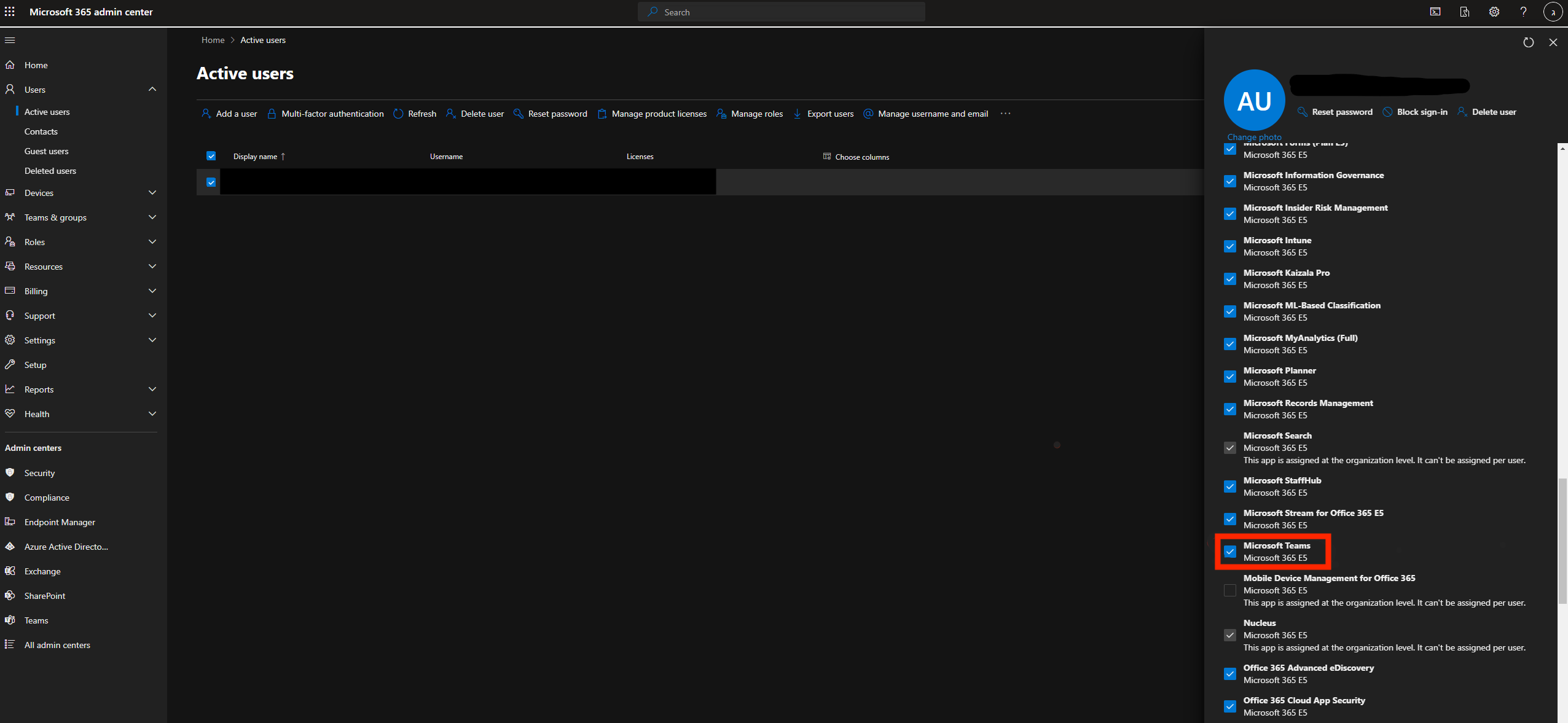
2. After you confirmed that the needed user has a license, you can start
creating the app for Microsoft Teams. First you need to go to [**Azure
Active Directory \> App
registrations**](https://portal.azure.com/#view/Microsoft_AAD_IAM/ActiveDirectoryMenuBlade/%7E/RegisteredApps).
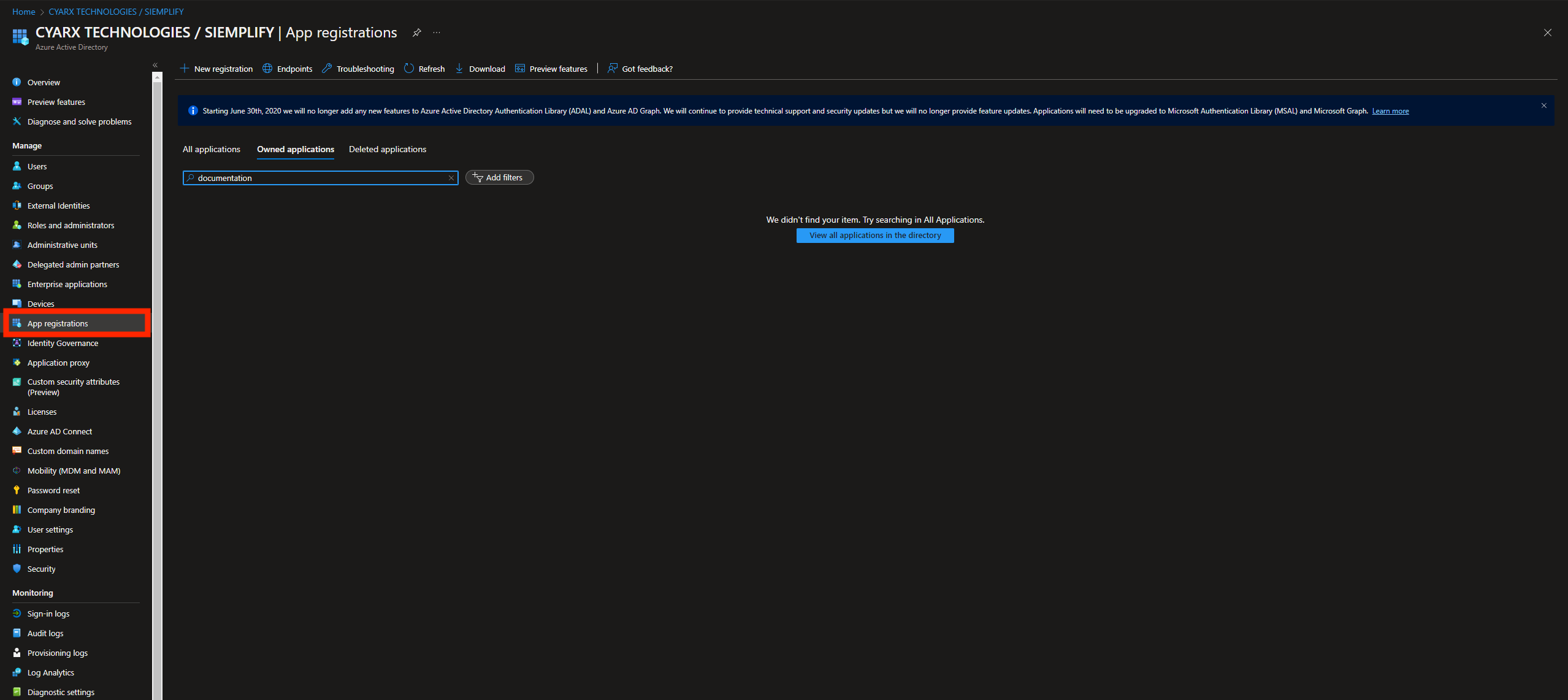
3. Click **New Registration** and provide:
- a name for the Teams app
- a Redirect URI: "https://localhost"
Make sure to save somewhere the Redirect URI, as it will be needed later in
the process.
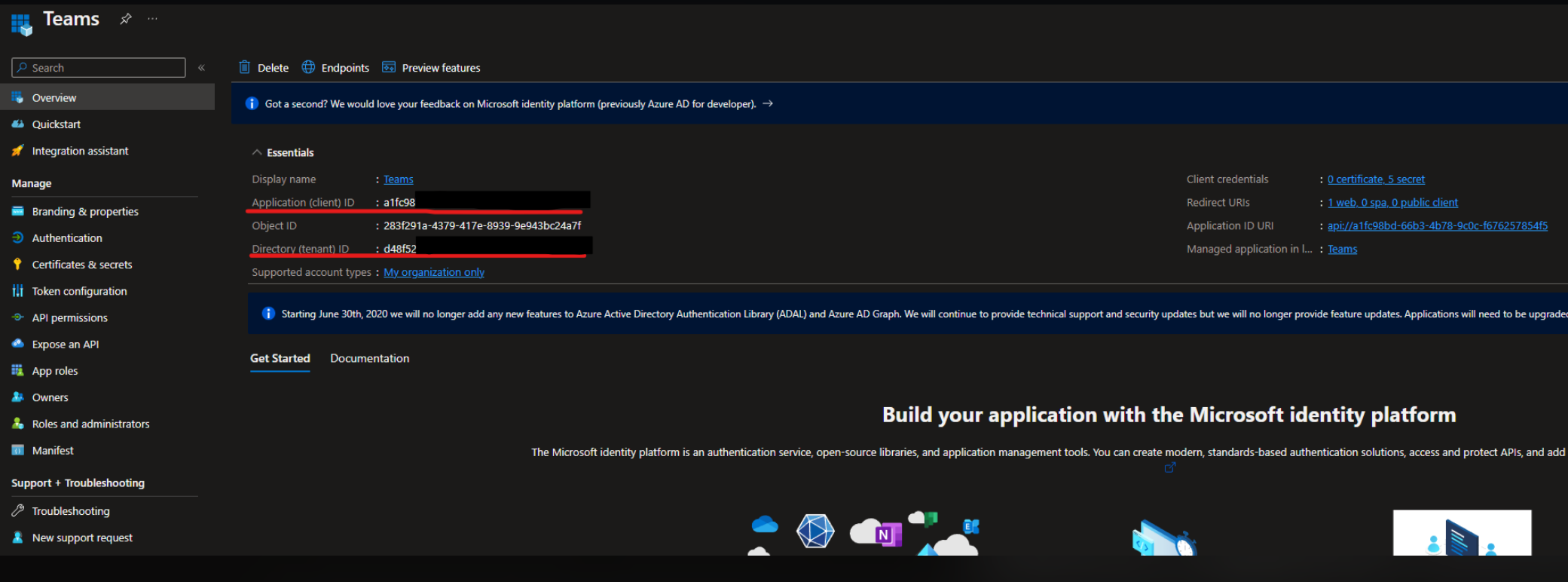
4. Go to the **Overview** page and copy:
- Application (client) ID: it corresponds to the "Client ID" parameter in the integration configuration
- Directory (tenant) ID: it corresponds to the "Tenant" parameter in the integration configuration
5. Add the necessary permissions. All of the applied permissions are
"Delegated" and should look like this:
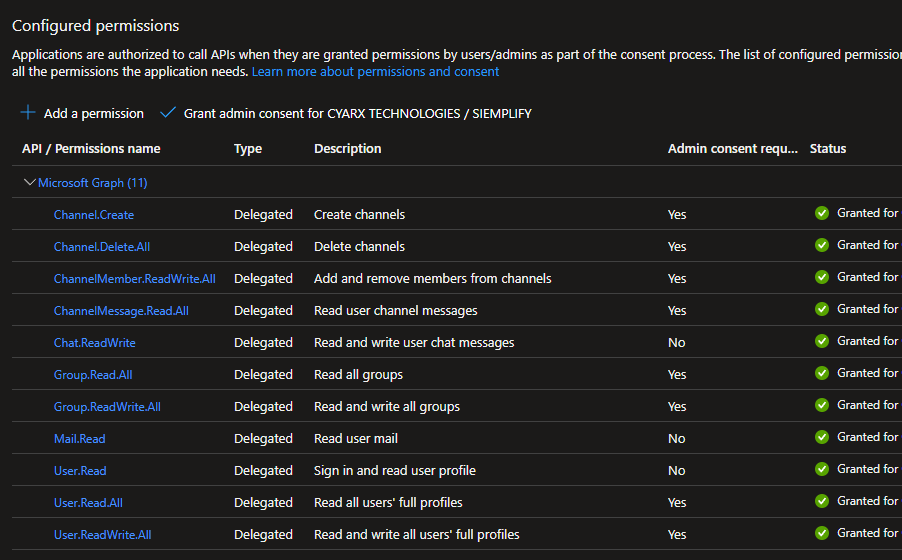
Make sure to grant admin consent for the permissions.
6. Go to the **Certificates \& secrets** tab and add a new client secret. When
the client secret is generated, you need to copy the data from the **Value**
column. This value is needed for the "Client Secret" parameter of the
integration configuration.
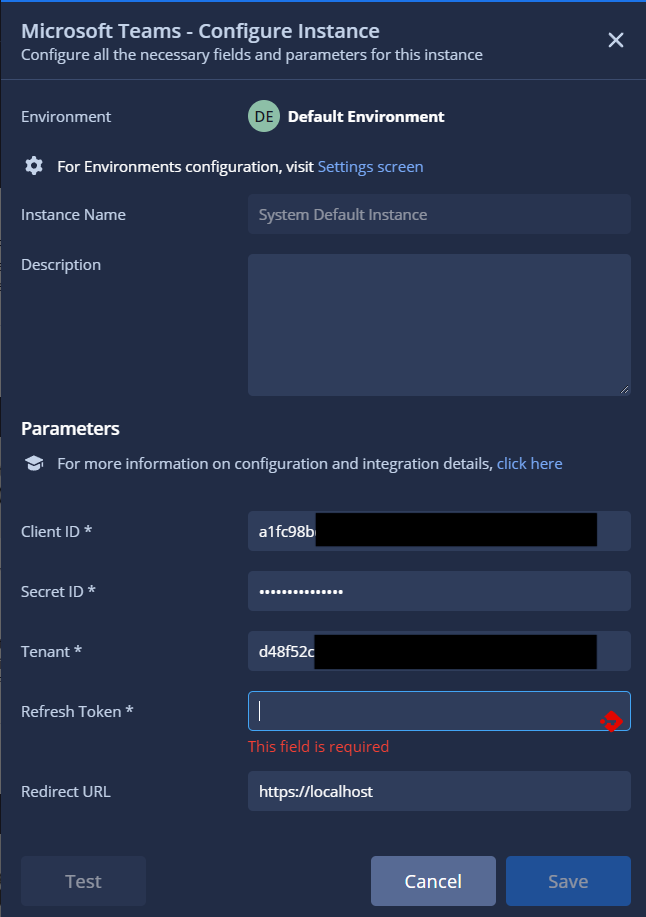
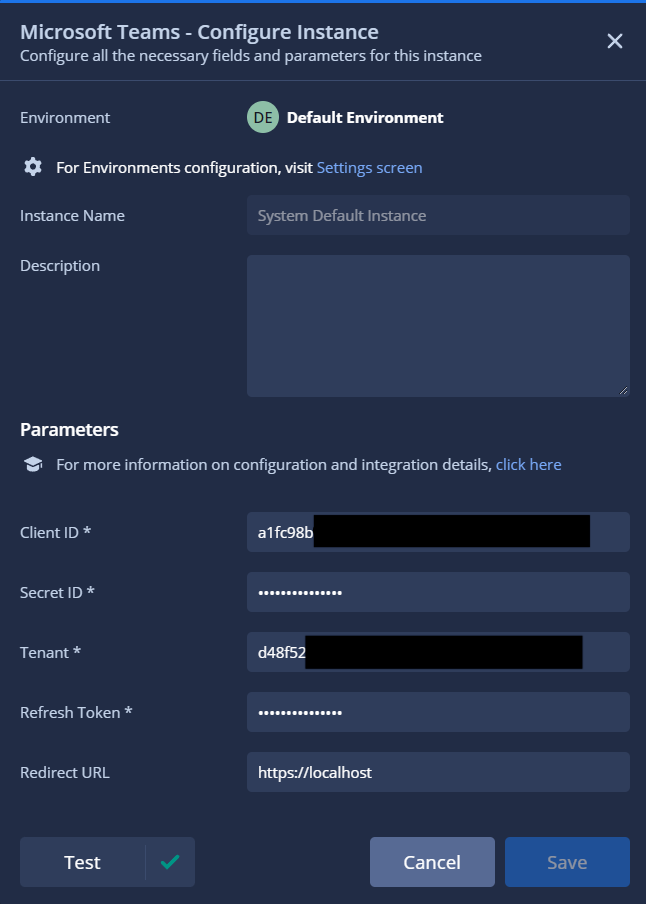
7. Go to the Google SecOps SOAR configuration page and enter the
following parameters:
- Client ID
- Client Secret
- Redirect URI
- Tenant
Enter a placeholder string for the "Refresh Token" parameter and save the
configuration.
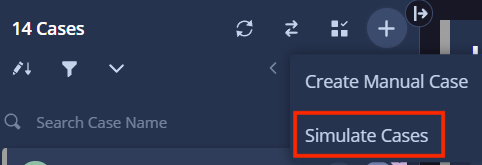
8. Go to the **Cases** tab and open any case. If you don't have a case, you can
simulate one.
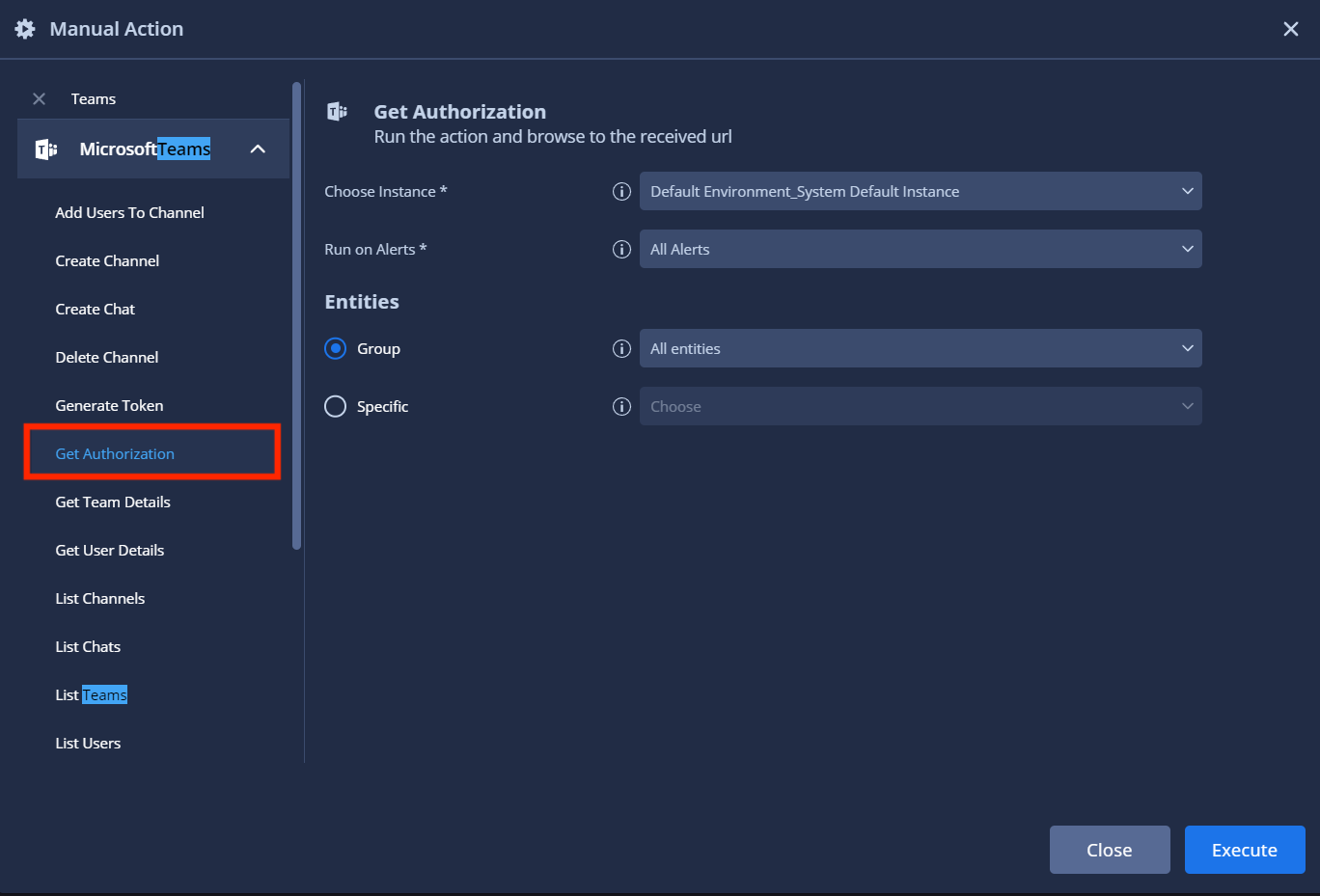
9. Select an alert in the case and click **Manual Action**.

10. Go to the **Microsoft Teams** integration and run the "Get Authorization"
action. This action generates a link that is used to authenticate to the
app.
11. To get the results, go to the Case Wall tab and click **View Results**.

You should see a similar output:
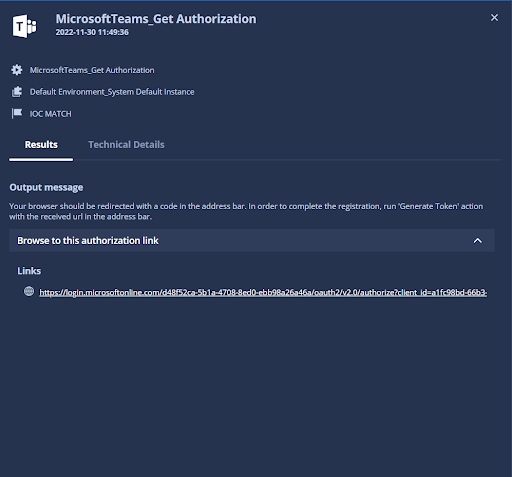
12. Click on the link that is provided by the action. Make sure that you are
logged in with a user that is used for this integration. After you opened
the link in a browser, you would see that it redirected you to a different
page. This page should look like this:
`https://localhost/?code=0.ATwAylKP1BpbCEeO0...&session_state=a149d18b-4131-4649-8956-2f0d09a98743#
Copy everything till "&session_state"`, for example:
`https://localhost/?code=0.ATwAylKP1BpbCEeO0...`
13. Run the "Generate Token" action.

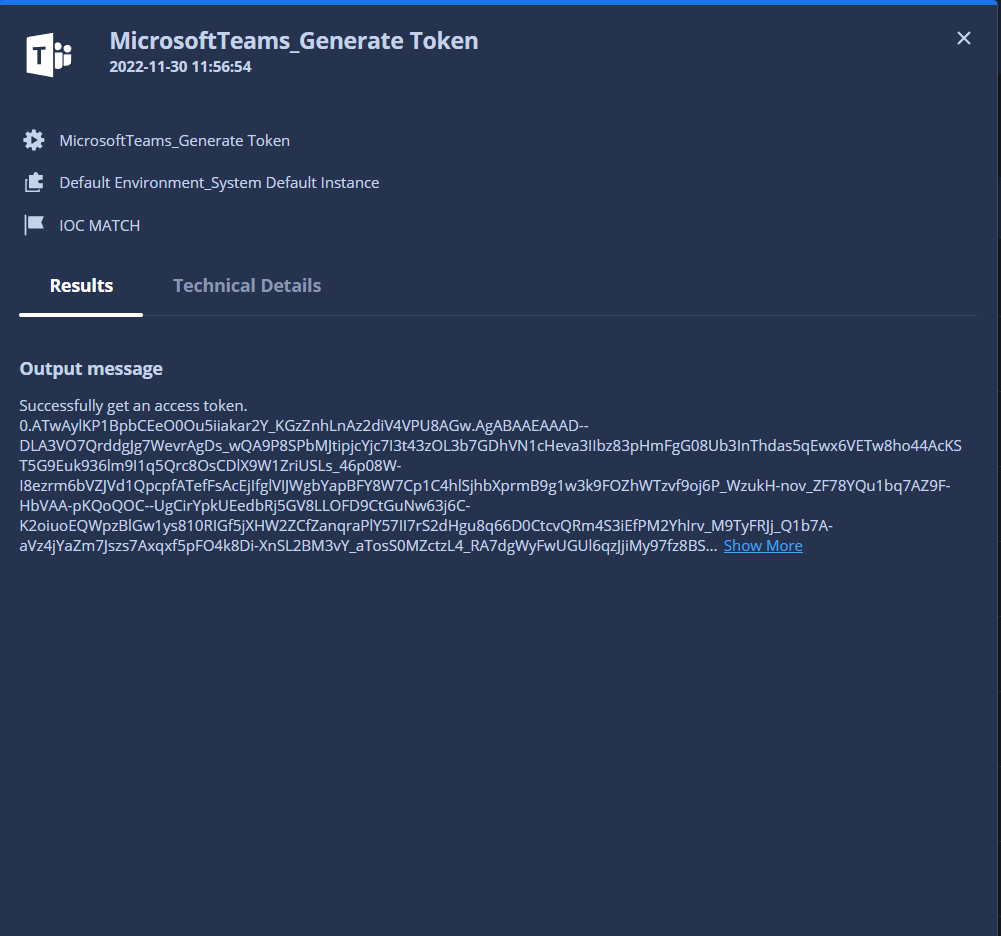
14. Go to the **Case Wall** tab to see the results. In the output message, you
will find a token. Copy this token and paste it into the "Refresh Token"
parameter.
15. If everything was done correctly, you will see a green check mark.
> [!IMPORTANT]
> **Important:** If you make any changes to the **Application Permissions** or **API Permissions** in your Microsoft Entra ID (Azure AD) App Registration after configuring this integration (for example, adding a new permission for a job to run), you must regenerate and update your credentials in Google SecOps.
>
> This typically means:
>
> - Generating a new client secret in your App Registration.
> - Updating the client secret (and regenerating the refresh token, if applicable) in the Google SecOps integration configuration.
>
> Failure to update will prevent new permissions from being applied, causing
> actions to fail.
### Integration parameters
Use the following parameters to configure the integration:
| Parameter Name | Type | Default | Is Mandatory | Description |
|---|---|---|---|---|
| Instance Name | String | N/A | No | Name of the Instance you intend to configure integration for. |
| Description | String | N/A | No | Description of the Instance. |
| Client ID | String | N/A | Yes | N/A |
| Secret ID | Password | N/A | Yes | N/A |
| Tenant | String | N/A | Yes | N/A |
| Refresh Token | Password | N/A | Yes | N/A |
| Redirect URL | String | http://localhost | No | Specify redirect URL that will be used to authenticate integration. Default value is http://localhost. This parameter affects actions "Get Authorization" and "Generate Token". |
For instructions about how to configure an integration in
Google SecOps, see [Configure
integrations](https://docs.cloud.google.com/chronicle/docs/soar/respond/integrations-setup/configure-integrations).
You can make changes at a later stage, if needed. After you configure an
integration instance, you can use it in playbooks. For more information about
how to configure and support multiple instances, see [Supporting
multiple instances](https://docs.cloud.google.com/chronicle/docs/soar/respond/integrations-setup/supporting-multiple-instances).
## Actions
For more information about actions, see [Respond to pending actions from your workdesk](https://docs.cloud.google.com/chronicle/docs/soar/overview-and-introduction/your-workdesk/respond-to-pending-actions-from-workdesk) and [Run a
manual action in your case](https://docs.cloud.google.com/chronicle/docs/soar/investigate/working-with-cases/what-actions-can-you-take-on-a-case#run-manual-action).
### Wait For Reply
Action waits for the expected reply in a specified message.
This action runs asynchronously. Adjust the script timeout value in the
Google SecOps IDE for action as needed.
> [!NOTE]
> **Note:** You need to be a part of the desired team and channel.
#### Parameters
| Parameter Display Name | Type | Default Value | Is Mandatory | Description |
|---|---|---|---|---|
| Team Name | String | N/A | Yes | Specify the name of the team. |
| Channel Name | String | N/A | Yes | Specify the name of the channel. |
| Message ID | String | N/A | Yes | Specify the ID of the message that is expected to have a reply. |
| Expected Reply | String | N/A | Yes | Specify the text of the expected reply. If this value is not provided, the action stops execution on any reply. |
| Wait Method | DDL | Check First Reply
Possible values: - Check First Reply - Wait Till Timeout | No | Specify the wait method for the action.
If *Check First Reply* is selected, the action either returns the first reply or compares it with an expected value. If *Wait Till Timeout* is selected, the action either waits for the expected value until timeout is reached or returns all of the messages sent during the timeout period. |
#### Run On
This action runs on all entities.
#### Action Results
##### Script Result
| Script Result Name | Value Options | Example |
|---|---|---|
| is_success | True/False | is_success:False |
### Generate Token
Get an access token using the authorization URL received in the previous step.
#### Parameters
| Parameter Display Name | Type | Default Value | Is Mandatory | Description |
|---|---|---|---|---|
| Authorization URL | String | N/A | Yes | Use the authorization URL received in the previous step to request an access token. |
#### Run On
This action runs on all entities.
#### Action Results
##### Script Result
| Script Result Name | Value Options | Example |
|---|---|---|
| is_connected | True/False | is_connected:False |
### Get Authorization
Run the action and browse to the received URL.
#### Parameters
| Parameter Display Name | Type | Default Value | Is Mandatory | Description |
|---|---|---|---|---|
| Redirect URL | String | N/A | Yes | Use the authorization URL received in the previous step to request an access token. |
#### Run On
This action runs on all entities.
#### Action Results
##### Script Result
| Script Result Name | Value Options | Example |
|---|---|---|
| is_connected | True/False | is_connected:false |
### Get Team ID
Retrieve the properties of a specific team.
#### Parameters
| Parameter Display Name | Type | Default Value | Is Mandatory | Description |
|---|---|---|---|---|
| Team Name | String | N/A | Yes | Name of the team. |
#### Run On
This action runs on all entities.
#### Action Results
##### Script Result
| Script Result Name | Value Options | Example |
|---|---|---|
| is_success | True/False | is_success:False |
### Get User Details
Retrieve the properties and relationships of a specific user.
#### Parameters
| Parameter Display Name | Type | Default Value | Is Mandatory | Description |
|---|---|---|---|---|
| Username | String | N/A | Yes | Microsoft Team's Username |
#### Run On
This action runs on all entities.
#### Action Results
##### Script Result
| Script Result Name | Value Options | Example |
|---|---|---|
| is_success | True/False | is_success:False |
##### JSON Result
{
"isResourceAccount": null,
"mailNickname": "username.co#EXT#",
"surname": null,
"deletedDateTime": null,
"assignedLicenses": [{
"skuId": "16ddbbfc-09ea-4de2-b1d7-312db6112d70",
"disabledPlans": []
}],
"userPrincipalName": "username.co#EXT#@tenant.onmicrosoft.com",
"faxNumber": null,
"consentProvidedForMinor": null,
"userType": "Member",
"officeLocation": null,
"usageLocation": "IL",
"city": null,
"employeeId": null,
"onPremisesImmutableId": null,
"preferredLanguage": null,
"streetAddress": null,
"@odata.context": "https://graph.microsoft.com/beta/$metadata#users/$entity",
"id": "5e457a85-a705-4b65-8a9f-3a3d2ad7715c",
"state": null,
"businessPhones": [],
"postalCode": null,
"mail": "john_doe@example.com",
"onPremisesSamAccountName": null,
"onPremisesLastSyncDateTime": null,
"accountEnabled": true,
"mobilePhone": null,
"refreshTokensValidFromDateTime": "2018-11-12T13:28:53Z",
"companyName": null,
"deviceKeys": [],
"jobTitle": null,
"preferredDataLocation": null,
"showInAddressList": false,
"department": null,
"proxyAddresses": ["SMTP:mail"],
"externalUserStateChangeDateTime": "2018-11-12T13:29:41Z",
"onPremisesProvisioningErrors": [],
"legalAgeGroupClassification": null,
"onPremisesSyncEnabled": null,
"onPremisesExtensionAttributes": {
"extensionAttribute4": null,
"extensionAttribute5": null,
"extensionAttribute6": null,
"extensionAttribute7": null,
"extensionAttribute12": null,
"extensionAttribute1": null,
"extensionAttribute2": null,
"extensionAttribute3": null,
"extensionAttribute10": null,
"extensionAttribute11": null,
"extensionAttribute8": null,
"extensionAttribute9": null,
"extensionAttribute14": null,
"extensionAttribute15": null,
"extensionAttribute13": null
},
"assignedPlans": [{
"capabilityStatus": "Enabled",
"servicePlanId":
"617d9209-3b90-4879-96e6-838c42b2701d",
"service": "MicrosoftCommunicationsOnline",
"assignedDateTime": "2018-11-12T13:28:57Z"
}, {
"capabilityStatus": "Enabled",
"servicePlanId": "902b47e5-dcb2-4fdc-858b-c63a90a2bdb9",
"service": "SharePoint",
"assignedDateTime": "2018-11-12T13:28:57Z"
}, {
"capabilityStatus": "Enabled",
"servicePlanId": "4fa4026d-ce74-4962-a151-8e96d57ea8e4",
"service": "TeamspaceAPI",
"assignedDateTime": "2018-11-12T13:28:57Z"
}],
"passwordProfile": null,
"passwordPolicies": null,
"externalUserState": "Accepted",
"otherMails": ["mail"],
"displayName": "name",
"imAddresses": [],
"provisionedPlans": [{
"capabilityStatus": "Enabled",
"provisioningStatus": "Success",
"service": "SharePoint"
}],
"createdDateTime": "2018-11-12T13:28:53Z",
"country": null,
"onPremisesDistinguishedName": null,
"onPremisesSecurityIdentifier": null,
"onPremisesDomainName": null,
"onPremisesUserPrincipalName": null,
"givenName": null,
"ageGroup": null
}
### List Channels
Get the details of all the channels that exist in a specific team.
#### Parameters
| Parameter Display Name | Type | Default Value | Is Mandatory | Description |
|---|---|---|---|---|
| Team Name | String | N/A | Yes | Name of the team. |
#### Run On
This action runs on all entities.
#### Action Results
##### Script Result
| Script Result Name | Value Options | Example |
|---|---|---|
| all_channels_details | N/A | N/A |
### List Teams
Retrieve the details of all teams.
#### Parameters
This action has no input parameters.
#### Run On
This action runs on all entities.
#### Action Results
##### Script Result
| Script Result Name | Value Options | Example |
|---|---|---|
| teams | N/A | N/A |
##### JSON Result
[
{
"mailNickname": "Test",
"classification": null,
"deletedDateTime": null,
"renewedDateTime": "2018-11-12T15:03:50Z",
"onPremisesProvisioningErrors": [],
"membershipRuleProcessingState": null,
"preferredLanguage": null,
"expirationDateTime": null,
"id": "43b559d5-f63d-47dd-9e6c-b3470b6446ee",
"theme": null,
"preferredDataLocation": null,
"mail": "john_doe@example.com",
"membershipRule": null,
"onPremisesLastSyncDateTime": null,
"description": "Test",
"securityEnabled": false,
"proxyAddresses": ["SPO:SPO_eaf75319-582a-46cf-8812-9e787d757c4e@SPO_a4a936ec-735f-488a-bfc0-7665f87aab47", "SMTP:Test@tenant.onmicrosoft.com"],
"visibility": "Public",
"resourceProvisioningOptions": ["Team"],
"displayName": "Test",
"groupTypes": ["Unified"],
"onPremisesSyncEnabled": null,
"createdDateTime": "2018-11-12T15:03:50Z",
"resourceBehaviorOptions": ["HideGroupInOutlook", "SubscribeMembersToCalendarEventsDisabled", "WelcomeEmailDisabled"],
"onPremisesSecurityIdentifier": null,
"mailEnabled": true
}, {
"mailNickname": "user",
"classification": null,
"deletedDateTime": null,
"renewedDateTime": "2018-11-28T13:46:50Z",
"onPremisesProvisioningErrors": [],
"membershipRuleProcessingState": null,
"preferredLanguage": null,
"expirationDateTime": null,
"id": "67149c85-7139-4062-bfae-059d18ee7e5d",
"theme": null,
"preferredDataLocation": null,
"mail": "john_doe@example.com",
"membershipRule": null,
"onPremisesLastSyncDateTime": null,
"description": "user",
"securityEnabled": false, "proxyAddresses": ["SPO:SPO_781470a6-2db5-454d-a8e3-71752b3b829e@SPO_a4a936ec-735f-488a-bfc0-7665f87aab47", "SMTP:user@tenant.onmicrosoft.com"],
"visibility": "Public",
"resourceProvisioningOptions": ["Team"],
"displayName": "user",
"groupTypes": ["Unified"],
"onPremisesSyncEnabled": null,
"createdDateTime": "2018-11-28T13:46:50Z",
"resourceBehaviorOptions": ["HideGroupInOutlook", "SubscribeMembersToCalendarEventsDisabled", "WelcomeEmailDisabled"],
"onPremisesSecurityIdentifier": null,
"mailEnabled": true
}
### List Users
Get details of all the users.
#### Parameters
This action has no input parameters.
#### Run On
This action runs on all entities.
#### Action Results
##### Script Result
| Script Result Name | Value Options | Example |
|---|---|---|
| users | N/A | N/A |
##### JSON Result
[{
"mailNickname": "Test",
"classification": null,
"deletedDateTime": null,
"renewedDateTime": "2018-11-12T15:03:50Z",
"onPremisesProvisioningErrors": [],
"membershipRuleProcessingState": null,
"preferredLanguage": null,
"expirationDateTime": null,
"id": "43b559d5-f63d-47dd-9e6c-b3470b6446ee",
"theme": null,
"preferredDataLocation": null,
"mail": "john_doe@example.com",
"membershipRule": null,
"onPremisesLastSyncDateTime": null,
"description": "Test",
"securityEnabled": false,
"proxyAddresses": ["SPO:SPO_eaf75319-582a-46cf-8812-9e787d757c4e@SPO_a4a936ec-735f-488a-bfc0-7665f87aab47", "SMTP:Test@tenant.onmicrosoft.com"],
"visibility": "Public",
"resourceProvisioningOptions": ["Team"],
"displayName": "Test",
"groupTypes": ["Unified"],
"onPremisesSyncEnabled": null,
"createdDateTime": "2018-11-12T15:03:50Z",
"resourceBehaviorOptions": ["HideGroupInOutlook", "SubscribeMembersToCalendarEventsDisabled", "WelcomeEmailDisabled"],
"onPremisesSecurityIdentifier": null,
"mailEnabled": true
}, {
"mailNickname": "user",
"classification": null,
"deletedDateTime": null,
"renewedDateTime": "2018-11-28T13:46:50Z",
"onPremisesProvisioningErrors": [],
"membershipRuleProcessingState": null,
"preferredLanguage": null,
"expirationDateTime": null,
"id": "67149c85-7139-4062-bfae-059d18ee7e5d",
"theme": null,
"preferredDataLocation": null,
"mail": "john_doe@example.com",
"membershipRule": null,
"onPremisesLastSyncDateTime": null,
"description": "user",
"securityEnabled": false,
"proxyAddresses": ["SPO:SPO_781470a6-2db5-454d-a8e3-71752b3b829e@SPO_a4a936ec-735f-488a-bfc0-7665f87aab47", "SMTP:user@tenant.onmicrosoft.com"],
"visibility": "Public",
"resourceProvisioningOptions": ["Team"],
"displayName": "user",
"groupTypes": ["Unified"],
"onPremisesSyncEnabled": null,
"createdDateTime": "2018-11-28T13:46:50Z",
"resourceBehaviorOptions": ["HideGroupInOutlook", "SubscribeMembersToCalendarEventsDisabled", "WelcomeEmailDisabled"],
"onPremisesSecurityIdentifier": null,
"mailEnabled": true
}]
### Ping
Test connectivity.
#### Parameters
This action has no input parameters.
#### Run On
This action runs on all entities.
#### Action Results
##### Script Result
| Script Result Name | Value Options | Example |
|---|---|---|
| is_connected | True/False | is_connected:False |
### Send Message
Send a message to a specific channel.
#### Parameters
| Parameter Display Name | Type | Default Value | Is Mandatory | Description |
|---|---|---|---|---|
| Team Name | String | N/A | Yes | Team name. |
| Channel Name | String | N/A | Yes | Channel name. |
| Message | String | N/A | Yes | Message. |
#### Run On
This action runs on all entities.
#### Action Results
##### Script Result
| Script Result Name | Value Options | Example |
|---|---|---|
| is_success | True/False | is_success:False |
##### JSON Result
[{
"@odata.context":"https://graph.microsoft.com/beta/$metadata#teams('192c0699-fad2-4d02-88a2-84efd6369894')/channels('19%3Ae3acbb17a8754cae9df724f493b5342f%40thread.tacv2')/messages/$entity",
"id":"1601372154742",
"replyToId":null,
"etag":"1601372154742",
"messageType":"message",
"createdDateTime":"2020-09-29T09:35:54.742Z",
"lastModifiedDateTime":"2020-09-29T09:35:54.742Z",
"lastEditedDateTime":null,
"deletedDateTime":null,
"subject":null,
"summary":null,
"chatId":null,
"importance":"normal",
"locale":"en-us",
"webUrl":"https://teams.microsoft.com/l/message/19%3Ae3acbb17a8754cae9df724f493b5342f%40thread.tacv2/1601372154742?groupId=192c0699-fad2-4d02-88a2-84efd6369894&tenantId=d48f52ca-5b1a-4708-8ed0-ebb98a26a46a&createdTime=1601372154742&parentMessageId=1601372154742",
"policyViolation":null,
"from":{
"application":null,
"device":null,
"conversation":null,
"user":{
"id":"b786d3cf-e97d-4511-b61c-0559e9f4da75",
"displayName":"u05D2'u05D9u05D9u05DEu05E1 u05D1u05D5u05E0u05D3",
"userIdentityType":"aadUser"
}},
"body":{
"contentType":"text",
"content":"Hello there"
},
"channelIdentity":{
"teamId":"192c0699-fad2-4d02-88a2-84efd6369894",
"channelId":"19:e3acbb17a8754cae9df724f493b5342f@thread.tacv2"
},
"attachments":[],
"mentions":[],
"reactions":[]
}]
### Send User Message
Send a chat message to the user in Microsoft Teams.
#### Parameters
| Parameter Display Name | Type | Default Value | Is Mandatory | Description |
|---|---|---|---|---|
| User Identifiers | CSV | N/A | No | Specify a comma-separated list of user identifiers to whom you want to send a message.
**Note:** The action combines valid entities and values provided in this parameter and sends the message to all of them. |
| Text | String | N/A | Yes | Specify the content of the message. |
| Wait For Reply | Checkbox | Checked | Yes | If enabled, the action waits until replies from all entities are available. |
| Content Type | DDL | Checked | Yes | Specify the content type for the message. |
| User Selection | DDL | Text Possible values: - Text - HTML
| From Entities \& User Identifiers Possible values: - From Entities \& User Identifiers - From Entities - From User Identifiers | Specify the type of selection that should be used for users. If "From Entities \& User Identifiers" is selected, the action searches in both relevant entities and values provided in the "User Identifiers" parameters. If "From Entities" is provided, the action only works with relevant entities and ignore values provided in the "User Identifiers" parameter. If "From User Identifiers" is selected, the action only works with values from the "User Identifiers" and "User Identifiers" parameter becomes mandatory. |
#### Run On
This action runs on the following entities:
- Username
- Email Address
#### Action Results
##### Script Result
| Script Result Name | Value Options | Example |
|---|---|---|
| is_success | True/False | is_success:False |
##### JSON Result
{
"id": "1632820681737",
"replyToId": null,
"etag": "1632820681737",
"messageType": "message",
"createdDateTime": "2021-09-28T09:18:01.737Z",
"lastModifiedDateTime": "2021-09-28T09:18:01.737Z",
"lastEditedDateTime": null,
"deletedDateTime": null,
"subject": null,
"summary": null,
"chatId": "19:5af81bea-9c9f-4f9f-8745-9df1fdba8e12_b786d3cf-e97d-4511-b61c-0559e9f4da75@unq.gbl.spaces",
"importance": "normal",
"locale": "en-us",
"webUrl": null,
"channelIdentity": null,
"policyViolation": null,
"from": {
"application": null,
"device": null,
"user": {
"id": "b786d3cf-e97d-4511-b61c-0559e9f4da75",
"displayName": "ג'יימס בונד",
"userIdentityType": "aadUser"
}
},
"body": {
"contentType": "text",
"content": "qqq"
},
"attachments": [],
"mentions": [],
"reactions": []
}
##### Case Wall
| Result type | Value/Description | Type |
|---|---|---|
| Output message\* | **The action should not fail nor stop a playbook execution:**
*If the 201 status code is reported (is_success = true):* "Successfully sent a message to the following users in Microsoft Teams: {entity.identifier}." *If one chat is not found with an entity (is_success = true):* "Action wasn't able to send a message to the following users in Microsoft Teams: {entity.identifier}." *If all chats are not found* *with an entity (is_success = false):* "No messages were sent to the provided users in Microsoft Teams." *Async Message:* "Waiting for a reply from the following users: {entity.identifier}."
**The action should fail and stop a playbook execution:** *If critical error is reported:* "Error executing action "Send User Message". Reason: {0}''.format(error.Stacktrace)
*If timeout:* "Error executing action "Send User Message". Reason: messages were sent, but action ran into a timeout while waiting for a reply from the following users: {entity.identifier}." Please increase the timeout in the IDE and try again. Note: If you retry the action will send another message. | General |
### Create Channel
Create a channel in Microsoft Teams.
#### Parameters
| Parameter Display Name | Type | Default Value | Is Mandatory | Description |
|---|---|---|---|---|
| Team Name | String | N/A | Yes | Specify the name of the team in which you need to create the channel. |
| Channel Name | String | N/A | Yes | Specify a unique name of the channel. |
| Channel Type | DDL | Standard
Possible Values: - Standard - Private | Yes | Specify the type of the channel that needs to be created. Standard channel is accessible to all members of the team, while private channel requires users to be added to it. |
| Description | String | N/A | No | Specify a description for the channel. |
#### Run On
This action doesn't run on entities.
#### Action Results
##### Script Result
| Script Result Name | Value Options | Example |
|---|---|---|
| is_success | True/False | is_success:False |
##### JSON Result
{
"@odata.context": "https://graph.microsoft.com/v1.0/$metadata#teams('c084d2c7-a7e6-47a5-921b-0c32c3ab41d1')/channels/$entity",
"id": "19:92ce922c1790450fae81f6713dbffbe3@thread.tacv2",
"createdDateTime": "2021-11-18T11:37:39.8186647Z",
"displayName": "Architecturea Discussion",
"description": null,
"isFavoriteByDefault": false,
"email": "",
"webUrl": "https://teams.microsoft.com/l/channel/19%3a92ce922c1790450fae81f6713dbffbe3%40thread.tacv2/Architecturea+Discussion?groupId=c084d2c7-a7e6-47a5-921b-0c32c3ab41d1&tenantId=d48f52ca-5b1a-4708-8ed0-ebb98a26a46a",
"membershipType": "standard"
}
##### Case Wall
| Result type | Value/Description | Type |
|---|---|---|
| Output message\* | **The action should not fail nor stop a playbook execution:**
*If the 201 status code is reported (is_success = true):* "Successfully create channel "{channel name}" in team "{team name}" in Microsoft Teams."
**The action should fail and stop a playbook execution:**
*If critical error is reported:* "Error executing action "Create Channel". Reason: {0}''.format(error.Stacktrace)
*If the team is not found:* "Error executing action "Create Channel". Reason: team with name {team, name} was not found in Microsoft Teams.
*If the 400 status code is reported:* "Error executing action "Create Channel". Reason: {innerError/message}. | General |
### Delete Channel
Delete a channel in Microsoft Teams.
#### Parameters
| Parameter Display Name | Type | Default Value | Is Mandatory | Description |
|---|---|---|---|---|
| Team Name | String | N/A | Yes | Specify the name of the team in which you need to delete the channel. |
| Channel Name | String | N/A | Yes | Specify a name of the channel that needs to be deleted. |
#### Run On
This action doesn't run on entities.
#### Action Results
##### Script Result
| Script Result Name | Value Options | Example |
|---|---|---|
| is_success | True/False | is_success:False |
##### Case Wall
| Result type | Value/Description | Type |
|---|---|---|
| Output message\* | **The action should not fail nor stop a playbook execution:**
*If the 204 status code is reported (is_success = true)*: "Successfully deleted channel "{channel name}" in team "{team name}" in Microsoft Teams."
*If the channel is not found (is_success = true):* "Channel "{channel name}" already didn't exist in team "{team name}" in Microsoft Teams."
**The action should fail and stop a playbook execution:**
*If critical error is reported:* "Error executing action "Delete Channel". Reason: {0}''.format(error.Stacktrace)
*If the team is not found:* "Error executing action "Delete Channel". Reason: team with name {team, name} was not found in Microsoft Teams. | General |
### Add Users To Channel
Add users to the private channel in Microsoft Teams.
> [!NOTE]
> **Note:** Only users that are a part of the same team can be added to the channel.
#### Parameters
| Parameter Display Name | Type | Default Value | Is Mandatory | Description |
|---|---|---|---|---|
| Team Name | String | N/A | Yes | Specify the name of the team in which you want to search for the channel. |
| Channel Name | String | N/A | Yes | Specify the name of the channel to which you want to add users. |
#### Run On
This action runs on the following entities:
- Username
- Email Address
#### Action Results
##### Script Result
| Script Result Name | Value Options | Example |
|---|---|---|
| is_success | True/False | is_success:False |
##### Case Wall
| Result type | Value/Description | Type |
|---|---|---|
| Output message\* | **The action should not fail nor stop a playbook execution:**
*If the 201 status code for one entity is reported (is_success = true):* "Successfully added the following users to the channel "{Channel Name}" from team "{team name}" in Microsoft Teams: {entity.identifier}"
*If the user is not found for one entity (is_success = true):* "Action wasn't able to find the following users in Microsoft Teams: {entity.identifier}"
*If the 400 status code for one entity is reported (is_success = true):* "Action wasn't able to add the following users to the channel "{Channel Name}" from team "{team name}" in Microsoft Teams: {entity.identifier}. Make sure that users are a part of the team "{team name}".
*If the user is not found for all (is_success = false):* "None of the provided users were found in Microsoft Teams."
*If the 400 status code for all is reported (is_success = false):* "Action wasn't able to add provided users to the channel "{Channel Name}" from team "{team name}" in Microsoft Teams. Make sure that users are a part of the team "{team name}".
**The action should fail and stop a playbook execution:**
*If critical error is reported:* "Error executing action "Add Users To Channel". Reason: {0}''.format(error.Stacktrace)
*If the team is not found:* "Error executing action "Add Users To Channel". Reason: team with name {team, name} was not found in Microsoft Teams.
*If the channel is not found:* "Error executing action "Add Users To Channel". Reason: channel with name {channel name} was not found in Microsoft Teams.
*If "membershipType" != "private" for the channel:* "Error executing action "Add Users To Channel". Reason: channel with name {channel name} is not private. | General |
### Remove Users From Channel
Remove users from the private channel in Microsoft Teams.
#### Parameters
| Parameter Display Name | Type | Default Value | Is Mandatory | Description |
|---|---|---|---|---|
| Team Name | String | N/A | Yes | Specify the name of the team in which you want to search for the channel. |
| Channel Name | String | N/A | Yes | Specify a name of the channel in which you want to remove users. |
#### Run On
This action runs on the following entities:
- Username
- Email Address (username that matches email regex)
#### Action Results
##### Script Result
| Script Result Name | Value Options | Example |
|---|---|---|
| is_success | True/False | is_success:False |
##### Case Wall
| Result type | Value/Description | Type |
|---|---|---|
| Output message\* | **The action should not fail nor stop a playbook execution:**
*If the 201 status code for one entity is reported (is_success = true):* "Successfully removed the following users from the channel "{Channel Name}" from team "{team name}" in Microsoft Teams: {entity.identifier}"
*If the user is not a part of the channel (is_success = true):* "The following users were already not a part of the channel "{Channel Name}" from team "{team name}" in Microsoft Teams: {entity.identifier}"
*If all users are not a part of the channel (is_success = true):* "None of the provided users were a part of the channel "{Channel Name}" from team "{team name}" in Microsoft Teams."
**The action should fail and stop a playbook execution:**
*If critical error is reported:* "Error executing action "Remove Users From Channel". Reason: {0}''.format(error.Stacktrace)
*If the team is not found:* "Error executing action "Remove Users To Channel". Reason: team with name {team, name} was not found in Microsoft Teams.
*If the channel is not found:* "Error executing action "Remove Users From Channel". Reason: channel with name {channel name} was not found in Microsoft Teams.
*If "membershipType" != "private" for the channel:* "Error executing action "Remove Users From Channel". Reason: channel with name {channel name} is not private. | General |
### Create Chat
Create a user chat in Microsoft Teams.
> [!NOTE]
> **Note:** A chat is created for each user.
#### Parameters
This action has no input parameters.
#### Run On
This action runs on the following entities:
- Username
- Email Address (username that matches email regex)
#### Action Results
##### Script Result
| Script Result Name | Value Options | Example |
|---|---|---|
| is_success | True/False | is_success:False |
##### JSON Result
{
"@odata.context": "https://graph.microsoft.com/v1.0/$metadata#chats/$entity",
"id": "19:b786d3cf-e97d-4511-b61c-0559e9f4da75_cb786032-1ba9-439a-b714-99286e185921@unq.gbl.spaces",
"topic": null,
"createdDateTime": "2021-10-13T11:24:15.696Z",
"lastUpdatedDateTime": "2021-10-13T11:24:15.696Z",
"chatType": "oneOnOne"
}
##### Case Wall
| Result type | Value/Description | Type |
|---|---|---|
| Output message\* | **The action should not fail nor stop a playbook execution:**
*If the 201 status code is reported (is_success = true):* "Successfully created chat with the following users in Microsoft Teams: {entities}"
I*f the user is not found (is_success = true):* "The following users were not found in Microsoft Teams: {entities}"
*If all users are not found (is_success = false):* "None of the provided users were found in Microsoft Teams: {entities}" *If the 400 status code for one entity is reported (is_success = true):* "Action wasn't able to create a chat with the following users in Microsoft Teams: {entities}"
*If the 400 status code for all entities is reported (is_success = false):* "Action wasn't able to create a chat with the provided users in Microsoft Teams."
**The action should fail and stop a playbook execution:**
*If a critical error is reported:* "Error executing action "Create Chat". Reason: {0}''.format(error.Stacktrace) | General |
### List Chats
List available chats in Microsoft Teams.
#### Parameters
| Parameter Display Name | Type | Default Value | Is Mandatory | Description |
|---|---|---|---|---|
| Chat Type | DDL | All
Possible Values: - All - Group Chat - Meeting Chat - One on One Chat | No | Specify what type of chat should be returned. |
| Filter Key | DDL | Select One
Possible Values: - Topic - Member Display Name - Member Email | No | Specify the key that needs to be used to filter chats. |
| Filter Logic | DDL | Not Specified
Possible Values: - Not Specified - Equal - Contains | No | Specify what filter logic should be applied. Filtering logic is working based on the value provided in the "Filter Key" parameter. |
| Filter Value | String | N/A | No | Specify what value should be used in the filter. If "Equal" is selected, action will try to find the exact match among results. If "Contains" is selected, action will try to find results that contain that substring. If nothing is provided in this parameter, the filter will not be applied. Filtering logic is working based on the value provided in the "Filter Key" parameter. |
| Max Records To Return | Integer | 50 | No | Specify the number of records to return. If nothing is provided, action will return 50 records. |
#### Run On
This action doesn't run on entities.
#### Action Results
##### Script Result
| Script Result Name | Value Options | Example |
|---|---|---|
| is_success | True/False | is_success:False |
##### JSON Result
{
"id": "19:5af81bea-9c9f-4f9f-8745-9df1fdba8e12_b786d3cf-e97d-4511-b61c-0559e9f4da75@unq.gbl.spaces",
"topic": null,
"createdDateTime": "2021-04-12T08:36:52.572Z",
"lastUpdatedDateTime": "2021-09-28T09:31:58.045Z",
"chatType": "oneOnOne",
"members@odata.context": "https://graph.microsoft.com/v1.0/$metadata#chats('19%3A5af81bea-9c9f-4f9f-8745-9df1fdba8e12_b786d3cf-e97d-4511-b61c-0559e9f4da75%40unq.gbl.spaces')/members",
"members": [
{
"@odata.type": "#microsoft.graph.aadUserConversationMember",
"id": "MCMjZDQ4ZjUyY2EtNWIxYS00NzA4LThlZDAtZWJiOThhMjZhNDZhIyMxOTo1YWY4MWJlYS05YzlmLTRmOWYtODc0NS05ZGYxZmRiYThlMTJfYjc4NmQzY2YtZTk3ZC00NTExLWI2MWMtMDU1OWU5ZjRkYTc1QHVucS5nYmwuc3BhY2VzIyM1YWY4MWJlYS05YzlmLTRmOWYtODc0NS05ZGYxZmRiYThlMTI=",
"roles": [
"Owner"
],
"displayName": "yuriy",
"visibleHistoryStartDateTime": "0001-01-01T00:00:00Z",
"userId": "5af81bea-9c9f-4f9f-8745-9df1fdba8e12",
"email": null,
"tenantId": "d48f52ca-5b1a-4708-8ed0-ebb98a26a46a"
},
{
"@odata.type": "#microsoft.graph.aadUserConversationMember",
"id": "MCMjZDQ4ZjUyY2EtNWIxYS00NzA4LThlZDAtZWJiOThhMjZhNDZhIyMxOTo1YWY4MWJlYS05YzlmLTRmOWYtODc0NS05ZGYxZmRiYThlMTJfYjc4NmQzY2YtZTk3ZC00NTExLWI2MWMtMDU1OWU5ZjRkYTc1QHVucS5nYmwuc3BhY2VzIyNiNzg2ZDNjZi1lOTdkLTQ1MTEtYjYxYy0wNTU5ZTlmNGRhNzU=",
"roles": [
"Owner"
],
"displayName": "ג'יימס בונד",
"visibleHistoryStartDateTime": "0001-01-01T00:00:00Z",
"userId": "b786d3cf-e97d-4511-b61c-0559e9f4da75",
"email": "james.bond@siemplifycyarx.onmicrosoft.com",
"tenantId": "d48f52ca-5b1a-4708-8ed0-ebb98a26a46a"
}
]
}
##### Case Wall
| Result type | Value/Description | Type |
|---|---|---|
| Output message\* | **The action should not fail nor stop a playbook execution:**
*If data is available (is_success = true):* "Successfully found chats for the provided criteria in Microsoft Teams".
*If data is not available* *(is_success=false):* "No chats were found for the provided criteria in Microsoft Teams."
*If the "Filter Value" parameter field is empty (is_success=true):* "The filter was not applied, because parameter "Filter Value" has an empty value."
**The action should fail and stop a playbook execution:**
*If the "Filter Key" parameter is set to "Select One" and the "Filter Logic" parameter is set to "Equal" or "Contains":* "Error executing action "{action name}". Reason: you need to select a field from the "Filter Key" parameter."
*If invalid value is provided for the "Max Records to Return" parameter:* "Error executing action "{action name}". Reason: "Invalid value was provided for "Max Records to Return": . Positive number should be provided"."
*If fatal error, like wrong credentials, no connection to server, other:* "Error executing action "{action name}". Reason: {0}''.format(error.Stacktrace) | General |
| Case Wall Table | **Table Name:** Available Chats **Table Columns:** - ID - id - Type - chatType - Members - csv of members/display - Names Topic - topic | General |
### Send Chat Message
Send a chat message in Microsoft Teams.
#### Parameters
| Parameter Display Name | Type | Default Value | Is Mandatory | Description |
|---|---|---|---|---|
| Chat ID | DDL | N/A | Yes | Specify the ID of the chat to which you want to send a message. |
| Text | String | N/A | Yes | Specify the content of the message. |
| Wait For Reply | Checkbox | Checked | Yes | If enabled, the action waits until reply. |
#### Run On
This action doesn't run on entities.
#### Action Results
##### Script Result
| Script Result Name | Value Options | Example |
|---|---|---|
| is_success | True/False | is_success:False |
##### JSON Result
{
"id": "1632820681737",
"replyToId": null,
"etag": "1632820681737",
"messageType": "message",
"createdDateTime": "2021-09-28T09:18:01.737Z",
"lastModifiedDateTime": "2021-09-28T09:18:01.737Z",
"lastEditedDateTime": null,
"deletedDateTime": null,
"subject": null,
"summary": null,
"chatId": "19:5af81bea-9c9f-4f9f-8745-9df1fdba8e12_b786d3cf-e97d-4511-b61c-0559e9f4da75@unq.gbl.spaces",
"importance": "normal",
"locale": "en-us",
"webUrl": null,
"channelIdentity": null,
"policyViolation": null,
"from": {
"application": null,
"device": null,
"user": {
"id": "b786d3cf-e97d-4511-b61c-0559e9f4da75",
"displayName": "ג'יימס בונד",
"userIdentityType": "aadUser"
}
},
"body": {
"contentType": "text",
"content": "qqq"
},
"attachments": [],
"mentions": [],
"reactions": []
}
##### Case Wall
| Result type | Value/Description | Type |
|---|---|---|
| Output message\* | **The action should not fail nor stop a playbook execution:**
*If the 201 status code is reported (is_success = true):* "Successfully sent a message in chat with ID {Chat ID} Microsoft Teams."
*If reply is available (is_success = true):* "Successfully sent a message and received a reply in chat with ID {Chat ID} Microsoft Teams."
*Async Message:* Waiting for a reply...
**The action should fail and stop a playbook execution:**
*If critical error is reported:* "Error executing action "Send Chat Message". Reason: {0}''.format(error.Stacktrace)
*If the 404 status code is reported:* "Error executing action "Send Chat Message". Reason: chat with ID was not found in Microsoft Teams.
*If timeout:* "Error executing action "Send Chat Message"." Reason: message was sent, but action ran into a timeout while waiting for a reply. Please increase the timeout in the IDE and try again. Note: If you retry, the action will send another message. | General |
### Send Message Reply
Send a reply to the channel message in Microsoft Teams.
#### Parameters
| Parameter | Type | Default value | Is mandatory | Description |
|---|---|---|---|---|
| Team Name | String | N/A | Yes | Specify the team to which you want to send the reply. |
| Channel Name | String | N/A | Yes | Specify the channel to which you want to send the reply. |
| Message ID | String | N/A | Yes | Specify the ID of the message to which you want to send the reply. |
| Content Type | DDL | Text | No | Specify the content type for the message. Possible values: - Text - HTML
|
| Text | String | N/A | Yes | Specify the content of the message. |
#### Run On
This action doesn't run on entities.
#### Action Results
##### Script Result
| Script Result Name | Value Options | Example |
|---|---|---|
| is_success | True/False | is_success:False |
##### JSON Result
{
"@odata.context": "https://graph.microsoft.com/v1.0/$metadata#teams('192c0699-fad2-4d02-88a2-84efd6369894')/channels('19%3A4649fcf41fa5417f9aa78a5840bea442%40thread.tacv2')/messages('1686652339690')/replies/$entity",
"id": "1686653341151",
"replyToId": "1686652339690",
"etag": "1686653341151",
"messageType": "message",
"createdDateTime": "2023-06-13T10:49:01.151Z",
"lastModifiedDateTime": "2023-06-13T10:49:01.151Z",
"lastEditedDateTime": null,
"deletedDateTime": null,
"subject": null,
"summary": null,
"chatId": null,
"importance": "normal",
"locale": "en-us",
"webUrl": "https://teams.microsoft.com/l/message/19%3A4649fcf41fa5417f9aa78a5840bea442%40thread.tacv2/1686653341151?groupId=192c0699-fad2-4d02-88a2-84efd6369894&tenantId=d48f52ca-5b1a-4708-8ed0-ebb98a26a46a&createdTime=1686653341151&parentMessageId=1686652339690",
"policyViolation": null,
"eventDetail": null,
"from": {
"application": null,
"device": null,
"user": {
"@odata.type": "#microsoft.graph.teamworkUserIdentity",
"id": "b786d3cf-e97d-4511-b61c-0559e9f4da75",
"displayName": "ג'יימס בונד",
"userIdentityType": "aadUser"
}
},
"body": {
"contentType": "text",
"content": "Reply"
},
"channelIdentity": {
"teamId": "192c0699-fad2-4d02-88a2-84efd6369894",
"channelId": "19:4649fcf41fa5417f9aa78a5840bea442@thread.tacv2"
},
"attachments": [],
"mentions": [],
"reactions": []
}
##### Case Wall
| Result type | Value/Description | Type |
|---|---|---|
| Output message\* | The action should not fail nor stop a playbook execution:
*If 201 for one (is_success = true):* print "Successfully sent a reply to the message in Microsoft Teams."
**The action should fail and stop a playbook execution:** *If critical error:* print "Error executing action "Send Message Reply". Reason: {0}''.format(error.Stacktrace) *If team not found:* print "Error executing action "Send Message Reply". Reason: team with name {team name} was not found in Microsoft Teams. Please check the spelling. *If channel not found:* print "Error executing action "Send Message Reply". Reason: channel with name {channel name} was not found in Microsoft Teams. Please check the spelling. *If "error" in response:* print "Error executing action "Send Message Reply". Reason: {error.message}. | General |
## Jobs
To configure jobs in Google SecOps, go to **Response \> Job
Scheduler**.
### Refresh Token Renewal Job
The goal of the Refresh Token Renewal Job is to periodically update the refresh
token used in the integration.
By default, the refresh token expires every 90 days, thus making integration
unusable upon expiration. It is recommended to run this job every 7 or 14 days
to make sure that the refresh token is up to date.
#### Job inputs
To configure the job, use the following parameters:
| Parameters ||
|---|---|
| Login API Root | *Required* API root used to authenticate with the Microsoft identity platform. The default value is `https://login.microsoftonline.com`. |
| API Root | *Required* API root of the Microsoft Graph instance. The default value is `https://graph.microsoft.com`. |
| Integration Environments | *Optional* Integration environments which the job updates the refresh tokens for. This parameter accepts multiple values as a comma-separated string. Enclose individual values in quotation marks (`" "`). |
**Need more help?** [Get answers from Community members and Google SecOps professionals.](https://security.googlecloudcommunity.com/)