# Collect Microsoft Windows Sysmon logs
Supported in:
This document:
- describes the deployment architecture and installation steps, plus any required configuration that produce logs supported by the Google SecOps Parser for Microsoft Windows Sysmon events. For an overview of Google SecOps data ingestion, see [Data ingestion to Google SecOps](https://docs.cloud.google.com/chronicle/docs/data-ingestion-flow).
- includes information about how the parser maps fields in the original log to Google SecOps Unified Data Model fields.
Information in this document applies to the parser with the WINDOWS_SYSMON ingestion label.
The ingestion label identifies which parser normalizes raw log data to structured UDM format.
## Before you begin
### Review the deployment architecture options
You can collect and send Microsoft Windows Sysmon data to Google SecOps using one of the following methods. The configuration files for each method are provided in later sections.
- NXLog with the Google SecOps Forwarder: This method uses NXLog on a Windows collector server to gather Sysmon logs and the Google SecOps Forwarder, typically on a central server, to send the logs to Google SecOps. The following illustrates the architecture for the NXLog and the Google SecOps Forwarder.
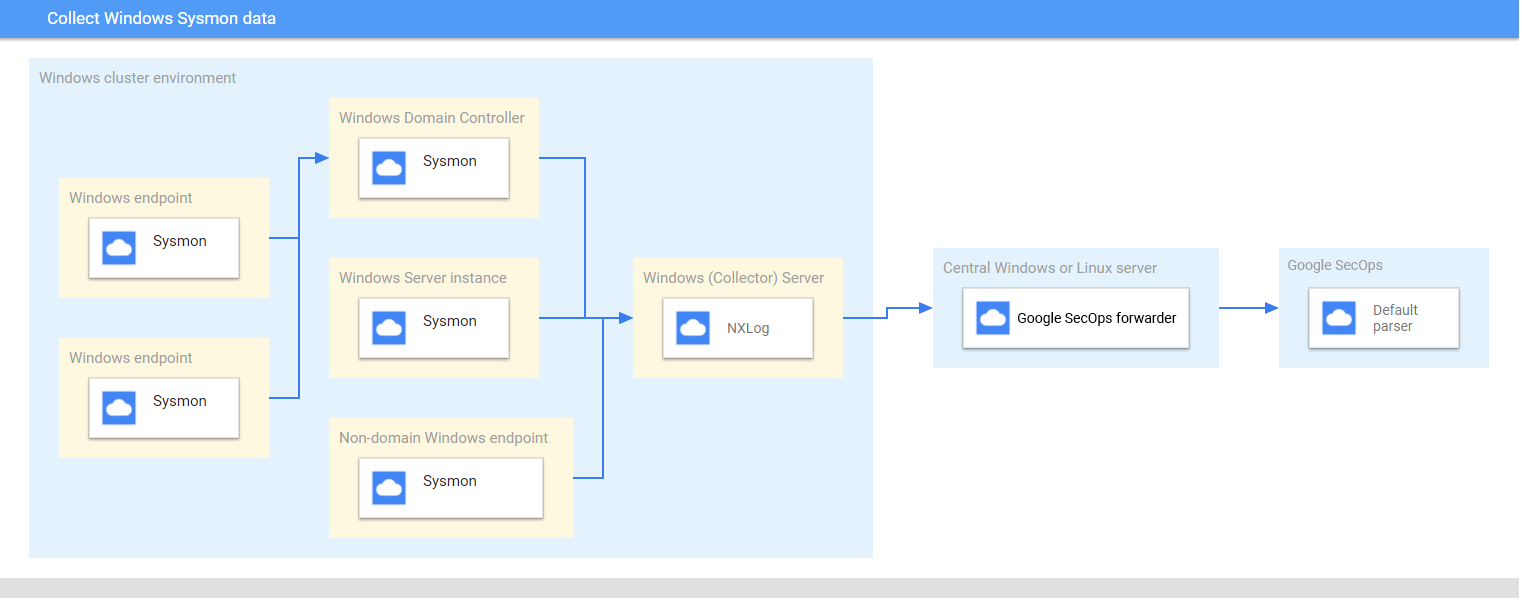
> [!NOTE]
> **Note:** If you choose to deploy the Google SecOps Linux forwarder, the central Linux server and collector Microsoft Windows server will be different systems. If you choose to deploy the Google SecOps forwarder for Microsoft Windows, the central Microsoft Windows server and collector Microsoft Windows server can be the same system.
- BindPlane Agent: This method uses the BindPlane Agent on a Windows collector server to gather Sysmon logs and send them directly to the Google SecOps API.
### Review the supported devices and versions
The Google SecOps parser supports logs generated by the following Microsoft Windows
server versions. Microsoft Windows Server is released with the following editions:
Foundation, Essentials, Standard, and Datacenter. The event schema of logs
generated by each edition does not differ.
- Microsoft Windows Server 2019
- Microsoft Windows Server 2016
- Microsoft Windows Server 2012
Google SecOps parser supports logs generated by:
- Microsoft Windows 7 and higher client systems
- Sysmon version 13.24.
Google SecOps parser supports logs collected by NXLog Community or Enterprise
Edition.
### Review the supported log types
The Google SecOps parser supports the following log types generated by Microsoft Windows
Sysmon. For more information about these log types, see the
[Microsoft Windows Sysmon documentation](https://docs.microsoft.com/en-us/sysinternals/downloads/sysmon).
It supports logs generated with English language text and is not supported with
logs generated in non-English languages.
| **Log Type** | **Description** |
|---|---|
| Sysmon Logs | Sysmon channel contains 27 Event Ids. (Event Id: 1 to 26, and 255). For a description of this log type, see the [Microsoft Windows Sysmon Events documentation](https://docs.microsoft.com/en-us/sysinternals/downloads/sysmon#events) |
### Configure Microsoft Windows servers, endpoints, and domain controllers
1. Install and configure the servers, endpoints, and domain controllers. For information, see [Microsoft Windows Sysmon Configuration documentation](https://docs.microsoft.com/en-us/sysinternals/downloads/sysmon#usage).
2. Set up a collector Microsoft Windows server to parse the collected logs from multiple systems.
3. Set up the central Microsoft Windows or Linux server
4. Configure all systems with the UTC time zone.
5. Configure the devices to forward logs to the collector Microsoft Windows server.
- Configure Source Initiated Subscriptions on Microsoft Windows systems. For information, see [Setting up a Source Initiated Subscription](https://docs.microsoft.com/en-us/windows/win32/wec/setting-up-a-source-initiated-subscription).
- Enable WinRM on Microsoft Windows servers and clients. For information, see [Installation and configuration for Microsoft Windows Remote Management](https://docs.microsoft.com/en-us/windows/win32/winrm/installation-and-configuration-for-windows-remote-management).
### Method 1 - Configure NXLog and Google SecOps Forwarder
1. Install NXLog on the collector that is running on a Windows server. Follow the [NXLog documentation](https://nxlog.co/documentation/nxlog-user-guide/deploy-windows.html#deploy-windows), including information about [configuring NXLog to collect logs from Sysmon](https://nxlog.co/documentation/nxlog-user-guide/sysmon.html).
2. Create a configuration file for NXLog. Use the
[im_msvistalog](https://nxlog.co/documentation/nxlog-user-guide/im_msvistalog.html) input module. Here is an example NXLog configuration.
Replace `HOSTNAME` and `PORT` values with information about the
destination central Microsoft Windows or Linux server. For more information,
see NXLog documentation about the
[om_tcp module](https://nxlog.co/documentation/nxlog-user-guide/om_tcp.html).
define ROOT C:\Program Files\nxlog
define SYSMON_OUTPUT_DESTINATION_ADDRESS HOSTNAME
define SYSMON_OUTPUT_DESTINATION_PORT PORT
define CERTDIR %ROOT%\cert
define CONFDIR %ROOT%\conf
define LOGDIR %ROOT%\data
define LOGFILE %LOGDIR%\nxlog.log
LogFile %LOGFILE%
Moduledir %ROOT%\modules
CacheDir %ROOT%\data
Pidfile %ROOT%\data\nxlog.pid
SpoolDir %ROOT%\data
Module xm_json
Module im_msvistalog
ReadFromLast False
SavePos False
Path windows_sysmon_eventlog => out_chronicle_sysmon
3. Install the Google SecOps forwarder on the central Microsoft Windows or Linux server.
See the [Installing and configuring the forwarder on Linux](https://docs.cloud.google.com/chronicle/docs/install/forwarder-linux)
or [Installing and configuring the forwarder on Microsoft Windows](https://docs.cloud.google.com/chronicle/docs/install/forwarder-windows)
for information about installing and configuring the forwarder.
4. Configure the Google SecOps forwarder to send logs to Google SecOps.
Here is an example forwarder configuration.
- syslog:
common:
enabled: true
data_type: WINDOWS_SYSMON
Data_hint:
batch_n_seconds: 10
batch_n_bytes: 1048576
tcp_address: 0.0.0.0:10518
connection_timeout_sec: 60
5. Start the NXLog service.
### Method 2 - Configure the Bindplane Agent
Collect the Windows Sysmon logs by using the Bindplane Agent.
After installation, the Bindplane Agent service appears as the `observerIQ` service in the list of Windows services.
1. Install the Bindplane Agent as an individual agent on each Windows endpoint or server where Sysmon is running: For more information about installing the Bindplane Agent, see [the Bindplane Agent installation instructions](https://github.com/observIQ/bindplane-agent?tab=readme-ov-file#installation).
2. Create a configuration file for the Bindplane Agent with the following contents.
receivers:
windowseventlog/sysmon:
channel: Microsoft-Windows-Sysmon/Operational
raw: true
processors:
batch:
exporters:
chronicle/winsysmon:
endpoint: https://malachiteingestion-pa.googleapis.com
creds: '{
"type": "service_account",
"project_id": "malachite-projectname",
"private_key_id": `PRIVATE_KEY_ID`,
"private_key": `PRIVATE_KEY`,
"client_email":"`SERVICE_ACCOUNT_NAME`@malachite-`PROJECT_ID`.iam.gserviceaccount.com",
"client_id": `CLIENT_ID`,
"auth_uri": "https://accounts.google.com/o/oauth2/auth",
"token_uri": "https://oauth2.googleapis.com/token",
"auth_provider_x509_cert_url":"https://www.googleapis.com/oauth2/v1/certs",
"client_x509_cert_url": "https://www.googleapis.com/robot/v1/metadata/x509/`SERVICSERVICE_ACCOUNT_NAME`%40malachite-`PROJECT_ID`.iam.gserviceaccount.com",
"universe_domain": "googleapis.com"
}'
log_type: 'WINDOWS_SYSMON'
override_log_type: false
raw_log_field: body
customer_id: `CUSTOMER_ID`
service:
pipelines:
logs/winsysmon:
receivers:
- windowseventlog/sysmon
processors: [batch]
exporters: [chronicle/winsysmon]
3. Replace the `PRIVATE_KEY_ID`, `PRIVATE_KEY` `SERVICSERVICE_ACCOUNT_NAME`,`PROJECT_ID`, `CLIENT_ID` and `CUSTOMER_ID` with the respective values from the service account JSON file which you can download from Google Cloud Platform. For more information about service account keys, see [Create and delete service account keys documentation](https://docs.cloud.google.com/iam/docs/keys-create-delete).
> [!CAUTION]
> **Caution:** To avoid **HTTP 429 (Too Many Requests)** errors and ingestion delays, don't reuse the same shared key or storage account across multiple feeds.
4. To start the observerIQ agent service, select **Services \> Extended \> the observerIQ Service \>
start**.
## Supported Windows Sysmon log formats
The Windows Sysmon parser supports logs in JSON and XML formats.
## Supported Windows Sysmon sample logs
- JSON:
{
"EventTime": 1611175283,
"Hostname": "dummy10-1.user12.local",
"Keywords": -9223372036854775808,
"EventType": "INFO",
"SeverityValue": 2,
"Severity": "INFO",
"EventID": 1,
"SourceName": "Microsoft-Windows-Sysmon",
"ProviderGuid": "{5770385F-C22A-43E0-BF4C-06F5698FFBD9}",
"Version": 5,
"Task": 1,
"OpcodeValue": 0,
"RecordNumber": 8846,
"ProcessID": 1184,
"ThreadID": 2568,
"Channel": "Microsoft-Windows-Sysmon/Operational",
"Domain": "NT AUTHORITY",
"AccountName": "SYSTEM",
"UserID": "S-1-2-3",
"AccountType": "User",
"Message": "Process Create:\\r\\nRuleName: -\\r\\nUtcTime: 2021-09-13 06:34:03.015\\r\\nProcessGuid: {de2dee9a-f0db-613e-7017-000000001100}\\r\\nProcessId: 5440\\r\\nImage: C:\\\\Program Files\\\\WindowsApps\\\\Microsoft.WindowsCalculator_10.2103.8.0_x64__8wekyb3d8bbwe\\\\Calculator.exe\\r\\nFileVersion: -\\r\\nDescription: -\\r\\nProduct: -\\r\\nCompany: -\\r\\nOriginalFileName: -\\r\\nCommandLine: \\"C:\\\\Program Files\\\\WindowsApps\\\\Microsoft.WindowsCalculator_10.2103.8.0_x64__8wekyb3d8bbwe\\\\Calculator.exe\\" -ServerName:App.AppXsm3pg4n7er43kdh1qp4e79f1j7am68r8.mca\\r\\nCurrentDirectory: C:\\\\Program Files\\\\WindowsApps\\\\Microsoft.WindowsCalculator_10.2103.8.0_x64__8wekyb3d8bbwe\\\\\\r\\nUser: DUMMY10-1\\\\admin\\r\\nLogonGuid: {de2dee9a-8d8d-6138-3c16-120000000000}\\r\\nLogonId: 0x12163C\\r\\nTerminalSessionId: 1\\r\\nIntegrityLevel: AppContainer\\r\\nHashes: SHA256=1BE51B1664853ACCA05B402FBB441456D0A6FA57D70BAED476434CF8F686E15F\\r\\nParentProcessGuid: {de2dee9a-8a98-6138-0d00-000000001100}\\r\\nParentProcessId: 924\\r\\nParentImage: C:\\\\Windows\\\\System32\\\\svchost.exe\\r\\nParentCommandLine: C:\\\\Windows\\\\system32\\\\svchost.exe -k DcomLaunch -p",
"Category": "Process Create (rule: ProcessCreate)",
"Opcode": "Info",
"RuleName": "-",
"UtcTime": "2021-09-13 06:34:03.015",
"ProcessGuid": "{de2dee9a-f0db-613e-7017-000000001100}",
"Image": "C:\\\\Program Files\\\\WindowsApps\\\\Microsoft.WindowsCalculator_10.2103.8.0_x64__8wekyb3d8bbwe\\\\Calculator.exe",
"FileVersion": "-",
"Description": "-",
"Product": "-",
"Company": "-",
"OriginalFileName": "-",
"CommandLine": "\\"C:\\\\Program Files\\\\WindowsApps\\\\Microsoft.WindowsCalculator_10.2103.8.0_x64__8wekyb3d8bbwe\\\\Calculator.exe\\" -ServerName:App.AppXsm3pg4n7er43kdh1qp4e79f1j7am68r8.mca",
"CurrentDirectory": "C:\\\\Program Files\\\\WindowsApps\\\\Microsoft.WindowsCalculator_10.2103.8.0_x64__8wekyb3d8bbwe\\\\",
"User": "DUMMY10-1\\\\admin",
"LogonGuid": "{de2dee9a-8d8d-6138-3c16-120000000000}",
"LogonId": "0x12163c",
"TerminalSessionId": "1",
"IntegrityLevel": "AppContainer",
"Hashes": "SHA256=1BE51B1664853ACCA05B402FBB441456D0A6FA57D70BAED476434CF8F686E15F",
"ParentProcessGuid": "{de2dee9a-8a98-6138-0d00-000000001100}",
"ParentProcessId": "924",
"ParentImage": "C:\\\\Windows\\\\System32\\\\svchost.exe",
"ParentCommandLine": "C:\\\\Windows\\\\system32\\\\svchost.exe -k DcomLaunch -p",
"EventReceivedTime": 1611175286,
"SourceModuleName": "windows_sysmon_eventlog",
"SourceModuleType": "im_msvistalog"
}
- XML:
734700x800000000000000015560430Microsoft-Windows-Sysmon/Operationaltestcomputer.example.org
technique_id=T1047,technique_name=Windows Management Instrumentation
2024-11-14 15:41:55.918
{de61df1c-1a43-6736-a863-00000000ad00}
20728
C:\\Program Files\\SourceFile\\SourceFile.exe
C:\\Windows\\System32\\wbem\\imagename.dll
10.0.22621.3672 (WinBuild.160101.0800)
WMI
Microsoft® Windows® Operating System
Microsoft Corporation
originalimagename.dll
SHA1=AB20D0B71E38A3BF130100BE2F85D32F29D04697,MD5=2C6D07DCF4CDD6177B67F210019D5C61,SHA256=413CDAACD75C19725591059F70CB7F1C0C1AEAA6E1D43C70A687310859C1813F,IMPHASH=472A202488B9A8A8072E75ADE4EC1496
true
Microsoft Windows
Valid
Test\\TestUser
## Field mapping reference: device event fields to UDM fields
This section describes how the parser maps original device log fields to
Unified Data Model (UDM) fields. The field mapping may differ by
Event Id.
> [!NOTE]
> **Note:** The % values (e.g. %1, %2, %3, %{EventID}) are variable placeholders.
### Field mapping reference: Event Identifier to Event Type
The following table lists the `WINDOWS_SYSMON` log types and their corresponding UDM event types.
| Event Identifier | Event Type | Security Category |
|---|---|---|
| `1` | `PROCESS_LAUNCH` | |
| `2` | `FILE_MODIFICATION` | |
| `3` | `NETWORK_CONNECTION` | |
| `4` | `SETTING_MODIFICATION` | |
| `5` | `PROCESS_TERMINATION` | |
| `6` | `PROCESS_MODULE_LOAD` | |
| `7` | `PROCESS_MODULE_LOAD` | |
| `8` | `PROCESS_MODULE_LOAD` | |
| `9` | `FILE_READ` | |
| `10` | `PROCESS_OPEN` | |
| `11` | `FILE_CREATION` | |
| `12` | If the `Message` log field value matches the regular expression pattern `CreateKey|CreateValue` then, the `metadata.event_type` UDM field is set to `REGISTRY_CREATION`. Else if the `Message` log field value matches the regular expression pattern `DeleteKey|DeleteValue` then, the ` target.resource.name` UDM field is set to `REGISTRY_DELETION`. Else, the ` target.resource.name` UDM field is set to `REGISTRY_MODIFICATION`. | |
| `13` | `REGISTRY_MODIFICATION` | |
| `14` | `REGISTRY_MODIFICATION` | |
| `15` | `FILE_CREATION` | |
| `16` | `SETTING_MODIFICATION` | |
| `17` | `PROCESS_UNCATEGORIZED` | |
| `18` | `PROCESS_UNCATEGORIZED` | |
| `19` | `USER_RESOURCE_ACCESS` | |
| `20` | `USER_RESOURCE_ACCESS` | |
| `21` | `USER_RESOURCE_ACCESS` | |
| `22` | `NETWORK_DNS` | |
| `23` | `FILE_DELETION` | |
| `24` | `RESOURCE_READ` | |
| `25` | `PROCESS_LAUNCH` | |
| `26` | `FILE_DELETION` | |
| `255` | `SERVICE_UNSPECIFIED` | |
### Field mapping reference: WINDOWS_SYSMON
The following table lists the log fields of the `WINDOWS_SYSMON` log type and their corresponding UDM fields.
| Log field | UDM mapping | Logic |
|---|---|---|
| `SourceName` | ` ` | |
| | `metadata.vendor_name` | The `metadata.vendor_name` UDM field is set to `Microsoft`. |
| | `metadata.product_name` | The `metadata.product_name` UDM field is set to `Microsoft-Windows-Sysmon`. |
| `UtcTime` | `metadata.event_timestamp` | |
| `EventID` | `metadata.product_event_type` | If the `EventID` log field value is equal to `255` then, the `metadata.product_event_type` UDM field is set to `Error - [255]`. Else `EventID` log field is mapped to the `metadata.product_event_type` UDM field. |
| `RecordNumber` | `metadata.product_log_id` | |
| `EventRecordID` | `metadata.product_log_id` | |
| `Version` | `metadata.product_version` | If the `EventID` log field value is equal to `4` then, `Version` log field is mapped to the `metadata.product_version` UDM field. |
| `QueryResults` | `network.dns.answers.data` | The `type_value` and `data_value` fields are extracted from `QueryResults` log field using the Grok pattern. If the `EventID` log field value is equal to `22` then, the `data_value` log field is mapped to the `network.dns.answers.data` UDM field. |
| `QueryResults` | `network.dns.answers.type` | The `type_value` and `data_value` fields are extracted from `QueryResults` log field using the Grok pattern. If the `EventID` log field value is equal to `22` then, the `type_value` log field is mapped to the `network.dns.answers.type` UDM field. |
| `QueryName` | `network.dns.questions.name` | If the `EventID` log field value is equal to `22` then, `QueryName` log field is mapped to the `network.dns.questions.name` UDM field. |
| `Protocol` | `network.ip_protocol` | If the `EventID` log field value is equal to `3` then, `Protocol` log field is mapped to the `network.ip_protocol` UDM field. |
| `ParentCommandLine` | `principal.process.command_line` | If the `EventID` log field value is equal to `1` then, `ParentCommandLine` log field is mapped to the `principal.process.command_line` UDM field. |
| `User` | `principal.administrative_domain` | The `principal_user_userid` and `principal_administrative_domain` fields are extracted from `User` log field using the Grok pattern. If the `principal_administrative_domain` log field value is *not* empty and the `User` log field value is *not* empty then, `principal_administrative_domain` extracted field is mapped to the `principal.administrative_domain` UDM field. Else `Domain` log field is mapped to the `principal.administrative_domain` UDM field. |
| `Domain` | `principal.administrative_domain` | The `principal_user_userid` and `principal_administrative_domain` fields are extracted from `User` log field using the Grok pattern. If the `principal_administrative_domain` log field value is *not* empty and the `User` log field value is *not* empty then, `principal_administrative_domain` extracted field is mapped to the `principal.administrative_domain` UDM field. Else `Domain` log field is mapped to the `principal.administrative_domain` UDM field. |
| `HostName` | `principal.hostname` | If the `Hostname` log field value is empty then, `Computer` log field is mapped to the `principal.hostname` UDM field. Else `HostName` log field is mapped to the `principal.hostname` UDM field and `Hostname` log field is mapped to the `principal.hostname` UDM field. |
| `Computer` | `principal.hostname` | If the `Hostname` log field value is empty then, `Computer` log field is mapped to the `principal.hostname` UDM field. Else `HostName` log field is mapped to the `principal.hostname` UDM field and `Hostname` log field is mapped to the `principal.hostname` UDM field. |
| `HostName` | `principal.asset.hostname` | If the `Hostname` log field value is empty then, `Computer` log field is mapped to the `principal.asset.hostname` UDM field. Else `HostName` log field is mapped to the `principal.asset.hostname` UDM field and `Hostname` log field is mapped to the `principal.asset.hostname` UDM field. |
| `Computer` | `principal.asset.hostname` | If the `Hostname` log field value is empty then, `Computer` log field is mapped to the `principal.asset.hostname` UDM field. Else `HostName` log field is mapped to the `principal.asset.hostname` UDM field and `Hostname` log field is mapped to the `principal.asset.hostname` UDM field. |
| `SourceIp` | `principal.ip` | If the `EventID` log field value is equal to `3` then, `SourceIp` log field is mapped to the `principal.ip` UDM field. |
| `SourcePort` | `principal.port` | If the `EventID` log field value is equal to `3` then, `SourcePort` log field is mapped to the `principal.port` UDM field. |
| `ImageLoaded` | `principal.process.file.full_path` | If the `EventID` log field value is equal to `6` then, `ImageLoaded` log field is mapped to the `principal.process.file.full_path` UDM field. |
| `Image` | `principal.process.file.full_path` | If the `EventID` log field value contain one of the following values: - `2` - `3` - `7` - `9` - `11` - `12` - `13` - `14` - `15` - `22` - `23` - `26` then, `Image` log field is mapped to the `principal.process.file.full_path` UDM field. |
| `SourceImage` | `principal.process.file.full_path` | If the `EventID` log field value contain one of the following values: - `8` - `10` then, `SourceImage` log field is mapped to the `principal.process.file.full_path` UDM field. |
| `ParentImage` | `principal.process.file.full_path` | If the `EventID` log field value is equal to `1` then, `ParentImage` log field is mapped to the `principal.process.file.full_path` UDM field. |
| `ProcessId` | `principal.process.pid` | If the `EventID` log field value contain one of the following values: - `2` - `3` - `7` - `9` - `11` - `12` - `13` - `14` - `15` - `22` - `23` - `24` - `25` - `26` and if the `ExecutionProcessID` log field value is *not* empty then, `ExecutionProcessID` log field is mapped to the `principal.process.pid` UDM field. Else `ProcessId` log field is mapped to the `principal.process.pid` UDM field. |
| `SourceProcessId` | `principal.process.pid` | If the `EventID` log field value is equal to `8` then, `SourceProcessId` log field is mapped to the `principal.process.pid` UDM field. |
| `ParentProcessId` | `principal.process.pid` | If the `EventID` log field value is equal to `1` then, `ParentProcessId` log field is mapped to the `principal.process.pid` UDM field. |
| `ProcessID` | `observer.process.pid` | |
| `ProcessGuid` | `principal.process.product_specific_process_id` | If the `EventID` log field value contain one of the following values: - `2` - `3` - `5` - `7` - `9` - `11` - `12` - `13` - `14` - `15` - `22` - `23` - `26` then, `principal.process.product_specific_process_id` UDM field is set to `SYSMON:%{ProcessGuid}`. |
| `ParentProcessGuid` | `principal.process.product_specific_process_id` | If the `EventID` log field value is equal to `1` then, `principal.process.product_specific_process_id` UDM field is set to `SYSMON:%{ParentProcessGuid}`. |
| `SourceProcessGuid` | `principal.process.product_specific_process_id` | If the `EventID` log field value is equal to `8` then, `principal.process.product_specific_process_id` UDM field is set to `SYSMON:%{SourceProcessGuid}`. |
| `SourceProcessGUID` | `principal.process.product_specific_process_id` | If the `EventID` log field value is equal to `10` then, `principal.process.product_specific_process_id` UDM field is set to `SYSMON:%{SourceProcessGUID}`. |
| `User` | `principal.user.userid` | The `principal_user_userid` and `principal_administrative_domain` fields are extracted from `User` log field using the Grok pattern. If the `EventID` log field value is *not* equal to `24` and if the `principal_user_userid` log field value is *not* empty and the `User` log field value is *not* empty then, `principal_user_userid` extracted field is mapped to the ` principal.user.userid` UDM field. |
| `ClientInfo` | `principal.user.userid` | The `host` and `user_id` fields are extracted from `ClientInfo` log field using the Grok pattern. If the `EventID` log field value is equal to `24` and if the `user_id` log field value is *not* empty and the `ClientInfo` log field value is *not* empty then, `user_id` extracted field is mapped to the `principal.user.userid` UDM field. Else `ClientInfo` log field is mapped to the `principal.user.userid` UDM field. |
| `AccountName` | `principal.user.userid` | The `principal_user_userid` and `principal_administrative_domain` fields are extracted from `User` log field using the Grok pattern. If the `EventID` log field value is *not* equal to `24` and if the `principal_user_userid` log field value is *not* empty and the `User` log field value is *not* empty then, `principal_user_userid` extracted field is mapped to the ` principal.user.userid` UDM field. Else `AccountName` log field is mapped to the ` principal.user.userid` UDM field. |
| `SourceUser` | `principal.user.userid` | |
| `UserID` | `principal.user.windows_sid` | If the `UserID` log field value matches the regular expression pattern `S-\d-(\d+-){1,14}\d+`, then the `UserID` log field is mapped to the `principal.user.windows_sid` UDM field. Else, if the `UserID` log field value *not* equal to the `User` log field value, then the `UserID` log field is mapped to the `principal.user.attribute.labels[user_id]` UDM field. |
| `Description` | `security_result.description` | If the `EventID` log field value is equal to `255` and if the `Description` log field value is *not* equal to `-` then, `Description` log field is mapped to the `security_result.description` UDM field. |
| `RuleName` | `security_result.rule_name` | |
| `EventID` | `security_result.rule_name` | The `security_result.rule_name` UDM field is set to `EventID: %{EventID}`. |
| | `security_result.severity` | If the `Level` log field value contain one of the following values: - `0` - `3` - `4` or the `Level` log field value is equal to `Information` then, the ` security_result.severity` UDM field is set to `INFORMATIONAL`. Else, If `Level` log field value is equal to `2` or the `Level` log field value is equal to `Error` then, the ` security_result.severity` UDM field is set to `ERROR`. If the `SeverityValue` log field value does not contain one of the following values: - `Empty` - `-` and if the `SeverityValue` log field value contain one of the following values: - `1` - `2` - `3` then, the ` security_result.severity` UDM field is set to `INFORMATIONAL`. Else, if `SeverityValue` log field value is equal to `4` then, the ` security_result.severity` UDM field is set to `ERROR`. Else, if `SeverityValue` log field value is equal to `5` then, the ` security_result.severity` UDM field is set to `CRITICAL`. |
| `Category` | `about.labels[Category ID]` | The `category_id` and `category_tag` fields are extracted from `Category` log field using the Grok pattern. `category_id` extracted field is mapped to the `about.labels.Category ID` UDM field. |
| `QueryStatus` | `security_result.summary` | If the `EventID` log field value is equal to `22` then, the `security_result.summary` UDM field is set to `QueryStatus: %{QueryStatus}`. |
| `ID` | `security_result.summary` | If the `EventID` log field value is equal to `255` then, `ID` log field is mapped to the `security_result.summary` UDM field. |
| `Category` | `security_result.summary` | The `category_id` and `category_tag` fields are extracted from `Category` log field using the Grok pattern. If the `category_id` log field value is *not* empty then, `category_tag` extracted field is mapped to the `security_result.summary` UDM field. Else `Category` log field is mapped to the `security_result.summary` UDM field. |
| `CurrentDirectory` | `additional.fields[current_directory]` | If the `EventID` log field value is equal to `1` then, `CurrentDirectory` log field is mapped to the `additional.fields.current_directory` UDM field. |
| `OriginalFileName ` | ` src.file.full_path` | If the `EventID` log field value is equal to `1` then, `OriginalFileName ` log field is mapped to the ` src.file.full_path` UDM field. |
| `TargetObject` | `src.registry.registry_key` | If the `EventID` log field value is equal to `14` then, `TargetObject` log field is mapped to the `src.registry.registry_key` UDM field. |
| `Name` | `target.application` | If the `EventID` log field value is equal to `19` then, `Name` log field is mapped to the `target.application` UDM field. If the `EventID` log field value is equal to `255` then, the `target.application` UDM field is set to `Microsoft Sysmon`. |
| `Description` | `target.asset.software.description` | If the `EventID` log field value contain one of the following values: - `1` - `7` and if the `Description` log field value is *not* equal to `-` then, `Description` log field is mapped to the `target.asset.software.description` UDM field. |
| `Product` | `target.asset.software.name` | If the `EventID` log field value contain one of the following values: - `1` - `7` and if the `Product` log field value is *not* equal to `-` then, `Product` log field is mapped to the `target.asset.software.name` UDM field. |
| `Company` | `target.asset.software.vendor_name` | If the `EventID` log field value contain one of the following values: - `1` - `7` and if the `Company` log field value is *not* equal to `-` then, `Company` log field is mapped to the `target.asset.software.vendor_name` UDM field. |
| `FileVersion` | `target.asset.software.version` | If the `EventID` log field value contain one of the following values: - `1` - `7` and if the `FileVersion` log field value is *not* equal to `-` then, `FileVersion` log field is mapped to the `target.asset.software.version` UDM field. |
| `EventNamespace` | `target.file.full_path` | If the `EventID` log field value is equal to `19` then, `EventNamespace` log field is mapped to the `target.file.full_path` UDM field. |
| `Device` | `target.file.full_path` | If the `EventID` log field value is equal to `9` then, `Device` log field is mapped to the `target.file.full_path` UDM field. |
| `TargetFilename` | `target.file.full_path` | If the `EventID` log field value contain one of the following values: - `2` - `11` - `15` - `23` - `26` then, `TargetFilename` log field is mapped to the `target.file.full_path` UDM field. |
| `DestinationHostname` | `target.asset.hostname` | If the `EventID` log field value is equal to `3` then, `DestinationHostname` log field is mapped to the `target.asset.hostname` UDM field. |
| `ClientInfo` | `target.asset.hostname` | The `host` and `user_id` fields are extracted from `ClientInfo` log field using the Grok pattern. The `target_ip` and `host` fields are extracted from `ClientInfo` log field using the Grok pattern. If the `EventID` log field value is equal to `24` then, `host` extracted field is mapped to the `target.asset.hostname` UDM field. |
| `DestinationHostname` | `target.hostname` | If the `EventID` log field value is equal to `3` then, `DestinationHostname` log field is mapped to the `target.hostname` UDM field. |
| `ClientInfo` | `target.hostname` | The `host` and `user_id` fields are extracted from `ClientInfo` log field using the Grok pattern. The `target_ip` and `host` fields are extracted from `ClientInfo` log field using the Grok pattern. If the `EventID` log field value is equal to `24` then, `host` extracted field is mapped to the `target.hostname` UDM field. |
| `ClientInfo` | `target.ip` | The `target_ip` and `host` fields are extracted from `ClientInfo` log field using the Grok pattern. If the `EventID` log field value is equal to `24` then, `target_ip` extracted field is mapped to the `target.ip` UDM field. |
| `DestinationIp` | `target.ip` | If the `EventID` log field value is equal to `3` then, `DestinationIp` log field is mapped to the `target.ip` UDM field. |
| `DestinationPort` | `target.port` | If the `EventID` log field value is equal to `3` then, `DestinationPort` log field is mapped to the `target.port` UDM field. |
| `CommandLine` | `target.process.command_line` | If the `EventID` log field value is equal to `1` then, `CommandLine` log field is mapped to the `target.process.command_line` UDM field. |
| `Configuration` | `target.process.command_line` | If the `EventID` log field value is equal to `16` and if the `ConfigurationFileHash` log field value contain one of the following values: - `Empty` - `-` then, `Configuration` log field is mapped to the `target.process.command_line` UDM field. |
| `ImageLoaded` | `target.process.file.full_path` | If the `EventID` log field value is equal to `7` then, `ImageLoaded` log field is mapped to the `target.process.file.full_path` UDM field. |
| `TargetImage` | `target.process.file.full_path` | If the `EventID` log field value contain one of the following values: - `8` - `10` then, `TargetImage` log field is mapped to the `target.process.file.full_path` UDM field. |
| `Image` | `target.process.file.full_path` | If the `EventID` log field value contain one of the following values: - `1` - `5` - `17` - `18` - `24` - `25` then, `Image` log field is mapped to the `target.process.file.full_path` UDM field. |
| `Configuration` | `target.process.file.full_path` | If the `EventID` log field value is equal to `16` and if the `ConfigurationFileHash` log field value does not contain one of the following values: - `Empty` - `-` then, `Configuration` log field is mapped to the `target.process.file.full_path` UDM field. |
| `Hashes` | `target.process.file.md5` | The KV filter is used to extract the `MD5` from the `Hashes` log field. If the `EventID` log field value contain one of the following values: - `1` - `6` - `7` - `15` - `16` - `23` - `24` - `26` then, `MD5` extracted field is mapped to the `target.process.file.md5` UDM field. |
| `Hash` | `target.process.file.md5` | The KV filter is used to extract the `MD5` from the `Hashe` log field. If the `EventID` log field value contain one of the following values: - `1` - `6` - `7` - `15` - `16` - `23` - `24` - `26` then, `MD5` extracted field is mapped to the `target.process.file.md5` UDM field. |
| `ConfigurationFileHash` | `target.process.file.md5` | The KV filter is used to extract the `MD5` from the `ConfigurationFileHash` log field. If the `EventID` log field value contain one of the following values: - `1` - `6` - `7` - `15` - `16` - `23` - `24` - `26` then, `MD5` extracted field is mapped to the `target.process.file.md5` UDM field. |
| `Hashes` | `target.process.file.sha1` | The KV filter is used to extract the `SHA1` from the `Hashes` log field. If the `EventID` log field value contain one of the following values: - `1` - `6` - `7` - `15` - `16` - `23` - `24` - `26` then, `SHA1` extracted field is mapped to the `target.process.file.sha1` UDM field. |
| `Hash` | `target.process.file.sha1` | The KV filter is used to extract the `SHA1` from the `Hash` log field. If the `EventID` log field value contain one of the following values: - `1` - `6` - `7` - `15` - `16` - `23` - `24` - `26` then, `SHA1` extracted field is mapped to the `target.process.file.sha1` UDM field. |
| `ConfigurationFileHash` | `target.process.file.sha1` | The KV filter is used to extract the `SHA1` from the `ConfigurationFileHash` log field. If the `EventID` log field value contain one of the following values: - `1` - `6` - `7` - `15` - `16` - `23` - `24` - `26` then, `SHA1` extracted field is mapped to the `target.process.file.sha1` UDM field. |
| `Hashes` | `target.process.file.sha256` | The KV filter is used to extract the `SHA256` from the `Hashes` log field. If the `EventID` log field value contain one of the following values: - `1` - `6` - `7` - `15` - `16` - `23` - `24` - `26` then, `SHA256` extracted field is mapped to the `target.process.file.sha256` UDM field. |
| `Hash` | `target.process.file.sha256` | The KV filter is used to extract the `SHA256` from the `Hash` log field. If the `EventID` log field value contain one of the following values: - `1` - `6` - `7` - `15` - `16` - `23` - `24` - `26` then, `SHA256` extracted field is mapped to the `target.process.file.sha256` UDM field. |
| `ConfigurationFileHash` | `target.process.file.sha256` | The KV filter is used to extract the `SHA256` from the `ConfigurationFileHash` log field. If the `EventID` log field value contain one of the following values: - `1` - `6` - `7` - `15` - `16` - `23` - `24` - `26` then, `SHA256` extracted field is mapped to the `target.process.file.sha256` UDM field. |
| `Hashes` | `target.process.file.file_metadata.pe.import_hash` | The KV filter is used to extract the `IMPHASH` from the `Hashes` log field. `IMPHASH` extracted field is mapped to the `target.process.file.file_metadata.pe.import_hash` UDM field. |
| `Hash` | `target.process.file.file_metadata.pe.import_hash` | The KV filter is used to extract the `IMPHASH` from the `Hash` log field. `IMPHASH` extracted field is mapped to the `target.process.file.file_metadata.pe.import_hash` UDM field. |
| `ConfigurationFileHash` | `target.process.file.file_metadata.pe.import_hash` | The KV filter is used to extract the `IMPHASH` from the `ConfigurationFileHash` log field. `IMPHASH` extracted field is mapped to the `target.process.file.file_metadata.pe.import_hash` UDM field. |
| `Hashes` | `target.process.file.pe_file.imphash` | The KV filter is used to extract the `IMPHASH` from the `Hashes` log field. `IMPHASH` extracted field is mapped to the `target.process.file.pe_file.imphash` UDM field. |
| `Hash` | `target.process.file.pe_file.imphash` | The KV filter is used to extract the `IMPHASH` from the `Hash` log field. `IMPHASH` extracted field is mapped to the `target.process.file.pe_file.imphash` UDM field. |
| `ConfigurationFileHash` | `target.process.file.pe_file.imphash` | The KV filter is used to extract the `IMPHASH` from the `ConfigurationFileHash` log field. `IMPHASH` extracted field is mapped to the `target.process.file.pe_file.imphash` UDM field. |
| `TargetProcessId` | `target.process.pid` | If the `EventID` log field value contain one of the following values: - `8` - `10` then, `TargetProcessId` log field is mapped to the `target.process.pid` UDM field. |
| `ProcessId` | `target.process.pid` | If the `EventID` log field value contain one of the following values: - `1` - `5` - `16` - `17` - `18` and if the `ExecutionProcessID` log field value is *not* empty then, `ExecutionProcessID` log field is mapped to the `target.process.pid` UDM field. Else `ProcessId` log field is mapped to the `target.process.pid` UDM field. |
| `ProcessID` | `target.process.pid` | If the `EventID` log field value contain one of the following values: - `1` - `5` - `16` - `17` - `18` and if the `ExecutionProcessID` log field value is *not* empty then, `ExecutionProcessID` log field is mapped to the `target.process.pid` UDM field. Else `ProcessID` log field is mapped to the `target.process.pid` UDM field. |
| `TargetProcessGuid` | `target.process.product_specific_process_id` | If the `EventID` log field value is equal to `8` then, the `target.process.product_specific_process_id` UDM field is set to `SYSMON:%{TargetProcessGuid}`. |
| `TargetProcessGUID` | `target.process.product_specific_process_id` | If the `EventID` log field value is equal to `10` then, the `target.process.product_specific_process_id` UDM field is set to `SYSMON:%{TargetProcessGUID}`. |
| `ProcessGuid` | `target.process.product_specific_process_id` | If the `EventID` log field value contain one of the following values: - `1` - `17` - `18` - `24` - `25` then, the `target.process.product_specific_process_id` UDM field is set to `SYSMON:%{ProcessGuid}`. |
| `NewName` | `target.registry.registry_key` | If the `EventID` log field value is equal to `14` then, `NewName` log field is mapped to the `target.registry.registry_key` UDM field. |
| `TargetObject` | `target.registry.registry_key` | If the `EventID` log field value contain one of the following values: - `12` - `13` then, `TargetObject` log field is mapped to the `target.registry.registry_key` UDM field. |
| `Details` | `target.registry.registry_value_data` | If the `EventID` log field value is equal to `13` then, `Details` log field is mapped to the `target.registry.registry_value_data` UDM field. |
| `PreviousCreationUtcTime` | `target.resource.attribute.labels.key[PreviousCreationUtcTime]` | If the `EventID` log field value is equal to `2` then, `PreviousCreationUtcTime` log field is mapped to the `target.resource.attribute.labels` UDM field. |
| `Archived` | `target.resource.attribute.labels[Archived]` | If the `EventID` log field value contain one of the following values: - `23` - `24` then, `Archived` log field is mapped to the `target.resource.attribute.labels` UDM field. |
| `Consumer` | `target.resource.attribute.labels[Consumer]` | If the `EventID` log field value is equal to `21` then, `Consumer` log field is mapped to the `target.resource.attribute.labels` UDM field. |
| `CreationUtcTime` | `target.resource.attribute.labels[CreationUtcTime]` | If the `EventID` log field value contain one of the following values: - `2` - `15` then, `CreationUtcTime` log field is mapped to the `target.resource.attribute.labels` UDM field. |
| `IsExecutable` | `target.resource.attribute.labels[IsExecutable]` | If the `EventID` log field value contain one of the following values: - `23` - `26` then, `IsExecutable` log field is mapped to the `target.resource.attribute.labels` UDM field. |
| `Name` | `target.resource.attribute.labels[Name]` | If the `EventID` log field value is equal to `20` then, `Name` log field is mapped to the `target.resource.attribute.labels` UDM field. |
| `Operation` | `target.resource.attribute.labels[Operation]` | If the `EventID` log field value contain one of the following values: - `19` - `20` - `21` then, `Operation` log field is mapped to the `target.resource.attribute.labels` UDM field. |
| `Signature` | `target.resource.attribute.labels[Signature]` | If the `EventID` log field value contain one of the following values: - `6` - `7` then, `Signature` log field is mapped to the `target.resource.attribute.labels` UDM field. |
| `SignatureStatus` | `target.resource.attribute.labels[SignatureStatus]` | If the `EventID` log field value contain one of the following values: - `6` - `7` then, `SignatureStatus` log field is mapped to the `target.resource.attribute.labels` UDM field. |
| `Signed` | `target.resource.attribute.labels[Signed]` | If the `EventID` log field value contain one of the following values: - `6` - `7` then, `Signed` log field is mapped to the `target.resource.attribute.labels` UDM field. |
| `Type` | `target.resource.attribute.labels[Type]` | If the `EventID` log field value is equal to `20` then, `Type` log field is mapped to the `target.resource.attribute.labels` UDM field. |
| `Type` | `additional.fields[Type]` | If the `EventID` log field value is equal to `25` then, `Type` log field is mapped to the `additional.fields` UDM field. |
| `State` | `target.resource.name` | If the `EventID` log field value is equal to `4` then, `State` log field is mapped to the `target.resource.name` UDM field. |
| `CreationUtcTime` | `target.resource.name` | If the `EventID` log field value is equal to `11` then, `CreationUtcTime` log field is mapped to the `target.resource.name` UDM field. |
| `PipeName` | `target.resource.name` | If the `EventID` log field value contain one of the following values: - `17` - `18` then, `PipeName` log field is mapped to the `target.resource.name` UDM field. |
| `Filter` | `target.resource.name` | If the `EventID` log field value is equal to `21` then, `Filter` log field is mapped to the `target.resource.name` UDM field. |
| `Destination` | `target.resource.name` | If the `EventID` log field value is equal to `20` then, `Destination` log field is mapped to the `target.resource.name` UDM field. |
| `Query` | `target.resource.name` | If the `EventID` log field value is equal to `19` then, `Query` log field is mapped to the `target.resource.name` UDM field. |
| `GrantedAccess` | `target.resource.name` | If the `EventID` log field value is equal to `10` and if the `GrantedAccess` log field value matches the regular expression pattern `^0x0080$` then, the ` target.resource.name` UDM field is set to `PROCESS_CREATE_PROCESS`. Else, If the `GrantedAccess` log field value matches the regular expression pattern `^0x0002$` then, the ` target.resource.name` UDM field is set to `PROCESS_CREATE_THREAD`. Else, If the `GrantedAccess` log field value matches the regular expression pattern `^0x0040$` then, the ` target.resource.name` UDM field is set to `PROCESS_DUP_HANDLE`. Else, If the `GrantedAccess` log field value matches the regular expression pattern `^0x0400$` then, the ` target.resource.name` UDM field is set to `PROCESS_QUERY_INFORMATION`. Else, If the `GrantedAccess` log field value matches the regular expression pattern `^0x1000$` then, the ` target.resource.name` UDM field is set to `PROCESS_QUERY_LIMITED_INFORMATION`. Else, If the `GrantedAccess` log field value matches the regular expression pattern `^0x0200$` then, the ` target.resource.name` UDM field is set to `PROCESS_SET_INFORMATION`. Else, If the `GrantedAccess` log field value matches the regular expression pattern `^0x0100$` then, the ` target.resource.name` UDM field is set to `PROCESS_SET_QUOTA`. Else, If the `GrantedAccess` log field value matches the regular expression pattern `^0x0800$` and if the `GrantedAccess` log field value matches the regular expression pattern `^0x0001$` then, the ` target.resource.name` UDM field is set to `PROCESS_TERMINATE`. Else, If the `GrantedAccess` log field value matches the regular expression pattern `^0x0008$` then, the ` target.resource.name` UDM field is set to `PROCESS_VM_OPERATION`. Else, If the `GrantedAccess` log field value matches the regular expression pattern `^0x0010$` then, the ` target.resource.name` UDM field is set to `PROCESS_VM_READ`. Else, If the `GrantedAccess` log field value matches the regular expression pattern `^0x0020$` then, the ` target.resource.name` UDM field is set to `PROCESS_VM_WRITE`. Else, If the `GrantedAccess` log field value matches the regular expression pattern `^0x00100000L$` then, the ` target.resource.name` UDM field is set to `SYNCHRONIZE`. |
| | `target.resource.resource_type` | If the `EventID` log field value contain one of the following values: - `4` - `16` then, the `target.resource.resource_type` UDM field is set to `SETTING`. Else, If `EventID` log field value contain one of the following values: - `17` - `18` then, the `target.resource.resource_type` UDM field is set to `PIPE`. |
| | `target.resource.resource_subtype` | If the `EventID` log field value is equal to `11` then, the `target.resource.resource_subtype` UDM field is set to `CreationUtcTime`. Else, If `EventID` log field value is equal to `10` then, the `target.resource.resource_subtype` UDM field is set to `GrantedAccess`. Else, If `EventID` log field value is equal to `4` then, the `target.resource.resource_subtype` UDM field is set to `State`. |
| `TargetUser` | `target.user.userid` | |
| | `network.direction` | If the `EventID` log field value is equal to `3` then, the `network.direction` UDM field is set to `OUTBOUND`. |
| | `security_result.action` | If the `EventID` log field value is equal to `3` then, the `security_result.action` UDM field is set to `ALLOW`. |
| `ProviderGuid` | `observer.asset_id` | `ProviderGuid` log field is mapped to the `observer.asset_id` UDM field. |
| `Keywords` | `additional.fields[Keywords]` | |
| `ThreadID` | `additional.fields[thread_id]` | |
| `ThreadID` | `additional.fields[ThreadID]` | |
| `Channel` | `additional.fields[channel]` | |
| `Opcode` | `additional.fields[Opcode]` | |
| `LogonId` | `principal.network.session_id` | |
| `LogonGuid` | `additional.fields[LogonGuid]` | |
| `TerminalSessionId` | `additional.fields[TerminalSessionId]` | |
| `SourcePortName` | `additional.fields[SourcePortName]` | |
| `SourceIsIpv6` | `additional.fields[SourceIsIpv6]` | |
| `DestinationPortName` | `additional.fields[DestinationPortName]` | |
| `DestinationIsIpv6` | `additional.fields[DestinationIsIpv6]` | |
| `Initiated` | `additional.fields[Initiated]` | |
| `SchemaVersion` | `additional.fields[SchemaVersion]` | |
| `CallTrace` | `additional.fields[CallTrace]` | |
| | `network.application_protocol` | If the `EventID` log field value is equal to `22` then, the `network.application_protocol` UDM field is set to `DNS`. |
| `NewThreadId` | `additional.fields[NewThreadId]` | |
| `StartAddress` | `additional.fields[StartAddress]` | |
| `StartFunction` | `additional.fields[StartFunction]` | |
| `StartModule` | `additional.fields[StartModule]` | |
| `ParentUser` | `additional.fields[ParentUser]` | |
| `IntegrityLevel` | `target.process.integrity_level_rid` | If the `EventID` log field value contain one of the following values: - `18` - `17` - `16` - `5` - `4` - `1` and if the `IntegrityLevel` log field value matches the regular expression pattern `(?i)(Untrusted)` then, the ` target.process.integrity_level_rid` UDM field is set to `0`. Else, if `IntegrityLevel` log field value matches the regular expression pattern `(?i)(Low)` then, the ` target.process.integrity_level_rid` UDM field is set to `4096`. Else, if `IntegrityLevel` log field value matches the regular expression pattern `(?i)(Medium)` then, the ` target.process.integrity_level_rid` UDM field is set to `8192`. Else, if `IntegrityLevel` log field value matches the regular expression pattern `(?i)(High)` then, the ` target.process.integrity_level_rid` UDM field is set to `12288`. Else, if `IntegrityLevel` log field value matches the regular expression pattern `(?i)(System)` then, the ` target.process.integrity_level_rid` UDM field is set to `16384`. Else, if `IntegrityLevel` log field value matches the regular expression pattern `(?i)(Protected)` then, the ` target.process.integrity_level_rid` UDM field is set to `20480`. |
| `IntegrityLevel` | `principal.process.integrity_level_rid` | If the `EventID` log field value does not contain one of the following values: - `18` - `17` - `16` - `5` - `4` - `1` and if the `IntegrityLevel` log field value matches the regular expression pattern `(?i)(Untrusted)` then, the ` principal.process.integrity_level_rid` UDM field is set to `0`. Else, if `IntegrityLevel` log field value matches the regular expression pattern `(?i)(Low)` then, the ` principal.process.integrity_level_rid` UDM field is set to `4096`. Else, if `IntegrityLevel` log field value matches the regular expression pattern `(?i)(Medium)` then, the ` principal.process.integrity_level_rid` UDM field is set to `8192`. Else, if `IntegrityLevel` log field value matches the regular expression pattern `(?i)(High)` then, the ` principal.process.integrity_level_rid` UDM field is set to `12288`. Else, if `IntegrityLevel` log field value matches the regular expression pattern `(?i)(System)` then, the ` principal.process.integrity_level_rid` UDM field is set to `16384`. Else, if `IntegrityLevel` log field value matches the regular expression pattern `(?i)(Protected)` then, the ` principal.process.integrity_level_rid` UDM field is set to `20480`. |
| `Computer` | `additional.fields[Computer]` | If the `HostName` log field value is *not* empty or the `Hostname` log field value is *not* empty then, `Computer` log field is mapped to the `additional.fields.Computer` UDM field. |
| `Task` | `security_result.summary` | |
## Change Log
[View the Change Log for this parser](https://docs.cloud.google.com/chronicle/docs/ingestion/parser-list/windows-sysmon-changelog)
**Need more help?** [Get answers from Community members and Google SecOps professionals.](https://security.googlecloudcommunity.com/)