# Delete certificate authorities
Certificate Authority Service lets you delete an existing certificate authority (CA). The CA
is permanently deleted after a 30-day grace period from when the deletion
process is initiated. After the grace period, CA Service permanently
deletes the CA and all the nested artifacts, such as certificates and
certificate revocation lists (CRLs).
Any customer-managed Google Cloud resources that were being used by the
deleted CA, such as Cloud Storage buckets or Cloud Key Management Service keys aren't
deleted. For more information about Google-managed and customer-managed
resources, see [Manage
resources](https://docs.cloud.google.com/certificate-authority-service/docs/managed-resources).
A deleted CA isn't billed during the grace period. However, if you [restore the
CA](https://docs.cloud.google.com/certificate-authority-service/docs/managing-ca-state#restore), you are
charged at the CA's billing tier for the time that the CA existed in the
`DELETED` state.
## Before you begin
- Make sure you have the CA Service Operation Manager
(`roles/privateca.caManager`) or the CA Service Admin
(`roles/privateca.admin`) Identity and Access Management (IAM) role. For more
information about the predefined IAM roles for
CA Service, see [Access control with
IAM](https://docs.cloud.google.com/certificate-authority-service/docs/access-control).
For information about granting an IAM role, see [Granting a
single role](https://docs.cloud.google.com/iam/docs/granting-changing-revoking-access#grant-single-role).
- Make sure the CA meets the following conditions:
- The CA must be in the `AWAITING_USER_ACTIVATION`, `DISABLED`, or `STAGED` state. For more information, see [Certificate authority
states](https://docs.cloud.google.com/certificate-authority-service/docs/certificate-authority-states).
> [!CAUTION]
> **Caution:** You **cannot** recover CAs that are deleted in the `AWAITING_USER_ACTIVATION` state. To use the CA again, you must recreate it with a different name.
- The CA must not contain active certificates. A certificate is considered
active when it meets the following conditions:
- The certificate has a valid 'from' and 'to' date.
- The certificate hasn't been revoked.
- The device or system using the certificate trusts the certificate
authority (CA) that issued the certificate.
Before deleting the CA, ensure that all active certificates that the CA has
issued are revoked. You can't revoke certificates from a deleted CA.
## Delete a CA
To initiate CA deletion, do the following:
### Console
1. Go to the **Certificate authorities** page in the Google Cloud console.
[Go to Certificate authorities](https://console.cloud.google.com/security/cas/certificateAuthorities)
2. In the list of CAs, select the CA you want to delete.
3. Click **Delete** . The **Delete
Certificate Authority** dialog appears.
4. Optional: Select one or both the following checkboxes if the conditions apply to you:
- **Delete this CA, even if there are active certificates**
This option lets
you delete a CA with active certificates. Deleting a CA with active certificates
might cause websites, applications, or systems relying on those certificates
to fail. We recommend that you revoke all active certificates issued by a CA
before you delete the CA.
- **Skip the 30 day grace period and delete this CA immediately**
The 30-day grace period allows you time to revoke all certificates issued
by this CA and verify that no systems depend on this CA. We recommend that
use this option *only* in non-production or test environments to prevent
potential outages and data loss.
5. Click **Confirm**.
### gcloud
1. Check the CA state to ensure it is disabled. You can only delete the CAs
that are in the `DISABLED` state.
gcloud privateca roots describe CA_ID --pool=POOL_ID --location=LOCATION --format="value(state)"
Replace the following:
- CA_ID: the unique identifier of the CA
- POOL_ID: the name of the CA pool that contains the CA
- LOCATION: the location of the CA pool. For the complete list of locations, see [Locations](https://docs.cloud.google.com/certificate-authority-service/docs/locations.md.txt).
For more information about the `gcloud privateca roots describe` command,
see [gcloud privateca roots
describe](https://docs.cloud.google.com/sdk/gcloud/reference/privateca/roots/describe).
2. If the CA isn't disabled, run the following command to disable the CA.
gcloud privateca roots disable CA_ID --pool=POOL_ID --location=LOCATION
For more information about the `gcloud privateca roots disable` command, see
[gcloud privateca roots disable](https://docs.cloud.google.com/sdk/gcloud/reference/privateca/roots/disable).
3. Delete the CA.
gcloud privateca roots delete CA_ID --pool=POOL_ID --location=LOCATION
You can delete the CA even if the CA has active certificates by including
the `--ignore-active-certificates` flag in your `gcloud` command.
For more information about the `gcloud privateca roots delete` command, see
[gcloud privateca roots delete](https://docs.cloud.google.com/sdk/gcloud/reference/privateca/roots/delete).
4. When you are prompted, confirm that you want to delete the CA.
After confirming, the CA is scheduled for deletion and the 30-day grace
period begins. The command outputs the expected date and time when the CA
will be deleted.
```
Deleted Root CA [projects/PROJECT_ID/locations/us-west1/caPools/POOL_ID/certificateAuthorities/CA_ID] can be undeleted until 2020-08-14T19:28:39Z.
```
### Go
To authenticate to CA Service, set up Application Default Credentials.
For more information, see
[Set up authentication for a local development environment](https://docs.cloud.google.com/docs/authentication/set-up-adc-local-dev-environment.md.txt).
```go
import (
"context"
"fmt"
"io"
privateca "cloud.google.com/go/security/privateca/apiv1"
"cloud.google.com/go/security/privateca/apiv1/privatecapb"
)
// Delete a Certificate Authority from the specified CA pool.
// Before deletion, the CA must be disabled or staged and must not contain any active certificates.
func deleteCa(w io.Writer, projectId string, location string, caPoolId string, caId string) error {
// projectId := "your_project_id"
// location := "us-central1" // For a list of locations, see: https://cloud.google.com/certificate-authority-service/docs/locations.
// caPoolId := "ca-pool-id" // The id of the CA pool under which the CA is present.
// caId := "ca-id" // The id of the CA to be deleted.
ctx := context.Background()
caClient, err := privateca.NewCertificateAuthorityClient(ctx)
if err != nil {
return fmt.Errorf("NewCertificateAuthorityClient creation failed: %w", err)
}
defer caClient.Close()
fullCaName := fmt.Sprintf("projects/%s/locations/%s/caPools/%s/certificateAuthorities/%s",
projectId, location, caPoolId, caId)
// Check if the CA is disabled or staged.
// See https://pkg.go.dev/cloud.google.com/go/security/privateca/apiv1/privatecapb#GetCertificateAuthorityRequest.
caReq := &privatecapb.GetCertificateAuthorityRequest{Name: fullCaName}
caResp, err := caClient.GetCertificateAuthority(ctx, caReq)
if err != nil {
return fmt.Errorf("GetCertificateAuthority failed: %w", err)
}
if caResp.State != privatecapb.CertificateAuthority_DISABLED &&
caResp.State != privatecapb.CertificateAuthority_STAGED {
return fmt.Errorf("you can only delete disabled or staged Certificate Authorities. %s is not disabled", caId)
}
// Create the DeleteCertificateAuthorityRequest.
// Setting the IgnoreActiveCertificates to True will delete the CA
// even if it contains active certificates. Care should be taken to re-anchor
// the certificates to new CA before deleting.
// See https://pkg.go.dev/cloud.google.com/go/security/privateca/apiv1/privatecapb#DeleteCertificateAuthorityRequest.
req := &privatecapb.DeleteCertificateAuthorityRequest{
Name: fullCaName,
IgnoreActiveCertificates: false,
}
op, err := caClient.DeleteCertificateAuthority(ctx, req)
if err != nil {
return fmt.Errorf("DeleteCertificateAuthority failed: %w", err)
}
if caResp, err = op.Wait(ctx); err != nil {
return fmt.Errorf("DeleteCertificateAuthority failed during wait: %w", err)
}
if caResp.State != privatecapb.CertificateAuthority_DELETED {
return fmt.Errorf("unable to delete Certificate Authority. Current state: %s", caResp.State.String())
}
fmt.Fprintf(w, "Successfully deleted Certificate Authority: %s.", caId)
return nil
}
```
### Java
To authenticate to CA Service, set up Application Default Credentials.
For more information, see
[Set up authentication for a local development environment](https://docs.cloud.google.com/docs/authentication/set-up-adc-local-dev-environment.md.txt).
```java
import com.google.api.core.ApiFuture;
import com.google.cloud.security.privateca.v1.CertificateAuthority.State;
import com.google.cloud.security.privateca.v1.CertificateAuthorityName;
import com.google.cloud.security.privateca.v1.CertificateAuthorityServiceClient;
import com.google.cloud.security.privateca.v1.DeleteCertificateAuthorityRequest;
import com.google.longrunning.Operation;
import java.io.IOException;
import java.util.concurrent.ExecutionException;
public class DeleteCertificateAuthority {
public static void main(String[] args)
throws InterruptedException, ExecutionException, IOException {
// TODO(developer): Replace these variables before running the sample.
// location: For a list of locations, see:
// https://cloud.google.com/certificate-authority-service/docs/locations
// poolId: The id of the CA pool under which the CA is present.
// certificateAuthorityName: The name of the CA to be deleted.
String project = "your-project-id";
String location = "ca-location";
String poolId = "ca-pool-id";
String certificateAuthorityName = "certificate-authority-name";
deleteCertificateAuthority(project, location, poolId, certificateAuthorityName);
}
// Delete the Certificate Authority from the specified CA pool.
// Before deletion, the CA must be disabled and must not contain any active certificates.
public static void deleteCertificateAuthority(
String project, String location, String poolId, String certificateAuthorityName)
throws IOException, ExecutionException, InterruptedException {
// Initialize client that will be used to send requests. This client only needs to be created
// once, and can be reused for multiple requests. After completing all of your requests, call
// the `certificateAuthorityServiceClient.close()` method on the client to safely
// clean up any remaining background resources.
try (CertificateAuthorityServiceClient certificateAuthorityServiceClient =
CertificateAuthorityServiceClient.create()) {
// Create the Certificate Authority Name.
CertificateAuthorityName certificateAuthorityNameParent =
CertificateAuthorityName.newBuilder()
.setProject(project)
.setLocation(location)
.setCaPool(poolId)
.setCertificateAuthority(certificateAuthorityName)
.build();
// Check if the CA is enabled.
State caState =
certificateAuthorityServiceClient
.getCertificateAuthority(certificateAuthorityNameParent)
.getState();
if (caState == State.ENABLED) {
System.out.println(
"Please disable the Certificate Authority before deletion ! Current state: " + caState);
return;
}
// Create the DeleteCertificateAuthorityRequest.
// Setting the setIgnoreActiveCertificates() to true, will delete the CA
// even if it contains active certificates. Care should be taken to re-anchor
// the certificates to new CA before deleting.
DeleteCertificateAuthorityRequest deleteCertificateAuthorityRequest =
DeleteCertificateAuthorityRequest.newBuilder()
.setName(certificateAuthorityNameParent.toString())
.setIgnoreActiveCertificates(false)
.build();
// Delete the Certificate Authority.
ApiFuture futureCall =
certificateAuthorityServiceClient
.deleteCertificateAuthorityCallable()
.futureCall(deleteCertificateAuthorityRequest);
Operation response = futureCall.get();
if (response.hasError()) {
System.out.println("Error while deleting Certificate Authority !" + response.getError());
return;
}
// Check if the CA has been deleted.
caState =
certificateAuthorityServiceClient
.getCertificateAuthority(certificateAuthorityNameParent)
.getState();
if (caState == State.DELETED) {
System.out.println(
"Successfully deleted Certificate Authority : " + certificateAuthorityName);
} else {
System.out.println(
"Unable to delete Certificate Authority. Please try again ! Current state: " + caState);
}
}
}
}
```
### Python
To authenticate to CA Service, set up Application Default Credentials.
For more information, see
[Set up authentication for a local development environment](https://docs.cloud.google.com/docs/authentication/set-up-adc-local-dev-environment.md.txt).
```python
import google.cloud.security.privateca_v1 as privateca_v1
def delete_certificate_authority(
project_id: str, location: str, ca_pool_name: str, ca_name: str
) -> None:
"""
Delete the Certificate Authority from the specified CA pool.
Before deletion, the CA must be disabled and must not contain any active certificates.
Args:
project_id: project ID or project number of the Cloud project you want to use.
location: location you want to use. For a list of locations, see: https://cloud.google.com/certificate-authority-service/docs/locations.
ca_pool_name: the name of the CA pool under which the CA is present.
ca_name: the name of the CA to be deleted.
"""
caServiceClient = privateca_v1.CertificateAuthorityServiceClient()
ca_path = caServiceClient.certificate_authority_path(
project_id, location, ca_pool_name, ca_name
)
# Check if the CA is enabled.
ca_state = caServiceClient.get_certificate_authority(name=ca_path).state
if ca_state != privateca_v1.CertificateAuthority.State.DISABLED:
print(
"Please disable the Certificate Authority before deletion ! Current state:",
ca_state,
)
raise RuntimeError(
f"You can only delete disabled Certificate Authorities. "
f"{ca_name} is not disabled!"
)
# Create the DeleteCertificateAuthorityRequest.
# Setting the ignore_active_certificates to True will delete the CA
# even if it contains active certificates. Care should be taken to re-anchor
# the certificates to new CA before deleting.
request = privateca_v1.DeleteCertificateAuthorityRequest(
name=ca_path, ignore_active_certificates=False
)
# Delete the Certificate Authority.
operation = caServiceClient.delete_certificate_authority(request=request)
result = operation.result()
print("Operation result", result)
# Get the current CA state.
ca_state = caServiceClient.get_certificate_authority(name=ca_path).state
# Check if the CA has been deleted.
if ca_state == privateca_v1.CertificateAuthority.State.DELETED:
print("Successfully deleted Certificate Authority:", ca_name)
else:
print(
"Unable to delete Certificate Authority. Please try again ! Current state:",
ca_state,
)
```
> [!NOTE]
> **Note:** You cannot use the name of the deleted CA for another CA. Even if you didn't activate the CA and CA Service deleted the CA after the 30-day grace period ended, you can't use the name of the deleted CA for a new CA.
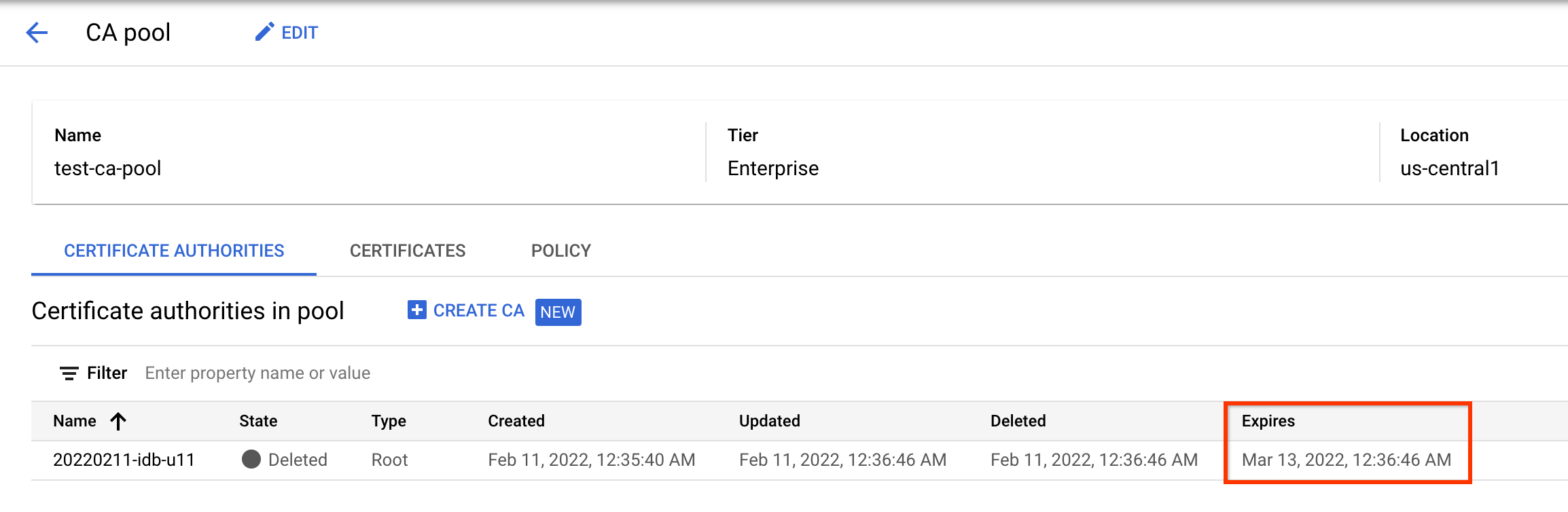
## Check the expiration date of a deleted CA
To see when a CA will be permanently deleted, do the following:
### Console
1. Click the **CA pool manager** tab.
2. Click the name of the CA pool that contained the CA you deleted.
You can see the expiration date of the CA in the table on the **CA pool**
page.

### gcloud
To check the expected deletion time for a CA, run the following command:
gcloud privateca roots describe CA_ID \
--pool=POOL_ID \
--location=LOCATION \
--format="value(expireTime.date())"
Replace the following:
- CA_ID: the name of the CA
- POOL_ID: the name of the CA pool that contained the CA
- LOCATION: the location of the CA pool. For the complete list of locations, see [Locations](https://docs.cloud.google.com/certificate-authority-service/docs/locations.md.txt).
The command returns the expected date and time when CA Service
deletes the CA.
```
2020-08-14T19:28:39
```
To verify that the CA has been permanently deleted, run the following
command:
gcloud privateca roots describe CA_ID --pool=POOL_ID --location=LOCATION
If the CA is successfully deleted, the command returns the following error.
```
ERROR: (gcloud.privateca.roots.describe) NOT_FOUND: Resource 'projects/PROJECT_ID/locations/LOCATION/caPools/POOL_ID/certificateAuthorities/CA_ID' was not found
```
## What's next
- Learn how to [restore
CAs](https://docs.cloud.google.com/certificate-authority-service/docs/managing-ca-state#restore).
- Learn about [CA
states](https://docs.cloud.google.com/certificate-authority-service/docs/certificate-authority-states).