# Create a subordinate certificate authority
This page describes how to create subordinate certificate authorities (CAs) in a
CA pool.
Subordinate CAs are responsible for issuing certificates directly to
end-entities such as users, computers, and devices. Subordinate CAs are
cryptographically signed by a parent CA, which is often the root CA. As a
result, systems that trust the root CA, automatically trust the subordinate CAs
and the end-entity certificates that the subordinate CAs issue.
## Before you begin
- Make sure you have the CA Service Operation Manager (`roles/privateca.caManager`) or the CA Service Admin (`roles/privateca.admin`) IAM role. For information, see [Configure IAM
policies](https://docs.cloud.google.com/certificate-authority-service/docs/configuring-iam).
- [Create a CA pool](https://docs.cloud.google.com/certificate-authority-service/docs/creating-ca-pool.md.txt).
- Select your root CA.
- If the CA pool containing your issuing root CA has a [certificate issuance policy](https://docs.cloud.google.com/certificate-authority-service/docs/use-issuance-policy.md.txt) configured, verify that its `baselineValues` permit issuing CA certificates `caOptions.isCa: true`, `keyUsage.baseKeyUsage.certSign: true`, and `keyUsage.baseKeyUsage.crlSign: true`. Otherwise, activating the subordinate CA fails with the `Fields in the CSR were modified or
removed in the signed CA certificate` error message.
## Create a subordinate CA
Subordinate CAs are easier to revoke and rotate than root CAs. If you have
multiple certificate issuance scenarios, you can create a subordinate CA for
each of those scenarios. Adding multiple subordinate CAs in a CA pool helps you
achieve better load-balancing of certificate requests and a [higher total
effective QPS](https://docs.cloud.google.com/certificate-authority-service/docs/ca-pool#higher-qps).
To create a subordinate CA, do the following:
### Console
1. Go to the **Certificate Authority Service** page in the
Google Cloud console.
[Go to Certificate Authority Service](https://console.cloud.google.com/security/cas)
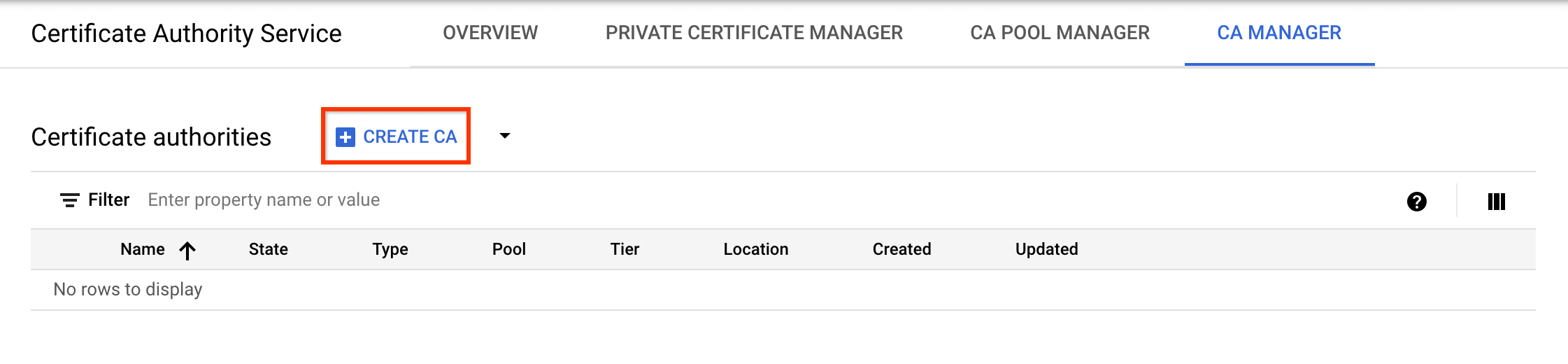
2. Click the **CA manager** tab.
3. Click **Create CA**.

**Select CA type**
1. Click **Subordinate CA**.
2. Click **Root CA is in Google Cloud**.
3. In the **Valid for** field, enter the duration that you want the CA certificate to be valid for.
4. Optional: Choose the tier for the CA. The default tier is **Enterprise** . For more information, see [Select the operation
tiers](https://docs.cloud.google.com/certificate-authority-service/docs/tiers).
5. Click **Region** to select a location for the CA. For more information, see [Locations](https://docs.cloud.google.com/certificate-authority-service/docs/locations.md.txt).
6. Optional: Under **Initialized state**, select the operational state to create the CA in.
7. Optional: Under **Set up an issuance scenario** , click **Certificate profile** and select the certificate profile that best suits your requirements from the list. For more information, see [Certificate
profiles](https://docs.cloud.google.com/certificate-authority-service/docs/certificate-profile).
8. Click **Next**.
**Configure CA subject name**
1. Optional: In the **Organization (O)** field, enter the name of your company.
2. Optional: In the **Organization unit (OU)** field, enter the company subdivision or business unit.
3. Optional: In the **Country name (C)** field, enter a two letter country code.
4. Optional: In the **State or province name** field, enter the name of your state.
5. Optional: In the **Locality name** field, enter the name of your city.
6. In the **CA common name (CN)** field, enter the CA name.
7. Click **Continue**.
**Configure CA key size and algorithm**
1. Choose the key algorithm that best meets your needs. For more details on signing key options, see [Configure CA signing keys](https://docs.cloud.google.com/certificate-authority-service/docs/choosing-key-algorithm.md.txt).
2. To use a customer-managed signing key, select **Customer-managed key** and provide the Cloud Key Management Service crypto key version.
3. Click **Continue**.
**Configure CA artifacts**
1. Choose whether you want to use a Google-managed or a customer-managed Cloud Storage bucket.
1. For a Google-managed Cloud Storage bucket, CA Service creates a Google-managed bucket in the same location as the CA.
2. For a customer-managed Cloud Storage bucket, click Browse and select one of the existing Cloud Storage buckets.
2. Click **Continue**.
**Add labels**
The following steps are optional.
If you want to add labels to the CA, do the following:
1. Click **Add item**.
2. In the **Key 1** field, enter the label key.
3. In the **Value 1** field, enter the label value.
4. If you want to add another label, click **Add item**. Then, add the label key and value as mentioned in steps 2 and 3.
5. Click **Continue**.
**Review the settings**
Carefully review all the settings, then click **Done** to create the CA.
### gcloud
1. Create a CA pool for the subordinate CA:
```bash
gcloud privateca pools create SUBORDINATE_POOL_ID --location=LOCATION
```
Replace the following:
- SUBORDINATE_POOL_ID: the name of the CA pool
- LOCATION: the location where you want to create the CA pool. For the complete list of locations, see [Locations](https://docs.cloud.google.com/certificate-authority-service/docs/locations.md.txt).
For more information about creating CA pools, see [Create a CA
pool](https://docs.cloud.google.com/certificate-authority-service/docs/creating-ca-pool).
For more information about the `gcloud privateca pools create` command, see
[gcloud privateca pools
create](https://docs.cloud.google.com/sdk/gcloud/reference/privateca/pools/create).
2. Create a subordinate CA in the created CA pool.
> [!NOTE]
> **Note:** You can obtain the issuer's resource ID (ISSUER_POOL_ID) by copying the ID from the create command, or by using the `gcloud
> privateca pools list` command.
Ensure that `--issuer-pool` specifies the ID of the issuing
**CA pool** (not the root CA's resource ID). In addition, if the issuing
CA pool has an [issuance policy](https://docs.cloud.google.com/certificate-authority-service/docs/use-issuance-policy.md.txt)
configured, its `baselineValues` must allow CA certificates:
baselineValues:
caOptions:
isCa: true
keyUsage:
baseKeyUsage:
certSign: true
crlSign: true
If the issuing CA pool restricts issuance to end-entity certificates,
activating the subordinate CA fails with the `Fields in the CSR were
modified or removed in the signed CA certificate` error message.
gcloud privateca subordinates create SUBORDINATE_CA_ID \
--pool=SUBORDINATE_POOL_ID \
--location=LOCATION \
--issuer-pool=ISSUER_POOL_ID \
--issuer-location=ISSUER_LOCATION \
--key-algorithm="ec-p256-sha256" \
--subject="CN=Example Server TLS CA, O=Example LLC"
Replace the following:
- SUBORDINATE_CA_ID: the unique identifier of the subordinate CA
- SUBORDINATE_POOL_ID: the name of the CA pool
- LOCATION: the location of the CA pool
- ISSUER_POOL_ID: the name of the CA pool containing the issuing CA
- ISSUER_LOCATION: the location of the CA pool containing the issuing CA
The `--key-algorithm` flag specifies the cryptographic algorithm that you want to
use for creating a managed Cloud HSM key for the CA.
The `--subject` flag specifies the X.501 name of the certificate subject.
To create a subordinate CA using a customer-managed signing key, run the following command:
gcloud privateca subordinates create SUBORDINATE_CA_ID \
--pool=SUBORDINATE_POOL_ID \
--location=LOCATION \
--issuer-pool=ISSUER_POOL_ID \
--issuer-location=ISSUER_LOCATION \
--kms-key-version=KMS_KEY_VERSION \
--subject="CN=Example Server TLS CA, O=Example LLC"
Replace the following:
- SUBORDINATE_POOL_ID: the name of the CA pool
- LOCATION: the location of the CA pool
- ISSUER_POOL_ID: the name of the CA pool containing the issuing CA
- ISSUER_LOCATION: the location of the CA pool containing the issuing CA
- KMS_KEY_VERSION: the full resource ID of a customer-managed Cloud KMS crypto key version to use as the signing key
For more details on signing key options and preparing a customer-managed signing key, see [Configure CA signing keys](https://docs.cloud.google.com/certificate-authority-service/docs/choosing-key-algorithm.md.txt).
The following statement is returned when the subordinate CA is created.
```
Created Certificate Authority [projects/my-project-pki/locations/us-west1/caPools/SUBORDINATE_POOL_ID/certificateAuthorities/SUBORDINATE_CA_ID].
```
To specify custom Authority Information Access (AIA) and CRL Distribution
Point (CDP) access URLs, use the `--custom-aia-urls`
and `--custom-cdp-urls` flags. If specified, these URLs are
included in all certificates issued by the CA and supersede the default
Cloud Storage bucket access URLs.
To see an exhaustive list of settings, run the following `gcloud` command:
gcloud privateca subordinates create --help
The command returns examples to create a subordinate CA whose issuer is
either located on CA Service or located elsewhere.
### Terraform
```terraform
resource "google_privateca_certificate_authority" "root_ca" {
// This example assumes this pool already exists.
// Pools cannot be deleted in normal test circumstances, so we depend on static pools
pool = "my-pool"
certificate_authority_id = "my-certificate-authority-root"
location = "us-central1"
deletion_protection = false # set to true to prevent destruction of the resource
ignore_active_certificates_on_deletion = true
config {
subject_config {
subject {
organization = "ACME"
common_name = "my-certificate-authority"
}
}
x509_config {
ca_options {
# is_ca *MUST* be true for certificate authorities
is_ca = true
}
key_usage {
base_key_usage {
# cert_sign and crl_sign *MUST* be true for certificate authorities
cert_sign = true
crl_sign = true
}
extended_key_usage {
}
}
}
}
key_spec {
algorithm = "RSA_PKCS1_4096_SHA256"
}
// valid for 10 years
lifetime = "${10 * 365 * 24 * 3600}s"
}
resource "google_privateca_certificate_authority" "sub_ca" {
// This example assumes this pool already exists.
// Pools cannot be deleted in normal test circumstances, so we depend on static pools
pool = "my-sub-pool"
certificate_authority_id = "my-certificate-authority-sub"
location = "us-central1"
deletion_protection = false # set to true to prevent destruction of the resource
subordinate_config {
certificate_authority = google_privateca_certificate_authority.root_ca.name
}
config {
subject_config {
subject {
organization = "ACME"
common_name = "my-subordinate-authority"
}
}
x509_config {
ca_options {
is_ca = true
# Force the sub CA to only issue leaf certs.
# Use e.g.
# max_issuer_path_length = 1
# if you need to chain more subordinates.
zero_max_issuer_path_length = true
}
key_usage {
base_key_usage {
cert_sign = true
crl_sign = true
}
extended_key_usage {
}
}
}
}
// valid for 5 years
lifetime = "${5 * 365 * 24 * 3600}s"
key_spec {
algorithm = "RSA_PKCS1_2048_SHA256"
}
type = "SUBORDINATE"
}
```
### Java
To authenticate to CA Service, set up Application Default Credentials.
For more information, see
[Set up authentication for a local development environment](https://docs.cloud.google.com/docs/authentication/set-up-adc-local-dev-environment.md.txt).
```java
import com.google.api.core.ApiFuture;
import com.google.cloud.security.privateca.v1.CaPoolName;
import com.google.cloud.security.privateca.v1.CertificateAuthority;
import com.google.cloud.security.privateca.v1.CertificateAuthority.KeyVersionSpec;
import com.google.cloud.security.privateca.v1.CertificateAuthority.SignHashAlgorithm;
import com.google.cloud.security.privateca.v1.CertificateAuthorityServiceClient;
import com.google.cloud.security.privateca.v1.CertificateConfig;
import com.google.cloud.security.privateca.v1.CertificateConfig.SubjectConfig;
import com.google.cloud.security.privateca.v1.CreateCertificateAuthorityRequest;
import com.google.cloud.security.privateca.v1.KeyUsage;
import com.google.cloud.security.privateca.v1.KeyUsage.KeyUsageOptions;
import com.google.cloud.security.privateca.v1.Subject;
import com.google.cloud.security.privateca.v1.SubjectAltNames;
import com.google.cloud.security.privateca.v1.X509Parameters;
import com.google.cloud.security.privateca.v1.X509Parameters.CaOptions;
import com.google.longrunning.Operation;
import com.google.protobuf.Duration;
import java.io.IOException;
import java.util.concurrent.ExecutionException;
public class CreateSubordinateCa {
public static void main(String[] args)
throws InterruptedException, ExecutionException, IOException {
// TODO(developer): Replace these variables before running the sample.
// location: For a list of locations, see:
// https://cloud.google.com/certificate-authority-service/docs/locations
// poolId: Set it to the CA Pool under which the CA should be created.
// subordinateCaName: Unique name for the Subordinate CA.
String project = "your-project-id";
String location = "ca-location";
String poolId = "ca-pool-id";
String subordinateCaName = "subordinate-certificate-authority-name";
createSubordinateCertificateAuthority(project, location, poolId, subordinateCaName);
}
public static void createSubordinateCertificateAuthority(
String project, String location, String poolId, String subordinateCaName)
throws IOException, ExecutionException, InterruptedException {
// Initialize client that will be used to send requests. This client only needs to be created
// once, and can be reused for multiple requests. After completing all of your requests, call
// the `certificateAuthorityServiceClient.close()` method on the client to safely
// clean up any remaining background resources.
try (CertificateAuthorityServiceClient certificateAuthorityServiceClient =
CertificateAuthorityServiceClient.create()) {
String commonName = "commonname";
String orgName = "csr-org-name";
String domainName = "dns.example.com";
int caDuration = 100000; // Validity of this CA in seconds.
// Set the type of Algorithm.
KeyVersionSpec keyVersionSpec =
KeyVersionSpec.newBuilder().setAlgorithm(SignHashAlgorithm.RSA_PKCS1_4096_SHA256).build();
// Set CA subject config.
SubjectConfig subjectConfig =
SubjectConfig.newBuilder()
.setSubject(
Subject.newBuilder().setCommonName(commonName).setOrganization(orgName).build())
// Set the fully qualified domain name.
.setSubjectAltName(SubjectAltNames.newBuilder().addDnsNames(domainName).build())
.build();
// Set the key usage options for X.509 fields.
X509Parameters x509Parameters =
X509Parameters.newBuilder()
.setKeyUsage(
KeyUsage.newBuilder()
.setBaseKeyUsage(
KeyUsageOptions.newBuilder().setCrlSign(true).setCertSign(true).build())
.build())
.setCaOptions(CaOptions.newBuilder().setIsCa(true).build())
.build();
// Set certificate authority settings.
CertificateAuthority subCertificateAuthority =
CertificateAuthority.newBuilder()
.setType(CertificateAuthority.Type.SUBORDINATE)
.setKeySpec(keyVersionSpec)
.setConfig(
CertificateConfig.newBuilder()
.setSubjectConfig(subjectConfig)
.setX509Config(x509Parameters)
.build())
// Set the CA validity duration.
.setLifetime(Duration.newBuilder().setSeconds(caDuration).build())
.build();
// Create the CertificateAuthorityRequest.
CreateCertificateAuthorityRequest subCertificateAuthorityRequest =
CreateCertificateAuthorityRequest.newBuilder()
.setParent(CaPoolName.of(project, location, poolId).toString())
.setCertificateAuthorityId(subordinateCaName)
.setCertificateAuthority(subCertificateAuthority)
.build();
// Create Subordinate CA.
ApiFuture futureCall =
certificateAuthorityServiceClient
.createCertificateAuthorityCallable()
.futureCall(subCertificateAuthorityRequest);
Operation response = futureCall.get();
if (response.hasError()) {
System.out.println("Error while creating Subordinate CA !" + response.getError());
return;
}
System.out.println(
"Subordinate Certificate Authority created successfully : " + subordinateCaName);
}
}
}
```
### Python
To authenticate to CA Service, set up Application Default Credentials.
For more information, see
[Set up authentication for a local development environment](https://docs.cloud.google.com/docs/authentication/set-up-adc-local-dev-environment.md.txt).
```python
import google.cloud.security.privateca_v1 as privateca_v1
from google.protobuf import duration_pb2
def create_subordinate_ca(
project_id: str,
location: str,
ca_pool_name: str,
subordinate_ca_name: str,
common_name: str,
organization: str,
domain: str,
ca_duration: int,
) -> None:
"""
Create Certificate Authority (CA) which is the subordinate CA in the given CA Pool.
Args:
project_id: project ID or project number of the Cloud project you want to use.
location: location you want to use. For a list of locations, see: https://cloud.google.com/certificate-authority-service/docs/locations.
ca_pool_name: set it to the CA Pool under which the CA should be created.
subordinate_ca_name: unique name for the Subordinate CA.
common_name: a title for your certificate authority.
organization: the name of your company for your certificate authority.
domain: the name of your company for your certificate authority.
ca_duration: the validity of the certificate authority in seconds.
"""
ca_service_client = privateca_v1.CertificateAuthorityServiceClient()
# Set the type of Algorithm
key_version_spec = privateca_v1.CertificateAuthority.KeyVersionSpec(
algorithm=privateca_v1.CertificateAuthority.SignHashAlgorithm.RSA_PKCS1_4096_SHA256
)
# Set CA subject config.
subject_config = privateca_v1.CertificateConfig.SubjectConfig(
subject=privateca_v1.Subject(
common_name=common_name, organization=organization
),
# Set the fully qualified domain name.
subject_alt_name=privateca_v1.SubjectAltNames(dns_names=[domain]),
)
# Set the key usage options for X.509 fields.
x509_parameters = privateca_v1.X509Parameters(
key_usage=privateca_v1.KeyUsage(
base_key_usage=privateca_v1.KeyUsage.KeyUsageOptions(
crl_sign=True,
cert_sign=True,
)
),
ca_options=privateca_v1.X509Parameters.CaOptions(
is_ca=True,
),
)
# Set certificate authority settings.
certificate_authority = privateca_v1.CertificateAuthority(
type_=privateca_v1.CertificateAuthority.Type.SUBORDINATE,
key_spec=key_version_spec,
config=privateca_v1.CertificateConfig(
subject_config=subject_config,
x509_config=x509_parameters,
),
# Set the CA validity duration.
lifetime=duration_pb2.Duration(seconds=ca_duration),
)
ca_pool_path = ca_service_client.ca_pool_path(project_id, location, ca_pool_name)
# Create the CertificateAuthorityRequest.
request = privateca_v1.CreateCertificateAuthorityRequest(
parent=ca_pool_path,
certificate_authority_id=subordinate_ca_name,
certificate_authority=certificate_authority,
)
operation = ca_service_client.create_certificate_authority(request=request)
result = operation.result()
print(f"Operation result: {result}")
```
## Enable a subordinate CA
To enable a subordinate CA, do the following:
### Console
1. Go to the **Certificate Authority Service** page in the
Google Cloud console.
[Go to Certificate Authority Service](https://console.cloud.google.com/security/cas)
2. Click the **CA manager** tab.
3. Under **Certificate authorities**, select the CA that you want to
enable.
4. Click play_circle**Enable**.
### gcloud
To enable a newly created subordinate CA, run the following command:
gcloud privateca subordinates enable SUBORDINATE_CA_ID \
--pool=SUBORDINATE_POOL_ID \
--location=LOCATION
Replace the following:
- SUBORDINATE_CA_ID: the unique identifier of the subordinate CA
- SUBORDINATE_POOL_ID: the name of the CA pool that contains the subordinate CA
- LOCATION: the location of the CA pool. For the complete list of locations, see [Locations](https://docs.cloud.google.com/certificate-authority-service/docs/locations.md.txt).
For more information about the `gcloud privateca subordinates enable`
command, see [gcloud privateca subordinates
enable](https://docs.cloud.google.com/sdk/gcloud/reference/privateca/subordinates/enable).
### Terraform
Set field `desired_state` to `ENABLED` on the subordinate CA and run
`terraform apply`.
### Java
To activate the subordinate CA using a signed certificate, call the `ActivateCertificateAuthority` RPC:
```java
import com.google.api.core.ApiFuture;
import com.google.cloud.security.privateca.v1.ActivateCertificateAuthorityRequest;
import com.google.cloud.security.privateca.v1.CertificateAuthorityName;
import com.google.cloud.security.privateca.v1.CertificateAuthorityServiceClient;
import com.google.cloud.security.privateca.v1.SubordinateConfig;
import com.google.longrunning.Operation;
import java.io.IOException;
import java.util.concurrent.ExecutionException;
import java.util.concurrent.TimeUnit;
public class ActivateSubordinateCa {
public static void main(String[] args)
throws InterruptedException, ExecutionException, IOException {
// TODO(developer): Replace these variables before running the sample.
// location: For a list of locations, see:
// https://cloud.google.com/certificate-authority-service/docs/locations
// poolId: Set a unique id for the CA pool.
// subordinateCaName: The CA to be activated.
// pemCaCertificate: The signed certificate, obtained by signing the CSR.
String project = "your-project-id";
String location = "ca-location";
String poolId = "ca-pool-id";
String subordinateCaName = "subordinate-certificate-authority-name";
String pemCaCertificate =
"---BEGIN CERTIFICATE---\n" + "sample-pem-certificate\n" + "---END CERTIFICATE---";
// certificateAuthorityName: The name of the certificate authority which signed the CSR.
// If an external CA (CA not present in Google Cloud) was used for signing,
// then use the CA's issuerCertificateChain.
String certificateAuthorityName = "certificate-authority-name";
activateSubordinateCa(
project, location, poolId, certificateAuthorityName, subordinateCaName, pemCaCertificate);
}
// Activate a subordinate CA.
// *Prerequisite*: Get the CSR of the subordinate CA signed by another CA. Pass in the signed
// certificate and (issuer CA's name or the issuer CA's Certificate chain).
// *Post*: After activating the subordinate CA, it should be enabled before issuing certificates.
public static void activateSubordinateCa(
String project,
String location,
String poolId,
String certificateAuthorityName,
String subordinateCaName,
String pemCaCertificate)
throws ExecutionException, InterruptedException, IOException {
// Initialize client that will be used to send requests. This client only needs to be created
// once, and can be reused for multiple requests. After completing all of your requests, call
// the `certificateAuthorityServiceClient.close()` method on the client to safely
// clean up any remaining background resources.
try (CertificateAuthorityServiceClient certificateAuthorityServiceClient =
CertificateAuthorityServiceClient.create()) {
// Subordinate CA parent.
String subordinateCaParent =
CertificateAuthorityName.of(project, location, poolId, subordinateCaName).toString();
// Construct the "Activate CA Request".
ActivateCertificateAuthorityRequest activateCertificateAuthorityRequest =
ActivateCertificateAuthorityRequest.newBuilder()
.setName(subordinateCaParent)
// The signed certificate.
.setPemCaCertificate(pemCaCertificate)
.setSubordinateConfig(
SubordinateConfig.newBuilder()
// Follow one of the below methods:
// Method 1: If issuer CA is in Google Cloud, set the Certificate Authority
// Name.
.setCertificateAuthority(
CertificateAuthorityName.of(
project, location, poolId, certificateAuthorityName)
.toString())
// Method 2: If issuer CA is external to Google Cloud, set the issuer's
// certificate chain.
// The certificate chain of the CA (which signed the CSR) from leaf to root.
// .setPemIssuerChain(
// SubordinateConfigChain.newBuilder()
// .addAllPemCertificates(issuerCertificateChain)
// .build())
.build())
.build();
// Activate the CA.
ApiFuture futureCall =
certificateAuthorityServiceClient
.activateCertificateAuthorityCallable()
.futureCall(activateCertificateAuthorityRequest);
Operation response = futureCall.get();
if (response.hasError()) {
System.out.println("Error while activating the subordinate CA! " + response.getError());
return;
}
System.out.println(
"Subordinate Certificate Authority activated successfully ! !" + subordinateCaName);
TimeUnit.SECONDS.sleep(3);
// The current state will be STAGED.
// The Subordinate CA has to be ENABLED before issuing certificates.
System.out.println(
"Current State: "
+ certificateAuthorityServiceClient
.getCertificateAuthority(subordinateCaParent)
.getState());
}
}
}
```
To enable the subordinate CA so that it can issue certificates, call the `EnableCertificateAuthority` RPC:
```java
import com.google.api.core.ApiFuture;
import com.google.cloud.security.privateca.v1.CertificateAuthority.State;
import com.google.cloud.security.privateca.v1.CertificateAuthorityName;
import com.google.cloud.security.privateca.v1.CertificateAuthorityServiceClient;
import com.google.cloud.security.privateca.v1.EnableCertificateAuthorityRequest;
import com.google.longrunning.Operation;
import java.io.IOException;
import java.util.concurrent.ExecutionException;
public class EnableCertificateAuthority {
public static void main(String[] args)
throws InterruptedException, ExecutionException, IOException {
// TODO(developer): Replace these variables before running the sample.
// location: For a list of locations, see:
// https://cloud.google.com/certificate-authority-service/docs/locations
// poolId: The id of the CA pool under which the CA is present.
// certificateAuthorityName: The name of the CA to be enabled.
String project = "your-project-id";
String location = "ca-location";
String poolId = "ca-pool-id";
String certificateAuthorityName = "certificate-authority-name";
enableCertificateAuthority(project, location, poolId, certificateAuthorityName);
}
// Enable the Certificate Authority present in the given ca pool.
// CA cannot be enabled if it has been already deleted.
public static void enableCertificateAuthority(
String project, String location, String poolId, String certificateAuthorityName)
throws IOException, ExecutionException, InterruptedException {
try (CertificateAuthorityServiceClient certificateAuthorityServiceClient =
CertificateAuthorityServiceClient.create()) {
// Create the Certificate Authority Name.
CertificateAuthorityName certificateAuthorityParent =
CertificateAuthorityName.newBuilder()
.setProject(project)
.setLocation(location)
.setCaPool(poolId)
.setCertificateAuthority(certificateAuthorityName)
.build();
// Create the Enable Certificate Authority Request.
EnableCertificateAuthorityRequest enableCertificateAuthorityRequest =
EnableCertificateAuthorityRequest.newBuilder()
.setName(certificateAuthorityParent.toString())
.build();
// Enable the Certificate Authority.
ApiFuture futureCall =
certificateAuthorityServiceClient
.enableCertificateAuthorityCallable()
.futureCall(enableCertificateAuthorityRequest);
Operation response = futureCall.get();
if (response.hasError()) {
System.out.println("Error while enabling Certificate Authority !" + response.getError());
return;
}
// Get the current CA state.
State caState =
certificateAuthorityServiceClient
.getCertificateAuthority(certificateAuthorityParent)
.getState();
// Check if the CA is enabled.
if (caState == State.ENABLED) {
System.out.println("Enabled Certificate Authority : " + certificateAuthorityName);
} else {
System.out.println(
"Cannot enable the Certificate Authority ! Current CA State: " + caState);
}
}
}
}
```
### Python
To activate the subordinate CA using a signed certificate, call the `ActivateCertificateAuthority` RPC:
```python
import google.cloud.security.privateca_v1 as privateca_v1
def activate_subordinate_ca(
project_id: str,
location: str,
ca_pool_name: str,
subordinate_ca_name: str,
pem_ca_certificate: str,
ca_name: str,
) -> None:
"""
Activate a subordinate Certificate Authority (CA).
*Prerequisite*: Get the Certificate Signing Resource (CSR) of the subordinate CA signed by another CA. Pass in the signed
certificate and (issuer CA's name or the issuer CA's Certificate chain).
*Post*: After activating the subordinate CA, it should be enabled before issuing certificates.
Args:
project_id: project ID or project number of the Cloud project you want to use.
location: location you want to use. For a list of locations, see: https://cloud.google.com/certificate-authority-service/docs/locations.
ca_pool_name: set it to the CA Pool under which the CA should be created.
pem_ca_certificate: the signed certificate, obtained by signing the CSR.
subordinate_ca_name: the CA to be activated.
ca_name: The name of the certificate authority which signed the CSR.
If an external CA (CA not present in Google Cloud) was used for signing,
then use the CA's issuerCertificateChain.
"""
ca_service_client = privateca_v1.CertificateAuthorityServiceClient()
subordinate_ca_path = ca_service_client.certificate_authority_path(
project_id, location, ca_pool_name, subordinate_ca_name
)
ca_path = ca_service_client.certificate_authority_path(
project_id, location, ca_pool_name, ca_name
)
# Set CA subordinate config.
subordinate_config = privateca_v1.SubordinateConfig(
# Follow one of the below methods:
# Method 1: If issuer CA is in Google Cloud, set the Certificate Authority Name.
certificate_authority=ca_path,
# Method 2: If issuer CA is external to Google Cloud, set the issuer's certificate chain.
# The certificate chain of the CA (which signed the CSR) from leaf to root.
# pem_issuer_chain=privateca_v1.SubordinateConfig.SubordinateConfigChain(
# pem_certificates=issuer_certificate_chain,
# )
)
# Construct the "Activate CA Request".
request = privateca_v1.ActivateCertificateAuthorityRequest(
name=subordinate_ca_path,
# The signed certificate.
pem_ca_certificate=pem_ca_certificate,
subordinate_config=subordinate_config,
)
# Activate the CA
operation = ca_service_client.activate_certificate_authority(request=request)
result = operation.result()
print("Operation result:", result)
# The current state will be STAGED.
# The Subordinate CA has to be ENABLED before issuing certificates.
print(
f"Current state: {ca_service_client.get_certificate_authority(name=subordinate_ca_path).state}"
)
```
To enable the subordinate CA so that it can issue certificates, call the `EnableCertificateAuthority` RPC:
```python
import google.cloud.security.privateca_v1 as privateca_v1
def enable_certificate_authority(
project_id: str, location: str, ca_pool_name: str, ca_name: str
) -> None:
"""
Enable the Certificate Authority present in the given ca pool.
CA cannot be enabled if it has been already deleted.
Args:
project_id: project ID or project number of the Cloud project you want to use.
location: location you want to use. For a list of locations, see: https://cloud.google.com/certificate-authority-service/docs/locations.
ca_pool_name: the name of the CA pool under which the CA is present.
ca_name: the name of the CA to be enabled.
"""
caServiceClient = privateca_v1.CertificateAuthorityServiceClient()
ca_path = caServiceClient.certificate_authority_path(
project_id, location, ca_pool_name, ca_name
)
# Create the Enable Certificate Authority Request.
request = privateca_v1.EnableCertificateAuthorityRequest(
name=ca_path,
)
# Enable the Certificate Authority.
operation = caServiceClient.enable_certificate_authority(request=request)
operation.result()
# Get the current CA state.
ca_state = caServiceClient.get_certificate_authority(name=ca_path).state
# Check if the CA is enabled.
if ca_state == privateca_v1.CertificateAuthority.State.ENABLED:
print("Enabled Certificate Authority:", ca_name)
else:
print("Cannot enable the Certificate Authority ! Current CA State:", ca_state)
```
> [!NOTE]
> **Note:** CA Service doesn't check the revocation status of the root CA before enabling a subordinate CA that chains up to it. The only exception to this policy is when you have created the root CA using CA Service. In this scenario, CA Service checks the revocation status of the root CA daily. If the root CA is revoked, CA Service updates the [`privateca.googleapis.com/ca/cert_revoked`](https://docs.cloud.google.com/monitoring/api/metrics_gcp_p_z.md.txt#gcp-privateca) metric on the subordinate CA.
## What's next
- Learn how to [request
certificates](https://docs.cloud.google.com/certificate-authority-service/docs/requesting-certificates).
- Learn how to [submit a certificate request using a
CSR](https://docs.cloud.google.com/certificate-authority-service/docs/requesting-certificates#submit-request-using-csr).
- Learn about [templates and issuance
policies](https://docs.cloud.google.com/certificate-authority-service/docs/certificate-template).