


了解如何向 Cloud Billing Budget API 发送一些支出上限预算请求。
如需查看完整的方法列表,请参阅 REST API 参考文档。
准备工作
在阅读本指南之前,请先完成以下事项:
识别您的 Cloud Billing 账号 ID
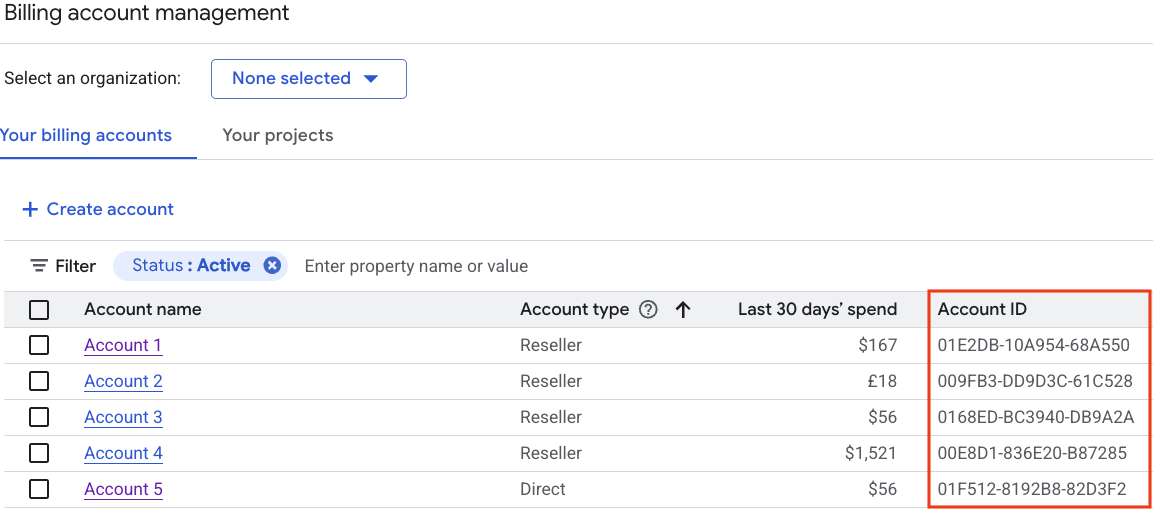
对于每个 Cloud Billing Budget API 调用,您需要有 Cloud Billing 账号 ID。支出上限预算仅限第一方Google Cloud 客户和 Cloud Billing 账号使用。转销商结算账号不在范围内。
- 前往 Google Cloud 控制台的“管理结算账号”页面。
- 在“您的结算账号”标签页中,您可以看到按名称和 ID 显示的 Cloud Billing 账号列表。找到您管理预算的账号的账号 ID 值。
支出上限预算的主要概念和限制
支出上限预算使用估算的总费用来触发提醒并强制执行支出限额,在解除支出上限之前,系统会阻止用量和费用累积。
支出上限预算字段限制
如果为预算设置了 spendCap,则该预算会受到严格的字段限制。请参阅 Filters、BudgetAmount、ThresholdRule、NotificationsRule 和 OwnershipScope 的字段级注释。
- billing-account-id:支出上限预算仅适用于第一方Google Cloud 客户和 Cloud Billing 账号。转销商结算账号不在范围内。
BudgetFilters必须包含以下参数:- 支出上限预算仅限于范围限定(过滤)为单个 Google Cloud 项目和单个 符合条件的服务的预算。
- 支出上限预算的预算周期时间范围限制为
MONTH的CalendarPeriod。 - 支出上限的费用计算基于总费用,不包括节省的费用和返还金额。您必须将
creditTypesTreatment设置为EXCLUDE_ALL_CREDITS。 - 支出上限不支持其他预算过滤条件,这些过滤条件必须为空,包括
resourceAncestors、credit_types、subaccounts和labels。
BudgetAmount必须使用specifiedAmount。在输入时,currencyCode是可选的。如果创建预算时指定了币种代码,则该代码必须与 Cloud Billing 账号的币种一致。currencyCode在输出中提供。ThresholdRules必须包含三个规则,且thresholdPercent值分别为0.5、0.8和1.0(50%、80% 和 100%),同时将spendBasis设置为CURRENT_SPEND或BASIS_UNSPECIFIED(支出上限不支持FORECASTED_SPEND)。NotificationsRule必须将enableProjectLevelRecipients设置为true。不支持所有其他NotificationsRule参数。OwnershipScope必须设置为OWNERSHIP_SCOPE_UNSPECIFIED或ALL_USERS(支出上限不支持BILLING_ACCOUNT)。创建支出上限预算时,必须将
inputState参数设置为CONFIGURED。
支出上限预算如何帮助您控制支出
使用估算费用更快地计算支出:为了更快地强制执行支出上限金额,支出上限预算会使用估算的总费用来触发提醒并强制执行支出上限。估算费用是根据服务的标价计算的,不包括节省的费用和赠金。
触发支出上限时自动暂停使用并停止累积费用:在指定项目中,当特定服务的估计总使用费用超出预算目标金额时,系统会触发支出上限,并在预算期的剩余时间内强制执行此上限。在预算中,
outputState参数设置为ENFORCED。在强制执行支出上限期间,以下规则适用:- 系统会暂停指定项目中特定服务的所有新使用,包括按需付费、随用随付的使用以及承诺(例如承诺使用折扣 (CUD) 和预配吞吐量 (PT))涵盖的使用。
- 指定服务的任何进行中的请求都会处理完毕,并根据情况收取费用。
- 支出上限不会暂停与永久性资源(例如计算和存储服务)关联的任何正在进行的固定用量,这些资源仍处于有效状态并会继续产生费用。
- 重要提示:在强制执行状态下,您无法修改支出上限预算的设置或删除该预算。在修改或删除强制预算之前,您必须先手动解除支出上限。
解除强制执行的支出上限以恢复服务和支出:强制执行支出上限后,系统会阻止指定项目中使用特定服务,直到解除支出上限。您可以通过以下方式解除支出上限:
自动解除支出上限:强制执行的支出上限会在下一个预算期开始时(通常是下个月的第一天)自动解除。当支出上限自动解除时,相应预算的支出金额会重置为零,支出上限状态会重置为
CONFIGURED,指定的服务会解除封锁,API 调用会恢复正常功能。手动解除支出上限:如果您需要在强制执行支出上限的同一预算期内撤消使用量限制,可以修改预算以手动解除支出上限。手动解除支出上限会产生以下结果:
解除支出上限后,服务可能需要长达一小时才能完全恢复正常运行。
自动重置支出上限预算:在下一个预算期开始时(通常是下个月的第一天),所有支出上限预算都会自动重置,将总估算支出金额设置为零,并将支出上限状态设置为
CONFIGURED。
配额限制:每个 Cloud Billing 账号一次最多可以关联数千个预算。如需了解当前限制和其他信息,请参阅配额和限制。
调用 API
以下示例展示了如何向 Cloud Billing Budget API 发送一些请求,以管理支出上限预算。
创建支出上限预算
此 API 方法会创建应用于单个项目和符合条件的服务的 Cloud Billing 支出上限预算。
REST
此示例展示了如何为特定项目中的 Gemini API 服务使用量创建支出上限预算。该预算 范围限定(过滤)为单个 Google Cloud 项目、单个 符合条件的服务,并设置为 每月 100 美元的预算金额。
在使用任何请求数据之前,请先进行以下替换:
projects/budget-scope-project-id:您要设置为预算范围 (budgetFilter) 的 Google Cloud 项目 ID。services/eligible-service_id:您要设置为预算范围 (budgetFilter) 的符合条件的服务 ID 之一。在示例中,我们使用服务 IDAEFD-7695-64FA来表示 Gemini API 服务。- billing-account-id:此预算适用的 Cloud Billing 账号 ID。支出上限预算仅限第一方 Google Cloud 客户和 Cloud Billing 账号使用。转销商结算账号不在支持范围内。
- api-user-project-id:启用了 Cloud Billing Budget API 的 Google Cloud 项目。
HTTP 方法和网址:
POST https://billingbudgets.googleapis.com/v1/billingAccounts/billing-account-id/budgets
请求 JSON 正文:
{
  "displayName": "My Gemini API Spend Cap",
  "budgetFilter": {
    "projects": [
      "projects/budget-scope-project-id"
    ],
    "services": [
      "services/AEFD-7695-64FA"
    ],
    "creditTypesTreatment": "EXCLUDE_ALL_CREDITS",
    "calendarPeriod": "MONTH"
 },
 "amount": {
   "specifiedAmount": {
     "units": "100",
     "nanos": 0
   }
 },
 "thresholdRules": [
   { "thresholdPercent": 0.5 },
   { "thresholdPercent": 0.8 },
   { "thresholdPercent": 1.0 }
 ],
 "notificationsRule": {
   "enableProjectLevelRecipients": true
 },
 "spendCap": {
   "inputState": "CONFIGURED"
 }
}
如需发送您的请求,请展开以下选项之一:
您应该收到类似以下内容的 JSON 响应:
{
  "name": "billingAccounts/000000-111111-222222/budgets/33333333-4444-5555-6666-777777777777",
  "displayName": "My Gemini API Spend Cap",
  "budgetFilter": {
    "projects": [
      "projects/123456789"
    ],
    "services": [
      "services/AEFD-7695-64FA"
    ],
    "creditTypesTreatment": "EXCLUDE_ALL_CREDITS",
    "calendarPeriod": "MONTH"
  },
  "amount": {
    "specifiedAmount": {
       "currencyCode": "USD",
       "units": "100"
     }
  },
  "thresholdRules": [
    {
      "thresholdPercent": 0.5,
      "spendBasis": "CURRENT_SPEND"
    },
    {
      "thresholdPercent": 0.8,
      "spendBasis": "CURRENT_SPEND"
    },
    {
      "thresholdPercent": 1,
      "spendBasis": "CURRENT_SPEND"
    }
  ],
  "notificationsRule": {
    "enableProjectLevelRecipients": true
  },
  "etag": "1790365289674138",
  "spendCap": {
    "outputState": "CONFIGURED"
  }
}
使用 PATCH 解除支出上限
使用 PATCH API 方法修改现有的 Cloud Billing 支出上限预算,以手动解除强制执行的支出上限。
REST
此示例展示了如何通过将
SpendCap.inputState 参数更新为 AWAITING_NEXT_PERIOD,手动解除现有预算的 ENFORCED 支出上限。
重要提示:当 spend_cap.output_state 为 ENFORCED 时,您必须先发送 UpdateBudget 请求来修改 spend_cap.input_state,例如将 input_state 设置为 AWAITING_NEXT_PERIOD,这样即可解除支出上限。如果您尝试在预算处于强制执行状态时修改任何其他预算字段,更新请求将失败并显示 FAILED_PRECONDITION。
要调用此方法,需要您想更新的预算的 budget-id。您可以在创建预算时从 createBudget 输出获取预算 ID;如果列出所有预算,则可以从 listBudgets 输出获取预算 ID。
在使用任何请求数据之前,请先进行以下替换:
- billing-account-id:此预算适用的 Cloud Billing 账号 ID。支出上限预算仅限第一方 Google Cloud 客户和 Cloud Billing 账号使用。转销商结算账号不在支持范围内。
- budget-id:要更新的预算的 ID。
- api-user-project-id:启用了 Cloud Billing Budget API 的 Google Cloud 项目。
HTTP 方法和网址:
PATCH https://billingbudgets.googleapis.com/v1/billingAccounts/billing-account-id/budgets/budget-id?updateMask=spendCap.inputState
请求 JSON 正文:
{
  "spendCap": {
    "inputState": "AWAITING_NEXT_PERIOD"
 }
}
如需发送您的请求,请展开以下选项之一:
您应该收到类似以下内容的 JSON 响应:
{
  "name": "billingAccounts/000000-111111-222222/budgets/33333333-4444-5555-6666-777777777777",
  "displayName": "My Gemini API Spend Cap",
  "budgetFilter": {
    "projects": [
      "projects/123456789"
    ],
    "services": [
      "services/AEFD-7695-64FA"
    ],
    "creditTypesTreatment": "EXCLUDE_ALL_CREDITS",
    "calendarPeriod": "MONTH"
  },
  "amount": {
    "specifiedAmount": {
       "currencyCode": "USD",
       "units": "100"
     }
  },
  "thresholdRules": [
    {
      "thresholdPercent": 0.5,
      "spendBasis": "CURRENT_SPEND"
    },
    {
      "thresholdPercent": 0.8,
      "spendBasis": "CURRENT_SPEND"
    },
    {
      "thresholdPercent": 1,
      "spendBasis": "CURRENT_SPEND"
    }
  ],
  "notificationsRule": {
    "enableProjectLevelRecipients": true
  },
  "etag": "1790365289674138",
  "spendCap": {
    "outputState": "AWAITING_NEXT_PERIOD",
    "reconciling": true
  }
}
使用 PATCH 更新支出上限预算
使用此 API 方法修改现有 Cloud Billing 支出上限预算以更改预算金额和预算过滤条件(预算范围)。
REST
此示例展示了如何更新现有支出上限预算以更改
预算金额。如果
支出上限状态为 AWAITING_NEXT_PERIOD,此示例还会展示如何通过将
SpendCap.inputState 参数更新为 CONFIGURED 来重置提升的支出上限。
要调用此方法,需要您想更新的预算的 budget-id。您可以在创建预算时从 createBudget 输出获取预算 ID;如果列出所有预算,则可以从 listBudgets 输出获取预算 ID。
在使用任何请求数据之前,请先进行以下替换:
projects/budget-scope-project-id:您要设置为预算范围 (budgetFilter) 的 Google Cloud 项目的 ID。services/eligible-service_id:您要设置为预算范围 (budgetFilter) 的符合条件的服务 ID 之一。在示例中,我们使用服务 IDAEFD-7695-64FA来表示 Gemini API 服务。- billing-account-id:此预算适用的 Cloud Billing 账号 ID。支出上限预算仅限第一方 Google Cloud 客户和 Cloud Billing 账号使用。转销商结算账号不在支持范围内。
- budget-id:要更新的预算的 ID。
- api-user-project-id:启用了 Cloud Billing Budget API 的 Google Cloud 项目。
HTTP 方法和网址:
PATCH https://billingbudgets.googleapis.com/v1/billingAccounts/billing-account-id/budgets/budget-id?updateMask=amount.specifiedAmount,spendCap.inputState
请求 JSON 正文:
{
  "displayName": "My Gemini API Spend Cap",
  "budgetFilter": {
    "projects": [
      "projects/budget-scope-project-id"
    ],
    "services": [
      "services/AEFD-7695-64FA"
    ],
    "creditTypesTreatment": "EXCLUDE_ALL_CREDITS",
    "calendarPeriod": "MONTH"
 },
 "amount": {
   "specifiedAmount": {
     "units": "500",
     "nanos": 0
   }
 },
 "thresholdRules": [
   { "thresholdPercent": 0.5 },
   { "thresholdPercent": 0.8 },
   { "thresholdPercent": 1.0 }
 ],
 "notificationsRule": {
   "enableProjectLevelRecipients": true
 },
 "spendCap": {
   "inputState": "CONFIGURED"
 }
}
如需发送您的请求,请展开以下选项之一:
您应该收到类似以下内容的 JSON 响应:
{
  "name": "billingAccounts/000000-111111-222222/budgets/33333333-4444-5555-6666-777777777777",
  "displayName": "My Gemini API Spend Cap",
  "budgetFilter": {
    "projects": [
      "projects/123456789"
    ],
    "services": [
      "services/AEFD-7695-64FA"
    ],
    "creditTypesTreatment": "EXCLUDE_ALL_CREDITS",
    "calendarPeriod": "MONTH"
  },
  "amount": {
    "specifiedAmount": {
       "currencyCode": "USD",
       "units": "500"
     }
  },
  "thresholdRules": [
    {
      "thresholdPercent": 0.5,
      "spendBasis": "CURRENT_SPEND"
    },
    {
      "thresholdPercent": 0.8,
      "spendBasis": "CURRENT_SPEND"
    },
    {
      "thresholdPercent": 1,
      "spendBasis": "CURRENT_SPEND"
    }
  ],
  "notificationsRule": {
    "enableProjectLevelRecipients": true
  },
  "etag": "1790365289674138",
  "spendCap": {
    "outputState": "CONFIGURED"
  }
}
列出预算
此 API 方法会列出可用于特定 Cloud Billing 账号的所有预算。
REST
在使用任何请求数据之前,请先进行以下替换:
- billing-account-id:预算适用的 Cloud Billing 账号 ID。支出上限预算仅限第一方 Google Cloud 客户和 Cloud Billing 账号使用。转销商结算账号不在支持范围内。
- project-id:启用了 Cloud Billing Budget API 的 Google Cloud 项目。
HTTP 方法和网址:
GET https://billingbudgets.googleapis.com/v1/billingAccounts/billing-account-id/budgets
如需发送您的请求,请展开以下选项之一:
您应会收到如下所示的 JSON 响应:
{
  "budgets": [
   {
      "name": "billingAccounts/000000-111111-222222/budgets/33333333-4444-5555-6666-777777777777",
      "displayName": "Gemini API Spend Cap in My Project",
      "budgetFilter": {
        "projects": [
          "projects/987654321"
        ],
        "services": [
          "services/AEFD-7695-64FA"
        ],
        "creditTypesTreatment": "EXCLUDE_ALL_CREDITS",
        "calendarPeriod": "MONTH"
      },
      "amount": {
        "specifiedAmount": {
          "currencyCode": "USD",
          "units": "500"
        }
      },
      "thresholdRules": [
        {
          "thresholdPercent": 0.5,
          "spendBasis": "CURRENT_SPEND"
        },
        {
          "thresholdPercent": 0.8,
          "spendBasis": "CURRENT_SPEND"
        },
        {
          "thresholdPercent": 1,
          "spendBasis": "CURRENT_SPEND"
        }
      ],
      "notificationsRule": {
        "enableProjectLevelRecipients": true
      },
      "allUpdatesRule": {},
      "etag": "17fc365289f74138c",
      "spendCap": {
        "outputState": "ENFORCED"
      }
    }
  ]
}
获取预算
此 API 方法可获取特定预算的详细信息。
REST
要调用此方法,需要您想更新的预算的 budget-id。您可以在创建预算时从 createBudget 输出获取预算 ID;如果列出所有预算,则可以从 listBudgets 输出获取预算 ID。
在使用任何请求数据之前,请先进行以下替换:
- billing-account-id:此预算适用的 Cloud Billing 账号 ID。支出上限预算仅限第一方 Google Cloud 客户和 Cloud Billing 账号使用。转销商结算账号不在支持范围内。
- budget-id:您要获得的预算的 ID。
- project-id:启用了 Cloud Billing Budget API 的 Google Cloud 项目。
HTTP 方法和网址:
GET https://billingbudgets.googleapis.com/v1/billingAccounts/billing-account-id/budgets/budget-id
如需发送您的请求,请展开以下选项之一:
您应该收到类似以下内容的 JSON 响应:
{
  "name": "billingAccounts/000000-111111-222222/budgets/33333333-4444-5555-6666-777777777777",
  "displayName": "Cloud Run Spend Cap in My Project",
  "budgetFilter": {
    "projects": [
      "projects/987654321"
    ],
    "services": [
      "services/152E-C115-5142"
    ],
    "creditTypesTreatment": "EXCLUDE_ALL_CREDITS",
    "calendarPeriod": "MONTH"
  },
  "amount": {
    "specifiedAmount": {
       "currencyCode": "USD",
       "units": "450"
     }
  },
  "thresholdRules": [
    {
      "thresholdPercent": 0.5,
      "spendBasis": "CURRENT_SPEND"
    },
    {
      "thresholdPercent": 0.8,
      "spendBasis": "CURRENT_SPEND"
    },
    {
      "thresholdPercent": 1,
      "spendBasis": "CURRENT_SPEND"
    }
  ],
  "notificationsRule": {
    "enableProjectLevelRecipients": true
  },
  "allUpdatesRule": {},
  "etag": "c9d6c011f6fa6b5c",
  "spendCap": {
    "outputState": "CONFIGURED"
  }
}
删除预算
使用此 API 方法删除现有的 Cloud Billing 预算。
REST
要调用此方法,需要您想更新的预算的 budget-id。您可以在创建预算时从 createBudget 输出获取预算 ID;如果列出所有预算,则可以从 listBudgets 输出获取预算 ID。
在使用任何请求数据之前,请先进行以下替换:
- billing-account-id:此预算适用的 Cloud Billing 账号 ID。
- budget-id:要删除的预算的 ID。
- project-id:启用了 Cloud Billing Budget API 的 Google Cloud 项目。
HTTP 方法和网址:
DELETE https://billingbudgets.googleapis.com/v1/billingAccounts/billing-account-id/budgets/budget-id
如需发送您的请求,请展开以下选项之一:
您应该收到类似以下内容的 JSON 响应:
{}