


エージェント アプリケーションでパラメータ化されたビューを使用する
AI エージェントまたは大規模言語モデル(LLM)を使用する Bigtable アプリケーションでパラメータ化されたビューを安全に実行するには、厳格なアクセス制御を確立し、帯域外でパラメータを渡す必要があります。
アクセス制御を設定する
Bigtable 論理ビューは、定義者の権限セキュリティ モデルで動作します。つまり、ビューに対してクエリを実行すると、クエリを実行しているユーザーではなく、ビューを定義したユーザーの権限でクエリが実行されます。最小権限の原則を適用するには、基盤となるソーステーブルへの権限を保持しながら、ビューへのアクセス権限のみをアプリケーションのサービス アカウントに付与します。
アクセス制御を設定する手順は次のとおりです。
bigtable.readerロールなど、最小限の権限を持つアプリケーション専用の IAM ロールを作成します。- このロールに表示専用の権限を付与します。IAM 条件を使用して、特定のビューに対する
bigtable.logicalViews.readRows権限を制限できます。 - アクセス制御を厳格にするには、IAM 拒否ポリシーを使用して、基盤となるベーステーブルに対する権限をアプリケーション ロールに明示的に拒否します。
詳細については、IAM による Bigtable のアクセス制御をご覧ください。
ビュー パラメータを挿入する
エージェント アプリケーションでは、パラメータ化された論理ビューのパラメータ値(ユーザー認証情報やテナント境界など)は、LLM やエンドユーザーではなく、信頼できるアプリケーション コードによって提供される必要があります。これにより、信頼できないユーザー入力とモデル生成のクエリ文字列がデータベース入力から分離されます。
AI エージェントを構築するには、Agent Development Kit(ADK)フレームワークを使用します。ADK には、パラメータ化されたビューの統合に役立つ次のコンポーネントが用意されています。
BigtableToolset: Bigtable と通信するデータベース対応ツール(特にexecute_sql_parameterized)を構成して提供する ADK データベース ツールセット。このツールセットは、ビュー パラメータを帯域外で自動的に抽出し、データに対して SQL クエリを実行します。ToolContext: セッション固有の状態とインフラストラクチャのプロパティをサンドボックス化するランタイム メカニズム。ツールは、機密性の高いフィルタリング パラメータを LLM に公開することなく解決できます。
次の図は、コンポーネントが連携して Bigtable にパラメータを挿入する仕組みを示しています。
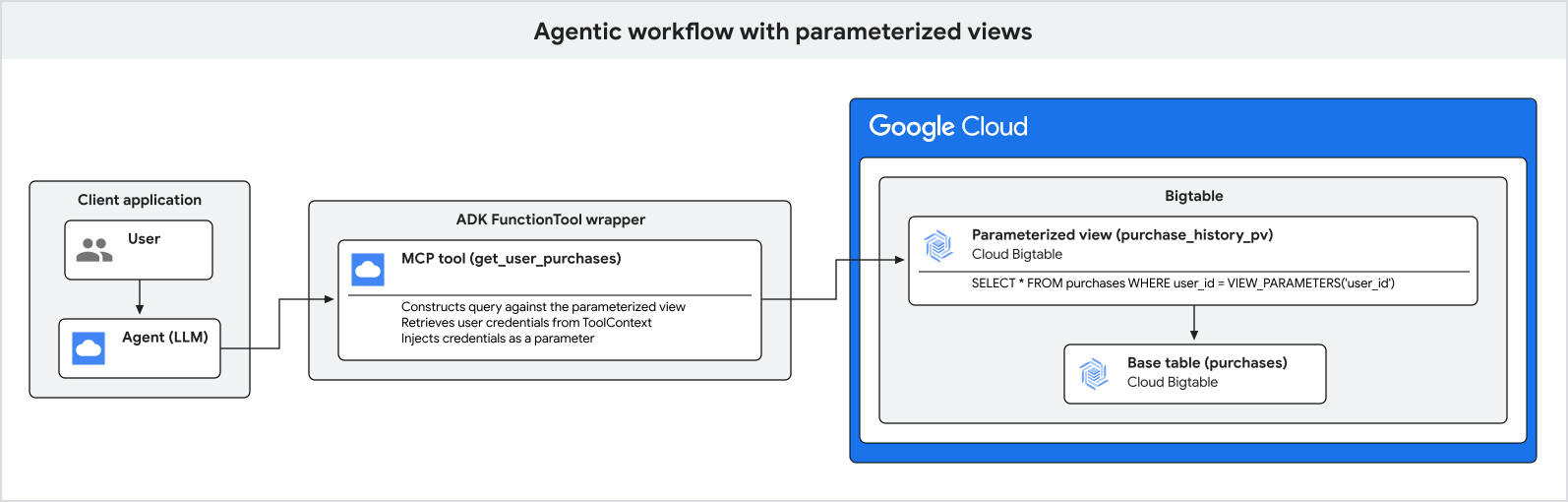
次の手順では、パラメータ インジェクションのプロセスについて詳しく説明します。
- アプリケーションがエンドユーザーを認証し、検証済みのユーザー認証情報とテナント組織を取得します。
- アプリケーションはユーザーから自然言語のクエリを受け取ります。
- アプリケーションは ADK エージェントを実行し、認証されたユーザーとテナントの識別子を安全なセッション状態に渡します。
- エージェントがデータベースのクエリを実行することを決定すると、都市などの自然言語フィルタリング引数のみを特定し、
execute_sql_parameterizedツールを呼び出します。 - 基盤となるデータベース ツールは、
ToolContextから機密性の高いユーザー認証情報とテナント境界を安全に取得し、Bigtable に対してクエリを実行します。
次の例は、ADK を使用してエージェント アプリケーションを設定し、ユーザーの購入履歴をクエリする方法を示しています。
Bigtable ツールセットを構成する
Python アプリケーションで、帯域外で解決するパラメータ名(view_parameter_names)を使用して ADK BigtableToolset を構成します。これにより、user_id などのフレームワーク インフラストラクチャ プロパティと、tenant_id などのアプリケーション セッション変数もデータベース クエリに直接マッピングされます。
import google.auth
from google.adk.agents.llm_agent import LlmAgent
from google.adk.tools.bigtable.bigtable_credentials import BigtableCredentialsConfig
from google.adk.tools.bigtable.bigtable_toolset import BigtableToolset

# 1. Initialize credentials (using Application Default Credentials here)
credentials, _ = google.auth.default()
credentials_config = BigtableCredentialsConfig(credentials=credentials)

# 2. Configure the BigtableToolset
# Passing view_parameter_names=["user_id", "tenant_id"] instructs the toolset
# to automatically extract both parameters from the ToolContext at runtime
# and inject them into the query's view_parameters.
bigtable_toolset = BigtableToolset(
    credentials_config=credentials_config,
    view_parameter_names=["user_id", "tenant_id"],
)
ツールセットを使用してエージェントを初期化する
ツールセットをエージェントの tools リストに直接渡します。エージェントは、厳密に型指定された execute_sql_parameterized ツールを自動的に検出して公開します。
# 3. Create the agent and expose the toolset
agent = LlmAgent(
    model="MODEL_NAME",
    name="purchase_history_agent",
    description="An agent that retrieves multi-tenant purchase history.",
    instruction="You are an assistant that helps users find their purchase history within their tenant.",
    tools=[bigtable_toolset],
)
MODEL_NAME は、使用するモデルの名前(gemini-2.5-flash など)に置き換えます。
エージェント アプリケーションを実行する
エージェントを実行するときに、インフラストラクチャ ユーザー ID とアプリケーションの組織状態の両方を使用してアクティブ セッションを初期化します。
import asyncio
from google.adk.runners import Runner
from google.adk.sessions import InMemorySessionService
from google.genai import types

async def main():
    # 4. Initialize session service
    session_service = InMemorySessionService()

    # 5. Create a session for the authenticated user and store their specific
    # organization tenant in the state.
    authenticated_user_id = "user-anwesha-123"
    organization_tenant_id = "tenant-corp-alpha"

    session = await session_service.create_session(
        user_id=authenticated_user_id, # Resolved from tool_context.user_id
        # Resolved from tool_context.state["tenant_id"]
        state={"tenant_id": organization_tenant_id},
        app_name="purchase_history_app",
    )

    runner = Runner(
        app_name="purchase_history_app",
        agent=agent,
        session_service=session_service,
    )

    # 6. Simulate a user query
    user_query = "What did I buy in New York?"
    content = types.Content(role="user", parts=[types.Part(text=user_query)])

    # The runner runs the agent.
    # When the agent calls execute_sql_parameterized, the ADK framework resolves
    # both "user_id" and "tenant_id" out-of-band and passes them to Bigtable
    # as view parameters, completely hidden from the LLM.
    events = runner.run(
        session_id=session.id,
        user_id=session.user_id,
        new_message=content,
    )

    for event in events:
        if event.content and event.content.parts:
            print(f"Agent: {event.content.parts[0].text}")

if __name__ == "__main__":
    asyncio.run(main())
結果は、認証されたユーザーの購入履歴レコードのリストです。このリストは、クエリで指定された都市でフィルタされ、テナント境界に制限されています。
このプロセスにより、セキュリティ パラメータが帯域外で挿入され、言語モデルの操作から完全に隠されます。