# Graph query overview
> [!NOTE]
> **Note:** This feature may not be available when using reservations that are created with certain BigQuery editions. For more information about which features are enabled in each edition, see [Introduction to
> BigQuery editions](https://docs.cloud.google.com/bigquery/docs/editions-intro).
[BigQuery Graph](https://docs.cloud.google.com/bigquery/docs/graph-overview.md.txt) lets you write graph
queries to match node, edge, and path patterns and traverse relationships by
using
[Graph Query Language (GQL)](https://docs.cloud.google.com/bigquery/docs/reference/standard-sql/graph-intro.md.txt).
The examples in this document refer to a graph called `FinGraph`, which shows
the relationships between people, accounts they own, and transfers between
accounts. For information about the definition of the graph, see
[`FinGraph` example](https://docs.cloud.google.com/bigquery/docs/reference/standard-sql/graph-schema-statements.md.txt#fin_graph).
## Query structure
A graph query consists of the name of the graph, followed by
one or more linear query statements. Each linear
query contains one or more
[statements](https://docs.cloud.google.com/bigquery/docs/reference/standard-sql/graph-query-statements.md.txt),
which let you work with graph data to find pattern matches, define variables,
filter and transform intermediate data, and return results. You run a graph
query the same way that you [run a SQL query](https://docs.cloud.google.com/bigquery/docs/running-queries.md.txt)
in BigQuery.
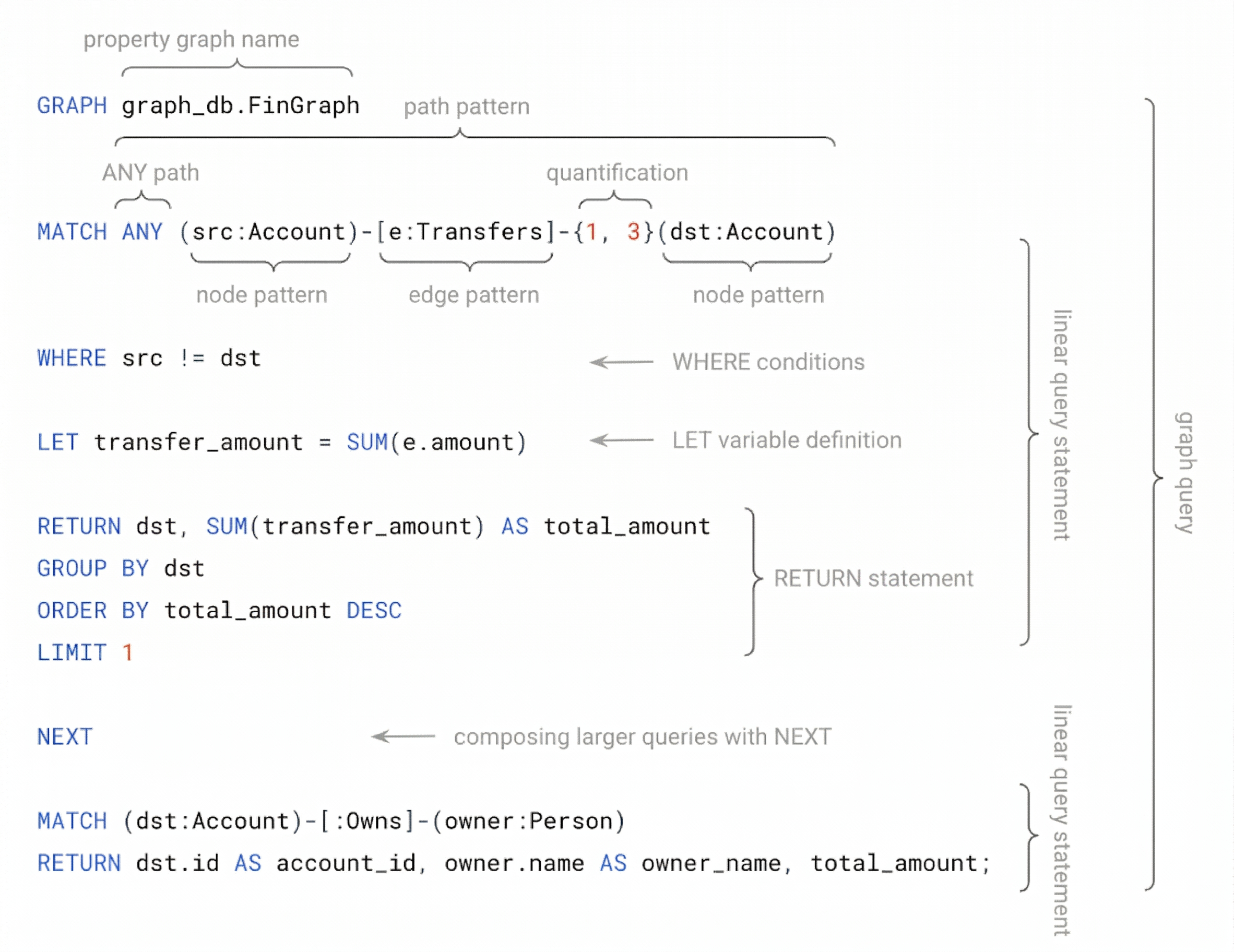 An example of the structure of a graph query.
## Graph pattern matching
[Graph pattern matching](https://docs.cloud.google.com/bigquery/docs/reference/standard-sql/graph-patterns.md.txt)
finds specific patterns within your graph. The most basic
patterns are element patterns, such as node patterns that match nodes and edge
patterns that match edges.
### Node patterns
A node pattern matches nodes in your graph. This pattern contains matching
parentheses, which might optionally include a graph pattern variable, a label
expression, and property filters.
#### Find all nodes
The following query returns all nodes in the graph. The variable `n`, a graph
pattern variable, binds to the matching nodes. In this case, the node pattern
matches all nodes in the graph.
```googlesql
GRAPH graph_db.FinGraph
MATCH (n)
RETURN LABELS(n) AS label, n.id;
```
This query returns `label` and `id`:
| `label` | `id` |
|---|---|
| `Account` | `7` |
| `Account` | `16` |
| `Account` | `20` |
| `Person` | `1` |
| `Person` | `2` |
| `Person` | `3` |
#### Find all nodes with a specific label
The following query matches all nodes in the graph that have the `Person`
[label](https://docs.cloud.google.com/bigquery/docs/reference/standard-sql/graph-patterns.md.txt#label_expression_definition).
The query returns the label and some properties of the matched nodes.
```googlesql
GRAPH graph_db.FinGraph
MATCH (p:Person)
RETURN LABELS(p) AS label, p.id, p.name;
```
This query returns the following properties of the matched nodes:
| `label` | `id` | `name` |
|---|---|---|
| `Person` | `1` | `Alex` |
| `Person` | `2` | `Dana` |
| `Person` | `3` | `Lee` |
#### Find all nodes matching a label expression
You can create a
[label expression](https://docs.cloud.google.com/bigquery/docs/reference/standard-sql/graph-patterns.md.txt#label_expression_definition)
with one or more logical operators. For example, the following query matches all
nodes in the graph that have either the `Person` or `Account` label. The graph
pattern variable `n` exposes all
[properties](https://docs.cloud.google.com/bigquery/docs/reference/standard-sql/graph-schema-statements.md.txt#element_table_property_definition)
from nodes with the `Person` or `Account` label.
```googlesql
GRAPH graph_db.FinGraph
MATCH (n:Person|Account)
RETURN LABELS(n) AS label, n.id, n.birthday, n.create_time;
```
Note the following in the results of this query:
- All nodes have the `id` property.
- Nodes matching the `Account` label have the `create_time` property but don't have the `birthday` property. The `birthday` property is `NULL` for these nodes.
- Nodes matching the `Person` label have the `birthday` property but don't have the `create_time` property. The `create_time` property is `NULL` for these nodes.
| `label` | `id` | `birthday` | `create_time` |
|---|---|---|---|
| `Account` | `7` | `NULL` | `2020-01-10T14:22:20.222Z` |
| `Account` | `16` | `NULL` | `2020-01-28T01:55:09.206Z` |
| `Account` | `20` | `NULL` | `2020-02-18T13:44:20.655Z` |
| `Person` | `1` | `1991-12-21T08:00:00Z` | `NULL` |
| `Person` | `2` | `1980-10-31T08:00:00Z` | `NULL` |
| `Person` | `3` | `1986-12-07T08:00:00Z` | `NULL` |
> [!NOTE]
> **Note:** A `NULL` value doesn't necessarily indicate the absence of a property, because an element can expose a property with a `NULL` value.
#### Find all nodes matching the label expression and property filter
The following query matches all nodes in the graph that have the `Person`
label and the property `id` equal to `1`:
```googlesql
GRAPH graph_db.FinGraph
MATCH (p:Person {id: 1})
RETURN LABELS(p) AS label, p.id, p.name, p.birthday;
```
The result is similar to the following:
| `label` | `id` | `name` | `birthday` |
|---|---|---|---|
| `Person` | `1` | `Alex` | `1991-12-21T08:00:00Z` |
You can use the `WHERE` clause to form more complex filtering conditions on
labels and properties.
The following query uses the `WHERE` clause to filter on nodes for which
the property `birthday` is before `1990-01-10`:
```googlesql
GRAPH graph_db.FinGraph
MATCH (p:Person WHERE p.birthday < '1990-01-10')
RETURN LABELS(p) AS label, p.name, p.birthday;
```
The result is similar to the following:
| `label` | `name` | `birthday` |
|---|---|---|
| `Person` | `Dana` | `1980-10-31T08:00:00Z` |
| `Person` | `Lee` | `1986-12-07T08:00:00Z` |
### Edge patterns
An edge pattern matches edges or relationships between nodes. Edge patterns are
enclosed in square brackets (`[]`) and include symbols such as `-`, `->`, or
`<-` to indicate directions. An edge pattern might optionally include a graph
pattern variable to bind to matching edges.
#### Find all edges with matching labels
This query returns all edges in the graph with the `Transfers` label. The query
binds the graph pattern variable `e` to the matching edges.
```googlesql
GRAPH graph_db.FinGraph
MATCH -[e:Transfers]->
RETURN e.Id as src_account, e.order_number;
```
The result is similar to the following:
| `src_account` | `order_number` |
|---|---|
| `7` | `304330008004315` |
| `7` | `304120005529714` |
| `16` | `103650009791820` |
| `20` | `304120005529714` |
| `20` | `302290001255747` |
#### Find all edges matching the label expression and property filter
The edge pattern in the following query uses a label expression and a property
filter to find all edges labeled `Transfers` that match a specified
order number:
```googlesql
GRAPH graph_db.FinGraph
MATCH -[e:Transfers {order_number: "304120005529714"}]->
RETURN e.Id AS src_account, e.order_number;
```
The result is similar to the following:
| `src_account` | `order_number` |
|---|---|
| `7` | `304120005529714` |
| `20` | `304120005529714` |
#### Find all edges using any direction edge pattern
You can use the `any direction` edge pattern (`-[]-`) in a query to match edges
in either direction. The following query finds all transfers with a blocked
account:
```googlesql
GRAPH graph_db.FinGraph
MATCH (account:Account)-[transfer:Transfers]-(:Account {is_blocked:true})
RETURN transfer.order_number, transfer.amount;
```
The result is similar to the following:
| `order_number` | `amount` |
|---|---|
| `304330008004315` | `300` |
| `304120005529714` | `100` |
| `103650009791820` | `300` |
| `302290001255747` | `200` |
### Path patterns
A path pattern is built from alternating node and edge patterns.
#### Find all paths from a specific node using a path pattern
The following query finds all transfers to an account initiated from an account
owned by `Person` with `id` equal to `2`.
Each matched result represents a path from a `Person` node when `id` is equal to
`2` through a connected `Account` node using an `Owns` edge,
into another `Account` node using a `Transfers` edge.
```googlesql
GRAPH graph_db.FinGraph
MATCH
(p:Person {id: 2})-[:Owns]->(account:Account)-[t:Transfers]->
(to_account:Account)
RETURN
p.id AS sender_id, account.id AS from_id, to_account.id AS to_id;
```
The result is similar to the following:
| `sender_id` | `from_id` | `to_id` |
|---|---|---|
| `2` | `20` | `7` |
| `2` | `20` | `16` |
### Quantified path patterns
A [quantified pattern](https://docs.cloud.google.com/bigquery/docs/reference/standard-sql/graph-patterns.md.txt#quantified_paths)
repeats a pattern within a specified range.
#### Match a quantified edge pattern
To find paths of a variable length, you can apply a quantifier to an edge
pattern. The following query demonstrates this by finding destination accounts
that are one to three transfers away from a source `Account` with an `id` value
of `7`.
The query applies the quantifier `{1, 3}` to the edge pattern
`-[e:Transfers]->`. This instructs the query to match paths that repeat the
`Transfers` edge pattern one, two, or three times. The `WHERE` clause is used to
exclude the source account from the results. The `ARRAY_LENGTH` function is used
to access the [`group variable`](https://docs.cloud.google.com/bigquery/docs/graph-query-overview.md.txt#group-variables) `e`.
```googlesql
GRAPH graph_db.FinGraph
MATCH (src:Account {id: 7})-[e:Transfers]->{1, 3}(dst:Account)
WHERE src != dst
RETURN src.id AS src_account_id, ARRAY_LENGTH(e) AS path_length, dst.id AS dst_account_id;
```
The result is similar to the following:
| `src_account_id` | `path_length` | `dst_account_id` |
|---|---|---|
| `7` | `1` | `16` |
| `7` | `1` | `16` |
| `7` | `3` | `16` |
| `7` | `3` | `16` |
| `7` | `2` | `20` |
| `7` | `2` | `20` |
Some rows in the results are repeated. This is because multiple paths that match
the pattern can exist between the same source and destination nodes, and the
query returns all of them.
#### Match a quantified path pattern
The following query finds paths between `Account` nodes with one to two
`Transfers` edges through intermediate accounts that are blocked.
The parenthesized path pattern is quantified, and its `WHERE` clause specifies
conditions for the repeated pattern.
```googlesql
GRAPH graph_db.FinGraph
MATCH
(src:Account)
((a:Account)-[:Transfers]->(b:Account {is_blocked:true}) WHERE a != b){1,2}
-[:Transfers]->(dst:Account)
RETURN src.id AS src_account_id, dst.id AS dst_account_id;
```
The result is similar to the following:
| `src_account_id` | `dst_account_id` |
|---|---|
| `7` | `20` |
| `7` | `20` |
| `20` | `20` |
### Group variables
A graph pattern variable declared in a quantified pattern becomes a *group
variable* when accessed outside that pattern. It then binds to an array of
matched graph elements.
You can access a group variable as an array. Its graph elements are preserved in
the order of their appearance along the matched paths. You can aggregate a group
variable using
[horizontal aggregation](https://docs.cloud.google.com/bigquery/docs/reference/standard-sql/graph-gql-functions.md.txt#gql-horiz-agg-func-calls).
#### Access group variable
In the following example, the variable `e` is accessed as follows:
- As a graph pattern variable bound to a single edge in the `WHERE` clause `e.amount > 100` when it's within the quantified pattern.
- As a group variable bound to an array of edge elements in `ARRAY_LENGTH(e)` in the `RETURN` statement when it's outside the quantified pattern.
- As a group variable bound to an array of edge elements, which is aggregated by `SUM(e.amount)` outside the quantified pattern. This is an example of [horizontal aggregation](https://docs.cloud.google.com/bigquery/docs/reference/standard-sql/graph-gql-functions.md.txt#gql-horiz-agg-func-calls).
```googlesql
GRAPH graph_db.FinGraph
MATCH
(src:Account {id: 7})-[e:Transfers WHERE e.amount > 100]->{0,2}
(dst:Account)
WHERE src.id != dst.id
LET total_amount = SUM(e.amount)
RETURN
src.id AS src_account_id, ARRAY_LENGTH(e) AS path_length,
total_amount, dst.id AS dst_account_id;
```
The result is similar to the following:
| `src_account_id` | `path_length` | `total_amount` | `dst_account_id` |
|---|---|---|---|
| `7` | `1` | `300` | `16` |
| `7` | `2` | `600` | `20` |
### Path search prefixes
To limit matched paths within groups that share source and destination nodes,
you can use the `ANY`, `ANY SHORTEST`, or `ANY CHEAPEST` path
[search prefix](https://docs.cloud.google.com/bigquery/docs/reference/standard-sql/graph-patterns.md.txt#search_prefix).
You can only apply these prefixes before an entire path pattern, and you can't
apply them inside parentheses.
#### Match using `ANY`
The following query finds all reachable unique accounts that are one or two
`Transfers` away from a given `Account` node.
The `ANY` path search prefix ensures that the query returns only one path
between a unique pair of `src` and `dst` `Account` nodes. In the following
example, although you can reach the `Account` node with `{id: 16}` in two
different paths from the source `Account` node, the query returns only one path.
```googlesql
GRAPH graph_db.FinGraph
MATCH ANY (src:Account {id: 7})-[e:Transfers]->{1,2}(dst:Account)
LET ids_in_path = ARRAY_CONCAT(ARRAY_AGG(e.Id), [dst.Id])
RETURN src.id AS src_account_id, dst.id AS dst_account_id, ids_in_path;
```
The result is similar to the following:
| `src_account_id` | `dst_account_id` | `ids_in_path` |
|---|---|---|
| `7` | `16` | `7,16` |
| `7` | `20` | `7,16,20` |
#### Match using `ANY SHORTEST`
The `ANY SHORTEST` path search prefix returns a single path for each pair of
source and destination nodes, selected from those with the minimum number of
edges.
For example, the following query finds one of the shortest paths between an
`Account` node with `id` value of `7` and an `Account` node with an `id` value
of `20`. The query considers paths with one to three `Transfers` edges.
```googlesql
GRAPH graph_db.FinGraph
MATCH ANY SHORTEST (src:Account {id: 7})-[e:Transfers]->{1, 3}(dst:Account {id: 20})
RETURN src.id AS src_account_id, dst.id AS dst_account_id, ARRAY_LENGTH(e) AS path_length;
```
The result is similar to the following:
| `src_account_id` | `dst_account_id` | `path_length` |
|---|---|---|
| `7` | `20` | `2` |
#### Match using `ANY CHEAPEST`
The `ANY CHEAPEST` path search prefix ensures that for each pair of source and
destination accounts, the query returns only one path with the minimum total
compute cost.
The following query finds a path with the minimum total compute cost between
`Account` nodes. This cost is based on the sum of the `amount` property of the
`Transfers` edges. The search considers paths with one to three `Transfers`
edges.
```googlesql
GRAPH graph_db.FinGraph
MATCH ANY CHEAPEST (src:Account)-[e:Transfers COST e.amount]->{1,3}(dst:Account)
LET total_cost = sum(e.amount)
RETURN src.id AS src_account_id, dst.id AS dst_account_id, total_cost;
```
The result is similar to the following:
| `src_account_id` | `dst_account_id` | `total_cost` |
|---|---|---|
| `7` | `7` | `900` |
| `7` | `16` | `100` |
| `7` | `20` | `400` |
| `16` | `7` | `800` |
| `16` | `16` | `500` |
| `16` | `20` | `300` |
| `20` | `7` | `500` |
| `20` | `16` | `200` |
| `20` | `20` | `500` |
### Graph patterns
A graph pattern consists of one or more path patterns,
separated by a comma (`,`).
Graph patterns can contain a `WHERE` clause, which lets you access all the graph
pattern variables in the path patterns to form filtering conditions. Each path
pattern produces a collection of paths.
#### Match using a graph pattern
The following query identifies intermediary accounts and their owners involved
in transactions amounts exceeding 200, through which funds are transferred from
a source account to a blocked account.
The following path patterns form the graph pattern:
- The first pattern finds paths where the transfer occurs from one account to a blocked account using an intermediate account.
- The second pattern finds paths from an account to its owning person.
The variable `interm` acts as a common link between the two path patterns, which
requires `interm` to reference the same element node in both path patterns. This
creates an equi-join operation based on the `interm` variable.
> [!NOTE]
> **Note:** If there is no shared variable among the path patterns, a [cross join](https://docs.cloud.google.com/bigquery/docs/reference/standard-sql/query-syntax.md.txt#cross_join) is performed between the collection of matches for each path pattern.
```googlesql
GRAPH graph_db.FinGraph
MATCH
(src:Account)-[t1:Transfers]->(interm:Account)-[t2:Transfers]->(dst:Account),
(interm)<-[:Owns]-(p:Person)
WHERE dst.is_blocked = TRUE AND t1.amount > 200 AND t2.amount > 200
RETURN
src.id AS src_account_id, dst.id AS dst_account_id,
interm.id AS interm_account_id, p.id AS owner_id;
```
The result is similar to the following:
| `src_account_id` | `dst_account_id` | `interm_account_id` | `owner_id` |
|---|---|---|---|
| `20` | `16` | `7` | `1` |
### Linear query statements
You can chain multiple graph statements together to form a
[linear query statement](https://docs.cloud.google.com/bigquery/docs/reference/standard-sql/graph-intro.md.txt#linear_query_statement).
The statements are executed in the same order as they appear in the
query.
- Each statement takes the output from the previous statement as input. The
input is empty for the first statement.
- The output of the last statement is the final result.
For example, you can use linear query statements to find the maximum transfer to
a blocked account. The following query finds the account and its owner with the
largest outgoing transfer to a blocked account.
```googlesql
GRAPH graph_db.FinGraph
MATCH (src_account:Account)-[transfer:Transfers]->(dst_account:Account {is_blocked:true})
ORDER BY transfer.amount DESC
LIMIT 1
MATCH (src_account:Account)<-[owns:Owns]-(owner:Person)
RETURN src_account.id AS account_id, owner.name AS owner_name;
```
The following table illustrates this process by showing the intermediate results
passed between each statement. For brevity, only some properties are shown.
Statement Intermediate result (abbreviated)
```
MATCH
(src_account:Account)
-[transfer:Transfers]->
(dst_account:Account {is_blocked:true})
```
**src_account** **transfer** **dst_account** `{id: 7}` `{amount: 300.0}` `{id: 16, is_blocked: true}` `{id: 7}` `{amount: 100.0}` `{id: 16, is_blocked: true}` `{id: 20}` `{amount: 200.0}` `{id: 16, is_blocked: true}`
```
ORDER BY transfer.amount DESC
```
**src_account** **transfer** **dst_account** `{id: 7}` `{amount: 300.0}` `{id: 16, is_blocked: true}` `{id: 20}` `{amount: 200.0}` `{id: 16, is_blocked: true}` `{id: 7}` `{amount: 100.0}` `{id: 16, is_blocked: true}`
```
LIMIT 1
```
**src_account** **transfer** **dst_account** `{id: 7}` `{amount: 300.0}` `{id: 16, is_blocked: true}`
```
MATCH
(src_account:Account)
<-[owns:Owns]-
(owner:Person)
```
**src_account** **transfer** **dst_account** **owns** **owner** `{id: 7}` `{amount: 300.0}` `{id: 16, is_blocked: true}` `{person_id: 1, account_id: 7}` `{id: 1, name: Alex}`
```
RETURN
src_account.id AS account_id,
owner.name AS owner_name
```
**account_id** **owner_name** `7` `Alex`
The result is similar to the following:
| account_id | owner_name |
|---|---|
| `7` | `Alex` |
### Return statement
The [`RETURN` statement](https://docs.cloud.google.com/bigquery/docs/reference/standard-sql/graph-query-statements.md.txt#gql_return)
specifies what to return from the matched patterns. It can access
graph pattern variables and include expressions and other clauses, such as
`ORDER BY` and `GROUP BY`.
BigQuery Graph doesn't support returning graph elements as query
results. To return the entire graph element, use the
[`TO_JSON` function](https://docs.cloud.google.com/bigquery/docs/reference/standard-sql/json_functions.md.txt#to_json).
#### Return graph elements as JSON
```googlesql
GRAPH graph_db.FinGraph
MATCH (n:Account {id: 7})
-- Returning a graph element in the final results is NOT allowed. Instead, use
-- the TO_JSON function or explicitly return the graph element's properties.
RETURN TO_JSON(n) AS n;
```
The result is similar to the following:
| n |
|---|
| `{"identifier":"mUZpbkdyYXBoLkFjY291bnQAeJEO","kind":"node","labels":["Account"],"properties":{"create_time":"2020-01-10T14:22:20.222Z","id":7,"is_blocked":false,"nick_name":"Vacation Fund"}}` |
## Compose larger queries with the `NEXT` keyword
You can chain multiple graph linear query statements using the `NEXT` keyword.
The first statement receives an empty input, and the output of each subsequent
statement becomes the input for the next.
The following example finds the owner of the account with the most incoming
transfers by chaining multiple graph linear statements. You can use the same
variable, for example, `account`, to refer to the same graph element across
multiple linear statements.
```googlesql
GRAPH graph_db.FinGraph
MATCH (:Account)-[:Transfers]->(account:Account)
RETURN account, COUNT(*) AS num_incoming_transfers
GROUP BY account
ORDER BY num_incoming_transfers DESC
LIMIT 1
NEXT
MATCH (account:Account)<-[:Owns]-(owner:Person)
RETURN account.id AS account_id, owner.name AS owner_name, num_incoming_transfers;
```
The result is similar to the following:
| account_id | owner_name | num_incoming_transfers |
|---|---|---|
| `16` | `Lee` | `3` |
You can also
[combine linear query statements with set operators](https://docs.cloud.google.com/bigquery/docs/reference/standard-sql/graph-intro.md.txt#combining_linear_query_statements_with_set_operators).
## Functions and expressions
You can use all GoogleSQL
[functions](https://docs.cloud.google.com/bigquery/docs/reference/standard-sql/functions-all.md.txt) (both aggregate
and scalar functions),
[operators](https://docs.cloud.google.com/bigquery/docs/reference/standard-sql/operators.md.txt), and
[conditional expressions](https://docs.cloud.google.com/bigquery/docs/reference/standard-sql/conditional_expressions.md.txt)
in graph queries. BigQuery Graph also supports
[GQL functions](https://docs.cloud.google.com/bigquery/docs/reference/standard-sql/graph-gql-functions.md.txt) and
[GQL operators](https://docs.cloud.google.com/bigquery/docs/reference/standard-sql/graph-operators.md.txt) that can
only be used in graph queries.
The following query includes a mix of GQL and SQL functions and
operators within a graph query:
```googlesql
GRAPH graph_db.FinGraph
MATCH (person:Person)-[o:Owns]->(account:Account)
WHERE person IS SOURCE OF o
RETURN person, ARRAY_AGG(account.nick_name) AS accounts
GROUP BY person
NEXT
RETURN
LABELS(person) AS labels,
accounts,
CONCAT(person.city, ", ", person.country) AS location,
TO_JSON(person) AS person
LIMIT 1;
```
The result is similar to the following:
| labels | accounts | location | person |
|---|---|---|---|
| `Person` | `["Vacation Fund"]` | `Adelaide, Australia` | `{"identifier":"mUZpbkdyYXBoLlBlcnNvbgB4kQI=","kind":"node","labels":["Person"],"properties":{"birthday":"1991-12-21T08:00:00Z","city":"Adelaide","country":"Australia","id":1,"name":"Alex"}}` |
## Subqueries
A *subquery* is a query that is nested in another query. The following rules
apply to subqueries within graph queries:
- A subquery is enclosed within a pair of braces `{}`.
- A subquery starts with a `GRAPH` clause to specify the graph in scope. The specified graph doesn't need to be the same as the one used in the outer query.
- A graph pattern variable declared outside the subquery scope can't be declared again inside the subquery, but it can be referred to in expressions or functions inside the subquery.
#### Use a subquery to find the total number of transfers from each account
The following query illustrates the use of the `VALUE` subquery. The subquery is
enclosed in braces `{}` prefixed by the `VALUE` keyword. The query returns the total
number of transfers initiated from an account.
```googlesql
GRAPH graph_db.FinGraph
MATCH (p:Person)-[:Owns]->(account:Account)
RETURN p.name, account.id AS account_id, VALUE {
GRAPH graph_db.FinGraph
MATCH (a:Account)-[transfer:Transfers]->(:Account)
WHERE a = account
RETURN COUNT(transfer) AS num_transfers
} AS num_transfers;
```
The result is similar to the following:
| name | account_id | num_transfers |
|---|---|---|
| `Alex` | `7` | `2` |
| `Dana` | `20` | `2` |
| `Lee` | `16` | `1` |
For a list of supported subquery expressions, see
[BigQuery Graph subqueries](https://docs.cloud.google.com/bigquery/docs/reference/standard-sql/graph-subqueries.md.txt).
## Query parameters
You can query BigQuery Graph with parameters. For more information, see the
[syntax](https://docs.cloud.google.com/bigquery/docs/reference/standard-sql/lexical.md.txt#query_parameters) and
learn how to
[Run parameterized queries](https://docs.cloud.google.com/bigquery/docs/parameterized-queries.md.txt).
The following query matches `Person` nodes that have an `id` value that matches
a query parameter:
```googlesql
GRAPH graph_db.FinGraph
MATCH (person:Person {id: @id})
RETURN person.name;
```
## Query graphs and tables together
You can combine graph queries and SQL queries by using the
[`GRAPH_TABLE` operator](https://docs.cloud.google.com/bigquery/docs/reference/standard-sql/graph-sql-queries.md.txt#graph_table_operator).
The `GRAPH_TABLE` operator takes a linear graph query and returns its result in
a tabular form that can be integrated into a SQL query. This interoperability
lets you enrich graph query results with non-graph content and the other way
around.
For example, you can create a `CreditReports` table and insert a few credit
reports, as shown in the following example:
```googlesql
CREATE TABLE graph_db.CreditReports (
person_id INT64 NOT NULL,
create_time TIMESTAMP NOT NULL,
score INT64 NOT NULL,
PRIMARY KEY (person_id, create_time) NOT ENFORCED
);
```
```googlesql
INSERT INTO graph_db.CreditReports (person_id, create_time, score)
VALUES
(1,"2020-01-10 06:22:20.222", 700),
(2,"2020-02-10 06:22:20.222", 800),
(3,"2020-03-10 06:22:20.222", 750);
```
Next, you can identify specific persons through graph pattern matching in
`GRAPH_TABLE` and join the graph query results with the `CreditReports` table to
retrieve credit scores.
```googlesql
SELECT
gt.person.id,
credit.score AS latest_credit_score
FROM GRAPH_TABLE(
graph_db.FinGraph
MATCH (person:Person)-[:Owns]->(:Account)-[:Transfers]->(account:Account {is_blocked:true})
RETURN DISTINCT person
) AS gt
JOIN graph_db.CreditReports AS credit
ON gt.person.id = credit.person_id
ORDER BY credit.create_time;
```
The result is similar to the following:
| person_id | latest_credit_score |
|---|---|
| `1` | `700` |
| `2` | `800` |
## Best practices
You can optimize query performance by structuring your GQL queries to minimize
the amount of data that is scanned and the number of intermediate results.
### Start path traversal from low-cardinality nodes
To keep intermediate result sets small and speed up query execution, write your
graph queries so that path traversal starts from lower cardinality nodes,
regardless of the direction of path traversal. The following
`MATCH` statement uses property filters to reduce the number of possible
starting nodes instead of computing all matches and then filtering:
```googlesql
MATCH (p:Person {id: 10})-[own:Owns]->(a:Account)
```
This is especially important for quantified path queries:
```googlesql
MATCH (p:Person {id: 10})-[own:Owns]->{1,3}(a:Account)
```
### Use directional path traversal
BigQuery Graph schemas are directional, which means that each
edge has a source node and a destination node. Although graph query
syntax allows path traversal in any direction (for example, `-[edge]-`), we
recommend using directional path traversal (for example, `-[edge]->` or
`<-[edge]-`) for better performance. Any direction path traversal might cause
performance loss.
The following `MATCH` statement combines two directional traversals with
`UNION ALL`:
```googlesql
MATCH (a1:Account {id: 7})-[t:Transfers]->(a2:Account)
...
UNION ALL
...
MATCH (a1:Account {id: 7})<-[t:Transfers]-(a2:Account)
```
### Use `ANY` or `ANY SHORTEST` syntax for connectivity checks
Quantified path queries can return duplicate paths between source nodes and
destination nodes. If your goal is to check for connectivity and you don't
require all possible paths, use `ANY` or `ANY SHORTEST` to reduce redundant
computations and improve path lookup efficiency. For example, the following
`MATCH` statement uses `ANY SHORTEST` to keep only one path between each pair
of nodes:
```googlesql
MATCH ANY SHORTEST (a1:Account)-[t:Transfers]->{1,3}(a2:Account)
```
### Specify labels explicitly
If node or edge labels are omitted in a query, BigQuery Graph
enumerates all qualifying node and edge labels. This enumeration might cause
more labels to be scanned than necessary. To avoid this, specify labels for
all nodes and edges in your query whenever possible.
For example, the following query specifies the `Account` and `Transfers` labels:
```googlesql
GRAPH graph_db.FinGraph
MATCH (a1:Account)-[t:Transfers]->(a2:Account)
RETURN COUNT(*) AS num_transfers;
```
Avoid omitting labels, because it might scan other unneeded relationships
between nodes. In the following query, `a1` can represent an account or a
person, and `t` can represent a transfer or an account ownership.
```googlesql
GRAPH graph_db.FinGraph
MATCH (a1)-[t]->(a2)
RETURN COUNT(*) AS num_transfers;
```
### Use a single `MATCH` statement
BigQuery Graph lets you include multiple `MATCH` statements in
a single graph query. These statements are connected by multi-declared variables
that represent the same node or edge. However, using multiple `MATCH`
statements can diminish cardinality benefits across statements. For better
performance, use a single `MATCH` statement.
For example, the following queries are equivalent, but the first one performs
better because it uses a single `MATCH` statement:
```googlesql
-- Preferred syntax.
GRAPH graph_db.FinGraph
MATCH
(p:Person {id: 1})-[o:Owns]->
(a:Account)-[t:Transfers]->(a2:Account)
RETURN o.account_id, t.amount;
```
```googlesql
-- Avoid this syntax.
GRAPH graph_db.FinGraph
MATCH (p:Person {id: 1})-[o:Owns]->(a:Account)
MATCH (a:Account)-[t:Transfers]->(a2:Account)
RETURN o.account_id, t.amount;
```
### Limit traversed edges from high-cardinality nodes
When you query graphs, some nodes can have a significantly larger number of
incoming or outgoing edges compared to other nodes. These high-cardinality
nodes are sometimes called *super nodes* or *hub nodes*. Super nodes can cause
performance issues because traversals through them might involve processing
large amounts of data, which leads to data skew and long execution times.
To optimize a query of a graph with super nodes, use the
[`ROW_NUMBER()` function](https://docs.cloud.google.com/bigquery/docs/reference/standard-sql/numbering_functions.md.txt#row_number)
within a `FILTER` clause or `WHERE` clause in `MATCH` to limit the
number of edges that the query traverses from or to a node. This technique is
particularly useful when you don't need a complete enumeration of all
connections from or to a super node.
For example, if some accounts in `FinGraph` have a large number of
transactions, you can use `ROW_NUMBER()` to limit the number of `Transfers`
edges to consider for each `Account` and avoid an inefficient query:
```googlesql
GRAPH graph_db.FinGraph
MATCH (a1:Account)-[e1:Transfers WHERE e1 IN {
GRAPH graph_db.FinGraph
-- Sample 5 edges per source node
MATCH -[selected_e:Transfers]->
FILTER ROW_NUMBER() OVER (
PARTITION BY SOURCE_NODE_ID(selected_e)) < 5
RETURN selected_e
}]->{1,3}(a2:Account)
RETURN COUNT(*) AS cnt;
```
### Sample intermediate nodes or edges in multi-hop queries
You can improve query efficiency by using `ROW_NUMBER()` to sample
intermediate nodes in multi-hop queries. This technique limits the number of
paths that the query considers for each intermediate
node. To do this, break a multi-hop query into multiple `MATCH` statements
separated by `NEXT`, and apply `ROW_NUMBER()` at the midpoint where you need to
sample:
```googlesql
GRAPH graph_db.FinGraph
MATCH (a1:Account)-[e1:Transfers]->(a2:Account)
-- Sample 5 destination nodes per a1 source node
FILTER ROW_NUMBER() OVER (PARTITION BY ELEMENT_ID(a1)) < 5
RETURN a1, a2
NEXT
MATCH (a2)-[e2:Transfers]->(a3:Account)
RETURN a1.id AS src_id, a2.id AS mid_id, a3.id AS dst_id;
```
## What's next
- Learn how to [create and query a graph](https://docs.cloud.google.com/bigquery/docs/graph-create.md.txt).
- Learn more about how to design a [graph schema](https://docs.cloud.google.com/bigquery/docs/graph-schema-overview.md.txt).
- Learn how to [visualize query results](https://docs.cloud.google.com/bigquery/docs/graph-visualization.md.txt).