You can use differential privacy with BigQuery to help protect personal
information in your data while you still perform computations and gain insights.
This privacy standard limits the personal information that's revealed by data
outputs, helping you share data and make inferences about groups without
exposing individuals. Differential privacy is particularly useful when there's a
risk of re-identification or when you need to quantify the tradeoff between
privacy risk and analytical utility.
For syntax details, see the [differential privacy clause](https://docs.cloud.google.com/bigquery/docs/reference/standard-sql/query-syntax#dp_clause). For a list
of functions that you can use with this syntax, see
[differentially private aggregate functions](https://docs.cloud.google.com/bigquery/docs/reference/standard-sql/aggregate-dp-functions).
> [!NOTE]
> **Note:** In this topic, the privacy parameters in the examples aren't recommendations. You should work with your privacy or security officer to determine the optimal privacy parameters for your dataset and organization.
## Example use case for differential privacy
To better understand differential privacy, let's look at a simple example.
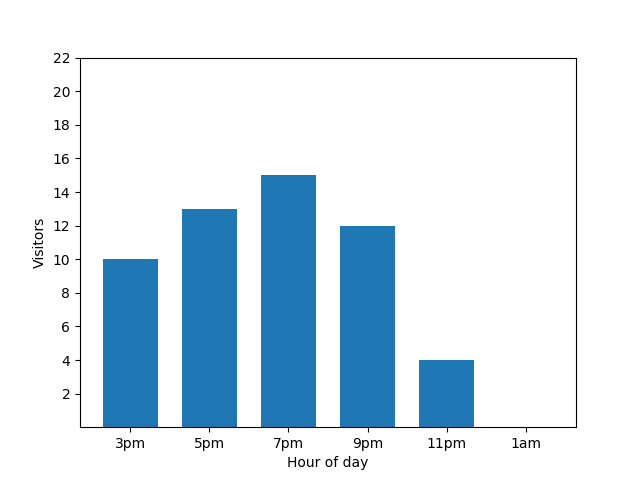
This bar chart shows the busyness of a small restaurant on one particular
evening. Lots of guests come at 7 PM, and the restaurant is completely empty
at 1 AM:
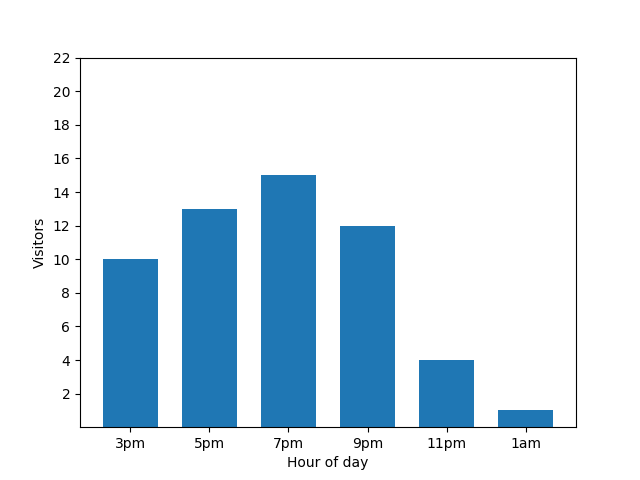
This chart looks useful, but there's a catch. When a new guest arrives, this
fact is immediately revealed by the bar chart. In the following chart, it's
clear that there's a new guest, and that this guest arrived at roughly 1 AM:
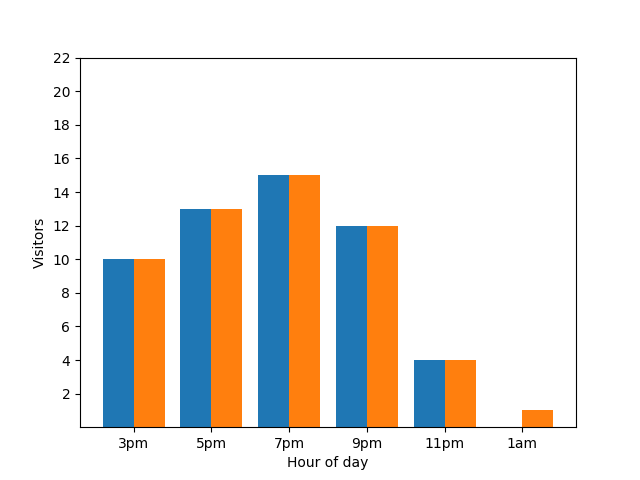
Showing this detail isn't great from a privacy perspective, as anonymized
statistics shouldn't reveal individual contributions. Putting those two charts
side by side makes it even more apparent: the orange bar chart has one extra
guest that has arrived around 1 AM:
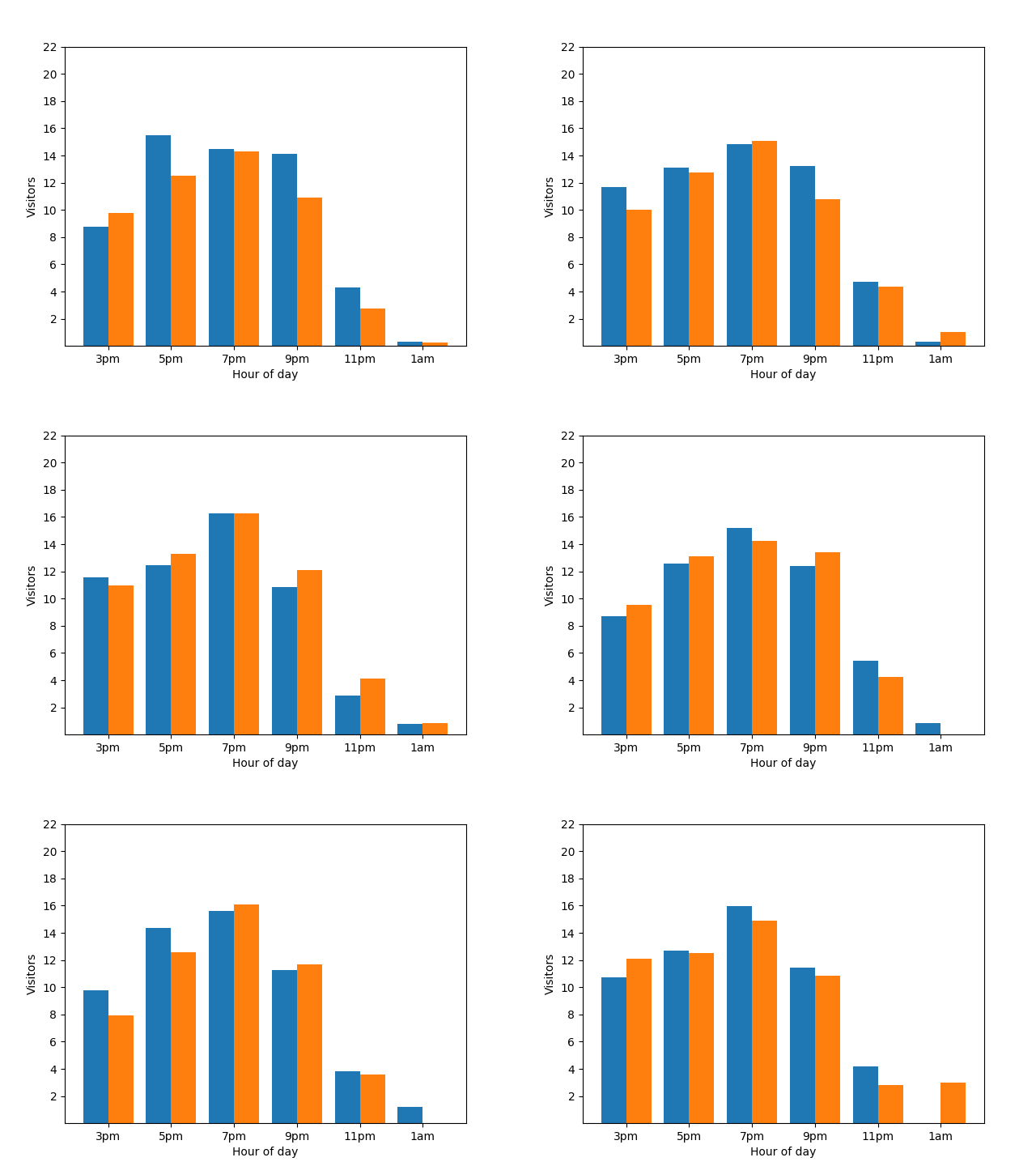
Again, that's not great. To avoid this kind privacy issue, you can add random
noise to the bar charts by using differential privacy. In the following
comparison chart, the results are anonymized and no longer reveal individual
contributions.
## How differential privacy works on queries
The goal of [differential privacy](https://www.cis.upenn.edu/%7Eaaroth/Papers/privacybook.pdf) is to mitigate
disclosure risk: the risk that someone can learn information about an entity in
a dataset. Differential privacy balances the need to safeguard privacy
against the need for statistical analytical utility. As privacy increases,
statistical analytical utility decreases, and vice versa.
With GoogleSQL for BigQuery, you can transform the results of a query with
differentially private aggregations. When the query is executed, it performs
the following:
1. Computes per-entity aggregations for each group if groups are specified with a `GROUP BY` clause. Limits the number of groups each entity can contribute to, based on the `max_groups_contributed` differential privacy parameter.
2. [Clamps](https://docs.cloud.google.com/bigquery/docs/reference/standard-sql/aggregate-dp-functions#dp_clamping) each per-entity aggregate contribution to be within the clamping bounds. If the clamping bounds aren't specified, they are implicitly calculated in a differentially private way.
3. Aggregates the clamped per-entity aggregate contributions for each group.
4. Adds noise to the final aggregate value for each group. The scale of random noise is a function of all of the clamped bounds and privacy parameters.
5. Computes a noisy entity count for each group and eliminates groups with few entities. A noisy entity count helps eliminate a non-deterministic set of groups.
The final result is a dataset where each group has noisy aggregate results
and small groups have been eliminated.
> [!NOTE]
> **Note:** BigQuery relies on [Google's open source differential privacy library](https://github.com/google/differential-privacy) to implement differential privacy functionality. The library provides low-level differential privacy primitives that you can use to implement end-to-end privacy systems. For additional information on guarantees, see [Limitations on privacy guarantees](https://docs.cloud.google.com/bigquery/docs/differential-privacy#privacy_guarantees).
> [!NOTE]
> **Note:** BigQuery additionally supports differential privacy for BigQuery Omni data sources, including Amazon Simple Storage Service (Amazon S3). BigQuery remote functions can also call external differential privacy libraries like [Tumult Analytics](https://docs.tmlt.dev/analytics/latest/index.html).
For additional context on what differential privacy is and its use cases, see
the following articles:
- [A friendly, non-technical introduction to differential privacy](https://desfontain.es/privacy/friendly-intro-to-differential-privacy.html)
- [Differentially private SQL with bounded user contribution](https://arxiv.org/abs/1909.01917)
- [Differential privacy on Wikipedia](https://en.wikipedia.org/wiki/Differential_privacy)
## Produce a valid differentially private query
The following rules must be met for the differentially private query to be
valid:
- A [privacy unit column](https://docs.cloud.google.com/bigquery/docs/differential-privacy#dp_define_privacy_unit_id) is defined.
- The `SELECT` list contains a [differentially private clause](https://docs.cloud.google.com/bigquery/docs/reference/standard-sql/query-syntax#dp_clause).
- Only [differentially private aggregate functions](https://docs.cloud.google.com/bigquery/docs/reference/standard-sql/aggregate-dp-functions) are in the `SELECT` list with the differentially private clause.
## Define a privacy unit column
A privacy unit is the entity in a dataset that's being protected, using
differential privacy. An entity can be an individual, a company, a location,
or any column that you choose.
A differentially private query must include one and only one
*privacy unit column* . A privacy unit column is a unique identifier for a
privacy unit and can exist within multiple groups. Because multiple groups
are supported, the data type for the
privacy unit column must be [groupable](https://docs.cloud.google.com/bigquery/docs/reference/standard-sql/data-types#groupable_data_types).
You can define a privacy unit column in the `OPTIONS` clause of a
differential privacy clause with the unique identifier `privacy_unit_column`.
In the following examples, a privacy unit column is added to a
differential privacy clause. `id` represents a column that originates from a
table called `students`.
SELECT WITH DIFFERENTIAL_PRIVACY
OPTIONS (epsilon=10, delta=.01, privacy_unit_column=id)
item,
COUNT(*, contribution_bounds_per_group=>(0, 100))
FROM students;
SELECT WITH DIFFERENTIAL_PRIVACY
OPTIONS (epsilon=10, delta=.01, privacy_unit_column=members.id)
item,
COUNT(*, contribution_bounds_per_group=>(0, 100))
FROM (SELECT * FROM students) AS members;
## Remove noise from a differentially private query
In the "Query syntax" reference, see [Remove noise](https://docs.cloud.google.com/bigquery/docs/reference/standard-sql/query-syntax#eliminate_noise).
## Add noise to a differentially private query
In the "Query syntax" reference, see [Add noise](https://docs.cloud.google.com/bigquery/docs/reference/standard-sql/query-syntax#add_noise).
## Limit the groups in which a privacy unit ID can exist
In the "Query syntax" reference, see
[Limit the groups in which a privacy unit ID can exist](https://docs.cloud.google.com/bigquery/docs/reference/standard-sql/query-syntax#limit_groups_for_privacy_unit).
## Limitations
This section describes limitations of differential privacy.
### Performance implications of differential privacy
Differentially private queries execute more slowly than standard queries
because per-entity aggregation is performed and the `max_groups_contributed` limitation
is applied. Limiting contribution bounds can help improve the performance of
your differentially private queries.
The performance profiles of the following queries aren't similar:
SELECT
WITH DIFFERENTIAL_PRIVACY OPTIONS(epsilon=1, delta=1e-10, privacy_unit_column=id)
column_a, COUNT(column_b)
FROM table_a
GROUP BY column_a;
SELECT column_a, COUNT(column_b)
FROM table_a
GROUP BY column_a;
The reason for the performance difference is that an additional
finer-granularity level of grouping is performed for
differentially private queries, because per-entity aggregation must also be
performed.
The performance profiles of the following queries should be similar,
although the differentially private query is slightly slower:
SELECT
WITH DIFFERENTIAL_PRIVACY OPTIONS(epsilon=1, delta=1e-10, privacy_unit_column=id)
column_a, COUNT(column_b)
FROM table_a
GROUP BY column_a;
SELECT column_a, id, COUNT(column_b)
FROM table_a
GROUP BY column_a, id;
The differentially private query performs more slowly because it has a high
number of distinct values for the privacy unit column.
### Implicit bounding limitations for small datasets
Implicit bounding works best when computed using large datasets.
Implicit bounding can fail with datasets that contain a low number of
[privacy units](https://docs.cloud.google.com/bigquery/docs/differential-privacy#dp_define_privacy_unit_id), returning no results. Furthermore,
implicit bounding on a dataset with a low number of privacy units can clamp a
large portion of non-outliers, leading to underreported aggregations and
results that are altered more by clamping than by added noise. Datasets that
have a low number of privacy units or are thinly partitioned should use
explicit rather than implicit clamping.
### Privacy vulnerabilities
Any differential privacy algorithm---including this one---incurs the risk of a
private data leak when an analyst acts in bad faith, especially when computing
basic statistics like sums, due to arithmetic limitations.
#### Limitations on privacy guarantees
While BigQuery differential privacy applies the
[differential privacy algorithm](https://arxiv.org/abs/1909.01917), it doesn't make a
guarantee regarding the privacy properties of the resulting dataset.
#### Runtime errors
An analyst acting in bad faith with the ability to write queries or control
input data could trigger a runtime error on private data.
#### Floating point noise
Vulnerabilities related to rounding, repeated rounding, and
re-ordering attacks should be considered before using differential privacy.
These vulnerabilities are particularly concerning when an attacker can
control some of the contents of a dataset or the order of contents in a dataset.
Differentially private noise additions on floating-point data types are subject
to the vulnerabilities described in [Widespread Underestimation of Sensitivity
in Differentially Private Libraries and How to Fix It](https://arxiv.org/abs/2207.10635).
Noise additions on integer data types aren't subject to the vulnerabilities
described in the paper.
#### Timing attack risks
An analyst acting in bad faith could execute a sufficiently complex query to
make an inference about input data based on a query's execution duration.
#### Misclassification
Creating a differential privacy query assumes that your data is in a well-known
and understood structure. If you apply differential privacy on the wrong
identifiers, such as one that represents a transaction ID instead of an
individual's ID, you could expose sensitive data.
If you need help understanding your data, consider
using services and tools such as the following:
- [BigQuery Data Profiler](https://docs.cloud.google.com/dlp/docs/data-profiles)
- [Re-identification risk analysis](https://docs.cloud.google.com/dlp/docs/concepts-risk-analysis)
## Pricing
There is no additional cost to use differential privacy,
but standard [BigQuery pricing](https://cloud.google.com/bigquery/pricing) for analysis applies.