# Restrict access with column-level access control
This page explains how to use BigQuery column-level access control to
restrict access to BigQuery data at the column level. For general
information about column-level access control, see
[Introduction to BigQuery column-level access control](https://docs.cloud.google.com/bigquery/docs/column-level-security-intro).
The instructions in this page use both BigQuery and
Data Catalog.
You need to update the table schema to set a policy tag on a column. You can
use the Google Cloud console, the bq command-line tool, and the BigQuery API to set a
policy tag on a column. Additionally, you can create a table, specify the
schema, and specify policy tags within one operation, using the following
techniques:
- The bq command-line tool's `bq mk` and `bq load` commands.
- The `tables.insert` API method.
- The **Create table** page in the Google Cloud console. If you use the Google Cloud console, you must select **Edit as text** when you add or edit the schema.
> [!NOTE]
> **Note:** You cannot use the DDL `CREATE TABLE` statement to specify policy tags.
To enhance column-level access control, you can optionally use
[dynamic data masking](https://docs.cloud.google.com/bigquery/docs/column-data-masking-intro).
Data masking lets you mask sensitive data by substituting null, default, or
hashed content in place of the column's actual value.
## Before you begin
1. BigQuery is automatically enabled in new projects, but you might need to activate it in a pre-existing project.
Enable the BigQuery API, if it is not already enabled.
**Roles required to enable APIs**
To enable APIs, you need the `serviceusage.services.enable` permission. If you
created the project, then you likely already have this permission through the
Owner role (`roles/owner`). Otherwise, you can get this permission through the
Service Usage Admin role (`roles/serviceusage.serviceUsageAdmin`).
[Learn how to grant roles](https://docs.cloud.google.com/iam/docs/granting-changing-revoking-access).
[Enable the API](https://console.cloud.google.com/apis/enableflow?apiid=bigquery.googleapis.com&redirect=https://console.cloud.google.com)
> [!NOTE]
> **Note:** The `datacatalog.googleapis.com` API must remain enabled to create and manage the Data Catalog policy tags and taxonomies used for data masking and column-level security. Although Data Catalog metadata search and catalog features are deprecated and transitioning to Knowledge Catalog, the Policy Tag Manager service (taxonomies and policy tags), its `datacatalog.googleapis.com` API methods and audit logs, and the `roles/datacatalog` Identity and Access Management (IAM) roles aren't deprecated.
## Roles and permissions
There are several roles related to policy tags for users and service accounts.
- Users or service accounts that administer policy tags are required to have the Data Catalog Policy Tag Admin role. The Policy Tag Admin role can manage taxonomies and policy tags, and can grant or remove IAM roles associated with policy tags.
- Users or service accounts that [enforce access control](https://docs.cloud.google.com/bigquery/docs/column-level-security#enforce_access_control) for column-level access control are required to have the BigQuery Admin role or the BigQuery Data Owner role. The BigQuery roles can manage data policies, which are used to enforce access control on a taxonomy.
- To view taxonomies and policy tags for all projects in an organization in the Google Cloud console, users need the Organization Viewer role. Otherwise, the console displays only taxonomies and policy tags associated with the selected project.
- Users or service accounts that query data that is protected by column-level access control must have the Data Catalog Fine-Grained Reader role to access that data.
For more information about all policy tag-related roles, see
[Roles used with column-level access control](https://docs.cloud.google.com/bigquery/docs/column-level-security-intro#roles).
### The Data Catalog Policy Tag Admin role
The Data Catalog Policy Tag Admin role can create and manage
data policy tags.
To grant the Policy Tag Admin role, you must
have the `resourcemanager.projects.setIamPolicy` permission on the project for
which you want to grant the role. If you don't have the
`resourcemanager.projects.setIamPolicy` permission, ask a Project Owner to
either grant you the permission, or perform the following steps for you.
1. In the Google Cloud console, go to the **IAM** page.
[Go to IAM](https://console.cloud.google.com/iam-admin/iam)
2. If the email address of the user to grant the role is in the list, select the
email address and click **Edit** . The
**Edit access** pane opens. Click **Add another role**.
If the user email address is not in the list, click
**Add** , then enter the email
address in the **New principals** box.
3. Click the **Select a role** drop-down list.
4. In **By product or service** , click **Data Catalog** . In **Roles** , click
**Policy Tag Admin**.
5. Click **Save**.
### The BigQuery Data Policy Admin, BigQuery Admin, and BigQuery Data Owner roles
The BigQuery Data Policy Admin, BigQuery Admin and BigQuery Data Owner roles can manage data policies.
To grant either of these roles, you must
have the `resourcemanager.projects.setIamPolicy` permission on the project for
which you want to grant the role. If you don't have the
`resourcemanager.projects.setIamPolicy` permission, ask a Project Owner to
either grant you the permission, or perform the following steps for you.
1. In the Google Cloud console, go to the **IAM** page.
[Go to IAM](https://console.cloud.google.com/iam-admin/iam)
2. If the email address of the user to grant the role is in the list, select the
email address and click **Edit** .
Then click **Add another role**.
If the user email address is not in the list, click
**Add** , then enter the email
address in the **New principals** box.
3. Click the **Select a role** drop-down list.
4. Click **BigQuery** , and then click **BigQuery Data Policy Admin** or **BigQuery Admin** or **BigQuery Data Owner**.
5. Click **Save**.
### The Organization Viewer role
The Organization Viewer role lets users view details about their organization
resource. To grant this role, you must have the
`resourcemanager.organizations.setIamPolicy` permission on the organization.
### The Data Catalog Fine-Grained Reader role
Users that need access to the data protected with column-level access control
need the Data Catalog Fine-Grained Reader role or any other role
that is granted the [`datacatalog.categories.fineGrainedGet`
permission](https://docs.cloud.google.com/iam/docs/roles-permissions/datacatalog#datacatalog.categories.fineGrainedGet).
This role is assigned to principals as part of configuring a policy tag.
To grant a user the Fine-Grained Reader role on a policy tag, you must have the
`datacatalog.taxonomies.setIamPolicy` permission on the project that contains
that policy tag's taxonomy. If you don't have
`datacatalog.taxonomies.setIamPolicy` permission, ask a Project Owner to
either grant you the permission, or to perform the action for you.
For instructions, see
[Set permissions on policy tags](https://docs.cloud.google.com/bigquery/docs/column-level-security#set_permissions_on_policy_tags).
## Set up column-level access control
Set up column-level access control by completing these tasks:
- Create a taxonomy of policy tags.
- Associate principals with the policy tags and grant the principals the Data Catalog Fine-Grained Reader role.
- Associate the policy tags with BigQuery table columns.
- Enforce access control on the taxonomy containing the policy tags.
### Create taxonomies
The user or service account that creates a taxonomy must be granted the
Data Catalog Policy Tag Admin role.
### Console
1. In the Google Cloud console, go to the **Policy tag taxonomies** page.
[Go to Policy tag taxonomies](https://console.cloud.google.com/bigquery/security/secure/policy-tags)
2. Click **Create taxonomy**.
3. On the **New taxonomy** page:
1. For **Taxonomy name**, enter the name of the taxonomy that you want to create.
2. For **Description**, enter a description.
3. If needed, change the project listed under **Project**.
4. If needed, change the location listed under **Location**.
5. Under **Policy Tags**, enter a policy tag name and description.
6. To add a child policy tag for a policy tag, click **Add subtag**.
7. To add a new policy tag at the same level as another policy tag, click **+ Add policy tag**.
8. Continue adding policy tags and child policy tags as needed for your taxonomy.
9. When you are done creating policy tags for your hierarchy, click **Create**.
### API
To use existing taxonomies, call
[`taxonomies.import`](https://docs.cloud.google.com/data-catalog/docs/reference/rest/v1/projects.locations.taxonomies/import)
in place of the first two steps of the following procedure.
1. Call [`taxonomies.create`](https://docs.cloud.google.com/data-catalog/docs/reference/rest/v1/projects.locations.taxonomies/create) to create a taxonomy.
2. Call [`taxonomies.policyTags.create`](https://docs.cloud.google.com/data-catalog/docs/reference/rest/v1/projects.locations.taxonomies.policyTags/create) to create a policy tag.
### Set permissions on policy tags
The user or service account that creates a taxonomy must be granted the
Data Catalog Policy Tag Admin role.
### Console
1. In the Google Cloud console, go to the **Policy tag taxonomies** page.
[Go to Policy tag taxonomies](https://console.cloud.google.com/bigquery/security/secure/policy-tags)
2. Click the name of the taxonomy that contains the relevant policy tags.
3. Select one or more policy tags.
4. If the **Info panel** is hidden, click **Show info panel**.
5. In the **Info panel** , you can see the roles and principals for the selected
policy tags.
Add the [Policy Tags Admin](https://docs.cloud.google.com/bigquery/docs/column-level-security#policy_tags_admin) role to accounts that create
and manage policy tags. Add the [Fine-Grained Reader](https://docs.cloud.google.com/bigquery/docs/column-level-security#fine_grained_reader)
role to accounts that are intended to have access to the data protected by
column-level access control. You also use this panel to remove roles
from accounts or modify other permissions.
6. Click **Save**.
### API
Call
[`taxonomies.policytag.setIamPolicy`](https://docs.cloud.google.com/data-catalog/docs/reference/rest/v1/projects.locations.taxonomies.policyTags/setIamPolicy)
to grant access to a policy tag by assigning principals to appropriate
roles.
### Set policy tags on columns
The user or service account that sets a policy tag needs the
`datacatalog.taxonomies.get` and `bigquery.tables.setCategory` permissions.
`datacatalog.taxonomies.get` is included in the
Data Catalog Policy Tags Admin and Project Viewer roles.
`bigquery.tables.setCategory` is included in the
BigQuery Admin (`roles/bigquery.admin`) and
BigQuery Data Owner (`roles/bigquery.dataOwner`) roles.
To view taxonomies and policy tags across all projects in an organization in
Google Cloud console, users need the `resourcemanager.organizations.get`
permission, which is included in the Organization Viewer role. This permission
is **not** required when using the API or the `bq` command-line tool.
> [!NOTE]
> **Note:** You can assign only one policy tag per column.
### Console
Set the policy tag by [modifying a schema](https://docs.cloud.google.com/bigquery/docs/managing-table-schemas) using the
Google Cloud console.
1. Open the BigQuery page in the Google Cloud console.
[Go to the BigQuery page](https://console.cloud.google.com/bigquery)
2. In the BigQuery **Explorer** pane, locate and select the
table that you want to update.
3. In the details pane, click **Edit \> Edit schema**.
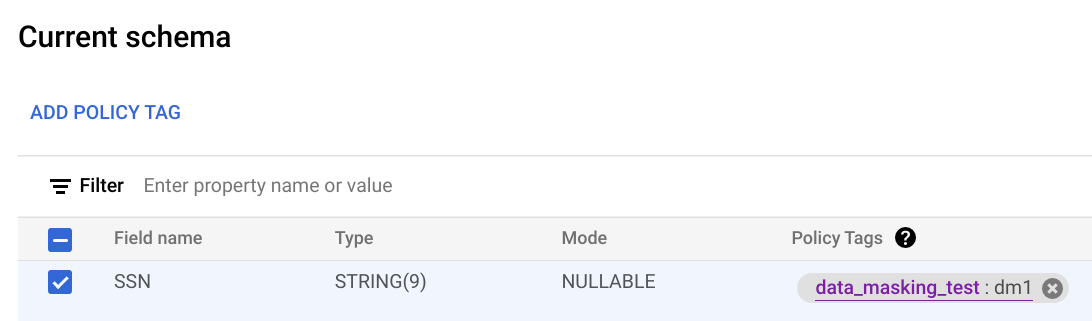
4. In the **Current schema** screen, select the target column and click **Add
policy tag**.
5. In the **Add a policy tag** screen, locate and select the policy tag that you want
to apply to the column.
6. Click **Select**. Your screen should look similar to the following:
7. Click **Save**.
### bq
1. Write the schema to a local file.
```bash
bq show --schema --format=prettyjson \
project-id:dataset.table > schema.json
```
where:
- project-id is your project ID.
- dataset is the name of the dataset that contains the table you're updating.
- table is the name of the table you're updating.
2. Modify schema.json to set a policy tag on a column. For the value of the
`names` field of `policyTags`, use the [policy tag resource name](https://docs.cloud.google.com/bigquery/docs/column-level-security#retrieve_policy_tag_name).
```googlesql
[
...
{
"name": "ssn",
"type": "STRING",
"mode": "REQUIRED",
"policyTags": {
"names": ["projects/project-id/locations/location/taxonomies/taxonomy-id/policyTags/policytag-id"]
}
},
...
]
```
3. Update the schema.
```bash
bq update \
project-id:dataset.table schema.json
```
### API
For existing tables, call [`tables.patch`](https://docs.cloud.google.com/bigquery/docs/reference/rest/v2/tables/patch), or for new tables call
[`tables.insert`](https://docs.cloud.google.com/bigquery/docs/reference/rest/v2/tables/insert). Use the
`schema` property of the `Table` object that you pass in
to set a policy tag in your schema definition. See the command-line example
schema to see how to set a policy tag.
When working with an existing table, the `tables.patch` method is preferred,
because the `tables.update` method replaces the entire table resource.
#### Other ways to set policy tags on columns
You can also set policy tags when you:
- Use [`bq mk`](https://docs.cloud.google.com/bigquery/docs/reference/bq-cli-reference#bq_mk) to create a table. Pass in a schema to use for creation of the table.
- Use [`bq load`](https://docs.cloud.google.com/bigquery/docs/reference/bq-cli-reference#bq_load) to load data to a table. Pass in a schema to use when you load the table.
For general schema information, see [Specifying a schema](https://docs.cloud.google.com/bigquery/docs/schemas).
### Enforce access control
Use these instructions to turn enforcement of access control on or off.
Enforcing access control requires a data policy to be created. This
is done for you if you enforce access control by using the
Google Cloud console. If you want to enforce access control by using the
BigQuery Data Policy API, you must explicitly create the data policy.
The principal that enforces access control must have either the
BigQuery Admin role or the BigQuery Data Owner
role. The principal must also have either the Data Catalog Admin
role or the Data Catalog Viewer role.
To stop enforcement of access control if it is on, click **Enforce access
control** to toggle the control.
If you have data policies associated with any of the policy tags in the
taxonomy, you must delete all of the data policies in the taxonomy before
you stop enforcement of access control. If you delete the data policies by
using the BigQuery Data Policy API, you must delete all data policies with a
`dataPolicyType` of `DATA_MASKING_POLICY`. For more information, see
[Delete data policies](https://docs.cloud.google.com/bigquery/docs/column-data-masking#delete_data_policies).
#### Create a data policy
Follow these steps to create a data policy:
### Console
To enforce access control, follow these steps:
1. In the Google Cloud console, go to the **Policy tag taxonomies** page.
[Go to Policy tag taxonomies](https://console.cloud.google.com/bigquery/security/secure/policy-tags)
2. Click the taxonomy whose column-level access control you want to enforce.
3. If **Enforce access control** is not already on, click
**Enforce access control** to enable it.
### API
Use the
[`create` method](https://docs.cloud.google.com/bigquery/docs/reference/bigquerydatapolicy/rest/v2/projects.locations.dataPolicies/create)
and pass in a
[`DataPolicy` resource](https://docs.cloud.google.com/bigquery/docs/reference/bigquerydatapolicy/rest/v2/projects.locations.dataPolicies#resource:-datapolicy)
where the `dataPolicyType` field is set to `COLUMN_LEVEL_SECURITY_POLICY`.
#### Get a data policy
Follow these steps to get information about a data policy:
### Node.js
Before trying this sample, follow the Node.js setup instructions in the
[BigQuery quickstart using
client libraries](https://docs.cloud.google.com/bigquery/docs/quickstarts/quickstart-client-libraries).
For more information, see the
[BigQuery Node.js API
reference documentation](https://googleapis.dev/nodejs/bigquery/latest/index.html).
To authenticate to BigQuery, set up Application Default Credentials.
For more information, see
[Set up authentication for client libraries](https://docs.cloud.google.com/bigquery/docs/authentication#client-libs).
const {DataPolicyServiceClient} =
require('https://docs.cloud.google.com/nodejs/docs/reference/bigquery-datapolicies/latest/overview.html').v2;
const {status} = require('@grpc/grpc-js');
const client = new https://docs.cloud.google.com/nodejs/docs/reference/bigquery-datapolicies/latest/overview.html();
/**
* Gets a specific data policy from the BigQuery Data Policy API by its name.
*
* This sample demonstrates how to fetch the details of an existing data policy.
* Data policies are used to define rules for data masking or row-level security
* on BigQuery tables.
*
* @param {string} projectId The Google Cloud project ID (for example, 'example-project-id')
* @param {string} [location='us'] The Google Cloud location of the data policy (For example, 'us', 'europe-west2').
* @param {string} [dataPolicyId='example-data-policy'] The ID of the data policy to retrieve.
*/
async function getDataPolicy(
projectId,
location = 'us',
dataPolicyId = 'example-data-policy',
) {
const name = client.dataPolicyPath(projectId, location, dataPolicyId);
const request = {
name,
};
try {
const [dataPolicy] = await client.getDataPolicy(request);
console.log('Successfully retrieved data policy:');
console.log(` Name: ${dataPolicy.name}`);
console.log(` Type: ${dataPolicy.dataPolicyType}`);
if (dataPolicy.dataMaskingPolicy) {
console.log(
` Data Masking Policy: ${dataPolicy.dataMaskingPolicy.predefinedExpression || dataPolicy.dataMaskingPolicy.routine}`,
);
}
if (dataPolicy.grantees && dataPolicy.grantees.length > 0) {
console.log(` Grantees: ${dataPolicy.grantees.join(', ')}`);
}
} catch (err) {
if (err.code === status.NOT_FOUND) {
console.error(
`Error: Data policy '${dataPolicyId}' not found in location '${location}' for project '${projectId}'.`,
);
console.error(
'Make sure the data policy ID, project ID, and location are correct.',
);
} else {
console.error('Error retrieving data policy:', err.message);
}
}
}
### Python
Before trying this sample, follow the Python setup instructions in the
[BigQuery quickstart using
client libraries](https://docs.cloud.google.com/bigquery/docs/quickstarts/quickstart-client-libraries).
For more information, see the
[BigQuery Python API
reference documentation](https://docs.cloud.google.com/python/docs/reference/bigquery/latest).
To authenticate to BigQuery, set up Application Default Credentials.
For more information, see
[Set up authentication for client libraries](https://docs.cloud.google.com/bigquery/docs/authentication#client-libs).
from google.api_core import exceptions
from google.cloud import bigquery_datapolicies_v2
client = bigquery_datapolicies_v2.DataPolicyServiceClient()
def get_data_policy(
project_id: str,
location: str,
data_policy_id: str,
) -> None:
"""Gets a specific data policy from the BigQuery Data Policy API by its name.
Args:
project_id: The Google Cloud project ID.
location: The geographic location of the data policy (for example, "us", "eu").
data_policy_id: The user-assigned ID of the data policy.
"""
client = bigquery_datapolicies_v2.DataPolicyServiceClient()
data_policy_name = client.https://docs.cloud.google.com/python/docs/reference/bigquerydatapolicy/latest/google.cloud.bigquery_datapolicies_v1.services.data_policy_service.DataPolicyServiceClient.html#google_cloud_bigquery_datapolicies_v1_services_data_policy_service_DataPolicyServiceClient_data_policy_path(
project=project_id,
location=location,
data_policy=data_policy_id,
)
try:
response = client.https://docs.cloud.google.com/python/docs/reference/bigquerydatapolicy/latest/google.cloud.bigquery_datapolicies_v1.services.data_policy_service.DataPolicyServiceClient.html#google_cloud_bigquery_datapolicies_v1_services_data_policy_service_DataPolicyServiceClient_get_data_policy(name=data_policy_name)
print(f"Successfully retrieved data policy: {response.name}")
print(f" Data Policy ID: {response.data_policy_id}")
print(f" Data Policy Type: {response.data_policy_type.name}")
if response.policy_tag:
print(f" Policy Tag: {response.policy_tag}")
if response.grantees:
print(f" Grantees: {', '.join(response.grantees)}")
if response.data_masking_policy:
masking_policy = response.data_masking_policy
if masking_policy.predefined_expression:
print(
f" Data Masking Predefined Expression: {masking_policy.predefined_expression.name}"
)
elif masking_policy.routine:
print(f" Data Masking Routine: {masking_policy.routine}")
except exceptions.NotFound:
print(f"Error: Data policy '{data_policy_name}' not found.")
print("Make sure the data policy ID, project ID, and location are correct.")
except Exception as e:
print(f"An unexpected error occurred: {e}")
### Java
Before trying this sample, follow the Java setup instructions in the
[BigQuery quickstart using
client libraries](https://docs.cloud.google.com/bigquery/docs/quickstarts/quickstart-client-libraries).
For more information, see the
[BigQuery Java API
reference documentation](https://docs.cloud.google.com/java/docs/reference/google-cloud-bigquery/latest/overview).
To authenticate to BigQuery, set up Application Default Credentials.
For more information, see
[Set up authentication for client libraries](https://docs.cloud.google.com/bigquery/docs/authentication#client-libs).
import com.google.api.gax.rpc.https://docs.cloud.google.com/java/docs/reference/gax/latest/com.google.api.gax.rpc.ApiException.html;
import com.google.api.gax.rpc.https://docs.cloud.google.com/java/docs/reference/gax/latest/com.google.api.gax.rpc.NotFoundException.html;
import com.google.cloud.bigquery.datapolicies.v2.https://docs.cloud.google.com/java/docs/reference/google-cloud-bigquerydatapolicy/latest/com.google.cloud.bigquery.datapolicies.v2.DataMaskingPolicy.html;
import com.google.cloud.bigquery.datapolicies.v2.https://docs.cloud.google.com/java/docs/reference/google-cloud-bigquerydatapolicy/latest/com.google.cloud.bigquery.datapolicies.v2.DataMaskingPolicy.html.https://docs.cloud.google.com/java/docs/reference/google-cloud-bigquerydatapolicy/latest/com.google.cloud.bigquery.datapolicies.v2.DataMaskingPolicy.PredefinedExpression.html;
import com.google.cloud.bigquery.datapolicies.v2.https://docs.cloud.google.com/java/docs/reference/google-cloud-bigquerydatapolicy/latest/com.google.cloud.bigquery.datapolicies.v2.DataPolicy.html;
import com.google.cloud.bigquery.datapolicies.v2.https://docs.cloud.google.com/java/docs/reference/google-cloud-bigquerydatapolicy/latest/com.google.cloud.bigquery.datapolicies.v2.DataPolicyName.html;
import com.google.cloud.bigquery.datapolicies.v2.https://docs.cloud.google.com/java/docs/reference/google-cloud-bigquerydatapolicy/latest/com.google.cloud.bigquery.datapolicies.v2.DataPolicyServiceClient.html;
import java.io.IOException;
public class GetDataPolicy {
/**
* Gets a specific data policy from the BigQuery Data Policy API by its name.
*
* @param projectId The Google Cloud project ID (for example, "example-project-id").
* @param location The geographic location of the data policy (for example, "us-central1").
* @param dataPolicyId The user-assigned ID of the data policy (for example,
* "example_data_policy").
*/
public static void getDataPolicy(String projectId, String location, String dataPolicyId) {
https://docs.cloud.google.com/java/docs/reference/google-cloud-bigquerydatapolicy/latest/com.google.cloud.bigquery.datapolicies.v2.DataPolicyName.html dataPolicyName = https://docs.cloud.google.com/java/docs/reference/google-cloud-bigquerydatapolicy/latest/com.google.cloud.bigquery.datapolicies.v2.DataPolicyName.html.of(projectId, location, dataPolicyId);
try (https://docs.cloud.google.com/java/docs/reference/google-cloud-bigquerydatapolicy/latest/com.google.cloud.bigquery.datapolicies.v2.DataPolicyServiceClient.html client = https://docs.cloud.google.com/java/docs/reference/google-cloud-bigquerydatapolicy/latest/com.google.cloud.bigquery.datapolicies.v2.DataPolicyServiceClient.html.create()) {
https://docs.cloud.google.com/java/docs/reference/google-cloud-bigquerydatapolicy/latest/com.google.cloud.bigquery.datapolicies.v2.DataPolicy.html response = client.getDataPolicy(dataPolicyName);
System.out.printf("Successfully retrieved data policy: %s%n", response.https://docs.cloud.google.com/java/docs/reference/google-cloud-bigquerydatapolicy/latest/com.google.cloud.bigquery.datapolicies.v2.DataPolicy.html#com_google_cloud_bigquery_datapolicies_v2_DataPolicy_getName__());
System.out.printf(" Data Policy ID: %s%n", response.https://docs.cloud.google.com/java/docs/reference/google-cloud-bigquerydatapolicy/latest/com.google.cloud.bigquery.datapolicies.v2.DataPolicy.html#com_google_cloud_bigquery_datapolicies_v2_DataPolicy_getDataPolicyId__());
System.out.printf(" Data Policy Type: %s%n", response.https://docs.cloud.google.com/java/docs/reference/google-cloud-bigquerydatapolicy/latest/com.google.cloud.bigquery.datapolicies.v2.DataPolicy.html#com_google_cloud_bigquery_datapolicies_v2_DataPolicy_getDataPolicyType__());
if (!response.https://docs.cloud.google.com/java/docs/reference/google-cloud-bigquerydatapolicy/latest/com.google.cloud.bigquery.datapolicies.v2.DataPolicy.html#com_google_cloud_bigquery_datapolicies_v2_DataPolicy_getPolicyTag__().https://docs.cloud.google.com/java/docs/reference/gax/latest/com.google.api.gax.rpc.LibraryMetadata.html#com_google_api_gax_rpc_LibraryMetadata_isEmpty__()) {
System.out.printf(" Policy Tag: %s%n", response.https://docs.cloud.google.com/java/docs/reference/google-cloud-bigquerydatapolicy/latest/com.google.cloud.bigquery.datapolicies.v2.DataPolicy.html#com_google_cloud_bigquery_datapolicies_v2_DataPolicy_getPolicyTag__());
}
if (!response.https://docs.cloud.google.com/java/docs/reference/google-cloud-bigquerydatapolicy/latest/com.google.cloud.bigquery.datapolicies.v2.DataPolicy.html#com_google_cloud_bigquery_datapolicies_v2_DataPolicy_getGranteesList__().https://docs.cloud.google.com/java/docs/reference/gax/latest/com.google.api.gax.rpc.LibraryMetadata.html#com_google_api_gax_rpc_LibraryMetadata_isEmpty__()) {
System.out.printf(" Grantees: %s%n", String.join(", ", response.https://docs.cloud.google.com/java/docs/reference/google-cloud-bigquerydatapolicy/latest/com.google.cloud.bigquery.datapolicies.v2.DataPolicy.html#com_google_cloud_bigquery_datapolicies_v2_DataPolicy_getGranteesList__()));
}
if (response.https://docs.cloud.google.com/java/docs/reference/google-cloud-bigquerydatapolicy/latest/com.google.cloud.bigquery.datapolicies.v2.DataPolicy.html#com_google_cloud_bigquery_datapolicies_v2_DataPolicy_hasDataMaskingPolicy__()) {
https://docs.cloud.google.com/java/docs/reference/google-cloud-bigquerydatapolicy/latest/com.google.cloud.bigquery.datapolicies.v2.DataMaskingPolicy.html maskingPolicy = response.https://docs.cloud.google.com/java/docs/reference/google-cloud-bigquerydatapolicy/latest/com.google.cloud.bigquery.datapolicies.v2.DataPolicy.html#com_google_cloud_bigquery_datapolicies_v2_DataPolicy_getDataMaskingPolicy__();
if (maskingPolicy.https://docs.cloud.google.com/java/docs/reference/google-cloud-bigquerydatapolicy/latest/com.google.cloud.bigquery.datapolicies.v2.DataMaskingPolicy.html#com_google_cloud_bigquery_datapolicies_v2_DataMaskingPolicy_getPredefinedExpression__()
!= https://docs.cloud.google.com/java/docs/reference/google-cloud-bigquerydatapolicy/latest/com.google.cloud.bigquery.datapolicies.v2.DataMaskingPolicy.PredefinedExpression.html.PREDEFINED_EXPRESSION_UNSPECIFIED) {
System.out.printf(
" Data Masking Predefined Expression: %s%n",
maskingPolicy.https://docs.cloud.google.com/java/docs/reference/google-cloud-bigquerydatapolicy/latest/com.google.cloud.bigquery.datapolicies.v2.DataMaskingPolicy.html#com_google_cloud_bigquery_datapolicies_v2_DataMaskingPolicy_getPredefinedExpression__());
} else if (!maskingPolicy.https://docs.cloud.google.com/java/docs/reference/google-cloud-bigquerydatapolicy/latest/com.google.cloud.bigquery.datapolicies.v2.DataMaskingPolicy.html#com_google_cloud_bigquery_datapolicies_v2_DataMaskingPolicy_getRoutine__().https://docs.cloud.google.com/java/docs/reference/gax/latest/com.google.api.gax.rpc.LibraryMetadata.html#com_google_api_gax_rpc_LibraryMetadata_isEmpty__()) {
System.out.printf(" Data Masking Routine: %s%n", maskingPolicy.https://docs.cloud.google.com/java/docs/reference/google-cloud-bigquerydatapolicy/latest/com.google.cloud.bigquery.datapolicies.v2.DataMaskingPolicy.html#com_google_cloud_bigquery_datapolicies_v2_DataMaskingPolicy_getRoutine__());
}
}
} catch (https://docs.cloud.google.com/java/docs/reference/gax/latest/com.google.api.gax.rpc.NotFoundException.html err) {
System.err.printf(
"error: data policy '%s' not found: %s%n", dataPolicyName, err.https://docs.cloud.google.com/java/docs/reference/gax/latest/com.google.api.gax.rpc.ErrorDetails.html#com_google_api_gax_rpc_ErrorDetails__T_getMessage_java_lang_Class_T__());
} catch (https://docs.cloud.google.com/java/docs/reference/gax/latest/com.google.api.gax.rpc.ApiException.html | IOException err) {
System.err.printf(
"error: failed to get data policy '%s': %s%n", dataPolicyName, err.https://docs.cloud.google.com/java/docs/reference/gax/latest/com.google.api.gax.rpc.ErrorDetails.html#com_google_api_gax_rpc_ErrorDetails__T_getMessage_java_lang_Class_T__());
}
}
#### Get the IAM policy for a data policy
Follow these steps to get the IAM policy for a data policy:
### Node.js
Before trying this sample, follow the Node.js setup instructions in the
[BigQuery quickstart using
client libraries](https://docs.cloud.google.com/bigquery/docs/quickstarts/quickstart-client-libraries).
For more information, see the
[BigQuery Node.js API
reference documentation](https://googleapis.dev/nodejs/bigquery/latest/index.html).
To authenticate to BigQuery, set up Application Default Credentials.
For more information, see
[Set up authentication for client libraries](https://docs.cloud.google.com/bigquery/docs/authentication#client-libs).
const {DataPolicyServiceClient} =
require('https://docs.cloud.google.com/nodejs/docs/reference/bigquery-datapolicies/latest/overview.html').v2;
const {status} = require('@grpc/grpc-js');
const client = new https://docs.cloud.google.com/nodejs/docs/reference/bigquery-datapolicies/latest/overview.html();
/**
* Get the IAM policy for a specified data policy resource from the BigQuery Data Policy API.
* This is useful for auditing which members have which roles on the policy.
*
*
* @param {string} projectId Google Cloud Project ID (For example, 'example-project-id')
* @param {string} location Google Cloud Location (For example, 'us-central1')
* @param {string} dataPolicyId The ID of the data policy (For example, 'example-data-policy-id')
*/
async function getIamPolicy(projectId, location, dataPolicyId) {
const resourceName = client.dataPolicyPath(projectId, location, dataPolicyId);
const request = {
resource: resourceName,
};
try {
const [policy] = await client.getIamPolicy(request);
console.log(
'Successfully retrieved IAM policy for data policy %s:',
resourceName,
);
console.log(JSON.stringify(policy, null, 2));
} catch (err) {
if (err.code === status.NOT_FOUND) {
console.error(
`Error: Data Policy '${dataPolicyId}' not found in location '${location}' of project '${projectId}'. ` +
'Make sure the data policy exists and the resource name is correct.',
);
} else {
console.error(
`Error getting IAM policy for data policy '${dataPolicyId}':`,
err,
);
}
}
}
### Python
Before trying this sample, follow the Python setup instructions in the
[BigQuery quickstart using
client libraries](https://docs.cloud.google.com/bigquery/docs/quickstarts/quickstart-client-libraries).
For more information, see the
[BigQuery Python API
reference documentation](https://docs.cloud.google.com/python/docs/reference/bigquery/latest).
To authenticate to BigQuery, set up Application Default Credentials.
For more information, see
[Set up authentication for client libraries](https://docs.cloud.google.com/bigquery/docs/authentication#client-libs).
from google.api_core import exceptions
from google.cloud import bigquery_datapolicies_v2
from google.iam.v1 import iam_policy_pb2
client = bigquery_datapolicies_v2.DataPolicyServiceClient()
def get_data_policy_iam_policy(
project_id: str,
location: str,
data_policy_id: str,
) -> None:
"""Get the IAM policy for a specified data policy resource from the BigQuery Data Policy API.
This is useful for auditing which members have which roles on the policy.
Args:
project_id: The Google Cloud project ID.
location: The geographic location of the data policy (for example, "us").
data_policy_id: The ID of the data policy.
"""
resource_name = client.https://docs.cloud.google.com/python/docs/reference/bigquerydatapolicy/latest/google.cloud.bigquery_datapolicies_v1.services.data_policy_service.DataPolicyServiceClient.html#google_cloud_bigquery_datapolicies_v1_services_data_policy_service_DataPolicyServiceClient_data_policy_path(
project=project_id,
location=location,
data_policy=data_policy_id,
)
request = iam_policy_pb2.GetIamPolicyRequest(resource=resource_name)
try:
policy = client.https://docs.cloud.google.com/python/docs/reference/bigquerydatapolicy/latest/google.cloud.bigquery_datapolicies_v1.services.data_policy_service.DataPolicyServiceClient.html#google_cloud_bigquery_datapolicies_v1_services_data_policy_service_DataPolicyServiceClient_get_iam_policy(request=request)
print(f"Successfully retrieved IAM policy for data policy: {resource_name}")
print("Policy Version:", policy.version)
if policy.bindings:
print("Policy Bindings:")
for binding in policy.bindings:
print(f" Role: {binding.role}")
print(f" Members: {', '.join(binding.members)}")
if binding.condition.expression:
print(f" Condition: {binding.condition.expression}")
else:
print("No bindings found in the policy.")
except exceptions.NotFound:
print(f"Error: Data policy '{resource_name}' not found.")
print("Make sure the project ID, location, and data policy ID are correct.")
except exceptions.GoogleAPIError as e:
print(f"An API error occurred: {e}")
except Exception as e:
print(f"An unexpected error occurred: {e}")
### Java
Before trying this sample, follow the Java setup instructions in the
[BigQuery quickstart using
client libraries](https://docs.cloud.google.com/bigquery/docs/quickstarts/quickstart-client-libraries).
For more information, see the
[BigQuery Java API
reference documentation](https://docs.cloud.google.com/java/docs/reference/google-cloud-bigquery/latest/overview).
To authenticate to BigQuery, set up Application Default Credentials.
For more information, see
[Set up authentication for client libraries](https://docs.cloud.google.com/bigquery/docs/authentication#client-libs).
import com.google.api.gax.rpc.https://docs.cloud.google.com/java/docs/reference/gax/latest/com.google.api.gax.rpc.ApiException.html;
import com.google.api.gax.rpc.https://docs.cloud.google.com/java/docs/reference/gax/latest/com.google.api.gax.rpc.NotFoundException.html;
import com.google.cloud.bigquery.datapolicies.v2.https://docs.cloud.google.com/java/docs/reference/google-cloud-bigquerydatapolicy/latest/com.google.cloud.bigquery.datapolicies.v2.DataPolicyName.html;
import com.google.cloud.bigquery.datapolicies.v2.https://docs.cloud.google.com/java/docs/reference/google-cloud-bigquerydatapolicy/latest/com.google.cloud.bigquery.datapolicies.v2.DataPolicyServiceClient.html;
import com.google.iam.v1.https://docs.cloud.google.com/java/docs/reference/proto-google-iam-v1/latest/com.google.iam.v1.Binding.html;
import com.google.iam.v1.https://docs.cloud.google.com/java/docs/reference/proto-google-iam-v1/latest/com.google.iam.v1.GetIamPolicyRequest.html;
import com.google.iam.v1.https://docs.cloud.google.com/java/docs/reference/proto-google-iam-v1/latest/com.google.iam.v1.Policy.html;
import java.io.IOException;
public class GetIamPolicy {
/**
* Gets the IAM policy for a specified data policy resource from the BigQuery Data Policy API.
*
* @param projectId The Google Cloud project ID (for example, "example-project-id").
* @param location The geographic location of the data policy (for example, "us-central1").
* @param dataPolicyId The ID of the data policy (for example, "example_data_policy").
*/
public static void getIamPolicy(String projectId, String location, String dataPolicyId) {
https://docs.cloud.google.com/java/docs/reference/google-cloud-bigquerydatapolicy/latest/com.google.cloud.bigquery.datapolicies.v2.DataPolicyName.html resourceName = https://docs.cloud.google.com/java/docs/reference/google-cloud-bigquerydatapolicy/latest/com.google.cloud.bigquery.datapolicies.v2.DataPolicyName.html.of(projectId, location, dataPolicyId);
https://docs.cloud.google.com/java/docs/reference/proto-google-iam-v1/latest/com.google.iam.v1.GetIamPolicyRequest.html request =
https://docs.cloud.google.com/java/docs/reference/proto-google-iam-v1/latest/com.google.iam.v1.GetIamPolicyRequest.html.newBuilder().setResource(resourceName.https://docs.cloud.google.com/java/docs/reference/google-cloud-bigquerydatapolicy/latest/com.google.cloud.bigquery.datapolicies.v2.DataPolicyName.html#com_google_cloud_bigquery_datapolicies_v2_DataPolicyName_toString__()).build();
try (https://docs.cloud.google.com/java/docs/reference/google-cloud-bigquerydatapolicy/latest/com.google.cloud.bigquery.datapolicies.v2.DataPolicyServiceClient.html client = https://docs.cloud.google.com/java/docs/reference/google-cloud-bigquerydatapolicy/latest/com.google.cloud.bigquery.datapolicies.v2.DataPolicyServiceClient.html.create()) {
https://docs.cloud.google.com/java/docs/reference/proto-google-iam-v1/latest/com.google.iam.v1.Policy.html policy = client.getIamPolicy(request);
System.out.printf("Successfully retrieved IAM policy for data policy: %s%n", resourceName);
System.out.printf("Policy Version: %d%n", policy.https://docs.cloud.google.com/java/docs/reference/proto-google-iam-v1/latest/com.google.iam.v1.Policy.html#com_google_iam_v1_Policy_getVersion__());
if (policy.https://docs.cloud.google.com/java/docs/reference/proto-google-iam-v1/latest/com.google.iam.v1.Policy.html#com_google_iam_v1_Policy_getBindingsCount__() > 0) {
System.out.println("Policy Bindings:");
for (https://docs.cloud.google.com/java/docs/reference/proto-google-iam-v1/latest/com.google.iam.v1.Binding.html binding : policy.https://docs.cloud.google.com/java/docs/reference/proto-google-iam-v1/latest/com.google.iam.v1.Policy.html#com_google_iam_v1_Policy_getBindingsList__()) {
System.out.printf(" Role: %s%n", binding.getRole());
System.out.printf(" Members: %s%n", String.join(", ", binding.getMembersList()));
if (binding.hasCondition() && !binding.getCondition().getExpression().https://docs.cloud.google.com/java/docs/reference/gax/latest/com.google.api.gax.rpc.LibraryMetadata.html#com_google_api_gax_rpc_LibraryMetadata_isEmpty__()) {
System.out.printf(" Condition: %s%n", binding.getCondition().getExpression());
}
}
} else {
System.out.println("No bindings found in the policy.");
}
} catch (https://docs.cloud.google.com/java/docs/reference/gax/latest/com.google.api.gax.rpc.NotFoundException.html err) {
System.err.printf("error: data policy '%s' not found: %s%n", resourceName, err.https://docs.cloud.google.com/java/docs/reference/gax/latest/com.google.api.gax.rpc.ErrorDetails.html#com_google_api_gax_rpc_ErrorDetails__T_getMessage_java_lang_Class_T__());
} catch (https://docs.cloud.google.com/java/docs/reference/gax/latest/com.google.api.gax.rpc.ApiException.html | IOException err) {
System.err.printf(
"error: failed to get IAM policy for data policy '%s': %s%n",
resourceName, err.https://docs.cloud.google.com/java/docs/reference/gax/latest/com.google.api.gax.rpc.ErrorDetails.html#com_google_api_gax_rpc_ErrorDetails__T_getMessage_java_lang_Class_T__());
}
}
#### List data policies
Follow these steps to list data policies:
### Node.js
Before trying this sample, follow the Node.js setup instructions in the
[BigQuery quickstart using
client libraries](https://docs.cloud.google.com/bigquery/docs/quickstarts/quickstart-client-libraries).
For more information, see the
[BigQuery Node.js API
reference documentation](https://googleapis.dev/nodejs/bigquery/latest/index.html).
To authenticate to BigQuery, set up Application Default Credentials.
For more information, see
[Set up authentication for client libraries](https://docs.cloud.google.com/bigquery/docs/authentication#client-libs).
const {DataPolicyServiceClient} =
require('https://docs.cloud.google.com/nodejs/docs/reference/bigquery-datapolicies/latest/overview.html').v2;
const {status} = require('@grpc/grpc-js');
const client = new https://docs.cloud.google.com/nodejs/docs/reference/bigquery-datapolicies/latest/overview.html();
/**
* Lists all data policies in a given project and location.
*
* Data policies define rules for data masking, row-level security, or column-level security.
*
* @param {string} projectId The Google Cloud project ID. (for example, 'example-project-id')
* @param {string} location The Google Cloud location of the data policies. (For example, 'us')
*/
async function listDataPolicies(projectId, location) {
const parent = `projects/${projectId}/locations/${location}`;
const request = {
parent,
};
try {
console.log(
`Listing data policies for project: ${projectId} in location: ${location}`,
);
const [dataPolicies] = await client.listDataPolicies(request);
if (dataPolicies.length === 0) {
console.log(
`No data policies found in location ${location} for project ${projectId}.`,
);
return;
}
console.log('Data Policies:');
for (const dataPolicy of dataPolicies) {
console.log(` Data Policy Name: ${dataPolicy.name}`);
console.log(` ID: ${dataPolicy.dataPolicyId}`);
console.log(` Type: ${dataPolicy.dataPolicyType}`);
if (dataPolicy.policyTag) {
console.log(` Policy Tag: ${dataPolicy.policyTag}`);
}
if (dataPolicy.grantees && dataPolicy.grantees.length > 0) {
console.log(` Grantees: ${dataPolicy.grantees.join(', ')}`);
}
if (dataPolicy.dataMaskingPolicy) {
if (dataPolicy.dataMaskingPolicy.predefinedExpression) {
console.log(
` Data Masking Predefined Expression: ${dataPolicy.dataMaskingPolicy.predefinedExpression}`,
);
} else if (dataPolicy.dataMaskingPolicy.routine) {
console.log(
` Data Masking Routine: ${dataPolicy.dataMaskingPolicy.routine}`,
);
}
}
}
console.log(`Successfully listed ${dataPolicies.length} data policies.`);
} catch (err) {
if (err.code === status.NOT_FOUND) {
console.error(
`Error: The project or location '${location}' for project '${projectId}' was not found. ` +
'Make sure the project ID and location are correct and that the BigQuery Data Policy API is enabled.',
);
} else if (err.code === status.PERMISSION_DENIED) {
console.error(
`Error: Permission denied when listing data policies for project '${projectId}' in location '${location}'. ` +
'Make sure the authenticated account has the necessary permissions (For example, bigquery.datapolicies.list).',
);
} else {
console.error(`Error listing data policies: ${err.message}`);
}
}
}
### Python
Before trying this sample, follow the Python setup instructions in the
[BigQuery quickstart using
client libraries](https://docs.cloud.google.com/bigquery/docs/quickstarts/quickstart-client-libraries).
For more information, see the
[BigQuery Python API
reference documentation](https://docs.cloud.google.com/python/docs/reference/bigquery/latest).
To authenticate to BigQuery, set up Application Default Credentials.
For more information, see
[Set up authentication for client libraries](https://docs.cloud.google.com/bigquery/docs/authentication#client-libs).
import google.api_core.exceptions
from google.cloud import bigquery_datapolicies_v2
client = bigquery_datapolicies_v2.DataPolicyServiceClient()
def list_data_policies(project_id: str, location: str) -> None:
"""Lists all data policies in a specified project.
Args:
project_id: The Google Cloud project ID.
location: The geographic location of the data policies (for example, "us", "us-central1").
"""
parent = f"projects/{project_id}/locations/{location}"
try:
request = bigquery_datapolicies_v2.ListDataPoliciesRequest(parent=parent)
print(
f"Listing data policies for project '{project_id}' in location '{location}':"
)
page_result = client.https://docs.cloud.google.com/python/docs/reference/bigquerydatapolicy/latest/google.cloud.bigquery_datapolicies_v1.services.data_policy_service.DataPolicyServiceClient.html#google_cloud_bigquery_datapolicies_v1_services_data_policy_service_DataPolicyServiceClient_list_data_policies(request=request)
found_policies = False
for data_policy in page_result:
found_policies = True
print(f" Data Policy Name: {data_policy.name}")
print(f" Data Policy ID: {data_policy.data_policy_id}")
print(f" Data Policy Type: {data_policy.data_policy_type.name}")
if data_policy.policy_tag:
print(f" Policy Tag: {data_policy.policy_tag}")
if data_policy.grantees:
print(f" Grantees: {', '.join(data_policy.grantees)}")
print("-" * 20)
if not found_policies:
print("No data policies found.")
except google.api_core.exceptions.NotFound as e:
print(f"Error: The specified project or location was not found or accessible.")
print(f"Details: {e}")
print(
"Make sure the project ID and location are correct and you have the necessary permissions."
)
except Exception as e:
print(f"An unexpected error occurred: {e}")
### Java
Before trying this sample, follow the Java setup instructions in the
[BigQuery quickstart using
client libraries](https://docs.cloud.google.com/bigquery/docs/quickstarts/quickstart-client-libraries).
For more information, see the
[BigQuery Java API
reference documentation](https://docs.cloud.google.com/java/docs/reference/google-cloud-bigquery/latest/overview).
To authenticate to BigQuery, set up Application Default Credentials.
For more information, see
[Set up authentication for client libraries](https://docs.cloud.google.com/bigquery/docs/authentication#client-libs).
import com.google.api.gax.rpc.https://docs.cloud.google.com/java/docs/reference/gax/latest/com.google.api.gax.rpc.ApiException.html;
import com.google.api.gax.rpc.https://docs.cloud.google.com/java/docs/reference/gax/latest/com.google.api.gax.rpc.NotFoundException.html;
import com.google.cloud.bigquery.datapolicies.v2.https://docs.cloud.google.com/java/docs/reference/google-cloud-bigquerydatapolicy/latest/com.google.cloud.bigquery.datapolicies.v2.DataPolicy.html;
import com.google.cloud.bigquery.datapolicies.v2.https://docs.cloud.google.com/java/docs/reference/google-cloud-bigquerydatapolicy/latest/com.google.cloud.bigquery.datapolicies.v2.DataPolicyServiceClient.html;
import com.google.cloud.bigquery.datapolicies.v2.https://docs.cloud.google.com/java/docs/reference/google-cloud-bigquerydatapolicy/latest/com.google.cloud.bigquery.datapolicies.v2.DataPolicyServiceClient.html.https://docs.cloud.google.com/java/docs/reference/google-cloud-bigquerydatapolicy/latest/com.google.cloud.bigquery.datapolicies.v2.DataPolicyServiceClient.ListDataPoliciesPagedResponse.html;
import com.google.cloud.bigquery.datapolicies.v2.https://docs.cloud.google.com/java/docs/reference/google-cloud-bigquerydatapolicy/latest/com.google.cloud.bigquery.datapolicies.v2.ListDataPoliciesRequest.html;
import com.google.cloud.bigquery.datapolicies.v2.https://docs.cloud.google.com/java/docs/reference/google-cloud-bigquerydatapolicy/latest/com.google.cloud.bigquery.datapolicies.v2.LocationName.html;
import java.io.IOException;
public class ListDataPolicies {
/**
* Lists all data policies in a specified project and location.
*
* @param projectId The Google Cloud project ID (for example, "example-project-id").
* @param location The geographic location of the data policies (for example, "us-central1").
*/
public static void listDataPolicies(String projectId, String location) {
https://docs.cloud.google.com/java/docs/reference/google-cloud-bigquerydatapolicy/latest/com.google.cloud.bigquery.datapolicies.v2.LocationName.html parent = https://docs.cloud.google.com/java/docs/reference/google-cloud-bigquerydatapolicy/latest/com.google.cloud.bigquery.datapolicies.v2.LocationName.html.of(projectId, location);
https://docs.cloud.google.com/java/docs/reference/google-cloud-bigquerydatapolicy/latest/com.google.cloud.bigquery.datapolicies.v2.ListDataPoliciesRequest.html request =
https://docs.cloud.google.com/java/docs/reference/google-cloud-bigquerydatapolicy/latest/com.google.cloud.bigquery.datapolicies.v2.ListDataPoliciesRequest.html.newBuilder().setParent(parent.https://docs.cloud.google.com/java/docs/reference/google-cloud-bigquerydatapolicy/latest/com.google.cloud.bigquery.datapolicies.v2.LocationName.html#com_google_cloud_bigquery_datapolicies_v2_LocationName_toString__()).build();
try (https://docs.cloud.google.com/java/docs/reference/google-cloud-bigquerydatapolicy/latest/com.google.cloud.bigquery.datapolicies.v2.DataPolicyServiceClient.html client = https://docs.cloud.google.com/java/docs/reference/google-cloud-bigquerydatapolicy/latest/com.google.cloud.bigquery.datapolicies.v2.DataPolicyServiceClient.html.create()) {
System.out.printf(
"Listing data policies for project '%s' in location '%s':%n", projectId, location);
https://docs.cloud.google.com/java/docs/reference/google-cloud-bigquerydatapolicy/latest/com.google.cloud.bigquery.datapolicies.v2.DataPolicyServiceClient.ListDataPoliciesPagedResponse.html pageResult = client.listDataPolicies(request);
boolean foundPolicies = false;
for (https://docs.cloud.google.com/java/docs/reference/google-cloud-bigquerydatapolicy/latest/com.google.cloud.bigquery.datapolicies.v2.DataPolicy.html dataPolicy : pageResult.iterateAll()) {
foundPolicies = true;
System.out.printf(" Data Policy Name: %s%n", dataPolicy.getName());
System.out.printf(" Data Policy ID: %s%n", dataPolicy.getDataPolicyId());
System.out.printf(" Data Policy Type: %s%n", dataPolicy.getDataPolicyType());
if (!dataPolicy.getPolicyTag().https://docs.cloud.google.com/java/docs/reference/gax/latest/com.google.api.gax.rpc.LibraryMetadata.html#com_google_api_gax_rpc_LibraryMetadata_isEmpty__()) {
System.out.printf(" Policy Tag: %s%n", dataPolicy.getPolicyTag());
}
if (!dataPolicy.getGranteesList().https://docs.cloud.google.com/java/docs/reference/gax/latest/com.google.api.gax.rpc.LibraryMetadata.html#com_google_api_gax_rpc_LibraryMetadata_isEmpty__()) {
System.out.printf(" Grantees: %s%n", String.join(", ", dataPolicy.getGranteesList()));
}
System.out.println("---");
}
if (!foundPolicies) {
System.out.println("No data policies found.");
}
} catch (https://docs.cloud.google.com/java/docs/reference/gax/latest/com.google.api.gax.rpc.NotFoundException.html err) {
System.err.printf(
"error: project '%s' or location '%s' was not found: %s%n",
projectId, location, err.https://docs.cloud.google.com/java/docs/reference/gax/latest/com.google.api.gax.rpc.ErrorDetails.html#com_google_api_gax_rpc_ErrorDetails__T_getMessage_java_lang_Class_T__());
} catch (https://docs.cloud.google.com/java/docs/reference/gax/latest/com.google.api.gax.rpc.ApiException.html | IOException err) {
System.err.printf(
"error: failed to list data policies in location '%s' for project '%s': %s%n",
location, projectId, err.https://docs.cloud.google.com/java/docs/reference/gax/latest/com.google.api.gax.rpc.ErrorDetails.html#com_google_api_gax_rpc_ErrorDetails__T_getMessage_java_lang_Class_T__());
}
}
#### Delete a data policy
Follow these steps to delete a data policy:
### Node.js
Before trying this sample, follow the Node.js setup instructions in the
[BigQuery quickstart using
client libraries](https://docs.cloud.google.com/bigquery/docs/quickstarts/quickstart-client-libraries).
For more information, see the
[BigQuery Node.js API
reference documentation](https://googleapis.dev/nodejs/bigquery/latest/index.html).
To authenticate to BigQuery, set up Application Default Credentials.
For more information, see
[Set up authentication for client libraries](https://docs.cloud.google.com/bigquery/docs/authentication#client-libs).
const {DataPolicyServiceClient} =
require('https://docs.cloud.google.com/nodejs/docs/reference/bigquery-datapolicies/latest/overview.html').v2;
const {status} = require('@grpc/grpc-js');
const client = new https://docs.cloud.google.com/nodejs/docs/reference/bigquery-datapolicies/latest/overview.html();
/**
* Deletes a data policy from the BigQuery Data Policy API, which is identified by its project ID, location, and data policy ID.
*
* @param {string} projectId The Google Cloud project ID.
* @param {string} location The Google Cloud location (For example, 'us').
* @param {string} dataPolicyId The ID of the data policy to delete (For example, 'example-data-policy').
*/
async function deleteDataPolicy(projectId, location, dataPolicyId) {
const name = client.dataPolicyPath(projectId, location, dataPolicyId);
const request = {
name,
};
try {
await client.deleteDataPolicy(request);
console.log(`Successfully deleted data policy: ${name}`);
} catch (err) {
if (err.code === status.NOT_FOUND) {
console.error(
`Data policy ${name} not found. Make sure the data policy ID and location are correct.`,
);
} else {
console.error(`Error deleting data policy ${name}:`, err.message);
}
}
}
### Python
Before trying this sample, follow the Python setup instructions in the
[BigQuery quickstart using
client libraries](https://docs.cloud.google.com/bigquery/docs/quickstarts/quickstart-client-libraries).
For more information, see the
[BigQuery Python API
reference documentation](https://docs.cloud.google.com/python/docs/reference/bigquery/latest).
To authenticate to BigQuery, set up Application Default Credentials.
For more information, see
[Set up authentication for client libraries](https://docs.cloud.google.com/bigquery/docs/authentication#client-libs).
from google.api_core import exceptions as core_exceptions
from google.cloud import bigquery_datapolicies_v2
client = bigquery_datapolicies_v2.DataPolicyServiceClient()
def delete_data_policy(project_id: str, location: str, data_policy_id: str) -> None:
"""Deletes a data policy from the BigQuery Data Policy APIs.
Args:
project_id: The Google Cloud project ID.
location: The location of the data policy (for example, "us").
data_policy_id: The ID of the data policy to delete.
"""
name = client.https://docs.cloud.google.com/python/docs/reference/bigquerydatapolicy/latest/google.cloud.bigquery_datapolicies_v1.services.data_policy_service.DataPolicyServiceClient.html#google_cloud_bigquery_datapolicies_v1_services_data_policy_service_DataPolicyServiceClient_data_policy_path(
project=project_id, location=location, data_policy=data_policy_id
)
try:
client.https://docs.cloud.google.com/python/docs/reference/bigquerydatapolicy/latest/google.cloud.bigquery_datapolicies_v1.services.data_policy_service.DataPolicyServiceClient.html#google_cloud_bigquery_datapolicies_v1_services_data_policy_service_DataPolicyServiceClient_delete_data_policy(name=name)
print(f"Successfully deleted data policy: {name}")
except core_exceptions.NotFound:
print(f"Data policy '{name}' not found. It may have already been deleted.")
except Exception as e:
print(f"Error deleting data policy '{name}': {e}")
### Java
Before trying this sample, follow the Java setup instructions in the
[BigQuery quickstart using
client libraries](https://docs.cloud.google.com/bigquery/docs/quickstarts/quickstart-client-libraries).
For more information, see the
[BigQuery Java API
reference documentation](https://docs.cloud.google.com/java/docs/reference/google-cloud-bigquery/latest/overview).
To authenticate to BigQuery, set up Application Default Credentials.
For more information, see
[Set up authentication for client libraries](https://docs.cloud.google.com/bigquery/docs/authentication#client-libs).
import com.google.api.gax.rpc.https://docs.cloud.google.com/java/docs/reference/gax/latest/com.google.api.gax.rpc.ApiException.html;
import com.google.api.gax.rpc.https://docs.cloud.google.com/java/docs/reference/gax/latest/com.google.api.gax.rpc.NotFoundException.html;
import com.google.cloud.bigquery.datapolicies.v2.https://docs.cloud.google.com/java/docs/reference/google-cloud-bigquerydatapolicy/latest/com.google.cloud.bigquery.datapolicies.v2.DataPolicyName.html;
import com.google.cloud.bigquery.datapolicies.v2.https://docs.cloud.google.com/java/docs/reference/google-cloud-bigquerydatapolicy/latest/com.google.cloud.bigquery.datapolicies.v2.DataPolicyServiceClient.html;
import java.io.IOException;
public class DeleteDataPolicy {
/**
* Deletes a data policy from the BigQuery Data Policy API.
*
* @param projectId The Google Cloud project ID (for example, "example-project-id").
* @param location The geographic location of the data policy (for example, "us-central1").
* @param dataPolicyId The ID of the data policy to delete (for example, "example_data_policy").
*/
public static void deleteDataPolicy(String projectId, String location, String dataPolicyId) {
https://docs.cloud.google.com/java/docs/reference/google-cloud-bigquerydatapolicy/latest/com.google.cloud.bigquery.datapolicies.v2.DataPolicyName.html name = https://docs.cloud.google.com/java/docs/reference/google-cloud-bigquerydatapolicy/latest/com.google.cloud.bigquery.datapolicies.v2.DataPolicyName.html.of(projectId, location, dataPolicyId);
try (https://docs.cloud.google.com/java/docs/reference/google-cloud-bigquerydatapolicy/latest/com.google.cloud.bigquery.datapolicies.v2.DataPolicyServiceClient.html client = https://docs.cloud.google.com/java/docs/reference/google-cloud-bigquerydatapolicy/latest/com.google.cloud.bigquery.datapolicies.v2.DataPolicyServiceClient.html.create()) {
client.deleteDataPolicy(name);
System.out.printf("Successfully deleted data policy: %s%n", name);
} catch (https://docs.cloud.google.com/java/docs/reference/gax/latest/com.google.api.gax.rpc.NotFoundException.html err) {
System.err.printf(
"error: data policy '%s' not found: %s%n", name, err.https://docs.cloud.google.com/java/docs/reference/gax/latest/com.google.api.gax.rpc.ErrorDetails.html#com_google_api_gax_rpc_ErrorDetails__T_getMessage_java_lang_Class_T__());
} catch (https://docs.cloud.google.com/java/docs/reference/gax/latest/com.google.api.gax.rpc.ApiException.html | IOException err) {
System.err.printf(
"error: failed to delete data policy '%s': %s%n", name, err.https://docs.cloud.google.com/java/docs/reference/gax/latest/com.google.api.gax.rpc.ErrorDetails.html#com_google_api_gax_rpc_ErrorDetails__T_getMessage_java_lang_Class_T__());
}
}
## Work with policy tags
Use this section to learn how to view, modify, and delete policy tags.
### View policy tags
To view the policy tags that you created for a taxonomy:
1. In the Google Cloud console, go to the **Policy tag taxonomies** page.
[Go to Policy tag taxonomies](https://console.cloud.google.com/bigquery/security/secure/policy-tags)
2. Click the taxonomy whose policy tags you want to view. The **Taxonomies** page shows the policy tags in the taxonomy.
### View policy tags in schema
You can view policy tags applied to a table when you examine the table schema.
You can see the schema using the Google Cloud console, the bq command-line tool, the
BigQuery API, and the client libraries. For details on how to view the
schema, see [Getting table information](https://docs.cloud.google.com/bigquery/docs/tables#get_information_about_tables).
### View permissions on policy tags
1. In the Google Cloud console, go to the **Policy tag taxonomies** page.
[Go to Policy tag taxonomies](https://console.cloud.google.com/bigquery/security/secure/policy-tags)
2. Click the name of the taxonomy that contains the relevant policy tags.
3. Select one or more policy tags.
4. If the **Info panel** is hidden, click **Show info panel**.
5. In the **Info panel**, you can see the roles and principals for the selected policy tags.
### Update permissions on policy tags
The user or service account that creates a taxonomy must be granted the
Data Catalog Policy Tag Admin role.
### Console
1. In the Google Cloud console, go to the **Policy tag taxonomies** page.
[Go to Policy tag taxonomies](https://console.cloud.google.com/bigquery/security/secure/policy-tags)
2. Click the name of the taxonomy that contains the relevant policy tags.
3. Select one or more policy tags.
4. If the **Info panel** is hidden, click **Show info panel**.
5. In the **Info panel** , you can see the roles and principals for the selected
policy tags.
Add the [Policy Tags Admin](https://docs.cloud.google.com/bigquery/docs/column-level-security#policy_tags_admin) role to accounts that create
and manage policy tags. Add the [Fine-Grained Reader](https://docs.cloud.google.com/bigquery/docs/column-level-security#fine_grained_reader)
role to accounts that are intended to have access to the data protected by
column-level access control. You also use this panel to remove roles
from accounts or modify other permissions.
6. Click **Save**.
### API
Call
[`taxonomies.policytag.setIamPolicy`](https://docs.cloud.google.com/data-catalog/docs/reference/rest/v1/projects.locations.taxonomies.policyTags/setIamPolicy)
to grant access to a policy tag by assigning principals to appropriate
roles.
### Retrieve policy tag resource names
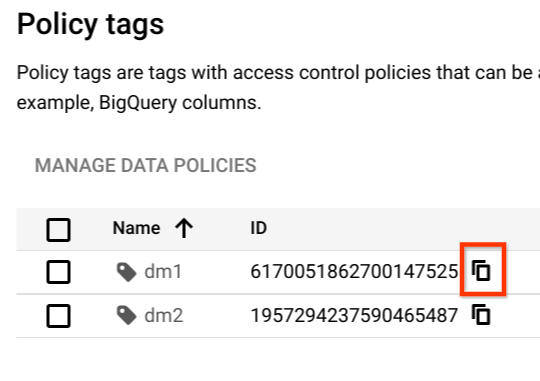
You need the policy tag resource name when you apply the policy tag to a column.
To retrieve the policy tag resource name:
1. [View the policy tags](https://docs.cloud.google.com/bigquery/docs/column-level-security#view_policy_tags) for the taxonomy that contains the
policy tag.
2. Find the policy tag whose resource name you want to copy.
3. Click the **Copy policy tag resource name** icon.
### Clear policy tags
Update the table schema to clear a policy tag from a column. You can use the
Google Cloud console, the bq command-line tool, and the BigQuery API method to clear a
policy tag from a column.
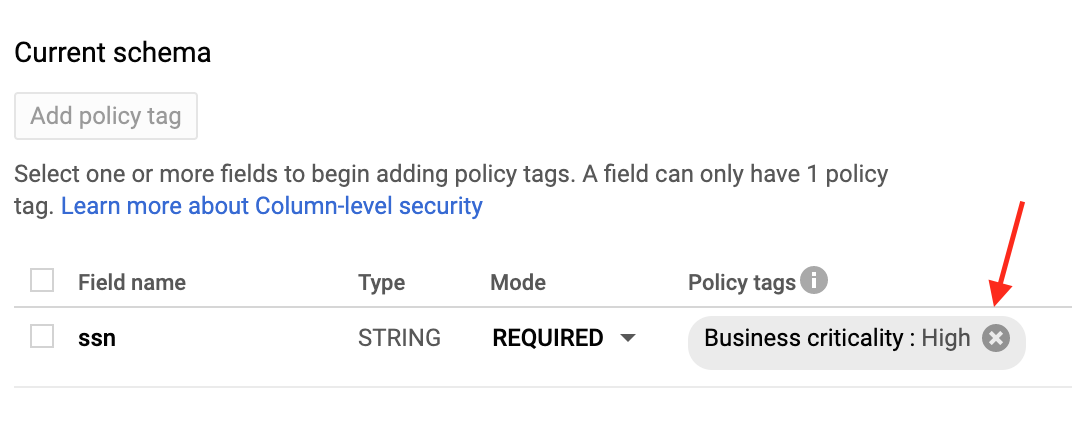
### Console
In the **Current schema** page, under **Policy tags** , click **X**.
### bq
> [!NOTE]
> **Note:** To clear a policy tag, you must explicitly set the `names` field of `policyTags` to an empty list, `[]`. If you delete the `policyTags` field, it has no effect on existing policy tags. This is by design, to prevent accidental removal of policy tags that would expose sensitive data.
1. Retrieve the schema and save it to a local file.
```bash
bq show --schema --format=prettyjson \
project-id:dataset.table > schema.json
```
where:
- project-id is your project ID.
- dataset is the name of the dataset that contains the table you're updating.
- table is the name of the table you're updating.
2. Modify schema.json to clear a policy tag from a column.
```googlesql
[
...
{
"name": "ssn",
"type": "STRING",
"mode": "REQUIRED",
"policyTags": {
"names": []
}
},
...
]
```
3. Update the schema.
```bash
bq update \
project-id:dataset.table schema.json
```
### API
> [!NOTE]
> **Note:** To clear a policy tag, you must explicitly set the `names` field of `policyTags` to an empty list, `[]`. If you delete the `policyTags` field, it has no effect on existing policy tags. This is by design, to prevent accidental removal of policy tags that would expose sensitive data.
Call [`tables.patch`](https://docs.cloud.google.com/bigquery/docs/reference/rest/v2/tables/patch) and use the `schema` property to clear a policy tag
in your schema definition. See the command-line example schema to see how
to clear a policy tag.
Because the `tables.update` method replaces the entire table resource, the
`tables.patch` method is preferred.
### Delete policy tags
You can delete one or more policy tags in a taxonomy, or you can delete the
taxonomy and all of the policy tags it contains. Deleting a policy tag
automatically removes the association between the policy tag and any columns it
was applied to.
When you delete a policy tag that has a
[data policy](https://docs.cloud.google.com/bigquery/docs/column-data-masking-intro) associated with
it, it can take up to 30 minutes for the data policy to also be deleted. You can
[delete the data policy](https://docs.cloud.google.com/bigquery/docs/column-data-masking#delete_data_policies)
directly if you want it to be deleted immediately.
To delete one or more policy tags in a taxonomy, follow these steps:
1. In the Google Cloud console, go to the **Policy tag taxonomies** page.
[Go to Policy tag taxonomies](https://console.cloud.google.com/bigquery/security/secure/policy-tags)
2. Click the name of the taxonomy containing the tags to delete.
3. Click **Edit**.
4. Click next to the policy tags to delete.
5. Click **Save**.
6. Click **Confirm**.
To delete an entire taxonomy, follow these steps:
1. In the Google Cloud console, go to the **Policy tag taxonomies** page.
[Go to Policy tag taxonomies](https://console.cloud.google.com/bigquery/security/secure/policy-tags)
2. Click the name of the taxonomy containing the tags to delete.
3. Click **Delete Policy Tag Taxonomy**.
4. Type the taxonomy name and then click **Delete**.
## Query data with column-level access control
If a user has dataset access and has the Data Catalog
Fine-Grained Reader role, the column data is available to the user. The user
runs a query as normal.
If a user has dataset access but does not have the Data Catalog
Fine-Grained Reader role, the column data is not available to the user. If such
a user runs `SELECT *`, they receive an error which lists the columns
that the user cannot access. To resolve the error, you can either:
- Modify the query to exclude the columns that the user cannot access. For
example, if the user does not have access to the `ssn` column, but does have
access to the remaining columns, the user can run the following query:
```googlesql
SELECT * EXCEPT (ssn) FROM ...
```
In the preceding example, the `EXCEPT` clause excludes the `ssn` column.
- Ask a Data Catalog Administrator to add the user as a
Data Catalog Fine-Grained Reader to the relevant data class. The
error message provides the full name of the policy tag for which the user would
need access.
## FAQs
### Does BigQuery column-level sec work for views?
Yes. Views are derived from an underlying table. The same column-level access
control on the table applies when the protected columns are accessed through a
view.
There are two kinds of views in BigQuery, logical views
and authorized views. Both types of views are derived from a source table, and
both are consistent with the table's column-level access control.
For more information, see [Authorized views](https://docs.cloud.google.com/bigquery/docs/authorized-views).
### Does column-level access control work on `STRUCT` or `RECORD` columns?
Yes. You can apply policy tags to the leaf fields only, and only those fields
are protected.
### Can I use both legacy SQL and GoogleSQL?
You can use GoogleSQL to query tables that are protected by column-level
access control.
Any legacy SQL queries are rejected if there are any policy tags on the target
tables.
### Are queries logged in Cloud Logging?
The policy tags check is logged in Logging. For more
information, see
[Audit logging](https://docs.cloud.google.com/bigquery/docs/column-level-security-intro#audit_logging) for
column-level access control.
### Is copying a table impacted by column-level access control?
Yes. You cannot copy columns if you don't have access to them.
The following operations verify column-level permissions.
- `SELECT` queries with destination tables
- [Table copy jobs](https://docs.cloud.google.com/bigquery/docs/managing-tables#copy-table)
- [Data extract jobs](https://docs.cloud.google.com/bigquery/docs/exporting-data) (for example, to Cloud Storage)
### When I copy data to a new table, are policy tags automatically propagated?
In most cases, no. If you copy the results of a query into a new table, the new
table doesn't automatically have policy tags assigned. So the new table doesn't
have column-level access control. The same is true if you export data to
Cloud Storage.
The exception is if you use a [table copy job](https://docs.cloud.google.com/bigquery/docs/managing-tables#copy-table). Because table copy jobs
don't apply any data transformation, policy tags are automatically propagated to
the target tables. This exception doesn't apply to cross-region table copy jobs,
because cross-region table copy jobs don't support copying policy tags.
### Is column-level access control compatible with Virtual Private Cloud?
Yes, column-level access control and VPC are compatible and complementary.
VPC leverages IAM to control access to services,
such as BigQuery and Cloud Storage. Column-level access
control provides granular security of individual columns within
BigQuery itself.
To enforce VPC for policy tags and data policies for
column-level access control and dynamic data masking, you must restrict the
following APIs in the perimeter:
- [Data Catalog API](https://docs.cloud.google.com/data-catalog/docs/reference/rest)
- [BigQuery API](https://docs.cloud.google.com/bigquery/docs/reference/rest)
- [BigQuery Data Policy API](https://docs.cloud.google.com/bigquery/docs/reference/bigquerydatapolicy/rest)
## Troubleshoot
The following sections explain how to troubleshoot issues with
[column-level access control](https://docs.cloud.google.com/bigquery/docs/column-level-security) and
Data Catalog policy tags.
### I can't see the Data Catalog roles
If you can't see roles such as Data Catalog Fine-Grained Reader,
it's possible that you haven't enabled the Data Catalog API in
your project. To learn how to enable the Data Catalog API, see
[Before you begin](https://docs.cloud.google.com/bigquery/docs/column-level-security#before_you_begin). The
Data Catalog roles appear several minutes after you enable the
Data Catalog API.
### I can't view the Taxonomies page
You need additional permissions to view the **Policy tag taxonomies** page in the
Google Cloud console. For example, the Data Catalog
[Policy Tag Admin](https://docs.cloud.google.com/bigquery/docs/column-level-security#policy_tags_admin) role
has access to the **Taxonomies** page.
### I enforced policy tags, but it doesn't seem to work
If you're still receiving query results for an account that shouldn't have
access, it's possible that the account is receiving cached results.
Specifically, if you previously ran the query successfully and then enforced
policy tags, you might be getting results from the
[query result cache](https://docs.cloud.google.com/bigquery/docs/cached-results). By default, query results
are cached for 24 hours. The query fails immediately if you
[disable the result cache](https://docs.cloud.google.com/bigquery/docs/cached-results#disabling_retrieval_of_cached_results).
For more details about caching, see
[Impact of column-level access control](https://docs.cloud.google.com/bigquery/docs/cached-results#security).
In general, IAM updates take about 30 seconds to propagate.
Changes in the policy tag hierarchy can take up to 30 minutes to propagate.
### I don't have the permission to read from a table with column-level security
You need either the
[Fine-Grained Reader role](https://docs.cloud.google.com/bigquery/docs/column-level-security#fine_grained_reader)
or the
[Masked Reader role](https://docs.cloud.google.com/bigquery/docs/column-data-masking-intro#roles_for_querying_masked_data)
at different levels, such as organization, folder, project, and policy tag. The
Fine-Grained Reader role grants raw data access, while the Masked Reader role
grants access to [masked data](https://docs.cloud.google.com/bigquery/docs/column-data-masking-intro). You
can use the
[IAM Policy Troubleshooter](https://docs.cloud.google.com/policy-intelligence/docs/troubleshoot-access)
to check this permission at the project level.
### I set fine-grained access control in policy tag taxonomy, but users see protected data
To troubleshoot this issue, confirm the following details:
- On the [**Policy tag taxonomies** page](https://console.cloud.google.com/bigquery/security/secure/policy-tags) of the BigQuery **Security center** , confirm that the **Enforce access control** toggle is in the **On** position.
- Ensure that your queries aren't using
[cached query results](https://docs.cloud.google.com/bigquery/docs/cached-results). If you use the
bq command-line tool to test your queries, then use the `--nouse_cache` flag to
disable the query cache. For example:
```bash
bq query --nouse_cache --use_legacy_sql=false "SELECT * EXCEPT (customer_pii) FROM my_table;"
```
### Project migration considerations
Policy tags and taxonomies are homed within a specific Google Cloud organization
and aren't automatically re-associated when a project is migrated to a new
organization. If you migrate a project that uses policy tags for column-level
access control to a different organization, the following issues occur:
- The policy tags are no longer manageable in the Google Cloud console within the migrated project.
- You can't apply these policy tags to new columns in the migrated project.
- Existing column-level access controls might appear to still be in place, but the link to the source taxonomy in the original organization is broken for management purposes.
Resolving this issue requires manual intervention by Google Cloud Support
to re-associate the taxonomy with the new organization. If you migrated a
project with policy tags and encounter these issues,
[contact Cloud Customer Care](https://docs.cloud.google.com/support).