# Mask column data
This document shows you how to implement data masking in order to
selectively obscure sensitive data. By implementing data masking, you can
provide different levels of visibility to different groups of users.
For general information, see
[Introduction to data masking](https://docs.cloud.google.com/bigquery/docs/column-data-masking-intro).
You implement data masking by adding a data policy to a column. To add a data
masking policy to a column, you must complete the following steps :
1. Create a taxonomy with at least one policy tag.
2. Optional: Grant the Data Catalog Fine-Grained Reader role to one or more principals on one or more of the policy tags you created.
3. Create up to eight data policies for the policy tag, to map masking rules and principals (which represent users or groups) to that tag.
4. Set the policy tag on a column. That maps the data policies associated with the policy tag to the selected column.
5. Assign users who should have access to masked data to the BigQuery Masked Reader role. As a best practice, assign the BigQuery Masked Reader role at the data policy level. Assigning the role at the project level or higher grants users permissions to all data policies under the project, which can lead to issues caused by excess permissions.
You can use the Google Cloud console or the BigQuery Data Policy API to work with
data policies.
When you have completed these steps, users running queries against the column
get unmasked data, masked data, or an access denied error, depending on the
groups that they belong to and the roles that they have been granted. For more
information, see
[How Masked Reader and Fine-Grained Reader roles interact](https://docs.cloud.google.com/bigquery/docs/column-data-masking-intro#role-interaction).
Alternatively, you can apply data policies directly on a column. For more
information, see [Mask data with data policies directly on a column](https://docs.cloud.google.com/bigquery/docs/column-data-masking#data-policies-on-column).
## Mask data with policy tags
Use policy tags to selectively obscure sensitive data.
### Before you begin
1. BigQuery is automatically enabled in new projects, but you might need to activate it in a pre-existing project.
Enable the BigQuery API, if it is not already enabled.
**Roles required to enable APIs**
To enable APIs, you need the `serviceusage.services.enable` permission. If you
created the project, then you likely already have this permission through the
Owner role (`roles/owner`). Otherwise, you can get this permission through the
Service Usage Admin role (`roles/serviceusage.serviceUsageAdmin`).
[Learn how to grant roles](https://docs.cloud.google.com/iam/docs/granting-changing-revoking-access).
[Enable the API](https://console.cloud.google.com/apis/enableflow?apiid=bigquery.googleapis.com&redirect=https://console.cloud.google.com)
2. If you are creating a data policy that references a [custom masking routine](https://docs.cloud.google.com/bigquery/docs/column-data-masking-intro#custom_mask), create the associated masking UDF so that it is available in the following steps.
> [!NOTE]
> **Note:** The `datacatalog.googleapis.com` API must remain enabled to create and manage the Data Catalog policy tags and taxonomies used for data masking and column-level security. Although Data Catalog metadata search and catalog features are deprecated and transitioning to Knowledge Catalog, the Policy Tag Manager service (taxonomies and policy tags), its `datacatalog.googleapis.com` API methods and audit logs, and the `roles/datacatalog` Identity and Access Management (IAM) roles aren't deprecated.
### Create taxonomies
The user or service account that creates a taxonomy must be granted the
Data Catalog Policy Tag Admin role.
### Console
1. In the Google Cloud console, go to the **Policy tag taxonomies** page.
[Go to Policy tag taxonomies](https://console.cloud.google.com/bigquery/security/secure/policy-tags)
2. Click **Create taxonomy**.
3. On the **New taxonomy** page:
1. For **Taxonomy name**, enter the name of the taxonomy that you want to create.
2. For **Description**, enter a description.
3. If needed, change the project listed under **Project**.
4. If needed, change the location listed under **Location**.
5. Under **Policy Tags**, enter a policy tag name and description.
6. To add a child policy tag for a policy tag, click **Add subtag**.
7. To add a new policy tag at the same level as another policy tag, click **+ Add policy tag**.
8. Continue adding policy tags and child policy tags as needed for your taxonomy.
9. When you are done creating policy tags for your hierarchy, click **Create**.
### API
To use existing taxonomies, call
[`taxonomies.import`](https://docs.cloud.google.com/data-catalog/docs/reference/rest/v1/projects.locations.taxonomies/import)
in place of the first two steps of the following procedure.
1. Call [`taxonomies.create`](https://docs.cloud.google.com/data-catalog/docs/reference/rest/v1/projects.locations.taxonomies/create) to create a taxonomy.
2. Call [`taxonomies.policyTags.create`](https://docs.cloud.google.com/data-catalog/docs/reference/rest/v1/projects.locations.taxonomies.policyTags/create) to create a policy tag.
### Work with policy tags
For more information about how to work with policy tags, such as how to view or
update them, see
[Work with policy tags](https://docs.cloud.google.com/bigquery/docs/column-level-security#work_with_policy_tags).
For best practices, see
[Best practices for using policy tags in BigQuery](https://docs.cloud.google.com/bigquery/docs/best-practices-policy-tags).
### Create data policies
The user or service account that creates a data policy must have the
`bigquery.dataPolicies.create`, `bigquery.dataPolicies.setIamPolicy`, and
`datacatalog.taxonomies.get` permissions.
The `bigquery.dataPolicies.create` and `bigquery.dataPolicies.setIamPolicy`
permissions are included in the
BigQuery Data Policy Admin, BigQuery Admin and BigQuery Data Owner roles.
The `datacatalog.taxonomies.get` permission is included in the
Data Catalog Admin and Data Catalog Viewer roles.
If you are creating a data policy that references a
[custom masking routine](https://docs.cloud.google.com/bigquery/docs/column-data-masking-intro#custom_mask),
you also need [routine permissions](https://docs.cloud.google.com/bigquery/docs/routines#permissions).
In case of custom masking, grant users the BigQuery Admin or BigQuery Data Owner
roles to ensure they have the necessary permissions for both routines and data policies.
You can create up to nine data policies for a policy tag. One of these policies
is reserved for
[column-level access control settings](https://docs.cloud.google.com/bigquery/docs/column-level-security#set_up_column-level_access_control).
### Console
1. In the Google Cloud console, go to the **Policy tag taxonomies** page.
[Go to Policy tag taxonomies](https://console.cloud.google.com/bigquery/security/secure/policy-tags)
2. Click the name of the taxonomy to open.
3. Select a policy tag.
4. Click **Manage Data Policies**.
5. For **Data Policy Name**, type a name for the data policy. The data policy name must be unique within the project that data policy resides in.
6. For **Masking Rule** , choose a predefined masking rule or a custom masking routine. If you are selecting a custom masking routine, ensure that you have both the `bigquery.routines.get` and the `bigquery.routines.list` permissions at the project level.
7. For **Principal**, type the name of one or more users or groups to whom you want to grant masked access to the column. Note that all users and groups you enter here are granted the BigQuery Masked Reader role.
8. Click **Submit**.
### API
1. Call the
[`create`](https://docs.cloud.google.com/bigquery/docs/reference/bigquerydatapolicy/rest/v2/projects.locations.dataPolicies/create)
method. Pass in a
[`DataPolicy`](https://docs.cloud.google.com/bigquery/docs/reference/bigquerydatapolicy/rest/v2/projects.locations.dataPolicies#resource:-datapolicy)
resource that meets the following requirements:
- The `dataPolicyType` field is set to `DATA_MASKING_POLICY`.
- The `dataMaskingPolicy` field identifies the data masking rule or routine to use.
- The `dataPolicyId` field provides a name for the data policy that is unique within the project that data policy resides in.
2. Call the
[`setIamPolicy`](https://docs.cloud.google.com/bigquery/docs/reference/bigquerydatapolicy/rest/v2/projects.locations.dataPolicies/setIamPolicy)
method and pass in a
[`Policy`](https://docs.cloud.google.com/iam/docs/reference/rest/v1/Policy). The `Policy` must
identify the principals who are granted access to masked data,
and specify `roles/bigquerydatapolicy.maskedReader` for the `role` field.
### Node.js
Before trying this sample, follow the Node.js setup instructions in the
[BigQuery quickstart using
client libraries](https://docs.cloud.google.com/bigquery/docs/quickstarts/quickstart-client-libraries).
For more information, see the
[BigQuery Node.js API
reference documentation](https://googleapis.dev/nodejs/bigquery/latest/index.html).
To authenticate to BigQuery, set up Application Default Credentials.
For more information, see
[Set up authentication for client libraries](https://docs.cloud.google.com/bigquery/docs/authentication#client-libs).
const datapolicy = require('https://docs.cloud.google.com/nodejs/docs/reference/bigquery-datapolicies/latest/overview.html');
const {DataPolicyServiceClient} = datapolicy.v2;
const protos = datapolicy.protos.google.cloud.bigquery.datapolicies.v2;
const {status} = require('@grpc/grpc-js');
const dataPolicyServiceClient = new https://docs.cloud.google.com/nodejs/docs/reference/bigquery-datapolicies/latest/overview.html();
/**
* Creates a data policy to apply a data masking rule to a specific BigQuery table column.
* This is a primary mechanism for implementing column-level security in BigQuery.
*
* @param {string} projectId The Google Cloud project ID (for example, 'example-project-id')
* @param {string} location The Google Cloud location. Example: 'us'
* @param {string} dataPolicyId The user-assigned ID of the data policy. Example: 'example-data-policy-id'
*/
async function createDataPolicy(projectId, location, dataPolicyId) {
const parent = `projects/${projectId}/locations/${location}`;
const dataPolicy = {
dataPolicyType: protos.DataPolicy.DataPolicyType.DATA_MASKING_POLICY,
dataMaskingPolicy: {
predefinedExpression:
protos.DataMaskingPolicy.PredefinedExpression.SHA256,
},
};
const request = {
parent,
dataPolicyId,
dataPolicy,
};
try {
const [response] = await dataPolicyServiceClient.createDataPolicy(request);
console.log(`Successfully created data policy: ${response.name}`);
console.log(`Data policy ID: ${response.dataPolicyId}`);
console.log(`Data policy type: ${response.dataPolicyType}`);
if (response.dataMaskingPolicy) {
console.log(
`Data masking expression: ${response.dataMaskingPolicy.predefinedExpression}`,
);
}
} catch (err) {
if (err.code === status.ALREADY_EXISTS) {
console.log(
`Data policy '${dataPolicyId}' already exists in location '${location}' of project '${projectId}'.`,
);
console.log(
'Consider updating the existing data policy or using a different dataPolicyId.',
);
} else {
console.error('Error creating data policy:', err.message);
}
}
}
### Python
Before trying this sample, follow the Python setup instructions in the
[BigQuery quickstart using
client libraries](https://docs.cloud.google.com/bigquery/docs/quickstarts/quickstart-client-libraries).
For more information, see the
[BigQuery Python API
reference documentation](https://docs.cloud.google.com/python/docs/reference/bigquery/latest).
To authenticate to BigQuery, set up Application Default Credentials.
For more information, see
[Set up authentication for client libraries](https://docs.cloud.google.com/bigquery/docs/authentication#client-libs).
from google.api_core import exceptions
from google.cloud import bigquery_datapolicies_v2
client = bigquery_datapolicies_v2.DataPolicyServiceClient()
def create_data_policy(project_id: str, location: str, data_policy_id: str) -> None:
"""Creates a data policy to apply a data masking rule to a specific BigQuery table column.
This is a primary mechanism for implementing column-level security in BigQuery.
Args:
project_id (str): The Google Cloud project ID.
location (str): The geographic location of the data policy (for example, "us-central1").
data_policy_id (str): The ID for the new data policy.
"""
parent = f"projects/{project_id}/locations/{location}"
# Define the data masking policy.
# Here, we specify a SHA-256 predefined expression for data masking.
data_masking_policy = bigquery_datapolicies_v2.DataMaskingPolicy(
predefined_expression=bigquery_datapolicies_v2.DataMaskingPolicy.PredefinedExpression.SHA256
)
# Create the DataPolicy object.
# We set the type to DATA_MASKING_POLICY and assign the defined masking policy.
data_policy = bigquery_datapolicies_v2.DataPolicy(
data_policy_type=bigquery_datapolicies_v2.DataPolicy.DataPolicyType.DATA_MASKING_POLICY,
data_masking_policy=data_masking_policy,
)
request = bigquery_datapolicies_v2.CreateDataPolicyRequest(
parent=parent,
data_policy_id=data_policy_id,
data_policy=data_policy,
)
try:
response = client.https://docs.cloud.google.com/python/docs/reference/bigquerydatapolicy/latest/google.cloud.bigquery_datapolicies_v1.services.data_policy_service.DataPolicyServiceClient.html#google_cloud_bigquery_datapolicies_v1_services_data_policy_service_DataPolicyServiceClient_create_data_policy(request=request)
print(f"Successfully created data policy: {response.name}")
print(f"Data Policy ID: {response.data_policy_id}")
print(f"Data Policy Type: {response.data_policy_type.name}")
print(
"Data Masking Predefined Expression:"
f" {response.data_masking_policy.predefined_expression.name}"
)
except exceptions.AlreadyExists as e:
print(
f"Error: Data policy '{data_policy_id}' already exists in project"
f" '{project_id}' in location '{location}'. Use a unique ID or"
" update the existing policy if needed."
)
except exceptions.NotFound as e:
print(
f"Error: The specified project '{project_id}' or location '{location}'"
" was not found or is inaccessible. Make sure the project ID and"
" location are correct and you have the necessary permissions."
)
except Exception as e:
print(f"An unexpected error occurred: {e}")
### Java
Before trying this sample, follow the Java setup instructions in the
[BigQuery quickstart using
client libraries](https://docs.cloud.google.com/bigquery/docs/quickstarts/quickstart-client-libraries).
For more information, see the
[BigQuery Java API
reference documentation](https://docs.cloud.google.com/java/docs/reference/google-cloud-bigquery/latest/overview).
To authenticate to BigQuery, set up Application Default Credentials.
For more information, see
[Set up authentication for client libraries](https://docs.cloud.google.com/bigquery/docs/authentication#client-libs).
import com.google.api.gax.rpc.https://docs.cloud.google.com/java/docs/reference/gax/latest/com.google.api.gax.rpc.AlreadyExistsException.html;
import com.google.api.gax.rpc.https://docs.cloud.google.com/java/docs/reference/gax/latest/com.google.api.gax.rpc.ApiException.html;
import com.google.api.gax.rpc.https://docs.cloud.google.com/java/docs/reference/gax/latest/com.google.api.gax.rpc.NotFoundException.html;
import com.google.cloud.bigquery.datapolicies.v2.https://docs.cloud.google.com/java/docs/reference/google-cloud-bigquerydatapolicy/latest/com.google.cloud.bigquery.datapolicies.v2.CreateDataPolicyRequest.html;
import com.google.cloud.bigquery.datapolicies.v2.https://docs.cloud.google.com/java/docs/reference/google-cloud-bigquerydatapolicy/latest/com.google.cloud.bigquery.datapolicies.v2.DataMaskingPolicy.html;
import com.google.cloud.bigquery.datapolicies.v2.https://docs.cloud.google.com/java/docs/reference/google-cloud-bigquerydatapolicy/latest/com.google.cloud.bigquery.datapolicies.v2.DataMaskingPolicy.html.https://docs.cloud.google.com/java/docs/reference/google-cloud-bigquerydatapolicy/latest/com.google.cloud.bigquery.datapolicies.v2.DataMaskingPolicy.PredefinedExpression.html;
import com.google.cloud.bigquery.datapolicies.v2.https://docs.cloud.google.com/java/docs/reference/google-cloud-bigquerydatapolicy/latest/com.google.cloud.bigquery.datapolicies.v2.DataPolicy.html;
import com.google.cloud.bigquery.datapolicies.v2.https://docs.cloud.google.com/java/docs/reference/google-cloud-bigquerydatapolicy/latest/com.google.cloud.bigquery.datapolicies.v2.DataPolicy.html.https://docs.cloud.google.com/java/docs/reference/google-cloud-bigquerydatapolicy/latest/com.google.cloud.bigquery.datapolicies.v2.DataPolicy.DataPolicyType.html;
import com.google.cloud.bigquery.datapolicies.v2.https://docs.cloud.google.com/java/docs/reference/google-cloud-bigquerydatapolicy/latest/com.google.cloud.bigquery.datapolicies.v2.DataPolicyServiceClient.html;
import com.google.cloud.bigquery.datapolicies.v2.https://docs.cloud.google.com/java/docs/reference/google-cloud-bigquerydatapolicy/latest/com.google.cloud.bigquery.datapolicies.v2.LocationName.html;
import java.io.IOException;
public class CreateDataPolicy {
/**
* Creates a data policy to apply a data masking rule to a specific BigQuery table column.
*
* @param projectId The Google Cloud project ID (for example, "example-project-id").
* @param location The geographic location of the data policy (for example, "us-central1").
* @param dataPolicyId The user-assigned ID for the new data policy (for example,
* "example_data_policy").
*/
public static void createDataPolicy(String projectId, String location, String dataPolicyId) {
https://docs.cloud.google.com/java/docs/reference/google-cloud-bigquerydatapolicy/latest/com.google.cloud.bigquery.datapolicies.v2.LocationName.html parent = https://docs.cloud.google.com/java/docs/reference/google-cloud-bigquerydatapolicy/latest/com.google.cloud.bigquery.datapolicies.v2.LocationName.html.of(projectId, location);
https://docs.cloud.google.com/java/docs/reference/google-cloud-bigquerydatapolicy/latest/com.google.cloud.bigquery.datapolicies.v2.DataMaskingPolicy.html dataMaskingPolicy =
https://docs.cloud.google.com/java/docs/reference/google-cloud-bigquerydatapolicy/latest/com.google.cloud.bigquery.datapolicies.v2.DataMaskingPolicy.html.newBuilder()
.https://docs.cloud.google.com/java/docs/reference/google-cloud-bigquerydatapolicy/latest/com.google.cloud.bigquery.datapolicies.v2.DataMaskingPolicy.Builder.html#com_google_cloud_bigquery_datapolicies_v2_DataMaskingPolicy_Builder_setPredefinedExpression_com_google_cloud_bigquery_datapolicies_v2_DataMaskingPolicy_PredefinedExpression_(https://docs.cloud.google.com/java/docs/reference/google-cloud-bigquerydatapolicy/latest/com.google.cloud.bigquery.datapolicies.v2.DataMaskingPolicy.PredefinedExpression.html.SHA256)
.build();
https://docs.cloud.google.com/java/docs/reference/google-cloud-bigquerydatapolicy/latest/com.google.cloud.bigquery.datapolicies.v2.DataPolicy.html dataPolicy =
https://docs.cloud.google.com/java/docs/reference/google-cloud-bigquerydatapolicy/latest/com.google.cloud.bigquery.datapolicies.v2.DataPolicy.html.newBuilder()
.https://docs.cloud.google.com/java/docs/reference/google-cloud-bigquerydatapolicy/latest/com.google.cloud.bigquery.datapolicies.v2.DataPolicy.Builder.html#com_google_cloud_bigquery_datapolicies_v2_DataPolicy_Builder_setDataPolicyType_com_google_cloud_bigquery_datapolicies_v2_DataPolicy_DataPolicyType_(https://docs.cloud.google.com/java/docs/reference/google-cloud-bigquerydatapolicy/latest/com.google.cloud.bigquery.datapolicies.v2.DataPolicy.DataPolicyType.html.DATA_MASKING_POLICY)
.https://docs.cloud.google.com/java/docs/reference/google-cloud-bigquerydatapolicy/latest/com.google.cloud.bigquery.datapolicies.v2.DataPolicy.Builder.html#com_google_cloud_bigquery_datapolicies_v2_DataPolicy_Builder_setDataMaskingPolicy_com_google_cloud_bigquery_datapolicies_v2_DataMaskingPolicy_(dataMaskingPolicy)
.build();
https://docs.cloud.google.com/java/docs/reference/google-cloud-bigquerydatapolicy/latest/com.google.cloud.bigquery.datapolicies.v2.CreateDataPolicyRequest.html request =
https://docs.cloud.google.com/java/docs/reference/google-cloud-bigquerydatapolicy/latest/com.google.cloud.bigquery.datapolicies.v2.CreateDataPolicyRequest.html.newBuilder()
.setParent(parent.https://docs.cloud.google.com/java/docs/reference/google-cloud-bigquerydatapolicy/latest/com.google.cloud.bigquery.datapolicies.v2.LocationName.html#com_google_cloud_bigquery_datapolicies_v2_LocationName_toString__())
.setDataPolicyId(dataPolicyId)
.setDataPolicy(dataPolicy)
.build();
try (https://docs.cloud.google.com/java/docs/reference/google-cloud-bigquerydatapolicy/latest/com.google.cloud.bigquery.datapolicies.v2.DataPolicyServiceClient.html client = https://docs.cloud.google.com/java/docs/reference/google-cloud-bigquerydatapolicy/latest/com.google.cloud.bigquery.datapolicies.v2.DataPolicyServiceClient.html.create()) {
https://docs.cloud.google.com/java/docs/reference/google-cloud-bigquerydatapolicy/latest/com.google.cloud.bigquery.datapolicies.v2.DataPolicy.html response = client.createDataPolicy(request);
System.out.printf("Successfully created data policy: %s%n", response.https://docs.cloud.google.com/java/docs/reference/google-cloud-bigquerydatapolicy/latest/com.google.cloud.bigquery.datapolicies.v2.DataPolicy.html#com_google_cloud_bigquery_datapolicies_v2_DataPolicy_getName__());
System.out.printf("Data Policy ID: %s%n", response.https://docs.cloud.google.com/java/docs/reference/google-cloud-bigquerydatapolicy/latest/com.google.cloud.bigquery.datapolicies.v2.DataPolicy.html#com_google_cloud_bigquery_datapolicies_v2_DataPolicy_getDataPolicyId__());
System.out.printf("Data Policy Type: %s%n", response.https://docs.cloud.google.com/java/docs/reference/google-cloud-bigquerydatapolicy/latest/com.google.cloud.bigquery.datapolicies.v2.DataPolicy.html#com_google_cloud_bigquery_datapolicies_v2_DataPolicy_getDataPolicyType__());
if (response.https://docs.cloud.google.com/java/docs/reference/google-cloud-bigquerydatapolicy/latest/com.google.cloud.bigquery.datapolicies.v2.DataPolicy.html#com_google_cloud_bigquery_datapolicies_v2_DataPolicy_hasDataMaskingPolicy__()) {
System.out.printf(
"Data Masking Predefined Expression: %s%n",
response.https://docs.cloud.google.com/java/docs/reference/google-cloud-bigquerydatapolicy/latest/com.google.cloud.bigquery.datapolicies.v2.DataPolicy.html#com_google_cloud_bigquery_datapolicies_v2_DataPolicy_getDataMaskingPolicy__().getPredefinedExpression());
}
} catch (https://docs.cloud.google.com/java/docs/reference/gax/latest/com.google.api.gax.rpc.AlreadyExistsException.html err) {
System.err.printf(
"error: data policy '%s' already exists in location '%s' for project '%s': %s%n",
dataPolicyId, location, projectId, err.https://docs.cloud.google.com/java/docs/reference/gax/latest/com.google.api.gax.rpc.ErrorDetails.html#com_google_api_gax_rpc_ErrorDetails__T_getMessage_java_lang_Class_T__());
} catch (https://docs.cloud.google.com/java/docs/reference/gax/latest/com.google.api.gax.rpc.NotFoundException.html err) {
System.err.printf(
"error: project '%s' or location '%s' was not found: %s%n",
projectId, location, err.https://docs.cloud.google.com/java/docs/reference/gax/latest/com.google.api.gax.rpc.ErrorDetails.html#com_google_api_gax_rpc_ErrorDetails__T_getMessage_java_lang_Class_T__());
} catch (https://docs.cloud.google.com/java/docs/reference/gax/latest/com.google.api.gax.rpc.ApiException.html | IOException err) {
System.err.printf(
"error: failed to create data policy '%s' in location '%s' for project '%s': %s%n",
dataPolicyId, location, projectId, err.https://docs.cloud.google.com/java/docs/reference/gax/latest/com.google.api.gax.rpc.ErrorDetails.html#com_google_api_gax_rpc_ErrorDetails__T_getMessage_java_lang_Class_T__());
}
}
### Set policy tags on columns
Set a data policy on a column by attaching the policy tag associated with
the data policy to the column.
The user or service account that sets a policy tag needs the
`datacatalog.taxonomies.get` and `bigquery.tables.setCategory` permissions.
`datacatalog.taxonomies.get` is included in the
Data Catalog Policy Tags Admin and Project Viewer roles.
`bigquery.tables.setCategory` is included in the
BigQuery Admin (`roles/bigquery.admin`) and
BigQuery Data Owner (`roles/bigquery.dataOwner`) roles.
To view taxonomies and policy tags across all projects in an organization in
Google Cloud console, users need the `resourcemanager.organizations.get`
permission, which is included in the Organization Viewer role. This permission
is **not** required when using the API or the `bq` command-line tool.
> [!NOTE]
> **Note:** You can assign only one policy tag per column.
### Console
Set the policy tag by [modifying a schema](https://docs.cloud.google.com/bigquery/docs/managing-table-schemas) using the
Google Cloud console.
1. Open the BigQuery page in the Google Cloud console.
[Go to the BigQuery page](https://console.cloud.google.com/bigquery)
2. In the BigQuery **Explorer** pane, locate and select the
table that you want to update.
3. In the details pane, click **Edit \> Edit schema**.
4. In the **Current schema** screen, select the target column and click **Add
policy tag**.
5. In the **Add a policy tag** screen, locate and select the policy tag that you want
to apply to the column.
6. Click **Select**. Your screen should look similar to the following:
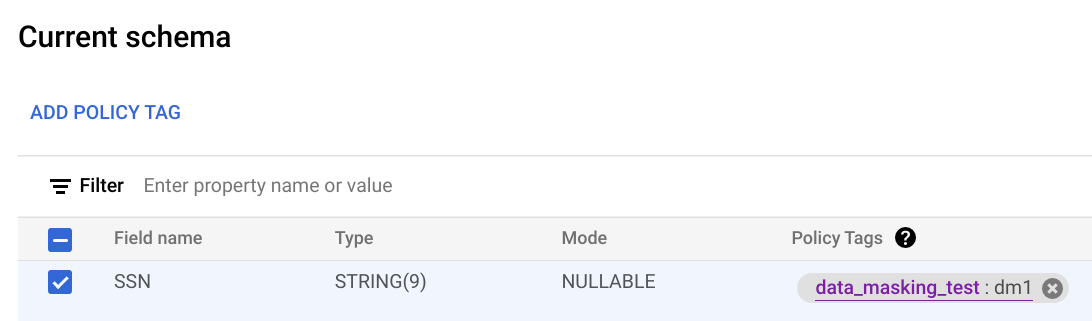
7. Click **Save**.
### bq
1. Write the schema to a local file.
```bash
bq show --schema --format=prettyjson \
project-id:dataset.table > schema.json
```
where:
- project-id is your project ID.
- dataset is the name of the dataset that contains the table you're updating.
- table is the name of the table you're updating.
2. Modify schema.json to set a policy tag on a column. For the value of the
`names` field of `policyTags`, use the [policy tag resource name](https://docs.cloud.google.com/bigquery/docs/column-data-masking#retrieve_policy_tag_name).
```googlesql
[
...
{
"name": "ssn",
"type": "STRING",
"mode": "REQUIRED",
"policyTags": {
"names": ["projects/project-id/locations/location/taxonomies/taxonomy-id/policyTags/policytag-id"]
}
},
...
]
```
3. Update the schema.
```bash
bq update \
project-id:dataset.table schema.json
```
### API
For existing tables, call [`tables.patch`](https://docs.cloud.google.com/bigquery/docs/reference/rest/v2/tables/patch), or for new tables call
[`tables.insert`](https://docs.cloud.google.com/bigquery/docs/reference/rest/v2/tables/insert). Use the
`schema` property of the `Table` object that you pass in
to set a policy tag in your schema definition. See the command-line example
schema to see how to set a policy tag.
When working with an existing table, the `tables.patch` method is preferred,
because the `tables.update` method replaces the entire table resource.
### Enforce access control
When you create a data policy for a policy tag, access control is automatically
enforced. All columns that have that policy tag applied return masked data in
response to queries from users who have the Masked Reader role.
To stop enforcement of access control, you must
first delete all data policies associated with the policy tags in the
taxonomy. For more information, see
[Enforce access control](https://docs.cloud.google.com/bigquery/docs/column-level-security#enforce_access_control).
### Get a data policy
Follow these steps to get information about a data policy:
### Node.js
Before trying this sample, follow the Node.js setup instructions in the
[BigQuery quickstart using
client libraries](https://docs.cloud.google.com/bigquery/docs/quickstarts/quickstart-client-libraries).
For more information, see the
[BigQuery Node.js API
reference documentation](https://googleapis.dev/nodejs/bigquery/latest/index.html).
To authenticate to BigQuery, set up Application Default Credentials.
For more information, see
[Set up authentication for client libraries](https://docs.cloud.google.com/bigquery/docs/authentication#client-libs).
const {DataPolicyServiceClient} =
require('https://docs.cloud.google.com/nodejs/docs/reference/bigquery-datapolicies/latest/overview.html').v2;
const {status} = require('@grpc/grpc-js');
const client = new https://docs.cloud.google.com/nodejs/docs/reference/bigquery-datapolicies/latest/overview.html();
/**
* Gets a specific data policy from the BigQuery Data Policy API by its name.
*
* This sample demonstrates how to fetch the details of an existing data policy.
* Data policies are used to define rules for data masking or row-level security
* on BigQuery tables.
*
* @param {string} projectId The Google Cloud project ID (for example, 'example-project-id')
* @param {string} [location='us'] The Google Cloud location of the data policy (For example, 'us', 'europe-west2').
* @param {string} [dataPolicyId='example-data-policy'] The ID of the data policy to retrieve.
*/
async function getDataPolicy(
projectId,
location = 'us',
dataPolicyId = 'example-data-policy',
) {
const name = client.dataPolicyPath(projectId, location, dataPolicyId);
const request = {
name,
};
try {
const [dataPolicy] = await client.getDataPolicy(request);
console.log('Successfully retrieved data policy:');
console.log(` Name: ${dataPolicy.name}`);
console.log(` Type: ${dataPolicy.dataPolicyType}`);
if (dataPolicy.dataMaskingPolicy) {
console.log(
` Data Masking Policy: ${dataPolicy.dataMaskingPolicy.predefinedExpression || dataPolicy.dataMaskingPolicy.routine}`,
);
}
if (dataPolicy.grantees && dataPolicy.grantees.length > 0) {
console.log(` Grantees: ${dataPolicy.grantees.join(', ')}`);
}
} catch (err) {
if (err.code === status.NOT_FOUND) {
console.error(
`Error: Data policy '${dataPolicyId}' not found in location '${location}' for project '${projectId}'.`,
);
console.error(
'Make sure the data policy ID, project ID, and location are correct.',
);
} else {
console.error('Error retrieving data policy:', err.message);
}
}
}
### Python
Before trying this sample, follow the Python setup instructions in the
[BigQuery quickstart using
client libraries](https://docs.cloud.google.com/bigquery/docs/quickstarts/quickstart-client-libraries).
For more information, see the
[BigQuery Python API
reference documentation](https://docs.cloud.google.com/python/docs/reference/bigquery/latest).
To authenticate to BigQuery, set up Application Default Credentials.
For more information, see
[Set up authentication for client libraries](https://docs.cloud.google.com/bigquery/docs/authentication#client-libs).
from google.api_core import exceptions
from google.cloud import bigquery_datapolicies_v2
client = bigquery_datapolicies_v2.DataPolicyServiceClient()
def get_data_policy(
project_id: str,
location: str,
data_policy_id: str,
) -> None:
"""Gets a specific data policy from the BigQuery Data Policy API by its name.
Args:
project_id: The Google Cloud project ID.
location: The geographic location of the data policy (for example, "us", "eu").
data_policy_id: The user-assigned ID of the data policy.
"""
client = bigquery_datapolicies_v2.DataPolicyServiceClient()
data_policy_name = client.https://docs.cloud.google.com/python/docs/reference/bigquerydatapolicy/latest/google.cloud.bigquery_datapolicies_v1.services.data_policy_service.DataPolicyServiceClient.html#google_cloud_bigquery_datapolicies_v1_services_data_policy_service_DataPolicyServiceClient_data_policy_path(
project=project_id,
location=location,
data_policy=data_policy_id,
)
try:
response = client.https://docs.cloud.google.com/python/docs/reference/bigquerydatapolicy/latest/google.cloud.bigquery_datapolicies_v1.services.data_policy_service.DataPolicyServiceClient.html#google_cloud_bigquery_datapolicies_v1_services_data_policy_service_DataPolicyServiceClient_get_data_policy(name=data_policy_name)
print(f"Successfully retrieved data policy: {response.name}")
print(f" Data Policy ID: {response.data_policy_id}")
print(f" Data Policy Type: {response.data_policy_type.name}")
if response.policy_tag:
print(f" Policy Tag: {response.policy_tag}")
if response.grantees:
print(f" Grantees: {', '.join(response.grantees)}")
if response.data_masking_policy:
masking_policy = response.data_masking_policy
if masking_policy.predefined_expression:
print(
f" Data Masking Predefined Expression: {masking_policy.predefined_expression.name}"
)
elif masking_policy.routine:
print(f" Data Masking Routine: {masking_policy.routine}")
except exceptions.NotFound:
print(f"Error: Data policy '{data_policy_name}' not found.")
print("Make sure the data policy ID, project ID, and location are correct.")
except Exception as e:
print(f"An unexpected error occurred: {e}")
### Java
Before trying this sample, follow the Java setup instructions in the
[BigQuery quickstart using
client libraries](https://docs.cloud.google.com/bigquery/docs/quickstarts/quickstart-client-libraries).
For more information, see the
[BigQuery Java API
reference documentation](https://docs.cloud.google.com/java/docs/reference/google-cloud-bigquery/latest/overview).
To authenticate to BigQuery, set up Application Default Credentials.
For more information, see
[Set up authentication for client libraries](https://docs.cloud.google.com/bigquery/docs/authentication#client-libs).
import com.google.api.gax.rpc.https://docs.cloud.google.com/java/docs/reference/gax/latest/com.google.api.gax.rpc.ApiException.html;
import com.google.api.gax.rpc.https://docs.cloud.google.com/java/docs/reference/gax/latest/com.google.api.gax.rpc.NotFoundException.html;
import com.google.cloud.bigquery.datapolicies.v2.https://docs.cloud.google.com/java/docs/reference/google-cloud-bigquerydatapolicy/latest/com.google.cloud.bigquery.datapolicies.v2.DataMaskingPolicy.html;
import com.google.cloud.bigquery.datapolicies.v2.https://docs.cloud.google.com/java/docs/reference/google-cloud-bigquerydatapolicy/latest/com.google.cloud.bigquery.datapolicies.v2.DataMaskingPolicy.html.https://docs.cloud.google.com/java/docs/reference/google-cloud-bigquerydatapolicy/latest/com.google.cloud.bigquery.datapolicies.v2.DataMaskingPolicy.PredefinedExpression.html;
import com.google.cloud.bigquery.datapolicies.v2.https://docs.cloud.google.com/java/docs/reference/google-cloud-bigquerydatapolicy/latest/com.google.cloud.bigquery.datapolicies.v2.DataPolicy.html;
import com.google.cloud.bigquery.datapolicies.v2.https://docs.cloud.google.com/java/docs/reference/google-cloud-bigquerydatapolicy/latest/com.google.cloud.bigquery.datapolicies.v2.DataPolicyName.html;
import com.google.cloud.bigquery.datapolicies.v2.https://docs.cloud.google.com/java/docs/reference/google-cloud-bigquerydatapolicy/latest/com.google.cloud.bigquery.datapolicies.v2.DataPolicyServiceClient.html;
import java.io.IOException;
public class GetDataPolicy {
/**
* Gets a specific data policy from the BigQuery Data Policy API by its name.
*
* @param projectId The Google Cloud project ID (for example, "example-project-id").
* @param location The geographic location of the data policy (for example, "us-central1").
* @param dataPolicyId The user-assigned ID of the data policy (for example,
* "example_data_policy").
*/
public static void getDataPolicy(String projectId, String location, String dataPolicyId) {
https://docs.cloud.google.com/java/docs/reference/google-cloud-bigquerydatapolicy/latest/com.google.cloud.bigquery.datapolicies.v2.DataPolicyName.html dataPolicyName = https://docs.cloud.google.com/java/docs/reference/google-cloud-bigquerydatapolicy/latest/com.google.cloud.bigquery.datapolicies.v2.DataPolicyName.html.of(projectId, location, dataPolicyId);
try (https://docs.cloud.google.com/java/docs/reference/google-cloud-bigquerydatapolicy/latest/com.google.cloud.bigquery.datapolicies.v2.DataPolicyServiceClient.html client = https://docs.cloud.google.com/java/docs/reference/google-cloud-bigquerydatapolicy/latest/com.google.cloud.bigquery.datapolicies.v2.DataPolicyServiceClient.html.create()) {
https://docs.cloud.google.com/java/docs/reference/google-cloud-bigquerydatapolicy/latest/com.google.cloud.bigquery.datapolicies.v2.DataPolicy.html response = client.getDataPolicy(dataPolicyName);
System.out.printf("Successfully retrieved data policy: %s%n", response.https://docs.cloud.google.com/java/docs/reference/google-cloud-bigquerydatapolicy/latest/com.google.cloud.bigquery.datapolicies.v2.DataPolicy.html#com_google_cloud_bigquery_datapolicies_v2_DataPolicy_getName__());
System.out.printf(" Data Policy ID: %s%n", response.https://docs.cloud.google.com/java/docs/reference/google-cloud-bigquerydatapolicy/latest/com.google.cloud.bigquery.datapolicies.v2.DataPolicy.html#com_google_cloud_bigquery_datapolicies_v2_DataPolicy_getDataPolicyId__());
System.out.printf(" Data Policy Type: %s%n", response.https://docs.cloud.google.com/java/docs/reference/google-cloud-bigquerydatapolicy/latest/com.google.cloud.bigquery.datapolicies.v2.DataPolicy.html#com_google_cloud_bigquery_datapolicies_v2_DataPolicy_getDataPolicyType__());
if (!response.https://docs.cloud.google.com/java/docs/reference/google-cloud-bigquerydatapolicy/latest/com.google.cloud.bigquery.datapolicies.v2.DataPolicy.html#com_google_cloud_bigquery_datapolicies_v2_DataPolicy_getPolicyTag__().https://docs.cloud.google.com/java/docs/reference/gax/latest/com.google.api.gax.rpc.LibraryMetadata.html#com_google_api_gax_rpc_LibraryMetadata_isEmpty__()) {
System.out.printf(" Policy Tag: %s%n", response.https://docs.cloud.google.com/java/docs/reference/google-cloud-bigquerydatapolicy/latest/com.google.cloud.bigquery.datapolicies.v2.DataPolicy.html#com_google_cloud_bigquery_datapolicies_v2_DataPolicy_getPolicyTag__());
}
if (!response.https://docs.cloud.google.com/java/docs/reference/google-cloud-bigquerydatapolicy/latest/com.google.cloud.bigquery.datapolicies.v2.DataPolicy.html#com_google_cloud_bigquery_datapolicies_v2_DataPolicy_getGranteesList__().https://docs.cloud.google.com/java/docs/reference/gax/latest/com.google.api.gax.rpc.LibraryMetadata.html#com_google_api_gax_rpc_LibraryMetadata_isEmpty__()) {
System.out.printf(" Grantees: %s%n", String.join(", ", response.https://docs.cloud.google.com/java/docs/reference/google-cloud-bigquerydatapolicy/latest/com.google.cloud.bigquery.datapolicies.v2.DataPolicy.html#com_google_cloud_bigquery_datapolicies_v2_DataPolicy_getGranteesList__()));
}
if (response.https://docs.cloud.google.com/java/docs/reference/google-cloud-bigquerydatapolicy/latest/com.google.cloud.bigquery.datapolicies.v2.DataPolicy.html#com_google_cloud_bigquery_datapolicies_v2_DataPolicy_hasDataMaskingPolicy__()) {
https://docs.cloud.google.com/java/docs/reference/google-cloud-bigquerydatapolicy/latest/com.google.cloud.bigquery.datapolicies.v2.DataMaskingPolicy.html maskingPolicy = response.https://docs.cloud.google.com/java/docs/reference/google-cloud-bigquerydatapolicy/latest/com.google.cloud.bigquery.datapolicies.v2.DataPolicy.html#com_google_cloud_bigquery_datapolicies_v2_DataPolicy_getDataMaskingPolicy__();
if (maskingPolicy.https://docs.cloud.google.com/java/docs/reference/google-cloud-bigquerydatapolicy/latest/com.google.cloud.bigquery.datapolicies.v2.DataMaskingPolicy.html#com_google_cloud_bigquery_datapolicies_v2_DataMaskingPolicy_getPredefinedExpression__()
!= https://docs.cloud.google.com/java/docs/reference/google-cloud-bigquerydatapolicy/latest/com.google.cloud.bigquery.datapolicies.v2.DataMaskingPolicy.PredefinedExpression.html.PREDEFINED_EXPRESSION_UNSPECIFIED) {
System.out.printf(
" Data Masking Predefined Expression: %s%n",
maskingPolicy.https://docs.cloud.google.com/java/docs/reference/google-cloud-bigquerydatapolicy/latest/com.google.cloud.bigquery.datapolicies.v2.DataMaskingPolicy.html#com_google_cloud_bigquery_datapolicies_v2_DataMaskingPolicy_getPredefinedExpression__());
} else if (!maskingPolicy.https://docs.cloud.google.com/java/docs/reference/google-cloud-bigquerydatapolicy/latest/com.google.cloud.bigquery.datapolicies.v2.DataMaskingPolicy.html#com_google_cloud_bigquery_datapolicies_v2_DataMaskingPolicy_getRoutine__().https://docs.cloud.google.com/java/docs/reference/gax/latest/com.google.api.gax.rpc.LibraryMetadata.html#com_google_api_gax_rpc_LibraryMetadata_isEmpty__()) {
System.out.printf(" Data Masking Routine: %s%n", maskingPolicy.https://docs.cloud.google.com/java/docs/reference/google-cloud-bigquerydatapolicy/latest/com.google.cloud.bigquery.datapolicies.v2.DataMaskingPolicy.html#com_google_cloud_bigquery_datapolicies_v2_DataMaskingPolicy_getRoutine__());
}
}
} catch (https://docs.cloud.google.com/java/docs/reference/gax/latest/com.google.api.gax.rpc.NotFoundException.html err) {
System.err.printf(
"error: data policy '%s' not found: %s%n", dataPolicyName, err.https://docs.cloud.google.com/java/docs/reference/gax/latest/com.google.api.gax.rpc.ErrorDetails.html#com_google_api_gax_rpc_ErrorDetails__T_getMessage_java_lang_Class_T__());
} catch (https://docs.cloud.google.com/java/docs/reference/gax/latest/com.google.api.gax.rpc.ApiException.html | IOException err) {
System.err.printf(
"error: failed to get data policy '%s': %s%n", dataPolicyName, err.https://docs.cloud.google.com/java/docs/reference/gax/latest/com.google.api.gax.rpc.ErrorDetails.html#com_google_api_gax_rpc_ErrorDetails__T_getMessage_java_lang_Class_T__());
}
}
### Check IAM permissions on a data policy
Follow these steps to get the IAM policy for a data policy:
### API
Call the
[`testIamPermissions` method](https://docs.cloud.google.com/bigquery/docs/reference/bigquerydatapolicy/rest/v2/projects.locations.dataPolicies/testIamPermissions).
### Node.js
Before trying this sample, follow the Node.js setup instructions in the
[BigQuery quickstart using
client libraries](https://docs.cloud.google.com/bigquery/docs/quickstarts/quickstart-client-libraries).
For more information, see the
[BigQuery Node.js API
reference documentation](https://googleapis.dev/nodejs/bigquery/latest/index.html).
To authenticate to BigQuery, set up Application Default Credentials.
For more information, see
[Set up authentication for client libraries](https://docs.cloud.google.com/bigquery/docs/authentication#client-libs).
const {DataPolicyServiceClient} =
require('https://docs.cloud.google.com/nodejs/docs/reference/bigquery-datapolicies/latest/overview.html').v2;
const {status} = require('@grpc/grpc-js');
const client = new https://docs.cloud.google.com/nodejs/docs/reference/bigquery-datapolicies/latest/overview.html();
/**
* Get the IAM policy for a specified data policy resource from the BigQuery Data Policy API.
* This is useful for auditing which members have which roles on the policy.
*
*
* @param {string} projectId Google Cloud Project ID (For example, 'example-project-id')
* @param {string} location Google Cloud Location (For example, 'us-central1')
* @param {string} dataPolicyId The ID of the data policy (For example, 'example-data-policy-id')
*/
async function getIamPolicy(projectId, location, dataPolicyId) {
const resourceName = client.dataPolicyPath(projectId, location, dataPolicyId);
const request = {
resource: resourceName,
};
try {
const [policy] = await client.getIamPolicy(request);
console.log(
'Successfully retrieved IAM policy for data policy %s:',
resourceName,
);
console.log(JSON.stringify(policy, null, 2));
} catch (err) {
if (err.code === status.NOT_FOUND) {
console.error(
`Error: Data Policy '${dataPolicyId}' not found in location '${location}' of project '${projectId}'. ` +
'Make sure the data policy exists and the resource name is correct.',
);
} else {
console.error(
`Error getting IAM policy for data policy '${dataPolicyId}':`,
err,
);
}
}
}
### Python
Before trying this sample, follow the Python setup instructions in the
[BigQuery quickstart using
client libraries](https://docs.cloud.google.com/bigquery/docs/quickstarts/quickstart-client-libraries).
For more information, see the
[BigQuery Python API
reference documentation](https://docs.cloud.google.com/python/docs/reference/bigquery/latest).
To authenticate to BigQuery, set up Application Default Credentials.
For more information, see
[Set up authentication for client libraries](https://docs.cloud.google.com/bigquery/docs/authentication#client-libs).
from google.api_core import exceptions
from google.cloud import bigquery_datapolicies_v2
from google.iam.v1 import iam_policy_pb2
client = bigquery_datapolicies_v2.DataPolicyServiceClient()
def get_data_policy_iam_policy(
project_id: str,
location: str,
data_policy_id: str,
) -> None:
"""Get the IAM policy for a specified data policy resource from the BigQuery Data Policy API.
This is useful for auditing which members have which roles on the policy.
Args:
project_id: The Google Cloud project ID.
location: The geographic location of the data policy (for example, "us").
data_policy_id: The ID of the data policy.
"""
resource_name = client.https://docs.cloud.google.com/python/docs/reference/bigquerydatapolicy/latest/google.cloud.bigquery_datapolicies_v1.services.data_policy_service.DataPolicyServiceClient.html#google_cloud_bigquery_datapolicies_v1_services_data_policy_service_DataPolicyServiceClient_data_policy_path(
project=project_id,
location=location,
data_policy=data_policy_id,
)
request = iam_policy_pb2.GetIamPolicyRequest(resource=resource_name)
try:
policy = client.https://docs.cloud.google.com/python/docs/reference/bigquerydatapolicy/latest/google.cloud.bigquery_datapolicies_v1.services.data_policy_service.DataPolicyServiceClient.html#google_cloud_bigquery_datapolicies_v1_services_data_policy_service_DataPolicyServiceClient_get_iam_policy(request=request)
print(f"Successfully retrieved IAM policy for data policy: {resource_name}")
print("Policy Version:", policy.version)
if policy.bindings:
print("Policy Bindings:")
for binding in policy.bindings:
print(f" Role: {binding.role}")
print(f" Members: {', '.join(binding.members)}")
if binding.condition.expression:
print(f" Condition: {binding.condition.expression}")
else:
print("No bindings found in the policy.")
except exceptions.NotFound:
print(f"Error: Data policy '{resource_name}' not found.")
print("Make sure the project ID, location, and data policy ID are correct.")
except exceptions.GoogleAPIError as e:
print(f"An API error occurred: {e}")
except Exception as e:
print(f"An unexpected error occurred: {e}")
### Java
Before trying this sample, follow the Java setup instructions in the
[BigQuery quickstart using
client libraries](https://docs.cloud.google.com/bigquery/docs/quickstarts/quickstart-client-libraries).
For more information, see the
[BigQuery Java API
reference documentation](https://docs.cloud.google.com/java/docs/reference/google-cloud-bigquery/latest/overview).
To authenticate to BigQuery, set up Application Default Credentials.
For more information, see
[Set up authentication for client libraries](https://docs.cloud.google.com/bigquery/docs/authentication#client-libs).
import com.google.api.gax.rpc.https://docs.cloud.google.com/java/docs/reference/gax/latest/com.google.api.gax.rpc.ApiException.html;
import com.google.api.gax.rpc.https://docs.cloud.google.com/java/docs/reference/gax/latest/com.google.api.gax.rpc.NotFoundException.html;
import com.google.cloud.bigquery.datapolicies.v2.https://docs.cloud.google.com/java/docs/reference/google-cloud-bigquerydatapolicy/latest/com.google.cloud.bigquery.datapolicies.v2.DataPolicyName.html;
import com.google.cloud.bigquery.datapolicies.v2.https://docs.cloud.google.com/java/docs/reference/google-cloud-bigquerydatapolicy/latest/com.google.cloud.bigquery.datapolicies.v2.DataPolicyServiceClient.html;
import com.google.iam.v1.https://docs.cloud.google.com/java/docs/reference/proto-google-iam-v1/latest/com.google.iam.v1.Binding.html;
import com.google.iam.v1.https://docs.cloud.google.com/java/docs/reference/proto-google-iam-v1/latest/com.google.iam.v1.GetIamPolicyRequest.html;
import com.google.iam.v1.https://docs.cloud.google.com/java/docs/reference/proto-google-iam-v1/latest/com.google.iam.v1.Policy.html;
import java.io.IOException;
public class GetIamPolicy {
/**
* Gets the IAM policy for a specified data policy resource from the BigQuery Data Policy API.
*
* @param projectId The Google Cloud project ID (for example, "example-project-id").
* @param location The geographic location of the data policy (for example, "us-central1").
* @param dataPolicyId The ID of the data policy (for example, "example_data_policy").
*/
public static void getIamPolicy(String projectId, String location, String dataPolicyId) {
https://docs.cloud.google.com/java/docs/reference/google-cloud-bigquerydatapolicy/latest/com.google.cloud.bigquery.datapolicies.v2.DataPolicyName.html resourceName = https://docs.cloud.google.com/java/docs/reference/google-cloud-bigquerydatapolicy/latest/com.google.cloud.bigquery.datapolicies.v2.DataPolicyName.html.of(projectId, location, dataPolicyId);
https://docs.cloud.google.com/java/docs/reference/proto-google-iam-v1/latest/com.google.iam.v1.GetIamPolicyRequest.html request =
https://docs.cloud.google.com/java/docs/reference/proto-google-iam-v1/latest/com.google.iam.v1.GetIamPolicyRequest.html.newBuilder().setResource(resourceName.https://docs.cloud.google.com/java/docs/reference/google-cloud-bigquerydatapolicy/latest/com.google.cloud.bigquery.datapolicies.v2.DataPolicyName.html#com_google_cloud_bigquery_datapolicies_v2_DataPolicyName_toString__()).build();
try (https://docs.cloud.google.com/java/docs/reference/google-cloud-bigquerydatapolicy/latest/com.google.cloud.bigquery.datapolicies.v2.DataPolicyServiceClient.html client = https://docs.cloud.google.com/java/docs/reference/google-cloud-bigquerydatapolicy/latest/com.google.cloud.bigquery.datapolicies.v2.DataPolicyServiceClient.html.create()) {
https://docs.cloud.google.com/java/docs/reference/proto-google-iam-v1/latest/com.google.iam.v1.Policy.html policy = client.getIamPolicy(request);
System.out.printf("Successfully retrieved IAM policy for data policy: %s%n", resourceName);
System.out.printf("Policy Version: %d%n", policy.https://docs.cloud.google.com/java/docs/reference/proto-google-iam-v1/latest/com.google.iam.v1.Policy.html#com_google_iam_v1_Policy_getVersion__());
if (policy.https://docs.cloud.google.com/java/docs/reference/proto-google-iam-v1/latest/com.google.iam.v1.Policy.html#com_google_iam_v1_Policy_getBindingsCount__() > 0) {
System.out.println("Policy Bindings:");
for (https://docs.cloud.google.com/java/docs/reference/proto-google-iam-v1/latest/com.google.iam.v1.Binding.html binding : policy.https://docs.cloud.google.com/java/docs/reference/proto-google-iam-v1/latest/com.google.iam.v1.Policy.html#com_google_iam_v1_Policy_getBindingsList__()) {
System.out.printf(" Role: %s%n", binding.getRole());
System.out.printf(" Members: %s%n", String.join(", ", binding.getMembersList()));
if (binding.hasCondition() && !binding.getCondition().getExpression().https://docs.cloud.google.com/java/docs/reference/gax/latest/com.google.api.gax.rpc.LibraryMetadata.html#com_google_api_gax_rpc_LibraryMetadata_isEmpty__()) {
System.out.printf(" Condition: %s%n", binding.getCondition().getExpression());
}
}
} else {
System.out.println("No bindings found in the policy.");
}
} catch (https://docs.cloud.google.com/java/docs/reference/gax/latest/com.google.api.gax.rpc.NotFoundException.html err) {
System.err.printf("error: data policy '%s' not found: %s%n", resourceName, err.https://docs.cloud.google.com/java/docs/reference/gax/latest/com.google.api.gax.rpc.ErrorDetails.html#com_google_api_gax_rpc_ErrorDetails__T_getMessage_java_lang_Class_T__());
} catch (https://docs.cloud.google.com/java/docs/reference/gax/latest/com.google.api.gax.rpc.ApiException.html | IOException err) {
System.err.printf(
"error: failed to get IAM policy for data policy '%s': %s%n",
resourceName, err.https://docs.cloud.google.com/java/docs/reference/gax/latest/com.google.api.gax.rpc.ErrorDetails.html#com_google_api_gax_rpc_ErrorDetails__T_getMessage_java_lang_Class_T__());
}
}
### List data policies
Follow these steps to list data policies:
### Node.js
Before trying this sample, follow the Node.js setup instructions in the
[BigQuery quickstart using
client libraries](https://docs.cloud.google.com/bigquery/docs/quickstarts/quickstart-client-libraries).
For more information, see the
[BigQuery Node.js API
reference documentation](https://googleapis.dev/nodejs/bigquery/latest/index.html).
To authenticate to BigQuery, set up Application Default Credentials.
For more information, see
[Set up authentication for client libraries](https://docs.cloud.google.com/bigquery/docs/authentication#client-libs).
const {DataPolicyServiceClient} =
require('https://docs.cloud.google.com/nodejs/docs/reference/bigquery-datapolicies/latest/overview.html').v2;
const {status} = require('@grpc/grpc-js');
const client = new https://docs.cloud.google.com/nodejs/docs/reference/bigquery-datapolicies/latest/overview.html();
/**
* Lists all data policies in a given project and location.
*
* Data policies define rules for data masking, row-level security, or column-level security.
*
* @param {string} projectId The Google Cloud project ID. (for example, 'example-project-id')
* @param {string} location The Google Cloud location of the data policies. (For example, 'us')
*/
async function listDataPolicies(projectId, location) {
const parent = `projects/${projectId}/locations/${location}`;
const request = {
parent,
};
try {
console.log(
`Listing data policies for project: ${projectId} in location: ${location}`,
);
const [dataPolicies] = await client.listDataPolicies(request);
if (dataPolicies.length === 0) {
console.log(
`No data policies found in location ${location} for project ${projectId}.`,
);
return;
}
console.log('Data Policies:');
for (const dataPolicy of dataPolicies) {
console.log(` Data Policy Name: ${dataPolicy.name}`);
console.log(` ID: ${dataPolicy.dataPolicyId}`);
console.log(` Type: ${dataPolicy.dataPolicyType}`);
if (dataPolicy.policyTag) {
console.log(` Policy Tag: ${dataPolicy.policyTag}`);
}
if (dataPolicy.grantees && dataPolicy.grantees.length > 0) {
console.log(` Grantees: ${dataPolicy.grantees.join(', ')}`);
}
if (dataPolicy.dataMaskingPolicy) {
if (dataPolicy.dataMaskingPolicy.predefinedExpression) {
console.log(
` Data Masking Predefined Expression: ${dataPolicy.dataMaskingPolicy.predefinedExpression}`,
);
} else if (dataPolicy.dataMaskingPolicy.routine) {
console.log(
` Data Masking Routine: ${dataPolicy.dataMaskingPolicy.routine}`,
);
}
}
}
console.log(`Successfully listed ${dataPolicies.length} data policies.`);
} catch (err) {
if (err.code === status.NOT_FOUND) {
console.error(
`Error: The project or location '${location}' for project '${projectId}' was not found. ` +
'Make sure the project ID and location are correct and that the BigQuery Data Policy API is enabled.',
);
} else if (err.code === status.PERMISSION_DENIED) {
console.error(
`Error: Permission denied when listing data policies for project '${projectId}' in location '${location}'. ` +
'Make sure the authenticated account has the necessary permissions (For example, bigquery.datapolicies.list).',
);
} else {
console.error(`Error listing data policies: ${err.message}`);
}
}
}
### Python
Before trying this sample, follow the Python setup instructions in the
[BigQuery quickstart using
client libraries](https://docs.cloud.google.com/bigquery/docs/quickstarts/quickstart-client-libraries).
For more information, see the
[BigQuery Python API
reference documentation](https://docs.cloud.google.com/python/docs/reference/bigquery/latest).
To authenticate to BigQuery, set up Application Default Credentials.
For more information, see
[Set up authentication for client libraries](https://docs.cloud.google.com/bigquery/docs/authentication#client-libs).
import google.api_core.exceptions
from google.cloud import bigquery_datapolicies_v2
client = bigquery_datapolicies_v2.DataPolicyServiceClient()
def list_data_policies(project_id: str, location: str) -> None:
"""Lists all data policies in a specified project.
Args:
project_id: The Google Cloud project ID.
location: The geographic location of the data policies (for example, "us", "us-central1").
"""
parent = f"projects/{project_id}/locations/{location}"
try:
request = bigquery_datapolicies_v2.ListDataPoliciesRequest(parent=parent)
print(
f"Listing data policies for project '{project_id}' in location '{location}':"
)
page_result = client.https://docs.cloud.google.com/python/docs/reference/bigquerydatapolicy/latest/google.cloud.bigquery_datapolicies_v1.services.data_policy_service.DataPolicyServiceClient.html#google_cloud_bigquery_datapolicies_v1_services_data_policy_service_DataPolicyServiceClient_list_data_policies(request=request)
found_policies = False
for data_policy in page_result:
found_policies = True
print(f" Data Policy Name: {data_policy.name}")
print(f" Data Policy ID: {data_policy.data_policy_id}")
print(f" Data Policy Type: {data_policy.data_policy_type.name}")
if data_policy.policy_tag:
print(f" Policy Tag: {data_policy.policy_tag}")
if data_policy.grantees:
print(f" Grantees: {', '.join(data_policy.grantees)}")
print("-" * 20)
if not found_policies:
print("No data policies found.")
except google.api_core.exceptions.NotFound as e:
print(f"Error: The specified project or location was not found or accessible.")
print(f"Details: {e}")
print(
"Make sure the project ID and location are correct and you have the necessary permissions."
)
except Exception as e:
print(f"An unexpected error occurred: {e}")
### Java
Before trying this sample, follow the Java setup instructions in the
[BigQuery quickstart using
client libraries](https://docs.cloud.google.com/bigquery/docs/quickstarts/quickstart-client-libraries).
For more information, see the
[BigQuery Java API
reference documentation](https://docs.cloud.google.com/java/docs/reference/google-cloud-bigquery/latest/overview).
To authenticate to BigQuery, set up Application Default Credentials.
For more information, see
[Set up authentication for client libraries](https://docs.cloud.google.com/bigquery/docs/authentication#client-libs).
import com.google.api.gax.rpc.https://docs.cloud.google.com/java/docs/reference/gax/latest/com.google.api.gax.rpc.ApiException.html;
import com.google.api.gax.rpc.https://docs.cloud.google.com/java/docs/reference/gax/latest/com.google.api.gax.rpc.NotFoundException.html;
import com.google.cloud.bigquery.datapolicies.v2.https://docs.cloud.google.com/java/docs/reference/google-cloud-bigquerydatapolicy/latest/com.google.cloud.bigquery.datapolicies.v2.DataPolicy.html;
import com.google.cloud.bigquery.datapolicies.v2.https://docs.cloud.google.com/java/docs/reference/google-cloud-bigquerydatapolicy/latest/com.google.cloud.bigquery.datapolicies.v2.DataPolicyServiceClient.html;
import com.google.cloud.bigquery.datapolicies.v2.https://docs.cloud.google.com/java/docs/reference/google-cloud-bigquerydatapolicy/latest/com.google.cloud.bigquery.datapolicies.v2.DataPolicyServiceClient.html.https://docs.cloud.google.com/java/docs/reference/google-cloud-bigquerydatapolicy/latest/com.google.cloud.bigquery.datapolicies.v2.DataPolicyServiceClient.ListDataPoliciesPagedResponse.html;
import com.google.cloud.bigquery.datapolicies.v2.https://docs.cloud.google.com/java/docs/reference/google-cloud-bigquerydatapolicy/latest/com.google.cloud.bigquery.datapolicies.v2.ListDataPoliciesRequest.html;
import com.google.cloud.bigquery.datapolicies.v2.https://docs.cloud.google.com/java/docs/reference/google-cloud-bigquerydatapolicy/latest/com.google.cloud.bigquery.datapolicies.v2.LocationName.html;
import java.io.IOException;
public class ListDataPolicies {
/**
* Lists all data policies in a specified project and location.
*
* @param projectId The Google Cloud project ID (for example, "example-project-id").
* @param location The geographic location of the data policies (for example, "us-central1").
*/
public static void listDataPolicies(String projectId, String location) {
https://docs.cloud.google.com/java/docs/reference/google-cloud-bigquerydatapolicy/latest/com.google.cloud.bigquery.datapolicies.v2.LocationName.html parent = https://docs.cloud.google.com/java/docs/reference/google-cloud-bigquerydatapolicy/latest/com.google.cloud.bigquery.datapolicies.v2.LocationName.html.of(projectId, location);
https://docs.cloud.google.com/java/docs/reference/google-cloud-bigquerydatapolicy/latest/com.google.cloud.bigquery.datapolicies.v2.ListDataPoliciesRequest.html request =
https://docs.cloud.google.com/java/docs/reference/google-cloud-bigquerydatapolicy/latest/com.google.cloud.bigquery.datapolicies.v2.ListDataPoliciesRequest.html.newBuilder().setParent(parent.https://docs.cloud.google.com/java/docs/reference/google-cloud-bigquerydatapolicy/latest/com.google.cloud.bigquery.datapolicies.v2.LocationName.html#com_google_cloud_bigquery_datapolicies_v2_LocationName_toString__()).build();
try (https://docs.cloud.google.com/java/docs/reference/google-cloud-bigquerydatapolicy/latest/com.google.cloud.bigquery.datapolicies.v2.DataPolicyServiceClient.html client = https://docs.cloud.google.com/java/docs/reference/google-cloud-bigquerydatapolicy/latest/com.google.cloud.bigquery.datapolicies.v2.DataPolicyServiceClient.html.create()) {
System.out.printf(
"Listing data policies for project '%s' in location '%s':%n", projectId, location);
https://docs.cloud.google.com/java/docs/reference/google-cloud-bigquerydatapolicy/latest/com.google.cloud.bigquery.datapolicies.v2.DataPolicyServiceClient.ListDataPoliciesPagedResponse.html pageResult = client.listDataPolicies(request);
boolean foundPolicies = false;
for (https://docs.cloud.google.com/java/docs/reference/google-cloud-bigquerydatapolicy/latest/com.google.cloud.bigquery.datapolicies.v2.DataPolicy.html dataPolicy : pageResult.iterateAll()) {
foundPolicies = true;
System.out.printf(" Data Policy Name: %s%n", dataPolicy.getName());
System.out.printf(" Data Policy ID: %s%n", dataPolicy.getDataPolicyId());
System.out.printf(" Data Policy Type: %s%n", dataPolicy.getDataPolicyType());
if (!dataPolicy.getPolicyTag().https://docs.cloud.google.com/java/docs/reference/gax/latest/com.google.api.gax.rpc.LibraryMetadata.html#com_google_api_gax_rpc_LibraryMetadata_isEmpty__()) {
System.out.printf(" Policy Tag: %s%n", dataPolicy.getPolicyTag());
}
if (!dataPolicy.getGranteesList().https://docs.cloud.google.com/java/docs/reference/gax/latest/com.google.api.gax.rpc.LibraryMetadata.html#com_google_api_gax_rpc_LibraryMetadata_isEmpty__()) {
System.out.printf(" Grantees: %s%n", String.join(", ", dataPolicy.getGranteesList()));
}
System.out.println("---");
}
if (!foundPolicies) {
System.out.println("No data policies found.");
}
} catch (https://docs.cloud.google.com/java/docs/reference/gax/latest/com.google.api.gax.rpc.NotFoundException.html err) {
System.err.printf(
"error: project '%s' or location '%s' was not found: %s%n",
projectId, location, err.https://docs.cloud.google.com/java/docs/reference/gax/latest/com.google.api.gax.rpc.ErrorDetails.html#com_google_api_gax_rpc_ErrorDetails__T_getMessage_java_lang_Class_T__());
} catch (https://docs.cloud.google.com/java/docs/reference/gax/latest/com.google.api.gax.rpc.ApiException.html | IOException err) {
System.err.printf(
"error: failed to list data policies in location '%s' for project '%s': %s%n",
location, projectId, err.https://docs.cloud.google.com/java/docs/reference/gax/latest/com.google.api.gax.rpc.ErrorDetails.html#com_google_api_gax_rpc_ErrorDetails__T_getMessage_java_lang_Class_T__());
}
}
### Update data policies
The user or service account that updates a data policy must have the
`bigquery.dataPolicies.update` permission.
If you are updating the policy tag the data policy is associated with, you also
require the `datacatalog.taxonomies.get` permission.
If you are updating the principals associated with the data policy, you
require the `bigquery.dataPolicies.setIamPolicy` permission.
The `bigquery.dataPolicies.update` and `bigquery.dataPolicies.setIamPolicy`
permissions are included in the
BigQuery Data Policy Admin, BigQuery Admin and BigQuery Data Owner roles.
The `datacatalog.taxonomies.get` permission is included in the
Data Catalog Admin and Data Catalog Viewer roles.
### Console
1. In the Google Cloud console, go to the **Policy tag taxonomies** page.
[Go to Policy tag taxonomies](https://console.cloud.google.com/bigquery/security/secure/policy-tags)
2. Click the name of the taxonomy to open.
3. Select a policy tag.
4. Click **Manage Data Policies**.
5. Optionally, change the masking rule.
6. Optional: Add or remove principals.
7. Click **Submit**.
### API
To change the data masking rule, call the
[`patch`](https://docs.cloud.google.com/bigquery/docs/reference/bigquerydatapolicy/rest/v2/projects.locations.dataPolicies/patch)
method and pass in a
[`DataPolicy`](https://docs.cloud.google.com/bigquery/docs/reference/bigquerydatapolicy/rest/v2/projects.locations.dataPolicies#resource:-datapolicy)
resource with an updated `dataMaskingPolicy` field.
To change the principals associated with a data policy, call the
[`setIamPolicy`](https://docs.cloud.google.com/bigquery/docs/reference/bigquerydatapolicy/rest/v2/projects.locations.dataPolicies/setIamPolicy)
method and pass in a
[`Policy`](https://docs.cloud.google.com/iam/docs/reference/rest/v1/Policy) that updates
the principals that are granted access to masked data.
### Node.js
Before trying this sample, follow the Node.js setup instructions in the
[BigQuery quickstart using
client libraries](https://docs.cloud.google.com/bigquery/docs/quickstarts/quickstart-client-libraries).
For more information, see the
[BigQuery Node.js API
reference documentation](https://googleapis.dev/nodejs/bigquery/latest/index.html).
To authenticate to BigQuery, set up Application Default Credentials.
For more information, see
[Set up authentication for client libraries](https://docs.cloud.google.com/bigquery/docs/authentication#client-libs).
const datapolicy = require('https://docs.cloud.google.com/nodejs/docs/reference/bigquery-datapolicies/latest/overview.html');
const {DataPolicyServiceClient} = datapolicy.v2;
const protos = datapolicy.protos.google.cloud.bigquery.datapolicies.v2;
const {status} = require('@grpc/grpc-js');
const client = new https://docs.cloud.google.com/nodejs/docs/reference/bigquery-datapolicies/latest/overview.html();
/**
* Updates the data masking configuration of an existing data policy.
* This example demonstrates how to use a FieldMask to selectively update the
* `data_masking_policy` (for example, changing the masking expression from
* ALWAYS_NULL to SHA256) without affecting other fields or recreating the policy.
*
* @param {string} projectId The Google Cloud project ID (For example, 'example-project-id').
* @param {string} location The location of the data policy (For example, 'us').
* @param {string} dataPolicyId The ID of the data policy to update (For example, 'example-data-policy-id').
*/
async function updateDataPolicy(projectId, location, dataPolicyId) {
const resourceName = client.dataPolicyPath(projectId, location, dataPolicyId);
const getRequest = {
name: resourceName,
};
try {
// To prevent race conditions, use the policy's etag in the update.
const [currentDataPolicy] = await client.getDataPolicy(getRequest);
const currentETag = currentDataPolicy.etag;
// This example transitions a masking rule from ALWAYS_NULL to SHA256.
const dataPolicy = {
name: resourceName,
etag: currentETag,
dataMaskingPolicy: {
predefinedExpression:
protos.DataMaskingPolicy.PredefinedExpression.SHA256,
},
};
// Use a field mask to selectively update only the data masking policy.
const updateMask = {
paths: ['data_masking_policy'],
};
const request = {
dataPolicy,
updateMask,
};
const [response] = await client.updateDataPolicy(request);
console.log(`Successfully updated data policy: ${response.name}`);
console.log(
`New masking expression: ${response.dataMaskingPolicy.predefinedExpression}`,
);
} catch (err) {
if (err.code === status.NOT_FOUND) {
console.error(
`Error: Data policy '${resourceName}' not found. ` +
'Make sure the data policy exists and the project, location, and data policy ID are correct.',
);
} else {
console.error('Error updating data policy:', err.message, err);
}
}
}
### Python
Before trying this sample, follow the Python setup instructions in the
[BigQuery quickstart using
client libraries](https://docs.cloud.google.com/bigquery/docs/quickstarts/quickstart-client-libraries).
For more information, see the
[BigQuery Python API
reference documentation](https://docs.cloud.google.com/python/docs/reference/bigquery/latest).
To authenticate to BigQuery, set up Application Default Credentials.
For more information, see
[Set up authentication for client libraries](https://docs.cloud.google.com/bigquery/docs/authentication#client-libs).
from google.api_core import exceptions
from google.cloud import bigquery_datapolicies_v2
from google.protobuf import field_mask_pb2
client = bigquery_datapolicies_v2.DataPolicyServiceClient()
def update_data_policy(project_id: str, location: str, data_policy_id: str) -> None:
"""Updates the data masking configuration of an existing data policy.
This example demonstrates how to use a FieldMask to selectively update the
`data_masking_policy` (for example, changing the masking expression from
ALWAYS_NULL to SHA256) without affecting other fields or recreating the policy.
Args:
project_id: The Google Cloud project ID.
location: The geographic location (for example, "us") of the data policy.
data_policy_id: The ID of the data policy to update.
"""
data_policy_name = client.https://docs.cloud.google.com/python/docs/reference/bigquerydatapolicy/latest/google.cloud.bigquery_datapolicies_v1.services.data_policy_service.DataPolicyServiceClient.html#google_cloud_bigquery_datapolicies_v1_services_data_policy_service_DataPolicyServiceClient_data_policy_path(
project=project_id,
location=location,
data_policy=data_policy_id,
)
# To prevent race conditions, use the policy's etag in the update.
existing_policy = client.https://docs.cloud.google.com/python/docs/reference/bigquerydatapolicy/latest/google.cloud.bigquery_datapolicies_v1.services.data_policy_service.DataPolicyServiceClient.html#google_cloud_bigquery_datapolicies_v1_services_data_policy_service_DataPolicyServiceClient_get_data_policy(name=data_policy_name)
# This example transitions a masking rule from ALWAYS_NULL to SHA256.
updated_data_policy = bigquery_datapolicies_v2.DataPolicy(
name=data_policy_name,
data_masking_policy=bigquery_datapolicies_v2.DataMaskingPolicy(
predefined_expression=bigquery_datapolicies_v2.DataMaskingPolicy.PredefinedExpression.SHA256
),
etag=existing_policy.etag,
)
# Use a field mask to selectively update only the data masking policy.
update_mask = field_mask_pb2.FieldMask(paths=["data_masking_policy"])
request = bigquery_datapolicies_v2.UpdateDataPolicyRequest(
data_policy=updated_data_policy,
update_mask=update_mask,
)
try:
response = client.https://docs.cloud.google.com/python/docs/reference/bigquerydatapolicy/latest/google.cloud.bigquery_datapolicies_v1.services.data_policy_service.DataPolicyServiceClient.html#google_cloud_bigquery_datapolicies_v1_services_data_policy_service_DataPolicyServiceClient_update_data_policy(request=request)
print(f"Successfully updated data policy: {response.name}")
print(f"New data policy type: {response.data_policy_type.name}")
if response.data_masking_policy:
print(
f"New masking expression: {response.data_masking_policy.predefined_expression.name}"
)
except exceptions.NotFound:
print(f"Error: Data policy '{data_policy_name}' not found.")
print("Make sure the data policy ID and location are correct.")
except Exception as e:
print(f"An unexpected error occurred: {e}")
### Java
Before trying this sample, follow the Java setup instructions in the
[BigQuery quickstart using
client libraries](https://docs.cloud.google.com/bigquery/docs/quickstarts/quickstart-client-libraries).
For more information, see the
[BigQuery Java API
reference documentation](https://docs.cloud.google.com/java/docs/reference/google-cloud-bigquery/latest/overview).
To authenticate to BigQuery, set up Application Default Credentials.
For more information, see
[Set up authentication for client libraries](https://docs.cloud.google.com/bigquery/docs/authentication#client-libs).
import com.google.api.gax.rpc.https://docs.cloud.google.com/java/docs/reference/gax/latest/com.google.api.gax.rpc.ApiException.html;
import com.google.api.gax.rpc.https://docs.cloud.google.com/java/docs/reference/gax/latest/com.google.api.gax.rpc.NotFoundException.html;
import com.google.cloud.bigquery.datapolicies.v2.https://docs.cloud.google.com/java/docs/reference/google-cloud-bigquerydatapolicy/latest/com.google.cloud.bigquery.datapolicies.v2.DataMaskingPolicy.html;
import com.google.cloud.bigquery.datapolicies.v2.https://docs.cloud.google.com/java/docs/reference/google-cloud-bigquerydatapolicy/latest/com.google.cloud.bigquery.datapolicies.v2.DataMaskingPolicy.html.https://docs.cloud.google.com/java/docs/reference/google-cloud-bigquerydatapolicy/latest/com.google.cloud.bigquery.datapolicies.v2.DataMaskingPolicy.PredefinedExpression.html;
import com.google.cloud.bigquery.datapolicies.v2.https://docs.cloud.google.com/java/docs/reference/google-cloud-bigquerydatapolicy/latest/com.google.cloud.bigquery.datapolicies.v2.DataPolicy.html;
import com.google.cloud.bigquery.datapolicies.v2.https://docs.cloud.google.com/java/docs/reference/google-cloud-bigquerydatapolicy/latest/com.google.cloud.bigquery.datapolicies.v2.DataPolicyName.html;
import com.google.cloud.bigquery.datapolicies.v2.https://docs.cloud.google.com/java/docs/reference/google-cloud-bigquerydatapolicy/latest/com.google.cloud.bigquery.datapolicies.v2.DataPolicyServiceClient.html;
import com.google.cloud.bigquery.datapolicies.v2.https://docs.cloud.google.com/java/docs/reference/google-cloud-bigquerydatapolicy/latest/com.google.cloud.bigquery.datapolicies.v2.UpdateDataPolicyRequest.html;
import com.google.protobuf.https://docs.cloud.google.com/java/docs/reference/protobuf/latest/com.google.protobuf.FieldMask.html;
import java.io.IOException;
public class UpdateDataPolicy {
/**
* Updates the data masking configuration of an existing data policy.
*
* @param projectId The Google Cloud project ID (for example, "example-project-id").
* @param location The geographic location of the data policy (for example, "us-central1").
* @param dataPolicyId The ID of the data policy to update (for example, "example_data_policy").
*/
public static void updateDataPolicy(String projectId, String location, String dataPolicyId) {
https://docs.cloud.google.com/java/docs/reference/google-cloud-bigquerydatapolicy/latest/com.google.cloud.bigquery.datapolicies.v2.DataPolicyName.html dataPolicyName = https://docs.cloud.google.com/java/docs/reference/google-cloud-bigquerydatapolicy/latest/com.google.cloud.bigquery.datapolicies.v2.DataPolicyName.html.of(projectId, location, dataPolicyId);
try (https://docs.cloud.google.com/java/docs/reference/google-cloud-bigquerydatapolicy/latest/com.google.cloud.bigquery.datapolicies.v2.DataPolicyServiceClient.html client = https://docs.cloud.google.com/java/docs/reference/google-cloud-bigquerydatapolicy/latest/com.google.cloud.bigquery.datapolicies.v2.DataPolicyServiceClient.html.create()) {
// Retrieve the existing policy so its etag can be used to prevent race conditions.
https://docs.cloud.google.com/java/docs/reference/google-cloud-bigquerydatapolicy/latest/com.google.cloud.bigquery.datapolicies.v2.DataPolicy.html existingPolicy = client.getDataPolicy(dataPolicyName);
https://docs.cloud.google.com/java/docs/reference/google-cloud-bigquerydatapolicy/latest/com.google.cloud.bigquery.datapolicies.v2.DataPolicy.html updatedDataPolicy =
https://docs.cloud.google.com/java/docs/reference/google-cloud-bigquerydatapolicy/latest/com.google.cloud.bigquery.datapolicies.v2.DataPolicy.html.newBuilder()
.setName(dataPolicyName.https://docs.cloud.google.com/java/docs/reference/google-cloud-bigquerydatapolicy/latest/com.google.cloud.bigquery.datapolicies.v2.DataPolicyName.html#com_google_cloud_bigquery_datapolicies_v2_DataPolicyName_toString__())
.https://docs.cloud.google.com/java/docs/reference/google-cloud-bigquerydatapolicy/latest/com.google.cloud.bigquery.datapolicies.v2.DataPolicy.Builder.html#com_google_cloud_bigquery_datapolicies_v2_DataPolicy_Builder_setDataMaskingPolicy_com_google_cloud_bigquery_datapolicies_v2_DataMaskingPolicy_(
https://docs.cloud.google.com/java/docs/reference/google-cloud-bigquerydatapolicy/latest/com.google.cloud.bigquery.datapolicies.v2.DataMaskingPolicy.html.newBuilder()
.https://docs.cloud.google.com/java/docs/reference/google-cloud-bigquerydatapolicy/latest/com.google.cloud.bigquery.datapolicies.v2.DataMaskingPolicy.Builder.html#com_google_cloud_bigquery_datapolicies_v2_DataMaskingPolicy_Builder_setPredefinedExpression_com_google_cloud_bigquery_datapolicies_v2_DataMaskingPolicy_PredefinedExpression_(https://docs.cloud.google.com/java/docs/reference/google-cloud-bigquerydatapolicy/latest/com.google.cloud.bigquery.datapolicies.v2.DataMaskingPolicy.PredefinedExpression.html.SHA256)
.build())
.https://docs.cloud.google.com/java/docs/reference/google-cloud-bigquerydatapolicy/latest/com.google.cloud.bigquery.datapolicies.v2.DataPolicy.Builder.html#com_google_cloud_bigquery_datapolicies_v2_DataPolicy_Builder_setEtag_java_lang_String_(existingPolicy.https://docs.cloud.google.com/java/docs/reference/google-cloud-bigquerydatapolicy/latest/com.google.cloud.bigquery.datapolicies.v2.DataPolicy.html#com_google_cloud_bigquery_datapolicies_v2_DataPolicy_getEtag__())
.build();
https://docs.cloud.google.com/java/docs/reference/protobuf/latest/com.google.protobuf.FieldMask.html updateMask = https://docs.cloud.google.com/java/docs/reference/protobuf/latest/com.google.protobuf.FieldMask.html.newBuilder().https://docs.cloud.google.com/java/docs/reference/protobuf/latest/com.google.protobuf.FieldMask.Builder.html#com_google_protobuf_FieldMask_Builder_addPaths_java_lang_String_("data_masking_policy").build();
https://docs.cloud.google.com/java/docs/reference/google-cloud-bigquerydatapolicy/latest/com.google.cloud.bigquery.datapolicies.v2.UpdateDataPolicyRequest.html request =
https://docs.cloud.google.com/java/docs/reference/google-cloud-bigquerydatapolicy/latest/com.google.cloud.bigquery.datapolicies.v2.UpdateDataPolicyRequest.html.newBuilder()
.setDataPolicy(updatedDataPolicy)
.https://docs.cloud.google.com/java/docs/reference/google-cloud-bigquerydatapolicy/latest/com.google.cloud.bigquery.datapolicies.v2.UpdateDataPolicyRequest.Builder.html#com_google_cloud_bigquery_datapolicies_v2_UpdateDataPolicyRequest_Builder_setUpdateMask_com_google_protobuf_FieldMask_(updateMask)
.build();
https://docs.cloud.google.com/java/docs/reference/google-cloud-bigquerydatapolicy/latest/com.google.cloud.bigquery.datapolicies.v2.DataPolicy.html response = client.updateDataPolicy(request);
System.out.printf("Successfully updated data policy: %s%n", response.https://docs.cloud.google.com/java/docs/reference/google-cloud-bigquerydatapolicy/latest/com.google.cloud.bigquery.datapolicies.v2.DataPolicy.html#com_google_cloud_bigquery_datapolicies_v2_DataPolicy_getName__());
System.out.printf("New data policy type: %s%n", response.https://docs.cloud.google.com/java/docs/reference/google-cloud-bigquerydatapolicy/latest/com.google.cloud.bigquery.datapolicies.v2.DataPolicy.html#com_google_cloud_bigquery_datapolicies_v2_DataPolicy_getDataPolicyType__());
if (response.https://docs.cloud.google.com/java/docs/reference/google-cloud-bigquerydatapolicy/latest/com.google.cloud.bigquery.datapolicies.v2.DataPolicy.html#com_google_cloud_bigquery_datapolicies_v2_DataPolicy_hasDataMaskingPolicy__()) {
System.out.printf(
"New masking expression: %s%n",
response.https://docs.cloud.google.com/java/docs/reference/google-cloud-bigquerydatapolicy/latest/com.google.cloud.bigquery.datapolicies.v2.DataPolicy.html#com_google_cloud_bigquery_datapolicies_v2_DataPolicy_getDataMaskingPolicy__().getPredefinedExpression());
}
} catch (https://docs.cloud.google.com/java/docs/reference/gax/latest/com.google.api.gax.rpc.NotFoundException.html err) {
System.err.printf(
"error: data policy '%s' not found: %s%n", dataPolicyName, err.getMessage());
} catch (https://docs.cloud.google.com/java/docs/reference/gax/latest/com.google.api.gax.rpc.ApiException.html | IOException err) {
System.err.printf(
"error: failed to update data policy '%s': %s%n", dataPolicyName, err.getMessage());
}
}
### Delete data policies
The user or service account that creates a data policy must have the
`bigquery.dataPolicies.delete` permission. This permission is included in the
BigQuery Data Policy Admin, BigQuery Admin and BigQuery Data Owner roles.
### Console
1. In the Google Cloud console, go to the **Policy tag taxonomies** page.
[Go to Policy tag taxonomies](https://console.cloud.google.com/bigquery/security/secure/policy-tags)
2. Click the name of the taxonomy to open.
3. Select a policy tag.
4. Click **Manage Data Policies**.
5. Click next to the data policy to delete.
6. Click **Submit**.
7. Click **Confirm**.
### API
To delete a data policy, call the
[`delete`](https://docs.cloud.google.com/bigquery/docs/reference/bigquerydatapolicy/rest/v2/projects.locations.dataPolicies/delete)
method.
### Node.js
Before trying this sample, follow the Node.js setup instructions in the
[BigQuery quickstart using
client libraries](https://docs.cloud.google.com/bigquery/docs/quickstarts/quickstart-client-libraries).
For more information, see the
[BigQuery Node.js API
reference documentation](https://googleapis.dev/nodejs/bigquery/latest/index.html).
To authenticate to BigQuery, set up Application Default Credentials.
For more information, see
[Set up authentication for client libraries](https://docs.cloud.google.com/bigquery/docs/authentication#client-libs).
const {DataPolicyServiceClient} =
require('https://docs.cloud.google.com/nodejs/docs/reference/bigquery-datapolicies/latest/overview.html').v2;
const {status} = require('@grpc/grpc-js');
const client = new https://docs.cloud.google.com/nodejs/docs/reference/bigquery-datapolicies/latest/overview.html();
/**
* Deletes a data policy from the BigQuery Data Policy API, which is identified by its project ID, location, and data policy ID.
*
* @param {string} projectId The Google Cloud project ID.
* @param {string} location The Google Cloud location (For example, 'us').
* @param {string} dataPolicyId The ID of the data policy to delete (For example, 'example-data-policy').
*/
async function deleteDataPolicy(projectId, location, dataPolicyId) {
const name = client.dataPolicyPath(projectId, location, dataPolicyId);
const request = {
name,
};
try {
await client.deleteDataPolicy(request);
console.log(`Successfully deleted data policy: ${name}`);
} catch (err) {
if (err.code === status.NOT_FOUND) {
console.error(
`Data policy ${name} not found. Make sure the data policy ID and location are correct.`,
);
} else {
console.error(`Error deleting data policy ${name}:`, err.message);
}
}
}
### Python
Before trying this sample, follow the Python setup instructions in the
[BigQuery quickstart using
client libraries](https://docs.cloud.google.com/bigquery/docs/quickstarts/quickstart-client-libraries).
For more information, see the
[BigQuery Python API
reference documentation](https://docs.cloud.google.com/python/docs/reference/bigquery/latest).
To authenticate to BigQuery, set up Application Default Credentials.
For more information, see
[Set up authentication for client libraries](https://docs.cloud.google.com/bigquery/docs/authentication#client-libs).
from google.api_core import exceptions as core_exceptions
from google.cloud import bigquery_datapolicies_v2
client = bigquery_datapolicies_v2.DataPolicyServiceClient()
def delete_data_policy(project_id: str, location: str, data_policy_id: str) -> None:
"""Deletes a data policy from the BigQuery Data Policy APIs.
Args:
project_id: The Google Cloud project ID.
location: The location of the data policy (for example, "us").
data_policy_id: The ID of the data policy to delete.
"""
name = client.https://docs.cloud.google.com/python/docs/reference/bigquerydatapolicy/latest/google.cloud.bigquery_datapolicies_v1.services.data_policy_service.DataPolicyServiceClient.html#google_cloud_bigquery_datapolicies_v1_services_data_policy_service_DataPolicyServiceClient_data_policy_path(
project=project_id, location=location, data_policy=data_policy_id
)
try:
client.https://docs.cloud.google.com/python/docs/reference/bigquerydatapolicy/latest/google.cloud.bigquery_datapolicies_v1.services.data_policy_service.DataPolicyServiceClient.html#google_cloud_bigquery_datapolicies_v1_services_data_policy_service_DataPolicyServiceClient_delete_data_policy(name=name)
print(f"Successfully deleted data policy: {name}")
except core_exceptions.NotFound:
print(f"Data policy '{name}' not found. It may have already been deleted.")
except Exception as e:
print(f"Error deleting data policy '{name}': {e}")
### Java
Before trying this sample, follow the Java setup instructions in the
[BigQuery quickstart using
client libraries](https://docs.cloud.google.com/bigquery/docs/quickstarts/quickstart-client-libraries).
For more information, see the
[BigQuery Java API
reference documentation](https://docs.cloud.google.com/java/docs/reference/google-cloud-bigquery/latest/overview).
To authenticate to BigQuery, set up Application Default Credentials.
For more information, see
[Set up authentication for client libraries](https://docs.cloud.google.com/bigquery/docs/authentication#client-libs).
import com.google.api.gax.rpc.https://docs.cloud.google.com/java/docs/reference/gax/latest/com.google.api.gax.rpc.ApiException.html;
import com.google.api.gax.rpc.https://docs.cloud.google.com/java/docs/reference/gax/latest/com.google.api.gax.rpc.NotFoundException.html;
import com.google.cloud.bigquery.datapolicies.v2.https://docs.cloud.google.com/java/docs/reference/google-cloud-bigquerydatapolicy/latest/com.google.cloud.bigquery.datapolicies.v2.DataPolicyName.html;
import com.google.cloud.bigquery.datapolicies.v2.https://docs.cloud.google.com/java/docs/reference/google-cloud-bigquerydatapolicy/latest/com.google.cloud.bigquery.datapolicies.v2.DataPolicyServiceClient.html;
import java.io.IOException;
public class DeleteDataPolicy {
/**
* Deletes a data policy from the BigQuery Data Policy API.
*
* @param projectId The Google Cloud project ID (for example, "example-project-id").
* @param location The geographic location of the data policy (for example, "us-central1").
* @param dataPolicyId The ID of the data policy to delete (for example, "example_data_policy").
*/
public static void deleteDataPolicy(String projectId, String location, String dataPolicyId) {
https://docs.cloud.google.com/java/docs/reference/google-cloud-bigquerydatapolicy/latest/com.google.cloud.bigquery.datapolicies.v2.DataPolicyName.html name = https://docs.cloud.google.com/java/docs/reference/google-cloud-bigquerydatapolicy/latest/com.google.cloud.bigquery.datapolicies.v2.DataPolicyName.html.of(projectId, location, dataPolicyId);
try (https://docs.cloud.google.com/java/docs/reference/google-cloud-bigquerydatapolicy/latest/com.google.cloud.bigquery.datapolicies.v2.DataPolicyServiceClient.html client = https://docs.cloud.google.com/java/docs/reference/google-cloud-bigquerydatapolicy/latest/com.google.cloud.bigquery.datapolicies.v2.DataPolicyServiceClient.html.create()) {
client.deleteDataPolicy(name);
System.out.printf("Successfully deleted data policy: %s%n", name);
} catch (https://docs.cloud.google.com/java/docs/reference/gax/latest/com.google.api.gax.rpc.NotFoundException.html err) {
System.err.printf(
"error: data policy '%s' not found: %s%n", name, err.https://docs.cloud.google.com/java/docs/reference/gax/latest/com.google.api.gax.rpc.ErrorDetails.html#com_google_api_gax_rpc_ErrorDetails__T_getMessage_java_lang_Class_T__());
} catch (https://docs.cloud.google.com/java/docs/reference/gax/latest/com.google.api.gax.rpc.ApiException.html | IOException err) {
System.err.printf(
"error: failed to delete data policy '%s': %s%n", name, err.https://docs.cloud.google.com/java/docs/reference/gax/latest/com.google.api.gax.rpc.ErrorDetails.html#com_google_api_gax_rpc_ErrorDetails__T_getMessage_java_lang_Class_T__());
}
}
## Mask data by applying data policies to a column
As an alternative to creating policy tags, you can create data policies and
apply them directly on a column.
You can also implement data masking through data governance tags. For more
information, see [Control access with data governance tags](https://docs.cloud.google.com/bigquery/docs/tags#data-governance-tags).
### Work with data policies
You can create, update, and delete data policies using the
[BigQuery Data Policy API](https://docs.cloud.google.com/bigquery/docs/reference/bigquerydatapolicy/rest). To
apply a data policy directly on a column, you can't use the **Policy tag
taxonomies** page in the Google Cloud console.
To work with data policies, use the
[`v2.projects.locations.datapolicies`](https://docs.cloud.google.com/bigquery/docs/reference/bigquerydatapolicy/rest#rest-resource:-v2.projects.locations.datapolicies)
resource.
#### Create data policies
The user or service account that creates a data policy must have the
`bigquery.dataPolicies.create` permission.
The `bigquery.dataPolicies.create` permission is included in the
BigQuery Data Policy Admin, BigQuery Admin and BigQuery Data Owner roles.
The `datacatalog.taxonomies.get` permission is included in the
Data Catalog Admin and Data Catalog Viewer roles.
If you are creating a data policy that references a
[custom masking routine](https://docs.cloud.google.com/bigquery/docs/column-data-masking-intro#custom_mask),
you also need [routine permissions](https://docs.cloud.google.com/bigquery/docs/routines#permissions).
If you use custom masking, grant users the BigQuery Data Owner
role to ensure they have the necessary permissions for both routines and data policies.
### API
To create a data policy, call the
[`create`](https://docs.cloud.google.com/bigquery/docs/reference/bigquerydatapolicy/rest/v2/projects.locations.dataPolicies/create)
method. Pass in a
[`DataPolicy`](https://docs.cloud.google.com/bigquery/docs/reference/bigquerydatapolicy/rest/v2/projects.locations.dataPolicies#resource:-datapolicy)
resource that meets the following requirements:
- The `dataPolicyType` field is set to `DATA_MASKING_POLICY` or `RAW_DATA_ACCESS_POLICY`.
- The `dataMaskingPolicy` field identifies the data masking rule or routine to use.
- The `dataPolicyId` field provides a name for the data policy that is unique within the project that the data policy resides in.
### SQL
To create a data policy with masked access, use the `CREATE DATA_POLICY`
statement and set the value of `data_policy_type` to `DATA_MASKING_POLICY`:
```sql
CREATE[ OR REPLACE] DATA_POLICY [IF NOT EXISTS] `myproject.region-us.data_policy_name`
OPTIONS (
data_policy_type="DATA_MASKING_POLICY",
masking_expression="ALWAYS_NULL"
);
```
To create a data policy with raw access, use the `CREATE DATA_POLICY` statement
and set the value of `data_policy_type` to `RAW_DATA_ACCESS_POLICY`:
```sql
CREATE[ OR REPLACE] DATA_POLICY [IF NOT EXISTS] `myproject.region-us.data_policy_name`
OPTIONS (data_policy_type="RAW_DATA_ACCESS_POLICY");
```
If the value of `data_policy_type` isn't specified, the default value is `RAW_DATA_ACCESS_POLICY`.
CREATE[ OR REPLACE] DATA_POLICY [IF NOT EXISTS] myproject.region-us.data_policy_name;
- The `data_policy_type` field is set to `DATA_MASKING_POLICY` or `RAW_DATA_ACCESS_POLICY`. You can't update this field once the data policy has been created.
- The `masking_expression` field identifies the data masking rule or routine to use.
#### Update data policies
The user or service account that updates a data policy must have the
`bigquery.dataPolicies.update` permission.
The `bigquery.dataPolicies.update` permission is included in the
BigQuery Data Policy Admin, BigQuery Admin and BigQuery Data Owner roles.
### API
To change the data masking rule, call the
[`patch`](https://docs.cloud.google.com/bigquery/docs/reference/bigquerydatapolicy/rest/v2/projects.locations.dataPolicies/patch)
method and pass in a
[`DataPolicy`](https://docs.cloud.google.com/bigquery/docs/reference/bigquerydatapolicy/rest/v2/projects.locations.dataPolicies#resource:-datapolicy)
resource with an updated `dataMaskingPolicy` field.
### SQL
Use the `ALTER DATA_POLICY` statement to update the data masking rules. For example:
```sql
ALTER DATA_POLICY `myproject.region-us.data_policy_name`
SET OPTIONS (
data_policy_type="DATA_MASKING_POLICY",
masking_expression="SHA256"
);
```
You can also grant fine-grained access control access to data policies.
The permissions to grant fine-grained access control access to data policies and manage data
policies are different. To control fine-grained access control permissions, you must update
the `grantees` field of the data policy. To control access to the data policies,
set the IAM roles using the
[`setIamPolicy`](https://docs.cloud.google.com/bigquery/docs/reference/bigquerydatapolicy/rest/v2/projects.locations.dataPolicies/setIamPolicy)
method.
To set grantees on a data policy, use the [v2 `patch`](https://docs.cloud.google.com/bigquery/docs/reference/bigquerydatapolicy/rest/v2/projects.locations.dataPolicies/patch)
method. To manage data policy permissions, use the [v1
`setIamPolicy`](https://docs.cloud.google.com/bigquery/docs/reference/bigquerydatapolicy/rest/v1/projects.locations.dataPolicies/setIamPolicy)
method.
### API
To grant fine-grained access control access to data policies, call the
[`patch`](https://docs.cloud.google.com/bigquery/docs/reference/bigquerydatapolicy/rest/v2/projects.locations.dataPolicies/patch)
method and pass in a
[`DataPolicy`](https://docs.cloud.google.com/bigquery/docs/reference/bigquerydatapolicy/rest/v2/projects.locations.dataPolicies#resource:-datapolicy)
resource with an updated `grantees` field.
### SQL
To grant fine-grained access control access to data policies, use the
`GRANT FINE_GRAINED_READ` statement to add `grantees`.
For example:
```sql
GRANT FINE_GRAINED_READ ON DATA_POLICY `myproject.region-us.data_policy_name`
TO "principal://goog/subject/user1@example.com","principal://goog/subject/user2@example.com"
```
To revoke fine-grained access control access from data policies, use the
`REVOKE FINE_GRAINED_READ` statement to remove `grantees`.
For example:
```sql
REVOKE FINE_GRAINED_READ ON DATA_POLICY `myproject.region-us.data_policy_name`
FROM "principal://goog/subject/user1@example.com","principal://goog/subject/user2@example.com"
```
#### Delete data policies
The user or service account that creates a data policy must have the
`bigquery.dataPolicies.delete` permission. This permission is included in the
BigQuery Data Policy Admin, BigQuery Admin and BigQuery Data Owner roles.
### API
To delete a data policy, call the
[`delete`](https://docs.cloud.google.com/bigquery/docs/reference/bigquerydatapolicy/rest/v2/projects.locations.dataPolicies/delete)
method.
### SQL
Use `DROP DATA_POLICY` statement to delete a data policy:
```sql
DROP DATA_POLICY `myproject.region-us.data_policy_name`;
```
### Assign a data policy directly on a column
You can assign a data policy directly on a column without using policy tags.
#### Before you begin
To get the permissions that
you need to assign a data policy directly on a column,
ask your administrator to grant you the
[BigQuery Data Policy Admin](https://docs.cloud.google.com/iam/docs/roles-permissions/bigquerydatapolicy#bigquerydatapolicy.admin) (`roles/bigquerydatapolicy.admin`) IAM role on your table.
For more information about granting roles, see [Manage access to projects, folders, and organizations](https://docs.cloud.google.com/iam/docs/granting-changing-revoking-access).
This predefined role contains
the permissions required to assign a data policy directly on a column. To see the exact permissions that are
required, expand the **Required permissions** section:
#### Required permissions
The following permissions are required to assign a data policy directly on a column:
- `bigquery.tables.update`
- `bigquery.tables.setColumnDataPolicy`
- `bigquery.dataPolicies.attach`
You might also be able to get
these permissions
with [custom roles](https://docs.cloud.google.com/iam/docs/creating-custom-roles) or
other [predefined roles](https://docs.cloud.google.com/iam/docs/roles-overview#predefined).
#### Assign a data policy
To assign a data policy directly on a column, do one of the following:
### SQL
To attach a data policy to a column, use the [`CREATE
TABLE`](https://docs.cloud.google.com/bigquery/docs/reference/standard-sql/data-definition-language#create_table_statement),
[`ALTER TABLE ADD
COLUMN`](https://docs.cloud.google.com/bigquery/docs/reference/standard-sql/data-definition-language#alter_table_add_column_statement),
or [`ALTER COLUMN SET
OPTIONS`](https://docs.cloud.google.com/bigquery/docs/reference/standard-sql/data-definition-language#alter_column_set_options_statement)
DDL statements.
The following example uses the `CREATE TABLE` statement and sets data policies
on a column:
```sql
CREATE TABLE myproject.table1 (
name INT64 OPTIONS (data_policies=["{'name':'myproject.region-us.data_policy_name1'}",
"{'name':'myproject.region-us.data_policy_name2'}"])
);
```
The following example uses the `ALTER COLUMN SET OPTIONS` to add a data policy
to an existing column on a table:
```sql
ALTER TABLE myproject.table1
ALTER COLUMN column_name SET OPTIONS (
data_policies += ["{'name':'myproject.region-us.data_policy_name1'}",
"{'name':'myproject.region-us.data_policy_name2'}"]);
```
### API
To assign a data policy to a column, call the
[`patch`](https://docs.cloud.google.com/bigquery/docs/reference/rest/v2/tables/patch) method on the table
and update the table schema with the applicable data policies.
### Unassign a data policy
To unassign a data policy directly on a column, do one of the following:
### SQL
To detach a data policy to a column, use the
[`ALTER COLUMN SET
OPTIONS`](https://docs.cloud.google.com/bigquery/docs/reference/standard-sql/data-definition-language#alter_column_set_options_statement)
DDL statement.
The following example uses the `ALTER COLUMN SET OPTIONS` to remove all data policies
from an existing column on a table:
```sql
ALTER TABLE myproject.table1
ALTER COLUMN column_name SET OPTIONS (
data_policies = []);
```
The following example uses the `ALTER COLUMN SET OPTIONS` to replace data policies
from an existing column on a table:
```sql
ALTER TABLE myproject.table1
ALTER COLUMN column_name SET OPTIONS (
data_policies = ["{'name':'myproject.region-us.new_data_policy_name'}"]);
```
### API
To unassign a data policy to a column, call the
[`patch`](https://docs.cloud.google.com/bigquery/docs/reference/rest/v2/tables/patch) method on the table
and update the table schema empty or updated data policies.
### Limitations
Assigning a data policy directly on a column is subject to the following limitations:
- You must use the [`v2.projects.locations.datapolicies`](https://docs.cloud.google.com/bigquery/docs/reference/bigquerydatapolicy/rest#rest-resource:-v2.projects.locations.datapolicies) resource.
- You can't apply both policy tags and data policies to the same column.
- You can attach a maximum of eight data policies to a column.
- A table can reference a maximum of 1,000 unique data policies through its columns.
- A query can reference a maximum of 2,000 data policies.
- You can delete a data policy only if no table column references it.
- If a user only has the `maskedAccess` role, the `tabledata.list` API call fails.
- Table copy operations fail on tables protected by column data policies if the user lacks raw data access.
- Cross-region table copy operations don't support tables protected by column data policies.
- Column data policies are unavailable in BigQuery Omni regions.
- Legacy SQL fails if the target table has column data policies.
- Load jobs don't support user-specified schemas with column data policies.
- If you overwrite a destination table, the system removes any existing policy tags from the table, unless you use the `--destination_schema` flag to specify a schema with column data policies.
- By default, data masking does not support partitioned or clustered columns. This is a general limitation of data masking, not specific to column data policies. Data masking on partitioned or clustered columns can significantly increase query costs.
- You can't assign a data policy directly on a column in [object tables](https://docs.cloud.google.com/bigquery/docs/object-table-introduction), [non-BigLake external tables](https://docs.cloud.google.com/bigquery/docs/external-tables), [Apache Iceberg external tables](https://docs.cloud.google.com/bigquery/docs/iceberg-external-tables) and [Delta Lake](https://docs.cloud.google.com/bigquery/docs/create-delta-lake-table).
- Fine Grained Access can be granted only at the data policy level. For more information, see [Update data policies](https://docs.cloud.google.com/bigquery/docs/column-data-masking#update-data-policies-on-column).
- You can't [unassign](https://docs.cloud.google.com/bigquery/docs/column-data-masking#unassign-data-policies-on-column) the last remaining data policy on a column using the BigQuery Data Policy API. You can unassign the last remaining data policy on a column using the [`ALTER COLUMN SET
OPTIONS`](https://docs.cloud.google.com/bigquery/docs/reference/standard-sql/data-definition-language#alter_column_set_options_statement) DDL statement.