# Disaster recovery options for Oracle databases workloads
This guide describes the disaster recovery options available for the users
running mission-critical Oracle databases workloads in a Bare Metal Solution
environment.
This guide assumes that you are running Oracle Enterprise Edition. Some of the
features described in this guide are separately licensed outside of an
Enterprise Edition license. Some of these features include, but are not limited
to:
- Oracle Real Application Clusters
- Oracle Active Data Guard
- Oracle Advanced Compression
- Oracle GoldenGate
Consult your Oracle license agreements to determine which features you are
entitled to use when planning for disaster recovery and high availability.
## Application RTO and RPO
Disaster recovery for Oracle database technologies must be determined based on
an application's recovery time objective (RTO) and recovery point objective
(RPO). In general, RTO describes the amount of acceptable downtime for a system,
and RPO describes the amount of data loss that is acceptable. The cost and
complexity of a system increase as each of these values decrease. For more
information about RTO and RPO, see [Basics of DR planning](https://docs.cloud.google.com/architecture/dr-scenarios-planning-guide#basics_of_dr_planning).
Architectures that are labeled as "RPO = 0" or "zero data loss" require the
data to be written in multiple locations before it is considered "committed" to
the database. Latency becomes an issue as RPO moves closer to zero.
Unless properly accounted for during the design phase, implementing a zero data
loss architecture can have adverse effects on overall application performance.
## High availability versus disaster recovery
High availability and disaster recovery are complementary concepts when
designing reliable database architectures. In the context of this guide,
high availability refers to the ability of a system to automatically recover
from individual or cascading failures on the system. On the other hand, disaster
recovery is part of an overall business continuity plan and applies to larger
failures that may make entire groups of systems unavailable. Disaster recovery
encompasses a larger scope due to the number of integrated components that must
be recovered in the event of a disaster.
High availability must be considered the "first line of defense" when designing
a reliable system. A highly available database architecture must be able to
sustain individual failures and continue running without causing downtime for
the application. The high availability components of a system must include, but
aren't limited to the following:
- Redundant power into server, network, or storage hardware
- Multiple network interfaces, switches, and cables
- Redundant storage fabrics, controllers, and disk devices
- Fault-tolerant Partner Interconnects between Google Cloud and the Bare Metal Solution region extension
- Oracle RAC to prevent server failures from disabling a database
A disaster recovery design must include processes to recover from multiple
cascading failures that render components unavailable. Disaster recovery
planning must consider the following:
- Regional outages
- Natural disasters
- Incidents that result in the full outage of one or more components of an application
## Oracle disaster recovery and high availability tools
Following are some Oracle disaster recovery and high availability tools:
- [Oracle Real Application Clusters](https://docs.cloud.google.com/bare-metal/docs/oracle-db-dr-options#oracle_rac)
- [Oracle Recovery Manager](https://docs.cloud.google.com/bare-metal/docs/oracle-db-dr-options#oracle_rman)
- [Oracle Data Guard](https://docs.cloud.google.com/bare-metal/docs/oracle-db-dr-options#oracle_data_guard)
- [Flashback database](https://docs.cloud.google.com/bare-metal/docs/oracle-db-dr-options#flashback_db)
- [Oracle GoldenGate](https://docs.cloud.google.com/bare-metal/docs/oracle-db-dr-options#oracle_goldengate)
### Oracle Real Application Clusters
Oracle Real Application Clusters (RAC) is used to horizontally scale database
workloads to be serviced by multiple database servers. Databases that use RAC
allow for an active/active configuration between servers within a region
extension.
RAC is typically used to provide high availability for systems that
need to protect against a single server failure. Because of the
"shared everything" approach (shared storage and shared networks) to clustering,
an RAC cluster running in Bare Metal Solution environment must exist within a
single Bare Metal Solution pod. This makes RAC a solution for high availability
concerns, but doesn't solve the requirement of disaster recovery.
### Oracle Recovery Manager
Oracle Recovery Manager (RMAN) is the primary tool for backup and recovery of
Oracle databases due to its ability to read Oracle's proprietary datafile
format. It can be used to perform database clones, point in time recovery, or
even recovery of a single table within an Oracle database.
RMAN is the only tool that can be used to take backups while the database is
open. It is also used to maintain the catalog of backup files that are available
to be used for recovery.
### Oracle Data Guard
Oracle Data Guard performs database replication to remote RAC clusters or other
database installations. Data Guard supports standby databases in either a
physical or logical configuration.
Physical standby databases are block-for-block copies that allow for one copy of
the database to be open for writing; all others are either mounted
(but not open) to apply changes or open read-only to support reporting
applications.
To learn how to set up Data Guard on Bare Metal Solution, see
[Deploy Oracle Data Guard on Bare Metal Solution](https://docs.cloud.google.com/bare-metal/docs/solutions/oracle/data-guard-setup/overview).
### `FLASHBACK DATABASE`
The `FLASHBACK DATABASE` feature of Oracle Enterprise Edition lets administrators
quickly rewind a database back to a specific point in time without needing to
perform time-consuming database restores.
In the context of disaster recovery, `FLASHBACK DATABASE` is commonly used in
conjunction with Data Guard during failover operations for faster database
reinstatement. The failed database is flashed back to a specific point in time
that is consistent with logs on the new primary, and redo is shipped so that it
can fully resynchronize.
### Oracle GoldenGate
Oracle GoldenGate is a logical replication tool that is commonly used for
enabling active/active multi-site deployments or moving data across hardware
platforms. When using GoldenGate, an `extract` process on the source database
captures changes in the online redo logs and writes these to changes to trail
files, which are transported to the target database. A `replicat` process on the
target database converts transactions from the tail files to SQL, and runs the
SQL on the target database.
This architecture makes GoldenGate a powerful tool for moving data across
database platforms or transforming data as it is replicated. Unlike Data Guard,
GoldenGate requires separate software to be installed and maintained on the
source and target systems. GoldenGate cannot be used for synchronous replication
due to the fact that transactions are translated and applied as SQL on the
target database. While GoldenGate can provide minimal lag for replication,
GoldenGate alone can't guarantee an RPO of zero.
## Disaster recovery deployment models (Database-only)
Oracle has created the Maximum Availability Architecture (MAA) framework to
provide you with recommended disaster recovery models for deploying your
applications and databases.
Each of the following models provide specific RTO and RPO targets:
- [Copper model](https://docs.cloud.google.com/bare-metal/docs/oracle-db-dr-options#oracle-dr-copper-level)
- [Bronze model](https://docs.cloud.google.com/bare-metal/docs/oracle-db-dr-options#oracle-dr-bronze-level)
- [Silver model](https://docs.cloud.google.com/bare-metal/docs/oracle-db-dr-options#oracle-dr-silver-level)
- [Gold model](https://docs.cloud.google.com/bare-metal/docs/oracle-db-dr-options#oracle-dr-gold-level)
- [Platinum model](https://docs.cloud.google.com/bare-metal/docs/oracle-db-dr-options#oracle-dr-platinum-level)
The models are mapped to specific deployment patterns that meet the RPO and RTO
in events of planned and unplanned outages. Each database workload must be
evaluated for its availability requirements and designed with a corresponding
model. It's common for development databases to use a model with lower protection
level than their production and QA counterparts.
The Bronze model is intended for databases that don't need an RTO measured in
minutes. The Silver and higher-level models include standby databases running in
a remote site. Each model incorporates the functionality of the lower-level
models. For example, Bronze model uses backup and recovery concepts that must
still be followed even if a standby database is deployed.
### Copper model
Copper model provides a minimal deployment to backup databases to local storage
media and copy to storage that resides outside of the region extension. This
deployment requires a two-stage approach, but can be scripted to use the
Google Cloud SDK to automate transmission of backups.
Using this deployment also increases RTO due to the two-stage recovery that is
required. RMAN cannot directly access the backups, so they must be moved to a
location available to RMAN before recovery can begin.
| Outage | Outage type | RPO | RTO |
|---|---|---|---|
| Unplanned | Recoverable node or instance failure | 0 | Time required to restart the instance |
| Unplanned | Disasters: corruptions | Last archivelog, incremental, or full backup that was **transferred out of the RE** | Hours, depending on database size and bandwidth assigned to Partner Interconnect |
| Unplanned | Disasters: region extension failures | Last archivelog, incremental, or full backup that was transferred out of the RE | Days / weeks, depending on time required to bring region extension back online |
| Planned | Database patches, OS / FW updates | 0 | Time required to update and restart the instance |
| Planned | Major database upgrade | 0 | 1-2 hours |
### Bronze model
The Bronze model offers two deployment options. They both use
Google Cloud-native storage for retaining database backups.
#### Bronze deployment 1: Backup on regional storage
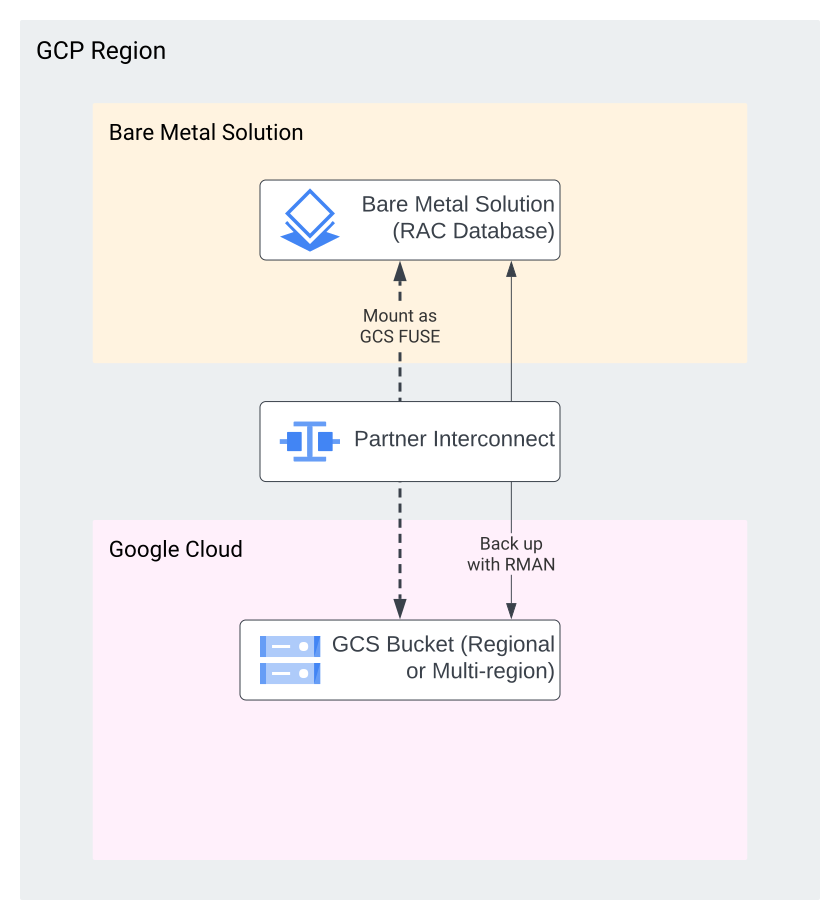
In this deployment, backups are directly written to offsite media. In most
cases, the preferred backup destination is Cloud Storage with [Cloud Storage FUSE](https://docs.cloud.google.com/storage/docs/gcs-fuse),
which presents a Cloud Storage bucket as a file system.
The recommendations for using Cloud Storage FUSE can be found in Oracle Backups
with NFS and Cloud Storage. Google Cloud Filestore,
which presents NFS shares to the Bare Metal Solution instances, can also be used.
The following diagram shows an example deployment.
| Outage | Outage type | RPO | RTO |
|---|---|---|---|
| Unplanned | Recoverable node or instance failure | 0 | Time required to restart the instance |
| Unplanned | Disasters: corruptions | Last archivelog, incremental, or full backup | Hours, depending on database size and bandwidth assigned to Partner Interconnect |
| Unplanned | Disasters: region extension failures | Last archivelog, incremental, or full backup | Days / weeks, depending on time required to bring region extension back online |
| Planned | Database patches, OS/FW updates | 0 | Time required to update and restart the instance |
| Planned | Major database upgrade | 0 | 1-2 hours |
#### Bronze deployment 2: Backup using Backup and DR
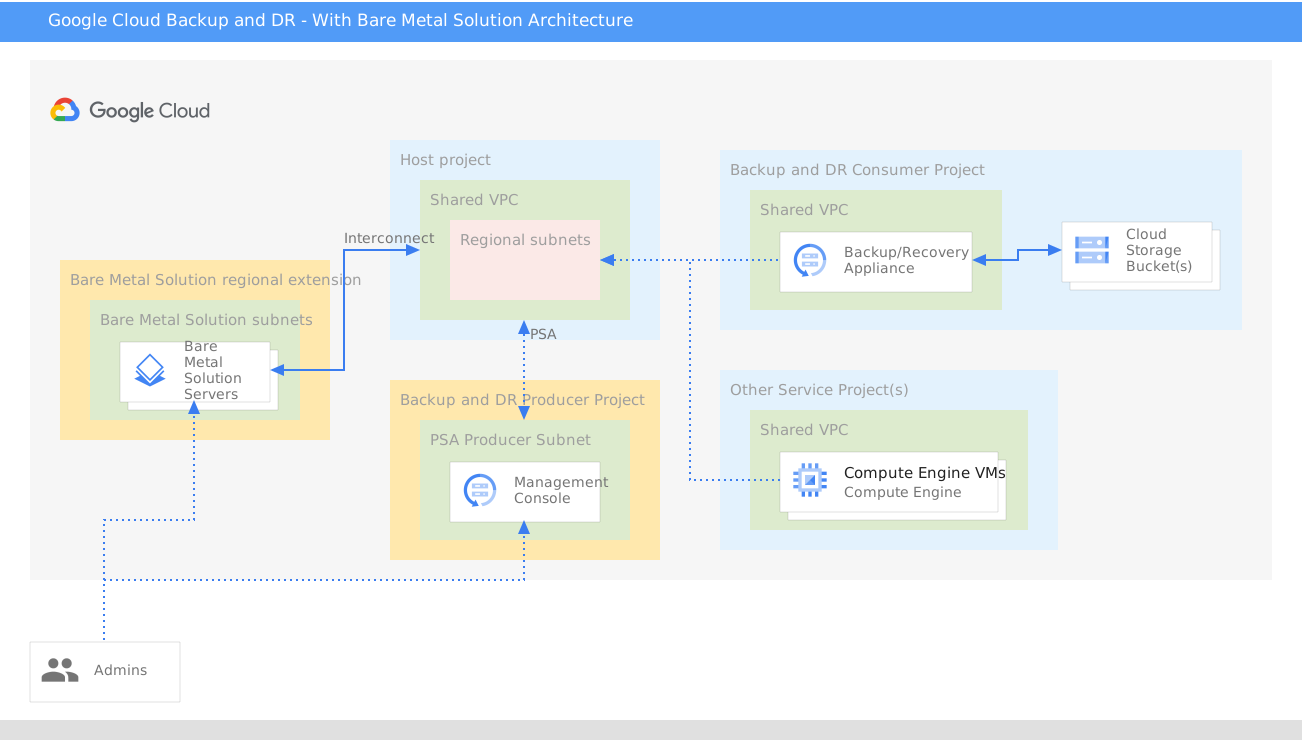
In this deployment, Backup and DR Service is used to store backups in
Google Cloud. Backup and DR offers an incremental-forever
approach to backups, which are stored on high performance media backed by
Cloud Storage for long-term retention.
Backup and DR also offers a faster RTO than storing backups on
Filestore or Cloud Storage, since it can immediately make
images of database files available to the Oracle instance. The mount and migrate
feature brings a database online quickly while copying back to the production
storage media, drastically reducing RTO.
The following diagram shows an example deployment.
| Outage | Outage type | RPO | RTO |
|---|---|---|---|
| Unplanned | Recoverable node or instance failure | 0 | Time required to restart the instance Seconds if using RAC |
| Unplanned | Disasters: corruptions | Last archivelog, incremental, or full backup | Minutes to hours, depending on performance requirements, database size, and bandwidth assigned to Partner Interconnect |
| Unplanned | Disasters: region extension failures | Last archivelog, incremental, or full backup | Days / weeks, depending on time required to bring region extension back online or ability for customer to move to another region extension. |
| Planned | Database patches, OS / FW updates | 0 | Time required to update and restart the instance |
| Planned | Major database upgrade | 0 | 1-2 hours |
### Silver
Silver model introduces database replication using Oracle Data Guard.
Data Guard provides real-time database replication with one or more databases
acting as a standby database. Since Data Guard relies on transporting and
applying database changes as they occur, the RPO can be near zero. The Silver
model relies on asynchronous replication; using synchronous replication ensures
zero data loss, but the time taken to send data between regions typically
drives application response time beyond acceptable limits.
Data Guard's fast-start failover feature has the capability to perform automatic
failover operations if a primary database becomes unavailable for a
user-defined period of time. The configuration is monitored by a Data Guard
observer process, which can run.
Silver model has the benefit of ensuring that the database is available in the
event of a total regional failure, but failover and switchover operations might
impact application performance as network latency between the application
servers and database increases. It is rarely recommended to run applications and
supporting databases in different regions. While RTO for the database may be
under 1 minute, cases of application failover might take minutes to hours before
services are fully functional. In most cases, executing cross-regional disaster
recovery failover plans typically involves manual processes due to the number of
components being moved.
In Silver model, you might still take downtime or maintenance windows
during quarterly patching activities. Introducing Oracle RAC can reduce downtime
for patching or server failures.
The following diagram shows an example configuration.
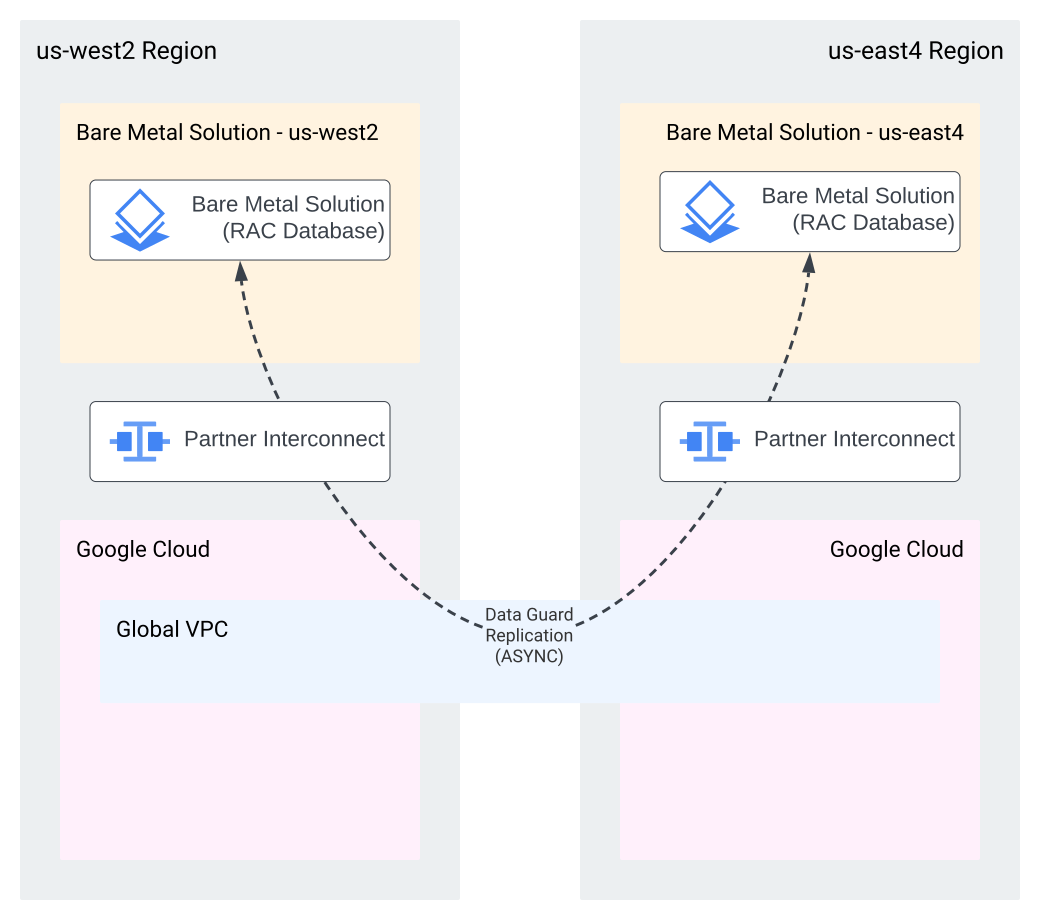
The example configuration in the diagram shows RAC databases running in
`us-west2` and `us-east4` regions. Replication is configured using asynchronous
Data Guard. All traffic between Bare Metal Solution and Google Cloud
transits a Partner Interconnect and cross-region traffic travels
over the Google network backbone. Application servers are configured in each
region, but are typically shut down in the disaster recovery region until a
failover event is declared.
| Outage | Outage type | RPO | RTO |
|---|---|---|---|
| Unplanned | Recoverable node or instance failure | 0 | Time required to restart the instance Seconds if using RAC |
| Unplanned | Disasters: corruptions | \< 60s | Minutes to hours, depending on application failover. |
| Unplanned | Disasters: region extension failures | \< 60s | Minutes to hours, depending on application failover. |
| Planned | Database patches, OS / FW updates | 0 | Time required to update and restart the instance. Seconds if using RAC |
| Planned | Major database upgrade | 0 | 1-2 hours Minutes if using `https://docs.oracle.com/en/database/oracle/oracle-database/19/sbydb/using-DBMS_ROLLING-to-perform-rolling-upgrade.html#GUID-70C09F5B-90BE-4C8C-96A5-45A52E05D380` to perform the upgrade. |
### Gold model
If you are concerned about the data loss in the Silver model, you can
opt for Gold model which uses a [far sync instance](https://docs.oracle.com/en/database/oracle/oracle-database/19/sbydb/creating-oracle-data-guard-far-sync-instance.html)
to provide synchronous replication to an instance running in Google Cloud
Compute Engine.
A far sync instance includes a database control file and a set of standby redo
logs that run geographically near the primary database. This instance is
configured to receive redo synchronously with low latency allowing all
changes to be recorded outside the primary database's region extension. The far
sync instance then forwards the redo to the standby database in the remote
region to apply asynchronously.
A far sync instance is not a full copy of the database, and thus can't service
application traffic. The far sync instance is used to provide a fault-tolerant
location for database changes to be written synchronously, allowing for a
zero data loss solution. When performing synchronous replication to the far sync
instance, transactions aren't committed on the primary database until the
changes have been received and committed on the far sync instance.
The Compute Engine instances are typically selected as candidates for hosting
a far sync instance. Placing the far sync instance in a Compute Engine zone in
close proximity to the primary database adds minimal latency (typically under 1.5 ms)
and protects against failures within the region extension.
The following diagram shows an example deployment.
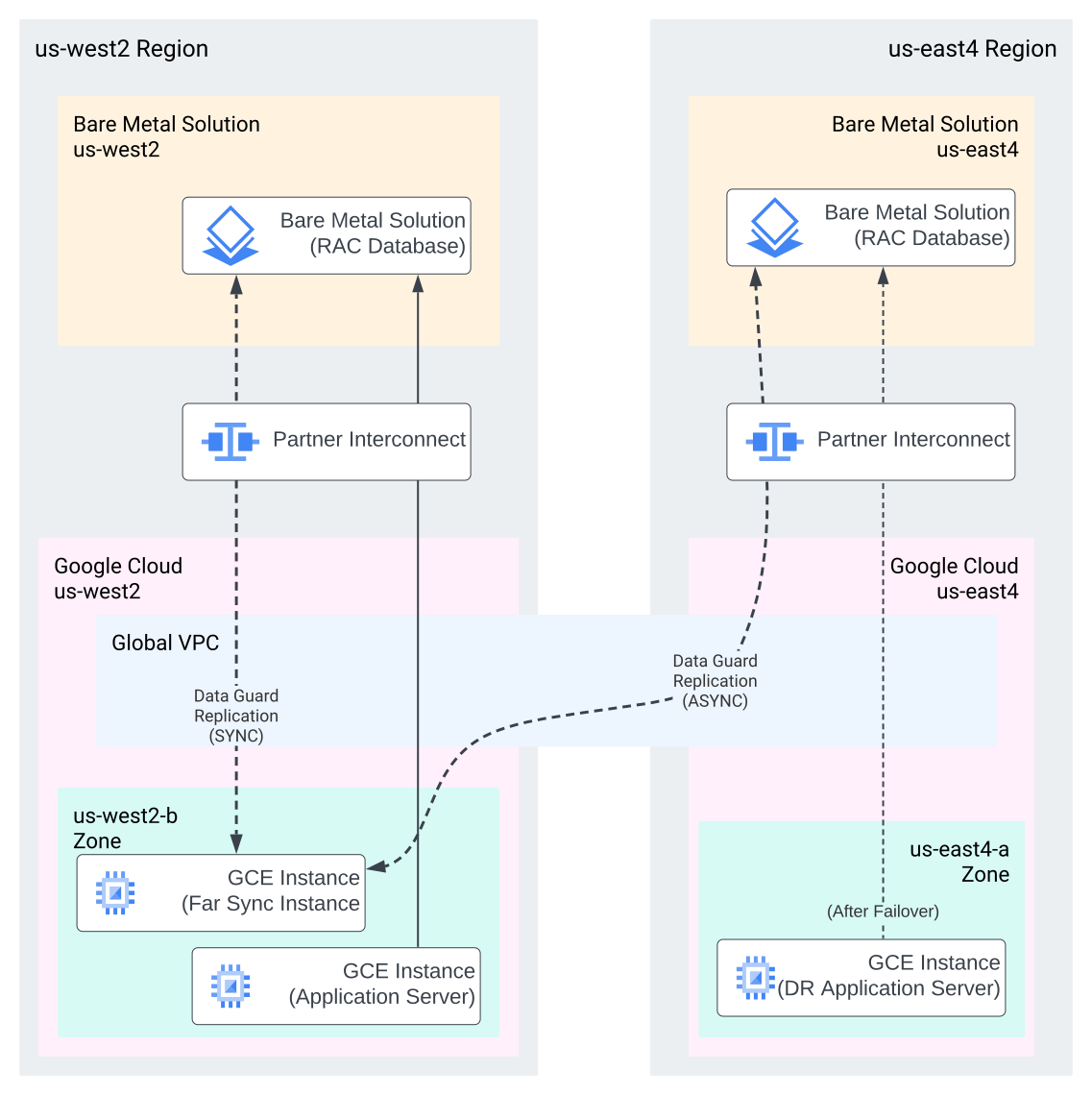
The example configuration in the diagram shows a primary RAC database running in
`us-west2` with applications running in Compute Engine. A Compute Engine
instance within `us-west2` is running a far sync instance, receiving synchronous
redo. The far sync instance is configured to send redo asynchronously to a RAC
database running in the `us-east4` region. Application instances are configured
in the `us-east4` region on Compute Engine to handle application traffic in
the event of a disaster.
| Outage | Outage type | RPO | RTO |
|---|---|---|---|
| Unplanned | Recoverable node or instance failure | 0 | Time required to restart the instance Seconds if using RAC |
| Unplanned | Disasters: corruptions | 0 | Minutes to hours, depending on application regional failover. |
| Unplanned | Disasters: region extension failures | 0 | Minutes to hours, depending on application regional failover. |
| Planned | Database patches, OS / FW updates | 0 | Time required to update and restart the instance. Seconds if using RAC |
| Planned | Major database upgrade | 0 | 1-2 hours Minutes if using `https://docs.oracle.com/en/database/oracle/oracle-database/19/sbydb/using-DBMS_ROLLING-to-perform-rolling-upgrade.html#GUID-70C09F5B-90BE-4C8C-96A5-45A52E05D380` to perform the upgrade. |
### Platinum model
Platinum model offers two deployment options. Each deployment option provides
protection using a different technology, and carries different RTO and RPO
characteristics.
#### Platinum deployment 1: Data Guard with fast-start failover
Platinum deployment 1 builds on the top of the Gold model deployment by
adding a second Data Guard standby database in the local region that runs on a
Compute Engine instance. This configuration uses synchronous replication
between the primary database and the standby running in Compute Engine,
providing a zero data loss guarantee within the primary region.
Creating an in-region standby database lets database failover and switchover
operations to occur without affecting applications. During database role
changes, applications that are configured in accordance with
[Oracle's client considerations](https://docs.oracle.com/en/database/oracle/oracle-database/19/dgbkr/using-data-guard-broker-to-manage-switchovers-failovers.html#GUID-790C40A3-B712-4AEB-B70E-1B7987C6315C) automatically reconnect to the new primary database without
requiring manual intervention. Properly configured applications experience less
than 2 minutes of downtime during a failover event.
While the standby database in Compute Engine does not run RAC, it must be
sized to support normal application traffic when it is running as the primary
database. This instance can either run with a smaller shape while operating as a
standby and scaled up during failover events, or run at the full capacity at all
times. Resizing the instance during a failover event negatively impacts the
RTO, since the instance must be restarted during the resize operation.
Fast-start failover is configured on a Compute Engine instance running the
Data Guard broker with an [observer](https://docs.cloud.google.com/bare-metal/docs/solutions/oracle/data-guard-setup/observer). The observer runs a basic Oracle client
with connections to all primary and standby databases. If the observer detects a
failure in the primary database, it initiates a failover to one of the standby
databases. The standby database running on Compute Engine must be
configured as the preferred failover target when using the Gold tier deployment.
[Oracle recommends](https://www.youtube.com/watch?v=e81UPLfnLi0) that the observer be placed in a region separate from the
primary and standby databases. This provides the best protection against
regional failures and network partitioning events. If a third region is not
possible, the observer must be installed in the primary region, running in a
different zone from the near-site standby.
The following diagram shows an example deployment.
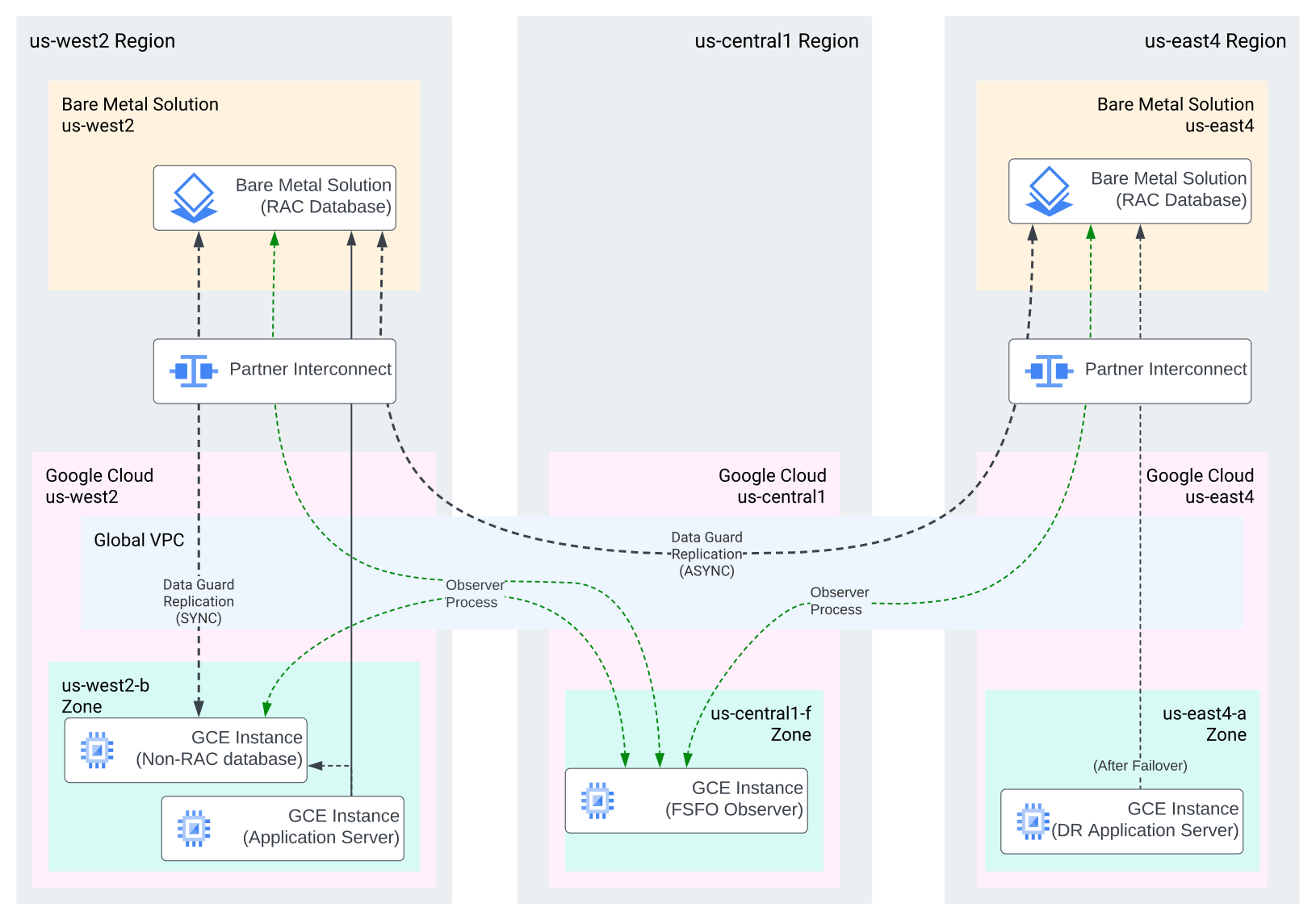
The example deployment shown in the diagram consists of the following:
- A primary database running RAC on Bare Metal Solution server in `us-west2` region.
- A near-site standby database running on Compute Engine instance in `us-west2` region.
- A remote standby database running on Bare Metal Solution server in `us-east4` region.
- The Data Guard observer running on Compute Engine instance in `us-central1` region.
Synchronous replication is configured for the in-region standby database running
on the Compute Engine instance, and asynchronous replication is configured to
the remote region. In each case, redo is sent from the primary database to the
standby; redo is not forwarded from one standby database to the other. The
observer is configured in a third region and maintains connectivity to all
databases in the configuration. Application instances are configured in the
primary region and connect to the primary database on Bare Metal Solution server
(or the database on the Compute Engine instance during failover and switchover
operations). Application instances are configured in the `us-east4` region on
Compute Engine to handle application traffic in the event of a disaster.
| Outage | Outage type | RPO | RTO |
|---|---|---|---|
| Unplanned | Recoverable node or instance failure | 0 | Time required to restart the instance Seconds if using RAC |
| Unplanned | Disasters: corruptions | 0 | \< 60s |
| Unplanned | Disasters: region extension failures | 0 | \< 60s |
| Planned | Database patches, OS / FW updates | 0 | Time required to update and restart the instance. Seconds if using RAC |
| Planned | Major database upgrade | 0 | 1-2 hours Minutes if using `https://docs.oracle.com/en/database/oracle/oracle-database/19/sbydb/using-DBMS_ROLLING-to-perform-rolling-upgrade.html#GUID-70C09F5B-90BE-4C8C-96A5-45A52E05D380` to perform the upgrade. |
#### Platinum deployment 2: GoldenGate for replication
Platinum deployment 2 relies on using Oracle GoldenGate for replication. Since
GoldenGate doesn't replicate at the block level. It lets each database to
service read and write application sessions independently. It replicates the
changes bidirectionally, allowing for an active/active database configuration.
Applications must be thoroughly [validated](https://docs.oracle.com/en/middleware/goldengate/core/21.3/admin/configuring-oracle-goldengate-active-active-high-availability.html#GUID-A6330D68-C306-4845-A4C7-AEC837619971)
before committing to an active/active
deployment, and you must account for the
[conflict detection and resolution](https://www.oracle.com/a/ocom/docs/ogg-best-practices-active-active.pdf).
Unlike Data Guard, GoldenGate requires the installation and maintenance of
additional software on the Oracle database servers. Active/active deployments
typically require sophisticated schema and application design to take advantage
of a multi-site database deployment. Many pre-packaged applications don't
support this type of architecture.
Deployments that depend on GoldenGate for all replication can't support a zero
data loss RPO due to the asynchronous nature of logical replication. Local
standby databases running in Compute Engine using Data Guard can be deployed
to provide an RPO of zero with synchronous replication.
The following diagram shows an example deployment.

| Outage | Outage type | RPO | RTO |
|---|---|---|---|
| Unplanned | Recoverable node or instance failure | 0 | Time required to restart the instance |
| Unplanned | Disasters: corruptions | Seconds to Minutes 0 if using Data Guard in each location | 0 |
| Unplanned | Disasters: region extension failures | Seconds to Minutes 0 if using Data Guard in each location | 0 |
| Planned | Database patches, OS / FW updates | 0 | Time required to update and restart the instance. Seconds if using RAC |
| Planned | Major database upgrade | 0 | 0 |