In this document you will learn how to enable the
Container Scanning API, push an image to Artifact Registry,
and see the list of vulnerabilities found in the image.
Artifact Analysis provides vulnerability information for the
container images in Artifact Registry. The metadata is stored as [notes](https://docs.cloud.google.com/artifact-analysis/docs/metadata-storage#note). An
[occurrence](https://docs.cloud.google.com/artifact-analysis/docs/metadata-storage#occurrence) is created for each instance of a note associated
with an image. See the [overview](https://docs.cloud.google.com/artifact-analysis/docs/container-scanning-overview) and
[pricing](https://docs.cloud.google.com/artifact-analysis/pricing) documents for more information.
## Before you begin
1. Create a Docker repository in Artifact Registry and push a container image to the repository. If you are not familiar with Artifact Registry, see the [Docker quickstart](https://docs.cloud.google.com/artifact-registry/docs/docker/store-docker-container-images).
> [!IMPORTANT]
> **Important:** When you enable the Artifact Analysis API, Artifact Analysis automatically begins scanning each new image as they are pushed to Artifact Registry repositories in your project. However, scanning is disabled by default for packages pushed to Artifact Registry repositories. To enable scanning in a repository, see [Control scanning settings for an individual repository](https://docs.cloud.google.com/artifact-analysis/docs/enable-automatic-scanning#disable-repo).
Enabling this API also enables language package scanning in
Artifact Registry. See
[supported package types](https://docs.cloud.google.com/artifact-analysis/docs/container-scanning-overview#feature-support).
### Required roles
To get the permissions that
you need to View package scan results,
ask your administrator to grant you the
following IAM roles on the project:
- [Container Scanner Service Agent](https://docs.cloud.google.com/iam/docs/roles-permissions/containerscanning#containerscanning.ServiceAgent) (`roles/containerscanning.ServiceAgent`)
- [Container Analysis Occurrences Viewer](https://docs.cloud.google.com/iam/docs/roles-permissions/containeranalysis#containeranalysis.occurrences.viewer) (`roles/containeranalysis.occurrences.viewer`)
- [Container Analysis Notes Viewer](https://docs.cloud.google.com/iam/docs/roles-permissions/containeranalysis#containeranalysis.notes.viewer) (`roles/containeranalysis.notes.viewer`)
- [Artifact Registry Reader](https://docs.cloud.google.com/iam/docs/roles-permissions/artifactregistry#artifactregistry.reader) (`roles/artifactregistry.reader`)
For more information about granting roles, see [Manage access to projects, folders, and organizations](https://docs.cloud.google.com/iam/docs/granting-changing-revoking-access).
You might also be able to get
the required permissions through [custom
roles](https://docs.cloud.google.com/iam/docs/creating-custom-roles) or other [predefined
roles](https://docs.cloud.google.com/iam/docs/roles-overview#predefined).
## View the image vulnerabilities
Artifact Analysis scans new images when they're uploaded to
Artifact Registry. This scan extracts information about the system packages in
the container.
You can view vulnerability occurrences for your images in
the registry using Google Cloud console, Google Cloud CLI, or the
Container Analysis API. If an image has vulnerabilities, you can then obtain
the details.
Artifact Analysis continues to scan images and packages as long as they
have been pulled within the last 30 days. After 30 days, metadata for scanned
images and packages will no longer be updated, and the results will be stale.
Artifact Analysis archives metadata that has been stale for more than 90
days. This archived metadata can be evaluated only by using the API.
You can re-scan an image with stale or archived metadata by pulling that image.
Refreshing metadata can take up to 24 hours. Packages with stale or archived
metadata can't be rescanned.
### View occurrences in Google Cloud console
To see the vulnerabilities in an image:
1. Get the list of repositories.
[Open the Repositories page](https://console.cloud.google.com/artifacts)
2. In the repositories list, click a repository.
3. In the images list, click an image name.
Vulnerability totals for each image digest are displayed in the
**Vulnerabilities** column.

4. To view the list of vulnerabilities for an image, click the link in the
**Vulnerabilities** column.
The **Scan results** section displays a summary of the package types
scanned, total vulnerabilities, vulnerabilities with fixes available,
vulnerabilities without fixes, and effective severity.

The table of vulnerabilities lists the Common Vulnerabilities and Exposures
(CVE) name for each vulnerability found, the
[effective severity](https://docs.cloud.google.com/artifact-analysis/docs/severity-levels),
Common Vulnerability Scoring System (CVSS) score, fixes (when available),
the name of the package that contains the vulnerability, and the package
type.
Google Cloud console displays up to 1200 vulnerabilities per page in this
table. You can filter and sort these files to check a specific file,
directory, layer, or type of file by file extension.
5. For details about a specific CVE, click the CVE name.
6. To view vulnerability occurrence details such as version number and affected
location, in the row with the name of the vulnerability, click **View** or
**View Fixed** . The link text is **View** for vulnerabilities without a fix,
and **View Fixed** for vulnerabilities where a fix has been applied.
#### View vulnerabilities in a specific layer
> [!WARNING]
>
> **Preview**
>
>
> This product or feature is
>
> subject to the "Pre-GA Offerings Terms" in the General Service Terms section
> of the [Service Specific
> Terms](https://docs.cloud.google.com/terms/service-terms#1).
>
> Pre-GA products and features are available "as is" and might have limited support.
>
> For more information, see the
> [launch stage descriptions](https://cloud.google.com/products/#product-launch-stages).
Artifact Analysis provides layer-specific metadata to help you identify which package contains vulnerabilities, and which Docker build command introduced that layer.
To view layer-based vulnerability metadata in the Google Cloud console:
1. In Artifact Registry, open your list of repositories.
[Open the Repositories page](https://console.cloud.google.com/artifacts)
2. In the **Repositories** page, click a repository.
3. In the **Repository Details** page, click an image.
4. In the image version list, click an image digest.
5. In the image digest details page, click the **Vulnerabilities** tab.
When layer-based metadata is available, Artifact Analysis shows
a selectable list of layers in the **Layer** bar:

6. To see the list of layers, click the layer drop-down menu.
A drop-down list opens, showing a numbered list of layers. Layer 0
represents the bottom layer, with each following layer building on the
previous layer. Only layers where vulnerabilities have been found are
shown.
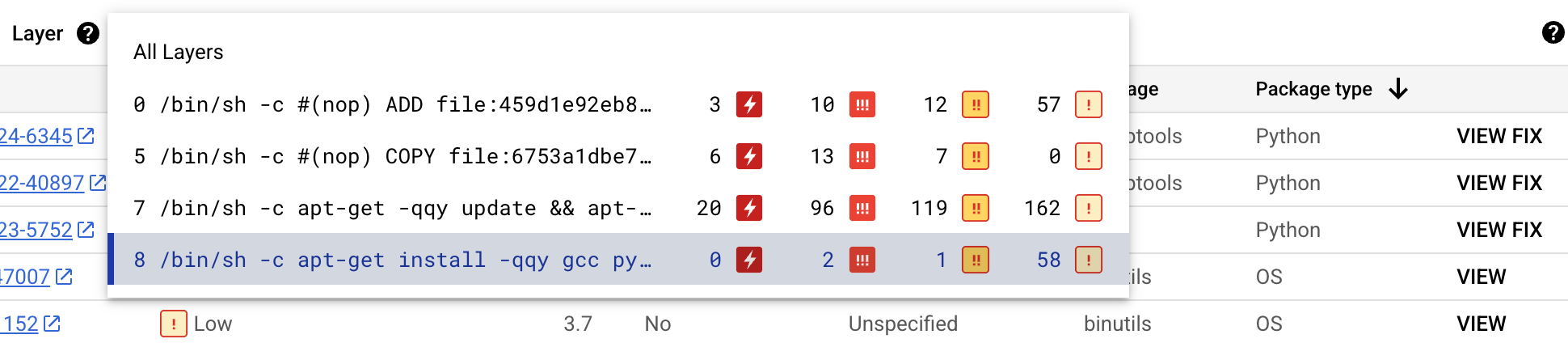
For each layer, Artifact Analysis shows the Docker
command used to build the layer and the number of vulnerabilities found
in that layer.
7. To learn more about the vulnerabilities in a specific layer, select a
layer from the layer list.
The table of vulnerabilities updates to show only the vulnerabilities found
in the selected layer. You can apply more filters or investigate specific
vulnerabilities.
8. Click **VIEW** or **VIEW FIX** beside a vulnerability to see more detailed
vulnerability information.
The **Vulnerability details** side panel shows file locations where
packages have vulnerabilities.
9. In the **File location(s)** table, hover over the question mark to open
additional layer metadata.
A dialog displays the layer index, layer build command, layer
digest, and base image where you can remediate the vulnerability.
### View occurrences using gcloud
To view occurrences for images in Artifact Registry, run the
[`gcloud artifacts docker images list`](https://docs.cloud.google.com/sdk/gcloud/reference/artifacts/docker/images/list)
command:
gcloud artifacts docker images list --show-occurrences \
LOCATION-docker.pkg.dev/PROJECT_ID/REPOSITORY/IMAGE_ID
Where:
- LOCATION is the regional or multi-regional [location](https://docs.cloud.google.com/artifact-registry/docs/repo-locations) of the repository.
- PROJECT_ID is your Google Cloud console [project ID](https://docs.cloud.google.com/resource-manager/docs/creating-managing-projects#identifying_projects).
- REPOSITORY is the name of the repository where the image is stored.
- IMAGE_ID is the name of the image in the repository. You cannot specify an image tag with this command.
By default, the command returns the 10 most recent results. To show a
different number of results, use the `--show-occurrences-from` flag.
For example, the following command returns the 25 most recent results:
gcloud artifacts docker images list --show-occurrences-from=25 \
us-central1-docker.pkg.dev/my-project/my-repo/my-image
The output looks similar to:
#### Sample image output
```
{
"name": "projects/my-project/locations/us-central1/occurrences/22d3edfb-34f2-4d3f-be08-fd90c549f010",
"resource": {
"uri": "https://us-central1-docker.pkg.dev/my-project/my-repo/golang-nginx@sha256:5b54ef20748417ccdb0b87afedf98c44e699e2f59bd6cv48cbdc1ca2e72c80e3"
},
"noteName": "projects/my-project/locations/us-central1/notes/CVE-2005-2541",
"kind": "VULNERABILITY",
"createTime": "2025-01-21T15:57:01.238832Z",
"updateTime": "2025-01-21T15:57:01.238832Z",
"vulnerability": {
"severity": "CRITICAL",
"cvssScore": 10,
"packageIssue": [
{
"affectedLocation": {
"cpeUri": "cpe:/o:debian:debian_linux:12",
"package": "tar",
"version": {
"name": "1.34+dfsg",
"revision": "1.2+deb12u1",
"kind": "NORMAL"
}
},
"fixedLocation": {
"cpeUri": "cpe:/o:debian:debian_linux:12",
"package": "tar",
"version": {
"kind": "MAXIMUM"
}
},
"packageType": "OS",
"effectiveSeverity": "LOW",
"file_location": [
{
"file_path": "/var/lib/dpkg/status",
"layerDetails": {
"index": 0,
"diffID": "sha256:123",
"buildCommand": "FROM golang:example_sha256",
"BaseImages": [
{
"name": "library/golang",
},
],
},
},
],
}
],
"shortDescription": "CVE-2005-2541",
"longDescription": "NIST vectors: AV:N/AC:L/Au:N/C:C/I:C/A:C",
"relatedUrls": [
{
"url": "https://security-tracker.debian.org/tracker/CVE-2005-2541",
"label": "More Info"
}
],
"effectiveSeverity": "LOW",
"cvssVersion": "CVSS_VERSION_2",
"cvssV2": {
"baseScore": 10,
"attackVector": "ATTACK_VECTOR_NETWORK",
"attackComplexity": "ATTACK_COMPLEXITY_LOW",
"authentication": "AUTHENTICATION_NONE",
"confidentialityImpact": "IMPACT_COMPLETE",
"integrityImpact": "IMPACT_COMPLETE",
"availabilityImpact": "IMPACT_COMPLETE"
}
}
}
```
#### Filter vulnerability occurrences
To filter vulnerability occurrences, use `--occurrence-filter` parameter:
gcloud artifacts docker images list --show-occurrences \
LOCATION-docker.pkg.dev/PROJECT_ID/REPOSITORY/IMAGE_ID \
--occurrence-filter=FILTER_EXPRESSION
Where:
- LOCATION is the regional or multi-regional [location](https://docs.cloud.google.com/artifact-registry/docs/repo-locations) of the repository.
- PROJECT_ID is your Google Cloud console [project ID](https://docs.cloud.google.com/resource-manager/docs/creating-managing-projects#identifying_projects).
- REPOSITORY is the name of the repository where the image is stored.
- IMAGE_ID is the name of the image in the repository.
- FILTER_EXPRESSION is a sample filter expression in the format explained in [Filtering vulnerability occurrences](https://docs.cloud.google.com/artifact-analysis/docs/scan-os-automatically#filtering).
#### View vulnerabilities for a specific layer
> [!WARNING]
>
> **Preview**
>
>
> This product or feature is
>
> subject to the "Pre-GA Offerings Terms" in the General Service Terms section
> of the [Service Specific
> Terms](https://docs.cloud.google.com/terms/service-terms#1).
>
> Pre-GA products and features are available "as is" and might have limited support.
>
> For more information, see the
> [launch stage descriptions](https://cloud.google.com/products/#product-launch-stages).
You can use the `layerDetails` field to determine which specific layer introduced a vulnerable package, and to view additional information about that layer. For example, consider the following `layerDetails` output for an image:
"layerDetails": {
"index": 0,
"diffID": "sha256:123",
"buildCommand": "FROM golang:example_sha256",
"BaseImages": [
{
"name": "library/golang",
},
],
}
The output shows that the layer index is `0` in the image,
with a layer hash of `sha256:123`.
The Docker build command used to build this layer is
`FROM golang:example_sha256`, and the layer is also found in the
`library/golang` base image.
### View occurrences using the API or code
To view occurrences for an image, specify images with a URL in the following
format:
LOCATION-docker.pkg.dev/PROJECT_ID/REPOSITORY/IMAGE_ID
### API
**Using cURL**
To get a list of occurrences in your project:
curl -X GET -H "Content-Type: application/json" -H \
"Authorization: Bearer $(gcloud auth print-access-token)" \
https://containeranalysis.googleapis.com/v1/projects/PROJECT_ID/occurrences
To get a summary of vulnerabilities in your project:
curl -X GET -H "Content-Type: application/json" -H \
"Authorization: Bearer $(gcloud auth print-access-token)" \
https://containeranalysis.googleapis.com/v1/projects/PROJECT_ID/occurrences:vulnerabilitySummary
To get details on a specific occurrence:
curl -X GET -H "Content-Type: application/json" -H \
"Authorization: Bearer $(gcloud auth print-access-token)" \
https://containeranalysis.googleapis.com/v1/projects/PROJECT_ID/occurrences/OCCURRENCE_ID
### Java
To learn how to install and use the client library for Artifact Analysis, see
[Artifact Analysis client libraries](https://docs.cloud.google.com/artifact-analysis/docs/reference/libraries).
For more information, see the
[Artifact Analysis Java API
reference documentation](https://docs.cloud.google.com/java/docs/reference/google-cloud-containeranalysis/latest/overview).
To authenticate to Artifact Analysis, set up Application Default Credentials.
For more information, see
[Set up authentication for a local development environment](https://docs.cloud.google.com/docs/authentication/set-up-adc-local-dev-environment).
import com.google.cloud.devtools.containeranalysis.v1.https://docs.cloud.google.com/java/docs/reference/google-cloud-containeranalysis/latest/com.google.cloud.devtools.containeranalysis.v1.ContainerAnalysisClient.html;
import io.grafeas.v1.https://docs.cloud.google.com/java/docs/reference/grafeas/latest/io.grafeas.v1.GrafeasClient.html;
import io.grafeas.v1.https://docs.cloud.google.com/java/docs/reference/grafeas/latest/io.grafeas.v1.Occurrence.html;
import io.grafeas.v1.https://docs.cloud.google.com/java/docs/reference/grafeas/latest/io.grafeas.v1.ProjectName.html;
import java.io.IOException;
import java.lang.InterruptedException;
public class OccurrencesForImage {
// Retrieves all the Occurrences associated with a specified image
// Here, all Occurrences are simply printed and counted
public static int getOccurrencesForImage(String resourceUrl, String projectId)
throws IOException, InterruptedException {
// String resourceUrl = "https://gcr.io/project/image@sha256:123";
// String projectId = "my-project-id";
final String projectName = https://docs.cloud.google.com/java/docs/reference/grafeas/latest/io.grafeas.v1.ProjectName.html.format(projectId);
final String filterStr = String.format("resourceUrl=\"%s\"", resourceUrl);
// Initialize client that will be used to send requests. After completing all of your requests,
// call the "close" method on the client to safely clean up any remaining background resources.
https://docs.cloud.google.com/java/docs/reference/grafeas/latest/io.grafeas.v1.GrafeasClient.html client = https://docs.cloud.google.com/java/docs/reference/google-cloud-containeranalysis/latest/com.google.cloud.devtools.containeranalysis.v1.ContainerAnalysisClient.html.create().https://docs.cloud.google.com/java/docs/reference/google-cloud-containeranalysis/latest/com.google.cloud.devtools.containeranalysis.v1.ContainerAnalysisClient.html#com_google_cloud_devtools_containeranalysis_v1_ContainerAnalysisClient_getGrafeasClient__();
int i = 0;
for (https://docs.cloud.google.com/java/docs/reference/grafeas/latest/io.grafeas.v1.Occurrence.html o : client.https://docs.cloud.google.com/java/docs/reference/grafeas/latest/io.grafeas.v1.GrafeasClient.html#io_grafeas_v1_GrafeasClient_listOccurrences__org_jspecify_annotations_Nullable_io_grafeas_v1_ProjectName_java_lang_String_(projectName, filterStr).iterateAll()) {
// Write custom code to process each Occurrence here
System.out.println(o.getName());
i = i + 1;
}
return i;
}
}
### Go
To learn how to install and use the client library for Artifact Analysis, see
[Artifact Analysis client libraries](https://docs.cloud.google.com/artifact-analysis/docs/reference/libraries).
For more information, see the
[Artifact Analysis Go API
reference documentation](https://godoc.org/cloud.google.com/go/containeranalysis/apiv1).
To authenticate to Artifact Analysis, set up Application Default Credentials.
For more information, see
[Set up authentication for a local development environment](https://docs.cloud.google.com/docs/authentication/set-up-adc-local-dev-environment).
import (
"context"
"fmt"
"io"
containeranalysis "cloud.google.com/go/containeranalysis/apiv1"
"google.golang.org/api/iterator"
grafeaspb "google.golang.org/genproto/googleapis/grafeas/v1"
)
// getOccurrencesForImage retrieves all the Occurrences associated with a specified image.
// Here, all Occurrences are simply printed and counted.
func getOccurrencesForImage(w io.Writer, resourceURL, projectID string) (int, error) {
// Use this style of URL when you use Google Container Registry.
// resourceURL := "https://gcr.io/my-project/my-repo/my-image"
// Use this style of URL when you use Google Artifact Registry.
// resourceURL := "https://LOCATION-docker.pkg.dev/my-project/my-repo/my-image"
ctx := context.Background()
client, err := containeranalysis.https://docs.cloud.google.com/go/docs/reference/cloud.google.com/go/containeranalysis/latest/apiv1.html#cloud_google_com_go_containeranalysis_apiv1_Client_NewClient(ctx)
if err != nil {
return -1, fmt.Errorf("NewClient: %w", err)
}
defer client.https://docs.cloud.google.com/go/docs/reference/cloud.google.com/go/containeranalysis/latest/apiv1.html#cloud_google_com_go_containeranalysis_apiv1_Client_Close()
req := &grafeaspb.https://docs.cloud.google.com/go/docs/reference/cloud.google.com/go/containeranalysis/latest/apiv1beta1/grafeas/grafeaspb.html#cloud_google_com_go_containeranalysis_apiv1beta1_grafeas_grafeaspb_ListOccurrencesRequest{
Parent: fmt.Sprintf("projects/%s", projectID),
Filter: fmt.Sprintf("resourceUrl=%q", resourceURL),
}
it := client.https://docs.cloud.google.com/go/docs/reference/cloud.google.com/go/containeranalysis/latest/apiv1.html#cloud_google_com_go_containeranalysis_apiv1_Client_GetGrafeasClient().ListOccurrences(ctx, req)
count := 0
for {
occ, err := it.Next()
if err == iterator.Done {
break
}
if err != nil {
return -1, fmt.Errorf("occurrence iteration error: %w", err)
}
// Write custom code to process each Occurrence here.
fmt.Fprintln(w, occ)
count = count + 1
}
return count, nil
}
### Node.js
To learn how to install and use the client library for Artifact Analysis, see
[Artifact Analysis client libraries](https://docs.cloud.google.com/artifact-analysis/docs/reference/libraries).
For more information, see the
[Artifact Analysis Node.js API
reference documentation](https://googleapis.dev/nodejs/containeranalysis/latest/index.html).
To authenticate to Artifact Analysis, set up Application Default Credentials.
For more information, see
[Set up authentication for a local development environment](https://docs.cloud.google.com/docs/authentication/set-up-adc-local-dev-environment).
/**
* TODO(developer): Uncomment these variables before running the sample
*/
// const projectId = 'your-project-id', // Your GCP Project ID
// If you are using Google Container Registry
// const imageUrl = 'https://gcr.io/my-project/my-repo/my-image@sha256:123' // Image to attach metadata to
// If you are using Google Artifact Registry
// const imageUrl = 'https://LOCATION-docker.pkg.dev/my-project/my-repo/my-image@sha256:123' // Image to attach metadata to
// Import the library and create a client
const {ContainerAnalysisClient} = require('https://docs.cloud.google.com/nodejs/docs/reference/containeranalysis/latest/overview.html');
const client = new https://docs.cloud.google.com/nodejs/docs/reference/containeranalysis/latest/overview.html();
const formattedParent = client.https://docs.cloud.google.com/nodejs/docs/reference/containeranalysis/latest/containeranalysis/v1.containeranalysisclient.html().https://docs.cloud.google.com/nodejs/docs/reference/containeranalysis/latest/containeranalysis/v1.containeranalysisclient.html(projectId);
// Retrieves all the Occurrences associated with a specified image
const [occurrences] = await client.https://docs.cloud.google.com/nodejs/docs/reference/containeranalysis/latest/containeranalysis/v1.containeranalysisclient.html().listOccurrences({
parent: formattedParent,
filter: `resourceUrl = "${imageUrl}"`,
});
if (occurrences.length) {
console.log(`Occurrences for ${imageUrl}`);
occurrences.forEach(occurrence => {
console.log(`${occurrence.name}:`);
});
} else {
console.log('No occurrences found.');
}
### Ruby
To learn how to install and use the client library for Artifact Analysis, see
[Artifact Analysis client libraries](https://docs.cloud.google.com/artifact-analysis/docs/reference/libraries).
For more information, see the
[Artifact Analysis Ruby API
reference documentation](https://docs.cloud.google.com/ruby/docs/reference/google-cloud-container_analysis/latest).
To authenticate to Artifact Analysis, set up Application Default Credentials.
For more information, see
[Set up authentication for a local development environment](https://docs.cloud.google.com/docs/authentication/set-up-adc-local-dev-environment).
# resource_url = "The URL of the resource associated with the occurrence."
# # e.g. https://gcr.io/project/image@sha256:123"
# project_id = "The Google Cloud project ID of the occurrences to retrieve"
require "google/cloud/container_analysis"
# Initialize the client
client = Google::Cloud::https://docs.cloud.google.com/ruby/docs/reference/google-cloud-container_analysis-v1/latest/Google-Cloud-ContainerAnalysis.html.https://docs.cloud.google.com/ruby/docs/reference/google-cloud-container_analysis/latest/Google-Cloud-ContainerAnalysis.html.https://docs.cloud.google.com/ruby/docs/reference/google-cloud-container_analysis-v1/latest/Google-Cloud-ContainerAnalysis-V1-ContainerAnalysis-Client.html
parent = client.https://docs.cloud.google.com/ruby/docs/reference/google-cloud-container_analysis-v1/latest/Google-Cloud-ContainerAnalysis-V1-ContainerAnalysis-Paths.html project: project_id
filter = "resourceUrl = \"#{resource_url}\""
count = 0
client.list_occurrences(parent: parent, filter: filter).each do |occurrence|
# Process occurrence here
puts occurrence
count += 1
end
puts "Found #{count} occurrences"
### Python
To learn how to install and use the client library for Artifact Analysis, see
[Artifact Analysis client libraries](https://docs.cloud.google.com/artifact-analysis/docs/reference/libraries).
For more information, see the
[Artifact Analysis Python API
reference documentation](https://docs.cloud.google.com/python/docs/reference/containeranalysis/latest).
To authenticate to Artifact Analysis, set up Application Default Credentials.
For more information, see
[Set up authentication for a local development environment](https://docs.cloud.google.com/docs/authentication/set-up-adc-local-dev-environment).
from google.cloud.devtools import https://docs.cloud.google.com/python/docs/reference/containeranalysis/latest
def get_occurrences_for_image(resource_url: str, project_id: str) -> int:
"""Retrieves all the occurrences associated with a specified image.
Here, all occurrences are simply printed and counted."""
# resource_url = 'https://gcr.io/my-project/my-image@sha256:123'
# project_id = 'my-gcp-project'
filter_str = f'resourceUrl="{resource_url}"'
client = https://docs.cloud.google.com/python/docs/reference/containeranalysis/latest.https://docs.cloud.google.com/python/docs/reference/containeranalysis/latest/google.cloud.devtools.containeranalysis_v1.services.container_analysis.ContainerAnalysisClient.html()
grafeas_client = client.get_grafeas_client()
project_name = f"projects/{project_id}"
response = grafeas_client.list_occurrences(parent=project_name, filter=filter_str)
count = 0
for o in response:
# do something with the retrieved occurrence
# in this sample, we will simply count each one
count += 1
return count
### View occurrences in Cloud Build
If you're using Cloud Build, you can also view image vulnerabilities in
the **Security insights** side panel within the Google Cloud console.
The **Security insights** side panel provides a high-level overview of build
security information for artifacts stored in Artifact Registry. To learn more
about the side panel and how you can use Cloud Build to help protect
your software supply chain, see
[View build security insights](https://docs.cloud.google.com/build/docs/view-build-security-insights).
## Filter occurrences
You can use filter strings in the `gcloud` commands and the
Artifact Analysis API to filter occurrences before viewing them. The
following sections describe the supported search filters.
### View discovery occurrences
When an image is initially pushed to Artifact Registry, Artifact Registry creates a
discovery occurrence, which contains information about the initial scan of the
container image.
To retrieve the discovery occurrence for an image, use the following filter
expression:
```bash
kind="DISCOVERY" AND resourceUrl="RESOURCE_URL"
```
Where RESOURCE_URL has the following format:
LOCATION-docker.pkg.dev/PROJECT_ID/REPOSITORY/IMAGE_ID
### gcloud
**View discovery occurrences for an image:**
In this case, the expression is not used directly in the command, but the same
information is passed as arguments:
Artifact Registry:
gcloud artifacts docker images list --show-occurrences \
--occurrence-filter='kind="DISCOVERY"' --format=json \
LOCATION-docker.pkg.dev/PROJECT_ID/REPOSITORY/IMAGE_ID
### API
To retrieve the discovery occurrence, your filter expression must be URL
encoded and embedded in a `GET` request as follows:
```
GET https://containeranalysis.googleapis.com/v1/projects/PROJECT_ID/occurrences?filter=kind%3D%22DISCOVERY%22%20AND%20resourceUrl%3D%22ENCODED_RESOURCE_URL%22
```
See
[`projects.occurrences.get`](https://docs.cloud.google.com/artifact-analysis/docs/reference/rest/v1/projects.occurrences/get)
API endpoint for more details.
### Java
To learn how to install and use the client library for Artifact Analysis, see
[Artifact Analysis client libraries](https://docs.cloud.google.com/artifact-analysis/docs/reference/libraries).
For more information, see the
[Artifact Analysis Java API
reference documentation](https://docs.cloud.google.com/java/docs/reference/google-cloud-containeranalysis/latest/overview).
To authenticate to Artifact Analysis, set up Application Default Credentials.
For more information, see
[Set up authentication for a local development environment](https://docs.cloud.google.com/docs/authentication/set-up-adc-local-dev-environment).
import com.google.cloud.devtools.containeranalysis.v1.https://docs.cloud.google.com/java/docs/reference/google-cloud-containeranalysis/latest/com.google.cloud.devtools.containeranalysis.v1.ContainerAnalysisClient.html;
import io.grafeas.v1.https://docs.cloud.google.com/java/docs/reference/grafeas/latest/io.grafeas.v1.GrafeasClient.html;
import io.grafeas.v1.https://docs.cloud.google.com/java/docs/reference/grafeas/latest/io.grafeas.v1.Occurrence.html;
import io.grafeas.v1.https://docs.cloud.google.com/java/docs/reference/grafeas/latest/io.grafeas.v1.ProjectName.html;
import java.io.IOException;
import java.lang.InterruptedException;
public class GetDiscoveryInfo {
// Retrieves and prints the Discovery Occurrence created for a specified image
// The Discovery Occurrence contains information about the initial scan on the image
public static void getDiscoveryInfo(String resourceUrl, String projectId)
throws IOException, InterruptedException {
// String resourceUrl = "https://gcr.io/project/image@sha256:123";
// String projectId = "my-project-id";
String filterStr = "kind=\"DISCOVERY\" AND resourceUrl=\"" + resourceUrl + "\"";
final String projectName = https://docs.cloud.google.com/java/docs/reference/grafeas/latest/io.grafeas.v1.ProjectName.html.format(projectId);
// Initialize client that will be used to send requests. After completing all of your requests,
// call the "close" method on the client to safely clean up any remaining background resources.
https://docs.cloud.google.com/java/docs/reference/grafeas/latest/io.grafeas.v1.GrafeasClient.html client = https://docs.cloud.google.com/java/docs/reference/google-cloud-containeranalysis/latest/com.google.cloud.devtools.containeranalysis.v1.ContainerAnalysisClient.html.create().https://docs.cloud.google.com/java/docs/reference/google-cloud-containeranalysis/latest/com.google.cloud.devtools.containeranalysis.v1.ContainerAnalysisClient.html#com_google_cloud_devtools_containeranalysis_v1_ContainerAnalysisClient_getGrafeasClient__();
for (https://docs.cloud.google.com/java/docs/reference/grafeas/latest/io.grafeas.v1.Occurrence.html o : client.https://docs.cloud.google.com/java/docs/reference/grafeas/latest/io.grafeas.v1.GrafeasClient.html#io_grafeas_v1_GrafeasClient_listOccurrences__org_jspecify_annotations_Nullable_io_grafeas_v1_ProjectName_java_lang_String_(projectName, filterStr).iterateAll()) {
System.out.println(o);
}
}
}
### Go
To learn how to install and use the client library for Artifact Analysis, see
[Artifact Analysis client libraries](https://docs.cloud.google.com/artifact-analysis/docs/reference/libraries).
For more information, see the
[Artifact Analysis Go API
reference documentation](https://godoc.org/cloud.google.com/go/containeranalysis/apiv1).
To authenticate to Artifact Analysis, set up Application Default Credentials.
For more information, see
[Set up authentication for a local development environment](https://docs.cloud.google.com/docs/authentication/set-up-adc-local-dev-environment).
import (
"context"
"fmt"
"io"
containeranalysis "cloud.google.com/go/containeranalysis/apiv1"
"google.golang.org/api/iterator"
grafeaspb "google.golang.org/genproto/googleapis/grafeas/v1"
)
// getDiscoveryInfo retrieves and prints the Discovery Occurrence created for a specified image.
// The Discovery Occurrence contains information about the initial scan on the image.
func getDiscoveryInfo(w io.Writer, resourceURL, projectID string) error {
// Use this style of URL when you use Google Container Registry.
// resourceURL := "https://gcr.io/my-project/my-repo/my-image"
// Use this style of URL when you use Google Artifact Registry.
// resourceURL := "https://LOCATION-docker.pkg.dev/my-project/my-repo/my-image"
ctx := context.Background()
client, err := containeranalysis.https://docs.cloud.google.com/go/docs/reference/cloud.google.com/go/containeranalysis/latest/apiv1.html#cloud_google_com_go_containeranalysis_apiv1_Client_NewClient(ctx)
if err != nil {
return fmt.Errorf("NewClient: %w", err)
}
defer client.https://docs.cloud.google.com/go/docs/reference/cloud.google.com/go/containeranalysis/latest/apiv1.html#cloud_google_com_go_containeranalysis_apiv1_Client_Close()
req := &grafeaspb.https://docs.cloud.google.com/go/docs/reference/cloud.google.com/go/containeranalysis/latest/apiv1beta1/grafeas/grafeaspb.html#cloud_google_com_go_containeranalysis_apiv1beta1_grafeas_grafeaspb_ListOccurrencesRequest{
Parent: fmt.Sprintf("projects/%s", projectID),
Filter: fmt.Sprintf(`kind="DISCOVERY" AND resourceUrl=%q`, resourceURL),
}
it := client.https://docs.cloud.google.com/go/docs/reference/cloud.google.com/go/containeranalysis/latest/apiv1.html#cloud_google_com_go_containeranalysis_apiv1_Client_GetGrafeasClient().ListOccurrences(ctx, req)
for {
occ, err := it.Next()
if err == iterator.Done {
break
}
if err != nil {
return fmt.Errorf("occurrence iteration error: %w", err)
}
fmt.Fprintln(w, occ)
}
return nil
}
### Node.js
To learn how to install and use the client library for Artifact Analysis, see
[Artifact Analysis client libraries](https://docs.cloud.google.com/artifact-analysis/docs/reference/libraries).
For more information, see the
[Artifact Analysis Node.js API
reference documentation](https://googleapis.dev/nodejs/containeranalysis/latest/index.html).
To authenticate to Artifact Analysis, set up Application Default Credentials.
For more information, see
[Set up authentication for a local development environment](https://docs.cloud.google.com/docs/authentication/set-up-adc-local-dev-environment).
/**
* TODO(developer): Uncomment these variables before running the sample
*/
// const projectId = 'your-project-id', // Your GCP Project ID
// If you are using Google Container Registry
// const imageUrl = 'https://gcr.io/my-project/my-repo/my-image:123' // Image to attach metadata to
// If you are using Google Artifact Registry
// const imageUrl = 'https://LOCATION-docker.pkg.dev/my-project/my-repo/my-image:123' // Image to attach metadata to
// Import the library and create a client
const {ContainerAnalysisClient} = require('https://docs.cloud.google.com/nodejs/docs/reference/containeranalysis/latest/overview.html');
const client = new https://docs.cloud.google.com/nodejs/docs/reference/containeranalysis/latest/overview.html();
const formattedParent = client.https://docs.cloud.google.com/nodejs/docs/reference/containeranalysis/latest/containeranalysis/v1.containeranalysisclient.html().https://docs.cloud.google.com/nodejs/docs/reference/containeranalysis/latest/containeranalysis/v1.containeranalysisclient.html(projectId);
// Retrieves and prints the Discovery Occurrence created for a specified image
// The Discovery Occurrence contains information about the initial scan on the image
const [occurrences] = await client.https://docs.cloud.google.com/nodejs/docs/reference/containeranalysis/latest/containeranalysis/v1.containeranalysisclient.html().listOccurrences({
parent: formattedParent,
filter: `kind = "DISCOVERY" AND resourceUrl = "${imageUrl}"`,
});
if (occurrences.length > 0) {
console.log(`Discovery Occurrences for ${imageUrl}`);
occurrences.forEach(occurrence => {
console.log(`${occurrence.name}:`);
});
} else {
console.log('No occurrences found.');
}
### Ruby
To learn how to install and use the client library for Artifact Analysis, see
[Artifact Analysis client libraries](https://docs.cloud.google.com/artifact-analysis/docs/reference/libraries).
For more information, see the
[Artifact Analysis Ruby API
reference documentation](https://docs.cloud.google.com/ruby/docs/reference/google-cloud-container_analysis/latest).
To authenticate to Artifact Analysis, set up Application Default Credentials.
For more information, see
[Set up authentication for a local development environment](https://docs.cloud.google.com/docs/authentication/set-up-adc-local-dev-environment).
# resource_url = "The URL of the resource associated with the occurrence."
# # e.g. https://gcr.io/project/image@sha256:123
# project_id = "The Google Cloud project ID of the occurrences to retrieve"
require "google/cloud/container_analysis"
# Initialize the client
client = Google::Cloud::https://docs.cloud.google.com/ruby/docs/reference/google-cloud-container_analysis-v1/latest/Google-Cloud-ContainerAnalysis.html.https://docs.cloud.google.com/ruby/docs/reference/google-cloud-container_analysis/latest/Google-Cloud-ContainerAnalysis.html.https://docs.cloud.google.com/ruby/docs/reference/google-cloud-container_analysis-v1/latest/Google-Cloud-ContainerAnalysis-V1-ContainerAnalysis-Client.html
parent = client.https://docs.cloud.google.com/ruby/docs/reference/google-cloud-container_analysis-v1/latest/Google-Cloud-ContainerAnalysis-V1-ContainerAnalysis-Paths.html project: project_id
filter = "kind = \"DISCOVERY\" AND resourceUrl = \"#{resource_url}\""
client.list_occurrences(parent: parent, filter: filter).each do |occurrence|
# Process discovery occurrence here
puts occurrence
end
### Python
To learn how to install and use the client library for Artifact Analysis, see
[Artifact Analysis client libraries](https://docs.cloud.google.com/artifact-analysis/docs/reference/libraries).
For more information, see the
[Artifact Analysis Python API
reference documentation](https://docs.cloud.google.com/python/docs/reference/containeranalysis/latest).
To authenticate to Artifact Analysis, set up Application Default Credentials.
For more information, see
[Set up authentication for a local development environment](https://docs.cloud.google.com/docs/authentication/set-up-adc-local-dev-environment).
from google.cloud.devtools import https://docs.cloud.google.com/python/docs/reference/containeranalysis/latest
def get_discovery_info(resource_url: str, project_id: str) -> None:
"""Retrieves and prints the discovery occurrence created for a specified
image. The discovery occurrence contains information about the initial
scan on the image."""
# resource_url = 'https://gcr.io/my-project/my-image@sha256:123'
# project_id = 'my-gcp-project'
filter_str = f'kind="DISCOVERY" AND resourceUrl="{resource_url}"'
client = https://docs.cloud.google.com/python/docs/reference/containeranalysis/latest.https://docs.cloud.google.com/python/docs/reference/containeranalysis/latest/google.cloud.devtools.containeranalysis_v1.services.container_analysis.ContainerAnalysisClient.html()
grafeas_client = client.get_grafeas_client()
project_name = f"projects/{project_id}"
response = grafeas_client.list_occurrences(parent=project_name, filter_=filter_str)
for occ in response:
print(occ)
### View vulnerability occurrences
To view vulnerability occurrences for a specific image, create a query
with a filter expression:
```bash
kind="VULNERABILITY" AND resourceUrl="RESOURCE_URL"
```
Where RESOURCE_URL has the following format:
LOCATION-docker.pkg.dev/PROJECT_ID/REPOSITORY/IMAGE_ID
### gcloud
In this case, the expression is not used directly in the command, but the same
information is passed as arguments:
Artifact Registry
gcloud artifacts docker images list --show-occurrences \
--occurrence-filter='kind="VULNERABILITY"' --format=json \
LOCATION-docker.pkg.dev/PROJECT_ID/REPOSITORY/IMAGE_ID
### API
The resource URL must be [URL encoded](https://developers.google.com/maps/documentation/urls/url-encoding),
and embedded in a GET request as follows:
```
GET https://containeranalysis.googleapis.com/v1/projects/PROJECT_ID/occurrences?filter=kind%3D%22VULNERABILITY%22%20AND%20resourceUrl%3D%22ENCODED_RESOURCE_URL%22
```
See
[`projects.occurrences.get`](https://docs.cloud.google.com/artifact-analysis/docs/reference/rest/v1/projects.occurrences/get)
API endpoint for more details.
### Java
To learn how to install and use the client library for Artifact Analysis, see
[Artifact Analysis client libraries](https://docs.cloud.google.com/artifact-analysis/docs/reference/libraries).
For more information, see the
[Artifact Analysis Java API
reference documentation](https://docs.cloud.google.com/java/docs/reference/google-cloud-containeranalysis/latest/overview).
To authenticate to Artifact Analysis, set up Application Default Credentials.
For more information, see
[Set up authentication for a local development environment](https://docs.cloud.google.com/docs/authentication/set-up-adc-local-dev-environment).
import com.google.cloud.devtools.containeranalysis.v1.https://docs.cloud.google.com/java/docs/reference/google-cloud-containeranalysis/latest/com.google.cloud.devtools.containeranalysis.v1.ContainerAnalysisClient.html;
import io.grafeas.v1.https://docs.cloud.google.com/java/docs/reference/grafeas/latest/io.grafeas.v1.GrafeasClient.html;
import io.grafeas.v1.https://docs.cloud.google.com/java/docs/reference/grafeas/latest/io.grafeas.v1.Occurrence.html;
import io.grafeas.v1.https://docs.cloud.google.com/java/docs/reference/grafeas/latest/io.grafeas.v1.ProjectName.html;
import java.io.IOException;
import java.util.LinkedList;
import java.util.List;
public class VulnerabilityOccurrencesForImage {
// Retrieve a list of vulnerability occurrences assoviated with a resource
public static List findVulnerabilityOccurrencesForImage(String resourceUrl,
String projectId) throws IOException {
// String resourceUrl = "https://gcr.io/project/image@sha256:123";
// String projectId = "my-project-id";
final String projectName = https://docs.cloud.google.com/java/docs/reference/grafeas/latest/io.grafeas.v1.ProjectName.html.format(projectId);
String filterStr = String.format("kind=\"VULNERABILITY\" AND resourceUrl=\"%s\"", resourceUrl);
// Initialize client that will be used to send requests. After completing all of your requests,
// call the "close" method on the client to safely clean up any remaining background resources.
https://docs.cloud.google.com/java/docs/reference/grafeas/latest/io.grafeas.v1.GrafeasClient.html client = https://docs.cloud.google.com/java/docs/reference/google-cloud-containeranalysis/latest/com.google.cloud.devtools.containeranalysis.v1.ContainerAnalysisClient.html.create().https://docs.cloud.google.com/java/docs/reference/google-cloud-containeranalysis/latest/com.google.cloud.devtools.containeranalysis.v1.ContainerAnalysisClient.html#com_google_cloud_devtools_containeranalysis_v1_ContainerAnalysisClient_getGrafeasClient__();
LinkedList vulnerabilitylist = new LinkedList();
for (https://docs.cloud.google.com/java/docs/reference/grafeas/latest/io.grafeas.v1.Occurrence.html o : client.https://docs.cloud.google.com/java/docs/reference/grafeas/latest/io.grafeas.v1.GrafeasClient.html#io_grafeas_v1_GrafeasClient_listOccurrences__org_jspecify_annotations_Nullable_io_grafeas_v1_ProjectName_java_lang_String_(projectName, filterStr).iterateAll()) {
vulnerabilitylist.add(o);
}
return vulnerabilitylist;
}
}
### Go
To learn how to install and use the client library for Artifact Analysis, see
[Artifact Analysis client libraries](https://docs.cloud.google.com/artifact-analysis/docs/reference/libraries).
For more information, see the
[Artifact Analysis Go API
reference documentation](https://godoc.org/cloud.google.com/go/containeranalysis/apiv1).
To authenticate to Artifact Analysis, set up Application Default Credentials.
For more information, see
[Set up authentication for a local development environment](https://docs.cloud.google.com/docs/authentication/set-up-adc-local-dev-environment).
import (
"context"
"fmt"
containeranalysis "cloud.google.com/go/containeranalysis/apiv1"
"google.golang.org/api/iterator"
grafeaspb "google.golang.org/genproto/googleapis/grafeas/v1"
)
// findVulnerabilityOccurrencesForImage retrieves all vulnerability Occurrences associated with a resource.
func findVulnerabilityOccurrencesForImage(resourceURL, projectID string) ([]*grafeaspb.https://docs.cloud.google.com/go/docs/reference/cloud.google.com/go/containeranalysis/latest/apiv1beta1/grafeas/grafeaspb.html#cloud_google_com_go_containeranalysis_apiv1beta1_grafeas_grafeaspb_Occurrence, error) {
// Use this style of URL when you use Google Container Registry.
// resourceURL := "https://gcr.io/my-project/my-repo/my-image"
// Use this style of URL when you use Google Artifact Registry.
// resourceURL := "https://LOCATION-docker.pkg.dev/my-project/my-repo/my-image"
ctx := context.Background()
client, err := containeranalysis.https://docs.cloud.google.com/go/docs/reference/cloud.google.com/go/containeranalysis/latest/apiv1.html#cloud_google_com_go_containeranalysis_apiv1_Client_NewClient(ctx)
if err != nil {
return nil, fmt.Errorf("NewClient: %w", err)
}
defer client.https://docs.cloud.google.com/go/docs/reference/cloud.google.com/go/containeranalysis/latest/apiv1.html#cloud_google_com_go_containeranalysis_apiv1_Client_Close()
req := &grafeaspb.https://docs.cloud.google.com/go/docs/reference/cloud.google.com/go/containeranalysis/latest/apiv1beta1/grafeas/grafeaspb.html#cloud_google_com_go_containeranalysis_apiv1beta1_grafeas_grafeaspb_ListOccurrencesRequest{
Parent: fmt.Sprintf("projects/%s", projectID),
Filter: fmt.Sprintf("resourceUrl = %q kind = %q", resourceURL, "VULNERABILITY"),
}
var occurrenceList []*grafeaspb.https://docs.cloud.google.com/go/docs/reference/cloud.google.com/go/containeranalysis/latest/apiv1beta1/grafeas/grafeaspb.html#cloud_google_com_go_containeranalysis_apiv1beta1_grafeas_grafeaspb_Occurrence
it := client.https://docs.cloud.google.com/go/docs/reference/cloud.google.com/go/containeranalysis/latest/apiv1.html#cloud_google_com_go_containeranalysis_apiv1_Client_GetGrafeasClient().ListOccurrences(ctx, req)
for {
occ, err := it.Next()
if err == iterator.Done {
break
}
if err != nil {
return nil, fmt.Errorf("occurrence iteration error: %w", err)
}
occurrenceList = append(occurrenceList, occ)
}
return occurrenceList, nil
}
### Node.js
To learn how to install and use the client library for Artifact Analysis, see
[Artifact Analysis client libraries](https://docs.cloud.google.com/artifact-analysis/docs/reference/libraries).
For more information, see the
[Artifact Analysis Node.js API
reference documentation](https://googleapis.dev/nodejs/containeranalysis/latest/index.html).
To authenticate to Artifact Analysis, set up Application Default Credentials.
For more information, see
[Set up authentication for a local development environment](https://docs.cloud.google.com/docs/authentication/set-up-adc-local-dev-environment).
/**
* TODO(developer): Uncomment these variables before running the sample
*/
// const projectId = 'your-project-id', // Your GCP Project ID
// If you are using Google Container Registry
// const imageUrl = 'https://gcr.io/my-project/my-repo/my-image:123' // Image to attach metadata to
// If you are using Google Artifact Registry
// const imageUrl = 'https://LOCATION-docker.pkg.dev/my-project/my-repo/my-image:123' // Image to attach metadata to
// Import the library and create a client
const {ContainerAnalysisClient} = require('https://docs.cloud.google.com/nodejs/docs/reference/containeranalysis/latest/overview.html');
const client = new https://docs.cloud.google.com/nodejs/docs/reference/containeranalysis/latest/overview.html();
const formattedParent = client.https://docs.cloud.google.com/nodejs/docs/reference/containeranalysis/latest/containeranalysis/v1.containeranalysisclient.html().https://docs.cloud.google.com/nodejs/docs/reference/containeranalysis/latest/containeranalysis/v1.containeranalysisclient.html(projectId);
// Retrieve a list of vulnerability occurrences assoviated with a resource
const [occurrences] = await client.https://docs.cloud.google.com/nodejs/docs/reference/containeranalysis/latest/containeranalysis/v1.containeranalysisclient.html().listOccurrences({
parent: formattedParent,
filter: `kind = "VULNERABILITY" AND resourceUrl = "${imageUrl}"`,
});
if (occurrences.length) {
console.log(`All Vulnerabilities for ${imageUrl}`);
occurrences.forEach(occurrence => {
console.log(`${occurrence.name}:`);
});
} else {
console.log('No occurrences found.');
}
### Ruby
To learn how to install and use the client library for Artifact Analysis, see
[Artifact Analysis client libraries](https://docs.cloud.google.com/artifact-analysis/docs/reference/libraries).
For more information, see the
[Artifact Analysis Ruby API
reference documentation](https://docs.cloud.google.com/ruby/docs/reference/google-cloud-container_analysis/latest).
To authenticate to Artifact Analysis, set up Application Default Credentials.
For more information, see
[Set up authentication for a local development environment](https://docs.cloud.google.com/docs/authentication/set-up-adc-local-dev-environment).
# resource_url = "The URL of the resource associated with the occurrence
# e.g. https://gcr.io/project/image@sha256:123"
# project_id = "The Google Cloud project ID of the vulnerabilities to find"
require "google/cloud/container_analysis"
# Initialize the client
client = Google::Cloud::https://docs.cloud.google.com/ruby/docs/reference/google-cloud-container_analysis-v1/latest/Google-Cloud-ContainerAnalysis.html.https://docs.cloud.google.com/ruby/docs/reference/google-cloud-container_analysis/latest/Google-Cloud-ContainerAnalysis.html.https://docs.cloud.google.com/ruby/docs/reference/google-cloud-container_analysis-v1/latest/Google-Cloud-ContainerAnalysis-V1-ContainerAnalysis-Client.html
parent = client.https://docs.cloud.google.com/ruby/docs/reference/google-cloud-container_analysis-v1/latest/Google-Cloud-ContainerAnalysis-V1-ContainerAnalysis-Paths.html project: project_id
filter = "resourceUrl = \"#{resource_url}\" AND kind = \"VULNERABILITY\""
client.list_occurrences parent: parent, filter: filter
### Python
To learn how to install and use the client library for Artifact Analysis, see
[Artifact Analysis client libraries](https://docs.cloud.google.com/artifact-analysis/docs/reference/libraries).
For more information, see the
[Artifact Analysis Python API
reference documentation](https://docs.cloud.google.com/python/docs/reference/containeranalysis/latest).
To authenticate to Artifact Analysis, set up Application Default Credentials.
For more information, see
[Set up authentication for a local development environment](https://docs.cloud.google.com/docs/authentication/set-up-adc-local-dev-environment).
from typing import List
from google.cloud.devtools import containeranalysis_v1
from grafeas.grafeas_v1 import types
def find_vulnerabilities_for_image(
resource_url: str, project_id: str
) -> List[types.grafeas.Occurrence]:
""" "Retrieves all vulnerability occurrences associated with a resource."""
# resource_url = 'https://gcr.io/my-project/my-image@sha256:123'
# project_id = 'my-gcp-project'
client = containeranalysis_v1.ContainerAnalysisClient()
grafeas_client = client.get_grafeas_client()
project_name = f"projects/{project_id}"
filter_str = 'kind="VULNERABILITY" AND resourceUrl="{}"'.format(resource_url)
return list(grafeas_client.list_occurrences(parent=project_name, filter=filter_str))
### View occurrences of a specific type
In the two previous examples, the only difference between the filter expressions
is the value of [`kind`](https://docs.cloud.google.com/container-registry/docs/reference/rest/v1/NoteKind), which identifies the type of occurrence. Use
this field to limit the list of occurrences to a particular type, such as a
vulnerability or deployment.
To retrieve occurrences for a specific image, use this filter expression:
```bash
kind="NOTE_KIND" AND resourceUrl="RESOURCE_URL"
```
Where:
- NOTE_KIND is the [kind](https://docs.cloud.google.com/artifact-analysis/docs/reference/rest/v1/NoteKind) of note.
- For example, use the kind `DISCOVERY` to list discovery occurrences. Discovery occurrences are created for images when they are initially pushed to Artifact Registry.
- To list vulnerability occurrences, use the kind `VULNERABILITY`.
- RESOURCE_URL is the complete URL of the image `https://HOSTNAME/PROJECT_ID/IMAGE_ID@sha256:HASH`
The filter expression to retrieve occurrences of a specific kind across many
images is:
```bash
kind="NOTE_KIND" AND has_prefix(resourceUrl, "RESOURCE_URL_PREFIX")
```
Where:
- RESOURCE_URL_PREFIX is the URL prefix for some images
- To list for all version of an image: `https://HOSTNAME/PROJECT_ID/IMAGE_ID@`
- To list for all images in a project: `https://HOSTNAME/PROJECT_ID/`
> [!NOTE]
> **Note:** This syntax is not supported by the `gcloud` command.
### View images associated with a specific note
You can retrieve a list of resources that are associated with a specific note
ID. For example, you can list images with a specific CVE vulnerability.
To list all images within a project that are associated with a particular note,
use the following filter expression:
```bash
noteProjectId="PROVIDER_PROJECT_ID" AND noteId="NOTE_ID"
```
To check a specific image for a specific note, use the following filter expression:
```bash
resourceUrl="RESOURCE_URL" AND noteProjectId="PROVIDER_PROJECT_ID" \
AND noteId="NOTE_ID"
```
Where:
- PROVIDER_PROJECT_ID is the ID of the provider project. For example, `goog-vulnz` provides the default vulnerability analysis.
- NOTE_ID is the ID of the note. Security related notes are often formatted as `CVE-2019-12345`.
- RESOURCE_URL is the complete URL of the image `https://HOSTNAME/PROJECT_ID/IMAGE_ID@sha256:HASH`
For example, to check for all images that have an occurrence of CVE-2017-16231
as analyzed by Google, use the following filter expression:
```bash
noteProjectId="goog-vulnz" AND noteId="CVE-2017-16231"
```
## What's next
- [Use Pub/Sub notifications](https://docs.cloud.google.com/artifact-analysis/docs/pub-sub-notifications) to get
notifications about vulnerabilities and other metadata.
- Kritis Signer lets you create Binary Authorization attestations as part of your
build pipeline. This tool can create [Binary Authorization](https://docs.cloud.google.com/binary-authorization/docs/overview)
attestations based on vulnerability scanning results. For more information,
see [Creating attestations with Kritis Signer](https://github.com/grafeas/kritis).