


本文档介绍了如何启用 Container Scanning API、将映像推送到 Artifact Registry,以及查看映像中发现的漏洞列表。
Artifact Analysis 会将漏洞信息存储为备注。Container Analysis 会为与映像相关联的备注的每个实例创建一个发生实例。如需了解详情,请参阅概览和价格文档。
准备工作
- 登录您的 Google Cloud 账号。如果您是 Google Cloud新手,请 创建一个账号来评估我们的产品在实际场景中的表现。新客户还可获享 $300 赠金,用于运行、测试和部署工作负载。
-
In the Google Cloud console, on the project selector page, select or create a Google Cloud project.
Roles required to select or create a project
- Select a project: Selecting a project doesn't require a specific IAM role—you can select any project that you've been granted a role on.
-
Create a project: To create a project, you need the Project Creator role
(
roles/resourcemanager.projectCreator), which contains theresourcemanager.projects.createpermission. Learn how to grant roles.
-
Verify that billing is enabled for your Google Cloud project.
Enable the Artifact Registry and Container Scanning APIs.
Roles required to enable APIs
To enable APIs, you need the
serviceusage.services.enablepermission. If you created the project, then you likely already have this permission through the Owner role (roles/owner). Otherwise, you can get this permission through the Service Usage Admin role (roles/serviceusage.serviceUsageAdmin). Learn how to grant roles.-
安装 Google Cloud CLI。
-
如果您使用的是外部身份提供方 (IdP),则必须先使用联合身份登录 gcloud CLI。
-
如需初始化 gcloud CLI,请运行以下命令:
gcloud init -
In the Google Cloud console, on the project selector page, select or create a Google Cloud project.
Roles required to select or create a project
- Select a project: Selecting a project doesn't require a specific IAM role—you can select any project that you've been granted a role on.
-
Create a project: To create a project, you need the Project Creator role
(
roles/resourcemanager.projectCreator), which contains theresourcemanager.projects.createpermission. Learn how to grant roles.
-
Verify that billing is enabled for your Google Cloud project.
Enable the Artifact Registry and Container Scanning APIs.
Roles required to enable APIs
To enable APIs, you need the
serviceusage.services.enablepermission. If you created the project, then you likely already have this permission through the Owner role (roles/owner). Otherwise, you can get this permission through the Service Usage Admin role (roles/serviceusage.serviceUsageAdmin). Learn how to grant roles.-
安装 Google Cloud CLI。
-
如果您使用的是外部身份提供方 (IdP),则必须先使用联合身份登录 gcloud CLI。
-
如需初始化 gcloud CLI,请运行以下命令:
gcloud init - 在 Artifact Registry 中创建代码库,并将包含应用代码的软件包推送到该代码库。如果您不熟悉如何在 Artifact Registry 中管理软件包,请参阅以下主题:
启用此 API 还会启用 Artifact Registry 中的语言包扫描功能。请参阅支持的软件包类型。
查看软件包漏洞
Artifact Analysis 会在新软件包上传到 Artifact Registry 时扫描这些软件包。此扫描可提取有关软件包及其依赖项的信息。
您可以使用 Google Cloud 控制台、Google Cloud CLI 或 Container Analysis API 查看 Artifact Registry 中映像的漏洞事件。如果某个映像存在漏洞,您就可以获取详细信息。
只要映像和软件包是在过去 30 天内拉取的,Artifact Analysis 就会继续扫描它们。30 天后,扫描的映像和软件包的元数据将不再更新,并且结果将过时。
Artifact Analysis 会归档过时超过 90 天的元数据。只有使用 API 才能评估此归档的元数据。 您可以拉取包含过时或归档元数据的映像,以重新扫描该映像。 刷新元数据最多可能需要 24 小时。无法重新扫描具有过时或已归档元数据的软件包。
在 Google Cloud 控制台中查看出现次数
如需查看软件包中的漏洞,请执行以下操作:
获取代码库列表。
在代码库列表中,点击一个代码库。
在软件包列表中,点击一个软件包名称。
每个软件包的漏洞总数将显示在漏洞列中。

如需查看软件包的漏洞列表,请点击漏洞列中的链接。
扫描结果部分会显示扫描的软件包类型、漏洞总数、有修复的漏洞、无修复的漏洞和有效严重程度的摘要。
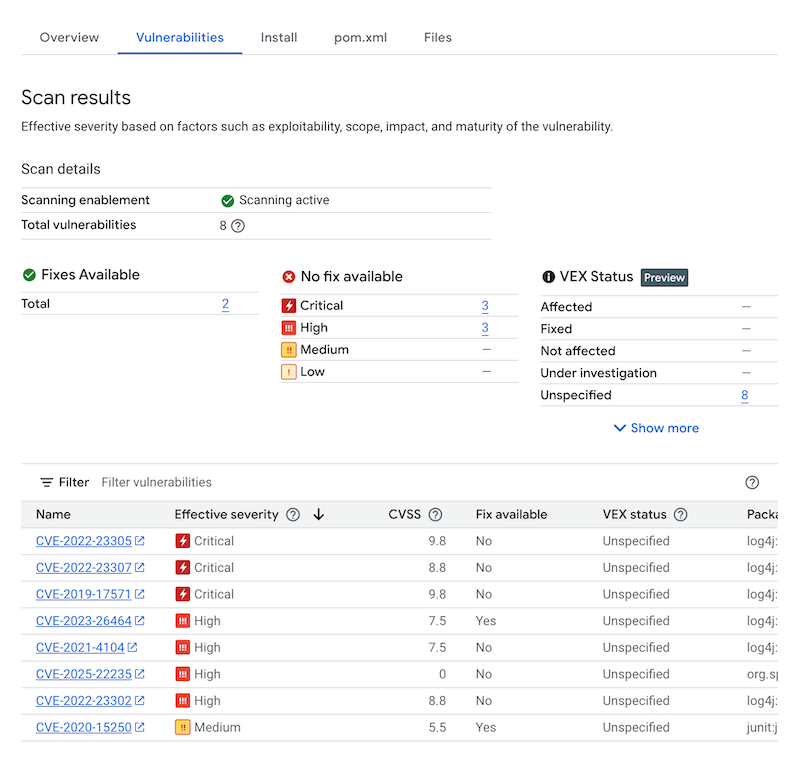
漏洞表格会列出发现的每个漏洞的常见漏洞和披露 (CVE) 名称、有效严重程度、通用漏洞评分系统 (CVSS) 评分、修复(如有)、包含漏洞的软件包的名称以及软件包类型。您可以过滤和排序这些文件,以按文件扩展名检查特定文件、目录或文件类型。 Google Cloud 控制台会在该表格中显示最多 1,200 个漏洞。
如需详细了解特定 CVE,请点击 CVE 名称。
如需查看漏洞出现详情(例如版本号和受影响的位置),请在包含漏洞名称的行中点击查看或查看已修复。对于没有修复的漏洞,链接文字为查看;对于已应用修复的漏洞,链接文字为查看已修复。
使用 gcloud 查看出现次数
如需查看 Artifact Registry 中软件包的出现情况,请运行 gcloud artifacts versions describe 命令:
gcloud artifacts versions describe VERSION \
    --location=LOCATION --repository=REPOSITORY --package=PACKAGE --show-package-vulnerability
其中:
- VERSION 是您要查看相应发生情况的软件包的版本。
- LOCATION 是代码库的单区域或多区域位置。
- REPOSITORY 是存储了相应软件包的代码库的名称。
- PACKAGE 是代码库中的软件包名称。 您无法使用此命令指定软件包标记。
使用 API 查看出现次数
如需获取项目中发生实例的列表,请使用以下命令:
 curl -X GET -H "Content-Type: application/json" -H \
    "Authorization: Bearer $(gcloud auth print-access-token)" \
    https://containeranalysis.googleapis.com/v1/projects/PROJECT_ID/occurrences
如需获取项目中漏洞的汇总,请使用以下命令:
 curl -X GET -H "Content-Type: application/json" -H \
    "Authorization: Bearer $(gcloud auth print-access-token)" \
    https://containeranalysis.googleapis.com/v1/projects/PROJECT_ID/occurrences:vulnerabilitySummary
如需获取特定发生实例的详细信息,请执行以下操作:
 curl -X GET -H "Content-Type: application/json" -H \
    "Authorization: Bearer $(gcloud auth print-access-token)" \
    https://containeranalysis.googleapis.com/v1/projects/PROJECT_ID/occurrences/OCCURRENCE_ID
过滤发生实例
您可以在 gcloud 命令和 Artifact Analysis API 中使用过滤条件字符串,以便在查看发生实例之前对其进行过滤。以下部分介绍了支持的搜索过滤条件。
查看特定类型的发生实例
您可以使用 kind 值按发生类型进行过滤。请参阅可用的种类。
以下示例演示了如何过滤软件包漏洞发现:
gcloud
Google Cloud CLI 不支持针对基于软件包的扫描过滤发现项。
API
在 API 查询中,使用以下过滤表达式:
kind="PACKAGE_VULNERABILITY" AND resourceUrl="RESOURCE_URL"
其中:
PACKAGE_VULNERABILITY是发生实例的种类。- RESOURCE_URL 是软件包的完整网址,格式为
projects/PROJECT_ID/locations/LOCATION/repositories/REPOSITORY_ID/packages/PACKAGE_ID/PACKAGE_TYPE/VERSION_ID:
您可以使用 hasPrefix 函数来扩大过滤范围。
例如,以下过滤条件用于在同一软件包的多个版本中过滤特定种类的发生实例:
kind="NOTE_KIND" AND has_prefix(resourceUrl, "RESOURCE_URL_PREFIX")
其中:
- RESOURCE_URL_PREFIX 用于指定资源网址中的子字符串。
- 如需过滤软件包的所有版本,请省略版本。使用以下格式:
projects/PROJECT_ID/locations/LOCATION/repositories/REPOSITORY_ID - 如需过滤项目中的所有软件包,只需指定资源位置和项目即可。使用以下格式:
projects/PROJECT_ID/locations/LOCATION
- 如需过滤软件包的所有版本,请省略版本。使用以下格式:
查看漏洞发生实例
您可以使用 gcloud CLI 或 Artifact Analysis API 查看漏洞发现列表。
gcloud
如需检索软件包的漏洞发生实例列表,请使用 --show-package-vulnerability 标志:
gcloud artifacts versions describe VERSION_ID --repository=REPOSITORY_ID
  --package=GROUP_ID:ARTIFACT_ID --show-package-vulnerability
其中:
- VERSION 是软件包的版本号。
- REPOSITORY 是存储了相应软件包的代码库的名称。
- GROUP_ID 是软件包的组标识符。
- ARTIFACT_ID 是您软件包的制品标识符。
API
在 API 查询中,使用以下过滤表达式:
GET https://containeranalysis.googleapis.com/v1/projects/PROJECT_ID/occurrences?filter=kind%3D%22VULNERABILITY%22%20AND%20resourceUrl%3D%22ENCODED_RESOURCE_URL%22
其中:
- ENCODED_RESOURCE_URL 是映像的编码路径。如需了解编码,请参阅网址编码。
如需详细了解如何使用该 API,请参阅 projects.occurrences.get。
查看与特定备注相关联的图片
您可以检索与特定备注 ID 相关联的资源列表。例如,您可以列出具有特定 CVE 漏洞的映像。
如需列出项目中与特定备注相关联的所有映像,请使用以下过滤条件表达式:
gcloud
Google Cloud CLI 不支持针对基于软件包的扫描过滤发现项。
API
GET https://containeranalysis.googleapis.com/v1/projects/PROJECT_ID/occurrences?filter=noteProjectId%3D%22goog-vulnz%22%20AND%20resourceUrl%3D%22ENCODED_RESOURCE_URL%22%20AND%20noteId%3D%22NOTE_ID%22
其中:
如需检查特定备注的特定映像,请使用以下过滤条件表达式:
gcloud
Google Cloud CLI 不支持针对基于软件包的扫描过滤发现项。
API
在 API 查询中,添加以下过滤表达式:
resourceUrl="RESOURCE_URL" AND noteProjectId="goog-vulnz" \
AND noteId="NOTE_ID"
其中:
- RESOURCE_URL 是软件包的完整网址,格式为
projects/PROJECT_ID/locations/LOCATION/repositories/REPOSITORY_ID/packages/PACKAGE_ID/PACKAGE_TYPE/VERSION_ID。 goog-vulnz是 Artifact Analysis 漏洞分析的PROVIDER_PROJECT_ID。- NOTE_ID 是备注的 ID。安全相关备注的格式通常为
CVE-2019-12345。
后续步骤
- 使用 Pub/Sub 通知可接收有关漏洞和其他元数据的通知。