自动扫描操作系统软件包

本文档将介绍如何启用 Container Scanning API、将映像推送到 Artifact Registry,以及查看映像中发现的漏洞列表。

Artifact Analysis 可为 Artifact Registry 中的容器映像提供漏洞信息。元数据以注释的形式存储。系统会为与映像关联的每个备注实例创建一个发生。如需了解详情,请参阅概览和价格文档。

准备工作

  1. 登录您的 Google Cloud 账号。如果您是 Google Cloud新手,请 创建一个账号来评估我们的产品在实际场景中的表现。新客户还可获享 $300 赠金,用于运行、测试和部署工作负载。
  2. In the Google Cloud console, on the project selector page, select or create a Google Cloud project.

    Roles required to select or create a project

    • Select a project: Selecting a project doesn't require a specific IAM role—you can select any project that you've been granted a role on.
    • Create a project: To create a project, you need the Project Creator role (roles/resourcemanager.projectCreator), which contains the resourcemanager.projects.create permission. Learn how to grant roles.

    Go to project selector

  3. Verify that billing is enabled for your Google Cloud project.

  4. Enable the Artifact Registry and Container Scanning APIs, if any are not already enabled.

    Roles required to enable APIs

    To enable APIs, you need the serviceusage.services.enable permission. If you created the project, then you likely already have this permission through the Owner role (roles/owner). Otherwise, you can get this permission through the Service Usage Admin role (roles/serviceusage.serviceUsageAdmin). Learn how to grant roles.

    Enable the APIs

  5. Install the Google Cloud CLI.

  6. If you're using an external identity provider (IdP), you must first sign in to the gcloud CLI with your federated identity.

  7. To initialize the gcloud CLI, run the following command:

    gcloud init
  8. In the Google Cloud console, on the project selector page, select or create a Google Cloud project.

    Roles required to select or create a project

    • Select a project: Selecting a project doesn't require a specific IAM role—you can select any project that you've been granted a role on.
    • Create a project: To create a project, you need the Project Creator role (roles/resourcemanager.projectCreator), which contains the resourcemanager.projects.create permission. Learn how to grant roles.

    Go to project selector

  9. Verify that billing is enabled for your Google Cloud project.

  10. Enable the Artifact Registry and Container Scanning APIs, if any are not already enabled.

    Roles required to enable APIs

    To enable APIs, you need the serviceusage.services.enable permission. If you created the project, then you likely already have this permission through the Owner role (roles/owner). Otherwise, you can get this permission through the Service Usage Admin role (roles/serviceusage.serviceUsageAdmin). Learn how to grant roles.

    Enable the APIs

  11. Install the Google Cloud CLI.

  12. If you're using an external identity provider (IdP), you must first sign in to the gcloud CLI with your federated identity.

  13. To initialize the gcloud CLI, run the following command:

    gcloud init
  14. 在 Artifact Registry 中创建 Docker 代码库,并将容器映像推送到该代码库。如果您不熟悉 Artifact Registry,请参阅 Docker 快速入门。

启用此 API 还会启用 Artifact Registry 中的语言包扫描功能。请参阅支持的软件包类型。

所需的角色

如需获得查看软件包扫描结果所需的权限,请让管理员向您授予项目的以下 IAM 角色:

如需详细了解如何授予角色,请参阅管理对项目、文件夹和组织的访问权限。

您也可以通过自定义角色或其他预定义角色来获取所需的权限。

查看映像漏洞

Artifact Analysis 会在新映像上传到 Artifact Registry 时扫描这些映像。此扫描可提取有关容器中系统软件包的信息。

您可以使用 Google Cloud 控制台、Google Cloud CLI 或 Container Analysis API 查看注册表中映像的漏洞发现情况。如果映像存在漏洞,您可以获取详细信息。

只要映像和软件包在过去 30 天内被拉取过,Artifact Analysis 就会继续扫描它们。30 天后,扫描过的映像和软件包的元数据将不再更新,并且结果将过时。

Artifact Analysis 会归档过时超过 90 天的元数据。此归档元数据只能使用 API 进行评估。 您可以通过拉取映像来重新扫描包含过时或归档元数据的映像。刷新元数据最多可能需要 24 小时。无法重新扫描具有过时或已归档元数据的软件包。

在 Google Cloud 控制台中查看发生实例

如需查看映像中的漏洞,请执行以下操作:

  1. 获取代码库列表。

    打开“代码库”页面

  2. 在代码库列表中,点击一个代码库。

  3. 在映像列表中,点击一个映像名称。

    漏洞列中会显示每个映像摘要的漏洞总数。

    存在漏洞的扫描图像

  4. 如需查看映像的漏洞列表,请点击漏洞列中的链接。

    扫描结果部分会显示扫描的软件包类型、漏洞总数、有修复的漏洞、无修复的漏洞和有效严重程度的摘要。
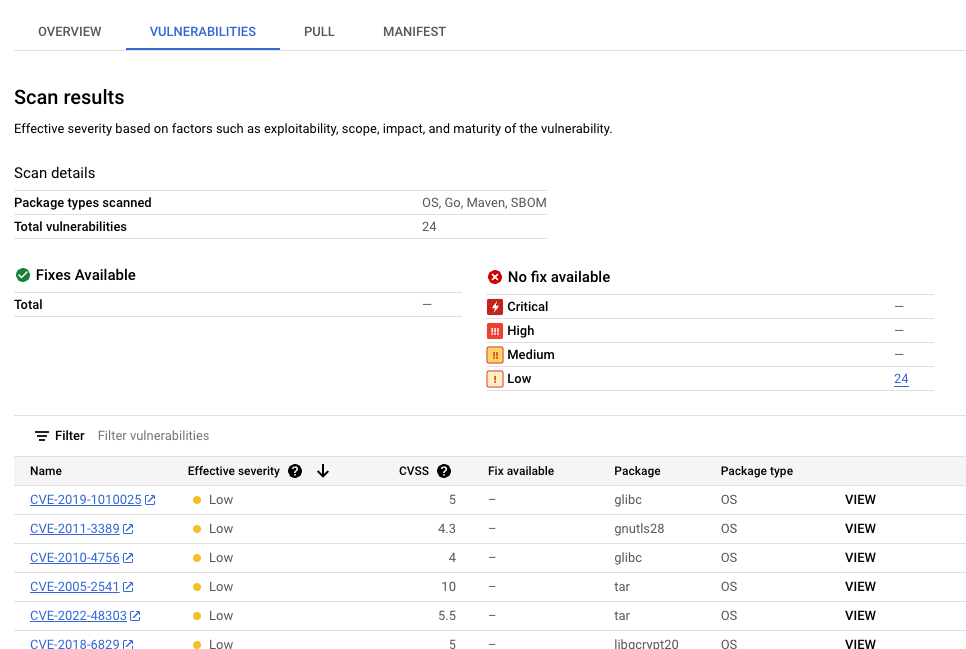
    “扫描结果”页面,其中列出了漏洞、修复和有效严重程度

    漏洞表格列出了发现的每个漏洞的常见漏洞和披露 (CVE) 名称、有效严重程度、通用漏洞评分系统 (CVSS) 评分、修复(如有)、包含漏洞的软件包的名称以及软件包类型。

    Google Cloud 控制台在此表格中每页最多显示 1,200 个漏洞。您可以过滤和排序这些文件,以便按文件扩展名查看特定文件、目录、图层或文件类型。

  5. 如需详细了解特定 CVE,请点击相应 CVE 名称。

  6. 如需查看漏洞出现详情(例如版本号和受影响的位置),请在包含漏洞名称的行中点击查看或查看已修复。对于没有修复的漏洞,链接文字为查看;对于已应用修复的漏洞,链接文字为查看已修复。

查看特定层中的漏洞

Artifact Analysis 可提供特定于层的元数据,帮助您确定哪个软件包包含漏洞,以及哪个 Docker build 命令引入了相应层。

如需在 Google Cloud 控制台中查看基于层的漏洞元数据,请执行以下操作:

  1. 在 Artifact Registry 中,打开代码库列表。

    打开“代码库”页面

  2. 在代码库页面中,点击一个代码库。

  3. 在媒体库详情页面中,点击一张图片。

  4. 在映像版本列表中,点击某个映像摘要。

  5. 在映像摘要详情页面中,点击漏洞标签页。

    当基于层的元数据可用时,Artifact Analysis 会在层栏中显示可供选择的层列表:

    映像摘要的“漏洞”页面(包括“层”栏)的图片。图层栏有一个下拉菜单,可用于从编号列表中进行选择。

  6. 如需查看图层列表,请点击图层下拉菜单。

    系统会打开一个下拉列表,其中显示了编号列表的图层。第 0 层代表底层,后续每一层均在前一层的基础上构建。系统只会显示已发现漏洞的层。
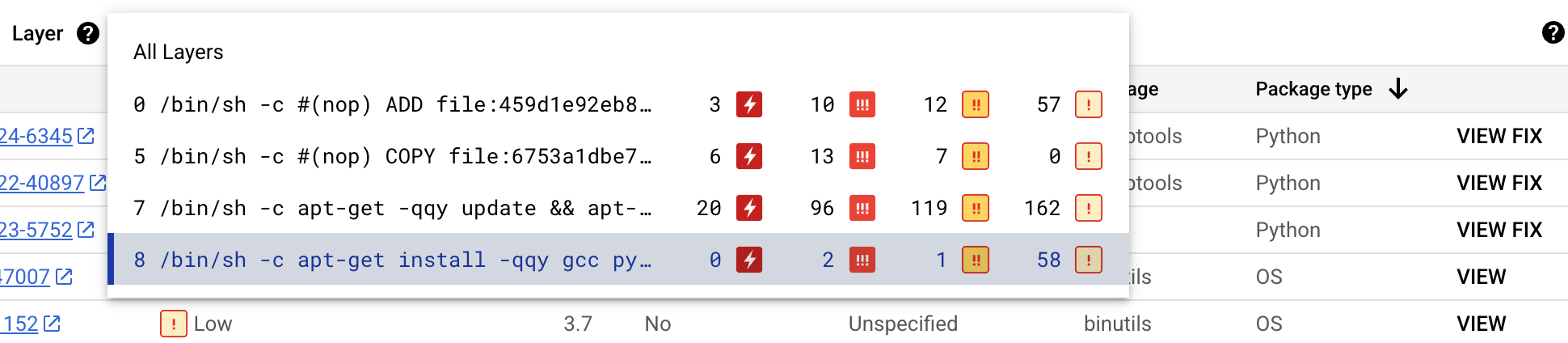
    一张打开的图层下拉菜单的图片。该菜单会显示用于构建层的 Docker 命令,以及每层的漏洞类型和数量。

    对于每个层,Artifact Analysis 会显示用于构建该层的 Docker 命令以及在该层中发现的漏洞数量。

  7. 如需详细了解特定层中的漏洞,请从层列表中选择一个层。

    漏洞表格会更新为仅显示所选层中发现的漏洞。您可以应用更多过滤条件,也可以调查特定漏洞。

  8. 点击漏洞旁边的查看或查看修复,即可查看更详细的漏洞信息。

    漏洞详情侧边栏会显示存在漏洞的软件包的文件位置。

  9. 在文件位置表格中,将光标悬停在问号上,以打开其他图层元数据。

    对话框会显示层索引、层构建命令、层摘要和基础映像,您可以在其中修复漏洞。

使用 gcloud 查看发生实例

如需查看 Artifact Registry 中映像的发生实例,请运行 gcloud artifacts docker images list 命令:

  gcloud artifacts docker images list --show-occurrences \
      LOCATION-docker.pkg.dev/PROJECT_ID/REPOSITORY/IMAGE_ID

其中:

  • LOCATION 是代码库的单区域或多区域位置。
  • PROJECT_ID 是您的 Google Cloud 控制台项目 ID。
  • REPOSITORY 是存储了映像的代码库的名称。
  • IMAGE_ID 是代码库中映像的名称。 您无法使用此命令指定映像标记。

默认情况下,该命令会返回最新的 10 个结果。如需显示不同数量的结果,请使用 --show-occurrences-from 标志。 例如,以下命令会返回最近的 25 个结果:

gcloud artifacts docker images list --show-occurrences-from=25 \
    us-central1-docker.pkg.dev/my-project/my-repo/my-image

输出类似于以下内容:

示例图片输出

  {
      "name": "projects/my-project/locations/us-central1/occurrences/22d3edfb-34f2-4d3f-be08-fd90c549f010",
      "resource": {
        "uri": "https://us-central1-docker.pkg.dev/my-project/my-repo/golang-nginx@sha256:5b54ef20748417ccdb0b87afedf98c44e699e2f59bd6cv48cbdc1ca2e72c80e3"
      },
      "noteName": "projects/my-project/locations/us-central1/notes/CVE-2005-2541",
      "kind": "VULNERABILITY",
      "createTime": "2025-01-21T15:57:01.238832Z",
      "updateTime": "2025-01-21T15:57:01.238832Z",
      "vulnerability": {
        "severity": "CRITICAL",
        "cvssScore": 10,
        "packageIssue": [
          {
            "affectedLocation": {
              "cpeUri": "cpe:/o:debian:debian_linux:12",
              "package": "tar",
              "version": {
                "name": "1.34+dfsg",
                "revision": "1.2+deb12u1",
                "kind": "NORMAL"
              }
            },
            "fixedLocation": {
              "cpeUri": "cpe:/o:debian:debian_linux:12",
              "package": "tar",
              "version": {
                "kind": "MAXIMUM"
              }
            },
            "packageType": "OS",
            "effectiveSeverity": "LOW",
            "file_location": [
                {
                "file_path": "/var/lib/dpkg/status",
                "layerDetails": {
                  "index": 0,
                  "diffID": "sha256:123",
                  "buildCommand": "FROM golang:example_sha256",
                  "BaseImages": [
                    {
                      "name": "library/golang",
                    },
                  ],
                },
              },
            ],
          }
        ],
        "shortDescription": "CVE-2005-2541",
        "longDescription": "NIST vectors: AV:N/AC:L/Au:N/C:C/I:C/A:C",
        "relatedUrls": [
          {
            "url": "https://security-tracker.debian.org/tracker/CVE-2005-2541",
            "label": "More Info"
          }
        ],
        "effectiveSeverity": "LOW",
        "cvssVersion": "CVSS_VERSION_2",
        "cvssV2": {
          "baseScore": 10,
          "attackVector": "ATTACK_VECTOR_NETWORK",
          "attackComplexity": "ATTACK_COMPLEXITY_LOW",
          "authentication": "AUTHENTICATION_NONE",
          "confidentialityImpact": "IMPACT_COMPLETE",
          "integrityImpact": "IMPACT_COMPLETE",
          "availabilityImpact": "IMPACT_COMPLETE"
        }
      }
    }
  

过滤漏洞出现次数

如需过滤漏洞发生实例,请使用 --occurrence-filter 参数:

gcloud artifacts docker images list --show-occurrences \
    LOCATION-docker.pkg.dev/PROJECT_ID/REPOSITORY/IMAGE_ID \
    --occurrence-filter=FILTER_EXPRESSION

其中:

  • LOCATION 是代码库的单区域或多区域位置。
  • PROJECT_ID 是您的 Google Cloud 控制台项目 ID。
  • REPOSITORY 是存储了映像的代码库的名称。
  • IMAGE_ID 是代码库中的映像名称。
  • FILTER_EXPRESSION 是一个示例过滤表达式,其格式如过滤漏洞出现情况中所述。

查看特定层的漏洞

您可以使用 layerDetails 字段来确定哪个特定层引入了易受攻击的软件包,并查看有关该层的其他信息。例如,请考虑以下图片的 layerDetails 输出:

  "layerDetails": {
    "index": 0,
    "diffID": "sha256:123",
    "buildCommand": "FROM golang:example_sha256",
    "BaseImages": [
      {
        "name": "library/golang",
      },
    ],
  }

输出显示,映像中的层索引为 0,层哈希为 sha256:123。用于构建此层的 Docker 构建命令是 FROM golang:example_sha256,该层也位于 library/golang 基础映像中。

使用 API 或代码查看活动

如需查看图片的出现情况,请按以下格式指定包含网址的图片:

LOCATION-docker.pkg.dev/PROJECT_ID/REPOSITORY/IMAGE_ID

API

使用 cURL

如需获取项目中发生实例的列表,请使用以下命令:

 curl -X GET -H "Content-Type: application/json" -H \
    "Authorization: Bearer $(gcloud auth print-access-token)" \
    https://containeranalysis.googleapis.com/v1/projects/PROJECT_ID/occurrences

如需获取项目中漏洞的汇总,请使用以下命令:

 curl -X GET -H "Content-Type: application/json" -H \
    "Authorization: Bearer $(gcloud auth print-access-token)" \
    https://containeranalysis.googleapis.com/v1/projects/PROJECT_ID/occurrences:vulnerabilitySummary

如需获取特定事件的详细信息,请执行以下操作:

 curl -X GET -H "Content-Type: application/json" -H \
    "Authorization: Bearer $(gcloud auth print-access-token)" \
    https://containeranalysis.googleapis.com/v1/projects/PROJECT_ID/occurrences/OCCURRENCE_ID

Java

如需了解如何安装和使用 Artifact Analysis 客户端库,请参阅 Artifact Analysis 客户端库。 如需了解详情,请参阅 Artifact Analysis Java API 参考文档。

如需向 Artifact Analysis 进行身份验证,请设置应用默认凭据。 如需了解详情,请参阅为本地开发环境设置身份验证。

import com.google.cloud.devtools.containeranalysis.v1.ContainerAnalysisClient;
import io.grafeas.v1.GrafeasClient;
import io.grafeas.v1.Occurrence;
import io.grafeas.v1.ProjectName;
import java.io.IOException;
import java.lang.InterruptedException;

public class OccurrencesForImage {
  // Retrieves all the Occurrences associated with a specified image
  // Here, all Occurrences are simply printed and counted
  public static int getOccurrencesForImage(String resourceUrl, String projectId)
      throws IOException, InterruptedException {
    // String resourceUrl = "https://gcr.io/project/image@sha256:123";
    // String projectId = "my-project-id";
    final String projectName = ProjectName.format(projectId);
    final String filterStr = String.format("resourceUrl=\"%s\"", resourceUrl);

    // Initialize client that will be used to send requests. After completing all of your requests, 
    // call the "close" method on the client to safely clean up any remaining background resources.
    GrafeasClient client = ContainerAnalysisClient.create().getGrafeasClient();
    int i = 0;
    for (Occurrence o : client.listOccurrences(projectName, filterStr).iterateAll()) {
      // Write custom code to process each Occurrence here
      System.out.println(o.getName());
      i = i + 1;
    }
    return i;
  }
}

Go

如需了解如何安装和使用 Artifact Analysis 客户端库,请参阅 Artifact Analysis 客户端库。 如需了解详情,请参阅 Artifact Analysis Go API 参考文档。

如需向 Artifact Analysis 进行身份验证,请设置应用默认凭据。 如需了解详情,请参阅为本地开发环境设置身份验证。


import (
	"context"
	"fmt"
	"io"

	containeranalysis "cloud.google.com/go/containeranalysis/apiv1"
	"google.golang.org/api/iterator"
	grafeaspb "google.golang.org/genproto/googleapis/grafeas/v1"
)

// getOccurrencesForImage retrieves all the Occurrences associated with a specified image.
// Here, all Occurrences are simply printed and counted.
func getOccurrencesForImage(w io.Writer, resourceURL, projectID string) (int, error) {
	// Use this style of URL when you use Google Container Registry.
	// resourceURL := "https://gcr.io/my-project/my-repo/my-image"
	// Use this style of URL when you use Google Artifact Registry.
	// resourceURL := "https://LOCATION-docker.pkg.dev/my-project/my-repo/my-image"
	ctx := context.Background()
	client, err := containeranalysis.NewClient(ctx)
	if err != nil {
		return -1, fmt.Errorf("NewClient: %w", err)
	}
	defer client.Close()

	req := &grafeaspb.ListOccurrencesRequest{
		Parent: fmt.Sprintf("projects/%s", projectID),
		Filter: fmt.Sprintf("resourceUrl=%q", resourceURL),
	}
	it := client.GetGrafeasClient().ListOccurrences(ctx, req)
	count := 0
	for {
		occ, err := it.Next()
		if err == iterator.Done {
			break
		}
		if err != nil {
			return -1, fmt.Errorf("occurrence iteration error: %w", err)
		}
		// Write custom code to process each Occurrence here.
		fmt.Fprintln(w, occ)
		count = count + 1
	}
	return count, nil
}

Node.js

如需了解如何安装和使用 Artifact Analysis 客户端库,请参阅 Artifact Analysis 客户端库。 如需了解详情,请参阅 Artifact Analysis Node.js API 参考文档。

如需向 Artifact Analysis 进行身份验证,请设置应用默认凭据。 如需了解详情,请参阅为本地开发环境设置身份验证。

/**
 * TODO(developer): Uncomment these variables before running the sample
 */
// const projectId = 'your-project-id', // Your GCP Project ID
// If you are using Google Container Registry
// const imageUrl = 'https://gcr.io/my-project/my-repo/my-image@sha256:123' // Image to attach metadata to
// If you are using Google Artifact Registry
// const imageUrl = 'https://LOCATION-docker.pkg.dev/my-project/my-repo/my-image@sha256:123' // Image to attach metadata to

// Import the library and create a client
const {ContainerAnalysisClient} = require('@google-cloud/containeranalysis');
const client = new ContainerAnalysisClient();

const formattedParent = client.getGrafeasClient().projectPath(projectId);

// Retrieves all the Occurrences associated with a specified image
const [occurrences] = await client.getGrafeasClient().listOccurrences({
  parent: formattedParent,
  filter: `resourceUrl = "${imageUrl}"`,
});

if (occurrences.length) {
  console.log(`Occurrences for ${imageUrl}`);
  occurrences.forEach(occurrence => {
    console.log(`${occurrence.name}:`);
  });
} else {
  console.log('No occurrences found.');
}

Ruby

如需了解如何安装和使用 Artifact Analysis 客户端库,请参阅 Artifact Analysis 客户端库。 如需了解详情,请参阅 Artifact Analysis Ruby API 参考文档。

如需向 Artifact Analysis 进行身份验证,请设置应用默认凭据。 如需了解详情,请参阅为本地开发环境设置身份验证。

# resource_url = "The URL of the resource associated with the occurrence."
#                # e.g. https://gcr.io/project/image@sha256:123"
# project_id   = "The Google Cloud project ID of the occurrences to retrieve"

require "google/cloud/container_analysis"

# Initialize the client
client = Google::Cloud::ContainerAnalysis.container_analysis.grafeas_client

parent = client.project_path project: project_id
filter = "resourceUrl = \"#{resource_url}\""
count = 0
client.list_occurrences(parent: parent, filter: filter).each do |occurrence|
  # Process occurrence here
  puts occurrence
  count += 1
end
puts "Found #{count} occurrences"

Python

如需了解如何安装和使用 Artifact Analysis 客户端库,请参阅 Artifact Analysis 客户端库。 如需了解详情,请参阅 Artifact Analysis Python API 参考文档。

如需向 Artifact Analysis 进行身份验证,请设置应用默认凭据。如需了解详情,请参阅为本地开发环境设置身份验证。

from google.cloud.devtools import containeranalysis_v1


def get_occurrences_for_image(resource_url: str, project_id: str) -> int:
    """Retrieves all the occurrences associated with a specified image.
    Here, all occurrences are simply printed and counted."""
    # resource_url = 'https://gcr.io/my-project/my-image@sha256:123'
    # project_id = 'my-gcp-project'

    filter_str = f'resourceUrl="{resource_url}"'
    client = containeranalysis_v1.ContainerAnalysisClient()
    grafeas_client = client.get_grafeas_client()
    project_name = f"projects/{project_id}"

    response = grafeas_client.list_occurrences(parent=project_name, filter=filter_str)
    count = 0
    for o in response:
        # do something with the retrieved occurrence
        # in this sample, we will simply count each one
        count += 1
    return count

在 Cloud Build 中查看出现次数

如果您使用的是 Cloud Build,还可以在 Google Cloud 控制台内的安全洞见侧边栏中查看映像漏洞。

安全性数据洞见侧边栏会大致显示存储在 Artifact Registry 中的工件的构建安全性信息。如需详细了解侧边栏以及如何使用 Cloud Build 帮助保护软件供应链,请参阅查看构建安全性数据分析。

过滤出现次数

您可以在 gcloud 命令和 Artifact Analysis API 中使用过滤字符串来过滤出现次数,然后再查看它们。以下部分介绍了支持的搜索过滤条件。

查看发现结果记录

首次将映像推送到 Artifact Registry 时,Artifact Registry 会创建一个发现事件,其中包含有关容器映像初始扫描的信息。

如需检索映像的扫描结果实例,请使用以下过滤条件表达式:

kind="DISCOVERY" AND resourceUrl="RESOURCE_URL"

其中,RESOURCE_URL 的格式如下:

LOCATION-docker.pkg.dev/PROJECT_ID/REPOSITORY/IMAGE_ID

gcloud

查看映像的发现次数:

在这种情况下,表达式不会直接在命令中使用,但相同的信息会作为参数传递:

Artifact Registry:

gcloud artifacts docker images list --show-occurrences \
--occurrence-filter='kind="DISCOVERY"' --format=json \
LOCATION-docker.pkg.dev/PROJECT_ID/REPOSITORY/IMAGE_ID

API

如需检索发现项,您的过滤表达式必须经过网址编码并嵌入到 GET 请求中,如下所示:

GET https://containeranalysis.googleapis.com/v1/projects/PROJECT_ID/occurrences?filter=kind%3D%22DISCOVERY%22%20AND%20resourceUrl%3D%22ENCODED_RESOURCE_URL%22

如需了解详情,请参阅 projects.occurrences.get API 端点。

Java

如需了解如何安装和使用 Artifact Analysis 客户端库,请参阅 Artifact Analysis 客户端库。 如需了解详情,请参阅 Artifact Analysis Java API 参考文档。

如需向 Artifact Analysis 进行身份验证,请设置应用默认凭据。 如需了解详情,请参阅为本地开发环境设置身份验证。

import com.google.cloud.devtools.containeranalysis.v1.ContainerAnalysisClient;
import io.grafeas.v1.GrafeasClient;
import io.grafeas.v1.Occurrence;
import io.grafeas.v1.ProjectName;
import java.io.IOException;
import java.lang.InterruptedException;

public class GetDiscoveryInfo {
  // Retrieves and prints the Discovery Occurrence created for a specified image
  // The Discovery Occurrence contains information about the initial scan on the image
  public static void getDiscoveryInfo(String resourceUrl, String projectId) 
      throws IOException, InterruptedException {
    // String resourceUrl = "https://gcr.io/project/image@sha256:123";
    // String projectId = "my-project-id";
    String filterStr = "kind=\"DISCOVERY\" AND resourceUrl=\"" + resourceUrl + "\"";
    final String projectName = ProjectName.format(projectId);

    // Initialize client that will be used to send requests. After completing all of your requests, 
    // call the "close" method on the client to safely clean up any remaining background resources.
    GrafeasClient client = ContainerAnalysisClient.create().getGrafeasClient();
    for (Occurrence o : client.listOccurrences(projectName, filterStr).iterateAll()) {
      System.out.println(o);
    }
  }
}

Go

如需了解如何安装和使用 Artifact Analysis 客户端库,请参阅 Artifact Analysis 客户端库。 如需了解详情,请参阅 Artifact Analysis Go API 参考文档。

如需向 Artifact Analysis 进行身份验证,请设置应用默认凭据。如需了解详情,请参阅为本地开发环境设置身份验证。


import (
	"context"
	"fmt"
	"io"

	containeranalysis "cloud.google.com/go/containeranalysis/apiv1"
	"google.golang.org/api/iterator"
	grafeaspb "google.golang.org/genproto/googleapis/grafeas/v1"
)

// getDiscoveryInfo retrieves and prints the Discovery Occurrence created for a specified image.
// The Discovery Occurrence contains information about the initial scan on the image.
func getDiscoveryInfo(w io.Writer, resourceURL, projectID string) error {
	// Use this style of URL when you use Google Container Registry.
	// resourceURL := "https://gcr.io/my-project/my-repo/my-image"
	// Use this style of URL when you use Google Artifact Registry.
	// resourceURL := "https://LOCATION-docker.pkg.dev/my-project/my-repo/my-image"
	ctx := context.Background()
	client, err := containeranalysis.NewClient(ctx)
	if err != nil {
		return fmt.Errorf("NewClient: %w", err)
	}
	defer client.Close()

	req := &grafeaspb.ListOccurrencesRequest{
		Parent: fmt.Sprintf("projects/%s", projectID),
		Filter: fmt.Sprintf(`kind="DISCOVERY" AND resourceUrl=%q`, resourceURL),
	}
	it := client.GetGrafeasClient().ListOccurrences(ctx, req)
	for {
		occ, err := it.Next()
		if err == iterator.Done {
			break
		}
		if err != nil {
			return fmt.Errorf("occurrence iteration error: %w", err)
		}
		fmt.Fprintln(w, occ)
	}
	return nil
}

Node.js

如需了解如何安装和使用 Artifact Analysis 客户端库,请参阅 Artifact Analysis 客户端库。 如需了解详情,请参阅 Artifact Analysis Node.js API 参考文档。

如需向 Artifact Analysis 进行身份验证,请设置应用默认凭据。 如需了解详情,请参阅为本地开发环境设置身份验证。

/**
 * TODO(developer): Uncomment these variables before running the sample
 */
// const projectId = 'your-project-id', // Your GCP Project ID
// If you are using Google Container Registry
// const imageUrl = 'https://gcr.io/my-project/my-repo/my-image:123' // Image to attach metadata to
// If you are using Google Artifact Registry
// const imageUrl = 'https://LOCATION-docker.pkg.dev/my-project/my-repo/my-image:123' // Image to attach metadata to

// Import the library and create a client
const {ContainerAnalysisClient} = require('@google-cloud/containeranalysis');
const client = new ContainerAnalysisClient();

const formattedParent = client.getGrafeasClient().projectPath(projectId);
// Retrieves and prints the Discovery Occurrence created for a specified image
// The Discovery Occurrence contains information about the initial scan on the image
const [occurrences] = await client.getGrafeasClient().listOccurrences({
  parent: formattedParent,
  filter: `kind = "DISCOVERY" AND resourceUrl = "${imageUrl}"`,
});

if (occurrences.length > 0) {
  console.log(`Discovery Occurrences for ${imageUrl}`);
  occurrences.forEach(occurrence => {
    console.log(`${occurrence.name}:`);
  });
} else {
  console.log('No occurrences found.');
}

Ruby

如需了解如何安装和使用 Artifact Analysis 客户端库,请参阅 Artifact Analysis 客户端库。 如需了解详情,请参阅 Artifact Analysis Ruby API 参考文档。

如需向 Artifact Analysis 进行身份验证,请设置应用默认凭据。 如需了解详情,请参阅为本地开发环境设置身份验证。

# resource_url = "The URL of the resource associated with the occurrence."
#                # e.g. https://gcr.io/project/image@sha256:123
# project_id   = "The Google Cloud project ID of the occurrences to retrieve"

require "google/cloud/container_analysis"

# Initialize the client
client = Google::Cloud::ContainerAnalysis.container_analysis.grafeas_client

parent = client.project_path project: project_id
filter = "kind = \"DISCOVERY\" AND resourceUrl = \"#{resource_url}\""
client.list_occurrences(parent: parent, filter: filter).each do |occurrence|
  # Process discovery occurrence here
  puts occurrence
end

Python

如需了解如何安装和使用 Artifact Analysis 客户端库,请参阅 Artifact Analysis 客户端库。 如需了解详情,请参阅 Artifact Analysis Python API 参考文档。

如需向 Artifact Analysis 进行身份验证,请设置应用默认凭据。 如需了解详情,请参阅为本地开发环境设置身份验证。

from google.cloud.devtools import containeranalysis_v1


def get_discovery_info(resource_url: str, project_id: str) -> None:
    """Retrieves and prints the discovery occurrence created for a specified
    image. The discovery occurrence contains information about the initial
    scan on the image."""
    # resource_url = 'https://gcr.io/my-project/my-image@sha256:123'
    # project_id = 'my-gcp-project'

    filter_str = f'kind="DISCOVERY" AND resourceUrl="{resource_url}"'
    client = containeranalysis_v1.ContainerAnalysisClient()
    grafeas_client = client.get_grafeas_client()
    project_name = f"projects/{project_id}"
    response = grafeas_client.list_occurrences(parent=project_name, filter_=filter_str)
    for occ in response:
        print(occ)

查看漏洞出现次数

如需查看特定映像的漏洞发生实例,请使用过滤条件表达式创建查询:

kind="VULNERABILITY" AND resourceUrl="RESOURCE_URL"

其中 RESOURCE_URL 采用以下格式:

LOCATION-docker.pkg.dev/PROJECT_ID/REPOSITORY/IMAGE_ID

gcloud

在这种情况下,表达式不会直接用于命令中,但会以实参的形式传递相同的信息:

Artifact Registry

gcloud artifacts docker images list --show-occurrences \
--occurrence-filter='kind="VULNERABILITY"' --format=json \
LOCATION-docker.pkg.dev/PROJECT_ID/REPOSITORY/IMAGE_ID

API

资源网址必须经过 网址编码,并按如下方式嵌入到 GET 请求中:

GET https://containeranalysis.googleapis.com/v1/projects/PROJECT_ID/occurrences?filter=kind%3D%22VULNERABILITY%22%20AND%20resourceUrl%3D%22ENCODED_RESOURCE_URL%22

如需了解详情,请参阅 projects.occurrences.get API 端点。

Java

如需了解如何安装和使用 Artifact Analysis 客户端库,请参阅 Artifact Analysis 客户端库。 如需了解详情,请参阅 Artifact Analysis Java API 参考文档。

如需向 Artifact Analysis 进行身份验证,请设置应用默认凭据。如需了解详情,请参阅为本地开发环境设置身份验证。

import com.google.cloud.devtools.containeranalysis.v1.ContainerAnalysisClient;
import io.grafeas.v1.GrafeasClient;
import io.grafeas.v1.Occurrence;
import io.grafeas.v1.ProjectName;
import java.io.IOException;
import java.util.LinkedList;
import java.util.List;

public class VulnerabilityOccurrencesForImage {
  // Retrieve a list of vulnerability occurrences assoviated with a resource
  public static List<Occurrence> findVulnerabilityOccurrencesForImage(String resourceUrl, 
      String projectId) throws IOException {
    // String resourceUrl = "https://gcr.io/project/image@sha256:123";
    // String projectId = "my-project-id";
    final String projectName = ProjectName.format(projectId);
    String filterStr = String.format("kind=\"VULNERABILITY\" AND resourceUrl=\"%s\"", resourceUrl);

    // Initialize client that will be used to send requests. After completing all of your requests, 
    // call the "close" method on the client to safely clean up any remaining background resources.
    GrafeasClient client = ContainerAnalysisClient.create().getGrafeasClient();
    LinkedList<Occurrence> vulnerabilitylist = new LinkedList<Occurrence>();
    for (Occurrence o : client.listOccurrences(projectName, filterStr).iterateAll()) {
      vulnerabilitylist.add(o);
    }
    return vulnerabilitylist;
  }
}

Go

如需了解如何安装和使用 Artifact Analysis 客户端库,请参阅 Artifact Analysis 客户端库。 如需了解详情,请参阅 Artifact Analysis Go API 参考文档。

如需向 Artifact Analysis 进行身份验证,请设置应用默认凭据。 如需了解详情,请参阅为本地开发环境设置身份验证。


import (
	"context"
	"fmt"

	containeranalysis "cloud.google.com/go/containeranalysis/apiv1"
	"google.golang.org/api/iterator"
	grafeaspb "google.golang.org/genproto/googleapis/grafeas/v1"
)

// findVulnerabilityOccurrencesForImage retrieves all vulnerability Occurrences associated with a resource.
func findVulnerabilityOccurrencesForImage(resourceURL, projectID string) ([]*grafeaspb.Occurrence, error) {
	// Use this style of URL when you use Google Container Registry.
	// resourceURL := "https://gcr.io/my-project/my-repo/my-image"
	// Use this style of URL when you use Google Artifact Registry.
	// resourceURL := "https://LOCATION-docker.pkg.dev/my-project/my-repo/my-image"
	ctx := context.Background()
	client, err := containeranalysis.NewClient(ctx)
	if err != nil {
		return nil, fmt.Errorf("NewClient: %w", err)
	}
	defer client.Close()

	req := &grafeaspb.ListOccurrencesRequest{
		Parent: fmt.Sprintf("projects/%s", projectID),
		Filter: fmt.Sprintf("resourceUrl = %q kind = %q", resourceURL, "VULNERABILITY"),
	}

	var occurrenceList []*grafeaspb.Occurrence
	it := client.GetGrafeasClient().ListOccurrences(ctx, req)
	for {
		occ, err := it.Next()
		if err == iterator.Done {
			break
		}
		if err != nil {
			return nil, fmt.Errorf("occurrence iteration error: %w", err)
		}
		occurrenceList = append(occurrenceList, occ)
	}

	return occurrenceList, nil
}

Node.js

如需了解如何安装和使用 Artifact Analysis 客户端库,请参阅 Artifact Analysis 客户端库。 如需了解详情,请参阅 Artifact Analysis Node.js API 参考文档。

如需向 Artifact Analysis 进行身份验证,请设置应用默认凭据。如需了解详情,请参阅为本地开发环境设置身份验证。

/**
 * TODO(developer): Uncomment these variables before running the sample
 */
// const projectId = 'your-project-id', // Your GCP Project ID
// If you are using Google Container Registry
// const imageUrl = 'https://gcr.io/my-project/my-repo/my-image:123' // Image to attach metadata to
// If you are using Google Artifact Registry
// const imageUrl = 'https://LOCATION-docker.pkg.dev/my-project/my-repo/my-image:123' // Image to attach metadata to

// Import the library and create a client
const {ContainerAnalysisClient} = require('@google-cloud/containeranalysis');
const client = new ContainerAnalysisClient();

const formattedParent = client.getGrafeasClient().projectPath(projectId);

// Retrieve a list of vulnerability occurrences assoviated with a resource
const [occurrences] = await client.getGrafeasClient().listOccurrences({
  parent: formattedParent,
  filter: `kind = "VULNERABILITY" AND resourceUrl = "${imageUrl}"`,
});

if (occurrences.length) {
  console.log(`All Vulnerabilities for ${imageUrl}`);
  occurrences.forEach(occurrence => {
    console.log(`${occurrence.name}:`);
  });
} else {
  console.log('No occurrences found.');
}

Ruby

如需了解如何安装和使用 Artifact Analysis 客户端库,请参阅 Artifact Analysis 客户端库。 如需了解详情,请参阅 Artifact Analysis Ruby API 参考文档。

如需向 Artifact Analysis 进行身份验证,请设置应用默认凭据。 如需了解详情,请参阅为本地开发环境设置身份验证。

# resource_url = "The URL of the resource associated with the occurrence
#                e.g. https://gcr.io/project/image@sha256:123"
# project_id   = "The Google Cloud project ID of the vulnerabilities to find"

require "google/cloud/container_analysis"

# Initialize the client
client = Google::Cloud::ContainerAnalysis.container_analysis.grafeas_client

parent = client.project_path project: project_id
filter = "resourceUrl = \"#{resource_url}\" AND kind = \"VULNERABILITY\""
client.list_occurrences parent: parent, filter: filter

Python

如需了解如何安装和使用 Artifact Analysis 客户端库,请参阅 Artifact Analysis 客户端库。 如需了解详情,请参阅 Artifact Analysis Python API 参考文档。

如需向 Artifact Analysis 进行身份验证,请设置应用默认凭据。如需了解详情,请参阅为本地开发环境设置身份验证。

from typing import List

from google.cloud.devtools import containeranalysis_v1
from grafeas.grafeas_v1 import types


def find_vulnerabilities_for_image(
    resource_url: str, project_id: str
) -> List[types.grafeas.Occurrence]:
    """ "Retrieves all vulnerability occurrences associated with a resource."""
    # resource_url = 'https://gcr.io/my-project/my-image@sha256:123'
    # project_id = 'my-gcp-project'

    client = containeranalysis_v1.ContainerAnalysisClient()
    grafeas_client = client.get_grafeas_client()
    project_name = f"projects/{project_id}"

    filter_str = 'kind="VULNERABILITY" AND resourceUrl="{}"'.format(resource_url)
    return list(grafeas_client.list_occurrences(parent=project_name, filter=filter_str))

查看特定类型的出现次数

在前面两个示例中,过滤表达式之间的唯一区别是 kind 的值,该值用于标识发生类型。使用此字段可将发生实例列表限制为特定类型,例如漏洞或部署。

如需检查特定映像的发生实例,请使用以下过滤条件表达式:

kind="NOTE_KIND" AND resourceUrl="RESOURCE_URL"

其中:

  • NOTE_KIND 是备注的种类。
    • 例如,使用 DISCOVERY 种类可列出扫描结果实例。 当映像首次推送到 Artifact Registry 时,系统会为映像创建发现事件。
    • 如需列出漏洞发生实例,请使用 VULNERABILITY 种类。
  • RESOURCE_URL 是图片的完整网址 https://HOSTNAME/PROJECT_ID/IMAGE_ID@sha256:HASH

用于在多个映像中检索特定种类发生实例的过滤条件表达式如下:

kind="NOTE_KIND" AND has_prefix(resourceUrl, "RESOURCE_URL_PREFIX")

其中:

  • RESOURCE_URL_PREFIX 是某些映像的网址前缀
    • 如需列出映像的所有版本,请使用以下网址前缀:https://HOSTNAME/PROJECT_ID/IMAGE_ID@
    • 如需列出项目中的所有映像,请使用以下网址前缀:https://HOSTNAME/PROJECT_ID/

查看与特定记事关联的图片

您可以检索与特定备注 ID 相关联的资源列表。例如,您可以列出具有特定 CVE 漏洞的映像。

如需列出项目中与特定备注相关联的所有映像,请使用以下过滤条件表达式:

noteProjectId="PROVIDER_PROJECT_ID" AND noteId="NOTE_ID"

如需检查特定备注的特定映像,请使用以下过滤条件表达式:

resourceUrl="RESOURCE_URL" AND noteProjectId="PROVIDER_PROJECT_ID" \
    AND noteId="NOTE_ID"

其中:

  • PROVIDER_PROJECT_ID 是提供商项目的 ID。例如,goog-vulnz 提供默认的漏洞分析。
  • NOTE_ID 是备注的 ID。与安全相关的备注通常格式化为 CVE-2019-12345。
  • RESOURCE_URL 是图片的完整网址 https://HOSTNAME/PROJECT_ID/IMAGE_ID@sha256:HASH

例如,如需检查经 Google 分析具有 CVE-2017-16231 发生实例的所有映像,请使用以下过滤条件表达式:

noteProjectId="goog-vulnz" AND noteId="CVE-2017-16231"

后续步骤
