This document describes common use cases for Google Cloud Armor security policies.
Cloud Armor security policies help protect your application with IP
address allowlists and denylists and preconfigured rules that deter common web
attacks.
## Feature availability
The following table summarizes the availability of Cloud Armor features
based on your subscription tier and the type of load balancer or endpoint you
are protecting.
| Feature | Cloud Armor Standard | Cloud Armor Enterprise | Supported endpoints |
|---|---|---|---|
| **Volumetric DDoS protection** | Included | Included | All external load balancers, Cloud CDN, Media CDN |
| **IP allow/deny rules** | Included | Included | External Application Load Balancer, External proxy Network Load Balancer |
| **Preconfigured WAF rules** | Included | Included | External Application Load Balancer, External proxy Network Load Balancer |
| **Custom CEL rules** | Included | Included | External Application Load Balancer, External proxy Network Load Balancer |
| **Adaptive Protection** | Alerting only | Full protection | External Application Load Balancer |
| **Bot management** | Not available | Included | External Application Load Balancer |
| **Advanced network DDoS protection** | Not available | Included | External passthrough Network Load Balancer, protocol forwarding, VM with public IP |
| **Network edge security policies** | Not available | Included | External passthrough Network Load Balancer, protocol forwarding, VM with public IP |
| **Threat Intelligence** | Not available | Included | External Application Load Balancer, External proxy Network Load Balancer |
## Security policy examples
This section describes how to use Cloud Armor security policies to
control access to your applications or services.
### Enable access for users at specific IP addresses with allowlists
Use an IP address allowlist to limit requests to specific IP addresses or CIDR
ranges, such as the public IPs of your branch offices. You can allow only traffic that originates from those specified ranges.
[](https://docs.cloud.google.com/static/armor/images/ip-bl-wl-2.svg) Restricting external Application Load Balancer access by using an allowlist (click to enlarge).
Control access to the global external Application Load Balancer or the classic Application Load Balancer by
configuring an allowlist with client IP addresses or client CIDR ranges. The
following section describes this configuration.
In this configuration, you only allow requests from client IP addresses in
a specific range to access the global external Application Load Balancer or the
classic Application Load Balancer. You want
all other traffic to be denied.
To create this configuration, follow these steps:
1. Create a Cloud Armor security policy.
2. In the security policy, add a rule that adds the range to the allowlist. This rule has the description `allow [RANGE]`, where `[RANGE]` is the desired IP range.
3. Change the default rule in the policy from an allow rule to a deny rule. The default rule is the last rule in the policy and governs traffic that doesn't match any preceding rules. Changing this rule to `deny` blocks all traffic that's not in the allowlist range.
4. Associate this policy with the global external Application Load Balancer or the classic Application Load Balancer's backend service.
If your organization uses a third-party security provider to scrub traffic, you
can add the security provider's IP address to an allowlist to ensure that only
scrubbed traffic can access the global external Application Load Balancer or the
classic Application Load Balancer and backends.
In the following illustration, the third-party provider is identified by the
CIDR range 192.0.2.0/24, and this range is on an allowlist.
[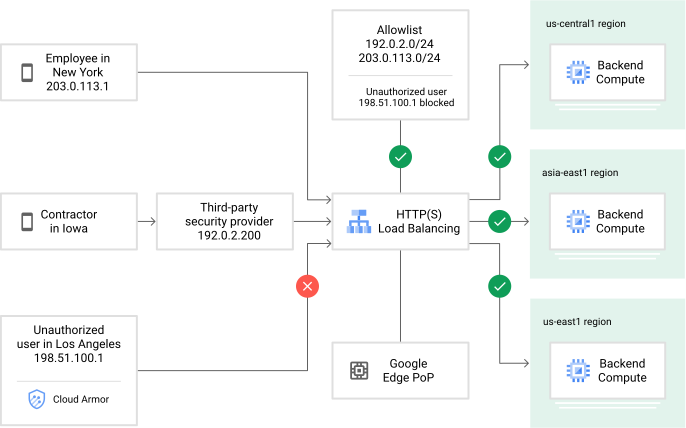](https://docs.cloud.google.com/static/armor/images/ip-bl-wl-4.svg) Restricting external Application Load Balancer access by using an allowlist to restrict traffic from a third-party security provider (click to enlarge).
### Block access for users at specific IP addresses with denylists
Use denylists to reject traffic from specific IP addresses or CIDR ranges.
In the following illustration, the Cloud Armor security policy has a
`deny` rule that blocks traffic from the IP address 198.51.100.1, where a
malicious user has been identified.
[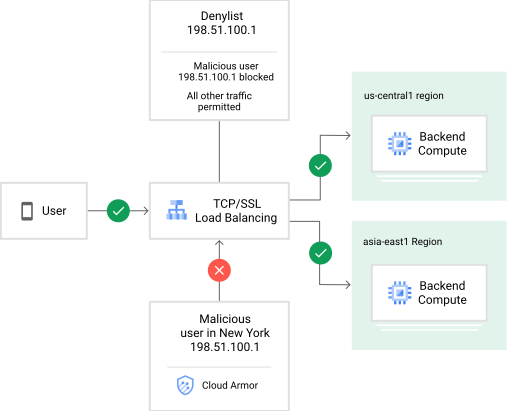](https://docs.cloud.google.com/static/armor/images/ip-bl-wl-3.svg) Restricting external passthrough Network Load Balancer access by using a denylist (click to enlarge).
### Custom rules to filter based on Layer 3 through Layer 7 parameters
Define expressions in a rule's match condition using the
Cloud Armor custom rules language. Cloud Armor evaluates
incoming requests against these expressions. If a request matches, the rule's
action applies, either denying or allowing the traffic.
The following examples are expressions that are written in the
Cloud Armor extension of the [Common Expression Language
(CEL)](https://github.com/google/cel-spec).
For more information, see the
[Custom rules language reference](https://docs.cloud.google.com/armor/docs/create-security-policy-rules).
Define expressions by using the Google Cloud CLI `--expression` flag or the
Google Cloud console. For more information, see
[Create security policies, rules, and expressions](https://docs.cloud.google.com/armor/docs/create-security-policies#creating-policy-rules).
In the following example, requests from `2001:db8::/32` (such as your alpha
testers) in the `AU` region match the following expression:
```
origin.region_code == "AU" && inIpRange(origin.ip, '2001:db8::/32')
```
The following example matches with requests from `192.0.2.0/24` and with a user
agent that contains the string `WordPress`:
```
inIpRange(origin.ip, '192.0.2.0/24') && has(request.headers['user-agent']) && request.headers['user-agent'].contains('WordPress')
```
For additional examples, see [Example
expressions](https://docs.cloud.google.com/armor/docs/create-security-policy-rules#expression-examples) in the
custom rules language reference.
## Protect your deployment against application layer attacks and help mitigate OWASP Top 10 risks
Cloud Armor helps protect Cloud CDN origin servers from application
layer (L7) attacks, such as SQL injection (SQLi) and cross-site scripting (XSS).
Content in a cache is static and generally doesn't pose a risk of a targeted
attack. However, the origin server might be a dynamic application with
vulnerabilities. Your security requirements might require you to mitigate these
risks to prevent exploits from attacking the origin server.
To mitigate the risks, follow these steps:
1. Create or identify a backend service with CDN enabled.
2. Create a Cloud Armor security policy.
3. Create one or more rules in the security policy to deny L7 attacks.
4. Configure one of the targets of the security policy to be the backend service that you created or identified in step 1.
Use preconfigured rules to detect and block common application layer attacks.
Preconfigured rules are predefined expression sets that you can add to a
security policy. To add these expression sets to a rule, use the gcloud CLI
`--expression` flag or Google Cloud console.
For more information, see
[Creating security policies, rules, and expressions](https://docs.cloud.google.com/armor/docs/create-security-policies#creating-policy-rules).
A preconfigured rule inspects up to the first 8 kB of a request body by default. However, you can
configure this limit per policy. For more information about configuring this
inspection limit for a request body when using preconfigured
WAF rules, see
[Request body inspection limitation](https://docs.cloud.google.com/armor/docs/security-policy-overview#request-body).
For more information about preconfigured rules, see [Preconfigured
rules](https://docs.cloud.google.com/armor/docs/create-security-policy-rules#preconfigured-rules) in the custom
rules language reference.
The following example uses a preconfigured rule to mitigate cross-site
scripting (XSS) attacks:
```
evaluatePreconfiguredWaf('xss-v422-stable')
```
The following example uses a preconfigured rule to mitigate SQL injection
(SQLi) attacks:
```
evaluatePreconfiguredWaf('sqli-v422-stable')
```
You can also combine preconfigured rules with other expressions. The following
example uses a preconfigured rule to mitigate SQLi attacks from the
`192.0.2.1/24` IP address range:
```
inIpRange(origin.ip, '192.0.2.1/24') && evaluatePreconfiguredWaf('sqli-v422-stable')
```
Cloud Armor managed rules provide continuously updated threat signatures to help you detect and block application-layer attacks. For more information, see [Managed rules overview](https://docs.cloud.google.com/armor/docs/managed-rules-overview).
The following example uses managed rules to mitigate cross-site scripting
(XSS) attacks:
```
evaluateManagedRules('google:xss:stable')
```
The following example uses managed rules to mitigate SQL injection (SQLi)
attacks:
```
evaluateManagedRules('google:sqli:stable')
```
### OWASP Top 10 mitigation for hybrid workloads
Cloud Armor offers mitigations for the following attacks, whether they
are deployed in Google Cloud, on-premises, or in a third-party provider:
- SQL injection (SQLi)
- Cross-site scripting (XSS)
- Local File Inclusion (LFI)
- Remote File Inclusion (RFI)
- Remote Code Execution (RCE)
You can use these capabilities to address some of the most common web
application security risks, including those risks identified in the
[OWASP Top 10](https://owasp.org/www-project-top-ten/)
list.
Cloud Armor's preconfigured [WAF rules](https://docs.cloud.google.com/armor/docs/rule-tuning)
or [managed
rules](https://docs.cloud.google.com/armor/docs/managed-rules-overview) can be added to
a security policy to detect and deny layer 7 requests containing SQLi or XSS
attempts. Cloud Armor detects malicious requests and drops them at
the edge of Google's infrastructure. The requests are not proxied to the backend
service, regardless of where the backend service is deployed.
To defend a non-Google Cloud-hosted workload from these attacks
at the edge of Google's network, follow these steps:
1. Configure a global external Application Load Balancer or a classic Application Load Balancer with a backend service that has an internet NEG as a backend.
2. Create a Cloud Armor security policy.
3. Add preconfigured SQLi and XSS rules to the policy.
4. Attach the security policy to the backend service that you created in step 1.
5. Monitor Cloud Armor activity by using Cloud Logging, Cloud Monitoring, and the findings sent to Security Command Center.
### Cloud CDN external origin server DDoS defense and layer 7 monitoring
Cloud CDN deployments with an external origin server can have
Google's edge infrastructure as the frontend for proxying, caching, and
Cloud Armor layer 7 filtering. Using internet NEGs, the origin
server can be located on-premises or with a third-party infrastructure
provider.
Cloud Armor and Google's edge infrastructure mitigate L3 and L4
attacks, alert you to suspicious Layer 7 activity, and deny unwanted Layer 7
requests with custom rules. Cloud Armor logging and telemetry in
Cloud Logging, Cloud Monitoring, and Security Command Center provide
actionable insight for protected applications regardless of where they are
deployed.
To enable Cloud Armor protection for CDN external origins servers,
follow these steps:
1. Configure a global external Application Load Balancer or a classic Application Load Balancer with a backend service that has an internet NEG as a backend.
2. Enable Cloud CDN for this backend service.
3. Create a Cloud Armor security policy.
4. Attach the security policy to the backend service that you created in step 1.
5. Access Cloud Armor alerts, logging and telemetry in Security Command Center, Cloud Logging, and Cloud Monitoring.
In addition, you can use edge security policies to help protect content stored in
cache. For more information on edge security policies, see the
[Security policy overview](https://docs.cloud.google.com/armor/docs/security-policy-overview#edge-policies).
### Layer 7 access controls and cache-busting attacks
Depending on the application architecture, you can configure one backend service
to serve requests for various URLs, including cacheable and non-cacheable
content. In such deployment scenarios, create Cloud Armor security
policies that deny unwelcome traffic on certain request paths, but allow all
clients to access static content on a different request path.
In other situations, even though content is served from cache, a malicious
client might generate many requests that result in a cache miss. A cache miss
requires the origin server to fetch or generate the content, which can strain
resources and impact availability. Create a security policy to match client
signatures causing the issue and deny the requests before they reach the origin
server.
To accomplish this, follow these steps:
1. Create a Cloud Armor security policy.
2. Configure a rule; for example, the following rule denies access to `"/admin"`:
request.path.contains("/admin") && !inIpRange(origin.ip, '')
3. Attach the security policy from step 1 to the backend service that has
Cloud CDN enabled.
## External passthrough Network Load Balancer protection
If you have a Cloud Armor Enterprise subscription, you can use
Advanced Network DDoS protection to help protect your
external passthrough Network Load Balancers, protocol forwarding, and VMs with public IP
addresses. This feature provides always-on, inline mitigation of L3 and L4
DDoS attacks.
For more information, see [Advanced Network DDoS protection overview](https://docs.cloud.google.com/armor/docs/advanced-network-ddos).
## What's next
- [Configure security policies](https://docs.cloud.google.com/armor/docs/create-security-policies)
- [Learn about the custom rules language](https://docs.cloud.google.com/armor/docs/create-security-policy-rules)
- [Tune WAF rules](https://docs.cloud.google.com/armor/docs/rule-tuning)