This guide is intended to help you address concerns unique to
Google Kubernetes Engine (GKE) applications when you are implementing customer
responsibilities for
[Payment Card Industry Data Security Standard (PCI DSS)](https://www.pcisecuritystandards.org/about_us/)
requirements.
**Disclaimer**: This guide is for informational purposes only.
Google does not intend the information or recommendations in this guide to
constitute legal or audit advice. Each customer is responsible for independently
evaluating their own particular use of the services as appropriate to support
its legal and compliance obligations.
## Introduction to PCI DSS compliance and GKE
If you handle payment card data, you must secure it---whether it resides in an
on-premises database or in the cloud. PCI DSS was developed to encourage and
enhance cardholder data security and facilitate the broad adoption of consistent
data security measures globally. PCI DSS provides a baseline of technical and
operational requirements designed to protect credit card data. PCI DSS applies
to all entities involved in payment card processing---including merchants,
processors, acquirers, issuers, and service providers. PCI DSS also applies to
all other entities that store, process, or transmit cardholder data (CHD) or
sensitive authentication data (SAD), or both.
Containerized applications have become popular recently with many legacy
workloads migrating from a virtual machine (VM)--based architecture to a
containerized one.
[Google Kubernetes Engine](https://docs.cloud.google.com/kubernetes-engine)
is a managed, production-ready environment for deploying
containerized applications. It brings Google's latest innovations in developer
productivity, resource efficiency, automated operations, and open source
flexibility to accelerate your time to market.
Compliance is a shared responsibility in the cloud. Google Cloud,
including GKE (both Autopilot and Standard
modes of operation), adheres to PCI DSS requirements. We outline
our responsibilities in our
[Shared responsibility matrix](https://services.google.com/fh/files/misc/gcp_pci_dss_v4_responsibility_matrix.pdf).
### Intended audience
- Customers who want to bring PCI-compliant workloads to [Google Cloud](https://docs.cloud.google.com/) that involve [GKE](https://docs.cloud.google.com/kubernetes-engine).
- Developers, security officers, compliance officers, IT administrators, and other employees who are responsible for implementing controls and ensuring compliance with PCI DSS requirements.
### Before you begin
For the recommendations that follow, you potentially have to use the
following:
- Google Cloud Organization, Folder, and Project resources
- Identity and Access Management (IAM)
- Google Kubernetes Engine
- Google Cloud VPCs
- Google Cloud Armor
- The Cloud Data Loss Prevention API (part of Sensitive Data Protection)
- Identity-Aware Proxy (IAP)
- Security Command Center
This guide is intended for those who are familiar with containers and
GKE.
### Scope
This guide identifies the following requirements from PCI DSS that are unique
concerns for GKE and supplies guidance for meeting them. It is
written against
[version 4.0 of the standard](https://docs-prv.pcisecuritystandards.org/PCI%20DSS/Standard/PCI-DSS-v4_0.pdf).
This guide doesn't cover all the requirements in PCI DSS.
The information provided in this guide might assist organizations in their pursuit of PCI DSS compliance but it's not comprehensive advice.
Organizations can engage a [PCI Qualified Security Assessor (QSA)](https://listings.pcisecuritystandards.org/assessors_and_solutions/qualified_security_assessors) for formal validation.
| PCI DSS goals | PCI DSS requirements |
|---|---|
| [Segment your cardholder data environment](https://docs.cloud.google.com/architecture/pci-dss-and-gke-guide#segment_your_cardholder_data_environment) | Sometimes referred to as requirement 0. Alhough it's not a must for PCI compliance, we recommend this requirement to keep the PCI scope limited. |
| [Build and maintain a secure network and systems](https://docs.cloud.google.com/architecture/pci-dss-and-gke-guide#build_and_maintain_a_secure_network_and_systems) | [1. Install and maintain network security controls](https://docs.cloud.google.com/architecture/pci-dss-and-gke-guide#requirement_1) - [Requirement 1.1](https://docs.cloud.google.com/architecture/pci-dss-and-gke-guide#requirement_1_1) - [Requirement 1.1.2](https://docs.cloud.google.com/architecture/pci-dss-and-gke-guide#requirement_1_1_2) - [Requirement 1.2](https://docs.cloud.google.com/architecture/pci-dss-and-gke-guide#requirement_1_2) - [Requirement 1.2.2](https://docs.cloud.google.com/architecture/pci-dss-and-gke-guide#requirement_1_2_2) - [Requirement 1.2.5](https://docs.cloud.google.com/architecture/pci-dss-and-gke-guide#requirement_1_2_5) - [Requirement 1.3](https://docs.cloud.google.com/architecture/pci-dss-and-gke-guide#requirement_1_3) - [Requirement 1.3.1](https://docs.cloud.google.com/architecture/pci-dss-and-gke-guide#requirement_1_3_1) - [Requirement 1.4](https://docs.cloud.google.com/architecture/pci-dss-and-gke-guide#requirement_1_4) - [Requirement 1.4.3](https://docs.cloud.google.com/architecture/pci-dss-and-gke-guide#requirement_1_4_3) - [Requirement 1.4.5](https://docs.cloud.google.com/architecture/pci-dss-and-gke-guide#requirement_1_4_5)
[2. Apply secure configurations to all system components](https://docs.cloud.google.com/architecture/pci-dss-and-gke-guide#requirement_2) - [Requirement 2.2](https://docs.cloud.google.com/architecture/pci-dss-and-gke-guide#requirement_2_2) - [Requirement 2.2.4](https://docs.cloud.google.com/architecture/pci-dss-and-gke-guide#requirement_2_2_4) - [Requirement 2.2.5](https://docs.cloud.google.com/architecture/pci-dss-and-gke-guide#requirement_2_2_5) - [Requirement 2.2.6](https://docs.cloud.google.com/architecture/pci-dss-and-gke-guide#requirement_2_2_6) |
| [Protect account data](https://docs.cloud.google.com/architecture/pci-dss-and-gke-guide#protect_account_data) | [3. Protect stored account data](https://docs.cloud.google.com/architecture/pci-dss-and-gke-guide#requirement_3) - [Requirement 3.5](https://docs.cloud.google.com/architecture/pci-dss-and-gke-guide#requirement_3_5) - [Requirement 3.6](https://docs.cloud.google.com/architecture/pci-dss-and-gke-guide#requirement_3_6)
[4. Protect cardholder data with strong cryptography during transmission over open, public networks](https://docs.cloud.google.com/architecture/pci-dss-and-gke-guide#requirement_4) - [Requirement 4.1](https://docs.cloud.google.com/architecture/pci-dss-and-gke-guide#requirement_4_1) |
| [Maintain a vulnerability management program](https://docs.cloud.google.com/architecture/pci-dss-and-gke-guide#maintain_a_vulnerability_management_program) | [5. Protect all systems and networks from malicious software](https://docs.cloud.google.com/architecture/pci-dss-and-gke-guide#requirement_5) - [Requirement 5.2](https://docs.cloud.google.com/architecture/pci-dss-and-gke-guide#requirement_5_2) - [Requirement 5.2.3](https://docs.cloud.google.com/architecture/pci-dss-and-gke-guide#requirement_5_2_3) - [Requirement 5.3](https://docs.cloud.google.com/architecture/pci-dss-and-gke-guide#requirement_5_3)
[6. Develop and maintain secure systems and software](https://docs.cloud.google.com/architecture/pci-dss-and-gke-guide#requirement_6) - [Requirement 6.2](https://docs.cloud.google.com/architecture/pci-dss-and-gke-guide#requirement_6_2) - [Requirement 6.2.1](https://docs.cloud.google.com/architecture/pci-dss-and-gke-guide#requirement_6_2_1) - [Requirement 6.3](https://docs.cloud.google.com/architecture/pci-dss-and-gke-guide#requirement_6_3) - [Requirement 6.3.1](https://docs.cloud.google.com/architecture/pci-dss-and-gke-guide#requirement_6_3_1) - [Requirement 6.4](https://docs.cloud.google.com/architecture/pci-dss-and-gke-guide#requirement_6_4) |
| [Implement strong access control measures](https://docs.cloud.google.com/architecture/pci-dss-and-gke-guide#implement_strong_access_control_measures) | [7. Restrict access to system components and cardholder data by business need to know](https://docs.cloud.google.com/architecture/pci-dss-and-gke-guide#requirement_7) - [Requirement 7.2](https://docs.cloud.google.com/architecture/pci-dss-and-gke-guide#requirement_7_2) - [Requirement 7.2.2](https://docs.cloud.google.com/architecture/pci-dss-and-gke-guide#requirement_7_2_2)
[8. Identify and authenticate access to system components](https://docs.cloud.google.com/architecture/pci-dss-and-gke-guide#requirement_8) - [Requirement 8.2](https://docs.cloud.google.com/architecture/pci-dss-and-gke-guide#requirement_8_2) - [Requirement 8.2.1](https://docs.cloud.google.com/architecture/pci-dss-and-gke-guide#requirement_8_2_1) - [Requirement 8.2.5](https://docs.cloud.google.com/architecture/pci-dss-and-gke-guide#requirement_8_2_5) - [Requirement 8.3](https://docs.cloud.google.com/architecture/pci-dss-and-gke-guide#requirement_8_3) - [Requirement 8.3.1](https://docs.cloud.google.com/architecture/pci-dss-and-gke-guide#requirement_8_3_1)
[9. Restrict physical access to cardholder data](https://docs.cloud.google.com/architecture/pci-dss-and-gke-guide#requirement_9) |
| [Regularly monitor and test networks](https://docs.cloud.google.com/architecture/pci-dss-and-gke-guide#regularly_monitor_and_test_networks) | [10. Log and monitor all access to system components and cardholder data](https://docs.cloud.google.com/architecture/pci-dss-and-gke-guide#requirement_10) - [Requirement 10.2](https://docs.cloud.google.com/architecture/pci-dss-and-gke-guide#requirement_10_2) - [Requirement 10.2.2](https://docs.cloud.google.com/architecture/pci-dss-and-gke-guide#requirement_10_2_2)
[11. Test security of systems and networks regularly](https://docs.cloud.google.com/architecture/pci-dss-and-gke-guide#requirement_11) - [Requirement 11.3](https://docs.cloud.google.com/architecture/pci-dss-and-gke-guide#requirement_11_3) - [Requirement 11.3.1](https://docs.cloud.google.com/architecture/pci-dss-and-gke-guide#requirement_11_3_1) - [Requirement 11.5](https://docs.cloud.google.com/architecture/pci-dss-and-gke-guide#requirement_11_5) - [Requirement 11.5.1](https://docs.cloud.google.com/architecture/pci-dss-and-gke-guide#requirement_11_5_1) |
| [Maintain an information security policy](https://docs.cloud.google.com/architecture/pci-dss-and-gke-guide#maintain_an_information_security_policy) | [12. Support information security with organizational policies and programs](https://docs.cloud.google.com/architecture/pci-dss-and-gke-guide#requirement_12) |
### Terminology
This section defines terms used in this guide. For more details, see the
[PCI DSS glossary](https://www.pcisecuritystandards.org/pci_security/glossary).
CHD
: *cardholder data*. At a minimum, consists of the full primary account number
(PAN). Cardholder data might also appear in the form of the full PAN plus
any of the following:
- Cardholder name
- Expiration date or service code
- Sensitive authentication data (SAD)
CDE
: *cardholder data environment*. The people, processes, and technology that
store, process, or transmit cardholder data or sensitive authentication data.
PAN
: *primary account number*. A key piece of cardholder data that you are
obligated to protect under PCI DSS. The PAN is generally a 16-digit
number that is unique to a payment card (credit and debit) and that
identifies the issuer and the cardholder account.
PIN
: *personal identification number*. A numeric password known only to
the user and a system; used to authenticate the user to the system.
QSA
: *qualified security assessor*. A person who is certified by the PCI Security
Standards Council to perform audits and compliance analysis.
SAD
: *sensitive authentication data*. In PCI compliance, data used by the
issuers of cards to authorize transactions. Similar to cardholder data, PCI
DSS requires protection of SAD. Additionally, SAD can't be retained by
merchants and their payment processors. SAD includes the following:
- "Track" data from magnetic stripes
- "Track equivalent data" generated by chip and contactless cards
- Security validation codes (for example, the 3-4 digit number printed on cards) used for online and card-not-present transactions.
- PINs and PIN blocks
segmentation
: In the context of PCI DSS, the practice of isolating the CDE from the
remainder of the entity's network. Segmentation is not a PCI DSS
requirement. However, it is strongly recommended as a method that can help
to reduce the following:
- The scope and cost of the PCI DSS assessment
- The cost and difficulty of implementing and maintaining PCI DSS controls
- The risk to an organization (reduced by consolidating cardholder data into fewer, more controlled locations)
## Segment your cardholder data environment
The cardholder data environment (CDE) comprises people, processes, and
technologies that store, process, or transmit cardholder data or sensitive
authentication data. In the context of GKE, the CDE also
comprises the following:
- Systems that provide security services (for example, IAM).
- Systems that facilitate segmentation (for example, projects, folders, firewalls, virtual private clouds (VPCs), and subnets).
- Application pods and clusters that store, process, or transmit cardholder data. Without adequate segmentation, your entire cloud footprint can get in scope for PCI DSS.
To be considered out of scope for PCI DSS, a system component must be properly
isolated from the CDE such that even if the out-of-scope system component were
compromised, it wouldn't impact the security of the CDE.
An important prerequisite to reduce the scope of the CDE is a clear
understanding of business needs and processes related to the storage,
processing, and transmission of cardholder data. Restricting cardholder data to
as few locations as possible by eliminating unnecessary data and
consolidating necessary data might require you to reengineer long-standing
business practices.
You can properly segment your CDE through a number of means on
Google Cloud. This section discusses the following means:
- Logical segmentation by using the resource hierarchy
- Network segmentation by using VPCs and subnets
- Service level segmentation by using VPC
- Other considerations for any in-scope cluster
### Logical segmentation using the resource hierarchy
There are several ways to isolate your CDE within your organizational structure
using Google Cloud's
[resource hierarchy](https://docs.cloud.google.com/resource-manager/docs/cloud-platform-resource-hierarchy).
Google Cloud resources are organized hierarchically. The
[Organization](https://docs.cloud.google.com/resource-manager/docs/cloud-platform-resource-hierarchy#organizations)
resource is the root node in the Google Cloud resource hierarchy.
[Folders](https://docs.cloud.google.com/resource-manager/docs/cloud-platform-resource-hierarchy#folders)
and
[projects](https://docs.cloud.google.com/resource-manager/docs/cloud-platform-resource-hierarchy#projects)
fall under the Organization resource. Folders can contain projects and folders.
Folders are used to control access to resources in the folder hierarchy through
folder-level IAM permissions. They're also used to group similar projects. A
project is a trust boundary for all your resources and an IAM enforcement point.
You might group all projects that are in PCI scope within a folder to
isolate at the folder level. You might also use one project for all
in-scope PCI clusters and applications, or you might create a project and
cluster for each in-scope PCI application and use them to organize your
Google Cloud resources. In any case, we recommend that you keep your
in-scope and out-of-scope workloads in different projects.
### Network segmentation using VPC networks and subnets
You can use
[Virtual Private Cloud](https://docs.cloud.google.com/vpc)
(VPC) and subnets to provision your network and to group and
isolate CDE-related resources. VPC is a logical isolation of a
section of a public cloud. VPC networks provide scalable and
flexible networking for your Compute Engine virtual machine (VM) instances and
for the services that use VM instances, including GKE. For
more details, see the
[VPC overview](https://docs.cloud.google.com/vpc/docs/vpc)
and refer to the
[best practice and reference architectures](https://docs.cloud.google.com/solutions/best-practices-vpc-design).
#### Service-level segmentation using VPC Service Controls and Cloud Armor
While VPC and subnets provide segmentation and create a perimeter
to isolate your CDE,
[VPC Service Controls](https://docs.cloud.google.com/vpc-service-controls)
augments the security perimeter at layer 7. You can use VPC Service Controls
to create a perimeter around your in-scope CDE projects.
VPC Service Controls gives you the following controls:
- **Ingress control**. Only authorized identities and clients are allowed into your security perimeter.
- **Egress control**. Only authorized destinations are allowed for identities and clients within your security perimeter.
You can use
[Cloud Armor](https://docs.cloud.google.com/armor)
to create lists of IP addresses to allow or deny access to your
[HTTP(S) load balancer](https://docs.cloud.google.com/load-balancing/docs/https)
at the edge of the Google Cloud network. By examining IP addresses as
close as possible to the user and to malicious traffic, you help prevent
malicious traffic from consuming resources or entering your VPC networks.
Use VPC Service Controls to define a service perimeter around your in-scope
projects. This perimeter governs VM-to-service and service-to-service paths, as
well as VPC ingress and egress traffic.
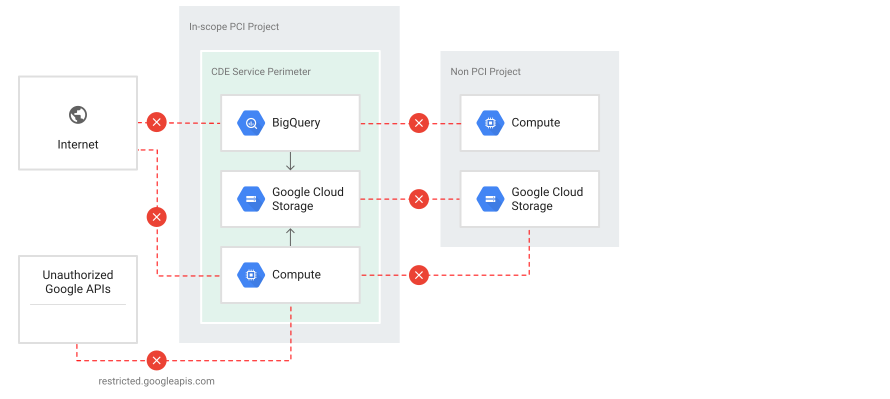 **Figure 1**. Achieving segmentation using VPC Service Controls
## Build and maintain a secure network and systems
Building and maintaining a secure network encompasses requirements 1 and 2 of
PCI DSS.
### Requirement 1
Install and maintain a firewall configuration to protect
cardholder data and traffic into and out of the CDE.
Networking concepts for containers and GKE differ from those for
VMs. Pods can reach each other directly, without NAT, even across
nodes. This creates a simple network topology that might be surprising if you're
used to managing more complex systems. The first step in network security for
GKE is to educate yourself on
[these networking concepts](https://docs.cloud.google.com/kubernetes-engine/docs/concepts/network-overview).
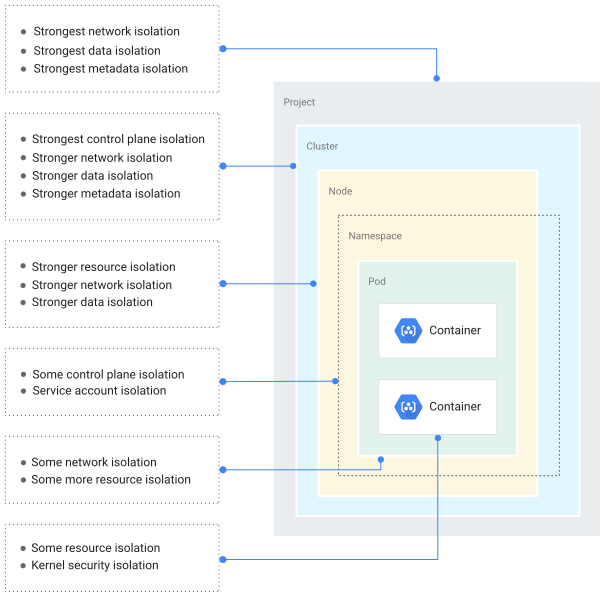 **Figure 2**. Logical layout of a secure Kubernetes cluster
Before diving into individual requirements under Requirement 1, you might want
to review the following networking concepts in relation to GKE:
- **Firewall rules** .
[Firewall rules](https://docs.cloud.google.com/vpc/docs/firewalls)
are used to restrict traffic to your nodes. GKE nodes are
provisioned as Compute Engine instances and use the same firewall
mechanisms as other instances. Within your network, you can use tags to
apply these firewall rules to each instance. Each node pool receives its own
set of tags that you can use in rules. By default, each instance belonging
to a node pool receives a tag that identifies a specific GKE
cluster that this node pool is a part of. This tag is used in firewall
rules that GKE creates automatically for you. You can add
custom tags at either cluster or node pool creation time by using the
`--tags` flag in the Google Cloud CLI.
- **Network policies** .
[Network policies](https://docs.cloud.google.com/kubernetes-engine/docs/how-to/network-policy)
let you limit network connections between pods, which can help restrict
[network pivoting](https://wikipedia.org/wiki/Exploit_(computer_security)#Pivoting)
and lateral movement inside the cluster in the event of
a security issue with a pod. To use network policies, you must enable the
feature explicitly when creating the GKE cluster. You can
enable it on an existing cluster, but it will cause your cluster
nodes to restart. The default behavior is that all pod-to-pod communication
is always open. Therefore, if you want to segment your network, you need to
enforce pod-level networking policies. In GKE, you can
define a network policy by using the
[Kubernetes Network Policy API](https://kubernetes.io/docs/concepts/services-networking/network-policies/)
or by using the `kubectl` tool. These pod-level traffic policy rules
determine which pods and services can access one another inside your
cluster.
- **Namespaces** .
[Namespaces](https://kubernetes.io/docs/concepts/overview/working-with-objects/namespaces/)
allow for resource segmentation inside your Kubernetes cluster. Kubernetes
comes with a default namespace out of the box, but you can create multiple
namespaces within your cluster. Namespaces are logically isolated from each
other. They provide scope for pods, services, and deployments in the
cluster, so that users interacting with one namespace won't see content
in another namespace. However, namespaces within the same cluster don't
restrict communication between namespaces; this is where network policies
come in. For more information on configuring namespaces, see the
[Namespaces Best Practices](https://cloud.google.com/blog/products/gcp/kubernetes-best-practices-organizing-with-namespaces)
blog post.
The following diagram illustrates the preceding concepts in relation to each
other and other GKE components such as cluster, node, and pod.
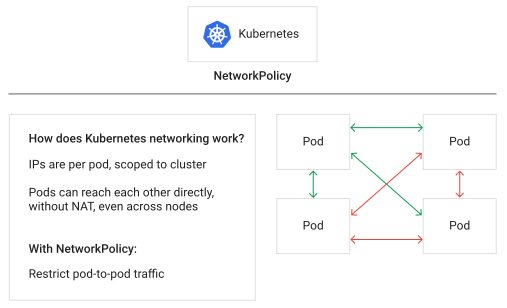 **Figure 3**. A Kubernetes network policy controlling traffic within a cluster
#### Requirement 1.1
Processes and mechanisms for installing and maintaining network security controls are defined and understood.
#### Requirement 1.1.2
Describe groups, roles, and responsibilities for managing
network components.
First, as you would with most services on Google Cloud, you need to
configure
[IAM](https://docs.cloud.google.com/iam)
roles in order to set up authorization on GKE. When you've set up
your IAM roles, you need to add
[Kubernetes role-based access control](https://kubernetes.io/docs/reference/access-authn-authz/rbac/)
(RBAC) configuration as part of a Kubernetes authorization strategy.
Essentially, all IAM configuration applies to any Google Cloud resources
and all clusters within a project. Kubernetes RBAC configuration applies to the
resources in each Kubernetes cluster, and enables fine-grained authorization at
the namespace level. With GKE, these approaches to authorization
work in parallel, with a user's capabilities effectively representing a union of
IAM and RBAC roles assigned to them:
- Use IAM to control groups, roles, and responsibilities for logical management of network components in GKE.
- Use Kubernetes RBAC to grant granular permissions to [network policies](https://kubernetes.io/docs/concepts/services-networking/network-policies/) within Kubernetes clusters, to control pod-to-pod traffic, and to prevent unauthorized or accidental changes from non-CDE users.
- Be able to justify for all IAM and RBAC users and permissions. Typically, when QSAs test for controls, they look for a business justification for a sample of IAM and RBAC.
#### Requirement 1.2
Network security controls (NSCs) are configured and maintained.
First, you configure
[firewall rules](https://docs.cloud.google.com/vpc/docs/firewalls)
on Compute Engine instances that run your GKE nodes.
Firewall rules protect these cluster nodes.
Next, you configure
[network policies](https://docs.cloud.google.com/kubernetes-engine/docs/how-to/network-policy)
to restrict flows and protect pods in a cluster. A
[network policy](https://docs.cloud.google.com/kubernetes-engine/docs/how-to/network-policy)
is a specification of how groups of pods are allowed to communicate with each
other and with other network endpoints. You can use GKE's network
policy enforcement to control the communication between your cluster's pods and
services. To further segment your cluster, create multiple namespaces within it.
Namespaces are logically isolated from each other. They provide scope for
pods, services, and deployments in the cluster, so users interacting with one
namespace won't see content in another namespace. However, namespaces within
the same cluster don't restrict communication between namespaces; this is where
network policies come in. Namespaces allow for resource segmentation inside your
Kubernetes cluster. For more information on configuring namespaces, see the
[Namespaces Best Practices](https://cloud.google.com/blog/products/gcp/kubernetes-best-practices-organizing-with-namespaces)
blog post.
By default, if no policies exist in a namespace, then all ingress and egress
traffic is allowed to and from pods in that namespace. For example, you
can create a default isolation policy for a namespace by creating a
network policy that selects all pods but doesn't allow any ingress traffic to
those pods.
#### Requirement 1.2.2
All changes to network connections and to
configurations of NSCs are approved and managed
in accordance with the change control process
defined at Requirement 6.5.1.
To treat your networking configurations and infrastructure as code, you need to
establish a continuous integration and continuous delivery (CI/CD)
pipeline as part of your change-management and change-control processes.
You can use
[Cloud Deployment Manager](https://docs.cloud.google.com/deployment-manager)
or
[Terraform](https://github.com/GoogleCloudPlatform/gke-network-policy-demo)
templates as part of the CI/CD pipeline to create network policies on your
clusters. With Deployment Manager or Terraform, you can treat
configuration and infrastructure as code that can reproduce consistent copies of
the current production or other environments. Then you are
able to write unit tests and other tests to ensure your network changes work as
expected. A change control process that includes an approval can be managed
through configuration files stored in a version repository.
With
[Terraform Config Validator](https://github.com/forseti-security/policy-library/blob/master/docs/user_guide.md#how-to-use-terraform-validator),
you can define constraints to enforce security and governance policies. By
adding Config Validator to your CI/CD pipeline, you can add a step to any
workflow. This step validates a Terraform plan and rejects it if violations
are found.
#### Requirement 1.2.5
All services, protocols, and ports allowed are
identified, approved, and have a defined business
need.
For strong ingress controls for your GKE clusters, you can use
[authorized networks](https://docs.cloud.google.com/kubernetes-engine/docs/how-to/authorized-networks)
to restrict certain IP ranges that can reach your cluster's
control plane. GKE uses both Transport Layer Security (TLS) and
authentication to provide secure access to your cluster control plane endpoint from the
public internet. This access gives you the flexibility to administer your
cluster from anywhere. By using authorized networks, you can further restrict
access to specified sets of IP addresses.
You can use
[Cloud Armor](https://docs.cloud.google.com/armor)
to create IP deny lists and allow lists and security policies for
GKE hosted applications. In a GKE cluster,
incoming traffic is handled by
[HTTP(S) Load Balancing](https://docs.cloud.google.com/load-balancing/docs/https),
which is a component of
[Cloud Load Balancing](https://docs.cloud.google.com/load-balancing/docs/load-balancing-overview).
Typically, the HTTP(S) load balancer is configured by the
[GKE ingress controller](https://github.com/kubernetes/ingress-gce),
which gets configuration information from a Kubernetes
[Ingress](https://docs.cloud.google.com/kubernetes-engine/docs/concepts/ingress)
object. For more information, see
[how to configure Cloud Armor policies with GKE](https://docs.cloud.google.com/kubernetes-engine/docs/how-to/cloud-armor-backendconfig).
#### Requirement 1.3
Network access to and from the cardholder data environment is restricted.
To keep sensitive data private, you can configure private communications between
GKE clusters inside your VPC networks and on-premises hybrid
deployments by using
[VPC Service Controls and Private Google Access](https://docs.cloud.google.com/vpc-service-controls).
#### Requirement 1.3.1
Inbound traffic to the CDE is restricted as follows:
- To only traffic that is necessary.
- All other traffic is specifically denied.
Consider implementing
[Cloud NAT setup with GKE](https://docs.cloud.google.com/nat/docs/gke-example)
to limit inbound internet traffic to only that cluster. You can
[set up a private cluster](https://docs.cloud.google.com/kubernetes-engine/docs/how-to/private-clusters)
for the non-public facing clusters in your CDE. In a private cluster, the nodes
have internal RFC 1918 IP addresses only, which ensures that their workloads are
isolated from the public internet.
#### Requirement 1.4
Network connections between trusted and untrusted networks are controlled.
You can address this requirement using the same methods listed for Requirement 1.3.
#### Requirement 1.4.3
Anti-spoofing measures are implemented to
detect and block forged source IP addresses from
entering the trusted network.
You implement anti-spoofing measures by using alias IP addresses on
GKE pods and clusters to detect and block forged source IP
addresses from entering the network. A cluster that uses
[alias IP ranges](https://docs.cloud.google.com/vpc/docs/alias-ip)
is called a VPC-native cluster.
#### Requirement 1.4.5
The disclosure of internal IP addresses and routing information is limited to only authorized parties.
You can use a
[GKE IP masquerade agent](https://docs.cloud.google.com/kubernetes-engine/docs/how-to/ip-masquerade-agent)
to do network address translation (NAT) for many-to-one IP address translations
on a cluster. Masquerading masks multiple source IP addresses behind a single
address.
### Requirement 2
Apply secure configurations to all system components.
Requirement 2 specifies how to harden security
parameters by removing defaults and vendor supplied credentials.
[Hardening your cluster](https://docs.cloud.google.com/kubernetes-engine/docs/how-to/hardening-your-cluster) is a customer responsibility.
#### Requirement 2.2
System components are configured and managed securely.
Ensure that these standards address all known security vulnerabilities and are consistent with industry-accepted system hardening standards. Sources of industry-accepted system hardening standards may include, but are not limited to:
- [Center for Internet Security (CIS)](https://www.cisecurity.org/)
- [International Organization for Standardization (ISO)](https://www.iso.org/home.html)
- [SysAdmin Audit Network Security (SANS) Institute](https://www.sans.org/)
- [National Institute of Standards Technology (NIST)](https://www.nist.gov/)
#### Requirement 2.2.4
Only necessary services, protocols, daemons,
and functions are enabled, and all unnecessary
functionality is removed or disabled.
#### Requirement 2.2.5
If any insecure services, protocols, or daemons are present:
- Business justification is documented.
- Additional security features are documented and implemented that reduce the risk of using insecure services, protocols, or daemons.
#### Requirement 2.2.6
System security parameters are configured to
prevent misuse.
#### Pre-deployment
Before you move containers onto GKE, we recommend the
following:
- Start with a container [managed base image](https://docs.cloud.google.com/artifact-registry/docs/docker/manage-images) that is built, maintained, and vulnerability-checked by a trusted source. Consider creating a set of "known good" or "golden" base images that your developers can use. A more restrictive option is to use a [distroless image](https://github.com/GoogleContainerTools/distroless) or a [scratch base image](https://docs.docker.com/develop/develop-images/baseimages/#create-a-simple-parent-image-using-scratch).
- Use [Artifact Analysis](https://docs.cloud.google.com/container-registry/docs/container-analysis) to scan your container images for vulnerabilities.
- Establish an internal DevOps/SecOps policy to include only approved, trusted libraries and binaries into the containers.
#### At setup
During set up, we recommend the following:
- Use the default [Container-Optimized OS](https://docs.cloud.google.com/container-optimized-os/docs) as the node image for GKE. Container-Optimized OS is based on Chromium OS and is optimized for [node security](https://docs.cloud.google.com/container-optimized-os/docs/concepts/security).
- Enable [auto-upgrading nodes](https://docs.cloud.google.com/kubernetes-engine/docs/how-to/node-auto-upgrades) for the clusters that run your applications. This feature automatically upgrades the node to the Kubernetes version that's running in the managed control plane, providing better stability and security.
- Enable [auto-repairing nodes](https://docs.cloud.google.com/kubernetes-engine/docs/how-to/node-auto-repair). When this feature is enabled, GKE periodically checks and uses the node's health status to determine if a node needs to be repaired. If a node requires repair, that node is drained and a new node is created and added to the cluster.
- Turn on [Cloud Monitoring](https://docs.cloud.google.com/monitoring/kubernetes-engine) and [Cloud Logging](https://docs.cloud.google.com/monitoring/kubernetes-engine/legacy-stackdriver/logging) for visibility of all events, including security events and node health status. Create [Cloud Monitoring alert policies](https://docs.cloud.google.com/monitoring/alerts) to get notified if a security incident occurs.
- Apply [least privilege service accounts](https://docs.cloud.google.com/kubernetes-engine/docs/how-to/hardening-your-cluster#use_least_privilege_sa) for GKE nodes
- Review and apply (where applicable) the GKE section in the [Google Cloud CIS Benchmark](https://www.cisecurity.org/blog/new-cis-benchmark-for-google-cloud-computing-platform/) guide. Kubernetes audit logging is already enabled by default, and logs for both requests to `kubectl` and the GKE API are written to Cloud Audit Logs.
- [Configure audit logging](https://docs.cloud.google.com/kubernetes-engine/docs/how-to/audit-logging).
## Protect account data
Protecting cardholder data encompasses requirements 3 and 4 of PCI DSS.
### Requirement 3
Protect stored account data.
Requirement 3 of PCI DSS stipulates that protection techniques such as
encryption, truncation, masking, and hashing are critical components of
cardholder data protection. If an intruder circumvents other security controls
and gains access to encrypted data, without the proper cryptographic keys, the
data is unreadable and unusable to that person.
You might also consider other methods of protecting stored data as
potential risk-mitigation opportunities. For example, methods for minimizing
risk include not storing cardholder data unless absolutely necessary, truncating
cardholder data if the full PAN is not needed, and not sending unprotected PANs
using end-user messaging technologies, such as email and instant messaging.
Examples of systems where CHD might persist as part of your payment processing
flows when running on Google Cloud are:
- Cloud Storage buckets
- BigQuery instances
- Datastore
- Cloud SQL
Be aware that CHD might be inadvertently stored in email or customer service
communication logs. It's prudent to use
[Sensitive Data Protection](https://docs.cloud.google.com/sensitive-data-protection)
to filter these data streams so that you limit your in-scope environment
to the payment processing systems.
Note that on Google Cloud, data is
[encrypted at rest by default](https://docs.cloud.google.com/docs/security/encryption/default-encryption),
and
[encrypted in transit by default when it traverses physical boundaries](https://docs.cloud.google.com/docs/security/encryption-in-transit).
No additional configuration is necessary to enable these protections.
#### Requirement 3.5
Primary account number (PAN) is secured wherever it is stored.
One mechanism to render PAN data unreadable is tokenization. For more
information, see the solution guide on
[tokenizing sensitive cardholder data for PCI DSS](https://docs.cloud.google.com/solutions/tokenizing-sensitive-cardholder-data-for-pci-dss).
You can use the
[DLP API](https://docs.cloud.google.com/sensitive-data-protection)
to scan, discover, and report the cardholder data. Sensitive Data Protection has built-in
support for scanning and classifying 12--19-digit PAN data in
Cloud Storage, BigQuery, and Datastore.
It also has a streaming content API to enable support for additional data
sources, custom workloads, and applications. You can also use the
DLP API to
[truncate (redact) or hash](https://cloud.google.com/blog/products/gcp/take-charge-of-your-sensitive-data-with-the-cloud-dlp-api)
the data.
#### Requirement 3.6
Cryptographic keys used to protect stored account data are secured.
[Cloud Key Management Service (KMS)](https://docs.cloud.google.com/kms)
is a managed storage system for cryptographic keys. It can generate, use,
rotate, and destroy cryptographic keys. Although Cloud KMS does not
directly
[store secrets](https://docs.cloud.google.com/kms/docs/encrypting-application-data)
like cardholder data, it can be used to encrypt such data.
Secrets in the context of Kubernetes are Kubernetes
[secret objects](https://kubernetes.io/docs/concepts/configuration/secret/)
that let you store and manage sensitive information, such as passwords, tokens,
and keys.
By default, Google Cloud
[encrypts customer content stored at rest](https://docs.cloud.google.com/docs/security/encryption/default-encryption).
GKE handles and manages this default encryption for you without
any additional action on your part.
[Application-layer secrets encryption](https://docs.cloud.google.com/kubernetes-engine/docs/how-to/encrypting-secrets)
provides an additional layer of security for sensitive data such as secrets.
Using this functionality, you can provide a key that you manage in
[Cloud KMS](https://docs.cloud.google.com/kms/docs),
to encrypt data at the application layer. This protects against attackers who
gain access to a copy of the Kubernetes configuration storage instance of your
cluster.
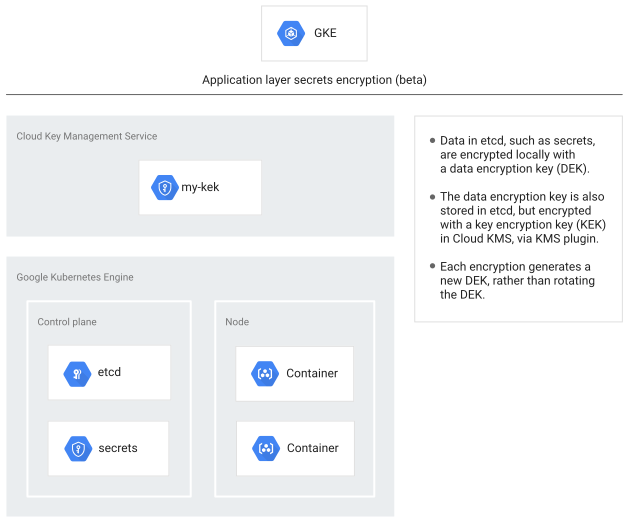 **Figure 4**. Application layer secrets with GKE
### Requirement 4
Protect cardholder data with strong cryptography during transmission over open, public
networks.
The in-scope data must be encrypted during transmission over networks that are
easily accessed by malicious individuals, for example, public networks.
[Istio](https://cloud.google.com/learn/what-is-istio)
is an open source service mesh that layers transparently onto existing
distributed applications. Istio scalably manages authentication, authorization,
and encryption of traffic between microservices. It's a platform that includes
APIs that let you integrate into any logging platform, telemetry, or policy
system. Istio's feature set lets you efficiently run a distributed microservice
architecture and provides a uniform way to secure, connect, and monitor
microservices.
#### Requirement 4.1
Processes and mechanisms for protecting cardholder data with strong cryptography during transmission over open, public networks are
defined and documented.
You can use Istio to create a network of deployed services---with load balancing,
service-to-service authentication, and monitoring. You can also use it to
deliver secure service-to-service communication in a cluster---with strong
identity-based authentication and authorization based on mutual TLS. Mutual TLS
(mTLS) is a TLS handshake performed twice, establishing the same level of
trust in both directions (as opposed to one-directional client-server trust).
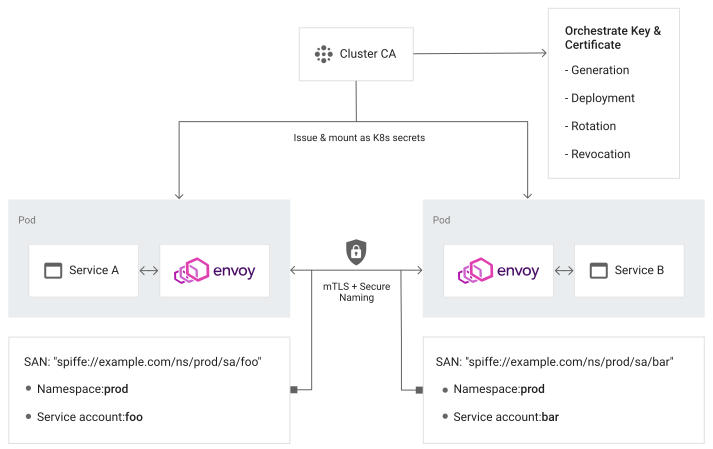 **Figure 5**. Secure service-to-service communication using Istio and mTLS
Istio lets you deploy TLS certificates to each of the GKE pods
within an application. Services running on the pod can use mTLS to strongly
identify their peer identities. Service-to-service communication is tunneled
through client-side and server-side
[Envoy](https://www.envoyproxy.io/)
proxies. Envoy uses
[SPIFFE](https://spiffe.io/)
IDs to
establish mTLS connections between services. For information on how to deploy
Istio on GKE, see the
[GKE documentation](https://docs.cloud.google.com/kubernetes-engine/docs/tutorials/secure-services-istio).
And for information on supported TLS versions, see the Istio
[Traffic Management reference](https://istio.io/docs/reference/config/networking/gateway/#Server-TLSOptions).
Use TLS version 1.2 and later.
If your application is exposed to the internet, use
[GKE HTTP(S) Load Balancing](https://docs.cloud.google.com/kubernetes-engine/docs/concepts/ingress)
with ingress routing that is set to use HTTP(S).
HTTP(S) Load Balancing,
configured by an Ingress object, includes the following features:
- **Flexible configuration for services**. An Ingress object defines how traffic reaches your services and how the traffic is routed to your application. In addition, an Ingress can provide a single IP address for multiple services in your cluster.
- **Integration with Google Cloud network services** . An Ingress object can configure Google Cloud features such as [Google-managed SSL certificates (beta)](https://docs.cloud.google.com/load-balancing/docs/ssl-certificates#certificate-types), [Cloud Armor](https://docs.cloud.google.com/kubernetes-engine/docs/how-to/cloud-armor-backendconfig), [Cloud CDN](https://docs.cloud.google.com/kubernetes-engine/docs/how-to/cdn-backendconfig), and [Identity-Aware Proxy](https://docs.cloud.google.com/iap/docs/enabling-kubernetes-howto).
- **Support for multiple TLS certificates**. An Ingress object can specify the use of multiple TLS certificates for request termination.
When you create an Ingress object, the
[GKE ingress controller](https://github.com/kubernetes/ingress-gce)
creates a
[Cloud HTTP(S) load balancer](https://docs.cloud.google.com/load-balancing/docs/https)
and configures it according to the information in the Ingress and its associated
Services.
## Maintain a vulnerability management program
Maintaining a vulnerability management program encompasses requirements 5 and 6
of PCI DSS.
### Requirement 5
Protect all systems and networks from malicious software.
Requirement 5 of PCI DSS stipulates that antivirus software must be used on
all systems commonly affected by malware to protect systems from current and
evolving malicious software threats---and containers are no exception.
#### Requirement 5.2
Malicious software (malware) is prevented, or detected and addressed..
You must implement vulnerability management programs for your container images.
We recommend the following actions:
- Regularly check and apply up-to-date security patches on the containers.
- Perform regular [vulnerability scanning](https://docs.cloud.google.com/container-registry/docs/get-image-vulnerabilities) against containerized applications and binaries/libraries.
- Scan images as part of the build pipeline.
- Subscribe to a [vulnerability intelligence service](https://www.cisa.gov/) to receive up-to-date vulnerability information relevant to the environment and libraries used in the containers.
Google Cloud works with various container security solutions providers
to improve security posture within customers' Google Cloud deployments. We
recommend leveraging validated security solutions and technologies to increase
depth of defense in your GKE environment. For the latest
Google Cloud-validated security partners list, see
[Security Partners](https://cloud.google.com/security/partners/).
#### Requirement 5.2.2
The deployed anti-malware solution(s):
- Detects all known types of malware.
- Removes, blocks, or contains all known types of malware.
#### Requirement 5.2.3
Any system components that are not at risk for
malware are evaluated periodically to include the
following:
- A documented list of all system components not at risk for malware.
- Identification and evaluation of evolving malware threats for those system components.
- Confirmation whether such system components continue to not require anti-malware protection.
There are many solutions available to perform malware scans, but PCI DSS
recognizes that not all systems are equally likely to be vulnerable. It's
common for merchants to declare their Linux servers, mainframes, and similar
machines as not "commonly affected by malicious software" and therefore exempt
from 5.2.2. In that case, 5.2.3 applies, and you must implement a system for
periodic threat evaluations.
Keep in mind that these rules apply to both nodes and pods within a
GKE cluster.
#### Requirement 5.3
Anti-malware mechanisms and processes are active, maintained, and monitored.
Requirements 5.2, 5.3, and 11.5 call for antivirus scans and file integrity monitoring
(FIM) on any in-scope host. We recommend implementing a solution where all nodes
can be scanned by a trusted agent within the cluster or where each node has a
scanner that reports up to a single management endpoint.
For more information, see
the [security overview for GKE](https://docs.cloud.google.com/kubernetes-engine/docs/concepts/security-overview),
and the [security overview for Container-Optimized OS](https://docs.cloud.google.com/container-optimized-os/docs/concepts/security).
A common solution to both the antivirus and FIM requirements is to lock down
your container so only specific allowed folders have write access. To do
this, you
[run your containers as a non-root user](https://kubernetes.io/blog/2018/07/18/11-ways-not-to-get-hacked/#8-run-containers-as-a-non-root-user)
and use file system permissions to prevent write access to all but the working
directories within the container file system.
[Disallow privilege escalation](https://kubernetes.io/docs/concepts/policy/pod-security-policy/#privilege-escalation)
to avoid circumvention of the file system rules.
### Requirement 6
Develop and maintain secure systems and software.
Requirement 6 of PCI DSS stipulates that you establish a strong software
development lifecycle where security is built in at every step of software
development.
#### Requirement 6.2
Bespoke and custom software are developed securely.
#### Requirement 6.2.1
Bespoke and custom software are developed
securely, as follows:
- Based on industry standards and/or best practices for secure development.
- In accordance with PCI DSS (for example, secure authentication and logging).
- Incorporating consideration of information security issues during each stage of the software development lifecycle.
You can use
[Binary Authorization](https://docs.cloud.google.com/binary-authorization/docs)
to help ensure that only trusted containers are deployed to GKE.
If you want to enable only images authorized by one or more specific attestors,
you can configure Binary Authorization to enforce a
[policy](https://docs.cloud.google.com/binary-authorization/docs/key-concepts#policies)
with rules that require
[attestations](https://docs.cloud.google.com/binary-authorization/docs/key-concepts#attestations)
based on vulnerability scan results. You can also write policies that require
one or more trusted parties (called "attestors") to approve of an image before
it can be deployed. For a multi-stage deployment pipeline where images progress
from development to testing to production clusters, you can use attestors to
ensure that all required processes have completed before software moves to the
next stage.
At deployment time, Binary Authorization enforces your policy by
checking that the container image has passed all required constraints---including
that all required attestors have verified that the image is ready for
deployment. If the image passes, the service allows it to be deployed.
Otherwise, deployment is blocked and the image can't be deployed until it's
compliant.
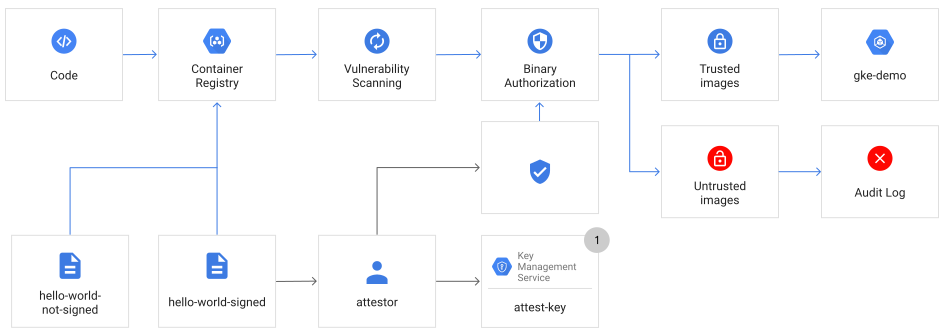 **Figure 6**. Using Binary Authorization to enforce a policy that requires only trusted images are applied to a GKE cluster
For more information on Binary Authorization, see
[Set up for GKE.](https://docs.cloud.google.com/binary-authorization/docs/setting-up)
In an emergency, you can bypass a Binary Authorization policy by using the
[breakglass workflow](https://cloud.google.com/blog/products/identity-security/deploy-only-what-you-trust-introducing-binary-authorization-for-google-kubernetes-engine).
All breakglass incidents are recorded in
[Cloud Audit Logs](https://docs.cloud.google.com/logging/docs/audit).
[GKE Sandbox](https://docs.cloud.google.com/kubernetes-engine/docs/concepts/sandbox-pods)
reduces the need for the container to interact directly with the host, shrinking
the attack surface for host compromise, and restricting the movement of
malicious actors.
#### Requirement 6.3
Security vulnerabilities are identified and addressed.
#### Requirement 6.3.1
Security vulnerabilities are identified and
managed as follows:
- New security vulnerabilities are identified using industry-recognized sources for security vulnerability information, including alerts from international and national computer emergency response teams (CERTs).
- Vulnerabilities are assigned a risk ranking based on industry best practices and consideration of potential impact.
- Risk rankings identify, at a minimum, all vulnerabilities considered to be a high-risk or critical to the environment.
- Vulnerabilities for bespoke and custom, and third-party software (for example operating systems and databases) are covered.
Security in the cloud is a shared responsibility between the cloud provider and
the customer.
In GKE, Google manages the control plane, which includes the
primary VMs, the API server, and other components running on those VMs, as well
as the `etcd` database. This includes upgrades and patching, scaling, and
repairs, all backed by a service-level objective (SLO). For the nodes' operating
system, such as Container-Optimized OS or Ubuntu, GKE
promptly makes any patches to these images available. If you have auto-upgrade
enabled, these patches are automatically deployed. (This is the base layer of
your container---it's not the same as the operating system running in your
containers.)
For more information on the GKE shared responsibility model, see
[Exploring container security: the shared responsibility model in GKE](https://cloud.google.com/blog/products/containers-kubernetes/exploring-container-security-the-shared-responsibility-model-in-gke-container-security-shared-responsibility-model-gke).
Google provides several security services to help build security into your
CI/CD pipeline. To identify vulnerabilities in your container images, you can
use
[Google Artifact Analysis Vulnerability Scanning](https://docs.cloud.google.com/container-registry/docs/container-analysis#vulnerability_scanning).
When a container image is pushed to
[Google Container Registry (GCR)](https://docs.cloud.google.com/container-registry),
vulnerability scanning automatically scans images for known vulnerabilities and
exposures from known
[CVE](https://wikipedia.org/wiki/Common_Vulnerabilities_and_Exposures)
sources. Vulnerabilities are assigned severity levels (critical, high, medium,
low, and minimal) based on
[CVSS scores](https://www.first.org/cvss/specification-document).
#### Requirement 6.4
Public-facing web applications are protected against attacks.
[Web Security Scanner](https://docs.cloud.google.com/security-command-center/docs/concepts-web-security-scanner-overview)
lets you scan publicly facing App Engine, Compute Engine, and
GKE web applications for common vulnerabilities ranging from
cross-site scripting and misconfigurations to vulnerable resources. Scans can be
performed on demand and scheduled from the
[Google Cloud console](https://console.cloud.google.com/).
Using the Security Scanner APIs, you can automate the scan as part of your
security test suite in your application build pipeline.
## Implement strong access control measures
Implementing strong access control measures encompasses requirements 7, 8, and 9
of PCI DSS.
### Requirement 7
Restrict access to system components and cardholder data by business need to know.
Requirement 7 focuses on *least privilege* or *need to know*. PCI DSS defines
these as granting access to the least amount of data and providing the fewest
privileges that are required in order to perform a job.
#### Requirement 7.2
Access to system components and data is appropriately defined and assigned.
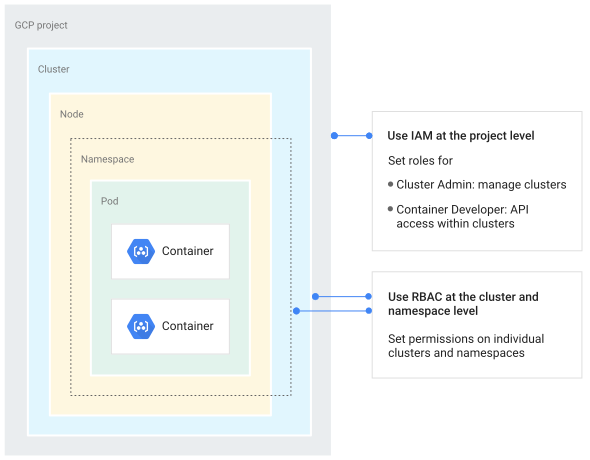 **Figure 7**. Employing IAM and RBAC to provide layers of security
[IAM](https://docs.cloud.google.com/iam)
and
[Kubernetes role-based access control (RBAC)](https://docs.cloud.google.com/kubernetes-engine/docs/how-to/role-based-access-control)
work together to provide fine-grained access control to your GKE
environment. IAM is used to manage user access and permissions of
Google Cloud resources in your CDE project. In GKE, you can
also use IAM to manage the access and actions that users and
service accounts can perform in your clusters, such as creating and deleting
clusters.
Kubernetes RBAC lets you configure fine-grained sets of
permissions that define how a given Google Cloud user, Google Cloud
service accounts, or group of users
([Google Groups](https://docs.cloud.google.com/kubernetes-engine/docs/how-to/role-based-access-control#google-groups-for-gke))
can interact with any Kubernetes object in your cluster, or in a specific
namespace of your cluster. Examples of RBAC permissions include editing
deployments or configmaps, deleting pods, or viewing logs from a pod. You grant
users or services limited IAM permissions, such as
[Google Kubernetes Engine Cluster Viewer](https://docs.cloud.google.com/kubernetes-engine/docs/how-to/iam#predefined)
or
[custom roles](https://docs.cloud.google.com/kubernetes-engine/docs/how-to/iam#custom_roles),
then apply Kubernetes RBAC RoleBindings as appropriate.
[Cloud Identity Aware Proxy (IAP)](https://docs.cloud.google.com/iap/docs/enabling-kubernetes-howto)
can be integrated through ingress for GKE to control
application-level access for employees or people who require access to your PCI
applications.
Additionally, you can use
[Organization policies](https://docs.cloud.google.com/resource-manager/docs/organization-policy/creating-managing-policies)
to restrict the APIs and services that are available within a
project.
#### Requirement 7.2.2
Access is assigned to users, including
privileged users, based on:
- Job classification and function.
- Least privileges necessary to perform job responsibilities.
Along with making sure users and service accounts adhere to the principle of
least privilege, containers should too. A best practice when running a container
is to run the process with a non-root user. You can accomplish and enforce this
practice by using the
[PodSecurity admission controller](https://docs.cloud.google.com/kubernetes-engine/docs/how-to/podsecurityadmission).
PodSecurity is a Kubernetes admission controller that lets you apply Pod Security Standards to Pods running on your GKE clusters. Pod Security Standards are predefined security policies that cover the high-level needs of Pod security in Kubernetes. These policies range from being highly permissive to highly restrictive. PodSecurity replaces the former PodSecurityPolicy admission controller that was removed in Kubernetes v1.25. Instructions are available for [migrating](https://docs.cloud.google.com/kubernetes-engine/docs/how-to/migrate-podsecuritypolicy) from PodSecurityPolicy to the PodSecurity admission controller.
### Requirement 8
Identify users and authenticate access to system components
Requirement 8 specifies that a unique ID must be assigned to each person who has
access to in-scope PCI systems to ensure that each individual is uniquely
accountable for their actions.
#### Requirement 8.2
User identification and related accounts for users and administrators are strictly managed throughout an account's lifecycle.
#### Requirement 8.2.1
All users are assigned a unique ID before
access to system components or cardholder data is
allowed.
#### Requirement 8.2.5
Access for terminated users is immediately
revoked.
Both IAM and Kubernetes RBAC can be used to control access to
your GKE cluster, and in both cases you can grant permissions to
a user. We recommend that the users tie back to your
[existing identity system](https://cloud.google.com/blog/products/identity-security/identity-and-authentication-the-google-cloud-way),
so that you can manage user accounts and policies in one location.
#### Requirement 8.3
Strong authentication for users and administrators is established and managed.
#### Requirement 8.3.1
All user access to system components for users and administrators is authenticated by using at least one of the following authentication factors:
- Something you know, such as a password or passphrase.
- Something you have, such as a token device or smart card.
- Something you are, such as a biometric element.
Certificates are bound to a user's identity when
[they authenticate to `kubectl`](https://docs.cloud.google.com/kubernetes-engine/docs/how-to/cluster-access-for-kubectl#authentication).
All GKE clusters are configured to accept Google Cloud user
and service account identities, by validating the credentials and retrieving the
email address associated with the user or service account identity. As a result,
the credentials for those accounts must include the `userinfo.email` OAuth scope
in order to successfully authenticate.
### Requirement 9
Restrict physical access to cardholder data.
Google is
[responsible](https://services.google.com/fh/files/misc/gcp_pci_dss_v4_responsibility_matrix.pdf)
for physical security controls on all Google data centers underlying
Google Cloud.
## Regularly monitor and test networks
Regularly monitoring and testing networks encompasses requirements 10 and 11 of
PCI DSS.
### Requirement 10
Log and monitor all access to system components and cardholder data.
#### Requirement 10.2
Audit logs are implemented to support the detection of anomalies and suspicious activity, and the forensic analysis of events.
Kubernetes clusters have
[Kubernetes audit logging](https://kubernetes.io/docs/tasks/debug/debug-cluster/audit/)
enabled by default, which keeps a chronological record of calls that have been
made to the Kubernetes API server. Kubernetes audit log entries are useful for
investigating suspicious API requests, for collecting statistics, or for
creating monitoring alerts for unwanted API calls.
GKE clusters integrate a default configuration for
[GKE audit logging](https://docs.cloud.google.com/kubernetes-engine/docs/how-to/audit-logging)
with
[Cloud Audit Logs](https://docs.cloud.google.com/logging/docs/audit)
and
[Logging](https://docs.cloud.google.com/logging/docs).
You can see Kubernetes audit log entries in your Google Cloud project.
In addition to entries written by Kubernetes, your project's audit logs have
entries written by GKE.
To differentiate your CDE and non-CDE workloads, we recommend that you add
labels to your GKE pods that will percolate into metrics and logs
emitted from those workloads.
#### Requirement 10.2.2
Audit logs record the following details for each auditable event:
- User identification
- Type of event
- Date and time
- Success or failure indication
- Origination of event
- Identity or name of affected data, system component, resource, or service (for example, name and protocol)
Every audit log entry in Logging is an object of type
[`LogEntry`](https://docs.cloud.google.com/logging/docs/reference/v2/rest/v2/LogEntry)
that contains the following fields:
- A payload, which is of the `protoPayload` type. The payload of each audit log entry is an object of type [`AuditLog`](https://docs.cloud.google.com/logging/docs/reference/audit/auditlog/rest/Shared.Types/AuditLog). You can find the user identity in the `AuthenticationInfo` field of `AuditLog` objects.
- The specific event, which you can find in the `methodName` field of `AuditLog`.
- A timestamp.
- The event status, which you can find in the `response` objects in the `AuditLog` object.
- The operation request, which you can find in the `request` and `requestMetadata` objects in the `AuditLog` object.
- The service that is going to be performed, which you can find in the `AuditData` object in `serviceData`.
### Requirement 11
Test security of systems and networks regularly.
#### Requirement 11.3
External and internal vulnerabilities are regularly identified, prioritized, and addressed.
#### Requirement 11.3.1
Internal vulnerability scans are performed as follows:
- At least once every three months.
- High-risk and critical vulnerabilities (per the entity's vulnerability risk rankings defined at Requirement 6.3.1) are resolved.
- Rescans are performed that confirm all high-risk and critical vulnerabilities (as noted above) have been resolved.
- Scan tool is kept up to date with latest vulnerability information.
- Scans are performed by qualified personnel and organizational independence of the tester exists.
Artifact Analysis
[vulnerability scanning](https://docs.cloud.google.com/container-registry/docs/container-analysis#vulnerability_scanning)
performs the following types of vulnerability scanning for the images in
Container Registry:
- **Initial scanning**. When you first activate the
Artifact Analysis API, it scans your images in
Container Registry and extracts package manager, image basis, and
vulnerability occurrences for the images.
- **Incremental scanning**. Artifact Analysis scans new
images when they're uploaded to Container Registry.
- **Continuous analysis**: As Artifact Analysis receives new
and updated vulnerability information from vulnerability sources, it reruns
analysis of containers to keep the list of vulnerability occurrences for
already scanned images up to date.
#### Requirement 11.5
Network intrusions and unexpected file changes are detected and responded to.
#### Requirement 11.5.1
Intrusion-detection and/or intrusion prevention techniques are used to detect and/or prevent intrusions into the network as follows:
- All traffic is monitored at the perimeter of the CDE.
- All traffic is monitored at critical points in the CDE.
- Personnel are alerted to suspected compromises.
- All intrusion-detection and prevention engines, baselines, and signatures are kept up to date.
Google Cloud [Packet Mirroring](https://docs.cloud.google.com/vpc/docs/packet-mirroring#enterprise_security)
can be used with [Cloud IDS](https://docs.cloud.google.com/intrusion-detection-system)
to detect network intrusions. Google Cloud packet mirroring forwards all
network traffic from your Compute Engine VMs or Google Cloud clusters
to a designated address. Cloud IDS can consume this
mirrored traffic to detect a wide range of threats including exploit attempts,
port scans, buffer overflows, protocol fragmentation, command and control (C2)
traffic, and malware.
[Security Command Center](https://docs.cloud.google.com/security-command-center)
gives you centralized visibility into the security state of
Google Cloud services (including GKE) and assets across your
whole organization, which makes it easier to prevent, detect, and respond to
threats. By using Security Command Center, you can see when high-risk threats such as
malware, cryptomining, unauthorized access to Google Cloud resources,
outgoing DDoS attacks, port scanning, and brute-force SSH have been detected
based on your Cloud Logging logs.
## Maintain an information security policy
A strong security policy sets the security tone and informs people what is
expected of them. In this case, "people" refers to full-time and part-time
employees, temporary employees, contractors, and consultants who have access to
your CDE.
### Requirement 12
Support information security with organizational policies and programs.
For information about requirement 12, see the
[Google Cloud PCI Shared Responsibility Matrix](https://services.google.com/fh/files/misc/gcp_pci_dss_v4_responsibility_matrix.pdf).
## Cleaning up
If you used any resources while following this article---for example, if you
started new VMs or used the Terraform scripts---you can avoid incurring
charges to your Google Cloud account by deleting the project where you
used those resources.
> [!CAUTION]
> **Caution** : Deleting a project has the following effects:
>
> - **Everything in the project is deleted.** If you used an existing project for the tasks in this document, when you delete it, you also delete any other work you've done in the project.
> - **Custom project IDs are lost.** When you created this project, you might have created a custom project ID that you want to use in the future. To preserve the URLs that use the project ID, such as an `appspot.com` URL, delete selected resources inside the project instead of deleting the whole project.
1. In the Google Cloud console, go to the **Manage resources** page.
[Go to Manage resources](https://console.cloud.google.com/iam-admin/projects)
2. In the project list, select the project that you want to delete, and then click **Delete**.
3. In the dialog, type the project ID, and then click **Shut down** to delete the project.
## What's next
- Learn more about [PCI Data Security Standard compliance](https://docs.cloud.google.com/solutions/pci-dss-compliance-in-gcp).
- Try the [Terraform Starter Kit](https://github.com/GoogleCloudPlatform/terraform-pci-starter).
- Explore reference architectures, diagrams, and best practices about Google Cloud. Take a look at our [Cloud Architecture Center](https://docs.cloud.google.com/architecture).