This document describes a reference architecture to send log event data from
across your Google Cloud ecosystem to Datadog Log Management. Sending data
from Google Cloud to Datadog uses a Pub/Sub pull
subscription and a Dataflow pipeline. This reference architecture is
intended for IT professionals who want to stream logs from Google Cloud to
Datadog. This document assumes that you are familiar with Datadog Log Management.
Sending your logs to Datadog lets you visualize logs, set up alerts for log
events, and correlate logs with metrics and traces from across your stack. Datadog is a cloud-based
platform that provides methods to monitor and secure your infrastructure and
applications. Datadog Log Management unifies logs, metrics, and traces into a
single dashboard. Having a single view helps provide rich context when you
analyze your log data.
## Architecture
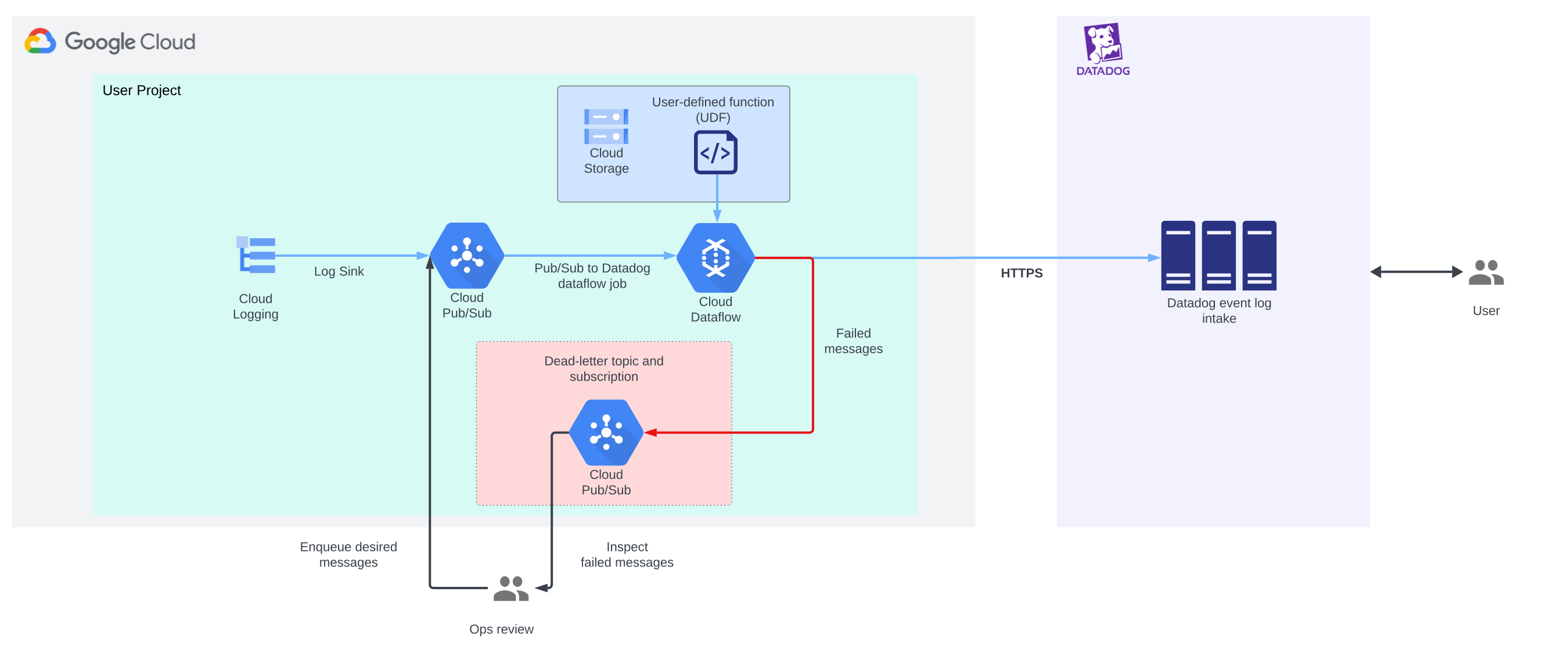
The following diagram shows the architecture that's described in this document.
This diagram demonstrates how log files that are generated by Google Cloud
are ingested by Datadog and shown to Datadog users.
Click the diagram to enlarge it.

This reference architecture uses Pub/Sub and Dataflow
to forward your log files to Datadog. The architecture achieves a high level of
log-file throughput by allowing batch delivery and compression. If you generate
high-throughput and low-latency event logs, we recommend that you use
a pull subscription.
For more information about the different features that are supported by
Pub/Sub subscriptions, see the
[Pub/Sub subscription comparison table](https://docs.cloud.google.com/pubsub/docs/subscriber#subscription_type_comparison).
This architecture diagram includes the following components:
- [**Cloud Logging**](https://docs.cloud.google.com/logging/docs): Routes all of your logs to a [Cloud Logging sink](https://docs.cloud.google.com/logging/docs/routing/overview#sinks), where they can then be filtered and forwarded to [supported destinations](https://docs.cloud.google.com/logging/docs/routing/overview#destinations), like Pub/Sub.
- [**Pub/Sub**](https://docs.cloud.google.com/pubsub/docs): Forwards your log file data to Datadog through a Dataflow pipeline. When Pub/Sub is integrated with Cloud Logging, Pub/Sub uses [topics](https://docs.cloud.google.com/pubsub/docs/create-topic) and [pull subscriptions](https://docs.cloud.google.com/pubsub/docs/create-subscription) to publish log file data to Pub/Sub topics in near real-time. For more information, see [View logs routed to Pub/Sub](https://docs.cloud.google.com/logging/docs/export/pubsub).
- [**Dataflow**](https://docs.cloud.google.com/dataflow/docs): Offers two pipeline types to manage Google Cloud log files:
- **Log forwarding**: This is the primary pipeline. Dataflow workers batch log file data and then compress it. The pipeline then sends that data to Datadog.
- **Dead-letter pipeline**: This is the backup pipeline. When there are data processing errors, Dataflow workers send the log messages to the dead-letter topic. When you've resolved the errors manually, you create this pipeline to resend the data in the dead-letter topic to Datadog.
- [**Datadog**](https://docs.datadoghq.com/logs/): Datadog's Log Management system is the destination for your Google Cloud log file data. Each [Datadog site](https://docs.datadoghq.com/getting_started/site/) provides a unique SSL-encrypted logging endpoint. For more information about the HTTPS endpoint of your Datadog data center, see [logging endpoints](https://docs.datadoghq.com/logs/log_collection/?tab=host#logging-endpoints).
## Products used
This reference architecture uses the following Google Cloud and
third-party products:
- [Cloud Logging](https://cloud.google.com/logging): A real-time log management system with storage, search, analysis, and alerting.
- [Pub/Sub](https://cloud.google.com/pubsub): An asynchronous and scalable messaging service that decouples services that produce messages from services that process those messages.
- [Cloud Storage](https://cloud.google.com/storage): A low-cost, no-limit object store for diverse data types. Data can be accessed from within and outside Google Cloud, and it's replicated across locations for redundancy.
- [Dataflow](https://cloud.google.com/dataflow): A service that provides unified stream and batch data processing at scale.
- [Datadog Log Management](https://docs.datadoghq.com/logs/): A service to collect, process, archive, explore, and monitor all of your logs.
## Use case
Use a pre-built Dataflow template to forward your
Google Cloud logs to Datadog. The pre-built template minimizes network
overhead by batching and compressing the log files before they're transferred.
If your organization uses a Virtual Private Cloud (VPC) with
[service perimeters](https://docs.cloud.google.com/vpc-service-controls/docs/service-perimeters),
you need a pull-based subscription model to access endpoints that are outside
the VPC perimeter. Pull subscriptions are useful if your log
volume is highly variable. Use the log data that you transferred to Datadog for
your organization's dashboards, alerts, and security platforms. You can also use
the log data to troubleshoot.
The log forwarding architecture that's described on this page uses a pull
subscription with the Pub/Sub topic. The pull subscription enables
access to the external Datadog endpoint. However, when you're using service
perimeters, not all of the subscription delivery types provide access to
external endpoints.
For more information, see
[Supported products and limitations](https://docs.cloud.google.com/vpc-service-controls/docs/supported-products#table_pubsub).
## Design considerations
This section describes design factors, best practices, and design
recommendations that you should consider when you use this reference
architecture to develop a topology that meets your specific requirements for
security, reliability, operational efficiency, cost, and performance.
The guidance in this section isn't exhaustive. Depending on the specific
requirements of your application and the Google Cloud and third-party
products and features that you use, there might be additional design factors and
trade-offs that you should consider.
### Security, privacy, and compliance
This section describes factors that you should consider when you design and
build a log-file-delivery pipeline between Google Cloud and Datadog that
meets your security, privacy, and compliance requirements.
#### Use private networking for the Dataflow VMs
We recommend that you restrict access to the worker VMs that are used in the
Dataflow pipeline by configuring them with private IP addresses.
Restricting access lets you keep communication on private networks and away from
the public internet.
To restrict access while also allowing the VMs to stream the exported logs
into Datadog over HTTPS, configure a public Cloud NAT gateway. After
you configure the gateway, map the gateway to the subnet that contains your
Dataflow pipeline workers. This mapping lets
Dataflow automatically allocate Cloud NAT IP addresses to the
VMs in the subnet. The mapping also enables Private Google Access.
For more information about using private networking for the
Dataflow VMs, see
[Private Google Access interaction](https://docs.cloud.google.com/nat/docs/nat-product-interactions#interaction-pga).
#### Store the Datadog API key in Secret Manager
This reference architecture uses Secret Manager to store the
Datadog API key value. Datadog API keys are unique to your
organization. You use them to authenticate to the Datadog API endpoints.
Any credentials that you store in Secret Manager are encrypted by
default. The credentials offer access control options through
IAM, and observability through audit logging.
Secret Manager also supports versioning. That means that you can
maintain a policy of short-lived credentials by rotating your API key value
whenever it's appropriate.
Each time the Datadog API key value is updated, Secret Manager
creates a new version of the Secret Manager secret.
For more information about rotating your API key values, see
[About rotation schedules](https://docs.cloud.google.com/secret-manager/docs/rotation-recommendations).
#### Create a custom service account for Dataflow pipeline workers
By default, the service account that's used by worker VMs in the
Dataflow pipeline is the
[Compute Engine default service account](https://docs.cloud.google.com/compute/docs/access/service-accounts#default_service_account).
This service account provides broad access to resources in your project. To
follow the
[principle of least privilege](https://en.wikipedia.org/wiki/Principle_of_least_privilege),
you should
[create a custom service account with the minimum required permissions](https://docs.cloud.google.com/dataflow/docs/concepts/security-and-permissions#user-managed).
Successfully running a Dataflow job requires the following roles
for the Dataflow worker service account:
- [Dataflow Admin](https://docs.cloud.google.com/dataflow/docs/concepts/access-control#dataflow.admin)
- [Dataflow Worker](https://docs.cloud.google.com/dataflow/docs/concepts/access-control#dataflow.worker)
- [Pub/Sub Publisher](https://docs.cloud.google.com/iam/docs/roles-permissions/pubsub#pubsub.publisher)
- [Pub/Sub Subscriber](https://docs.cloud.google.com/iam/docs/roles-permissions/pubsub#pubsub.subscriber)
- [Pub/Sub Viewer](https://docs.cloud.google.com/iam/docs/roles-permissions/pubsub#pubsub.viewer)
- [Secret Manager Secret Accessor](https://docs.cloud.google.com/iam/docs/roles-permissions/secretmanager#secretmanager.secretAccessor)
- [Storage Object Admin](https://docs.cloud.google.com/iam/docs/roles-permissions/storage#storage.objectAdmin)
#### Use Datadog to maintain data sovereignty
To maintain data sovereignty, Datadog offers unique sites that are
[distributed throughout the world](https://docs.datadoghq.com/getting_started/site/).
Data is never shared between sites. Each site operates independently. Use
different sites for specific use cases (such as government security regulations)
or to store your data in different regions.
### Reliability
This section describes features and design considerations for reliability.
#### Intake errors
The
[Datadog API documentation](https://docs.datadoghq.com/api/latest/logs/#send-logs)
lists the potential errors that you might encounter at intake. The following
table briefly describes Datadog status codes, causes, and which error types are
automatically retried. For example, `4xx` errors aren't automatically retried
and `5xx` errors are automatically retried.
| Status Code | Cause | Automatically retried? |
|---|---|---|
| 400 | Bad request (likely an issue in the payload formatting) | No |
| 401 | Unauthorized (likely a missing API Key) | No |
| 403 | Permission issue (likely using an invalid API Key) | No |
| 408 | Request timeout | No |
| 413 | Payload too large | No |
| 429 | Too many requests | No |
| 500 | Internal server error | Yes |
| 503 | Service unavailable | Yes |
Due to API rate-limits at intake, rapid and unexpected bursts in platform logs
can lead to throttling and `429` errors. To help prevent these errors, configure
the Pub/Sub to Datadog Dataflow template so that
the Dataflow worker pipelines batch up to 1,000 logs in each
request. To ensure a timely and consistent flow of logs during slow periods,
configure the template so that Google Cloud sends batches to Datadog
every two seconds.
#### Index daily quotas
If you are receiving errors with a `429` status code (too many requests), you
might have reached the maximum daily quota for a Datadog log index. By default,
Datadog log indexes can receive up to 200,000,000 log events per day before
being rate-limited.
Increase your daily quota by directly editing your index in the Datadog user
interface or through the Datadog API. You can also set up multiple indexes.
Configure each index to have a different retention period. You can also create
different queries for each index.
For more information, see
[Best Practices for Log Management](https://docs.datadoghq.com/logs/guide/best-practices-for-log-management/).
#### Logs silently dropped at intake
Sometimes Datadog drops Google Cloud log files at intake without
generating an error status code.
For more information about potential causes, as well as how to use Datadog
metrics to determine if you're affected by this issue, see
[Unexpectedly dropping logs](https://docs.datadoghq.com/logs/guide/log-collection-troubleshooting-guide/?tab=linux#unexpectedly-dropping-logs).
#### Log event tags
A log event shouldn't have more than 100 tags. Each tag shouldn't exceed 200
characters. Tags can include Unicode characters. Datadog supports a maximum of
10,000,000 unique tags per day.
For more information, see
[Getting Started with Tags](https://docs.datadoghq.com/getting_started/tagging/).
#### Log event attributes
Any log event that's converted to the JSON file format should contain less than
256 attributes. Each attribute key should be less than 50 characters. Each key
should be nested in less than 10 successive levels. If you intend to promote
attributes as
[log facets](https://docs.datadoghq.com/logs/explorer/facets/),
the attributes should have fewer than 1,024 characters.
For more information, see
[Attributes and Aliasing](https://docs.datadoghq.com/logs/log_configuration/attributes_naming_convention/).
#### Maximum log file sizes
To learn about the limitations on single log file size, uncompressed payload
size, and number of logs grouped together that the Datadog API can accept, see
the
[Datadog Logs API reference](https://docs.datadoghq.com/api/latest/logs/).
### Operational efficiency
The following sections describe the operational efficiency considerations for
this reference architecture.
#### Overwrite default log attributes with user-defined functions
You can use Datadog Log Management
[processors](https://docs.datadoghq.com/logs/log_configuration/processors/)
to transform and enrich Google Cloud log files after Datadog receives
them. However, an alternative transformation option is to extend the
Pub/Sub to Datadog template by writing a user-defined function
(UDF) in JavaScript.
The UDF can override certain default log attributes such as `host` or
`service`. For more information, see the
[User-defined function parameter](https://docs.cloud.google.com/dataflow/docs/guides/templates/provided/pubsub-to-datadog#user-defined-function)
in the Pub/Sub to Datadog template.
#### Redeliver failed messages
To prevent data loss, messages that are sent but that aren't delivered to
Datadog are sent to the dead-letter topic. This can happen because of `4xx`
(authorization) or `5xx` (server) errors.
When a server error (`5xx`) occurs, delivery is retried with
[exponential backoff](https://en.wikipedia.org/wiki/Exponential_backoff).
The maximum backoff is 15 minutes. If the message isn't successfully delivered
in this timeframe, it's sent to the dead-letter topic.
The Datadog Logs API accepts log events with timestamps up to 18 hours in the
past. Ensure that you resend any log messages in the dead-letter topic within
this timeframe so that they are accepted by the Datadog API.
For failed log messages, use the following process to troubleshoot and then
redeliver the logs to Datadog:
- Inspect the logs and resolve the issues that prevented delivery. For example:
- For `401` (unauthorized) or `403` (permission issue) errors, confirm that the Datadog API key is valid and that the Dataflow job has access to it.
- Check the [API key validity](https://app.datadoghq.com/organization-settings/api-keys) in Datadog.
- Check that the [Secret Manager](https://console.cloud.google.com/security/secret-manager) secret that contains your valid Datadog API key allows access from the correct service account.
- Review the reasons for the errors. Other errors might be caused by restrictions on the Datadog logging endpoint. For more information, see the [custom log forwarding section](https://docs.datadoghq.com/logs/log_collection/#custom-log-forwarding) of Datadog's log collection documentation.
- Create a temporary Dataflow job with the [Pub/Sub to Pub/Sub template](https://docs.cloud.google.com/dataflow/docs/guides/templates/provided/pubsub-to-pubsub). Use this job to route the undelivered message back into the input topic of the primary log.
- Confirm that all failed messages in the dead-letter topic have been sent back to the input topic of the primary log.
### Performance and cost optimization
The following sections describe the factors that can influence the network and
cost efficiency of this reference architecture.
#### Batch count
For optimal efficiency of network egress traffic, and its associated cost
savings, Datadog recommends that you configure your `batchCount` parameter to
the maximum setting of 1,000. This maximum parameter value means that up to
1,000 messages are batched together in a single network request. A batch is sent
at least every two seconds, regardless of the batch size.
- The minimum value for `batchCount` is 10.
- The default value for `batchCount` is 100.
To provide near real-time viewing of Google Cloud logs, Datadog sets the
delay between batches to two seconds, regardless of whether the `batchCount`
value has been reached. For example, if your `batchCount` value is set to 1,000,
you continue to receive logs at least every two seconds---even during periods of
sparse log-file generation.
#### Parallelism
To increase the number of requests that are sent to Datadog in parallel, use the
parallelism parameter in the Pub/Sub-to-Datadog template. By
default, this value is set to 1, which makes parallelism inactive. There is no
defined upper limit for parallelism.
For more information about parallelism, see
[Pipeline lifecycle](https://docs.cloud.google.com/dataflow/docs/pipeline-lifecycle#parallelization_and_distribution).
#### Optimize compute resources with Dataflow Prime
You can incorporate
[Dataflow Prime](https://docs.cloud.google.com/dataflow/docs/guides/enable-dataflow-prime)
with the Pub/Sub to Datadog template. Dataflow
Prime is a serverless data-processing platform based on Dataflow.
Use one or both of the following parameters to optimize the compute resources
that your Dataflow pipeline uses:
- **Vertical autoscaling** : To meet the requirements of your pipeline, Dataflow Prime automatically scales the memory capacity of your Dataflow worker VMs. Scaling memory capacity can be useful for bursty workloads that trigger out-of-memory issues. For more information, see [Vertical Autoscaling](https://docs.cloud.google.com/dataflow/docs/vertical-autoscaling).
- **Right fitting** : To help you specify stage-specific or pipeline-wide compute resources, Dataflow Prime creates stage-specific worker pools, with resource hints, for each stage in the Dataflow pipeline. For more information, see [Right fitting](https://docs.cloud.google.com/dataflow/docs/guides/right-fitting).
#### Dataflow pipeline options
Other factors that can influence the performance and cost of your
Dataflow pipeline are documented on the
[Pipeline options](https://docs.cloud.google.com/dataflow/docs/reference/pipeline-options)
page---for example:
- [Resource utilization options](https://docs.cloud.google.com/dataflow/docs/reference/pipeline-options#resource_utilization), like autoscaling mode and the maximum number of Compute Engine instances that are available to your pipeline during runtime.
- [Worker-level options](https://docs.cloud.google.com/dataflow/docs/reference/pipeline-options#worker-level_options), like worker machine type.
If needed, use these settings to further refine the performance and cost
efficiency of your Dataflow pipeline.
## Deployment
To deploy this architecture, see
[Deploy Log Streaming from Google Cloud to Datadog](https://docs.cloud.google.com/architecture/partners/stream-cloud-logs-to-datadog/deployment).
## What's Next
- To learn more about the benefits of the Pub/Sub to Datadog Dataflow template, read the [Stream your Google Cloud logs to Datadog with Dataflow](https://www.datadoghq.com/blog/stream-logs-datadog-dataflow-template/) blog post.
- To learn more about Datadog Log Management, see [Best Practices for Log Management](https://docs.datadoghq.com/logs/guide/best-practices-for-log-management/).
- For more information about Dataflow, see the [Dataflow overview](https://docs.cloud.google.com/dataflow/docs/overview).
- For more reference architectures, diagrams, and best practices, explore the [Cloud Architecture Center](https://docs.cloud.google.com/architecture).
## Contributors
Authors:
- [Ashraf Hanafy](https://www.linkedin.com/in/ashraf-hanafy-24660442) \| Senior Software Engineer for Google Cloud Integrations, Datadog
- [Daniel Trujillo](https://www.linkedin.com/in/dtrupenn) \| Engineering Manager, Google Cloud Integrations, Datadog
- [Bryce Eadie](https://www.linkedin.com/in/bryce-eadie-432559102) \| Technical Writer, Datadog
- [Sriram Raman](https://www.linkedin.com/in/sriram-raman-79a6703) \| Senior Product Manager, Google Cloud Integrations, Datadog
Other contributors:
- [Maruti C](https://www.linkedin.com/in/maruti-c) \| Global Partner Engineer
- [Chirag Shankar](https://www.linkedin.com/in/chirag-shankar) \| Data Engineer
- [Kevin Winters](https://www.linkedin.com/in/kevin-winters-307a72) \| Key Enterprise Architect
- [Leonid Yankulin](https://www.linkedin.com/in/minherz) \| Developer Relations Engineer
- [Mohamed Ali](https://www.linkedin.com/in/mohamed1ali) \| Cloud Technical Solutions Developer