Authors: Bartek Moczulski, Sherelle Farrington -
[Fortinet Inc.](https://www.fortinet.com/) \|
Jimit Modi - Google
This document describes the overall concepts around deploying a FortiGate Next
Generation Firewall (NGFW) in Google Cloud. It's intended for network
administrators, solution architects, and security professionals who are familiar
with[Compute Engine](https://docs.cloud.google.com/compute)
and[Virtual Private Cloud networking](https://docs.cloud.google.com/vpc).
## Architecture
The following architecture diagram shows a highly available cloud security
solution that helps to reduce costs and to detect threats. The recommended
deployment of FortiGate NGFW on Google Cloud consists of a pair of
FortiGate virtual machine (VM) instances deployed in an active-passive
high-availability (HA) cluster across two
[availability zones in the same region](https://docs.cloud.google.com/compute/docs/regions-zones).

In the previous diagram, traffic is forwarded through the cluster using a
[regional external passthrough Network Load Balancer](https://docs.cloud.google.com/load-balancing/docs/passthrough-network-load-balancer)
and an internal passthrough Network Load Balancer.
The regional external passthrough Network Load Balancer binds to external IP addresses and forwards all
traffic to the external network interface (`port1`) of the active FortiGate
instance. The internal passthrough Network Load Balancer is used as the next hop for the custom
static route from the shared Virtual Private Clouds (VPCs) in the host
project. The load balancer forwards outbound traffic to the internal network
interface (`port2`) of the active FortiGate VM. To determine which instance is
active, both load balancers use health checks.
The FortiGate Clustering Protocol (FGCP) requires a dedicated
network interface for configuration and session synchronization. Standard deployments use
`port3` for clustering (HA sync in the diagram). Both VM instances are managed
through dedicated management network interfaces (`port4`) that are directly
reachable using either external IP addresses or over a VLAN attachment. The VLAN
attachment isn't marked in the diagram. Newer firmware versions (7.0 and later)
allow using dedicated HA sync interfaces for management. Use
[Cloud Next Generation Firewall rules](https://docs.cloud.google.com/vpc/docs/firewalls)
to restrict access to management interfaces.
When outbound traffic originates from FortiGate VMs---for example, updates from
the FortiGate Intrusion Prevention System (IPS), or communications with
Compute Engine APIs---that traffic is forwarded to the internet using the
[Cloud NAT](https://docs.cloud.google.com/nat/docs/overview)
service. In environments isolated from the internet, the outbound traffic that
originates from a FortiGate VM scan also uses a combination of
[Private Google Access](https://docs.cloud.google.com/vpc/docs/private-google-access)
and
[FortiManager](https://www.fortinet.com/products/management/fortimanager).
Private Google Access accesses Compute Engine APIs. FortiManager is a
central management appliance that acts as a proxy for accessing
[FortiGuard Security Services](https://www.fortinet.com/content/dam/fortinet/assets/data-sheets/FortiGuard_Security_Services.pdf).
Workloads protected by FortiGate NGFWs are typically located in separate VPC
networks, either simple or shared. Those separate VPC networks are connected to
the internal VPC using
[VPC Network Peering](https://docs.cloud.google.com/vpc/docs/vpc-peering).
To apply the custom default route from the internal VPC to all the workloads,
enable export custom routes or import custom routes in the peering options
for both the internal network VPC and the workload VPCs. Placing security
features in this central hub enables different independent DevOps teams to
deploy and operate their workload projects behind a common security management
zone.
This dedicated VPC forms the basis of the
Fortinet [Cloud Security Services Hub](https://www.fortinet.com/content/dam/fortinet/assets/solution-guides/sb-fortinet-cloud-security-service-hub.pdf)
concept. This hub is designed to offload effective and scalable secure
connectivity and policy enforcement to the network security team.
For more details about the different traffic flows, see the
[Use cases](https://docs.cloud.google.com/architecture/partners/fortigate-architecture-in-cloud#use_cases)
section.
### Product capabilities
FortiGate on Google Cloud delivers NGFW, VPN, advanced routing, and
software-defined wide area network (SD-WAN) capabilities for organizations.
FortiGate reduces complexity with automated threat protection, visibility into
applications and users, and network and security ratings that enable security
best practices.
Close integration with Google Cloud, management automation using
[Terraform](https://developer.hashicorp.com/terraform/intro),
[Ansible](https://www.ansible.com/resources/get-started),
and robust APIs, help you maintain your strong network security posture in agile
modern cloud deployments.
### Features highlight
FortiGate NGFW is a virtual appliance that offers the following features:
- Full traffic visibility
- Granular access control based on metadata, geolocation, protocols, and applications
- Threat protection powered by threat intelligence security services from [FortiGuard Labs](https://www.fortiguard.com/)
- Encrypted traffic inspection
- Secure remote access options, including the following:
- Zero-trust network access (ZTNA)
- SSL VPN for individual users
- IPsec and award-winning secure SD-WAN connectivity for distributed locations and data centers
By combining FortiGate NGFW with optional additional elements of the Fortinet
Security Fabric, like FortiManager, FortiAnalyzer, FortiSandbox, and FortiWeb,
administrators can expand security capabilities in the targeted areas.
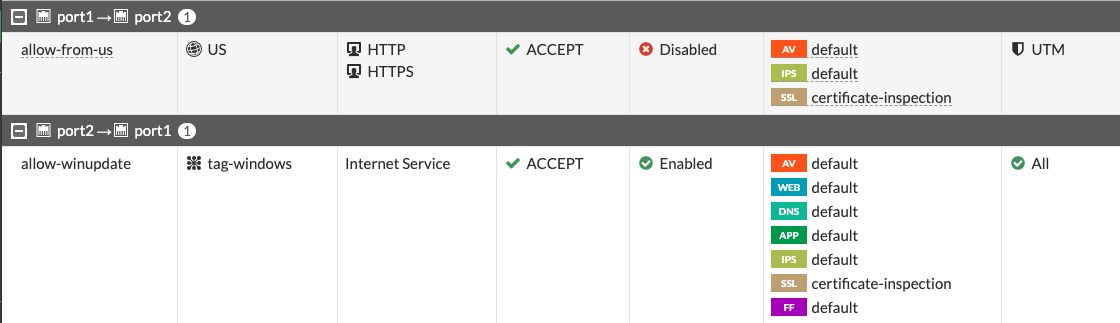
The following screenshot displays FortiGate firewall policies using
geolocation and Google Cloud network tags.
## Use cases
You can deploy FortiGate to secure your environment and apply deep
packet inspection to both incoming, outgoing, and local traffic. In the
following sections, the document discusses packet inspection:
- [North-south traffic inspection](https://docs.cloud.google.com/architecture/partners/fortigate-architecture-in-cloud#north-south_traffic_inspection)
- [Inbound traffic](https://docs.cloud.google.com/architecture/partners/fortigate-architecture-in-cloud#inbound_traffic)
- [Private service access](https://docs.cloud.google.com/architecture/partners/fortigate-architecture-in-cloud#private_service_access)
- [Outbound traffic](https://docs.cloud.google.com/architecture/partners/fortigate-architecture-in-cloud#outbound_traffic)
- [East-west traffic inspection](https://docs.cloud.google.com/architecture/partners/fortigate-architecture-in-cloud#east-west_traffic_inspection)
### North-south traffic inspection
When you're running your workloads on Google Cloud you should protect
your applications against cyberattacks. When deployed in a VPC, a FortiGate VM
can help secure applications by inspecting all inbound traffic originating from
the internet. You can also use a FortiGate VM as a secure web gateway that
protects the outbound traffic originating from workloads.
> [!NOTE]
> **Note:** To provide enhanced protection of the services that are based on HTTP and HTTPS protocols, it's recommended that you deploy a WAAP ([web application and API protection](https://www.gartner.com/en/documents/4018252)) solution. Fortinet offers a dedicated WAAP product for Google Cloud as a VM deployment ([FortiWeb](https://www.fortinet.com/products/web-application-firewall/fortiweb)), and as a service ([FortiWeb Cloud](https://www.fortiweb-cloud.com/)).
### Inbound traffic
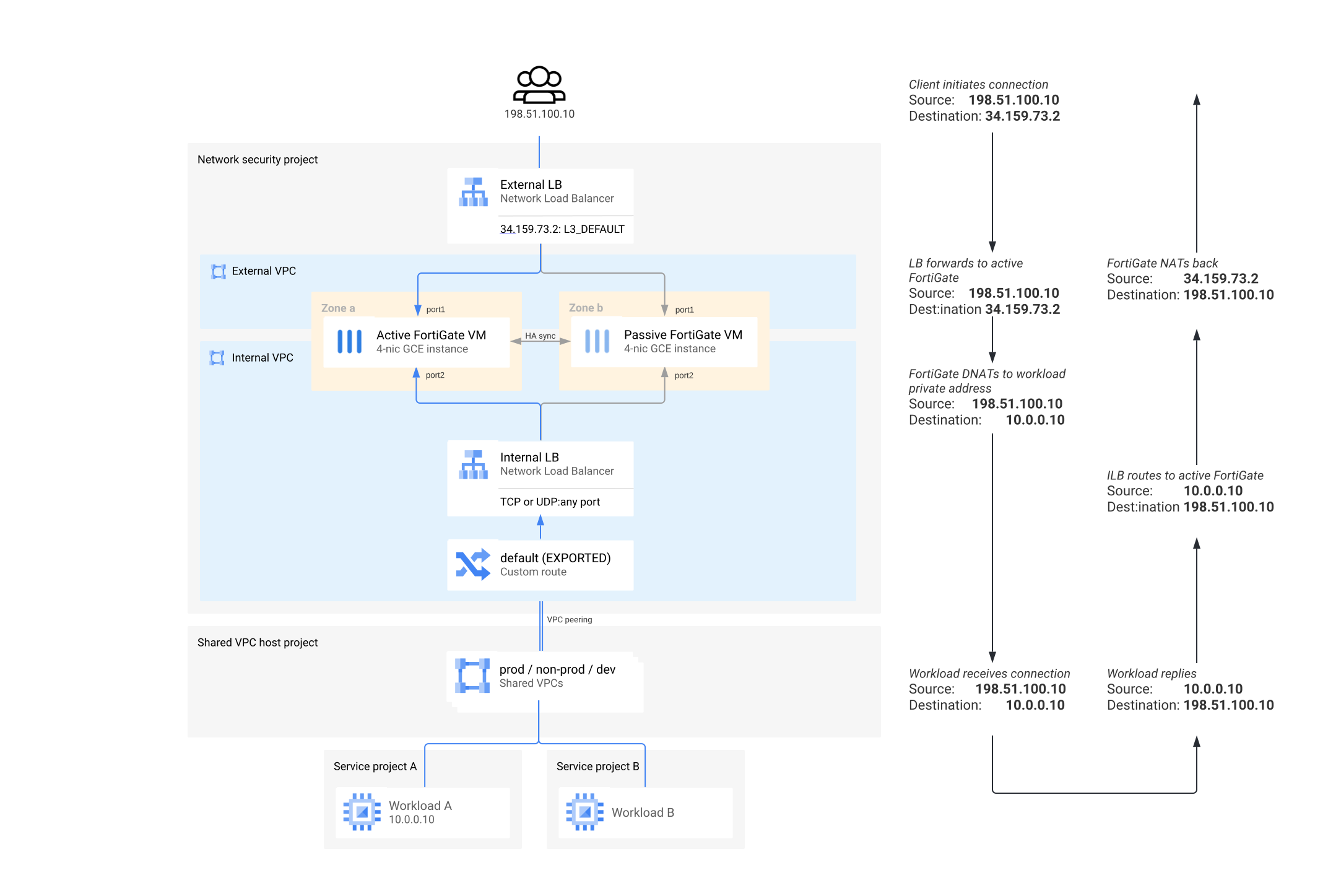
To enable secure connectivity to your workloads, assign one or more external IP
addresses to the regional external passthrough Network Load Balancer that forwards the traffic to FortiGate
instances. There, the incoming connections are:
- Translated according to DNAT (Virtual IP) configuration
- Matched to the access policy
- Inspected for threats according to the security profile
- Forwarded to the workloads using their internal IP addresses or FQDN
Don't translate source IP addresses. Not translating a source IP address
ensures that the original client IP address is visible to the workloads.
When using internal domain names for service discovery, you must configure
FortiGate VMs to use the following internal Cloud DNS service
(`169.254.169.254`) instead of the FortiGuard servers.
The return traffic flow is ensured because of a custom static route in the
internal VPC. That route is configured with the internal passthrough Network Load Balancer as a next
hop. The workloads might be deployed directly into the internal network, or
connected to it using VPC Network Peering.
The following diagram shows an example of the traffic packet flow for inbound
traffic inspection with FortiGate:
### Private service access
You can make some Google Cloud services accessible to the workloads in a
VPC network using
[private services access (PSA)](https://docs.cloud.google.com/vpc/docs/private-services-access).
Examples of these services include---but aren't limited to---Cloud SQL and
Gemini Enterprise Agent Platform.
Because the VPC Network Peering is non-transitive, services connected
using PSA aren't directly available from other VPC networks over peering. In
the recommended architecture design with peered internal and workload VPCs, the
services connected to the workload VPCs aren't available from or through
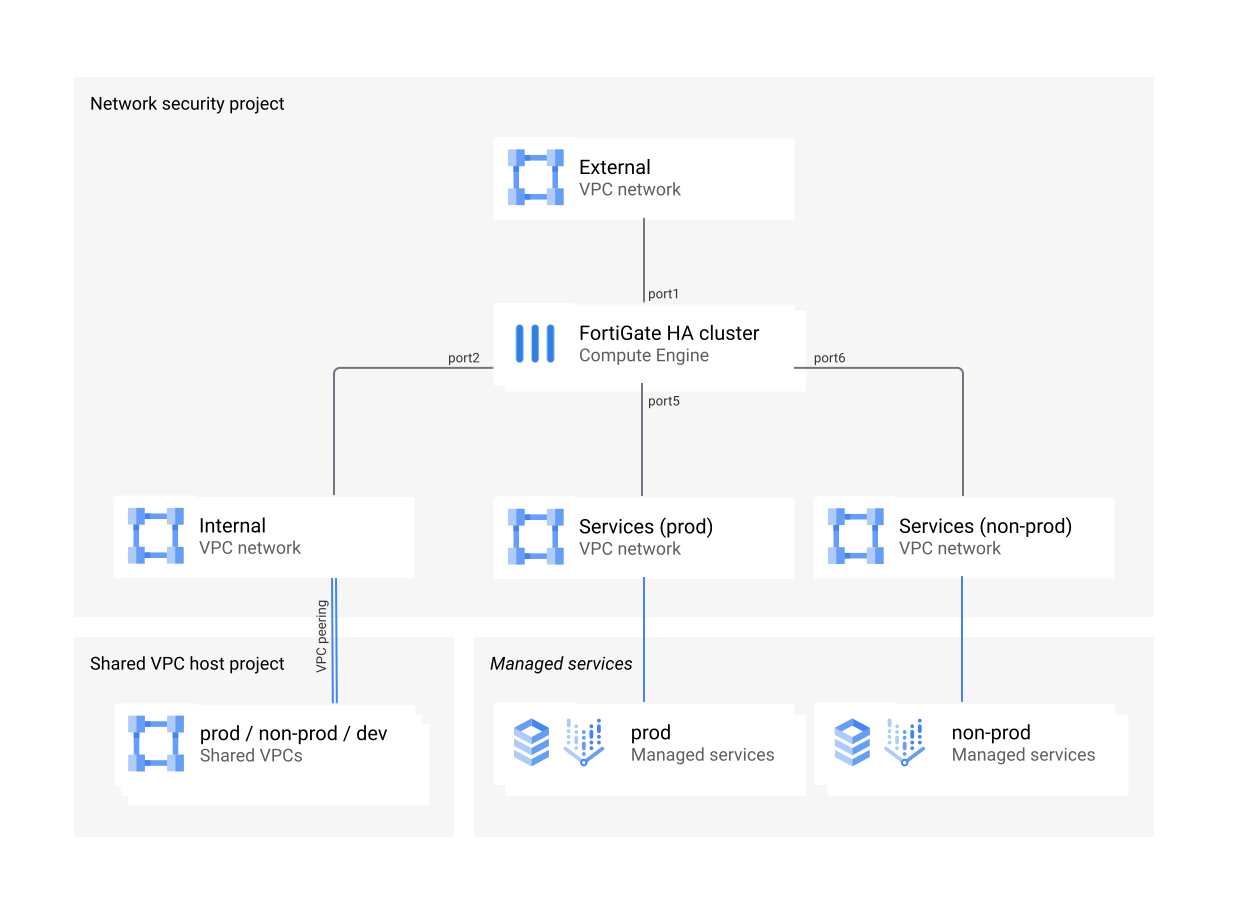
FortiGate NGFWs. To make a single instance of the service available through
FortiGate NGFWs, connect it using PSA to the internal VPC. For multiple
service instances, connect each instance to workload VPCs and create an extra
FortiGate network interface for each instance.
The following diagram shows additional network interfaces for PSA in a network
security project:
### Outbound traffic
Any outbound traffic initiated by workloads and headed to the active FortiGate
instance uses a custom route through an internal passthrough Network Load Balancer. The load
balancer forwards the traffic to the active FortiGate instance.
FortiGate inspects the traffic according to its policy and source-NATs (SNATs)
to one of the external IP addresses of the regional external passthrough Network Load Balancer. It's also
possible to SNAT to an internal IP address. In that case, Cloud NAT
handles the translation to an external IP address. Using IP address pools in
FortiGate for SNATing offers better control over the external IP addresses
assigned to individual groups of outbound connections when compared to using
directly attached external IP addresses or first-party NAT solutions.
### East-west traffic inspection
East-west traffic inspection, or segmentation, is a common requirement for
three-tier architecture (presentation, application, data) deployments that are
used to detect and block lateral movement, in case one of the tiers is
compromised. It's also commonly used to provide control and visibility of the
connections between multiple internal applications or services.
Each tier must be put in a separate VPC and peered with the firewall's internal
VPC to form a
[hub-and-spoke architecture](https://docs.cloud.google.com/architecture/deploy-hub-spoke-vpc-network-topology)
with an internal VPC in the role of a hub.
To make connections between the spokes to be passed through FortiGate for
inspection, perform the following steps:
1. Create a custom route in the internal VPC.
2. Apply the custom route to the spokes.
1. To apply the route, use the **Export custom route** and **Import custom route** options in the peering settings for both the hub and the spokes.
You can add and remove workload VPCs at any time. Doing so doesn't affect
traffic between the other spoke networks.
If the peering group size limit enforced by Google Cloud is too low for a
specific deployment, you can deploy FortiGate VMs with multiple internal network
interfaces. You can group these interfaces into a single zone to simplify the
firewall configuration.
> [!NOTE]
> **Note:** Google Cloud recently introduced policy-based routes, which makes it possible to inspect traffic using FortiGate NGFWs between the workloads in the same VPC. As of November 2023, this feature is in preview, but you might consider it as an alternative to a hub-and-spoke approach.
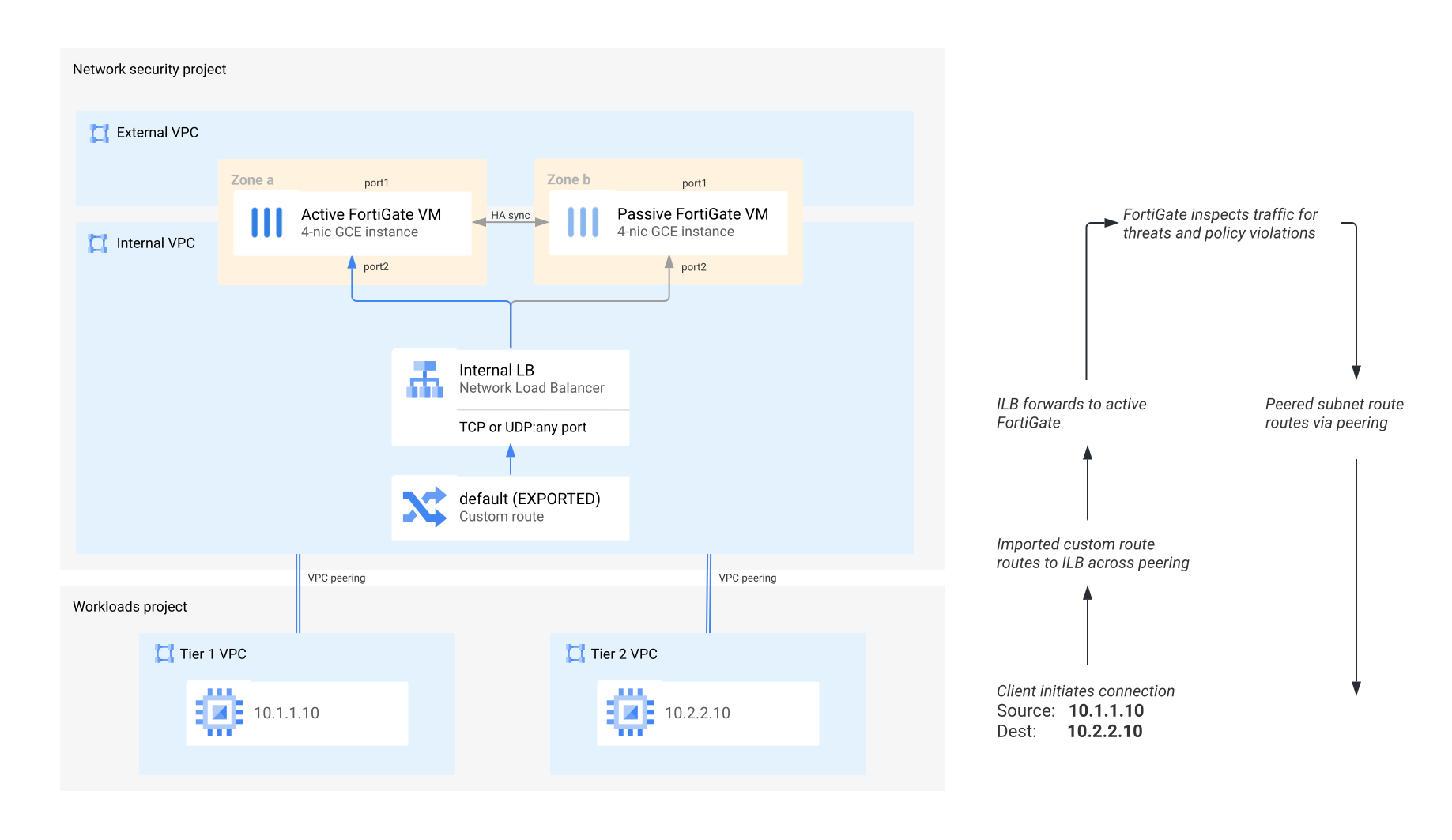
In the preceding diagram, the connection initiated from the Tier 1 VPC toward
the Tier 2 VPC matches the imported default custom route. The connection is sent
through the internal passthrough Network Load Balancer to the active FortiGate for inspection. Once
inspected, the connection is forwarded by FortiGate using the same internal
`port2`, that matches the peering route. That route is more specific than the
default custom route and is sent over VPC Network Peering to its destination
in the Tier 2 VPC.
## Additional use cases
This section contains some additional use cases for deploying a FortiGate NGFW
in Google Cloud.
### Secure a hybrid cloud
Because of regulatory or compliance requirements, you might be required to
perform a thorough inspection of the connectivity between an on-premises data
center and the cloud. FortiGate can provide inline IPS inspection and enforce
access policies for Cloud Interconnect links.
To avoid direct traffic flow between Cloud Interconnect and your
workloads, don't place VLAN attachments in the workload VPC networks. Instead,
place them in an external VPC that's only connected to the firewalls. You can
redirect traffic between Cloud Interconnect and the workload VPCs by
using a set of custom routes that point to the two internal passthrough Network Load Balancers
placed on the external side and the internal side of the FortiGate cluster.
To enable traffic flow, and to match the IP address space of the workloads, you
must manually update the custom route (or routes) on the external
(Cloud Interconnect) side of the FortiGate cluster, and the custom
advertisement list of the Cloud Router. While organizations can automate this
process, those steps are beyond the scope of this document.
> [!NOTE]
> **Note:** Sometimes, high throughput requirements can only be met using an active-active deployment. In these cases, the flow symmetry necessary for full bi-directional IPS inspection is maintained by the symmetric hashing feature of internal passthrough Network Load Balancer. This feature is enabled by default.
The following diagram shows an example of the packet flow from an on-premises
location to Google Cloud, when those packets are protected by FortiGate:
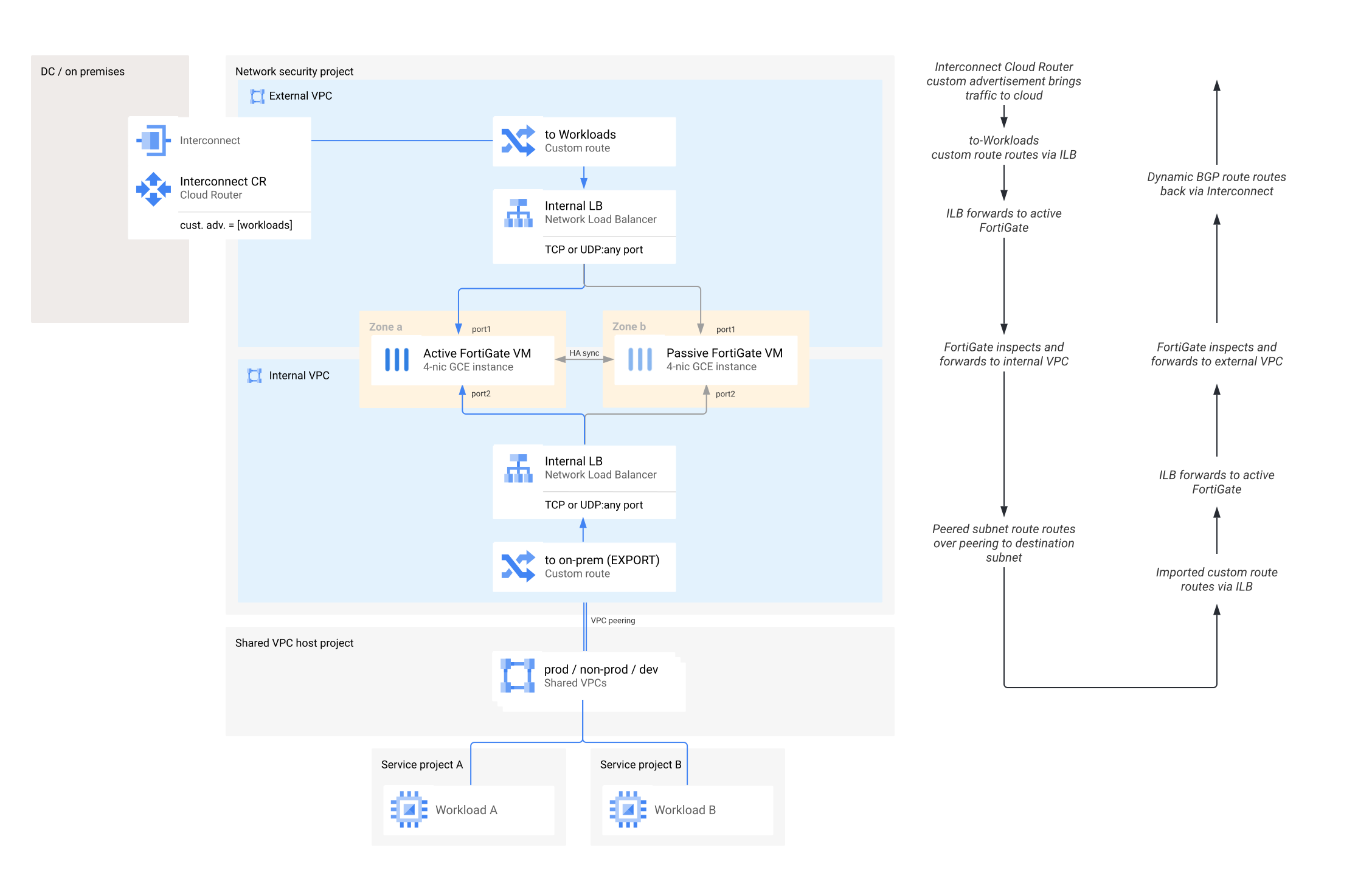
A network packet sent from the on-premises location is directed by the custom
BGP advertisement configured on the Cloud Router to a Cloud Interconnect
link. Once the packet reaches the external VPC, it's sent using a custom static
route to the active FortiGate instance. The FortiGate instance is located behind
an internal network pass-through load balancer. FortiGate inspects the
connection and passes the packet to the internal VPC network. The packet then
reaches its destination in a peered network. The return packet is routed through
the Internal Network Load Balancer in the Internal VPC and through the FortiGate
instance to the external VPC network. After that, the packet is sent back to the
on-premises location through Cloud Interconnect.
### Connect with shared VPCs
Larger organizations that have multiple projects hosting application workloads
often use
[Shared VPCs](https://docs.cloud.google.com/vpc/docs/shared-vpc)
to centralize network management in a single host project and extend subnets to
individual service projects. In projects used by DevOps teams, this approach
helps increase operational security by restricting unnecessary access to network
functions. It's also aligned to
[Fortinet Security Services Hub](https://www.fortinet.com/products/public-cloud-security/usecases/cloud-security-services-hub)
best practices.
Fortinet recommends using VPC peering between FortiGate internal VPC and
Shared VPC networks within the same project. But only if those
networks are controlled by the network security team. And only if that team also
manages network operations. If network security and network operations are
managed by separate teams, implement the peering across different projects.
Using individual FortiGate NICs to connect directly to the
Shared VPCs--while necessary in some architectures to access services
attached to different Shared VPCs using PSA--negatively affects
performance. This performance issue can be caused by the distribution of NIC
queues across multiple interfaces and the reduced number of vCPUs available
to each NIC.
### Connect with the Network Connectivity Center
To connect between branch offices and to provide access to cloud resources,
NCC (NCC) provides an advanced multi-regional architecture that
uses dynamic routing and the Google backbone network. To manage SD-WAN
connectivity between Google Cloud and on-premises locations equipped with
FortiGate appliances, FortiGate NGFWs are certified for use as
[NCC router appliances](https://docs.cloud.google.com/network-connectivity/docs/network-connectivity-center/concepts/ra-overview).
FortiGate clusters, as described in this document, are deployed into NCC spokes
to form regional SD-WAN hubs that connect on-premises locations in the region.
Locations within the same region can use FortiGate
[Auto-Discovery VPN](https://docs.fortinet.com/document/fortigate/7.2.0/administration-guide/978793/advpn)
technology to create on-demand direct links between each location. This practice
can help deliver minimum latency. Another advantage is that locations in
different regions can connect over the Google backbone to deliver fast and
stable connectivity that's constantly monitored by FortiGate SD-WAN performance
SLAs.
## Design considerations
This section discusses the Google Cloud and FortiGate components that you
need to consider when designing systems and deploying a FortiGate NGFW in
Google Cloud.
### FortiGate VMs
FortiGate VMs are configured in a unicast FortiGate Clustering Protocol
(FGCP) active-passive cluster. The cluster heartbeat is on
`port3`. Dedicated management is on `port4`. `Port1` and `port2` are used for
forwarding traffic. Optionally, `port4` can be linked to an external IP address
unless the internal IP addresses of the interfaces are available in another
way---for example, by VLAN attachment.
No other NICs need external IP addresses. `Port3` needs a static internal IP
address because it's part of the configuration of the peer instance in the
cluster. Other NICs can be configured with static IP addresses for
consistency.
### Cloud Load Balancing
To identify the current active instance, Cloud Load Balancing health
checks constantly probe FortiGate VMs. A built-in FortiGate probe responder
responds only when a cluster member is active. During an HA failover, the load
balancer identifies the active instance and redirects traffic through
it. During a failover, the connection tracking feature of
Cloud Load Balancing helps sustain existing TCP connections.
### Cloud NAT
Both FortiGate VMs in a cluster periodically connect to Compute Engine API
and to FortiGuard services to accomplish the following tasks:
- Verify licenses
- Access workload metadata
- Update signature databases
The external network interfaces of the FortiGate VMs don't have an attached
external IP address. To enable connectivity to these services, use
Cloud NAT. Or, you can use a combination of
[PSA](https://docs.cloud.google.com/service-infrastructure/docs/enabling-private-services-access)
for Compute Engine API and a FortiManager acting as a proxy for
accessing FortiGuard services.
### Service Account
VM instances in Google Cloud can be bound to a
[service account](https://docs.cloud.google.com/iam/docs/service-account-overview)and
use the IAM privileges of the account when interacting with Google
Cloud APIs. Create and assign to FortiGate VM instances a dedicated
service account with a custom role. This custom role should enable the reading
of metadata information for VMs and Kubernetes clusters in all projects which
host protected workloads. To build dynamic firewall policies without explicitly
providing IP addresses, you can use metadata from Compute Engine and
Google Kubernetes Engine. For example, only VMs with the network tag `frontend` can
connect to VMs with the network tag `backend`.
### Workloads
Workloads are any VM instances or Kubernetes clusters providing services that
are protected by FortiGate VMs. You can deploy these instances or clusters into
the internal VPC that's connected directly to the FortiGate VM instances. For
role separation and flexibility reasons, Fortinet recommends using a separate
VPC network that's peered with the FortiGate internal VPC.
## Costs
FortiGate VM for Google Cloud supports both the on-demand, pay-as-you-go
model and the bring-your-own-license model. For more information, see
[FortiGate support](https://www.fortinet.com/support).
The FortiGate NGFW uses the following billable components of Google Cloud:
- [Compute Engine](https://cloud.google.com/compute/vm-instance-pricing)
- [Cloud Load Balancing](https://docs.cloud.google.com/vpc/network-pricing#lb)
- [Cloud Storage](https://cloud.google.com/storage/pricing)
- [Cloud NAT](https://cloud.google.com/nat/pricing)
For more information on FortiGate licensing in Google Cloud, see
[Fortinet's article on order types](https://docs.fortinet.com/document/fortigate-public-cloud/7.2.0/gcp-administration-guide/451056/order-types).
To generate a cost estimate based on your projected usage, use the
Google Cloud
[pricing calculator](https://cloud.google.com/products/calculator).
New Google Cloud users might be eligible for a
[free trial](https://cloud.google.com/free).
## High-performance deployments
By default, FortiGate NGFWs are deployed in an active-passive high-availability
cluster that can only scale up vertically and that's limited by the maximum
throughput of a single active instance. While that's sufficient for many
deployments, it's possible to deploy active-active clusters and even autoscaling
groups for organizations that require higher performance.
Using an active-active architecture might enforce additional limitations to the
configuration and licensing of your FortiGate NGFWs---for example, requirements
for a central management system or the source-NAT. When autoscaling a
deployment, NGFW only supports pay-as-you-go licensing.
Fortinet recommends following the active-passive approach. Contact the
[Fortinet support team](https://www.fortinet.com/support/contact)
with questions.
Because of the way the Google Cloud algorithm assigns queues to VMs and
the way individual queues get assigned to CPUs in the Linux kernel, your
business can help increase performance by using custom queue assignment in
Compute Engine and
[fine-tuning interrupt affinity settings](https://docs.fortinet.com/document/fortigate-private-cloud/7.2.0/kvm-administration-guide/685796/interrupt-affinity)
in FortiGate.
For more information on performance offered by a single appliance, see
[FortiGate®-VM on Google Cloud](https://www.fortinet.com/content/dam/fortinet/assets/data-sheets/FortiGate_VM_GCP.pdf).
## Deployment
Standalone FortiGate virtual appliances are available in
[Google Cloud Marketplace](https://console.cloud.google.com/marketplace/browse?filter=partner:Fortinet+Inc.&supportedpurview=project&_ga=2.98365468.2012605509.1697567924-1060970370.1697567924).
You can use the following methods to automate the deployment of the
high-availability architectures described in this document:
- [FortiGate reference architecture deployment with Terraform](https://github.com/fortinet/fortigate-tutorial-gcp/tree/main/terraform)
- [FortiGate reference architecture deployment with
Deployment Manager](https://github.com/fortinet/fortigate-tutorial-gcp/tree/main/deployment-manager)
- [FortiGate reference architecture deployment with Google Cloud CLI](https://github.com/fortinet/fortigate-tutorial-gcp/tree/main/gcloud)
For a customizable experience without deploying a described solution in your
own project, see the *FortiGate: Protecting Google Compute resources* lab in the
[Fortinet Qwiklabs portal](https://fortinet.qwiklabs.com).
## What's next
- Read more about FortiGate in their
[Google Cloud administration guide](https://docs.fortinet.com/document/fortigate-public-cloud/7.0.0/gcp-administration-guide/736375/about-fortigate-vm-for-gcp).
- Read more about other Fortinet products for Google Cloud at
[fortinet.com](https://fortinet.com/gcp/).
-
For more reference architectures, diagrams, and best practices, explore the
[Cloud Architecture Center](https://docs.cloud.google.com/architecture).
## Contributors
Authors:
- [Bartek Moczulsk](https://www.linkedin.com/in/bartekmo) \| Consulting System Engineer (Fortinet)
- [Jimit Modi](https://www.linkedin.com/in/jimit-m-05688854) \| Cloud Partner Engineer
Other contributors:
- Deepak Michael \| Networking Specialist Customer Engineer
- [Ammett Williams](https://www.linkedin.com/in/ammett) \| Developer Relations Engineer