This document provides a reference architecture for a multi-tier application
that runs on Compute Engine VMs in multiple
[regions](https://docs.cloud.google.com/docs/geography-and-regions#regions_and_zones)
in Google Cloud. You can use this reference architecture to efficiently [rehost (lift and shift)](https://docs.cloud.google.com/architecture/migration-to-gcp-getting-started#rehost_lift_and_shift) on-premises applications to the cloud with minimal changes to the applications. The document also describes the design factors that you should consider when you build a multi-regional
architecture for your cloud applications.
The intended audience for this document is cloud architects.
## Architecture
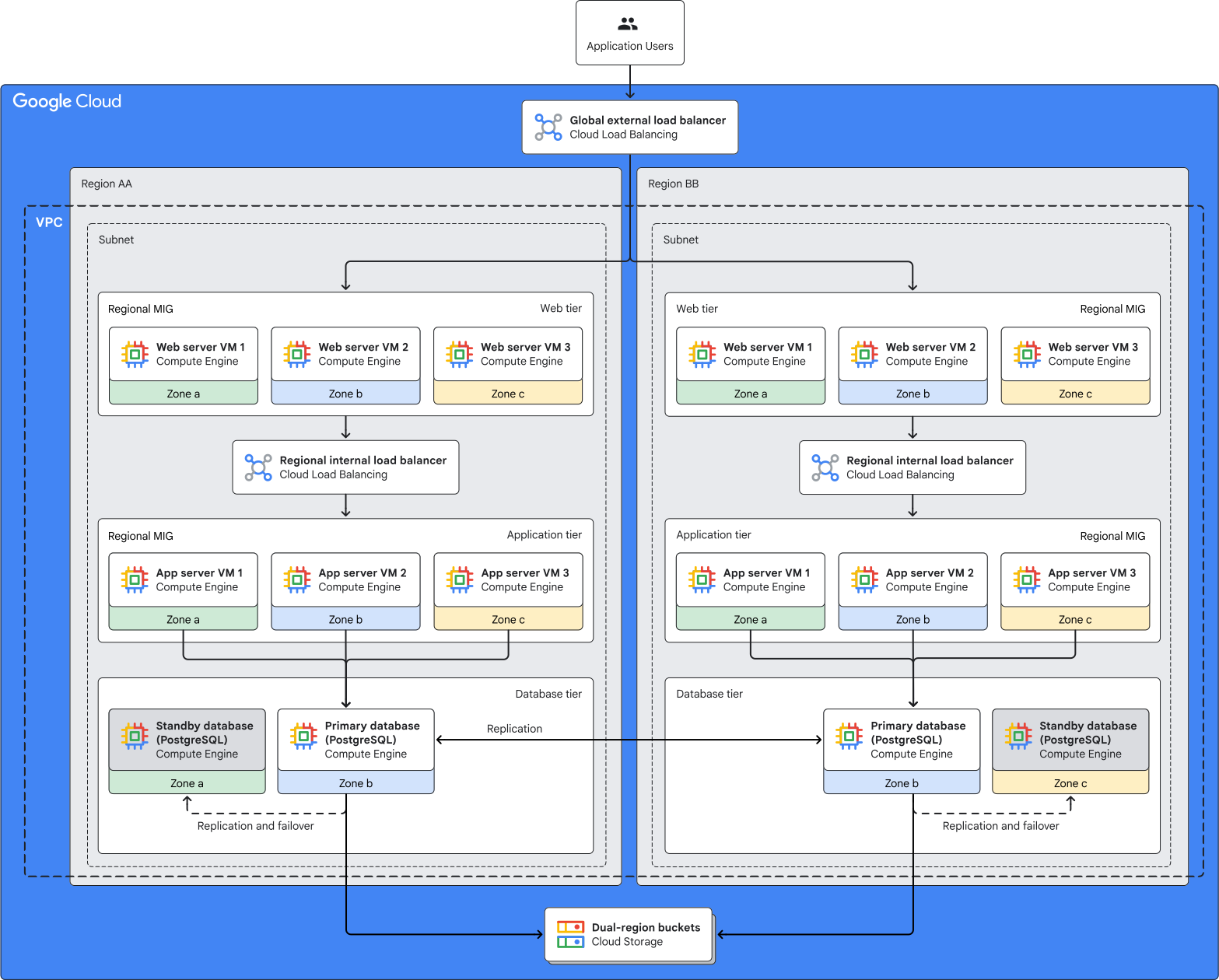
The following diagram shows an architecture for an application that runs in active-active mode in
isolated stacks that are deployed across two Google Cloud regions. In each
region, the application runs independently in three zones. The architecture is
aligned with the
[Google Cloud multi-regional deployment archetype](https://docs.cloud.google.com/architecture/deployment-archetypes/multiregional),
which ensures that your Google Cloud topology is robust against zone and
region outages and that it provides low latency for application users.

The architecture is based on the infrastructure as a service (IaaS) cloud
model. You provision the required infrastructure resources (compute, networking,
and storage) in Google Cloud, and you retain full control over and
responsibility for the operating system, middleware, and higher layers of the
application stack. To learn more about IaaS and other cloud models, see
[PaaS vs. IaaS vs. SaaS vs. CaaS: How are they different?](https://cloud.google.com/learn/paas-vs-iaas-vs-saas)
The preceding diagram includes the following components:
| **Component** | **Purpose** |
|---|---|
| Global external load balancer | The global external load balancer receives and distributes user requests to the application. The global external load balancer advertises a single anycast IP address, but it's implemented as a large number of proxies on [Google Front Ends (GFEs)](https://docs.cloud.google.com/docs/security/infrastructure/design#google-frontend-service). Client requests are directed to the GFE that's closest to the client. |
| Regional [managed instance groups (MIGs)](https://docs.cloud.google.com/compute/docs/instance-groups) for the web tier | The web tier of the application is deployed on Compute Engine VMs that are part of regional MIGs. These MIGs are the backends for the global load balancer. Each MIG contains Compute Engine VMs in three different zones. Each of these VMs hosts an independent instance of the web tier of the application. |
| Regional internal load balancers | The internal load balancer in each region distributes traffic from the web tier VMs to the application tier VMs in that region. |
| Regional MIGs for the application tier | The application tier is deployed on Compute Engine VMs that are part of regional MIGs. The MIG in each region is the backend for the internal load balancer in that region. Each MIG contains Compute Engine VMs in three different zones. Each VM hosts an independent instance of the application tier. |
| Third-party database deployed on Compute Engine VMs | The architecture in this document shows a third-party database (such as [PostgreSQL](https://www.postgresql.org/)) that's deployed on Compute Engine VMs in the two regions. You can set up cross-region replication for the databases and configure the database in each region to fail over to the database in the other region. The replication and failover capabilities depend on the database that you use. Installing and managing a third-party database involves additional effort and operational cost for replication, applying updates, monitoring, and ensuring availability. You can avoid the overhead of installing and managing a third-party database and take advantage of built-in high availability (HA) features by using a fully managed database like a [multi-region Spanner instance](https://docs.cloud.google.com/spanner/docs/instance-configurations#multi-region-configurations). |
| [Virtual Private Cloud network](https://docs.cloud.google.com/vpc/docs/vpc) and [subnets](https://docs.cloud.google.com/vpc/docs/subnets) | All the Google Cloud resources in the architecture use a single VPC network that has subnets in two different regions. Depending on your requirements, you can choose to build an architecture that uses multiple VPC networks and subnets. For more information, see [Deciding whether to create multiple VPC networks](https://docs.cloud.google.com/architecture/best-practices-vpc-design#decide-whether-to-create-multiple-vpcs). |
| [Cloud Storage](https://docs.cloud.google.com/storage/docs/introduction) dual-region buckets | Database backups are stored in dual-region Cloud Storage buckets. Alternatively, you can use [Backup and DR Service](https://docs.cloud.google.com/backup-disaster-recovery/docs/concepts/backup-dr) to create, store, and manage the database backups. |
## Products used
This reference architecture uses the following Google Cloud products:
- [Compute Engine](https://cloud.google.com/compute): A secure and customizable compute service that lets you create and run VMs on Google's infrastructure.
- [Cloud Load Balancing](https://cloud.google.com/load-balancing): A portfolio of high performance, scalable, global and regional load balancers.
- [Cloud Storage](https://cloud.google.com/storage): A low-cost, no-limit object store for diverse data types. Data can be accessed from within and outside Google Cloud, and it's replicated across locations for redundancy.
- [Virtual Private Cloud (VPC)](https://cloud.google.com/vpc): A virtual system that provides global, scalable networking functionality for your Google Cloud workloads. VPC includes VPC Network Peering, Private Service Connect, private services access, and Shared VPC.
## Use cases
This section describes use cases for which a multi-regional deployment on
Compute Engine is an appropriate choice.
### Efficient migration of on-premises applications
You can use this reference architecture to build a Google Cloud topology
to rehost (lift and shift) on-premises applications to the cloud with minimal changes to the applications.
All the tiers of the application in this reference architecture are hosted on
Compute Engine VMs. This approach lets you migrate on-premises
applications efficiently to the cloud and take advantage of the cost benefits,
reliability, performance, and operational simplicity that Google Cloud
provides.
### High availability for geographically dispersed users
We recommend a multi-regional deployment for applications that are
business-critical and where high availability and robustness against region
outages are essential. If a region becomes unavailable for any reason (even a
large-scale disruption caused by a natural disaster), users of the application
don't experience any downtime. Traffic is routed to the application in the other
available regions. If data is replicated synchronously, the recovery time
objective (RTO) is near zero.
### Low latency for application users
If your users are within a specific geographical area, such as a continent, you
can use a multi-regional deployment to achieve an optimal balance between
availability and performance. When one of the regions has an outage, the global
load balancer sends requests that originate in that region to another region.
Users don't perceive significant performance impact because the regions are
within a geographical area.
## Design alternative
The preceding architecture uses a global load balancer, which supports certain features to enhance the reliability of your
deployments, such as edge caching using
[Cloud CDN](https://docs.cloud.google.com/cdn/docs/overview).
This section presents an alternative architecture that uses regional load
balancers and Cloud DNS.
This alternative architecture supports the following additional features:
- Transport Layer Security (TLS) termination in specified regions.
- Ability to serve content from the region that you specify. However, that region might not be the best performing region at a given time.
- A wider range of connection protocols if you use a [Passthrough Network Load Balancer](https://docs.cloud.google.com/load-balancing/docs/passthrough-network-load-balancer).
For more information about the differences between regional and global load
balancers, see [Global versus regional load balancing](https://docs.cloud.google.com/load-balancing/docs/choosing-load-balancer#global-regional) and [Modes of operation](https://docs.cloud.google.com/load-balancing/docs/https#load-balancer-mode).
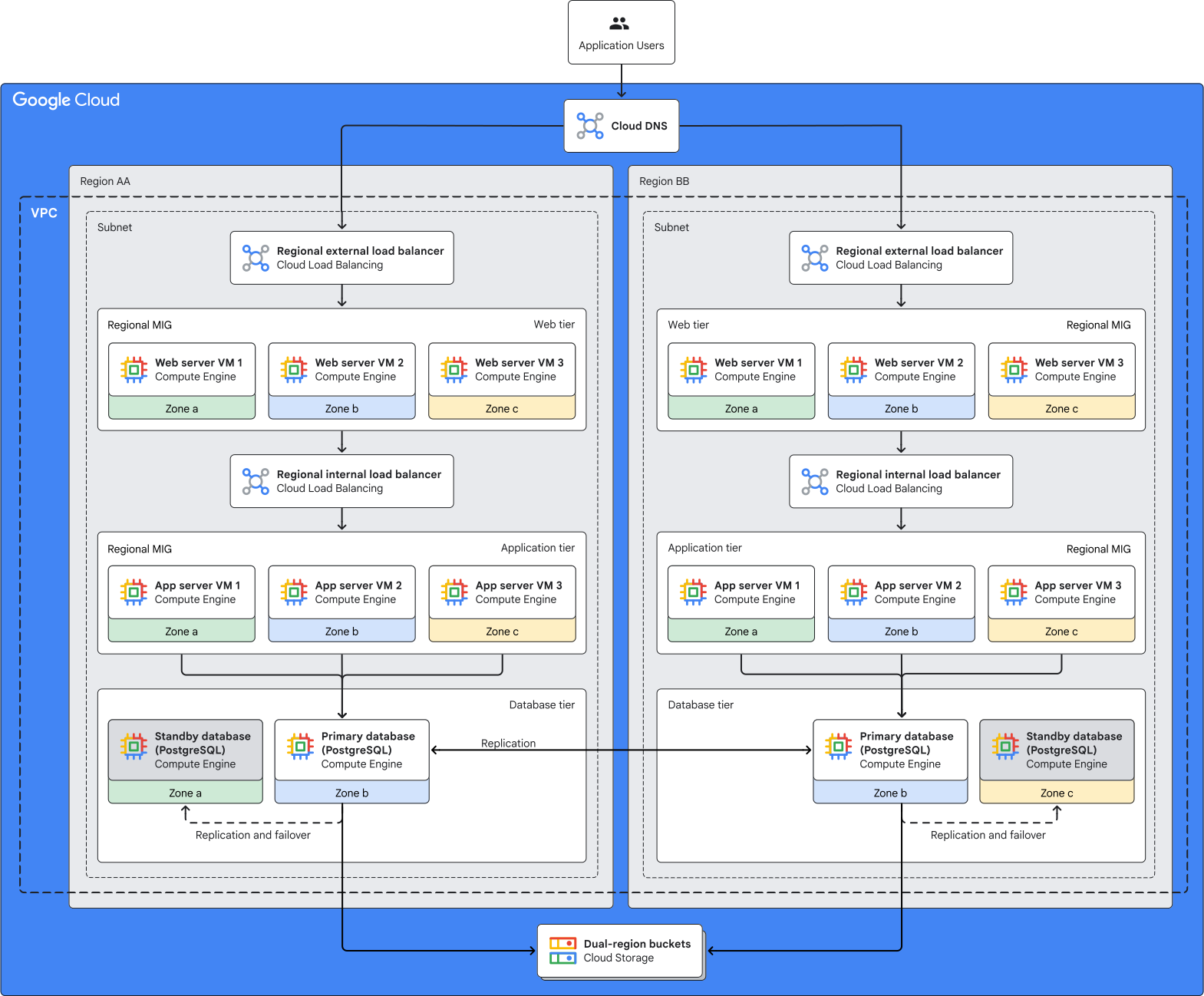

The alternative architecture in the preceding diagram is robust
against zone and region outages. A
[Cloud DNS](https://docs.cloud.google.com/dns/docs/overview)
public zone routes user requests to the appropriate region. Regional external
load balancers receive user requests and distribute them across the web tier
instances of the application within each region. The other components in this
architecture are identical to the components in the
[global load balancer-based architecture](https://docs.cloud.google.com/architecture/multiregional-vms#figure-1).
## Design considerations
This section provides guidance to help you use this reference architecture to
develop an architecture that meets your specific requirements for system design,
security, reliability, operational efficiency, cost, and
performance.
> [!NOTE]
> **Note:** The guidance in this section isn't exhaustive. Depending on the specific requirements of your application and the Google Cloud products and features that you use, there might be additional design factors and trade-offs that you should consider.
When you build an architecture for your workload, consider the best practices and recommendations in the [Google Cloud Well-Architected Framework](https://docs.cloud.google.com/architecture/framework).
### System design
This section provides guidance to help you to choose Google Cloud regions
for your multi-regional deployment and to select appropriate Google Cloud
services.
#### Region selection
When you choose the Google Cloud regions where your applications must be
deployed, consider the following factors and requirements:
- Availability of Google Cloud services in each region. For more information, see [Products available by location](https://cloud.google.com/about/locations#products-available-by-location).
- Availability of Compute Engine machine types in each region. For more information, see [Regions and zones](https://docs.cloud.google.com/compute/docs/regions-zones#available).
- End-user [latency](https://docs.cloud.google.com/network-intelligence-center/docs/performance-dashboard/how-to/view-google-cloud-latency#global-latency) requirements.
- [Cost](https://cloud.google.com/products/calculator) of Google Cloud resources.
- Cross-regional data transfer costs.
- Regulatory requirements.
- [Sustainability requirements](https://docs.cloud.google.com/architecture/framework/sustainability/low-carbon-regions).
Some of these factors and requirements might involve trade-offs. For
example, the most cost-efficient region might not have the lowest
carbon footprint. For more information, see
[Best practices for Compute Engine regions selection](https://docs.cloud.google.com/solutions/best-practices-compute-engine-region-selection).
#### Compute infrastructure
The reference architecture in this document uses Compute Engine VMs for
certain tiers of the application. Depending on the requirements of your
application, you can choose from other Google Cloud compute services:
- **Containers** : You can run [containerized](https://cloud.google.com/discover/what-are-containerized-applications) applications in [Google Kubernetes Engine (GKE)](https://docs.cloud.google.com/kubernetes-engine/docs/concepts/kubernetes-engine-overview) clusters. GKE is a container-orchestration engine that automates deploying, scaling, and managing containerized applications.
- **Serverless** : If you prefer to focus your IT efforts on your data and applications instead of setting up and operating infrastructure resources, then you can use [serverless](https://cloud.google.com/discover/what-is-serverless-computing) services like [Cloud Run](https://docs.cloud.google.com/run/docs/overview/what-is-cloud-run).
The decision of whether to use VMs, containers, or serverless services involves
a trade-off between configuration flexibility and management effort. VMs and
containers provide more configuration flexibility, but you're responsible for
managing the resources. In a serverless architecture, you deploy workloads to a
preconfigured platform that requires minimal management effort. For more
information about choosing appropriate compute services for your workloads in
Google Cloud, see
[Hosting Applications on Google Cloud](https://cloud.google.com/hosting-options).
#### Storage services
The architectures shown in this document use
[regional Persistent Disk volumes](https://docs.cloud.google.com/compute/docs/disks#repds)
for all the tiers. Persistent disks provide synchronous replication of data
across two zones within a region.
[Google Cloud Hyperdisk](https://docs.cloud.google.com/compute/docs/disks/hyperdisks)
provides better performance, flexibility, and efficiency than Persistent Disk.
With Hyperdisk Balanced, you can provision IOPS and throughput
separately and dynamically, which lets you tune the volume to a wide variety of
workloads.
For low-cost storage that's replicated across multiple locations, you can use
Cloud Storage regional, dual-region, or multi-region buckets.
- Data in regional buckets is replicated synchronously across the zones in the region.
- Data in dual-region or multi-region buckets is stored redundantly in at least two separate geographic locations. Metadata is written synchronously across regions, and data is replicated asynchronously. For dual-region buckets, you can use [turbo replication](https://docs.cloud.google.com/storage/docs/availability-durability#turbo-replication), which ensures that objects are replicated across region pairs, with a recovery point objective (RPO) of 15 minutes. For more information, see [Data availability and durability](https://docs.cloud.google.com/storage/docs/availability-durability).
To store data that's shared across multiple VMs in a region, such as across all
the VMs in the web tier or application tier, you can use a
[Filestore regional instance](https://docs.cloud.google.com/filestore/docs/service-tiers#regional).
The data that you store in a Filestore regional instance is replicated
synchronously across three zones within the region. This replication ensures
[high availability](https://cloud.google.com/filestore/sla)
and robustness against zone outages. You can store shared configuration files,
common tools and utilities, and centralized logs in the Filestore
instance, and mount the instance on multiple VMs. For robustness against region
outages, you can replicate a Filestore instance to a different
region. For more information, see
[Instance replication](https://docs.cloud.google.com/filestore/docs/instance-replication#instance-replication).
If your database is Microsoft SQL Server, we recommend using
Cloud SQL for SQL Server. In scenarios when Cloud SQL doesn't support your
configuration requirements, or if you need access to the operating system, you
can deploy a
[Microsoft SQL Server failover cluster instance (FCI)](https://learn.microsoft.com/sql/sql-server/failover-clusters/windows/always-on-failover-cluster-instances-sql-server).
In this scenario, you can use the fully managed
[Google Cloud NetApp Volumes](https://docs.cloud.google.com/netapp/volumes/docs/discover/overview)
to provide continuous availability (CA) SMB storage for the database.
When you design storage for your workloads, consider the functional
characteristics, resilience requirements, performance expectations, and cost
goals. For more information, see
[Design an optimal storage strategy for your cloud workload](https://docs.cloud.google.com/architecture/storage-advisor).
#### Database services
The reference architecture in this document uses a third-party database that's
deployed on Compute Engine VMs. Installing and managing a third-party
database involves effort and cost for operations like applying updates,
monitoring and ensuring availability, performing backups, and recovering from
failures.
You can avoid the effort and cost of installing and managing a third-party
database by using a fully managed database service like
[Cloud SQL](https://docs.cloud.google.com/sql/docs/introduction),
[AlloyDB for PostgreSQL](https://docs.cloud.google.com/alloydb/docs/overview),
[Bigtable](https://docs.cloud.google.com/bigtable/docs/overview),
[Spanner](https://docs.cloud.google.com/spanner/docs),
or
[Firestore](https://docs.cloud.google.com/firestore/native/docs/overview).
These Google Cloud database services provide uptime service-level
agreements (SLAs), and they include default capabilities for scalability and
observability.
If your workload needs an
[Oracle database](https://www.oracle.com/database/),
you can deploy the database on a Compute Engine VM or use
Oracle Database@Google Cloud. For more information, see
[Oracle workloads in Google Cloud](https://docs.cloud.google.com/architecture/oracle-workloads).
When you choose and set up the database for a multi-regional deployment,
consider your application's requirements for cross-region data consistency, and
be aware of the performance and cost trade-offs.
- If the application requires strong consistency (all users must read the same data at all times), then the data must be replicated synchronously across all regions in the architecture. However, synchronous replication can lead to higher cost and decreased performance, because any data that's written must be replicated in real time across the regions before the data is available for read operations.
- If your application can tolerate eventual consistency, then you can replicate data asynchronously. This can help improve performance because the data doesn't need to be replicated synchronously across regions. However, users in different regions might read different data because the data might not have been fully replicated at the time of the request.
#### Network design
Choose a network design that meets your business and technical requirements. You
can use a single VPC network or multiple VPC networks. For more information, see
the following documentation:
- [Deciding whether to create multiple VPC networks](https://docs.cloud.google.com/architecture/best-practices-vpc-design#decide-whether-to-create-multiple-vpcs)
- [Decide the network design for your Google Cloud landing zone](https://docs.cloud.google.com/architecture/landing-zones/decide-network-design)
### Security, privacy, and compliance
This section describes factors that you should consider when you use this
reference architecture to design and build a multi-regional topology in
Google Cloud that meets the security, privacy, and compliance requirements of your
workloads.
#### Protection against external threats
To protect your application against threats like distributed-denial-of-service
(DDoS) attacks and cross-site scripting (XSS), you can use Google Cloud Armor
security policies. Each policy is a set of rules that specifies certain
conditions that should be evaluated and actions to take when the conditions are
met. For example, a rule could specify that if the source IP
address of the incoming traffic matches a specific IP address or CIDR range,
then the traffic must be denied. You can also apply preconfigured web
application firewall (WAF) rules. For more information, see
[Security policy overview](https://docs.cloud.google.com/armor/docs/security-policy-overview).
#### External access for VMs
In the reference architecture that this document describes, the
Compute Engine VMs don't need inbound access from the internet. Don't
assign
[external IP addresses](https://docs.cloud.google.com/load-balancing/docs/backend-service#backend_vms_and_external_ip_addresses)
to the VMs. Google Cloud resources that have only a private, internal IP
address can still access certain Google APIs and services by using
Private Service Connect or Private Google Access. For more
information, see
[Private access options for services](https://docs.cloud.google.com/vpc/docs/private-access-options).
To enable secure outbound connections from Google Cloud resources that
have only private IP addresses, like the Compute Engine VMs in this
reference architecture, you can use [Secure Web Proxy](https://docs.cloud.google.com/secure-web-proxy/docs/overview#benefits) or [Cloud NAT](https://docs.cloud.google.com/nat/docs/overview#benefits).
#### Service account privileges
For the Compute Engine VMs in the architecture, instead of using the
default service accounts, we recommend that you create dedicated service
accounts and specify the resources that the service account can access. The
default service account has a broad range of permissions, including some that
might not be necessary. You can tailor dedicated service accounts to
have only the essential permissions. For more information, see
[Limit service account privileges](https://docs.cloud.google.com/iam/docs/best-practices-service-accounts#limit-service-account-privileges).
#### SSH security
To enhance the security of SSH connections to the Compute Engine VMs in
your architecture, implement
[Identity-Aware Proxy (IAP)](https://docs.cloud.google.com/iap/docs/concepts-overview)
and
[Cloud OS Login API](https://docs.cloud.google.com/compute/docs/oslogin).
IAP lets you control network access based on user identity and
Identity and Access Management (IAM) policies. Cloud OS Login API lets you control
Linux SSH access based on user identity and IAM policies. For
more information about managing network access, see
[Best practices for controlling SSH login access](https://docs.cloud.google.com/compute/docs/connect/ssh-best-practices/login-access).
#### Disk encryption
By default, the data that's stored in Persistent Disk volumes is encrypted using
Google-owned and Google-managed encryption keys. As an additional layer of protection,
you can choose to encrypt the Google-owned and managed key by using
keys that you own and manage in Cloud Key Management Service (Cloud KMS). For more
information, see
[About disk encryption](https://docs.cloud.google.com/compute/docs/disks/disk-encryption)
for Hyperdisk volumes and
[Encrypt data with customer-managed encryption keys](https://docs.cloud.google.com/compute/docs/disks/customer-supplied-encryption).
#### Network security
To control network traffic between the resources in the architecture, you must
configure appropriate
[Cloud Next Generation Firewall (NGFW) policies](https://docs.cloud.google.com/firewall/docs/about-firewalls).
#### Data residency considerations
You can use regional load balancers to build a multi-regional architecture that
helps you to meet data residency requirements. For example, a country in Europe
might require that all user data be stored and accessed in data centers that are
located physically within Europe. To meet this requirement, you can use the
regional load balancer-based architecture.
In that architecture, the application runs in
[Google Cloud regions in Europe](https://cloud.google.com/about/locations#europe)
and you use Cloud DNS with a
[geofenced routing policy](https://docs.cloud.google.com/dns/docs/policies-overview#geo-fenced-policy)
to route traffic through regional load balancers. To meet data residency
requirements for the database tier, use a
[sharded](https://en.wikipedia.org/wiki/Shard_(database_architecture))
architecture instead of replication across regions. With this approach, the data
in each region is isolated, but you can't implement cross-region high
availability and failover for the database.
#### More security considerations
When you build the architecture for your workload, consider the platform-level
security best practices and recommendations that are provided in the
[Enterprise foundations blueprint](https://docs.cloud.google.com/architecture/blueprints/security-foundations) and [Google Cloud Well-Architected Framework: Security, privacy, and compliance](https://docs.cloud.google.com/architecture/framework/security).
### Reliability
This section describes design factors that you should consider when you use
this reference architecture to build and operate reliable infrastructure for
your multi-regional deployments in Google Cloud.
#### Robustness against infrastructure outages
In a multi-regional deployment architecture, if any individual component in the
infrastructure stack fails, the application can process requests if at least one functioning component with adequate capacity exists in each tier. For example, if a web server instance fails, the load balancer forwards user requests to the other available web server instances. If a VM that hosts a web server or app server instance crashes, the
[MIG recreates the VM automatically](https://docs.cloud.google.com/compute/docs/instance-groups/about-repair#automatic_repair).
If a zone outage occurs, the load balancer isn't affected, because it's a regional resource. A zone outage might affect individual Compute Engine VMs. But the application remains available and responsive because the VMs are in a regional MIG. A regional MIG ensures that new VMs are created automatically to maintain the configured minimum number of VMs. After Google resolves the zone outage, you must verify that the application runs as expected in all of the zones where it's deployed.
If all of the zones in one of the regions have an outage or if a region-wide outages occurs, then the application in the other region remains available and responsive. The global external load balancer directs traffic to the region that isn't affected by the outage. After Google resolves the region outage, you must verify that the application runs as expected in the region that had the outage.
If both of the regions in this architecture have outages, then the application is unavailable. You must wait for Google to resolve the outage, and then verify that the application works as expected.
#### MIG autoscaling
When you run your application on multiple regional MIGs, the application
remains available during isolated zone outages or region outages. The
[autoscaling](https://docs.cloud.google.com/compute/docs/autoscaler) capability of stateless MIGs lets you maintain application
availability and performance at predictable levels.
To control the autoscaling
behavior of your stateless MIGs, you can specify target utilization metrics,
such as average CPU utilization. You can also configure schedule-based
autoscaling for stateless MIGs.
[Stateful MIGs](https://docs.cloud.google.com/compute/docs/instance-groups/stateful-migs)
can't be autoscaled. For more information, see
[Autoscaling groups of instances](https://docs.cloud.google.com/compute/docs/autoscaler).
#### MIG size limit
When you decide the size of your MIGs, consider the default and maximum limits
on the number of VMs that can be created in a MIG. For more information, see
[Add and remove VMs from a MIG](https://docs.cloud.google.com/compute/docs/instance-groups/add-remove-vms-in-mig#increase_the_groups_size_limit).
#### VM autohealing
Sometimes the VMs that host your application might be running and available, but
there might be issues with the application itself. The application might freeze,
crash, or not have sufficient memory. To verify whether an application is
responding as expected, you can configure application-based health checks as
part of the autohealing policy of your MIGs. If the application on a particular
VM isn't responding, the MIG autoheals (repairs) the VM. For more information
about configuring autohealing, see
[About repairing VMs for high availability](https://docs.cloud.google.com/compute/docs/instance-groups/about-repair).
#### VM placement
In the architecture that this document describes, the application tier and web
tier run on Compute Engine VMs that are distributed across multiple
zones. This distribution ensures that your application is robust against zone
outages.
To improve the robustness of the architecture, you can create a
[spread placement policy](https://docs.cloud.google.com/compute/docs/instances/placement-policies-overview#about-spread-policies)
and apply it to the MIG template. When the MIG creates VMs, it places the VMs
within each zone on different physical servers (called *hosts* ), so your VMs are
robust against failures of individual hosts. For more information, see
[Create and apply spread placement policies to VMs](https://docs.cloud.google.com/compute/docs/instances/use-spread-placement-policies).
#### VM capacity planning
To make sure that capacity for Compute Engine VMs is available when VMs
need to be provisioned, you can create *reservations* . A reservation provides
assured capacity in a specific zone for a specified number of VMs of a machine
type that you choose. A reservation can be specific to a project, or shared
across multiple projects. For more information about reservations, see
[Choose a reservation type](https://docs.cloud.google.com/compute/docs/instances/choose-reservation-type).
#### Stateful storage
A best practice in application design is to avoid the need for stateful local
disks. But if the requirement exists, you can configure your persistent disks to
be stateful to ensure that the data is preserved when the VMs are repaired or
recreated. However, we recommend that you keep the boot disks stateless, so that
you can update them to the latest images with new versions and security
patches. For more information, see
[Configuring stateful persistent disks in MIGs](https://docs.cloud.google.com/compute/docs/instance-groups/configuring-stateful-disks-in-migs).
#### Data durability
You can use
[Backup and DR](https://docs.cloud.google.com/backup-disaster-recovery/docs/concepts/backup-dr)
to create, store, and manage backups of the Compute Engine VMs.
Backup and DR stores backup data in its original, application-readable
format. When required, you can restore your workloads to production by directly
using data from long-term backup storage and avoid the need to prepare or move data.
Compute Engine provides the following options to help you to ensure the
durability of data that's stored in Persistent Disk volumes:
- You can use [snapshots](https://docs.cloud.google.com/compute/docs/disks/snapshots) to capture the point-in-time state of Persistent Disk volumes. The snapshots are stored redundantly in multiple regions, with automatic checksums to ensure the integrity of your data. Snapshots are incremental by default, so they use less storage space and you save money. Snapshots are stored in a [Cloud Storage location](https://docs.cloud.google.com/compute/docs/disks/snapshot-settings#storage_location_options) that you can configure. For more recommendations about using and managing snapshots, see [Best practices for Compute Engine disk snapshots](https://docs.cloud.google.com/compute/docs/disks/snapshot-best-practices).
- To ensure that data in Persistent Disk remains available if a zone outage occurs, you can use [Regional Persistent Disk](https://docs.cloud.google.com/compute/docs/disks/persistent-disks#repds) or [Hyperdisk Balanced High Availability](https://docs.cloud.google.com/compute/docs/disks/hd-types/hyperdisk-balanced-ha). Data in these disk types is replicated synchronously between two zones in the same region. For more information, see [About synchronous disk replication](https://docs.cloud.google.com/compute/docs/disks/about-regional-persistent-disk#about-synchronous-disk-replication).
#### Database availability
To implement cross-zone failover for a database that's deployed on a
Compute Engine VM, you need a mechanism to identify failures of the
primary database and a process to fail over to the standby database. The
specifics of the failover mechanism depend on the database that you use. You can
set up an observer instance to detect failures of the primary database and
orchestrate the failover. You must configure the failover rules appropriately to
avoid a
[split-brain](https://en.wikipedia.org/wiki/Split-brain_(computing))
situation and prevent unnecessary failover. For example architectures that you
can use to implement failover for PostgreSQL databases, see
[Architectures for high availability of PostgreSQL clusters on Compute Engine](https://docs.cloud.google.com/architecture/architectures-high-availability-postgresql-clusters-compute-engine).
#### More reliability considerations
When you build the cloud architecture for your workload, review the
reliability-related best practices and recommendations that are provided in the
following documentation:
- [Google Cloud infrastructure reliability guide](https://docs.cloud.google.com/architecture/infra-reliability-guide)
- [Patterns for scalable and resilient apps](https://docs.cloud.google.com/architecture/scalable-and-resilient-apps)
- [Designing resilient systems](https://docs.cloud.google.com/compute/docs/tutorials/robustsystems)
- [Google Cloud Well-Architected Framework: Reliability](https://docs.cloud.google.com/architecture/framework/reliability)
### Cost optimization
This section provides guidance to optimize the cost of setting up and operating
a multi-regional Google Cloud topology that you build by using this
reference architecture.
#### VM machine types
To help you optimize the resource utilization of your VM instances,
Compute Engine provides
[machine type recommendations](https://docs.cloud.google.com/compute/docs/instances/apply-machine-type-recommendations-for-instances).
Use the recommendations to choose machine types that match your workload's
compute requirements. For workloads with predictable resource requirements, you
can customize the machine type to your needs and save money by using
[custom machine types](https://docs.cloud.google.com/compute/docs/instances/creating-instance-with-custom-machine-type#specifications).
#### VM provisioning model
If your application is fault tolerant, then
[Spot VMs](https://docs.cloud.google.com/compute/docs/instances/spot)
can help to reduce your Compute Engine costs for the VMs in the
application and web tiers. The cost of Spot VMs is significantly lower
than regular VMs. However, Compute Engine might preemptively stop or
delete Spot VMs to reclaim capacity.
Spot VMs are suitable for
batch jobs that can tolerate preemption and don't have high availability
requirements. Spot VMs offer the same machine types, options, and
performance as regular VMs. However, when the resource capacity in a zone is
limited, MIGs might not be able to scale out (that is, create VMs) automatically
to the specified target size until the required capacity becomes available
again.
#### VM resource utilization
The
[autoscaling](https://docs.cloud.google.com/compute/docs/autoscaler)
capability of stateless MIGs enables your application to handle increases in
traffic gracefully, and it helps you to reduce cost when the need for resources
is low.
[Stateful MIGs](https://docs.cloud.google.com/compute/docs/instance-groups/stateful-migs)
can't be autoscaled.
#### Third-party licensing
When you migrate third-party workloads to Google Cloud, you might be able
to reduce cost by bringing your own licenses (BYOL). For example, to deploy
Microsoft Windows Server VMs, instead of using a
[premium image](https://docs.cloud.google.com/compute/disks-image-pricing#section-1)
that incurs additional cost for the third-party license, you can create and use
a
[custom Windows BYOL image](https://docs.cloud.google.com/compute/docs/images/creating-custom-windows-byol-images).
You then pay only for the VM infrastructure that you use on Google Cloud.
This strategy helps you continue to realize value from your existing investments
in third-party licenses.
If you decide to use the BYOL approach, then the following recommendations might
help to reduce cost:
- Provision the required number of compute CPU cores independently of memory by using [custom machine types](https://docs.cloud.google.com/compute/docs/instances/creating-instance-with-custom-machine-type#extendedmemory). By doing this, you limit the third-party licensing cost to the number of CPU cores that you need.
- Reduce the number of vCPUs per core from 2 to 1 by disabling [simultaneous multithreading (SMT)](https://docs.cloud.google.com/compute/docs/instances/configuring-simultaneous-multithreading).
If you deploy a third-party database like Microsoft SQL Server on
Compute Engine VMs, then you must consider the license costs for the
third-party software. When you use a managed database service like
Cloud SQL, the database license costs are included in the charges for
the service.
#### More cost considerations
When you build the architecture for your workload, also consider the general
best practices and recommendations that are provided in
[Google Cloud Well-Architected Framework: Cost optimization](https://docs.cloud.google.com/architecture/framework/cost-optimization).
### Operational efficiency
This section describes the factors that you should consider when you use this
reference architecture to design and build a multi-regional Google Cloud
topology that you can operate efficiently.
#### VM configuration updates
To update the configuration of the VMs in a MIG (such as the machine type or
boot-disk image), you create a new instance template with the required
configuration and then apply the new template to the MIG. The MIG updates the
VMs by using the update method that you choose: automatic or selective. Choose
an appropriate method based on your requirements for availability and
operational efficiency. For more information about these MIG update methods, see
[Apply new VM configurations in a MIG](https://docs.cloud.google.com/compute/docs/instance-groups/updating-migs).
#### VM images
For your VMs, instead of using Google-provided public
images, we recommend that you create and use [custom OS images](https://docs.cloud.google.com/compute/docs/images#custom_images) that contain the
configurations and software that your applications require. You can group your
custom images into a custom image family. An image family always points to the
most recent image in that family, so your instance templates and scripts can use
that image without you having to update references to a specific image
version. You must regularly update your custom images to include the security
updates and patches that are provided by the OS vendor.
#### Deterministic instance templates
If the instance templates that you use for your MIGs include startup scripts to
install third-party software, make sure that the scripts explicitly specify
software-installation parameters such as the software version. Otherwise, when
the MIG creates the VMs, the software that's installed on the VMs might not be
consistent. For example, if your instance template includes a startup script to
install Apache HTTP Server 2.0 (the `apache2` package), then make sure that the
script specifies the exact `apache2` version that should be installed, such as
version `2.4.53`. For more information, see
[Deterministic instance templates](https://docs.cloud.google.com/compute/docs/instance-templates/deterministic-instance-templates).
#### More operational considerations
When you build the architecture for your workload, consider the general best
practices and recommendations for operational efficiency that are described in
[Google Cloud Well-Architected Framework: Operational excellence](https://docs.cloud.google.com/architecture/framework/operational-excellence).
### Performance optimization
This section describes the factors that you should consider when you use this
reference architecture to design and build a multi-regional topology in
Google Cloud that meets the performance requirements of your workloads.
#### Compute performance
Compute Engine offers a wide range of predefined and customizable
machine types for the workloads that you run on VMs. Choose an appropriate
machine type based on your performance requirements. For more information, see
[Machine families resource and comparison guide](https://docs.cloud.google.com/compute/docs/machine-resource).
#### VM multithreading
Each virtual CPU (vCPU) that you allocate to a Compute Engine VM is
implemented as a single hardware multithread. By default, two vCPUs share a
physical CPU core. For applications that involve highly parallel operations or that perform
floating point calculations (such as genetic sequence analysis, and financial
risk modeling), you can improve performance by reducing the number of threads
that run on each physical CPU core. For more information, see
[Set the number of threads per core](https://docs.cloud.google.com/compute/docs/instances/set-threads-per-core).
VM multithreading might have licensing implications for some third-party
software, like databases. For more information, read the licensing documentation
for the third-party software.
#### Network Service Tiers
[Network Service Tiers](https://docs.cloud.google.com/network-tiers/docs/overview)
lets you optimize the network cost and performance of your workloads. You can
choose Premium Tier or Standard Tier. Premium Tier delivers traffic on Google's
global backbone to achieve minimal packet loss and low latency. Standard Tier
delivers traffic using peering, internet service providers (ISP), or transit
networks at an edge point of presence (PoP) that's closest to the region where
your Google Cloud workload runs. To optimize performance, we recommend
using Premium Tier. To optimize cost, we recommend using Standard Tier.
#### Network performance
For workloads that need low inter-VM network latency within the application and
web tiers, you can create a compact placement policy and apply it to the MIG
template that's used for those tiers. When the MIG creates VMs, it places the
VMs on physical servers that are close to each other. While a compact placement
policy helps improve inter-VM network performance, a spread placement policy can
help improve VM availability as described earlier. To achieve an optimal balance
between network performance and availability, when you create a compact
placement policy, you can specify how far apart the VMs must be placed. For more
information, see
[Placement policies overview](https://docs.cloud.google.com/compute/docs/instances/placement-policies-overview).
Compute Engine has a per-VM limit for egress
[network bandwidth](https://docs.cloud.google.com/compute/docs/network-bandwidth).
This limit depends on the VM's machine type and whether traffic is routed
through the same VPC network as the source VM. For VMs with certain machine
types, to improve network performance, you can get a higher maximum egress
bandwidth by enabling [Tier_1 networking](https://docs.cloud.google.com/compute/docs/networking/configure-vm-with-high-bandwidth-configuration).
#### Caching
If your application serves static website assets and if your architecture
includes a global external Application Load Balancer,
then you can use Cloud CDN to cache regularly accessed static content
closer to your users. Cloud CDN can help to improve performance for
your users, reduce your infrastructure resource usage in the backend, and reduce
your network delivery costs. For more information, see
[Faster web performance and improved web protection for load balancing](https://docs.cloud.google.com/load-balancing/docs/tutorials/faster-performance-improved-protection).
#### More performance considerations
When you build the architecture for your workload, consider the general best
practices and recommendations that are provided in
[Google Cloud Well-Architected Framework: Performance optimization](https://docs.cloud.google.com/architecture/framework/performance-optimization).
## What's next
- Learn more about the Google Cloud products used in this reference architecture:
- [Cloud Load Balancing overview](https://docs.cloud.google.com/load-balancing/docs/load-balancing-overview)
- [Instance groups](https://docs.cloud.google.com/compute/docs/instance-groups)
- [Cloud DNS overview](https://docs.cloud.google.com/dns/docs/overview)
- [Get started with migrating your workloads](https://docs.cloud.google.com/architecture/migration-to-gcp-getting-started) to Google Cloud.
- Explore and evaluate [deployment archetypes](https://docs.cloud.google.com/architecture/deployment-archetypes) that you can choose to build architectures for your cloud workloads.
- Review architecture options for [designing reliable infrastructure](https://docs.cloud.google.com/architecture/infra-reliability-guide/design#deployment_architectures) for your workloads in Google Cloud.
- For more reference architectures, design guides, and best practices, explore the [Cloud Architecture Center](https://docs.cloud.google.com/architecture).
## Contributors
Authors:
- [Kumar Dhanagopal](https://www.linkedin.com/in/kumardhanagopal) \| Cross-Product Solution Developer
- [Samantha He](https://www.linkedin.com/in/samantha-he-05a98173) \| Technical Writer
Other contributors:
- [Ben Good](https://www.linkedin.com/in/benjamingood) \| Solutions Architect
- [Carl Franklin](https://www.linkedin.com/in/carlscottfranklin) \| Director, PSO Enterprise Architecture
- [Daniel Lees](https://www.linkedin.com/in/daniellees) \| Cloud Security Architect
- [Gleb Otochkin](https://www.linkedin.com/in/glebotochkin) \| Cloud Advocate, Databases
- [Mark Schlagenhauf](https://www.linkedin.com/in/mark-schlagenhauf-63b98) \| Technical Writer, Networking
- [Pawel Wenda](https://www.linkedin.com/in/pwenda) \| Group Product Manager
- [Sean Derrington](https://www.linkedin.com/in/seanderrington) \| Group Product Manager, Storage
- [Sekou Page](https://www.linkedin.com/in/sekoupage) \| Outbound Product Manager
- [Shobhit Gupta](https://www.linkedin.com/in/shobhit-gupta-3b1a5078) \| Solutions Architect
- [Simon Bennett](https://www.linkedin.com/in/simonpbennett) \| Group Product Manager
- [Steve McGhee](https://www.linkedin.com/in/stevemcghee) \| Reliability Advocate
- [Victor Moreno](https://www.linkedin.com/in/vimoreno) \| Product Manager, Cloud Networking