This document describes deployment architectures, use cases, and best practices
for multicloud database management. It's intended for architects and engineers
who design and implement stateful applications within and across multiple
clouds.
Multicloud application architectures that access databases are use-case
dependent. No single stateful application architecture can support all
multicloud use cases. For example, the best database solution for a
[cloud bursting](https://docs.cloud.google.com/architecture/multi-cloud-database-management#cloud_bursting)
use case is different from the best database solution for an application that
runs concurrently in multiple cloud environments.
For public clouds like Google Cloud, there are various database technologies
that fit specific multicloud use cases. To deploy an application
in multiple [regions](https://docs.cloud.google.com/docs/geography-and-regions#regions_and_zones) within a single public cloud, one option is to use a public
cloud, provider-managed, multi-regional database such as
[Spanner](https://docs.cloud.google.com/spanner).
To deploy an application to be portable across public clouds, a platform-independent
database might be a better choice, such as
[AlloyDB Omni](https://cloud.google.com/alloydb/omni)
or
[PostgreSQL](https://www.postgresql.org/).
This document introduces a definition for a
[stateful database application](https://docs.cloud.google.com/architecture/multi-cloud-database-management#stateful_database_applications)
followed by a multicloud database use-case analysis. It then presents a
detailed
[database system categorization](https://docs.cloud.google.com/architecture/multi-cloud-database-management#database_system_categorization)
for multicloud deployment architectures based on the use cases.
The document also introduces a
[decision tree for selecting databases](https://docs.cloud.google.com/architecture/multi-cloud-database-management#multicloud_database_selection)
which outlines key decision points for selecting an appropriate database
technology. It concludes with a discussion about
[best practices](https://docs.cloud.google.com/architecture/multi-cloud-database-management#deployment_best_practices)
for multicloud database management.
## Key terms and definitions
This section provides a terminology and defines the generic stateful
database application that's used in this document.
### Terminology
- **Public cloud** . A public cloud provides multi-tenant infrastructure (generally global) and services that customers can use to run their production workloads. Google Cloud is a public cloud that provides many managed services, including [GKE](https://docs.cloud.google.com/kubernetes-engine) and [managed databases](https://cloud.google.com/products/databases).
- **Hybrid cloud**. A hybrid cloud is a combination of a public cloud with one or more on-premises data centers. Hybrid cloud customers can combine their on-premises services with additional services provided by a public cloud.
- **Multicloud**. A multicloud is a combination of several public clouds and on-premises data centers. A hybrid cloud is a subset of multicloud.
- **Deployment location**. An infrastructure location is a physical location that can deploy and run workloads, including applications and databases. For example, in Google Cloud, deployment locations are zones and regions. At an abstract level, a public cloud region or zone and an on-premises data center are deployment locations.
### Stateful database applications
To define multicloud use cases, a generic stateful database application
architecture is used in this document, as shown in the following diagram.
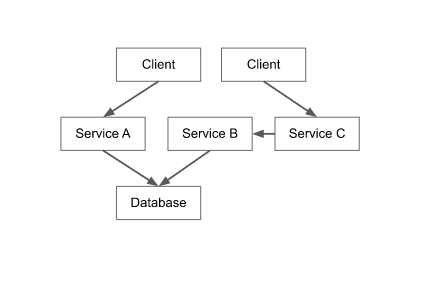
The diagram shows the following components:
- **Database**. A database can be a single instance, multi-instance, or distributed database, deployed on computing nodes or available as a cloud-managed service.
- **Application services** . These services are combined as an application that implements the business logic. Application services can be any of the following:
- Microservices on Kubernetes.
- Coarse-grained processes running on one or more virtual machines.
- A monolithic application on one large virtual machine.
- Serverless code in [Cloud Run functions](https://docs.cloud.google.com/functions) or [Cloud Run](https://docs.cloud.google.com/run). Some application services can access the database. It's possible to deploy each application service several times. Each deployment of an application service is an instance of that application service.
- **Application clients** . Application clients access the functionality that is provided by application services. Application clients can be one of the following:
- Deployed clients, where code runs on a machine, laptop, or mobile phone.
- Non-deployed clients, where the client code runs in a browser. Application client instances always access one or more application service instances.
In the context of a multicloud database discussion, the architectural
abstraction of a stateful application consists of a database, application
services, and application clients. In an implementation of an application,
factors such as the use of operating systems or the programming languages that
are used can vary. However, these details don't affect multicloud
database management.
### Queues and files as data storage services
There are many persistence resources available for application services to
persist data. These resources include databases, queues, and files. Each
persistence resource provides storage data models and access patterns that are
specialized for these models. Although queues, messaging systems, and file
systems are used by applications, in the following section, the focus is
specifically on databases.
Although the same considerations for factors such as deployment location,
sharing of state, synchronous and asynchronous replication for multicloud
databases are applicable to queues and files, this discussion is out of the
scope of this document.
### Networking
In the architecture of a generic stateful application (shown again in the
following diagram), each arrow between the components represents a communication
relationship over a network connection---for example, an application client
accessing an application service.

A connection can be within a zone or across zones, regions, or clouds.
Connections can exist between any combination of deployment locations. In
multicloud environments, networking across clouds is an important
consideration and there are several options that you can use. For more
information about networking across clouds, see
[Cross-Cloud Network for distributed applications](https://docs.cloud.google.com/architecture/ccn-distributed-apps-design)
and
[Connecting to Google Cloud: your networking options explained](https://cloud.google.com/blog/products/networking/google-cloud-network-connectivity-options-explained).
In the use cases in this document, the following is assumed:
- A secure network connection exists between the clouds.
- The databases and their components can communicate with each other.
From a non-functional perspective, the size of the network, meaning the
throughput and latency, might affect the database latency and throughput. From a
functional perspective, networking generally has no effect.
## Multicloud database use cases
This section presents a selection of the most common use cases for multicloud
database management. For these use cases, it's assumed that there's secure
network connectivity between the clouds and database nodes.
### Application migration
In the context of multicloud database management, application migration refers
to the migration of an application, all application services, and the database
from the current cloud to a target cloud. There are many reasons that an
enterprise might decide to [migrate an application](https://docs.cloud.google.com/architecture/hybrid-multicloud-patterns/adopt#migration_and_modernization), for example, to avoid a competitive
situation with the cloud provider, to modernize technology, or to lower total
cost of ownership (TCO).
In application migration, the intent is to stop production in the current cloud
and continue production in the target cloud after the migration completes. The
application services must run in the target cloud. To implement the services, a
[lift and shift](https://wiktionary.org/wiki/lift_and_shift)
approach can be used. In this approach, the same code is deployed in the target
cloud. To reimplement the service, the modern cloud technologies that are
available in the target cloud can be used.
From a database perspective, consider the following alternative choices for
application migration:
- **Database lift and shift**: If the same database engine is available in the target cloud, it's possible to lift and shift the database to create an identical deployment in the target cloud.
- **Database lift and move to managed equivalent**: A self-managed database can be migrated to a managed version of the same database engine if the target cloud provides it.
- **Database modernization**: Different clouds offer different database technologies. Databases managed by a cloud provider could have advantages such as stricter service-level agreements (SLAs), scalability, and automatic disaster recovery.
Regardless of the deployment strategy, database migration is a process that
takes time because of the need to move data from the current cloud to the target
cloud. While it's possible to follow an export and import approach that incurs
downtime, [minimal or zero downtime migration](https://docs.cloud.google.com/solutions/database-migration-concepts-principles-part-1#migration_downtime_zero_versus_minimal_versus_significant) is
preferable. This approach minimizes application downtime and has the least
effect on an enterprise and its customers. However, it typically requires
a more intricate migration setup as it involves an initial load, ongoing
replication, monitoring, granular validation, and synchronization when switching.
To support fallback scenarios, you need to implement a reverse replication
mechanism, to synchronize the changes back to the source database after
switching to the target database.
### Disaster recovery
Disaster recovery refers to the ability of an application to continue providing
services to application clients during a region outage. To ensure disaster
recovery, an application must be deployed to at least two regions and be ready
to execute at any time. In production, the application runs in the primary
region. However, if an outage occurs, a secondary region becomes the primary
region. The following are different models of readiness in disaster recovery:
- **Hot standby**. The application is deployed to two or more regions (primary and secondary), and the application is fully functioning in every region. If the primary region fails, the application in the secondary region can take on application client traffic immediately.
- **Cold standby**. The application is running in the primary region, however, it's ready for startup in a secondary region (but not running). If the primary region fails, the application is started up in the secondary region. An application outage occurs until the application is able to run and provide all application services to application clients.
- **No standby**. In this model, the application code is ready for deployment but not yet deployed in the secondary region (and so not using any deployed resources). If a primary region has an outage, the first deployment of the application must be in the secondary region. This deployment puts the application in the same state as a cold standby, which means that it must be started up. In this approach, the application outage is longer compared to the cold standby case because application deployment has to take place first, which includes creating cloud resources.
From a database perspective, the readiness models discussed in the preceding
list correspond to the following database approaches:
- **Transactionally synchronized database**. This database corresponds to the hot standby model. Every transaction in the primary region is committed in synchronous coordination in a secondary region. When the secondary region becomes the primary region during an outage, the database is consistent and immediately available. In this model, the recovery point objective (RPO) and the recovery time objective (RTO) are both zero.
- **Asynchronously replicated database**. This database also corresponds to the hot standby model. Because the database replication from the primary region to the secondary region is asynchronous, there's a possibility that if the primary region fails some transactions might be replicated to the secondary region. While the database in the secondary region is ready for production load, it might not have the most current data. For this reason, the application could incur a loss of transactions that aren't recoverable. Because of this risk, this approach has an RTO of zero, but the RPO is larger than zero.
- **Idling database**. This database corresponds to the cold standby model. The database is created without any data. When the primary region fails, data has to be loaded to the idling database. To enable this action, a regular backup has to be taken in the primary region and transferred to the secondary region. The backup can be full or incremental, depending on what the database engine supports. In either case, the database is set back to the last backup, and, from the perspective of the application, many transactions can be lost compared to the primary region. While this approach might be cost effective, the value is mitigated by the risk that all transactions since the last available backup might be lost due to the database state not being up to date.
- **No database** . This model is equivalent to the *no standby* case. The secondary region has no database installed, and if the primary region fails, a database must be created. After the database is created, as in the idling database case, it must be loaded with data before it's available for the application.
The disaster recovery approaches that are discussed in this document also apply
if a primary and a secondary cloud are used instead of a primary and secondary
region. The main difference is that because of the network heterogeneity between
clouds, the latency between clouds might increase compared to the network
distance between regions within a cloud. Other discrepancies may come from
different features and default settings of managed databases of different cloud
providers.
The likelihood of a whole cloud failing is less than that of a region failing.
However, it might still be useful for enterprises to have an application
deployed in two clouds. This approach could help to protect an
enterprise against failure, or help it to meet business or industry regulations.
Another disaster recovery approach is to have a primary and a secondary region
and a primary and a secondary cloud. This approach allows enterprises to choose
the best disaster recovery process to address a failure situation. To enable an
application to run, either a secondary region or a secondary cloud can be used,
depending on the severity of the outage.
### Cloud bursting
[Cloud bursting](https://en.wikipedia.org/wiki/Cloud_computing#Hybrid) refers to a configuration that enables the scale up of application client traffic
across different deployment locations. An application *bursts* when demand
for capacity increases and a standby location provides additional capacity. A
primary location supports the regular traffic whereas a standby location can
provide additional capacity in case application client traffic is increasing
beyond what the primary location can support. Both the primary and standby
location have application service instances deployed.
Cloud bursting is implemented across clouds where one cloud is the primary cloud
and a second cloud is the standby cloud. It's used in a hybrid cloud
context to augment a limited number of compute resources in on-premises data
centers with elastic cloud compute resources in a public cloud.
For database support, the following options are available:
- **Primary location deployment**. In this deployment, the database is only deployed in the primary location and not in the standby location. When an application bursts, the application in the standby location accesses the database in the primary location.
- **Primary and standby location deployment** . This deployment supports both the primary and standby location. A database instance is deployed in both locations and is accessed by the application service instances of that location, especially in the case of bursting. As in [Disaster recovery within and across clouds](https://docs.cloud.google.com/architecture/multi-cloud-database-management#disaster_recovery), the two databases can be transactionally synchronized, or asynchronously synchronized. In asynchronous synchronization, there can be a delay. If updates are taking place in the standby location then these updates have to be propagated back to the primary location. If concurrent updates are possible in both locations, conflict resolution must be implemented.
Cloud bursting is a common use case in hybrid clouds to increase capacity in
on-premises data centers. It's also an approach that can be used across public
clouds when data has to stay within a country. In situations where a public
cloud has only one region in a country, it's possible to burst into a region of
a different public cloud in the same country. This approach ensures that the
data stays within the country while still addressing resource constraints in the
region of the public cloud regions.
### Best-in-class cloud service use
Some applications require specialized cloud services and products that are not
available in a single cloud. For example, an application might perform business
logic processing of business data in one cloud, and analytics of the business
data in another cloud. In this use case, the business logic processing parts and
the analytics parts of the application are deployed to different clouds.
From a data-management perspective, the use cases are as follows:
- **Partitioned data**. Each part of the application has its own database (separate partition) and none of the databases are connected directly to each other. The application that manages the data writes any data that needs to be available in both databases (partitions) twice.
- **Asynchronously replicated database**. If data from one cloud needs to be available in the other cloud, an asynchronous replication relationship might be appropriate. For example, if an analytics application requires the same dataset or a subset of the dataset for a business application, the latter can be replicated between the clouds.
- **Transactionally synchronized database**. These kinds of databases let you make data available to both parts of the application. Each update from each of the applications is transactionally consistent and available to both databases (partitions) immediately. Transactionally synchronized databases effectively act as a single distributed database.
### Distributed services
A distributed service is deployed and executed in two or more deployment
locations. It's possible to deploy all service instances into all the deployment
locations. Alternatively, it's possible to deploy some services in all
locations, and some only in one of the locations, based on factors such as
hardware availability or expected limited load.
Data in a transactionally synchronized database is consistent in all locations.
Therefore, such a database is the best option to deploy service instances to all
deployment locations.
When you use an asynchronous replicated database, there's a risk of the same
data item being modified in two deployment locations concurrently. To determine
which of the two conflicting changes is the final consistent state, a
conflict-resolution strategy must be implemented. Although it's possible to
implement a conflict resolution strategy, it's not always straightforward, and
there are instances where manual intervention is needed to restore data to a
consistent state.
### Distributed service relocation and failover
If a whole cloud region fails,
[disaster recovery](https://docs.cloud.google.com/architecture/multi-cloud-database-management#disaster_recovery)
is initiated. If a single service in a stateful database application fails
(not the region or the whole application), the service has to be
recovered and restarted.
An initial approach for disaster recovery is to restart the failed service in
its original deployment location (a restart-in-place approach). Technologies like
Kubernetes automatically restart a service based on its configuration.
However, if this restart-in-place approach is not successful, an alternative is
to restart the service in a secondary location. The service fails over from its
primary location to a secondary location. If the application is
deployed as a set of
[distributed services](https://docs.cloud.google.com/architecture/multi-cloud-database-management#distributed_services),
then the failover of a single service can take place dynamically.
From a database perspective, restarting the service in its original deployment
location doesn't require a specific database deployment. When a service is
moved to an alternative deployment location and the service accesses the
database, then the same readiness models apply that were discussed in
[Distributed services](https://docs.cloud.google.com/architecture/multi-cloud-database-management#distributed_services)
earlier in this document.
If a service is being relocated on a temporary basis, and if higher latencies
are acceptable for an enterprise during the relocation, the service could access
the database across deployment locations. Although the service is relocated, it
continues to access the database in the same way as it would from its original
deployment location.
### Context-dependent deployment
In general, a single application deployment to serve all application clients
includes all its application services and databases. However, there are
exceptional use cases. A single application deployment can serve only a subset
of clients (based on specific criteria), which means that more than one
application deployment is needed. Each deployment serves a different subset of
clients, and all deployments together serve all clients.
Example use cases for a context-dependent deployment are as follows:
- When deploying a multi-tenant application for which one application is deployed for all small tenants, another application is deployed for every 10 medium tenants, and one application is deployed for each premium tenant.
- When there is a need to separate customers, for example, business customers and government customers.
- When there is a need to separate development, staging, and production environments.
From a database perspective, it's possible to deploy one database for each
application deployment in a one-to-one deployment strategy. As shown in the
following diagram, this strategy is a straightforward approach where partitioned
data is created because each deployment has its own dataset.
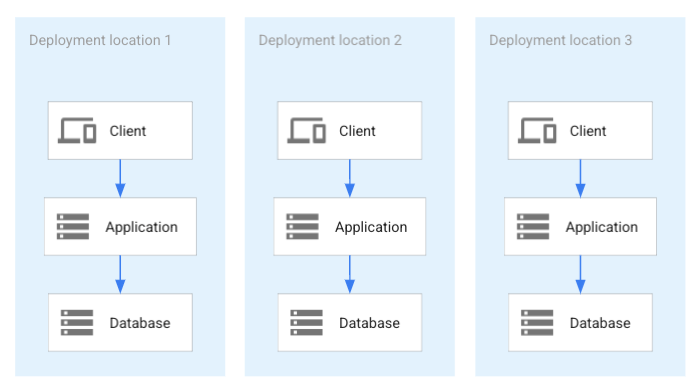
The preceding diagram shows the following:
- A setup with three deployments of an application.
- Each dataset has its own respective database.
- No data is shared between the deployments.
In many situations, a one-to-one deployment is the most appropriate strategy,
however, there are alternatives.
In the case of multi-tenancy, tenants might be relocated. A small
tenant might turn into a medium tenant and have to be relocated to a different
application. In this case, separate database deployments require database
migration. If a distributed database is deployed and is used by all deployments
at the same time, all tenant data resides in a single database system. For this
reason, moving a tenant between databases doesn't require database migration.
The following diagram shows an example of this kind of database:
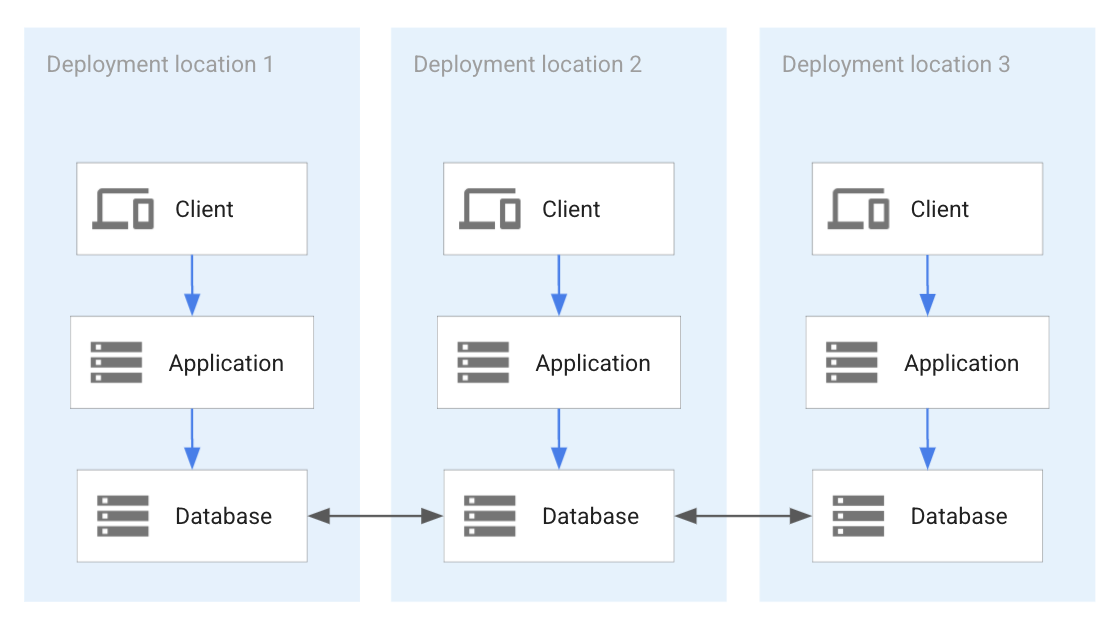
The preceding diagram shows the following:
- Three deployments of an application.
- The deployments all share a single distributed database.
- Applications can access all of the data in each deployment.
- There is no data partitioning implemented.
If an enterprise often relocates tenants as part of lifecycle operations,
database replication might be a useful alternative. In this approach, tenant
data is replicated between databases before a tenant migration. In this case,
independent databases are used for different application deployments and only
set up for replication immediately before and during tenant migration. The
following diagram shows a temporary replication between two application
deployments during a tenant migration.
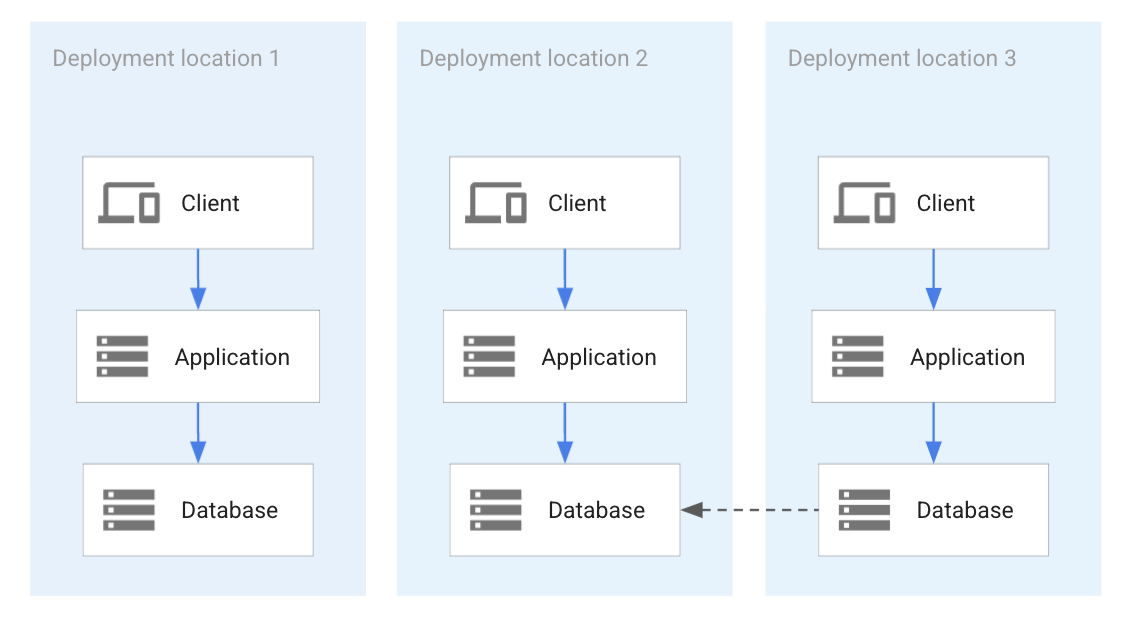
The preceding diagram shows three deployments of an application with
three separate databases holding the data that's associated with each respective
deployment. To migrate data from one database to another, temporary database
migration can be set up.
### Application portability
Application portability ensures that an application can be deployed into
different deployment locations, especially different clouds. This portability
ensures that an application can be migrated at any time, without the need for
migration-specific reengineering or additional application development to
prepare for an application migration.
To ensure application portability, you can use one of the following approaches,
which are described later in this section:
- System-based portability
- API compatibility
- Functionality-based portability
System-based portability uses the same technical components that are used in all
possible deployments. To ensure system-based portability, each technology must
be available in all potential deployment locations. For example, if a database
like PostgreSQL is a candidate, its availability in all potential deployment
locations has to be verified for the expected timeframe. The same is true for
all other technologies---for example, programming languages and
infrastructure technologies. As shown in the following diagram, this approach
establishes a set of common functionalities across all the deployment locations
based on technology.
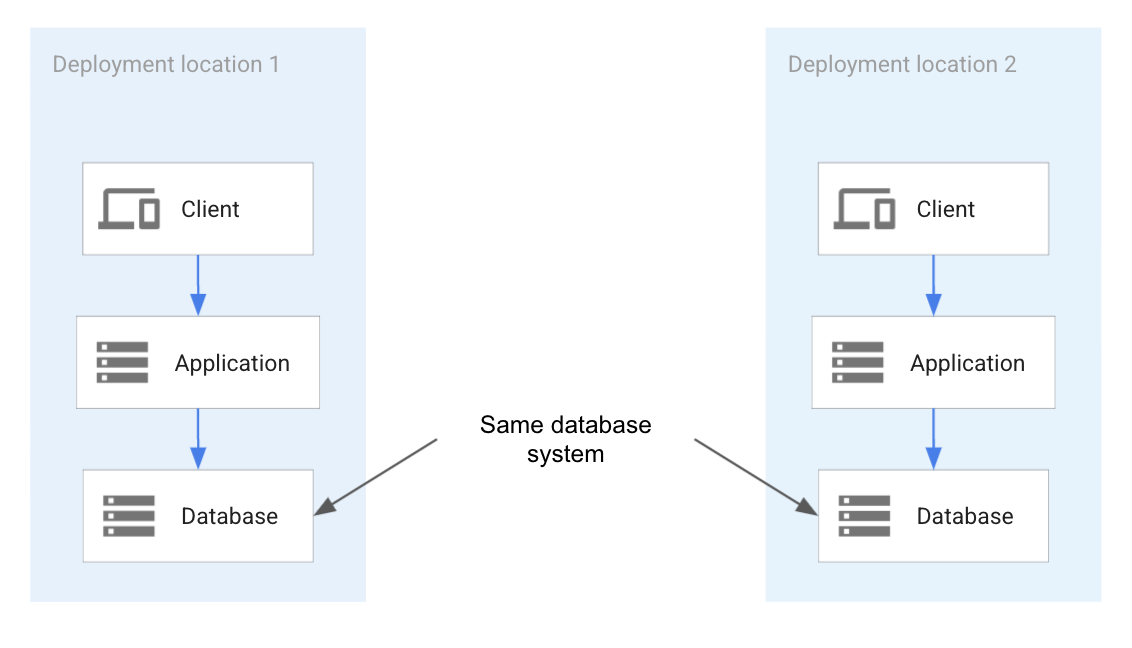
The preceding diagram shows a portable application deployment where the application
expects the exact same database system in every location that it's deployed to.
Because the same database system is used in each location, the application is
portable. The application can expect that the exact same database system will be
used across the deployment. Therefore, the exact same database system interface
and behavior can be assumed.
In the context of databases, in the API-compatibility system, the client uses a
specific database access library (for example, a MySQL client library) to ensure
that it can connect to any compliant implementation that might be available in a
cloud environment. The following diagram illustrates the API compatibility.

The preceding diagram shows application portability based on the database system
API instead of the database system. Although the database systems can be
different in each of the locations, the API is the same and exposes the same
functionality. The application is portable because it can assume the same API in
each location, even if the underlying database system is a different database
technology.
In functionality-based portability, different technologies in different clouds
might be used that provide the same functionality. For example, it might be
possible to restrict the use of databases to the relational model. Because any
relational database system can support the application, different database
systems on different versions can be used in different clouds without affecting
the portability of the application. A drawback to functionality-based
portability is that it can only use the parts of the database model that all
relational database systems support. Instead of a database system that is
compatible with all clouds, a database model must be used. The following diagram
shows an example architecture for functionality-based portability.
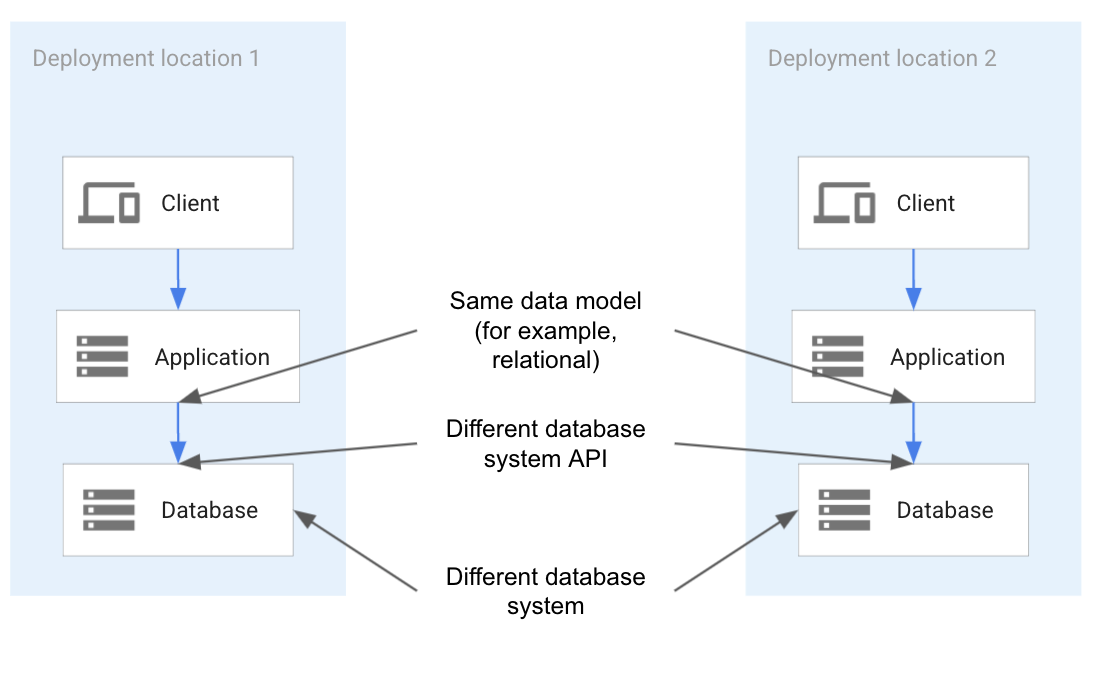
As the preceding diagram shows, the database system API and the database system
might be different in each location. To ensure portability, the application must
only use the parts of each database system and each API that are available in
each location. Because only a subset of each database system is commonly
available in each location, the application has to restrict its use to that
subset.
To ensure portability for all the options in this section, the complete
architecture must be continuously deployed to all target locations. All unit and
system test cases must be executed against these deployments. These are
essential requirements for changes in infrastructures and technologies to be
detected early and addressed.
### Vendor dependency prevention
[Vendor dependency (lock-in)](https://wikipedia.org/wiki/Vendor_lock-in) prevention helps to mitigate the risk of dependency on a specific technology and
vendor. It's superficially similar to application portability. Vendor dependency
prevention applies to all technologies that are used, not only cloud services.
For example, if MySQL is used as a database system and installed on virtual
machines in clouds, then there is no dependency from a cloud perspective, but
there is a dependence on MySQL. An application that's portable across clouds
might still depend on technologies that are provided by different vendors than
the cloud.
To prevent vendor dependency, all technologies need to be replaceable. For this
reason, thorough and structured abstraction of all application functionality is
needed so that each application service can be reimplemented to a different
technology base without affecting how the application is implemented. From a
database perspective, this abstraction can be done by separating the use of a
database model from a particular database-management system.
### Existing production database-management system
While many multicloud applications are developed with database systems as part
of their design, many enterprises develop multicloud applications as a part of
their application modernization effort. These applications are developed with
the assumption that the newly designed and implemented application accesses the
existing databases.
There are many reasons for not incorporating existing databases into a
modernization effort. There might be specific features in use that aren't
available from other database systems. An enterprise might have databases with
complex and well-established management processes in place, making a move to a
different system impractical or uneconomical. Or, an enterprise might choose to
modernize an application in the first phase, and modernize the database in the
second phase.
When an enterprise uses an existing database system, the designer of the
multicloud application has to decide if it will be the only database used, or
if a different database system needs to be added for different deployment
locations. For example, if a database is used on-premises and the application
also needs to run in Google Cloud, they need to consider if the
application services deployed on Google Cloud access the database
on-premises. Or, alternatively, if a second database should be deployed both in
Google Cloud and for the locally running application services.
If a second database is deployed in Google Cloud, the use case might be
the same as the use cases discussed in [Cloud bursting](https://docs.cloud.google.com/architecture/multi-cloud-database-management#cloud_bursting)
or [Distributed services](https://docs.cloud.google.com/architecture/multi-cloud-database-management#distributed_services). In either case, the same
database discussion applies as in these sections. However, it's limited to the
cross-location functionality that the existing database on-premises can
support---for example, synchronization and replication.
## Deployment patterns
The use cases discussed in this document raise a common question from a
database perspective: if databases are in more than one deployment location,
what's their relationship?
The main kinds of relationships (deployment patterns), which are discussed in
the next section, are as follows:
- Partitioned without cross-database dependency
- Asynchronous unidirectional replication
- Bidirectional replication with conflict resolution
- Fully active-active synchronized distributed system
It's possible to map each use case in this document to one or more of the four
deployment patterns.
In the following discussion, it's assumed that clients access application
services directly. Depending on the use case, a load balancer might be needed to
dynamically direct client access to applications, as shown in the following
diagram.

In the preceding diagram, a cloud load balancer directs client
calls to one of the available locations. The load balancer ensures that load
balancing policies are enforced and that clients are directed to the correct
location of the application and its database.
### Partitioned without cross-database dependency
This deployment pattern is the simplest of all the patterns discussed in this
document: each location or cloud has a database and the databases contain
partitioned datasets that are not dependent on each other. A data item is stored
in only one database. Each data partition is located in its own database. An
example for this pattern is a multi-tenant application where a dataset is in one
or the other database. The following diagram shows two fully partitioned
applications.
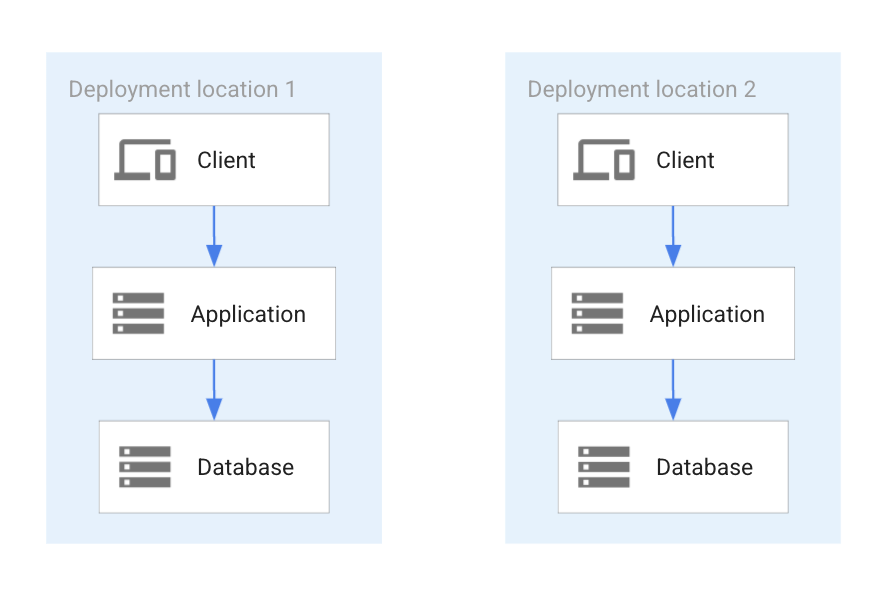
As the preceding diagram shows, an application is deployed in two locations, each
responsible for a partition of the entire dataset. Each data item resides in
only one of the locations, ensuring a partitioned dataset without any replication
between the two.
An alternative deployment pattern for partitioned databases is where the dataset
is completely partitioned but still stored within the same database. There is
only one database containing all datasets. Although the datasets are stored
within the same database, the datasets are completely separate (partitioned) and
a change to one doesn't cause changes in another. The following diagram shows
two applications that share a single database.
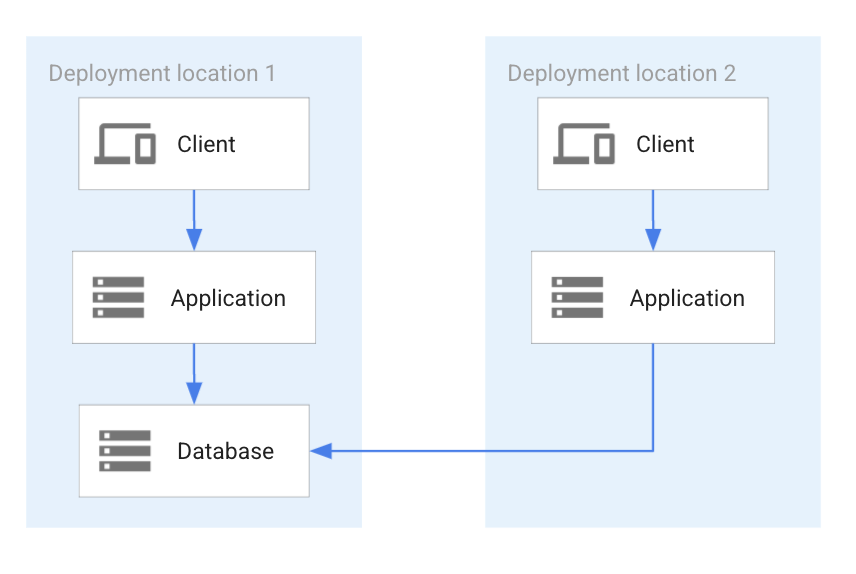
The preceding diagram shows the following:
- Two application deployments that both share a common database, which is in the first location.
- Each application can access all of the data in the deployment because the dataset isn't partitioned.
### Asynchronous unidirectional replication
This deployment pattern has a primary database that replicates to one or more
secondary databases. The secondary database can be used for read access, but
the application has to factor in potential replication lag. An example for this
pattern is when the best database for a particular use case is used as the
primary database and the secondary database is used for analytics. The
following diagram shows two applications accessing unidirectionally replicated
databases.
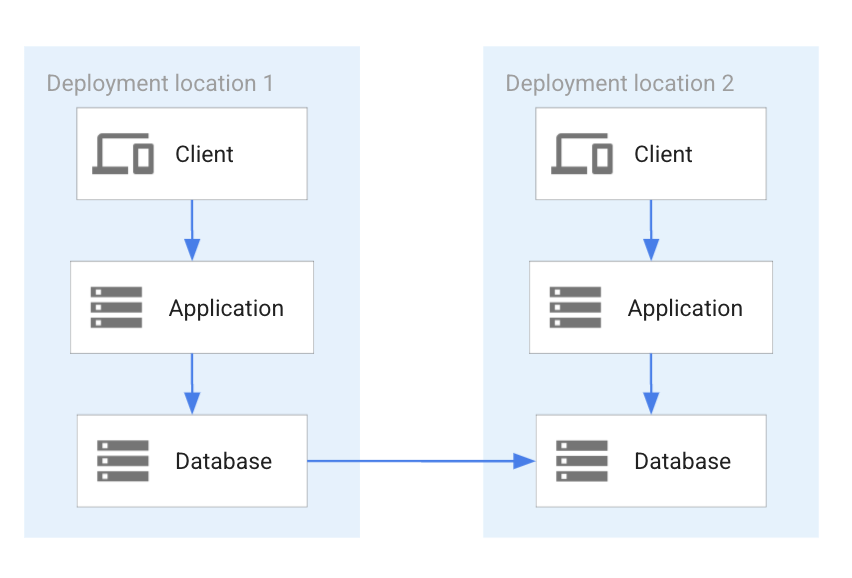
As the preceding diagram shows, one of the two databases is a replica of the
other. The arrow in the diagram indicates the replication direction: the data
from the database system in location 1 is replicated to the database system in
location 2.
### Bidirectional replication with conflict resolution
This deployment pattern has two primary databases that are asynchronously
replicated to each other. If the same data is written at the same time to each
database (for example, the same primary key) it can cause a write-write
conflict. Because of this risk, there must be a conflict resolution in place to
determine which state is the last state during replication. This pattern can be
used in situations where the chance of a write-write conflict is rare. The
following diagram shows two applications accessing bidirectionally replicated
databases.
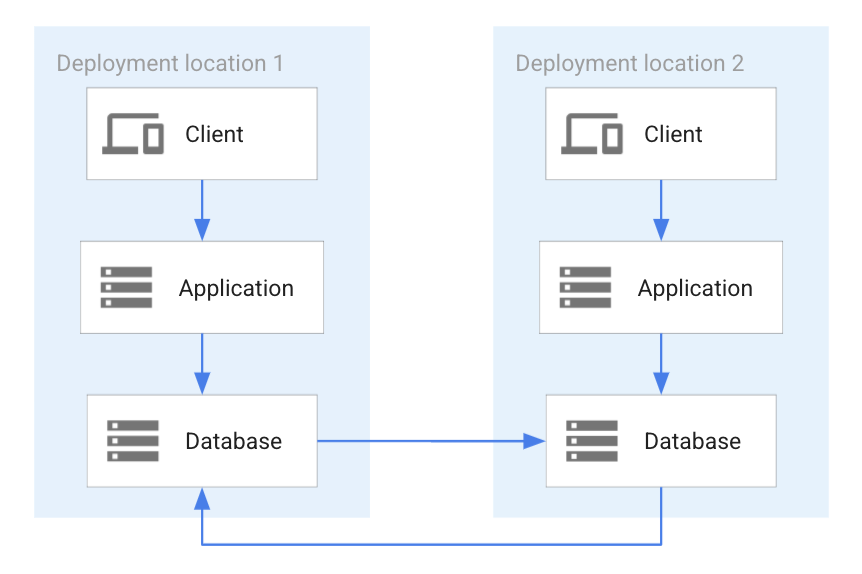
As the preceding diagram shows, each database is replicated to the other
database. The two replications are independent to each other, as indicated in
the diagram by two separate blue arrows. Since the two replications are
independent, a conflict can arise if by chance the same data item is changed by
each of the applications and concurrently replicated. In this case, conflict
resolution has to take place.
### Fully active-active synchronized distributed system
This deployment pattern has a single database that has an active-active (also
primary-primary) setup. In an active-active setup, an update of
data in any primary database is transactionally consistent and synchronously
replicated. An example use case for this pattern is distributed computing. The
following diagram shows two applications accessing a fully synchronized primary-
primary database.

As the preceding diagram shows, this arrangement ensures that each application
always accesses the last consistent state, without a delay or risk of conflict.
A change in one database is immediately available in the other database. Any
change is reflected in both databases when a changing transaction commit
happens.
## Database system categorization
Not all database-management systems can be used equally well for the [deployment patterns](https://docs.cloud.google.com/architecture/multi-cloud-database-management#deployment_patterns) that are discussed in
this document. Depending on the use case, it might only be possible to implement
one deployment pattern or a combination of deployment patterns with only a
subset of database systems.
In the following section, the different database systems are categorized and
mapped to the four deployment patterns.
It's possible to categorize databases by different dimensions such as data model,
internal architecture, deployment model, and transaction types. In the following
section, for the purpose of multicloud database management, two dimensions are
used:
- **Deployment architecture**. The architecture of how a database management system is deployed onto resources of clouds (for example, compute engines or cloud-managed).
- **Distribution model**. The model of distribution a database system supports (for example, single instance or fully distributed).
These two dimensions are the most relevant in the context of multicloud use
cases and can support the four [deployment patterns](https://docs.cloud.google.com/architecture/multi-cloud-database-management#deployment_patterns) derived from the [multicloud database use cases](https://docs.cloud.google.com/architecture/multi-cloud-database-management#multicloud_database_use_cases). A popular categorization is based on the data
models that are supported by a database-management system. Some systems support
only one model (for example, a graph model). Other systems support
several data models at the same time (for example, relational and document
models). However, in the context of multicloud database management, this
categorization isn't relevant because multicloud applications can use any data
model for their multicloud deployment.
### Database system by deployment architecture
Multicloud database management includes the following four main classes of
deployment architecture for database-management systems:
- **Built-in cloud databases** . Built-in cloud databases are designed, built, and optimized to work with cloud technology. For example, some database systems use Kubernetes as their implementation platform and use Kubernetes functionality. [CockroachDB](https://www.cockroachlabs.com/) and [YugaByte](https://www.yugabyte.com/) are examples of this kind of database. They can be deployed into any cloud that supports Kubernetes.
- **Cloud provider-managed databases** . Cloud provider-managed databases are built on cloud provider-specific technology and are a database service managed by a specific cloud provider. [Spanner](https://docs.cloud.google.com/spanner), [Bigtable](https://docs.cloud.google.com/bigtable), [Firestore](https://cloud.google.com/products/firestore), and [AlloyDB for PostgreSQL](https://docs.cloud.google.com/alloydb/docs/overview) are examples of this kind of database. Cloud provider-managed databases are only available in the cloud of the cloud provider and can't be installed and run elsewhere. However, AlloyDB for PostgreSQL is fully [PostgreSQL](https://www.postgresql.org/) compatible.
- **Pre-cloud databases** . Pre-cloud databases existed before the development of cloud technology (sometimes for a long time) and usually run on bare metal hardware and virtual machines (VMs). [PostgreSQL](https://www.postgresql.org/), [MySQL](https://www.mysql.com/) and [SQL Server](https://www.microsoft.com/sql-server/) are examples of this kind of database. These systems can run on any cloud that supports the required VMs or bare metal hardware.
- **Cloud partner-managed databases** . Some public clouds have database partners that install and manage customers' databases in the public cloud. For this reason, customers don't have to manage these databases themselves. [MongoDB Atlas](https://cloud.google.com/mongodb), [MariaDB](https://mariadb.com/products/skysql/google-cloud-platform/), and [ScyllaDB](https://www.scylladb.com/) are examples of this kind of database.
There are some variants of these main categories. For example, a database vendor
implementing a database that's built for the cloud might also provide an
installation on technology built for the cloud and a managed offering to
customers in their vendor-provided cloud. This approach is equivalent to the
vendor providing a public cloud that supports only their database as the single
service.
Pre-cloud databases might also be in containers and they might be deployable
into a Kubernetes cluster. However, these databases don't use
Kubernetes-specific functionality like scaling, multi-service, or
multi-pod deployment.
Database vendors might partner with more than one public cloud provider at the
same time, offering their database as a cloud partner-managed database in more
than one public cloud.
### Database system by distribution model
Different database-management systems are implemented according to the
distribution models in the architecture of a database. The models for databases
are as follows:
- **Single instance**. A single database instance runs on one VM or one container and acts as a centralized system. This system manages all database access. Because the single instance can't be connected to any other instance, the database system doesn't support replication.
- **Multi-instance active-passive**. In this common architecture, several database instances are linked together. The most common linking is an active-passive relationship where one instance is the active database instance that supports both instances and writes and reads. One or more passive systems are read-only, and receive all database changes from the primary either synchronously or asynchronously. Passive systems can provide read access. Active-passive is also referred to as primary-secondary or source-replica.
- **Multi-instance active-active**. In this relatively uncommon architecture, each instance is an active instance. In this case, each instance can execute read and write transactions and provide data consistency. For this reason, to prevent data inconsistencies, all instances are always synchronized.
- **Multi-instance active-active with conflict resolution**. This is also a relatively uncommon system. Each instance is available for write and read access, however, the databases are synchronized in an asynchronous mode. Concurrent updates of the same data item are permitted, which leads to an inconsistent state. A conflict resolution policy has to decide which of the states is the last consistent state.
- **Multi-instance sharding**. Sharding is based on the management of (disjointed) partitions of data. A separate database instance manages each partition. This distribution is scalable because more shards can be added dynamically over time. However, cross-shard queries might not be possible because this functionality is not supported by all systems.
All the distribution models that are discussed in this section can support
sharding and can be a sharded system. However, not all systems are designed to
provide a sharding option. Sharding is a scalability concept and isn't generally
relevant for architectural database selection in multicloud environments.
Distribution models are different for cloud and partner-managed databases.
Because these databases are tied to the architecture of a cloud provider, these
systems implement architectures based on the following deployment locations:
- **Zonal system**. A zonal-managed database system is tied to a zone. When the zone is available, the database system is available too. However, if the zone becomes unavailable, it's not possible to access the database.
- **Regional system**. A regional-managed database is tied to a region and is accessible when at least one zone is accessible. Any combination of zones can become inaccessible.
- **Cross-regional system**. A cross-regional system is tied to two or more regions and functions properly when at least one region is available.
A cross-regional system can also support a cross-cloud system if the database
can be installed in all the clouds that an enterprise intends to use.
There are other possible alternatives to the managed-database architectures
discussed in this section. A regional system might share a disk between two
zones. If either of the two zones becomes inaccessible, the database system can
continue in the remaining zone. However, if an outage affects both zones, the
database system is unavailable even though other zones might still be fully
online.
## Mapping database systems to deployment patterns
The following table describes how the deployment patterns and deployment
architectures that are discussed in this document relate to each other. The
fields state the conditions that are needed for a combination to be possible,
based on deployment pattern and deployment architecture.
| Deployment architecture | Deployment pattern |||||
| Deployment architecture | Partitioned without cross-database dependency | Asynchronous unidirectional replication | Bidirectional replication with conflict resolution | Fully active-active synchronized distributed system |
|---|---|---|---|---|---|
| **Built-in cloud databases** | Possible for all clouds that provide built-in cloud technology used by database systems.
If the same database isn't available, different database systems can be used. | Cloud database that provides replication. | Cloud database that provides bidirectional replication. | Cloud database that provides primary-primary synchronization. |
| **Cloud provider-managed databases** | Database systems can be different in different clouds. | Replica doesn't have to be the cloud provider-managed database (see [The role of database migration technology in deployment patterns](https://docs.cloud.google.com/architecture/multi-cloud-database-management#the_role_of_database_migration_technology_in_deployment_patterns)). | Only within a cloud, not across clouds, if the database provides bidirectional replication. | Only within a cloud, not across clouds, if the database provides primary-primary synchronization. |
| **Pre-cloud databases** | Database systems can be the same or different in different clouds. | Replication is possible across several clouds. | Database system provides bidirectional replication and conflict resolution. | Database system provides primary-primary synchronization. |
| **Cloud partner-managed databases** | Database systems can be different in different clouds.
If the partner provides a managed database system in all required clouds, the same database can be used. | Replica doesn't have to be the cloud provider-managed database.
If the partner provides a managed database system in all required clouds, the same database can be used. | Database system provides bidirectional replication and conflict resolution. | Database system provides primary-primary synchronization. |
If a database system doesn't provide built-in replication, it might be
possible to use database replication technology instead. For more information,
see
[The role of database migration technology in deployment patterns](https://docs.cloud.google.com/architecture/multi-cloud-database-management#the_role_of_database_migration_technology_in_deployment_patterns).
The following table relates the deployment patterns to distribution models.
The fields state the conditions for which the combination is possible given a
deployment pattern and a distribution model.
| Distribution model | Deployment pattern |||||
| Distribution model | Partitioned without cross-database dependency | Asynchronous unidirectional replication | Bidirectional replication with conflict resolution | Fully active-active synchronized distributed system |
|---|---|---|---|---|---|
| Single instance | Possible with the same or different database system in the involved clouds. | Not applicable | Not applicable | Not applicable |
| Multi-instance active-passive | Possible with the same or different database system in the involved clouds. | Replication is possible across clouds. | Replication is possible across clouds. | Not applicable |
| Multi-instance active-active | Possible with the same or different database system in the involved clouds. | Not applicable | Not applicable | Synchronization is possible across clouds. |
| Multi-instance active-active with conflict resolution | Possible with the same or different database system in the involved clouds. | Not applicable | Not applicable | Applicable if bidirectional replication is possible across clouds. |
Some implementations of distribution models that add additional abstraction
based on the underlying database technology don't have such a distribution model
built into it---for example,
[Postgres-BDR](https://www.enterprisedb.com/docs/pgd/4/bdr/),
an active-active system. Such systems are included in the preceding
table in the respective category. From a multicloud perspective, it's
irrelevant how a distribution model is implemented.
## Database migration and replication
Depending on the use case, an enterprise might need to migrate a database from
one deployment location to another. Alternatively, for downstream processing,
it might need to replicate the data for a database to another location. In the
following section, database migration and database replication are discussed in
more detail.
### Database migration
Database migration is used when a database is being moved from one deployment
location to another. For example, a database running in an on-premises data
center is migrated to run on the cloud instead. After migration is complete, the
database is shut down in the on-premises data center.
The main approaches to database migration are as follows:
- **Lift and shift**. The VM and the disks running the database instances are copied to the target environment as they are. After they are copied, they are started up and the migration is complete.
- **Export and import and backup and restore**. These approaches both use database system functionality to externalize a database and recreate it at the target location. Export/import usually is based on an ASCII format, whereas backup and restore is based on a binary format.
- **Zero downtime migration** . In this approach, a database is migrated while the application systems access the source system. After an initial load, changes are transmitted from the source to the target database using [change data capture (CDC)](https://wikipedia.org/wiki/Change_data_capture) technologies. The application incurs downtime from the time it's stopped on the source database system, until it's restarted on the target database system after migration is complete.
Database migration becomes relevant in multicloud use cases when a database is
moved from one cloud to another, or from one kind of database engine to another.
Database migration is a multi-faceted process. For more information, see
[Database migration: Concepts and principles (Part 1)](https://docs.cloud.google.com/solutions/database-migration-concepts-principles-part-1)and
[Database migration: Concepts and principles (Part 2)](https://docs.cloud.google.com/solutions/database-migration-concepts-principles-part-2).
Built-in database technologies can be used to do database migration---for
example export and import, backup and restore, or built-in replication protocols. When
the source and target system are different database systems, migration
technologies are the best option for database migration. [Database Migration Service](https://docs.cloud.google.com/database-migration/docs/overview), [Striim](http://www.striim.com) and [Debezium](https://debezium.io/)
are examples of database migration technologies.
### Database replication
Database replication is similar to database migration. However, during database
replication, the source database system stays in place while every change is
transmitted to the target database.
Database replication is a continuous process that sends changes from
the source database to the target database. When this process is asynchronous,
the changes arrive at the target database after a short delay. If the process is
synchronous, the changes to the source system are made to the target system at
the same time and to the same transactions.
Aside from replicating a source to a target database, a common practice is to
replicate data from a source database to a target analytics system.
As with database migration, if replication protocols are available, built-in
database technology can be used for database replication. If there are no
built-in replication protocols, it's possible to use replication technology such
as
[Datastream](https://docs.cloud.google.com/datastream/docs/overview), [Striim](http://www.striim.com)
or
[Debezium](https://debezium.io/).
### The role of database migration technology in deployment patterns
Built-in database technology to enable replication isn't generally available
when different database systems are used in deployment patterns---for example,
asynchronous (heterogeneous) replication. Instead, database migration technology
can be deployed to enable this kind of replication. Some of these migration systems
also implement
[bidirectional replication](https://www.striim.com/docs/en/bidirectional-replication.html).
If database migration or replication technology is available for the database
systems used in combinations marked as "Not applicable" in Table 1 or Table
2 in
[Mapping database systems to deployment patterns](https://docs.cloud.google.com/architecture/multi-cloud-database-management#mapping_database_systems_to_deployment_patterns)
then it might be possible to use it for database replication. The following
diagram shows an approach for database replication using a migration technology.
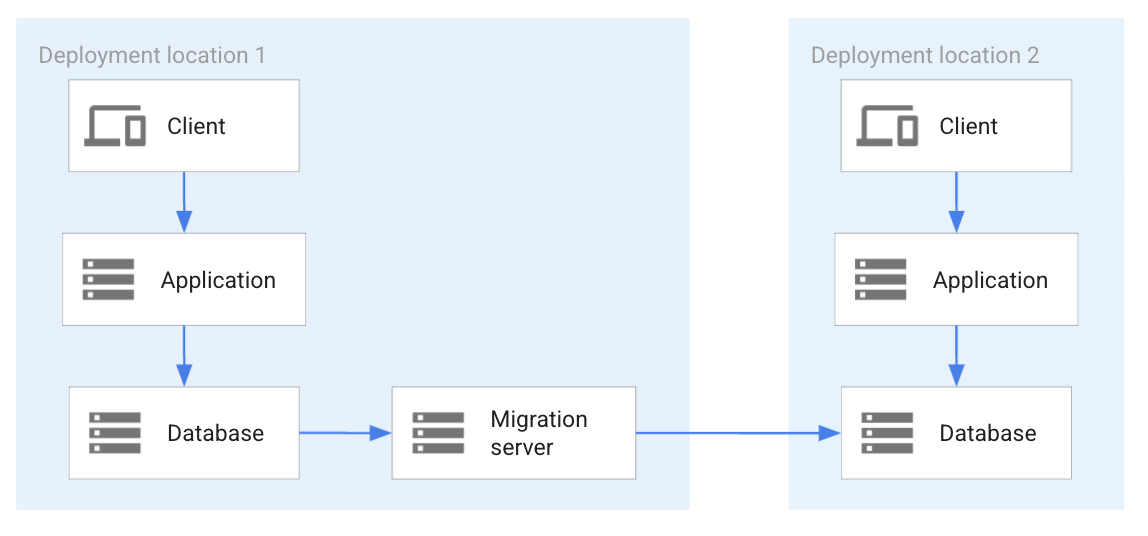
In the preceding diagram, the database in location 1 is replicated to the
database in location 2. Instead of a direct database system replication, a
migration server is deployed to implement the replication. This approach is used
for database systems that don't have database replication functionality built
into their implementation and that need to rely on a system separate from the
database system to implement replication.
## Multicloud database selection
The multicloud database use cases combined with the database system
categorization helps you to decide which databases are best for a given use
case. For example, to implement the use case in [Application
portability](https://docs.cloud.google.com/architecture/multi-cloud-database-management#application_portability), there are two options. The
first option is to ensure that the same database engine is available in all
clouds. This approach ensures system portability. The second option is to ensure
that the same data model and query interface is available to all clouds.
Although the database systems might be different, the portability is provided on
a functional interface.
The decision trees in the following sections show the decision-making criteria
for the multicloud database use cases in this document. The decision trees
suggest the best database to consider for each use case.
### Best practices for existing database system
If a database system is in production, a decision must be made about whether
to keep or replace it. The following diagram shows the questions to ask
in your decision process:
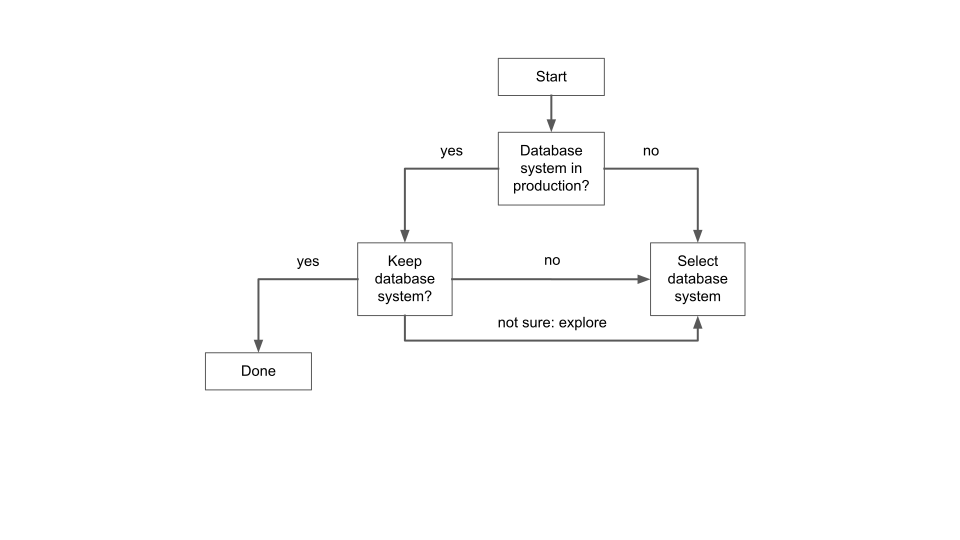
The questions and answers in the decision tree are as follows:
- Is a database system in production?
- If no database system is in production, select a database system (skip to the [Decision on multicloud database management](https://docs.cloud.google.com/architecture/multi-cloud-database-management#decision_on_multicloud_database_management)).
- If a database system is in production, evaluate whether it should be retained.
- If a database system is in production, evaluate whether it should be retained.
- If the database system should be retained, then the decision is made and the decision process is complete.
- If the database system should be changed or if the decision is still being made, select a database system (skip to the [Decision on multicloud database management](https://docs.cloud.google.com/architecture/multi-cloud-database-management#decision_on_multicloud_database_management)).
### Decision on multicloud database management
The following decision tree is for a use case with a multi-location database
requirement (including a multicloud database deployment). It uses the
deployment pattern as the basis for the decision-making criteria.
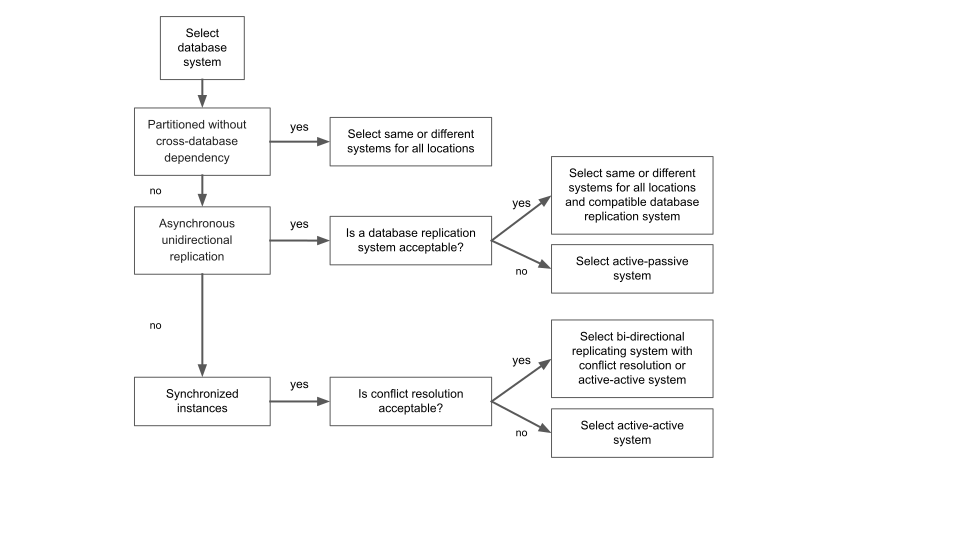
The questions and answers in the decision tree are as follows:
- Is the data partitioned in different databases without any cross-database dependency?
- If yes, the same or different database systems can be selected for each location.
- If no, continue to the next question.
- Is asynchronous unidirectional replication required?
- If yes, then evaluate if a database replication system is acceptable.
- If yes, select the same or different database systems that are compatible with the replication system.
- If no, select a database system that can implement an active-passive distribution model.
- If no, continue to the next question.
- Select a database system with synchronized instances.
- Is conflict resolution acceptable?
- If yes, select a bidirectional replicating database system or an active-active database system.
- If no, select an active-active system.
If more than one multicloud use case is implemented, an enterprise must decide
if it wants to use one database system to support all use cases, or multiple
database systems.
If an enterprise wants to use one database system to support all use cases,
the system with the best synchronization is the best choice. For example, if
unidirectional replication is required as well as synchronized instances, the
best choice is the synchronized instances.
The hierarchy of synchronization quality is (from none to best): partitioned,
unidirectional replication, bidirectional replication, and fully synchronized
replication.
## Deployment best practices
This section highlights best practices to follow when
choosing a database for multicloud application migration or development.
### Existing database-management system
It can be a good practice to retain a database and not make changes to the
database system unless required by a specific use case. For an enterprise with
an established database-management system in place and that has effective
development, operational, and maintenance processes, it might be best to avoid
making changes.
A cloud bursting use case that doesn't require a database system in the
cloud might not need a change of database. Another use case is asynchronous
replication to a different deployment location within the same cloud or to
another cloud. For these use cases, a good approach is to implement a benchmark
and verify that the cross-location communication and that the cross-location
communication and latency satisfies application requirements when accessing the
database.
### Database system as a Kubernetes service
If an enterprise is considering running a database system within Kubernetes as
a service based on
[StatefulSets](https://docs.cloud.google.com/kubernetes-engine/docs/concepts/statefulset),
then the following factors must be considered:
- If the database provides the database model required by the application.
- Non-functional factors which determine how operationalization is implemented in a database system as a Kubernetes service---for example, how scaling is done (scaling up and down), how backup and restore are managed, and how monitoring is made available by the system. To help them understand the requirements of a Kubernetes-based database system, enterprises should use their experiences with databases as a point of comparison.
- High availability and disaster recovery. To provide high availability, the system needs to continue operating when a zone within a region fails. The database must be able to failover fast from one zone to another. In the best case scenario, the database has an instance running in each zone that's fully synchronized for an RTO and RPO of zero.
- Disaster recovery to address the failure of a region (or cloud). In an ideal scenario, the database continues to operate in a second region with an RPO and RTO of zero. In a less ideal scenario, the database in the secondary region might not be fully caught up on all transactions from the primary database.
To determine how best to run a database within Kubernetes, a full
database evaluation is a good approach, especially when the system needs to be
comparable to a system in production outside of Kubernetes.
### Kubernetes-independent database system
It's not always necessary for an application that's implemented as services in
Kubernetes to have the database running in Kubernetes at the same time. There
are many reasons that a database system needs to be run outside of Kubernetes,
---for example, established processes, product knowledge within an
enterprise, or unavailability. Both cloud providers and cloud partner-managed
databases fit into this category.
It's equally possible and feasible to run a database on a Compute Engine. When
selecting a database system, it's a good practice to do a full database
evaluation to ensure that all of the requirements for an application are met.
From an application design perspective, connection pooling is an important
design consideration. An application service accessing a database might use a
connection pool internally. Using a connection pool is good for efficiency and
reduced latency. Requests are taken from the pool instead without the need for
them to be initiated, and there's no wait for connections to be created. If the
application is scaled up by adding application service instances, each instance
creates a connection pool. If best practices are followed, each pool pre-creates
a minimum set of connections. Each time another application service instance is
created for application scaling, connections are added to the database. From a
design perspective, because databases can't support unlimited
connections, the addition of connections has to be managed to avoid overload.
### Best database system versus database system portability
When selecting database systems, it's common for enterprises to select the best
database system to address the requirements of an application. In a multicloud
environment, the best database in each cloud can be selected, and they can be
connected to each other based on the use case. If these systems are different,
any replication---one-directional or bidirectional---requires
significant effort. This approach might be justified if the benefit of using the
best system outweighs the effort required to implement it.
However, a good practice is to consider and evaluate concurrently an approach
for a database system that's available in all required clouds. While such a
database might not be as ideal as the best option, it might be a lot easier to
implement, operate, and maintain such a system.
A concurrent database system evaluation demonstrates the advantages and
disadvantages of both database systems, providing a solid basis for selection.
### Built-in versus external database system replication
For use cases that require a database system in all deployment locations (zones,
regions or clouds), replication is an important feature. Replication can be
asynchronous, bidirectional, or fully synchronized active-active replication.
Database systems don't all support all of these forms of replication.
For the systems that don't support replication as part of their system
implementation replication, systems like [Striim](http://www.striim.com) can be used to complement
the architecture (as discussed in [Database migration](https://docs.cloud.google.com/architecture/multi-cloud-database-management#database_migration)).
A best practice is to evaluate alternative database-management systems to
determine the advantages and disadvantages of a system that has built-in
replication or a system that requires replication technology.
A third class of technology plays a role in this case as well. This class
provides add-ons to existing database systems to provide replication. One
example is [MariaDB Galera Cluster](https://mariadb.com/kb/en/what-is-mariadb-galera-cluster/). If the evaluation process permits, evaluating these systems
is a good practice.
### Multi-model databases
Multi-model databases provide flexible, scalable data management in the cloud
and in real-time applications. Multi-model databases support multiple data models
like document, graph, key-value, column-family, and relational under a unified
query interface and storage engine. These capabilities offer advantages like
the following:
- **Simplified management**: Developers manage various data types within a single database system, which helps to reduce operational complexity and overhead.
- **Faster development**: Multi-model databases provide the flexibility to use the optimal data model for different needs. This flexibility can accelerate development and help you adapt faster to changing requirements.
- **Easier integration**: A unified query interface and storage engine minimize the complexity of connecting and synchronizing disparate databases.
- **Enhanced querying**: Developers can query and combine data across different models, which enables richer insights and more sophisticated application features.
- **Cost savings**: Fewer database systems translate to lower costs for licensing, hardware, and operational expenses.
- **Optimized performance**: By choosing the most suitable data model for specific tasks, you can potentially improve application performance.
For example,
[Spanner](https://docs.cloud.google.com/spanner/docs)
offers multi-model features with
[PostgreSQL dialect support](https://docs.cloud.google.com/spanner/docs/postgresql-interface).
This capability lets you build smart, AI-powered apps using both relational and
NoSQL data, query complex relationships with
[Spanner Graph](https://cloud.google.com/products/spanner/graph),
and use
[vector search](https://docs.cloud.google.com/spanner/docs/vector-search-embeddings)
for semantic search.
## What's next
- Learn about [hybrid and multicloud architecture patterns](https://docs.cloud.google.com/architecture/hybrid-multicloud-patterns-and-practices).
- Read about [patterns for connecting other cloud service providers with Google Cloud](https://docs.cloud.google.com/architecture/patterns-for-connecting-other-csps-with-gcp).
- Learn about [monitoring and logging architectures for hybrid and multicloud deployments on Google Cloud](https://docs.cloud.google.com/architecture/hybrid-and-multi-cloud-monitoring-and-logging-patterns).
- For more reference architectures, diagrams, and best practices, explore the [Cloud Architecture Center](https://docs.cloud.google.com/architecture).
## Contributors
Author: [Alex Cârciu](https://www.linkedin.com/in/alex-carciu) \| Solutions Architect