Google Cloud provides tools, products, guidance, and professional services to
migrate from Amazon Relational Database Service (RDS) or Amazon Aurora to
Cloud SQL for MySQL.
This document is intended for cloud and database administrators who want to
plan, implement, and validate a database migration project. It's also intended
for decision makers who are evaluating the opportunity to migrate and want an
example of what a migration might look like.
This document focuses on a homogeneous database migration, which is a migration
where the source and destination databases use the same database technology. In
this migration guide, the source is Amazon RDS or Amazon Aurora for MySQL,
and the destination is Cloud SQL for MySQL.
This document is part of a multi-part series about migrating from AWS to
Google Cloud that includes the following documents:
- [Get started](https://docs.cloud.google.com/architecture/migration-from-aws-get-started)
- [Migrate from Amazon EC2 to Compute Engine](https://docs.cloud.google.com/architecture/migrate-amazon-ec2-to-compute-engine)
- [Migrate from Amazon S3 to Cloud Storage](https://docs.cloud.google.com/architecture/migrate-amazon-s3-to-cloud-storage)
- [Migrate from Amazon EKS to GKE](https://docs.cloud.google.com/architecture/migrate-amazon-eks-to-gke)
- Migrate from Amazon RDS and Amazon Aurora for MySQL to Cloud SQL for MySQL (this document)
- [Migrate from Amazon RDS and Amazon Aurora for PostgreSQL to Cloud SQL for PostgreSQL and AlloyDB for PostgreSQL](https://docs.cloud.google.com/architecture/migrate-aws-rds-aurora-to-postgresql)
- [Migrate from Amazon RDS for SQL Server to Cloud SQL for SQL Server](https://docs.cloud.google.com/architecture/migrate-aws-rds-to-cloudsql-for-sqlserver)
- [Migrate from AWS Lambda to Cloud Run](https://docs.cloud.google.com/architecture/migrate-aws-lambda-to-cloudrun)
For this migration to Google Cloud, we recommend that you follow
the migration framework described in
[Migrate to Google Cloud: Get started](https://docs.cloud.google.com/architecture/migration-to-gcp-getting-started#the_migration_path).
The following diagram illustrates the path of your migration journey.

You might migrate from your source environment to Google Cloud in a series
of iterations---for example, you might migrate some workloads first and others
later. For each separate migration iteration, you follow the phases of the
general migration framework:
1. Assess and discover your workloads and data.
2. Plan and build a foundation on Google Cloud.
3. Migrate your workloads and data to Google Cloud.
4. Optimize your Google Cloud environment.
For more information about the phases of this framework, see
[Migrate to Google Cloud: Get started](https://docs.cloud.google.com/architecture/migration-to-gcp-getting-started).
To design an effective migration plan, we recommend that you validate each step
of the plan, and ensure that you have a rollback strategy. To help you validate
your migration plan, see
[Migrate to Google Cloud: Best practices for validating a migration plan](https://docs.cloud.google.com/architecture/migration-to-google-cloud-best-practices).
## Assess the source environment
In the assessment phase, you determine the requirements and dependencies to
migrate your source environment to Google Cloud.
The assessment phase is crucial for the success of your migration. You need to
gain deep knowledge about the workloads you want to migrate, their requirements,
their dependencies, and about your current environment. You need to understand
your starting point to successfully plan and execute a Google Cloud
migration.
The assessment phase consists of the following tasks:
1. Build a comprehensive inventory of your workloads.
2. Catalog your workloads according to their properties and dependencies.
3. Train and educate your teams on Google Cloud.
4. Build experiments and proofs of concept on Google Cloud.
5. Calculate the total cost of ownership (TCO) of the target environment.
6. Choose the migration strategy for your workloads.
7. Choose your migration tools.
8. Define the migration plan and timeline.
9. Validate your migration plan.
The database assessment phase helps you choose the size and specifications of
your target Cloud SQL database instance that matches the source for
similar performance needs. Pay special attention to disk size and throughput,
IOPS, and number of vCPUs. Migrations might struggle or fail due to incorrect
target database instance sizing. Incorrect sizing can lead to long migration
times, database performance problems, database errors, and application
performance problems. When deciding on the Cloud SQL instance, keep in
mind that disk performance is based on the disk size and the number of vCPUs.
The following sections rely on
[Migrate to Google Cloud: Assess and discover your workloads](https://docs.cloud.google.com/architecture/migration-to-gcp-assessing-and-discovering-your-workloads),
and integrate the information in that document.
### Build an inventory of your Amazon RDS or Amazon Aurora instances
To define the scope of your migration, you create an inventory and collect
information about your Amazon RDS or Amazon Aurora instances. We recommend that
you automate this process by using specialized tools, because manual approaches
are prone to error and can lead to incorrect assumptions.
Amazon RDS or Amazon Aurora and Cloud SQL might not have similar
features, instance specifications, or operations. Some functionalities might be
implemented differently or be unavailable. Areas of differences might include
infrastructure, storage, authentication and security, replication, backup, high
availability, resource capacity model and specific database engine feature
integrations, and extensions. Depending on the database engine type, instance
size, and architecture, there can also be differences in the default values of
database parameter settings.
Benchmarking can help you to better understand the workloads that are to be
migrated and contributes to defining the right architecture of the migration
target environment. Collecting information about performance is important to
help estimate the performance needs of the Google Cloud target
environment. Benchmarking concepts and tools are detailed in the
[Perform testing and validation](https://docs.cloud.google.com/architecture/migrate-aws-rds-to-sql-mysql#perform-testing) phase
of the migration process, but they also apply to the inventory building stage.
### Tools for assessments
For an initial overview assessment of your current infrastructure, we recommend
that you use
[Google Cloud Migration Center](https://docs.cloud.google.com/migration-center/docs/migration-center-overview)
along with other specialized database assessment tools such as migVisor and
Database Migration Assessment Tool (DMA).
With Migration Center, you can perform a complete assessment of
your application and database landscape, including the technical fit for a
database migration to Google Cloud. You receive size and configuration
recommendations for each source database, and create a total cost of ownership
(TCO) report for servers and databases.
For more information about assessing your AWS environment by using
Migration Center, see
[Import data from other cloud providers](https://docs.cloud.google.com/migration-center/docs/import-data-cloud-providers).
In addition to Migration Center, you can use the specialized
tool migVisor. migVisor supports a variety of database engines and is
particularly suitable for heterogeneous migrations. For an introduction to
migVisor, see the
[migVisor overview](https://doc.migvisor.com/mdoc/overview).
migVisor can identify artifacts and incompatible proprietary database features
that can cause migration defaulting, and can point to workarounds. migVisor can
also recommend a target Google Cloud solution, including initial sizing and
architecture.
The migVisor database assessment output provides the following:
- Comprehensive discovery and analysis of current database deployments.
- Detailed report of migration complexity, based on the proprietary features used by your database.
- Financial report with details on cost savings post migration, migration costs, and new operating budget.
- Phased migration plan to move databases and associated applications with minimal disruption to the business.
To see some examples of assessment outputs, see
[migVisor - Cloud migration assessment tool](https://solutionshub.epam.com/solution/migvisor-by-epam).
Note that migVisor temporarily increases database server utilization.
Typically, this additional load is less than 3%, and can be run during non-peak
hours.
The migVisor assessment output helps you to build a complete inventory of your RDS
instances. The report includes generic properties (database engine version and
edition, CPUs, and memory size), as well as details about database topology,
backup policies, parameter settings, and special customizations in use.
If you prefer to use open source tools, you can use data collector scripts with
(or instead of) the mentioned tools. These scripts can help you collect detailed
information (about workloads, features, database objects, and database code) and
build your database inventory. Also, scripts usually provide a detailed database
migration assessment, including a migration effort estimation.
We recommend the open source tool DMA,
which was built by Google engineers. It offers a complete and accurate database
assessment, including features in use, database logic, and database objects
(including schemas, tables, views, functions, triggers, and stored
procedures).
To use DMA, download the collection scripts for your database engine from the
[Git repository](https://googlecloudplatform.github.io/database-assessment/),
and follow the instructions. Send the output files to Google Cloud for
analysis. Google Cloud creates and delivers a database assessment readout,
and provides the next steps in the migration journey.
### Identify and document the migration scope and affordable downtime
At this stage, you document essential information that influences your
migration strategy and tooling. By now, you can answer the following
questions:
- Are your databases larger than 5 TB?
- Are there any large tables in your database? Are they larger than 16 TB?
- Where are the databases located ([regions](https://docs.cloud.google.com/docs/geography-and-regions#regions_and_zones) and zones), and what's their proximity to applications?
- How often does the data change?
- What is your data consistency model?
- What are the options for destination databases?
- How compatible are the source and destination databases?
- Does the data need to reside in some physical locations?
- Is there data that can be compressed and archived, or is there data that doesn't need migration at all?
To define the migration scope, decide what data to keep and what to migrate. Migrating
all your databases might take considerable time and effort. Some data might
remain in your source database backups. For example, old logging tables or
archival data might not be needed. Alternatively, you might decide to move data
after the migration process, depending on your strategy and tools.
Establish data migration baselines that help you compare and evaluate your
outcomes and impacts. These baselines are reference points that represent the
state of your data before and after the migration and help you make decisions.
It's important to take measurements on the source environment that can help you
evaluate your data migration's success. Such measurements include the
following:
- The size and structure of your data.
- The completeness and consistency of your data.
- The duration and performance of the most important business transactions and processes.
Determine how much downtime you can afford. What are the business impacts of
downtime? Are there periods of low database activity, during which there are
fewer users affected by downtime? If so, how long are such periods and when do
they occur? Consider having a partial write only downtime, while read-only
requests are still served.
### Assess your deployment and administration process
After you build the inventories, assess the operational and deployment
processes for your database to determine how you need to adapt them to
facilitate your migration. These processes are fundamental to how you prepare
and maintain your production environment.
Consider how you complete the following tasks:
- **Define and enforce security policies for your instances**: For
example, you might need to replace Amazon Security Groups. You can use
Google IAM roles, VPC firewall rules, and VPC Service Controls
to control access to your Cloud SQL instances and constrain the
data within a VPC.
- **Patch and configure your instances**: Your existing deployment tools
might need to be updated. For example, you might be using custom
configuration settings in Amazon parameter groups or Amazon option groups.
Your provisioning tools might need to be adapted to use Google
Cloud Storage or Secret Manager to read such custom
configuration lists.
- **Manage monitoring and alerting infrastructure**: Metric categories
for your Amazon source database instances provide observability during the
migration process. Metric categories might include Amazon CloudWatch,
Performance Insights, Enhanced Monitoring, and OS process lists.
### Complete the assessment
After you build the inventories from your Amazon RDS or Amazon Aurora
environment, complete the rest of the activities of the assessment phase as
described in
[Migrate to Google Cloud: Assess and discover your workloads](https://docs.cloud.google.com/solutions/migration-to-gcp-assessing-and-discovering-your-workloads).
## Plan and build your foundation
In the plan and build phase, you provision and configure the infrastructure to
do the following:
- Support your workloads in your Google Cloud environment.
- Connect your source environment and your Google Cloud environment to complete the migration.
The plan and build phase is composed of the following tasks:
1. Build a resource hierarchy.
2. Configure Google Cloud's Identity and Access Management (IAM).
3. Set up billing.
4. Set up network connectivity.
5. Harden your security.
6. Set up logging, monitoring, and alerting.
For more information about each of these tasks, see the
[Migrate to Google Cloud: Plan and build your foundation](https://docs.cloud.google.com/architecture/migration-to-google-cloud-building-your-foundation).
If you plan to use Database Migration Service for migration, see
[Networking methods for MySQL](https://docs.cloud.google.com/database-migration/docs/mysql/networking-methods)
to understand the networking configurations available for migration scenarios.
### Monitoring and alerting
Use Google
[Cloud Monitoring](https://docs.cloud.google.com/monitoring),
which includes predefined dashboards for several Google Cloud products,
including a Cloud SQL monitoring dashboard. Alternatively, you can
consider using third-party monitoring solutions that are integrated with
Google Cloud, like Datadog and Splunk. For more information, see
[About database observability](https://docs.cloud.google.com/sql/docs/mysql/observability).
## Migrate Amazon RDS and Amazon Aurora for MySQL instances to Cloud SQL for MySQL
To migrate your instances, you do the following:
1. Choose the migration strategy: continuous replication or scheduled
maintenance.
2. Choose the migration tools, depending on your chosen strategy and
requirements.
3. Define the migration plan and timeline for each database migration,
including preparation and execution tasks.
4. Define the preparation tasks that must be done to ensure the migration
tool can work properly.
5. Define the execution tasks, which include work activities that
implement the migration.
6. Define fallback scenarios for each execution task.
7. Perform testing and validation, which can be done in a separate staging
environment.
8. Perform the migration.
9. Perform the production cut-over.
10. Clean up the source environment and configure the target instance.
11. Perform tuning and optimization.
Each phase is described in the following sections.
## Choose your migration strategy
At this step, you have enough information to evaluate and select one of the
following migration strategies that best suits your use case for each
database:
- **Scheduled maintenance (also called one-time migration or *big bang
migration*)**: This approach is ideal if you can afford downtime. This option is relatively lower in cost and complexity, because your workloads and services won't require much refactoring. However, if the migration fails before completion, you have to restart the process, which prolongs the downtime.
- **Continuous replication (also called online migration or *trickle
migration*)**:
For mission-critical databases, this option offers a lower risk of data
loss and near-zero downtime. The efforts are split into several chunks,
so if a failure occurs, rollback and repeat takes less time. However,
setup is more complex and takes more planning and time. Additional effort
is also required to refactor the applications that connect to your database
instances.
Consider one of the following variations:
- Using the [Y (writing and reading)](https://docs.cloud.google.com/architecture/migration-to-google-cloud-transferring-your-large-datasets#y_writing_and_reading) approach, which is a form of parallel migration, duplicating data in both source and destination instances during the migration.
- Using a data-access microservice, which reduces refactoring effort required by the Y (writing and reading) approach.
For more information about data migration strategies, see
[Evaluating data migration approaches](https://docs.cloud.google.com/architecture/migration-to-google-cloud-transferring-your-large-datasets#data_migration_approaches).
The following diagram shows a flowchart based on example questions that you
might have when deciding the migration strategy for a single database:
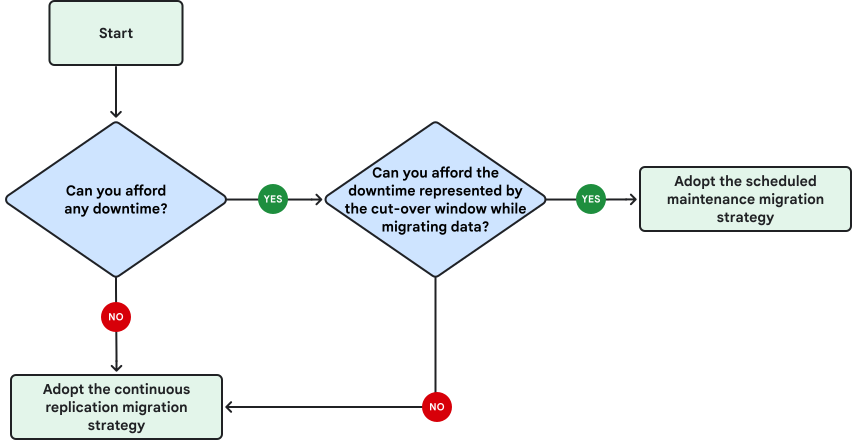
The preceding flowchart shows the following decision points:
- Can you afford any downtime?
- If no, adopt the continuous replication migration strategy.
- If yes, continue to the next decision point.
- Can you afford the downtime represented by the cut-over window while
migrating data?
The cut-over window represents the amount of time to take
a backup of the database, transfer it to Cloud SQL, restore it,
and then switch over your applications.
- If no, adopt the continuous replication migration strategy.
- If yes, adopt the scheduled maintenance migration strategy.
Strategies might vary for different databases, even when they're located on the
same instance. A mix of strategies can produce optimal results. For example,
migrate small and infrequently used databases by using the scheduled maintenance
approach, but use continuous replication for mission-critical databases where
having downtime is expensive.
Usually, a migration is considered completed when the switch between the
initial source instance and the target instance takes place. Any replication (if
used) is stopped and all reads and writes are done on the target instance.
Switching when both instances are in sync means no data loss and minimal
downtime.
For more information about data migration strategies and deployments, see
[Classification of database migrations](https://docs.cloud.google.com/architecture/database-migration-concepts-principles-part-1#classification_of_database_migrations).
### Minimize downtime and migration-related impacts
Migration configurations that provide no application downtime require a more
complicated setup. Find the right balance between setup complexity and downtime
scheduled during low-traffic business hours.
Each migration strategy has a tradeoff and some impact associated with the
migration process. For example, replication processes involve some additional
load on your source instances and your applications might be affected by
replication lag. Applications (and customers) might have to wait during
application downtime, at least as long as the replication lag lasts before using
the new database. In practice, the following factors might increase downtime:
- Database queries can take a few seconds to complete. At the time of migration, in-flight queries might be aborted.
- The cache might take some time to fill up if the database is large or has a substantial buffer memory.
- Applications stopped in the source and restarted in Google Cloud might have a small lag until the connection to the Google Cloud database instance is established.
- Network routes to the applications must be rerouted. Depending on how DNS entries are set up, this can take some time. When you update DNS records, reduce TTL before the migration.
The following common practices can help minimize downtime and impact:
- Find a time period when downtime would have a minimal impact on your workloads. For example, outside normal business hours, during weekends, or other scheduled maintenance windows.
- Identify parts of your workloads that can undergo migration and production cut-over at different stages. Your applications might have different components that can be isolated, adapted, and migrated with no impact. For example, frontends, CRM modules, backend services, and reporting platforms. Such modules could have their own databases that can be scheduled for migration earlier or later in the process.
- If you can afford some latency on the target database, consider implementing a gradual migration. Use incremental, batched data transfers, and adapt part of your workloads to work with the stale data on the target instance.
- Consider refactoring your applications to support minimal migration impact. For example, adapt your applications to write to both source and target databases, and therefore implement an application-level replication.
## Choose your migration tools
The most important factor for a successful migration is choosing the right
migration tool. Once the migration strategy has been decided, review and decide
upon the migration tool.
There are many tools available, each optimized for certain migration use cases.
Use cases can include the following:
- Migration strategy (scheduled maintenance or continuous replication).
- Source and target database engines and engine versions.
- Environments in which source instances and target instances are located.
- Database size. The larger the database, the more time it takes to migrate the initial backup.
- Frequency of the database changes.
- Availability to use managed services for migration.
To ensure a seamless migration and cut-over, you can use application deployment
patterns, infrastructure orchestration, and custom migration applications.
However, specialized tools called managed migration services can facilitate the
process of moving data, applications, or even entire infrastructures from one
environment to another. They run the data extraction from the source databases,
securely transport data to the target databases, and can optionally modify the
data during transit. With these capabilities, they encapsulate the complex logic
of migration and offer migration monitoring capabilities.
Managed migration services provide the following advantages:
- **Minimize downtime**: Services use the built-in replication
capabilities of the database engines when available, and perform
replica promotion.
- **Ensure data integrity and security**: Data is securely and
reliably transferred from the source to the destination database.
- **Provide a consistent migration experience**: Different migration
techniques and patterns can be consolidated into a consistent, common
interface by using database migration executables, which you can manage and
monitor.
- **Offer resilient and proven migration models**: Database
migrations are infrequent but critical events. To avoid beginner mistakes
and issues with existing solutions, you can use tools from experienced
experts, rather than building a custom solution.
- **Optimize costs**: Managed migration services can be more cost
effective than provisioning additional servers and resources for custom
migration solutions.
The next sections describe the migration tool recommendations, which depend on
the chosen migration strategy.
### Tools for scheduled maintenance migrations
The following diagram shows a flowchart with questions that can help you choose
the migration tool for a single database, when you use a scheduled maintenance migration
strategy:
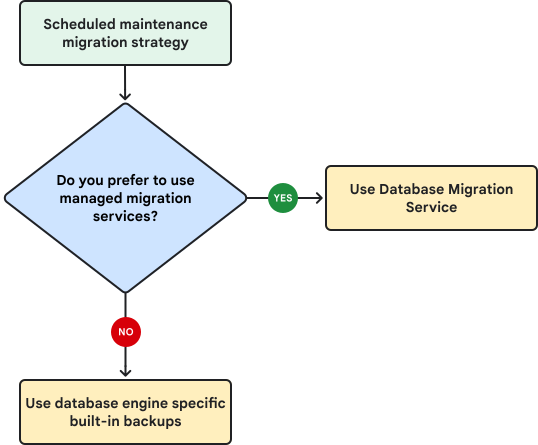
The preceding flowchart shows the following decision points:
- Do you prefer managed migration services?
- If yes, we recommend that you use [Database Migration Service](https://docs.cloud.google.com/architecture/migrate-aws-rds-to-sql-mysql#dms-for-scheduled-maintenance-migration).
- If no, we recommend that you migrate by using the database engine built-in backups.
Using a managed migration service provides some advantages, which are
discussed in the [Choose your migration tools](https://docs.cloud.google.com/architecture/migrate-aws-rds-to-sql-mysql#choose_your_migration_tools)
section of this document.
The following subsections describe the tools that can be used for one-time
migrations, along with their limitations and best practices.
#### Database Migration Service for scheduled maintenance migration
Database Migration Service manages both the
initial sync and ongoing change data capture (CDC) replication, and provides the
status of the migration operation.
By using Database Migration Service, you can create migration jobs that you can manage and
verify. We recommend that you use Database Migration Service, because it supports migrations to
Cloud SQL for MySQL through one-time migration jobs. For large databases,
you can use [data dump parallelism](https://docs.cloud.google.com/database-migration/docs/mysql/known-limitations#parallelism-considerations)
in Database Migration Service.
For more information about database migration architecture and about
Database Migration Service, see
[Migrate a database to Cloud SQL for MySQL by using Database Migration Service](https://docs.cloud.google.com/database-migration/docs/mysql/quickstart)
and
[Migration fidelity for MySQL](https://docs.cloud.google.com/database-migration/docs/mysql/migration-fidelity).
For more information about Database Migration Service limitations and prerequisites, see the
following:
- [Known limitations in Database Migration Service](https://docs.cloud.google.com/database-migration/docs/mysql/known-limitations).
- [Quotas and limits in Database Migration Service](https://docs.cloud.google.com/database-migration/docs/mysql/quotas).
- [Configure your source in Database Migration Service](https://docs.cloud.google.com/database-migration/docs/mysql/configure-source-database).
#### Built-in database engine backups
When significant downtime is acceptable, and your source databases are
relatively static, you can use the database engine's built-in dump and load
(also sometimes called backup and restore) capabilities.
Some effort is required for setup and synchronization, especially for a large
number of databases, but database engine backups are usually readily available and
straightforward to use.
Database engine backups have the following general limitations:
- Backups can be error prone, particularly if performed manually.
- Data is unsecured if the backups are not properly managed.
- Backups lack proper monitoring capabilities.
- Effort is required to scale, if many databases are being migrated by using this tool.
If you choose this approach, consider the following limitations and best
practices:
- If your database is relatively small (under 10 GB), we recommend that you use [mysqldump](https://dev.mysql.com/doc/refman/8.0/en/mysqldump.html). There is no fixed limit, but the ideal database size for mysqldump is usually under 10 GB.
- If you import databases larger than 10 GB, you might require some other
strategies to minimize the database downtime. Some of these strategies are as follows:
- Export the schema and data in subsections, without secondary keys.
- Take advantage of timestamps. If any of your tables use timestamp columns, you can use a feature of the mysqldump command that lets you specify a `WHERE` clause to filter by a timestamp column.
- Consider other approaches like using [*mydumper* and *myloader*](https://github.com/mydumper/mydumper) tools.
Database dumps and backups usually don't include MySQL user accounts. When
preparing to migrate, review all user accounts on the source instance. For
example, you can run the `SHOW GRANTS` command for each user to review the
current set of privileges and see if there are any that are restricted in
Cloud SQL. Similarly, the
[`pt-show-grants`](https://docs.percona.com/percona-toolkit/pt-show-grants.html)
tool from Percona can also list grants.
Restrictions on user privileges in Cloud SQL can affect migrations
when migrating database objects that have a `DEFINER` attribute. For example, a
stored procedure might have a super-privileged definer to run SQL commands like
changing a global variable that isn't allowed in Cloud SQL. For cases
like this, you might need to rewrite the stored procedure code or migrate
non-table objects like stored procedures as a separate migration step. For more
information, check
[Best practices for importing and exporting data](https://docs.cloud.google.com/sql/docs/mysql/import-export#mysql_import_and_migration_jobs_containing_metadata_with_definer_clause).
For further reading about limitations and best practices, see the
following:
- [Cloud SQL for MySQL about users](https://docs.cloud.google.com/sql/docs/mysql/users).
- [Best practices for importing and exporting data with Cloud SQL for MySQL](https://docs.cloud.google.com/sql/docs/mysql/import-export).
- [Cloud SQL for MySQL Known Issues](https://docs.cloud.google.com/sql/docs/mysql/known-issues#import-export).
#### Other approaches for scheduled maintenance migration
As part of using a managed import to set up replication from an external MySQL
database, there's an initial load of data from the external database into the
Cloud SQL instance. This approach uses a service that extracts data
from the external server - the RDS instance in this case - and imports it into
the Cloud SQL instance directly.
For big databases (several TB), a faster way is to use a custom import
initial load that uses the *mydumper* and *myloader* tools.
You can consider exporting the tables from your MySQL database to CSV files,
which can then be imported into Cloud SQL for MySQL. To export data from
your RDS instance, you can use AWS Database Migration Service (AWS DMS) and an
S3 bucket as the target.
For detailed information and steps, see
[Use a managed import to set up replication from external databases](https://docs.cloud.google.com/sql/docs/mysql/replication/managed-import-replication-from-external).
### Tools for continuous replication migrations
The following diagram shows a flowchart with questions that can help you choose
the migration tool for a single database, when you use a continuous replication
migration strategy:
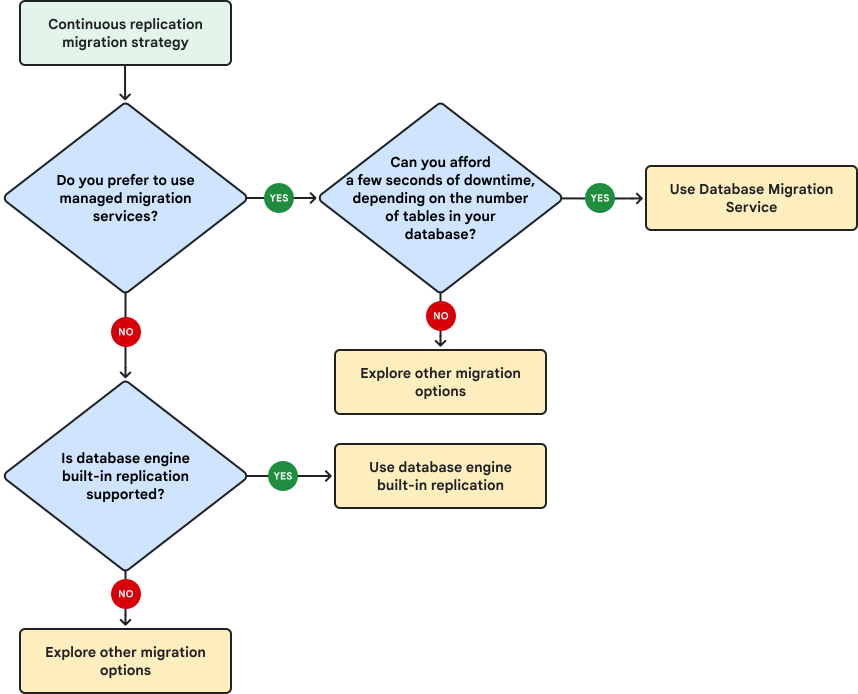
The preceding flowchart shows the following decision points:
- Do you prefer to use managed migration services?
- If yes, can you afford a few seconds of write downtime,
depending on the number of tables in your database?
- If yes, use Database Migration Service.
- If no, explore other migration options.
- If no, you must evaluate if database engine built-in replication
is supported:
- If yes, we recommend that you use built-in replication.
- If no, we recommend that you explore other migration options.
The following sections describe the tools that can be used for continuous
migrations, along with their limitations and best practices.
#### Database Migration Service for continuous replication migration
Database Migration Service provides seamless support for continuous migrations through its
use of continuous migration jobs types. Only continuous migration jobs can be
promoted, which signals the replication to stop.
If you choose this tool, consider the following restrictions and best
practices:
- Avoid long-running transactions during migration. In such cases, we recommend migration from a read replica if you're not migrating from AWS Aurora.
- For a full list of limitations, see [Known limitations](https://docs.cloud.google.com/database-migration/docs/mysql/known-limitations).
#### Database engine built-in replication
Database engine built-in replication is an alternative option to Database Migration Service
for a continuous migration.
Database replication represents the process of copying and distributing data
from a database called the primary database to other databases called replicas. It's
intended to increase data accessibility and improve the fault tolerance and
reliability of a database system. Although database migration is not the primary
purpose of database replication, it can be successfully used as a tool to
achieve this goal. Database replication is usually an ongoing process that
occurs in real time as data is inserted, updated, or deleted in the primary
database. It can be done as a one-time operation, or a sequence of batch
operations.
Most modern database engines implement different ways of achieving database
replication. One type of replication can be achieved by copying and sending the
write ahead log or transaction log of the primary to its replicas. This approach
is called physical or binary replication. Other replication types work by
distributing the raw SQL statements that a primary database receives, instead of
replicating file system level changes.
Cloud SQL supports replication for MySQL. However, there are some
prerequisites and limitations.
Prerequisites:
- Ensure that you are using MySQL 5.5, 5.6, 5.7, or 8.0 on your Amazon RDS or Amazon Aurora instance.
- Ensure that binary logs are enabled.
- To speed up the initial full dump phase, choose a large enough machine tier from a CPU and memory size perspective.
- If you need to speed up the CDC phase, you can try to [configure parallel replication](https://docs.cloud.google.com/sql/docs/mysql/replication/manage-replicas#configuring-parallel-replication) and enable [high performance flushing](https://docs.cloud.google.com/sql/docs/mysql/replication/replication-lag#high_performance_flushing).
- If the Cloud SQL replica is enabled with internal IP addressss because the outgoing IP address isn't static, configure the Amazon RDS or Amazon Aurora server's firewall to allow the internal IP range allocated for the private services access of the VPC network that the Cloud SQL replica uses as its private network. For more information, see [About replicating from an external server](https://docs.cloud.google.com/sql/docs/mysql/replication/external-server) and [Configure private services access](https://docs.cloud.google.com/vpc/docs/configure-private-services-access).
Limitations:
- If you have single large tables and many secondary indexes in your database, the initial full dump might take longer.
- If your external server contains `DEFINER` clauses (views, events, triggers, or stored procedures), depending on the order of when these statements are executed, replication might fail. Learn more about `DEFINER` usage and potential workarounds in Cloud SQL.
- InnoDB is the only supported database engine in Cloud SQL. Migrating MyISAM might cause data inconsistency and require data validation. See [Converting tables from MyISAM to InnoDB](https://dev.mysql.com/doc/refman/8.0/en/converting-tables-to-innodb.html).
#### Other approaches for continuous replication migration
Other continuous replication migration approaches include the following:
- Refactor your applications to perform
[Y (writing and reading)](https://docs.cloud.google.com/architecture/migration-to-google-cloud-transferring-your-large-datasets#y_writing_and_reading)
or use a
[data-access microservice](https://docs.cloud.google.com/architecture/migration-to-google-cloud-transferring-your-large-datasets#data-access_microservice).
- Continuous replication is performed by your applications.
- The migration effort is focused on the refactoring or development of tools that connect to your database instances.
- Reader applications are then gradually refactored and deployed to use the target instance.
- Replicate near real-time changes of your MySQL instance by using
[Datastream](https://docs.cloud.google.com/datastream/docs/overview).
- Datastream is a serverless CDC and replication service that can be used with Amazon RDS or Amazon Aurora to replicate and synchronize data.
- Use Datastream to replicate changes from your MySQL instance to either BigQuery or Cloud Storage, and then use Dataflow or Managed Service for Apache Spark to bring the data into your Cloud SQL instance.
For more information about replication with Datastream, see the
following:
- [Configure an Amazon RDS for MySQL database in Datastream](https://docs.cloud.google.com/datastream/docs/configure-amazon-rds-mysql)
- [Configure an Amazon Aurora MySQL database in Datastream](https://docs.cloud.google.com/datastream/docs/configure-amazon-aurora-mysql)
- [Stream changes to data in real time with Datastream](https://docs.cloud.google.com/datastream/docs/quickstart-change-streaming-to-gcs)
#### Third-party tools for continuous replication migration
In some cases, it might be better to use one third-party tool for most database
engines. Such cases might be if you prefer to use a managed migration service
and you need to ensure that the target database is always in near-real-time sync
with the source, or if you need more complex transformations like data
cleaning, restructuring, and adaptation during the migration process.
If you decide to use a third-party tool, choose one of the following
recommendations, which you can use for most database engines.
[Striim](https://www.striim.com/striim-for-google-cloud-sql/)
is an end-to-end, in-memory platform for collecting, filtering, transforming,
enriching, aggregating, analyzing, and delivering data in real time:
- Advantages:
- Handles large data volumes and complex migrations.
- Built-in change data capture for SQL Server.
- Preconfigured connection templates and no-code pipelines.
- Able to handle mission-critical, large databases that operate under heavy transactional load.
- Exactly-once delivery.
- Disadvantages:
- Not open source.
- Can become expensive, especially for long migrations.
- Some limitations in data definition language (DDL) operations propagation. For more information, see [Supported DDL operations](https://www.striim.com/docs/en/handling-schema-evolution.html#supported-ddl-operations) and [Schema evolution notes and limitations](https://www.striim.com/docs/en/handling-schema-evolution.html#schema-evolution-notes-and-limitations).
For more information about Striim, see
[Running Striim in the Google Cloud](https://www.striim.com/docs/platform/en/running-striim-in-the-google-cloud-platform.html).
[Debezium](https://debezium.io/)
is an open source distributed platform for CDC, and can stream data changes to
external subscribers:
- Advantages:
- Open source.
- Strong community support.
- Cost effective.
- Fine-grained control on rows, tables, or databases.
- Specialized for change capture in real time from database transaction logs.
- Disadvantages:
- Requires specific experience with Kafka and ZooKeeper.
- At-least-once delivery of data changes, which means that you need duplicates handling.
- Manual monitoring setup using Grafana and Prometheus.
- No support for incremental batch replication.
For more information about Debezium migrations, see
[Near Real Time Data Replication using Debezium](https://medium.com/google-cloud/near-real-time-data-replication-using-debezium-fd32be6d192a).
[Fivetran](https://www.fivetran.com/)
is an automated data movement platform for moving data out of and across cloud data
platforms.
- Advantages:
- Preconfigured connection templates and no-code pipelines.
- Propagates any schema changes from your source to the target database.
- Exactly-once delivery of your data changes, which means that you don't need duplicates handling.
- Disadvantages:
- Not open source.
- Support for complex data transformation is limited.
## Define the migration plan and timeline
For a successful database migration and production cut-over, we recommend that
you prepare a well-defined, comprehensive migration plan. To help reduce the
impact on your business, we recommend that you create a list of all the
necessary work items.
Defining the migration scope reveals the work tasks that you must do before,
during, and after the database migration process. For example, if you decide not
to migrate certain tables from a database, you might need pre-migration or
post-migration tasks to implement this filtering. You also ensure that your
database migration doesn't affect your existing service-level agreement (SLA) and business continuity
plan.
We recommend that your migration planning documentation include the following
documents:
- Technical design document (TDD)
- RACI matrix
- Timeline (such as a T-Minus plan)
Database migrations are an iterative process, and first migrations are often
slower than the later ones. Usually, well-planned migrations run without issues,
but unplanned issues can still arise. We recommend that you always have a rollback
plan. As a best practice, follow the guidance from
[Migrate to Google Cloud: Best practices for validating a migration plan](https://docs.cloud.google.com/architecture/migration-to-google-cloud-best-practices#migration_planning).
### TDD
The TDD documents all technical decisions to be made for the project. Include
the following in the TDD:
- Business requirements and criticality
- Recovery time objective (RTO)
- Recovery point objective (RPO)
- Database migration details
- Migration effort estimates
- Migration validation recommendations
### RACI matrix
Some migrations projects require a RACI matrix, which is a common project
management document that defines which individuals or groups are responsible for
tasks and deliverables within the migration project.
### Timeline
Prepare a timeline for each database that needs to be migrated. Include all
work tasks that must be performed, and defined start dates and estimated end
dates.
For each migration environment, we recommend that you create a T-minus plan.
A T-minus plan is structured as a countdown schedule, and lists all the tasks
required to complete the migration project, along with the responsible groups and
estimated duration.
The timeline should account for not only pre-migration preparation tasks
execution, but also validating, auditing, or testing tasks that happen after the
data transfer takes place.
The duration of migration tasks typically depends on database size, but there
are also other aspects to consider, like business logic complexity, application
usage, and team availability.
A T-Minus plan might look like the following:
| Date | Phase | Category | Tasks | Role | T-minus | Status |
|---|---|---|---|---|---|---|
| 11/1/2023 | Pre-migration | Assessment | Create assessment report | Discovery team | -21 | Complete |
| 11/7/2023 | Pre-migration | Target preparation | Design target environment as described by the design document | Migration team | -14 | Complete |
| 11/15/2023 | Pre-migration | Company governance | Migration date and T-Minus approval | Leadership | -6 | Complete |
| 11/18/2023 | Migration | Set up DMS | Build connection profiles | Cloud migration engineer | -3 | Complete |
| 11/19/2023 | Migration | Set up DMS | Build and start migration jobs | Cloud migration engineer | -2 | Not started |
| 11/19/2023 | Migration | Monitor DMS | Monitor DMS Jobs and DDL changes in the source instance | Cloud migration engineer | -2 | Not started |
| 11/21/2023 | Migration | Cutover DMS | Promote DMS replica | Cloud migration engineer | 0 | Not started |
| 11/21/2023 | Migration | Migration validation | Database migration validation | Migration team | 0 | Not started |
| 11/21/2023 | Migration | Application test | Run capabilities and performance tests | Migration team | 0 | Not started |
| 11/22/2023 | Migration | Company governance | Migration validation GO or NO GO | Migration team | 1 | Not started |
| 11/23/2023 | Post-migration | Validate monitoring | Configure monitoring | Infrastructure team | 2 | Not started |
| 11/25/2023 | Post-migration | Security | Remove DMS user account | Security team | 4 | Not started |
### Multiple database migrations
If you have multiple databases to migrate, your migration plan should contain
tasks for all of the migrations.
We recommend that you start the process by migrating a smaller, ideally
non-mission-critical database. This approach can help you to build your
knowledge and confidence in the migration process and tooling. You can also
detect any flaws in the process in the early stages of the overall migration
schedule.
If you have multiple databases to migrate, the timelines can be parallelized.
For example, to speed up the migration process, you might choose to migrate a
group of small, static, or less mission-critical databases at the same time, as
shown in the following diagram.
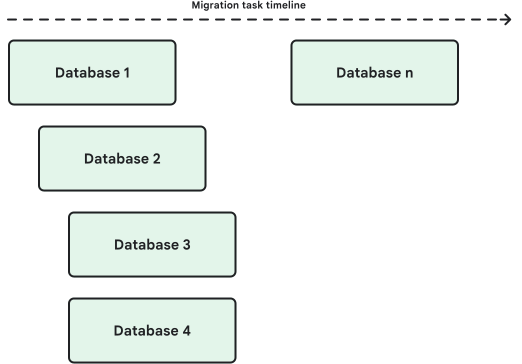
In the example shown in the diagram, databases 1-4 are a group of small
databases that are migrated at the same time.
## Define the preparation tasks
The preparation tasks are all the activities that you need to complete to
fulfill the migration prerequisites. Without the preparation tasks, the
migration can't take place or the migration results in the migrated database
being in an unusable state.
Preparation tasks can be categorized as follows:
- Amazon RDS or Amazon Aurora instance preparations and prerequisites
- Source database preparation and prerequisites
- Cloud SQL setup
- Migration specific setup
### Amazon RDS or Amazon Aurora instance preparation and prerequisites
Consider the following common setup and prerequisite tasks:
- Depending on your migration path, you might need to allow remote connections on your RDS instances. If your RDS instance is configured to be private in your VPC, private [RFC 1918](https://datatracker.ietf.org/doc/html/rfc1918) connectivity must exist between Amazon and Google Cloud.
- You might need to configure a new security group to allow remote
connections on required ports.
- By default, in AWS, network access is turned off for database instances.
- You can specify rules in a security group that allow access from an IP address range, port, or security group. The same rules apply to all database instances that are associated with that security group.
- Make sure you have enough free disk space to buffer WAL logs for the duration
of the full load operation on your Amazon RDS instance.
- For optimal migration results, consider migrating from a read replica,
unless you are migrating from Amazon Aurora. Additionally, we
recommend that you begin the migration process during a period of reduced
database activity.
- MySQL limits the hostname to 60 characters. Amazon RDS database
hostnames are typically longer than 60 characters. If this is the case for
the database you're migrating, then configure a DNS redirect to create a
`CNAME` record that associates your domain name with the domain name of your
RDS database instance.
- If you're using built-in replication, you need to set up your Amazon
RDS or Amazon Aurora instance for replication. Built-in replication, or
tools that use it, need binary logging for MySQL set to `ROW`.
- If you're using third-party tools, upfront settings and configurations
are usually required before using the tool. Check the documentation from
the third-party tool.
For more information about instance preparation and prerequisites, see
[Set up the external server for replication for MySQL](https://docs.cloud.google.com/sql/docs/mysql/replication/configure-replication-from-external#set_up_the_external_server_for_replication).
### Source database preparation and prerequisites
- If you choose to use Database Migration Service, you need to configure your source database before connecting to it. Review the migration jobs before implementing the jobs. For more information, see [Configure your source for MySQL](https://docs.cloud.google.com/database-migration/docs/mysql/configure-source-database).
- Depending on your database engine, you might need to change certain features. For example, Cloud SQL for MySQL supports only the InnoDB database engine. You need to change MyISAM tables to InnoDB.
- Some third-party migration tools require that all `LOB` columns are nullable. Any `LOB` columns that are `NOT NULL` need to have that constraint removed during migration.
- Take baseline measurements on your source environment in production use.
Consider the following:
- Measure the size of your data, as well as your workload's performance. How long do important queries or transactions take, on average? How long during peak times?
- Document the baseline measurements for later comparison, to help you decide if the fidelity of your database migration is satisfactory. Decide if you can switch your production workloads and decommission your source environment, or if you still need it for fallback purposes.
### Cloud SQL setup
Carefully choose the size and specifications of your target Cloud SQL for MySQL
database instance to match the source for similar performance needs. Pay special
attention to disk size and throughput, IOPS, and number of vCPUs. Incorrect
sizing can lead to long migration times, database performance problems, database
errors, and application performance problems.
You must confirm the following properties and requirements before you create your
Cloud SQL instances, because they can't be changed later without
recreating them.
- Choose the project and [region](https://docs.cloud.google.com/docs/geography-and-regions#regions_and_zones) of your target Cloud SQL instances carefully. Cloud SQL instances can't be migrated between Google Cloud projects and regions without data transfer.
- Migrate to a matching major version on Cloud SQL. For example, if your source uses MySQL 8.0.34 on Amazon RDS or Amazon Aurora, you should migrate to Cloud SQL for MySQL version 8.0.34.
- Replicate user information separately, if you are using built-in database engine backups or Database Migration Service. Cloud SQL manages users using Google IAM. For details, review the limitations in the [Built-in database engine backups](https://docs.cloud.google.com/architecture/migrate-aws-rds-to-sql-mysql#tools-database-engine-specific-backups) section.
- Review the database engine configuration flags and compare their source and target instance values. Make sure you understand their impact and whether they need to be the same or not. For example, we recommend running the `SHOW VARIABLES` command on your source database before the migration, and then run it again on the Cloud SQL database. Update flag settings as needed on the Cloud SQL database to replicate the source settings. Note that not all MySQL flags are allowed on a Cloud SQL instance.
For more information about Cloud SQL setup, see the following:
- [General best practices for MySQL](https://docs.cloud.google.com/sql/docs/mysql/best-practices)
- [Instance configuration options for MySQL](https://docs.cloud.google.com/sql/docs/mysql/instance-settings)
- [Important considerations before Aurora to Cloud SQL for MySQL migration](https://cloud.google.com/mysql/aurora-to-cloudsql)
### Migration specific setup
If you import SQL dump files to Cloud SQL, you might need to create a
Cloud Storage bucket. The bucket stores the database dump.
If you use replication, you must ensure that the Cloud SQL replica has
access to your primary database. This access can be achieved through the documented
connectivity options.
Depending on your scenario and criticality, you might need to implement a
[fallback scenario](https://docs.cloud.google.com/architecture/migrate-aws-rds-to-sql-mysql#define-fallback-scenarios), which usually includes
reversing the direction of the replication.
In this case, you might need an additional replication mechanism from
Cloud SQL back to your source Amazon instance.
For most third-party tools, you need to provision migration specific resources.
For example, for Striim, you need to use the Google Cloud Marketplace to begin.
Then, to set up your migration environment in Striim, you can use the Flow
Designer to create and change applications, or you can select a pre-existing
template. Applications can also be coded using the Tungsten Query Language (TQL)
programming language. Using a data validation dashboard, you can get a visual
representation of data handled by your Striim application.
You can decommission the resources that connect your Amazon and
Google Cloud environment after the migration is completed and validated.
For more information, see the following:
- [Manage migration jobs in Database Migration Service](https://docs.cloud.google.com/database-migration/docs/manage-jobs)
- [Best practices for importing and exporting data](https://docs.cloud.google.com/sql/docs/mysql/import-export)
- [Connectivity for MySQL](https://docs.cloud.google.com/database-migration/docs/mysql/configure-connectivity)
## Define the execution tasks
Execution tasks implement the migration work itself. The tasks depend on your
chosen migration tool, as described in the following subsections.
### Built-in database engine backups
To perform a one-time migration,
use the mysqldump utility to create a backup, which copies the data from Amazon
RDS to your local client computer. For instructions, see
[Import a SQL dump file to Cloud SQL for MySQL](https://docs.cloud.google.com/sql/docs/mysql/import-export/import-export-sql#import_a_sql_dump_file_to).
You can
[check the status of import and export operations](https://docs.cloud.google.com/sql/docs/mysql/import-export/checking-status-import-export)
for your Cloud SQL instance.
### Database Migration Service migration jobs
Define and configure migration jobs in Database Migration Service to migrate data from a
source instance to the destination database. Migration jobs connect to the
source database instance through user-defined connection profiles.
Test all the prerequisites to ensure the job can run successfully. Choose a
time when your workloads can afford a small downtime for the migration and
production cut-over.
In Database Migration Service, the migration begins with the initial full backup and load,
followed by a continuous flow of changes from the source to the destination
database instance.
Database Migration Service requires a few seconds to get the read lock on all the tables in your
source Amazon RDS or Amazon Aurora instance that it needs to perform the initial
full dump in a consistent way. To achieve the read lock, it might need a write
downtime of anywhere between 1 and 49 seconds. The downtimes depends on the number
of tables in your database, with 1 second corresponding to 100 tables and 9 seconds
corresponding to 10000 tables.
The migration process with Database Migration Service ends with the promotion operation.
Promoting a database instance disconnects the destination database from the flow
of changes coming from the source database, and then the now standalone
destination instance is promoted to a primary instance. This approach is also
sometimes called a production switch.
For more information about migration jobs in Database Migration Service, see the following:
- [Review a migration job](https://docs.cloud.google.com/database-migration/docs/mysql/review-migration-job#migration_job_statuses)
- [Manage migration jobs](https://docs.cloud.google.com/database-migration/docs/mysql/migration-job-actions)
- [Promote a migration](https://docs.cloud.google.com/database-migration/docs/mysql/promote-migration)
For a detailed migration setup process, see
[Migrate a database to Cloud SQL for MySQL by using Database Migration Service](https://docs.cloud.google.com/database-migration/docs/mysql/quickstart).
In Database Migration Service, the migration is performed by starting and running a migration
job.
### Database engine built-in replication
You can use built-in replication from Amazon RDS to an external
Cloud SQL for MySQL instance.
For MySQL, you first need to start with an initial dump that can be stored in a
Cloud Storage bucket, and then import the data into Cloud SQL for MySQL. Then, you
start the replication process.
Monitor the replication, and stop the writes on your source instance at an
appropriate time. Check the replication status again to make sure that all of the
changes were replicated, and then promote the Cloud SQL for MySQL replica to a
standalone instance to complete your migration.
For a detailed instructions about how to set up built-in replication from an
external server like Amazon RDS or Amazon Aurora for MySQL, see
[About replicating from an external server](https://docs.cloud.google.com/sql/docs/mysql/replication/external-server)
and
[Configure Cloud SQL and the external server for replication](https://docs.cloud.google.com/sql/docs/mysql/replication/configure-replication-from-external).
For more information and guidance, see the following:
- [Export your database to a Cloud Storage bucket](https://docs.cloud.google.com/sql/docs/mysql/replication/dump-file-replication-from-external#export)
- [Use a managed import to set up replication from external databases](https://docs.cloud.google.com/sql/docs/mysql/replication/managed-import-replication-from-external)
- [Start replication on the external server](https://docs.cloud.google.com/sql/docs/mysql/replication/dump-file-replication-from-external#replicate-source-server)
### Third-party tools
Define any execution tasks for the third-party tool you've chosen.
This section focuses on Striim as an example. Striim uses applications that acquire data from
various sources, process the data, and then deliver the data to other applications or
targets.
Applications can be created graphically using the web client and they contain
sources, targets, and other logical components organized into one or more flows.
To set up your migration environment in Striim, you can use the
[Flow Designer](https://www.striim.com/docs/en/web-ui-guide.html#flow-designer-page)
feature to create and change applications, or you can select from a number of
pre-existing templates. Applications can also be coded by using the TQL
programming language.
You can get a visual representation of data handled by your Striim application
by using a data validation dashboard.
For a quick start with Striim in Google Cloud, see
[Running Striim in the Google Cloud](https://www.striim.com/docs/platform/en/running-striim-in-the-google-cloud-platform.html).
To learn more about Striim's basic concepts, see
[Striim concepts](https://www.striim.com/docs/en/striim-concepts.html).
Make sure that you also read the best practices guide for
[Switching from an initial load to continuous replication](https://www.striim.com/docs/en/switching-from-initial-load-to-continuous-replication.html).
Consider the following best practices for your data migration:
- Inform the involved teams whenever each of the plan steps starts and finishes.
- If any of the steps take longer than expected, compare the time elapsed with the maximal amount of time allotted for each step. Issue regular intermediary updates to involved teams when this happens.
- If the time span is greater than the maximal amount of time reserved for each step in the plan, consider rolling back.
- Make "go or no-go" decisions for every step of the migration and cut-over plan.
- Consider rollback actions or alternative scenarios for each of the steps.
## Define fallback scenarios
Define fallback action items for each migration execution task, to safeguard
against unforeseen issues that might occur during the migration process. The
fallback tasks usually depend on the migration strategy and tools used.
Fallback might require significant effort. As a best practice, don't perform
production cut-over until your test results are satisfactory. Both the database
migration and the fallback scenario should be properly tested to avoid a severe
outage.
Define success criteria and timebox all your migration execution tasks. Doing a
migration dry run helps collect information about the expected times for each
task. For example, for a scheduled maintenance migration, you can afford the
downtime represented by the cut-over window. However, it's important to plan
your next action in case the one-time migration job or the restore of the backup
fails midway. Depending on how much time of your planned downtime has elapsed,
you might have to postpone the migration if the migration task doesn't finish in
the expected amount of time.
A fallback plan usually refers to rolling back the migration after you perform
the production cut-over, if issues on the target instance appear. If you
implement a fallback plan, remember that it must be treated as a full database
migration, including planning and testing.
If you choose not to have a fallback plan, make sure you understand the
possible consequences. Having no fallback plan can add unforeseen effort and
cause avoidable disruptions in your migration process.
Although a fallback is a last resort, and most database migrations don't end up
using it, we recommend that you always have a fallback strategy.
### Simple fallback
In this fallback strategy, you switch your applications back to the original
source database instance. Adopt this strategy if you can afford downtime when
you fall back or if you don't need the transactions committed on the new target
system.
If you do need all the written data on your target database, and you can afford
some downtime, you can consider stopping writes to your target database
instance, taking built-in backups and restoring them on your source instance,
and then re-connecting your applications to the initial source database
instance. Depending on the nature of your workload and amount of data written on
the target database instance, you could bring it into your initial source
database system at a later time, especially if your workloads aren't
dependent on any specific record creation time or any time ordering constraints.
### Reverse replication
In this strategy, you replicate the writes that happen on your new target
database after production cut-over back to your initial source database. In this
way, you keep the original source in sync with the new target database and have
the writes happening on the new target database instance. Its main disadvantage
is that you can't test the replication stream until after you cut-over to the
target database instance, therefore it doesn't allow end-to-end testing and it
has a small period of no fallback.
Choose this approach when you can still keep your source instance for some time
and you migrate using the continuous replication migration.
### Forward replication
This strategy is a variation of reverse replication. You replicate the
writes on your new target database to a third database instance of your choice.
You can point your applications to this third database, which connects to the
server and runs read-only queries while the server is unavailable. You can use
any replication mechanism, depending on your needs. The advantage of this
approach is that it can be fully end-to-end tested.
Take this approach when you want to be covered by a fallback at all times or
when you must discard your initial source database shortly after the production
cut-over.
### Duplicate writes
If you choose a Y (writing and reading) or data-access microservice migration
strategy, this fallback plan is already set. This strategy is more complicated,
because you need to refactor applications or develop tools that connect to your
database instances.
Your applications write to both initial source and target database instances,
which lets you perform a gradual production cut-over until you are using only
your target database instances. If there are any issues, you connect your
applications back to the initial source with no downtime. You can discard the
initial source and the duplicate writing mechanism when you consider the
migration performed with no issues observed.
We recommend this approach when it's critical to have no migration downtime,
have a reliable fallback in place, and when you have time and resources to
perform application refactoring.
## Perform testing and validation
The goals of this step are to test and validate the following:
- Successful migration of the data in the database.
- Integration with existing applications after they are switched to use the new target instance.
Define the key success factors, which are subjective to your migration. The
following are examples of subjective factors:
- Which data to migrate. For some workloads, it might not be necessary to migrate all of the data. You might not want to migrate data that is already aggregated, redundant, archived, or old. You might archive that data in a Cloud Storage bucket, as a backup.
- An acceptable percentage of data loss. This particularly applies to data used for analytics workloads, where losing part of the data does not affect general trends or performance of your workloads.
- Data quality and quantity criteria, which you can apply to your source environment and compare to the target environment after the migration.
- Performance criteria. Some business transactions might be slower in the target environment, but the processing time is still within defined expectations.
The storage configurations in your source environment might not map directly to
Google Cloud environment targets. For example, configurations from the
[General Purpose SSD (gp2 and gp3) volumes](https://docs.aws.amazon.com/ebs/latest/userguide/general-purpose.html#gp3-ebs-volume-type)
with IOPS burst performance or
[Provisioned IOPS SSD](https://docs.aws.amazon.com/ebs/latest/userguide/provisioned-iops.html).
To compare and properly size the target instances, benchmark your source
instances, in both the assessment and validation phases.
In the benchmarking process, you apply production-like sequences of operations
to the database instances. During this time, you capture and process metrics to
measure and compare the relative performance of both source and target
systems.
For conventional, server based configurations, use relevant measurements
observed during peak loads. For flexible resource capacity models like Aurora
Serverless, consider looking at historical metric data to observe your scaling
needs.
The following tools can be used for testing, validation, and database
benchmarking:
- [HammerDB](https://www.hammerdb.com/about.html): an open source database benchmarking and load testing tool. It supports complex transactional and analytic workloads, based on industry standards, on multiple database engines (both TPROC-C and TPROC-H). HammerDB has detailed documentation and a wide community of users. You can share and compare results across several database engines and storage configurations. For more information, see [Load testing SQL Server using HammerDB](https://docs.cloud.google.com/compute/docs/tutorials/load-testing-sql-server-hammerdb) and [Benchmark Amazon RDS SQL Server performance using HammerDB](https://aws.amazon.com/blogs/database/benchmark-amazon-rds-sql-server-performance-using-hammerdb/).
- [DBT2 Benchmark Tool](https://dev.mysql.com/downloads/benchmarks.html): benchmarking specialized for MySQL. A set of database workload kits mimics an application for a company that owns warehouses and involves a mix of read and write transactions. Use this tool if you want to use a ready-made online transaction processing (OLTP) load test.
- [DbUnit](http://www.dbunit.org/): an open source unit testing tool used to test relational database interactions in Java. The setup and use is straightforward, and it supports multiple database engines (MySQL, PostgreSQL, SQL Server, and others). However, the test execution can be slow sometimes, depending on the size and complexity of the database. We recommend this tool when simplicity is important.
- [DbFit](https://dbfit.github.io/dbfit/docs/): an open source database testing framework that supports test-driven code development and automated testing. It uses a basic syntax for creating test cases and features data-driven testing, version control, and test result reporting. However, support for complex queries and transactions is limited and it doesn't have large community support or extensive documentation, compared to other tools. We recommend this tool if your queries are not complex and you want to perform automated tests and integrate them with your continuous integration and delivery process.
To run an end-to-end test, including testing of the migration plan, always
perform a migration dry run exercise. A dry run performs the full-scope database
migration without switching any production workloads, and it offers the
following advantages:
- Lets you ensure that all objects and configurations are properly migrated.
- Helps you define and execute your migration test cases.
- Offers insights into the time needed for the actual migration, so you can calibrate your timeline.
- Represents an occasion to test, validate, and adapt the migration plan. Sometimes you can't plan for everything in advance, so this helps you to spot any gaps.
Data testing can be performed on a small set of the databases to be migrated or
the entire set. Depending on the total number of databases and the tools used
for implementing their migration, you can decide to adopt a risk based approach.
With this approach, you perform data validation on a subset of databases
migrated through the same tool, especially if this tool is a managed migration
service.
For testing, you should have access to both source and target databases and do
the following tasks:
- Compare source and target schemas. Check if all tables and executables exist. Check row counts and compare data at the database level.
- Run custom data validation scripts.
- Test that the migrated data is also visible in the applications that switched to use the target database (migrated data is read through the application).
- Perform integration testing between the switched applications and the target database by testing various use cases. This testing includes both reading and writing data to the target databases through the applications so that the workloads fully support migrated data together with newly created data.
- Test the performance of the most used database queries to observe if there's any degradation due to misconfigurations or wrong sizing.
Ideally, all these migration test scenarios are automated and repeatable
on any source system. The automated test cases suite is adapted to perform
against the switched applications.
If you're using Database Migration Service as your migration tool, see
[Verify a migration](https://docs.cloud.google.com/database-migration/docs/mysql/verify-migration).
### Data Validation Tool
For performing data validation, we recommend that you use the
[Data Validation Tool (DVT)](https://github.com/GoogleCloudPlatform/professional-services-data-validator).
The DVT is an open sourced Python CLI tool, backed by Google, that
provides an automated and repeatable solution for validation across different
environments.
The DVT can help streamline the data validation process by offering customized,
multi-level validation functions to compare source and target tables on the
table, column, and row level. You can also add validation rules.
The DVT covers many Google Cloud data sources, including AlloyDB for PostgreSQL,
BigQuery, Cloud SQL, Spanner, JSON, and CSV files on
Cloud Storage. It can also be integrated with Cloud Run functions
and Cloud Run for event based triggering and orchestration.
The DVT supports the following types of validations:
- Schema level comparisons
- Column (including 'AVG', 'COUNT', 'SUM', 'MIN', 'MAX', 'GROUP BY', and 'STRING_AGG')
- Row (including hash and exact match in field comparisons)
- Custom query results comparison
For more information about the DVT, see the
[Git repository](https://github.com/GoogleCloudPlatform/professional-services-data-validator)
and
[Data validation made easy with Google Cloud's Data Validation Tool](https://medium.com/google-cloud/dvt-google-clouds-data-validation-tool-bac307779635).
### Perform the migration
The migration tasks include the activities to support the transfer from one
system to another.
Consider the following best practices for your data migration:
- Inform the involved teams whenever a plan step begins and finishes.
- If any of the steps take longer than expected, compare the time elapsed with the maximum amount of time allotted for that step. Issue regular intermediary updates to involved teams when this happens.
- If the time span is greater than the maximal amount of time reserved for each step in the plan, consider rolling back.
- Make "go or no-go" decisions for every step of the migration and cut-over plan.
- Consider rollback actions or alternative scenarios for each of the steps.
Perform the migration by following your
[defined execution tasks](https://docs.cloud.google.com/architecture/migrate-aws-rds-to-sql-mysql#define_the_execution_tasks), and refer to the documentation for your selected migration tool.
### Perform the production cut-over
The high-level production cut-over process can differ depending on your chosen
migration strategy. If you can have downtime on your workloads, then your
migration cut-over begins by stopping writes to your source database.
For continuous replication migrations, you typically do the following high-level
steps in the cut-over process:
- Stop writing to the source database.
- Drain the source.
- Stop the replication process.
- Deploy the applications that point to the new target database.
After the data has been migrated by using the chosen migration tool, you
validate the data in the target database. You confirm that the source database
and the target databases are in sync and the data in the target instance adheres
to your chosen migration success standards.
Once the data validation passes your criteria, you can perform the application
level cut-over. Deploy the workloads that have been refactored to use the new
target instance. You deploy the versions of your applications that point to the
new target database instance. The deployments can be performed either through
rolling updates, staged releases, or by using a blue-green deployment pattern.
Some application downtime might be incurred.
Follow the best practices for your production cut-over:
- Monitor your applications that work with the target database after the cut-over.
- Define a time period of monitoring to consider whether or not you need to implement your fallback plan.
- Note that your Cloud SQL or AlloyDB for PostgreSQL instance might need a restart if you change some database flags.
- Consider that the effort of rolling back the migration might be greater than fixing issues that appear on the target environment.
### Cleanup the source environment and configure the Cloud SQL or AlloyDB for PostgreSQL instance
After the cut-over is completed, you can delete the source databases. We
recommend performing the following important actions before the cleanup of your
source instance:
- Create a final backup of each source database. These backups provide you with
an end state of the source databases. The backups might also be required in
some cases for compliance with some data regulations.
- Collect the database parameter settings of your source instance.
Alternatively, check that they match the ones you've gathered in the
inventory building phase. Adjust the target instance parameters to match
the ones from the source instance.
- Collect database statistics from the source instance and compare them
to the ones in the target instance. If the statistics are disparate, it's
hard to compare the performance of the source instance and target instance.
In a fallback scenario, you might want to implement the replication of your
writes on the Cloud SQL instance back to your original source database.
The setup resembles the migration process but would run in reverse: the initial
source database would become the new target.
As a best practice to keep the source instances up to date after the cut-over,
replicate the writes performed on the target Cloud SQL instances back
to the source database. If you need to roll back, you can fall back to
your old source instances with minimal data loss.
Besides the source environment cleanup, you must make the following critical configurations
for your Cloud SQL instances:
- Configure a maintenance window for your primary instance to control when disruptive updates can occur.
- Configure the storage on the instance so that you have at least 20% available space to accommodate any critical database maintenance operations that Cloud SQL might perform. To receive an alert if available disk space gets lower than 20%, create a metrics-based alerting policy for the disk utilization metric.
Don't start an administrative operation before the previous operation has completed.
For more information about maintenance and best practices, see
[About maintenance on Cloud SQL instances](https://docs.cloud.google.com/sql/docs/postgres/maintenance#management).
## Optimize your environment after migration
Optimization is the last phase of your migration. In this phase, you iterate on
optimization tasks until your target environment meets your optimization
requirements. The steps of each iteration are as follows:
1. Assess your current environment, teams, and optimization loop.
2. Establish your optimization requirements and goals.
3. Optimize your environment and your teams.
4. Tune the optimization loop.
You repeat this sequence until you've achieved your optimization goals.
For more information about optimizing your Google Cloud environment, see
[Migrate to Google Cloud: Optimize your environment](https://docs.cloud.google.com/architecture/migration-to-google-cloud-optimizing-your-environment)
and
[Google Cloud Well-Architected Framework: Performance optimization](https://docs.cloud.google.com/architecture/framework/performance-optimization).
### Establish your optimization requirements
Review the following optimization requirements for your Google Cloud
environment and choose the ones that best fit your workloads:
#### Increase the reliability and availability of your database
With Cloud SQL, you can implement a high availability and disaster
recovery strategy that aligns with your recovery time objective (RTO) and
recovery point objective (RPO). To increase reliability and availability,
consider the following:
- In cases of read-heavy workloads, add read replicas to offload traffic from the primary instance.
- For mission critical workloads, use the high-availability configuration, replicas for regional failover, and a robust disaster recovery configuration.
- For less critical workloads, automated and on-demand backups can be sufficient.
- To prevent accidental removal of instances, use instance deletion protection.
- Consider using Cloud SQL Enterprise Plus edition to benefit from increased availability, log retention, and near-zero downtime planned maintenance. For more information about Cloud SQL Enterprise Plus, see [Introduction to Cloud SQL editions](https://docs.cloud.google.com/sql/docs/editions-intro#edition-features) and [Near-zero downtime planned maintenance](https://docs.cloud.google.com/sql/docs/mysql/maintenance).
For more information on increasing the reliability and availability of your
database, see the following:
- [Promote replicas for regional migration or disaster recovery](https://docs.cloud.google.com/sql/docs/mysql/replication/cross-region-replicas)
- [Cloud SQL database disaster recovery](https://docs.cloud.google.com/sql/docs/mysql/intro-to-cloud-sql-disaster-recovery)
- [About Cloud SQL backups](https://docs.cloud.google.com/sql/docs/mysql/backup-recovery/backups)
- [Prevent deletion of an instance documentation](https://docs.cloud.google.com/sql/docs/mysql/deletion-protection)
#### Increase the cost effectiveness of your database infrastructure
To have a positive economic impact, your workloads must use the available
resources and services efficiently. Consider the following options:
- Provide the database with the minimum required storage capacity by doing the
following:
- To scale storage capacity automatically as your data grows, [enable automatic storage increases](https://docs.cloud.google.com/sql/docs/postgres/instance-settings#automatic-storage-increase-2ndgen). However, ensure that you configure your instances to have some buffer in peak workloads. Remember that database workloads tend to increase over time.
- Identify possible overestimated resources:
- Rightsizing your Cloud SQL instances can reduce the infrastructure cost without adding additional risks to the capacity management strategy.
- Cloud Monitoring provides predefined dashboards that help identify the health and capacity utilization of many Google Cloud components, including Cloud SQL. For details, see [Create and manage custom dashboards](https://docs.cloud.google.com/monitoring/charts/dashboards#listing_all_dashboards).
- Identify instances that don't require high availability or disaster
recovery configurations, and remove them from your infrastructure.
- Remove tables and objects that are no longer needed. You can store them
in a full backup or an archival Cloud Storage bucket.
- Evaluate the most cost-effective storage type (SSD or HDD) for your use
case.
- For most use cases, SSD is the most efficient and cost-effective choice.
- If your datasets are large (10 TB or more), latency-insensitive, or infrequently accessed, HDD might be more appropriate.
- For details, see [Choose between SSD and HDD storage](https://docs.cloud.google.com/sql/docs/mysql/choosing-ssd-hdd).
- Purchase
[committed use discounts](https://docs.cloud.google.com/sql/cud#pricing)
for workloads with predictable resource needs.
- Use
[Active Assist](https://docs.cloud.google.com/solutions/active-assist)
to get cost insights and recommendations.
For more information and options, see
[Do more with less: Introducing Cloud SQL cost optimization recommendations with Active Assist](https://cloud.google.com/blog/products/databases/reduce-cloud-sql-costs-with-optimizations-by-active-assist).
#### Increase the performance of your database infrastructure
Minor database-related performance issues frequently have the potential to impact
the entire operation. To maintain and increase your Cloud SQL instance
performance, consider the following guidelines:
- If you have a large number of database tables, they can affect instance performance and availability, and cause the instance to lose its SLA coverage.
- Ensure that your instance isn't constrained on memory or CPU.
- For performance-intensive workloads, ensure that your instance has at least 60 GB of memory.
- For slow database inserts, updates, or deletes, check the locations of the writer and database; sending data over long distances introduces latency.
- Improve query performance by using the predefined Query Insights
dashboard in Cloud Monitoring (or similar database engine built-in
features). Identify the most expensive commands and try to optimize them.
- Prevent database files from becoming unnecessarily large. Set
[`autogrow`](https://docs.microsoft.com/en-us/troubleshoot/sql/admin/considerations-autogrow-autoshrink)
in MBs rather than as a percentage, using increments appropriate to the
requirement.
- Check reader and database location. Latency affects read performance
more than write performance.
- Consider using Cloud SQL Enterprise Plus edition to benefit
from increased machine configuration limits and data cache. For more
information, see
[Introduction to Cloud SQL editions](https://docs.cloud.google.com/sql/docs/editions-intro#edition-features).
For more information about increasing performance, see [Performance](https://docs.cloud.google.com/sql/docs/mysql/diagnose-issues#performance)
in "Diagnose issues".
#### Increase database observability capabilities
Diagnosing and troubleshooting issues in applications that connect to database
instances can be challenging and time-consuming. For this reason, a centralized
place where all team members can see what's happening at the database and instance
level is essential. You can monitor Cloud SQL instances in the
following ways:
- Cloud SQL uses built-in memory custom agents to collect query
telemetry.
- Use [Cloud Monitoring](https://docs.cloud.google.com/monitoring/docs/monitoring-overview) to collect measurements of your service and the Google Cloud resources that you use. [Cloud Monitoring](https://docs.cloud.google.com/monitoring) includes predefined dashboards for several Google Cloud products, including a Cloud SQL monitoring dashboard.
- You can create custom dashboards that help you monitor metrics and set up alert policies so that you can receive timely notifications.
- Alternatively, you can consider using third-party monitoring solutions that are integrated with Google Cloud, such as Datadog and Splunk.
- [Cloud Logging](https://docs.cloud.google.com/logging/docs/overview)
collects logging data from common application components.
- [Cloud Trace](https://docs.cloud.google.com/trace/docs/overview)
collects latency data and executed query plans from applications to help
you track how requests propagate through your application.
- [Database Center](https://docs.cloud.google.com/database-center/docs/overview)
provides an AI-assisted, centralized database fleet overview. You can monitor
the health of your databases, availability configuration, data protection,
security, and industry compliance.
### General Cloud SQL best practices and operational guidelines
Apply the best practices for Cloud SQL to configure and tune the
database.
Some important Cloud SQL general recommendations are as follows:
- If you have large instances, we recommend that you split them into smaller instances, when possible.
- Configure storage to accommodate critical database maintenance. Ensure you have at least 20% available space to accommodate any critical database maintenance operations that Cloud SQL might perform.
- Having too many database tables can affect database upgrade time. Ideally, aim to have under 10,000 tables per instance.
- Choose the appropriate size for your instances to account for transaction (binary) log retention, especially for high write activity instances.
To be able to efficiently handle any database performance issues that you might
encounter, use the following guidelines until your issue is resolved:
**Scale up infrastructure**: Increase resources (such as disk throughput, vCPU,
and RAM). Depending on the urgency and your team's availability and experience,
vertically scaling your instance can resolve most performance issues. Later, you
can further investigate the root cause of the issue in a test environment and
consider options to eliminate it.
**Perform and schedule database maintenance operations**: Index
defragmentation, statistics updates, vacuum analyze, and reindex heavily updated
tables. Check if and when these maintenance operations were last performed,
especially on the affected objects (tables, indexes). Find out if there was a
change from normal database activities. For example, recently adding a new
column or having lots of updates on a table.
**Perform database tuning and optimization** : Are the tables in your database
properly structured? Do the columns have the correct data types? Is your data
model right for the type of workload? Investigate your
[slow queries](https://dev.mysql.com/doc/refman/8.0/en/slow-query-log.html)
and their execution plans. Are they using the available indexes? Check for index
scans, locks, and waits on other resources. Consider adding indexes to support
your critical queries. Eliminate non-critical indexes and foreign keys. Consider
rewriting complex queries and joins. The time it takes to resolve your issue
depends on the experience and availability of your team and can range from hours
to days.
**Scale out your reads**: Consider having read replicas. When scaling
vertically isn't sufficient for your needs, and database tuning and optimization
measures aren't helping, consider scaling horizontally. Routing read queries
from your applications to a read replica improves the overall performance of
your database workload. However, it might require additional effort to change
your applications to connect to the read replica.
**Database re-architecture**: Consider partitioning and indexing the database.
This operation requires significantly more effort than database tuning and
optimization, and it might involve a data migration, but it can be a long-term
fix. Sometimes, poor data model design can lead to performance issues, which can
be partially compensated by vertical scale-up. However, a proper data model is a
long-term fix. Consider partitioning your tables. Archive data that isn't needed
anymore, if possible. Normalize your database structure, but remember that
denormalizing can also improve performance.
**Database sharding**: You can scale out your writes by sharding your database.
Sharding is a complicated operation and involves re-architecting your database
and applications in a specific way and performing data migration. You split your
database instance in multiple smaller instances by using a specific partitioning
criteria. The criteria can be based on customer or subject. This option lets you
horizontally scale both your writes and reads. However, it increases the
complexity of your database and application workloads. It might also lead to
unbalanced shards called hotspots, which would outweigh the benefit of sharding.
- Specifically for Cloud SQL for MySQL, make sure that your tables
have a primary or unique key. Cloud SQL uses row-based
replication, which works best on tables with primary or unique keys.
For more details, see
[General best practices](https://docs.cloud.google.com/sql/docs/mysql/best-practices)
and
[Operational guidelines](https://docs.cloud.google.com/sql/docs/mysql/operational-guidelines)
for Cloud SQL for MySQL.
## What's next
- Read about [other AWS to Google Cloud migration journeys](https://docs.cloud.google.com/architecture/migration-from-aws-get-started).
- Learn how to [compare AWS and Azure services to Google Cloud](https://docs.cloud.google.com/free/docs/aws-azure-gcp-service-comparison).
- Learn where to [find help for your migrations](https://docs.cloud.google.com/architecture/migration-to-gcp-getting-started#finding_help).
- Take the [Google Skills training course on migrating to Google Cloud](https://www.skills.google/course_templates/1561).
- For more reference architectures, diagrams, and best practices, explore the [Cloud Architecture Center](https://docs.cloud.google.com/architecture).
## Contributors
Authors:
- [Alex Cârciu](https://www.linkedin.com/in/alex-carciu) \| Solutions Architect
- [Marco Ferrari](https://www.linkedin.com/in/ferrarimark) \| Cloud Solutions Architect
Other contributors:
- [Derek Downey](https://www.linkedin.com/in/derekjdowney) \| Developer Relations Engineer
- [Paweł Krentowski](https://www.linkedin.com/in/pkrnt) \| Technical Writer
- [Matthew Smith](https://www.linkedin.com/in/mattfsmith) \| Strategic Cloud Engineer
- [Somdyuti Paul](https://www.linkedin.com/in/somdyuti-paul-042aa27) \| Data Management Specialist
- [Zach Seils](https://www.linkedin.com/in/zachseils) \| Networking Specialist