> [!IMPORTANT]
> This page provides a single-page view of all the pages in [Build hybrid and
> multicloud architectures using Google Cloud](https://docs.cloud.google.com/architecture/hybrid-multicloud-patterns-and-practices). You can print this page, or you can save it in PDF format by using your browser's print function and choosing the **Save as PDF** option. This page does *not* provide a table of contents (ToC) pane on the right side.
This document is the third of three documents in a set. It discusses hybrid
and multicloud networking architecture patterns. This part explores several
common secure network architecture patterns that you can use for hybrid and
multicloud architectures. It describes the scenarios that these networking
patterns are best suited for, and provides best practices for implementing them
with Google Cloud.
The document set for hybrid and multicloud architecture patterns consists of
these parts:
- [Build hybrid and multicloud architectures](https://docs.cloud.google.com/architecture/hybrid-multicloud-patterns): discusses planning a strategy for architecting a hybrid and multicloud setup with Google Cloud.
- [Hybrid and multicloud architecture patterns](https://docs.cloud.google.com/architecture/hybrid-multicloud-patterns-and-practices): discusses common architecture patterns to adopt as part of a hybrid and multicloud strategy.
- Hybrid and multicloud secure networking architecture patterns: discusses hybrid and multicloud networking architecture patterns from a networking perspective (this document).
Connecting private computing environments to Google Cloud securely and
reliably is essential for any successful hybrid and multicloud architecture.
The hybrid networking connectivity and cloud networking architecture pattern you
choose for a hybrid and multicloud setup must meet the unique requirements of
your enterprise workloads. It must also suit the architecture patterns you
intend to apply. Although you might need to tailor each design, there are common patterns you can use as a blueprint.
The networking architecture patterns in this document shouldn't be
considered alternatives to the
[landing zone design in Google Cloud](https://docs.cloud.google.com/architecture/landing-zones).
Instead, you should design and deploy the architecture patterns you
select as part of the overall Google Cloud landing zone design, which
spans the following areas:
- Identities
- Resource management
- Security
- Networking
- Monitoring
Different applications can use different networking architecture patterns,
which are incorporated as part of a landing zone architecture. In a multicloud
setup, you should maintain the consistency of the landing zone design across all
environments.
This series contains the following pages:
- [Design considerations](https://docs.cloud.google.com/architecture/hybrid-multicloud-secure-networking-patterns/design-considerations)
- [Architecture patterns](https://docs.cloud.google.com/architecture/hybrid-multicloud-secure-networking-patterns/architecture-patterns)
- [Mirrored pattern](https://docs.cloud.google.com/architecture/hybrid-multicloud-secure-networking-patterns/mirrored-pattern)
- [Meshed pattern](https://docs.cloud.google.com/architecture/hybrid-multicloud-secure-networking-patterns/meshed-pattern)
- [Gated patterns](https://docs.cloud.google.com/architecture/hybrid-multicloud-secure-networking-patterns/gated-patterns)
- [Gated egress](https://docs.cloud.google.com/architecture/hybrid-multicloud-secure-networking-patterns/gated-egress)
- [Gated ingress](https://docs.cloud.google.com/architecture/hybrid-multicloud-secure-networking-patterns/gated-ingress)
- [Gated egress and ingress](https://docs.cloud.google.com/architecture/hybrid-multicloud-secure-networking-patterns/gated-egress-ingress)
- [Handover](https://docs.cloud.google.com/architecture/hybrid-multicloud-secure-networking-patterns/handover-pattern)
- [General best practices](https://docs.cloud.google.com/architecture/hybrid-multicloud-secure-networking-patterns/general-best-practices)
## Contributors
Author: [Marwan Al Shawi](https://www.linkedin.com/in/marwanalshawi) \| Partner Customer Engineer
Other contributors:
- [Saud Albazei](https://www.linkedin.com/in/albazei) \| Customer Engineer, Application Modernization
- [Anna Berenberg](https://www.linkedin.com/in/annaberenberg) \| Engineering Fellow
- [Marco Ferrari](https://www.linkedin.com/in/ferrarimark) \| Cloud Solutions Architect
- [Victor Moreno](https://www.linkedin.com/in/vimoreno) \| Product Manager, Cloud Networking
- [Johannes Passing](https://www.linkedin.com/in/johannespassing) \| Cloud Solutions Architect
- [Mark Schlagenhauf](https://www.linkedin.com/in/mark-schlagenhauf-63b98) \| Technical Writer, Networking
- [Daniel Strebel](https://www.linkedin.com/in/danistrebel) \| EMEA Solution Lead, Application Modernization
- [Ammett Williams](https://www.linkedin.com/in/ammett) \| Developer Relations Engineer
# Architecture patterns
The documents in this series discuss networking architecture patterns that are
designed based on the required communication models between applications
residing in Google Cloud and in other environments (on-premises, in other
clouds, or both).
These patterns should be incorporated into the overall organization landing
zone architecture, which can include multiple networking patterns to address the
specific communication and security requirements of different applications.
The documents in this series also discuss the different design variations that
can be used with each architecture pattern. The following networking
patterns can help you to meet communication and security requirements for
your applications:
- [Mirrored pattern](https://docs.cloud.google.com/architecture/hybrid-multicloud-secure-networking-patterns/mirrored-pattern)
- [Meshed pattern](https://docs.cloud.google.com/architecture/hybrid-multicloud-secure-networking-patterns/meshed-pattern)
- [Gated patterns](https://docs.cloud.google.com/architecture/hybrid-multicloud-secure-networking-patterns/gated-patterns)
- [Gated egress](https://docs.cloud.google.com/architecture/hybrid-multicloud-secure-networking-patterns/gated-egress)
- [Gated ingress](https://docs.cloud.google.com/architecture/hybrid-multicloud-secure-networking-patterns/gated-ingress)
- [Gated egress and gated ingress](https://docs.cloud.google.com/architecture/hybrid-multicloud-secure-networking-patterns/gated-egress-ingress)
- [Handover pattern](https://docs.cloud.google.com/architecture/hybrid-multicloud-secure-networking-patterns/handover-pattern)
# Mirrored pattern
The *mirrored* pattern is based on replicating the design of a certain existing
environment or environments to a new environment or environments. Therefore,
this pattern applies primarily to architectures that follow the
[*environment hybrid* pattern](https://docs.cloud.google.com/architecture/hybrid-multicloud-patterns-and-practices/environment-hybrid-pattern).
In that pattern, you run your development and testing workloads in one
environment while you run your staging and production workloads in another.
The mirrored pattern assumes that testing and production workloads aren't
supposed to communicate directly with one another. However, it should be
possible to manage and deploy both groups of workloads in a consistent manner.
If you use this pattern, connect the two computing environments in a way that
aligns with the following requirements:
- Continuous integration/continuous deployment (CI/CD) can deploy and manage workloads across all computing environments or specific environments.
- Monitoring, configuration management, and other administrative systems should work across computing environments.
- Workloads can't communicate directly across computing environments. If necessary, communication has to be in a fine-grained and controlled fashion.
## Architecture
The following architecture diagram shows a high level reference architecture of
this pattern that supports CI/CD, Monitoring, configuration management,
other administrative systems, and workload communication:
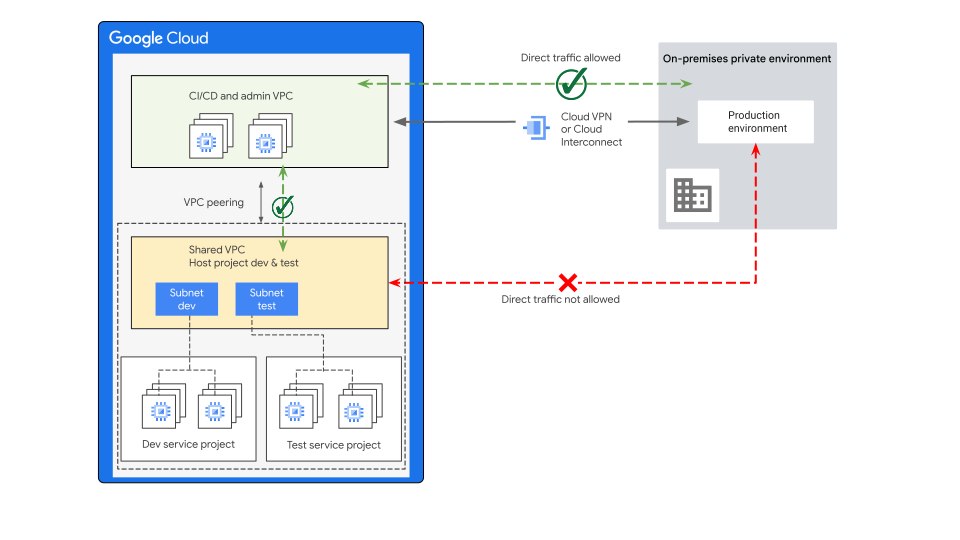
The description of the architecture in the preceding diagram is as follows:
- Workloads are distributed based on the functional environments (development, testing, CI/CD and administrative tooling) across separate VPCs on the Google Cloud side.
- [Shared VPC](https://docs.cloud.google.com/vpc/docs/shared-vpc) is used for development and testing workloads. An extra VPC is used for the CI/CD and administrative tooling. With shared VPCs:
- The applications are managed by different teams per environment and per service project.
- The host project administers and controls the network communication and security controls between the development and test environments---as well as to outside the VPC.
- CI/CD VPC is connected to the network running the production workloads in your private computing environment.
- Firewall rules permit only allowed traffic.
- You might also use [Cloud Next Generation Firewall Enterprise](https://docs.cloud.google.com/firewall/docs/about-intrusion-prevention) with intrusion prevention service (IPS) to implement deep packet inspection for threat prevention without changing the design or routing. Cloud Next Generation Firewall Enterprise works by creating Google-managed zonal firewall endpoints that use packet intercept technology to transparently inspect the workloads for the configured threat signatures. It also protects workloads against threats.
- Enables communication among the peered VPCs using internal IP addresses.
- The peering in this pattern allows CI/CD and administrative systems to deploy and manage development and testing workloads.
- Consider these [general best practices](https://docs.cloud.google.com/architecture/hybrid-multicloud-secure-networking-patterns/general-best-practices).
You establish this CI/CD connection by using one of the discussed
[hybrid and multicloud networking connectivity options](https://docs.cloud.google.com/architecture/hybrid-multicloud-secure-networking-patterns/design-considerations#hybrid_and_multicloud_connectivity)
that meet your business and applications requirements. To let you deploy and
manage production workloads, this connection provides private network
reachability between the different computing environments. All environments
should have overlap-free RFC 1918 IP address space.
If the instances in the development and testing environments require internet
access, consider the following options:
- You can deploy [Cloud NAT](https://docs.cloud.google.com/nat/docs) into the same Shared VPC host project network. Deploying into the same Shared VPC host project network helps to avoid making these instances directly accessible from the internet.
- For outbound web traffic, you can use [Secure Web Proxy](https://docs.cloud.google.com/secure-web-proxy/docs/overview). The proxy offers [several benefits](https://docs.cloud.google.com/secure-web-proxy/docs/overview#benefits).
For more information about the Google Cloud tools and capabilities
that help you to build, test, and deploy in Google Cloud and across hybrid
and multicloud environments, see the
[DevOps and CI/CD on Google Cloud explained](https://cloud.google.com/blog/topics/developers-practitioners/devops-and-cicd-google-cloud-explained)
blog.
## Variations
To meet different design requirements, while still considering all
communication requirements, the *mirrored* architecture pattern offers these
options, which are described in the following sections:
- [Shared VPC per environment](https://docs.cloud.google.com/architecture/hybrid-multicloud-secure-networking-patterns/one-page-view#shared-vpc-per-environment)
- [Centralized application layer firewall](https://docs.cloud.google.com/architecture/hybrid-multicloud-secure-networking-patterns/one-page-view#centralized_application_layer_firewall)
- [Hub-and-spoke topology](https://docs.cloud.google.com/architecture/hybrid-multicloud-secure-networking-patterns/one-page-view#hub-and-spoke_topology)
- [Microservices zero trust distributed architecture](https://docs.cloud.google.com/architecture/hybrid-multicloud-secure-networking-patterns/one-page-view#mztda)
### Shared VPC per environment
The shared VPC per environment design option allows for application-
or service-level separation across environments, including CI/CD and
administrative tools that might be required to meet certain organizational
security requirements. These requirements limit communication, administrative
domain, and access control for different services that also need to be managed
by different teams.
This design achieves separation by providing network- and project-level
isolation between the different environments, which enables more fine-grained
communication and
[Identity and Access Management (IAM)](https://docs.cloud.google.com/iam/docs/overview)
access control.
From a management and operations perspective, this design provides the
flexibility to manage the applications and workloads created by different teams
per environment and per service project. VPC networking, and its security
features can be provisioned and managed by networking operations teams based on
the following possible structures:
- One team manages all host projects across all environments.
- Different teams manage the host projects in their respective environments.
Decisions about managing host projects should be based on the team structure,
security operations, and access requirements of each team. You can apply this
design variation to the
[Shared VPC network for each environment landing zone design option](https://docs.cloud.google.com/architecture/landing-zones/decide-network-design#option-1).
However, you need to consider the communication requirements of the *mirrored*
pattern to define what communication is allowed between the different
environments, including communication over the hybrid network.
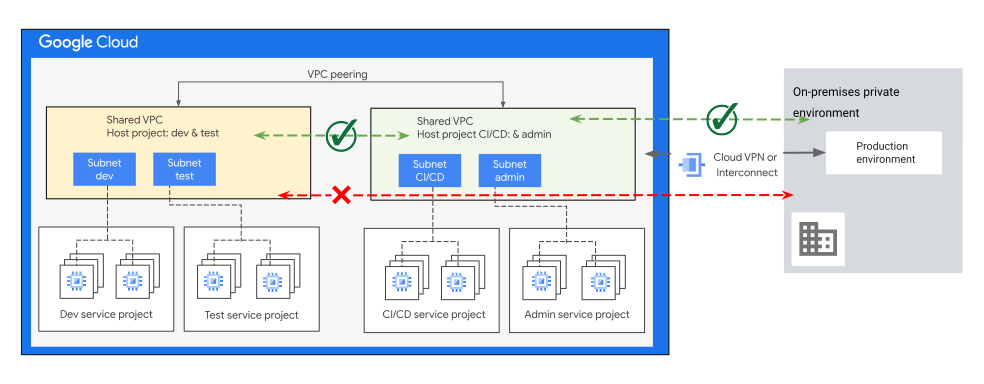
You can also provision a Shared VPC network for each main environment,
as illustrated in the following diagram:
### Centralized application layer firewall
In some scenarios, the security requirements might mandate the consideration of
application layer (Layer 7) and deep packet inspection with advanced firewalling
mechanisms that exceed the capabilities of Cloud Next Generation Firewall. To meet the
security requirements and standards of your organization, you can use an NGFW
appliance
[hosted in a network virtual appliance (NVA)](https://docs.cloud.google.com/architecture/network-secure-intra-cloud-access#network_virtual_appliance).
Several Google Cloud
[security partners](https://cloud.google.com/security/partners)
offer options well suited to this task.
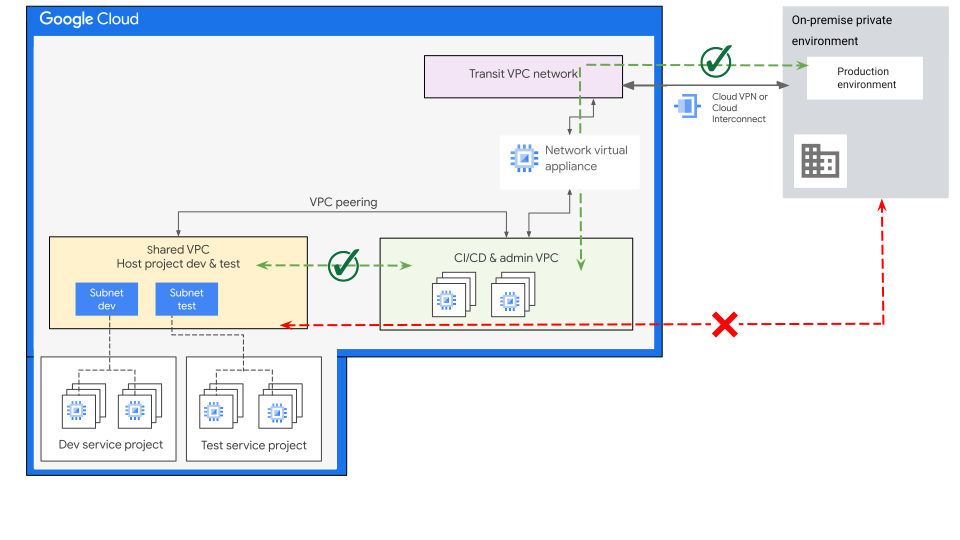
As illustrated in the following diagram, you can place the NVA in the network
path between Virtual Private Cloud and the private computing environment using
[multiple network interfaces](https://docs.cloud.google.com/vpc/docs/multiple-interfaces-concepts).
This design also can be used with multiple shared VPCs as illustrated in the
following diagram.

The NVA in this design acts as the perimeter security layer. It also serves as
the foundation for enabling inline traffic inspection and enforcing strict
access control policies.
For a robust multilayer security strategy that includes VPC firewall rules and
intrusion prevention service capabilities, include further traffic inspection
and security control to both east-west and north-south traffic flows.
> [!NOTE]
> **Note:** In supported cloud [regions](https://docs.cloud.google.com/docs/geography-and-regions#regions_and_zones), and when technically feasible for your design, NVAs can be deployed without requiring multiple VPC networks or appliance interfaces. This deployment is based on using load balancing and [policy-based routing](https://docs.cloud.google.com/vpc/docs/policy-based-routes) capabilities. These capabilities enable a topology-independent, policy-driven mechanism for integrating NVAs into your cloud network. For more details, see [Deploy network virtual appliances (NVAs) without multiple VPCs](https://cloud.google.com/blog/products/networking/policy-based-routing-network-patterns-for-virtual-appliances).
### Hub-and-spoke topology
Another possible design variation is to use separate VPCs (including shared
VPCs) for your development and different testing stages. In this variation, as
shown in the following diagram, all stage environments connect with the CI/CD
and administrative VPC in a hub-and-spoke architecture. Use this option if you
must separate the administrative domains and the functions in each environment.
The hub-and-spoke communication model can help with the following requirements:
- Applications need to access a common set of services, like monitoring, configuration management tools, CI/CD, or authentication.
- A common set of security policies needs to be applied to inbound and outbound traffic in a centralized manner through the hub.
For more information about hub-and-spoke design options, see
[Hub-and-spoke topology with centralized appliances](https://docs.cloud.google.com/architecture/landing-zones/decide-network-design#option-2)
and
[Hub-and-spoke topology without centralized appliances](https://docs.cloud.google.com/architecture/landing-zones/decide-network-design#option-3).
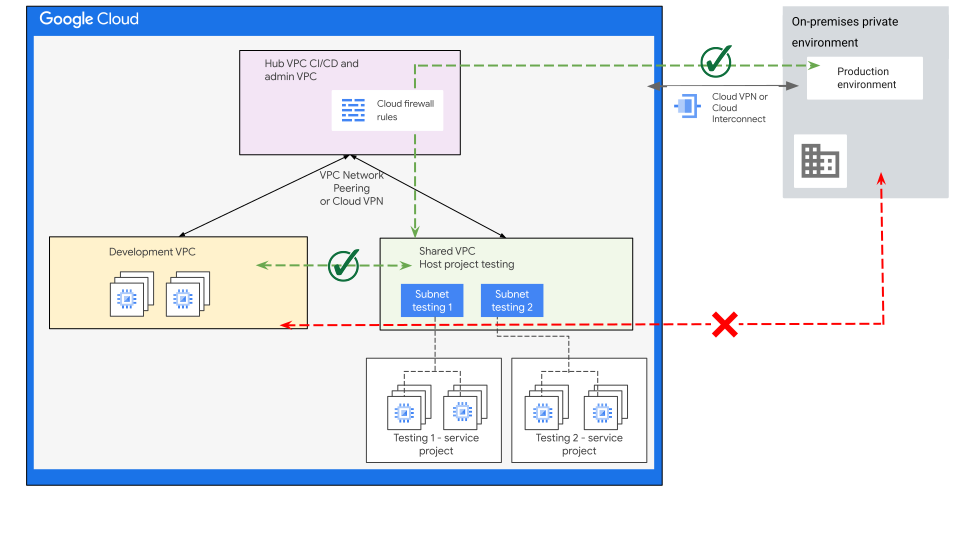
As shown in the preceding diagram, the inter-VPC communication and hybrid
connectivity all pass through the hub VPC. As part of this pattern, you can
control and restrict the communication at the hub VPC to align with your
connectivity requirements.
As part of the hub-and-spoke network architecture the following are the primary
connectivity options (between the spokes and hub VPCs) on Google Cloud:
- VPC Network Peering
- VPN
- Using network virtual appliance (NVA)
- With multiple network interfaces
- With [Network Connectivity Center](https://docs.cloud.google.com/network-connectivity/docs/network-connectivity-center/concepts/connect-vpc-networks) (NCC)
For more information on which option you should consider in your design, see
[Hub-and-spoke network architecture](https://docs.cloud.google.com/architecture/deploy-hub-spoke-vpc-network-topology).
A key influencing factor for selecting VPN over VPC peering between the spokes
and the hub VPC is when
[traffic transitivity](https://docs.cloud.google.com/architecture/network-secure-intra-cloud-access#hub_and_spoke_with_transitivity)
is required. Traffic transitivity means that traffic from a spoke can reach
other spokes through the hub.
### Microservices zero trust distributed architecture
Hybrid and multicloud architectures can require
[multiple clusters](https://docs.cloud.google.com/anthos/fleet-management/docs/multi-cluster-use-cases)
to achieve their technical and business objectives, including separating the
production environment from the development and testing environments. Therefore,
network perimeter security controls are important, especially when they're
required to comply with certain security requirements.
It's not enough to support the security requirements of current cloud-first
distributed microservices architectures, you should also consider zero trust
distributed architectures. The microservices zero trust distributed architecture
supports your microservices architecture with microservice level security policy
enforcement, authentication, and workload identity. Trust is
[identity-based](https://docs.cloud.google.com/service-mesh/docs/security/security-overview#mutual_tls)
and enforced for each service.
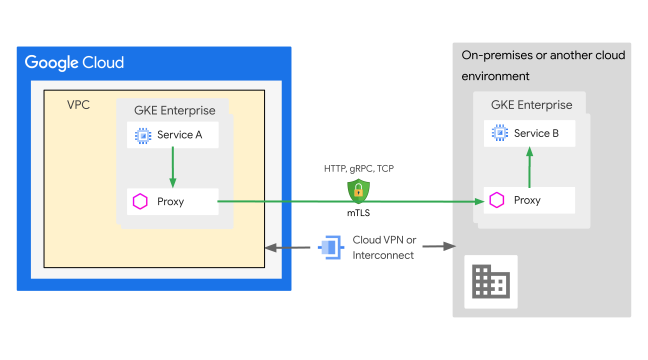
By using a distributed proxy architecture, such as a service mesh, services can
effectively validate callers and implement fine-grained access control policies
for each request, enabling a more secure and scalable microservices environment.
[Cloud Service Mesh](https://cloud.google.com/products/service-mesh)
gives you the flexibility to have a common mesh that can span your
Google Cloud and on-premises deployments. The mesh uses authorization
policies to help secure service-to-service communications.
You might also incorporate
[Apigee Adapter for Envoy](https://docs.cloud.google.com/apigee/docs/api-platform/envoy-adapter/v2.0.x/concepts),
which is a lightweight Apigee API gateway deployment within a
Kubernetes cluster, with this architecture. Apigee Adapter for Envoy
is an open source edge and service proxy that's designed for cloud-first
applications.
For more information about this topic, see the following articles:
- [Zero Trust Distributed Architecture](https://docs.cloud.google.com/architecture/network-hybrid-multicloud#zero_trust_distributed_architecture)
- [Google Kubernetes Engine (GKE) hybrid environment](https://docs.cloud.google.com/anthos/docs/architecture/anthos-hybrid-environment)
- [Connect to Google](https://docs.cloud.google.com/anthos/clusters/docs/bare-metal/latest/concepts/connect-on-prem-gcp)
- Connect an on-premises cluster to a Google Cloud network.
- [Set up a multicloud or hybrid mesh](https://docs.cloud.google.com/service-mesh/docs/unified-install/multi-cloud-hybrid-mesh)
- Deploy Cloud Service Mesh across environments and clusters.
## Mirrored pattern best practices
- The CI/CD systems required for deploying or reconfiguring production deployments must be highly available, meaning that all architecture components must be designed to provide the expected level of system availability. For more information, see [Google Cloud infrastructure reliability](https://docs.cloud.google.com/architecture/infra-reliability-guide).
- To eliminate configuration errors for repeated processes like code updates, automation is essential to standardize your builds, tests, and deployments.
- The integration of centralized NVAs in this design might require the incorporation of multiple segments with varying levels of security access controls.
- When designing a solution that includes NVAs, it's important to consider the high availability (HA) of the NVAs to avoid a single point of failure that could block all communication. Follow the HA and redundancy design and implementation guidance provided by your NVA vendor.
- By not exporting on-premises IP routes over VPC peering or VPN to the development and testing VPC, you can restrict network reachability from development and testing environments to the on-premises environment. For more information, see [VPC Network Peering custom route exchange](https://docs.cloud.google.com/vpc/docs/vpc-peering#custom-route-exchange).
- For workloads with private IP addressing that can require Google's APIs access, you can expose [Google APIs](https://docs.cloud.google.com/vpc/docs/about-accessing-google-apis-endpoints#supported-apis) by using a [Private Service Connect endpoint](https://docs.cloud.google.com/vpc/docs/private-service-connect) within a VPC network. For more information, see [*Gated ingress*](https://docs.cloud.google.com/architecture/hybrid-multicloud-secure-networking-patterns/gated-ingress), in this series.
- Review the [general best practices](https://docs.cloud.google.com/architecture/hybrid-multicloud-secure-networking-patterns/general-best-practices) for hybrid and multicloud networking architecture patterns.
# Meshed pattern
The *meshed* pattern is based on establishing a hybrid network architecture.
That architecture spans multiple computing environments. In these environments,
all systems can communicate with one another and aren't limited to one-way
communication based on the security requirements of your applications.
This networking pattern applies primarily to
[*tiered hybrid*](https://docs.cloud.google.com/architecture/hybrid-multicloud-patterns-and-practices/tiered-hybrid-pattern),
[*partitioned multicloud*](https://docs.cloud.google.com/architecture/hybrid-multicloud-patterns-and-practices/partitioned-multicloud-pattern),
or
[*bursting*](https://docs.cloud.google.com/architecture/hybrid-multicloud-patterns-and-practices/cloud-bursting-pattern)
architectures. It's also applicable to
[business continuity](https://docs.cloud.google.com/architecture/hybrid-multicloud-patterns-and-practices/business-continuity-patterns)
design to provision a disaster recovery (DR) environment in Google Cloud. In all
cases, it requires that you connect computing environments in a way that align
with the following communication requirements:
- Workloads can communicate with one another across environment boundaries using private RFC 1918 IP addresses.
- Communication can be initiated from either side. The specifics of the communications model can vary based on the applications and security requirements, such as the communication models discussed in the design options that follow.
- The firewall rules that you use must allow traffic between specific IP address sources and destinations based on the requirements of the application, or applications, for which the pattern is designed. Ideally, you can use a multi-layered security approach to restrict traffic flows in a fine-grained fashion, both between and within computing environments.
## Architecture
The following diagram illustrates a high level reference architecture of the
*meshed* pattern.
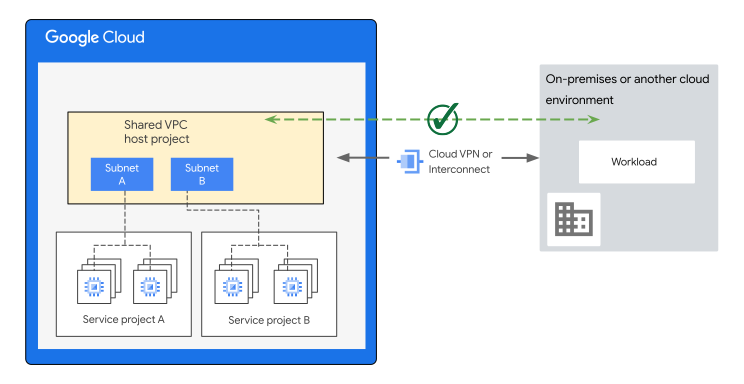
- All environments should use an overlap-free RFC 1918 IP address space.
- On the Google Cloud side, you can deploy workloads into a single or multiple shared VPCs or non-shared VPCs. For other possible design options of this pattern, refer to the design variations that follow. The selected structure of your VPCs should align with the projects and [resources hierarchy design](https://docs.cloud.google.com/architecture/landing-zones/decide-resource-hierarchy) of your organization.
- The VPC network of Google Cloud extends to other computing environments. Those environments can be on-premises or in another cloud. Use one of the [hybrid and multicloud networking connectivity](https://docs.cloud.google.com/architecture/hybrid-multicloud-secure-networking-patterns/design-considerations#hybrid_and_multicloud_connectivity) options that meet your business and application requirements.
- Limit communications to only the allowed IP addresses of your sources
and destinations. Use any of the following capabilities, or a combination
of them:
- [Firewall rules](https://docs.cloud.google.com/firewall/docs/firewalls)
or
[firewall policies](https://docs.cloud.google.com/firewall/docs/firewall-policies-overview).
- Network virtual appliance (NVA) with next generation firewall
(NGFW) inspection capabilities, placed in the network path.
- [Cloud Next Generation Firewall Enterprise](https://docs.cloud.google.com/firewall/docs/about-intrusion-prevention)
with intrusion prevention service (IPS) to implement deep packet
inspection for threat prevention without changing the network design or
routing.
## Variations
The *meshed* architecture pattern can be combined with other approaches to meet
different design requirements, while still considering the communication
requirements of the pattern. The pattern options are described in the following sections:
- [One VPC per environment](https://docs.cloud.google.com/architecture/hybrid-multicloud-secure-networking-patterns/one-page-view#one_vpc_per_environment)
- [Use a centralized application layer firewall](https://docs.cloud.google.com/architecture/hybrid-multicloud-secure-networking-patterns/one-page-view#use_a_centralized_application_layer_firewall)
- [Microservices zero trust distributed architecture](https://docs.cloud.google.com/architecture/hybrid-multicloud-secure-networking-patterns/one-page-view#mztda)
### One VPC per environment
The common reasons to consider the one-VPC-per-environment option are as
follows:
- The cloud environment requires network-level separation of the VPC networks and resources, in alignment with your organization's [resource hierarchy design](https://docs.cloud.google.com/architecture/landing-zones/decide-resource-hierarchy). If administrative domain separation is required, it can also be combined with a separate project per environment.
- To centrally manage network resources in a common network and provide network isolation between the different environments, use a [shared VPC for each environment](https://docs.cloud.google.com/architecture/landing-zones/decide-network-design#option-1) that you have in Google Cloud, such as development, testing, and production.
- Scale requirements that might need to go beyond the [VPC quotas](https://docs.cloud.google.com/vpc/docs/quota) for a single VPC or project.
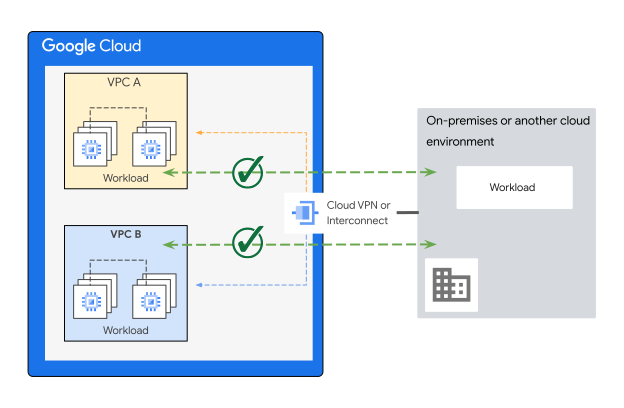
As illustrated in the following diagram, the one-VPC-per-environment design lets
each VPC integrate directly with the on-premises environment or other cloud
environments using VPNs, or a Cloud Interconnect with multiple
[VLAN attachments](https://docs.cloud.google.com/network-connectivity/docs/interconnect/how-to/dedicated/creating-vlan-attachments).
The pattern displayed in the preceding diagram can be applied on a landing zone
[hub-and-spoke network topology](https://docs.cloud.google.com/architecture/landing-zones/decide-network-design#option-3).
In that topology, a single (or multiple) hybrid connection can be shared with
all spoke VPCs. It's shared by using a transit VPC to terminate both the hybrid
connectivity and the other spoke VPCs. You can also expand this design by adding
NVA with next-generation firewall (NGFW) inspection capabilities at the transit
VPC, as described in the next section, "Use a centralized application layer
firewall."
### Use a centralized application layer firewall
If your technical requirements mandate considering application layer (Layer 7)
and deep packet inspection with advanced firewalling capabilities that exceed
the capabilities of Cloud Next Generation Firewall, you can use an NGFW appliance hosted in
an NVA. However, that NVA must meet the security needs of your organization. To
implement these mechanisms, you can extend the topology to pass all
cross-environment traffic through a centralized NVA firewall, as shown in the
following diagram.
You can apply the pattern in the following diagram on the landing zone design by
using a
[hub-and-spoke topology with centralized appliances](https://docs.cloud.google.com/architecture/landing-zones/decide-network-design#option-2):
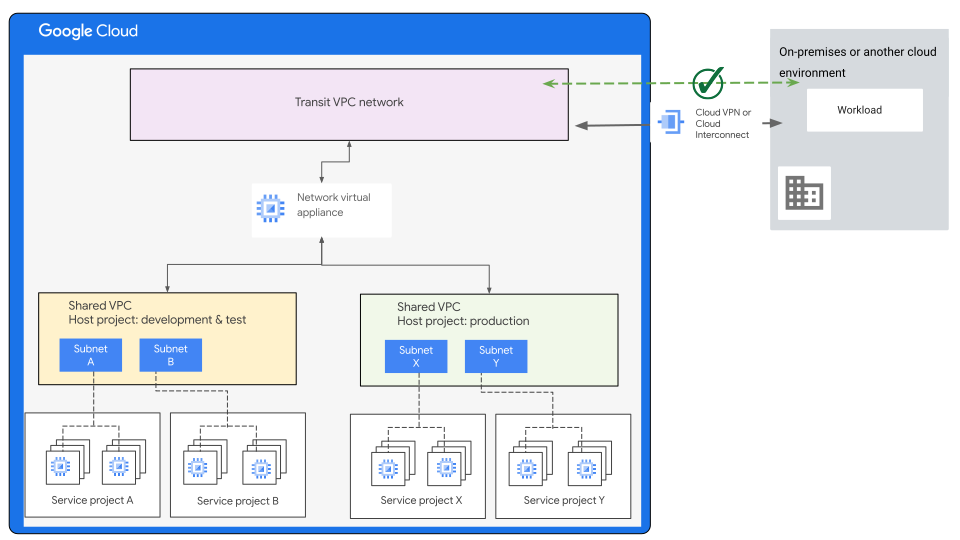
As shown in the preceding diagram, The NVA acts as the perimeter security layer
and serves as the foundation for enabling inline traffic inspection. It also
enforces strict access control policies. To inspect both east-west and
north-south traffic flows, the design of a centralized NVA might include
multiple segments with different levels of security access controls.
### Microservices zero trust distributed architecture
When containerized applications are used, the microservices zero trust
distributed architecture discussed in the
[*mirrored* pattern](https://docs.cloud.google.com/architecture/hybrid-multicloud-secure-networking-patterns/mirrored-pattern)
section is also applicable to this architecture pattern.
The key difference between this pattern and the mirrored pattern is that the communication model between
workloads in Google Cloud and other environments can be initiated from
either side. Traffic must be controlled and fine-grained, based on the
application requirements and security requirements using
[Cloud Service Mesh](https://cloud.google.com/products/service-mesh).
## Meshed pattern best practices
- Before you do anything else, decide on your [resource hierarchy design](https://docs.cloud.google.com/architecture/landing-zones/decide-resource-hierarchy), and the design required to support any project and VPC. Doing so can help you select the optimal networking architecture that aligns with the structure of your Google Cloud projects.
- Use a [zero trust distributed architecture](https://docs.cloud.google.com/architecture/network-hybrid-multicloud#zero_trust_distributed_architecture) when using Kubernetes within your private computing environment and Google Cloud.
- When you use centralized NVAs in your design, you should define multiple segments with different levels of security access controls and traffic inspection policies. Base these controls and policies on the security requirements of your applications.
- When designing a solution that includes NVAs, it's important to consider the high availability (HA) of the NVAs to avoid a single point of failure that could block all communication. Follow the HA and redundancy design and implementation guidance provided by the [Google Cloud security vendor](https://cloud.google.com/security/partners) that supplies your NVAs.
- To provide increased privacy, data integrity, and a controlled communication model, expose applications through APIs using API gateways, like [Apigee](https://docs.cloud.google.com/apigee) and [Apigee hybrid](https://docs.cloud.google.com/apigee/docs/hybrid/v1.11/what-is-hybrid) with end-to-end mTLS. You can also use a shared [VPC with Apigee](https://docs.cloud.google.com/apigee/docs/api-platform/system-administration/shared-vpcs#configuring-shared-vpc-with-apigee) in the same [organization](https://docs.cloud.google.com/resource-manager/docs/cloud-platform-resource-hierarchy#organizations) resource.
- If the design of your solution requires exposing a Google Cloud based application to the public internet, consider the design recommendations discussed in [Networking for internet-facing application delivery](https://docs.cloud.google.com/architecture/network-application-delivery).
- To help protect Google Cloud services in your projects, and to help mitigate the risk of data exfiltration, use VPC Service Controls to specify service perimeters at the project or VPC network level. Also, you can [extend service perimeters](https://docs.cloud.google.com/vpc-service-controls/docs/overview#hybrid_access)to a hybrid environment over an authorized VPN or Cloud Interconnect. For more information about the benefits of service perimeters, see [Overview of VPC Service Controls](https://docs.cloud.google.com/vpc-service-controls/docs/overview).
- Review the [general best practices](https://docs.cloud.google.com/architecture/hybrid-multicloud-secure-networking-patterns/general-best-practices) for hybrid and multicloud networking patterns.
If you intend to enforce stricter isolation and more fine-grained access
between your applications hosted in Google Cloud, and in other
environments, consider using one of the
[*gated* patterns](https://docs.cloud.google.com/architecture/hybrid-multicloud-secure-networking-patterns/gated-patterns)
that are discussed in the other documents in this series.
# Gated patterns
The *gated* pattern is based on an architecture that exposes select
applications and services in a fine-grained manner, based on specific exposed
APIs or endpoints between the different environments. This guide categorizes
this pattern into three possible options, each determined by the specific
communication model:
- [Gated egress](https://docs.cloud.google.com/architecture/hybrid-multicloud-secure-networking-patterns/gated-egress)
- [Gated ingress](https://docs.cloud.google.com/architecture/hybrid-multicloud-secure-networking-patterns/gated-ingress)
- [Gated egress and ingress](https://docs.cloud.google.com/architecture/hybrid-multicloud-secure-networking-patterns/gated-egress-ingress)
(bidirectional gated in both directions)
As previously mentioned in this guide, the networking architecture patterns
described here can be adapted to various applications with diverse requirements.
To address the specific needs of different applications, your main landing zone
architecture might incorporate one pattern or a combination of patterns
simultaneously. The specific deployment of the selected architecture is
determined by the specific communication requirements of each gated pattern.
> [!NOTE]
> **Note:** In general, the *gated* pattern can be applied or incorporated with the landing zone design option that exposes the services in a [consumer-producer model](https://docs.cloud.google.com/architecture/landing-zones/decide-network-design#option-4).
This series discusses each gated pattern and its possible design options.
However, one common design option applicable to all gated patterns is the
[Zero Trust Distributed Architecture](https://docs.cloud.google.com/architecture/network-hybrid-multicloud#zero_trust_distributed_architecture)
for containerized applications with microservice architecture. This option is
powered by
[Cloud Service Mesh](https://cloud.google.com/products/service-mesh),
Apigee, and
[Apigee Adapter for Envoy](https://docs.cloud.google.com/apigee/docs/api-platform/envoy-adapter/v2.0.x/concepts)---a
lightweight Apigee gateway deployment within a Kubernetes cluster.
Apigee Adapter for Envoy is a popular, open source edge and service proxy that's
designed for cloud-first applications. This architecture controls allowed secure
service-to-service communications and the direction of communication at a
service level. Traffic communication policies can be designed, fine-tuned, and
applied at the service level based on the selected pattern.
Gated patterns allow for the implementation of Cloud Next Generation Firewall Enterprise
with
[intrusion prevention service (IPS)](https://docs.cloud.google.com/firewall/docs/about-intrusion-prevention)
to perform deep packet inspection for threat prevention without any design
or routing modifications. That inspection is subject to the specific
applications being accessed, the communication model, and the security
requirements. If security requirements demand Layer 7 and deep packet inspection
with advanced firewalling mechanisms that surpass the capabilities of
Cloud Next Generation Firewall, you can use a centralized next generation firewall (NGFW)
[hosted in a network virtual appliance (NVA)](https://docs.cloud.google.com/architecture/network-secure-intra-cloud-access#network_virtual_appliance).
Several Google Cloud
[security partners](https://cloud.google.com/security/partners)
offer NGFW appliances that can meet your security requirements. Integrating NVAs
with these gated patterns can require introducing multiple security zones within
the network design, each with distinct access control levels.
# Gated egress
The architecture of the *gated egress* networking pattern is based on exposing
select APIs from the on-premises environment or another cloud environment to
workloads that are deployed in Google Cloud. It does so without directly
exposing them to the public internet from an on-premises environment or from
other cloud environments. You can facilitate this limited exposure through an
API gateway or proxy, or a load balancer that serves as a
[facade](https://cloud.google.com/apigee/resources/ebook/api-facade-pattern-register)
for existing workloads. You can deploy the API gateway functionality in an
isolated perimeter network segment, like a
[perimeter network](https://en.wikipedia.org/wiki/DMZ_(computing)).
The *gated egress* networking pattern applies primarily to (but isn't limited
to)
[tiered application architecture patterns](https://docs.cloud.google.com/architecture/hybrid-multicloud-patterns-and-practices/tiered-hybrid-pattern)
and
[partitioned application architecture patterns](https://docs.cloud.google.com/architecture/hybrid-multicloud-patterns-and-practices/partitioned-multicloud-pattern).
When deploying backend workloads within an internal network, gated egress
networking helps to maintain a higher level of security within your on-premises
computing environment. The pattern requires that you connect computing
environments in a way that meets the following communication requirements:
- Workloads that you deploy in Google Cloud can communicate with the API gateway or load balancer (or a Private Service Connect endpoint) that exposes the application by using internal IP addresses.
- Other systems in the private computing environment can't be reached directly from within Google Cloud.
- Communication from the private computing environment to any workloads deployed in Google Cloud isn't allowed.
- Traffic to the private APIs in other environments is only initiated from within the Google Cloud environment.
The focus of this guide is on hybrid and multicloud environments connected
over a private hybrid network. If the security requirements of your organization
permit it, API calls to remote target APIs with public IP addresses can be
directly reached over the internet. But you must consider the following security
mechanisms:
- API [OAuth 2.0](https://docs.cloud.google.com/apigee/docs/api-platform/security/oauth/oauth-introduction) with Transport Layer Security (TLS).
- Rate limiting.
- Threat protection policies.
- Mutual TLS configured to the backend of your API layer.
- IP address allowlist filtering configured to only allow communication with predefined API sources and destinations from both sides.
To secure an API proxy, consider these
[other security aspects](https://docs.cloud.google.com/apigee/docs/api-platform/security/api-security).
For more information,
see
[Best practices for securing your applications and APIs using Apigee](https://docs.cloud.google.com/architecture/best-practices-securing-applications-and-apis-using-apigee).
## Architecture
The following diagram shows a reference architecture that supports the
communication requirements listed in the previous section:
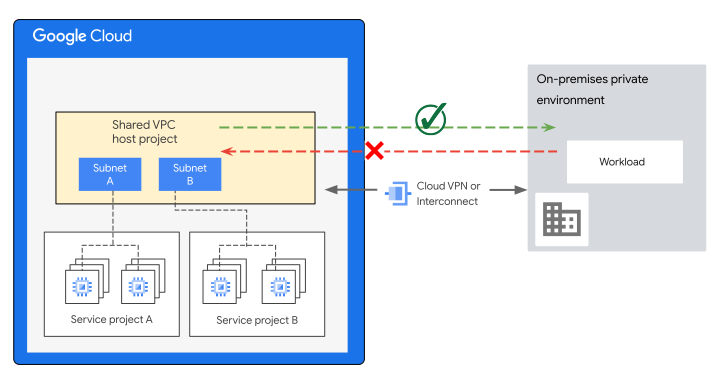
Data flows through the preceding diagram as follows:
- On the Google Cloud side, you can deploy workloads into virtual private clouds (VPCs). The VPCs can be single or multiple (shared or non-shared). The deployment should be in alignment with the projects and [resource hierarchy design](https://docs.cloud.google.com/architecture/landing-zones/decide-resource-hierarchy) of your organization.
- The VPC networks of the Google Cloud environment are extended to the other computing environments. The environments can be on-premises or in another cloud. To facilitate the communication between environments using internal IP addresses, use a suitable hybrid and multicloud networking connectivity.
- To limit the traffic that originates from specific VPC IP addresses, and
is destined for remote gateways or load balancers, use IP address allowlist
filtering. Return traffic from these connections is allowed when using
[stateful firewall rules](https://docs.cloud.google.com/firewall/docs/firewalls#specifications).
You can use any combination of the following capabilities to secure and
limit communications to only the allowed source and destination IP addresses:
- [Firewall rules](https://docs.cloud.google.com/firewall/docs/firewalls)
or
[firewall policies](https://docs.cloud.google.com/firewall/docs/firewall-policies-overview).
- Network virtual appliance (NVA) with next generation firewall
(NGFW) inspection capabilities that are placed in the network path.
- [Cloud Next Generation Firewall Enterprise](https://docs.cloud.google.com/firewall/docs/about-intrusion-prevention)
with intrusion prevention service (IPS) to implement deep packet
inspection for threat prevention.
- All environments share overlap-free RFC 1918 IP address space.
## Variations
The *gated egress* architecture pattern can be combined with other approaches
to meet different design requirements that still consider the communication
requirements of this pattern. The pattern offers the following options:
- [Use Google Cloud API gateway and global frontend](https://docs.cloud.google.com/architecture/hybrid-multicloud-secure-networking-patterns/one-page-view#use-google-cloud-api-gateway-and-global-frontend)
- [Expose remote services using Private Service Connect](https://docs.cloud.google.com/architecture/hybrid-multicloud-secure-networking-patterns/one-page-view#expose-remote-services-using-private-service-connect)
### Use Google Cloud API gateway and global frontend
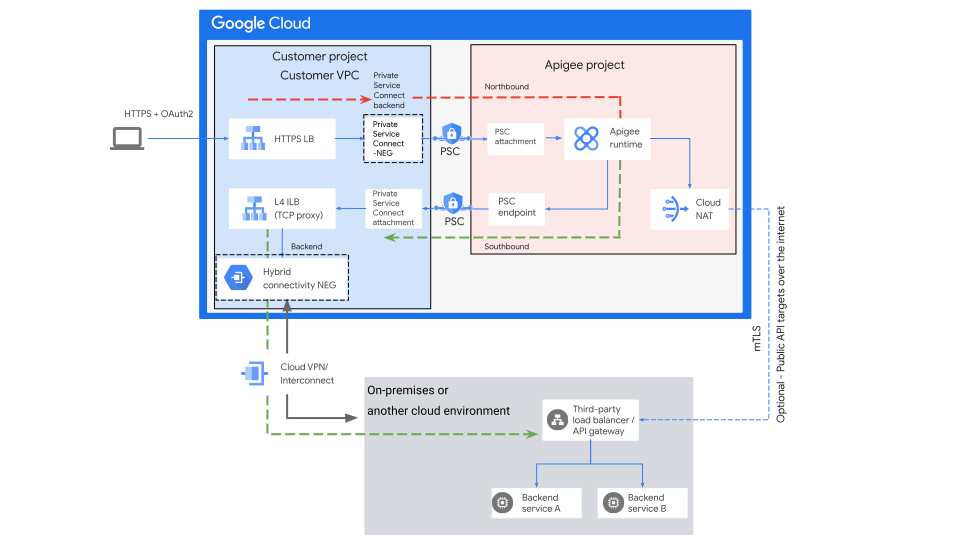
With this design approach, API exposure and management reside within
Google Cloud. As shown in the preceding diagram, you can accomplish this
through the implementation of Apigee as the API platform. The
decision to deploy an API gateway or load balancer in the remote environment
depends on your specific needs and current configuration. Apigee provides
[two options for provisioning](https://docs.cloud.google.com/apigee/docs/api-platform/architecture/overview#withoutvpcpeering)
connectivity:
- With VPC peering
- Without VPC peering
Google Cloud global frontend capabilities like Cloud Load Balancing,
Cloud CDN (when accessed over Cloud Interconnect), and
Cross-Cloud Interconnect enhance the speed with which users can access
applications that have backends hosted in your on-premises environments and in
other cloud environments.
Optimizing content delivery speeds is achieved by delivering those applications
from Google Cloud points of presence (PoP). Google Cloud PoPs are
present on over
[180 internet exchanges and at over 160 interconnection facilities](https://www.peeringdb.com/net/433)
around the world.
To see how PoPs help to deliver high-performing APIs when using
Apigee with Cloud CDN to accomplish the following, watch
[Delivering high-performing APIs with Apigee and Cloud CDN](https://www.youtube.com/watch?v=lwiJUaGPCK4) on YouTube:
- Reduce latency.
- Host APIs globally.
- Increase availability for peak traffic.
The design example illustrated in the preceding diagram is based on
Private Service Connect without VPC peering.
The northbound network in this design is established through:
- A load balancer (LB in the diagram), where client requests terminate, processes the traffic and then routes it to a Private Service Connect backend.
- A [Private Service Connect backend](https://docs.cloud.google.com/vpc/docs/private-service-connect-backends) lets a Google Cloud load balancer send clients requests over a Private Service Connect connection associated with a producer service attachment to the published service (Apigee runtime instance) using [Private Service Connect network endpoint groups (NEGs)](https://docs.cloud.google.com/load-balancing/docs/negs#psc-neg).
The southbound networking is established through:
- A Private Service Connect endpoint that references a [service attachment](https://docs.cloud.google.com/vpc/docs/private-service-connect#service-attachments) associated with an internal load balancer (ILB in the diagram) in the customer VPC.
- The ILB is deployed with hybrid connectivity network
endpoint groups
([hybrid connectivity NEGs](https://docs.cloud.google.com/vpc/docs/private-service-connect-deployments#hybrid-services)).
- Hybrid services are accessed through the hybrid connectivity NEG over a
hybrid network connectivity, like VPN or Cloud Interconnect.
For more information, see
[Set up a regional internal proxy Network Load Balancer with hybrid connectivity](https://docs.cloud.google.com/load-balancing/docs/tcp/set-up-int-tcp-proxy-hybrid)
and
[Private Service Connect deployment patterns](https://docs.cloud.google.com/vpc/docs/private-service-connect-deployments).
> [!NOTE]
> **Note:** Depending on your requirements, the APIs of the on-premises backends can be exposed through [Apigee Hybrid](https://docs.cloud.google.com/apigee/docs/hybrid/v1.10/what-is-hybrid), a third party API gateway or proxy, or a load balancer.
### Expose remote services using Private Service Connect

Use the Private Service Connect option to expose remote services
for the following scenarios:
- You aren't using an API platform or you want to avoid connecting your entire VPC network directly to an external environment for the following reasons:
- You have security restrictions or compliance requirements.
- You have an IP address range overlap, such as in a merger and acquisition scenario.
- To enable secure uni-directional communications between clients, applications, and services across the environments even when you have a short deadline.
- You might need to provide connectivity to multiple consumer VPCs through a service-producer VPC (transit VPC) to offer highly scalable multi-tenant or single-tenant service models, to reach published services on other environments.
Using Private Service Connect for applications that are consumed
as APIs provides an internal IP address for the published applications, enabling
secure access within the private network across
[regions](https://docs.cloud.google.com/docs/geography-and-regions#regions_and_zones) and over hybrid
connectivity. This abstraction
facilitates the integration of resources from diverse clouds and on-premises
environments over a hybrid and multicloud connectivity model.
You can accelerate application integration and securely expose applications that
reside in an on-premises environment, or another cloud environment, by using
[Private Service Connect](https://docs.cloud.google.com/vpc/docs/private-service-connect)
to
[publish the service](https://docs.cloud.google.com/vpc/docs/about-vpc-hosted-services)
with fine-grained access. In this case, you can use the following option:
- A service attachment that references a [regional internal proxy Network Load Balancer](https://docs.cloud.google.com/load-balancing/docs/tcp/set-up-int-tcp-proxy-hybrid#overview) or an [internal Application Load Balancer](https://docs.cloud.google.com/load-balancing/docs/l7-internal/setting-up-l7-cross-reg-hybrid).
- The load balancer uses a hybrid network endpoint group (hybrid connectivity NEG) in a producer VPC that acts in this design as a transit VPC.
In the preceding diagram, the workloads in the VPC network of your application
can reach the hybrid services running in your on-premises environment, or in
other cloud environments, through the Private Service Connect
endpoint, as illustrated in the following diagram. This design option for
uni-directional communications provides an alternative option to
[peering to a transit VPC](https://docs.cloud.google.com/vpc/docs/vpc-peering).
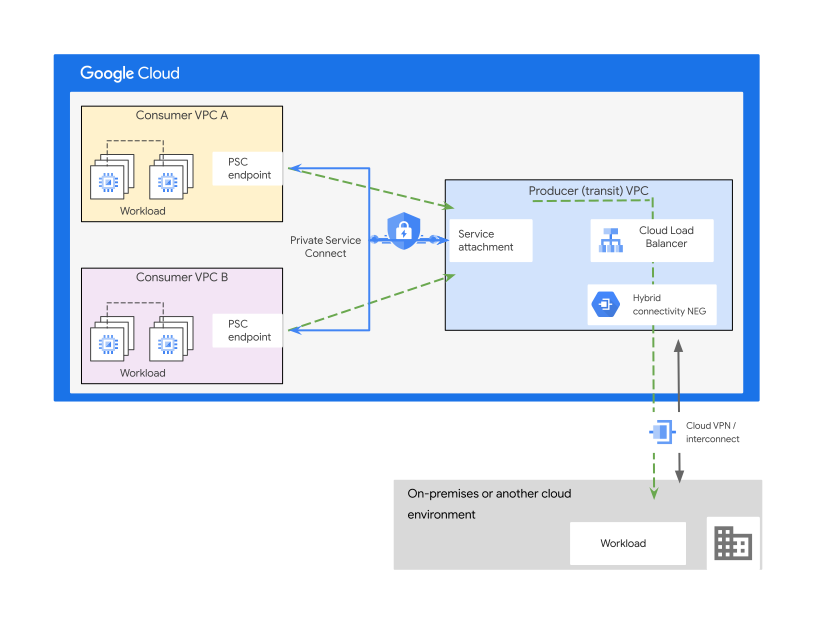
As part of the design in the preceding diagram, multiple frontends, backends, or
endpoints can connect to the same
[service attachment](https://docs.cloud.google.com/vpc/docs/private-service-connect#service-attachments),
which lets multiple VPC networks or multiple consumers access the same service.
As illustrated in the following diagram, you can make the application accessible
to multiple VPCs. This accessibility can help in
[multi-tenant services](https://docs.cloud.google.com/vpc/docs/private-service-connect-deployments#multi-tenant-services)
scenarios where your service is consumed by multiple consumer VPCs even if their
IP address ranges overlap.
IP address overlap is one of most common issues when integrating applications
that reside in different environments. The
Private Service Connect connection in the following diagram helps to
avoid the IP address overlap issue. It does so without requiring provisioning or
managing any additional networking components, like Cloud NAT or an NVA, to
perform the IP address translation. For an example configuration, see
[Publish a hybrid service by using Private Service Connect](https://docs.cloud.google.com/load-balancing/docs/tcp/set-up-int-tcp-proxy-hybrid#publish).
The design has the following advantages:
- Avoids potential shared scaling dependencies and complex manageability at scale.
- [Improves security](https://codelabs.developers.google.com/cloudnet-psc-ilb-gke#1) by providing fine-grained connectivity control.
- Reduces IP address coordination between the producer and consumer of the service and the remote external environment.
The design approach in the preceding diagram can expand at later stages to
integrate Apigee as the API platform by using the networking
design options discussed earlier, including the
Private Service Connect option.
You can make the Private Service Connect endpoint accessible from
other regions by using
[Private Service Connect global access](https://docs.cloud.google.com/vpc/docs/about-accessing-vpc-hosted-services-endpoints#global-access).
The client connecting to the Private Service Connect endpoint can
be in the same region as the endpoint or in a different region. This approach
might be used to provide high availability across services hosted in multiple
regions, or to access services available in a single region from other regions.
When a Private Service Connect endpoint is accessed
by resources hosted in other regions,
[inter-regional outbound charges](https://docs.cloud.google.com/vpc/network-pricing#psc-forwarding-rule-service)
apply to the traffic destined to endpoints with global access.
> [!NOTE]
> **Note:** To achieve distributed wellness checks and to facilitate connecting multiple VPCs to on-premises environments over multiple hybrid connections, chain an internal Application Load Balancer with an external Application Load Balancer. For more information, see [Explicit Chaining of Google Cloud L7 Load Balancers with PSC](https://codelabs.developers.google.com/codelabs/l7lb-chain-psc#0).
## Best practices
- Considering [Apigee](https://docs.cloud.google.com/apigee/docs/api-platform/get-started/what-apigee) and Apigee Hybrid as your API platform solution offers several benefits. It provides a proxy layer, and an abstraction or facade, for your backend service APIs combined with security capabilities, rate limiting, quotas, and analytics.
- Use Apigee Adapter for Envoy with an [Apigee Hybrid deployment with Kubernetes](https://docs.cloud.google.com/apigee/docs/api-platform/envoy-adapter/v2.0.x/example-hybrid) architecture where applicable to your requirements and the architecture.
- VPCs and project design in Google Cloud should be driven by your resource hierarchy and your secure communication model requirements.
- When APIs with API gateways are used, you should also use an IP address allowlist. An allowlist limits communications to the specific IP address sources and destinations of the API consumers and API gateways that might be hosted in different environments.
- Use [VPC firewall rules](https://docs.cloud.google.com/firewall/docs/firewalls) or [firewall policies](https://docs.cloud.google.com/firewall/docs/firewall-policies-overview) to control access to Private Service Connect resources through the Private Service Connect endpoint.
- If an application is exposed externally through an application load balancer, consider using [Google Cloud Armor](https://docs.cloud.google.com/armor/docs/cloud-armor-overview) as an extra layer of security to protect against DDoS and application layer security threats.
- If instances require internet access, use
[Cloud NAT](https://docs.cloud.google.com/nat/docs)
in the application (consumer) VPC to allow workloads to access the
internet. Doing so lets you avoid assigning VM instances with external
public IP addresses in systems that are deployed behind an API gateway or a
load balancer.
- For outbound web traffic, you can use Google Cloud [Secure Web Proxy](https://docs.cloud.google.com/secure-web-proxy/docs/overview). The proxy offers [several benefits](https://docs.cloud.google.com/secure-web-proxy/docs/overview#benefits).
- Review the
[general best practices](https://docs.cloud.google.com/architecture/hybrid-multicloud-secure-networking-patterns/general-best-practices)
for hybrid and multicloud networking patterns.
# Gated ingress
The architecture of the *gated ingress* pattern is based on exposing select
APIs of workloads running in Google Cloud to the private computing environment
without exposing them to the public internet. This pattern is the counterpart to
the
[*gated egress* pattern](https://docs.cloud.google.com/architecture/hybrid-multicloud-secure-networking-patterns/gated-egress)
and is well suited for
[*edge hybrid*](https://docs.cloud.google.com/architecture/hybrid-multicloud-patterns-and-practices/edge-hybrid-pattern),
[*tiered hybrid*](https://docs.cloud.google.com/architecture/hybrid-multicloud-patterns-and-practices/tiered-hybrid-pattern),
and
[*partitioned multicloud*](https://docs.cloud.google.com/architecture/hybrid-multicloud-patterns-and-practices/partitioned-multicloud-pattern)
scenarios.
Like with the *gated egress* pattern, you can facilitate this limited exposure
through an API gateway or load balancer that
[serves as a facade](https://cloud.google.com/apigee/resources/ebook/api-facade-pattern-register)
for existing workloads or services. Doing so makes it accessible to private
computing environments, on-premises environments, or on other cloud environment,
as follows:
- Workloads that you deploy in the private computing environment or other cloud environments are able to communicate with the API gateway or load balancer by using internal IP addresses. Other systems deployed in Google Cloud can't be reached.
- Communication from Google Cloud to the private computing environment or to other cloud environments isn't allowed. Traffic is only initiated from the private environment or other cloud environments to the APIs in Google Cloud.
## Architecture
The following diagram shows a reference architecture that meets the
requirements of the gated ingress pattern.
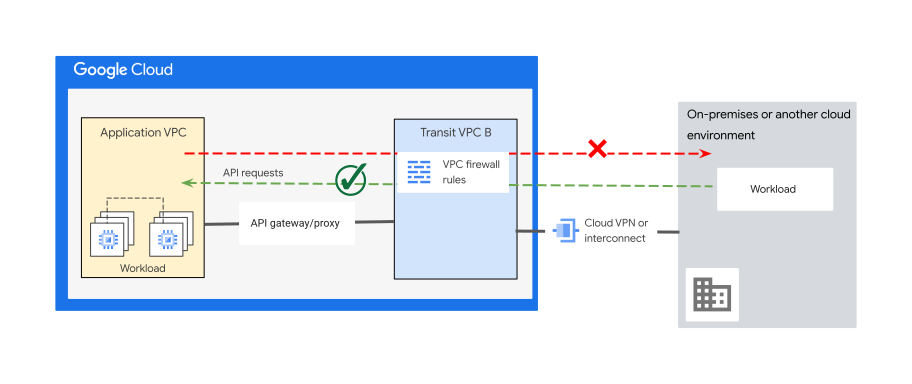
The description of the architecture in the preceding diagram is as follows:
- On the Google Cloud side, you deploy workloads into an application VPC (or multiple VPCs).
- The Google Cloud environment network extends to other computing environments (on-premises or on another cloud) by using hybrid or multicloud network connectivity to facilitate the communication between environments.
- Optionally, you can use a transit VPC to accomplish the following:
- Provide additional perimeter security layers to allow access to specific APIs outside of your application VPC.
- Route traffic to the IP addresses of the APIs. You can create VPC firewall rules to prevent some sources from accessing certain APIs through an endpoint.
- Inspect Layer 7 traffic at the transit VPC by integrating a network virtual appliance (NVA).
- Access APIs through an API gateway or a load balancer (proxy or application load balancer) to provide a proxy layer, and an abstraction layer or facade for your service APIs. If you need to distribute traffic across multiple API gateway instances, you could use an [internal passthrough Network Load Balancer](https://docs.cloud.google.com/kubernetes-engine/docs/how-to/internal-load-balancing).
- Provide limited and fine-grained access to a published [service through a Private Service Connect endpoint](https://docs.cloud.google.com/vpc/docs/about-accessing-vpc-hosted-services-endpoints) by using a load balancer through Private Service Connect to expose an application or service.
- All environments should use an overlap-free RFC 1918 IP address space.
The following diagram illustrates the design of this pattern using
Apigee as the API platform.
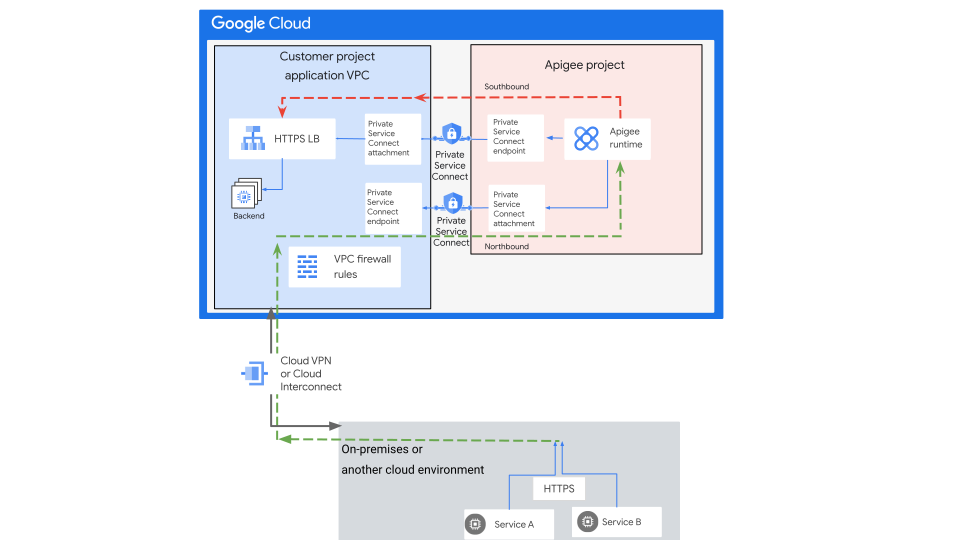
In the preceding diagram, using Apigee as the API platform provides the
following features and capabilities to enable the *gated ingress* pattern:
- Gateway or proxy functionality
- Security capabilities
- Rate limiting
- Analytics
In the design:
- The northbound networking connectivity (for traffic coming from other environments) passes through a Private Service Connect endpoint in your application VPC that's associated with the Apigee VPC.
- At the application VPC, an internal load balancer is used to expose the application APIs through a Private Service Connect endpoint presented in the Apigee VPC. For more information, see [Architecture with VPC peering disabled](https://docs.cloud.google.com/apigee/docs/api-platform/architecture/overview#withoutvpcpeering).
- Configure firewall rules and traffic filtering at the application VPC.
Doing so provides fine-grained and controlled access. It also helps stop
systems from directly reaching your applications without passing through
the Private Service Connect endpoint and API gateway.
Also, you can restrict the advertisement of the internal IP
address subnet of the backend workload in the application VPC to the
on-premises network to avoid direct reachability without passing
through the Private Service Connect endpoint and the API
gateway.
Certain security requirements might require perimeter security inspection
outside the application VPC, including hybrid connectivity traffic. In such
cases, you can incorporate a transit VPC to implement additional security
layers. These layers, like next generation firewalls (NGFWs) NVAs with
[multiple network interfaces](https://docs.cloud.google.com/vpc/docs/multiple-interfaces-concepts),
or Cloud Next Generation Firewall Enterprise with
[intrusion prevention service (IPS)](https://docs.cloud.google.com/firewall/docs/about-intrusion-prevention), perform deep packet inspection outside of your
application VPC, as illustrated in the following diagram:
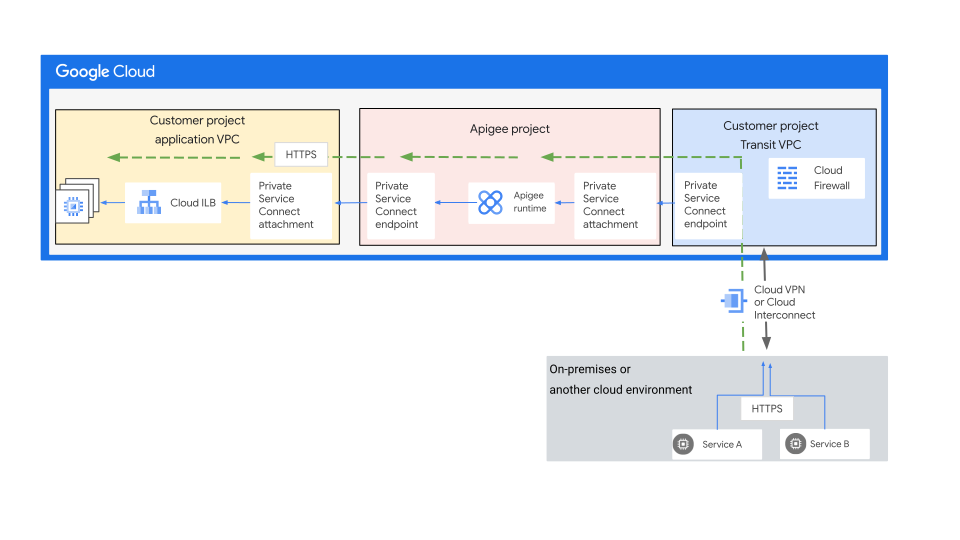
As illustrated in the preceding diagram:
- The northbound networking connectivity (for traffic coming from other environments) passes through a separate transit VPC toward the Private Service Connect endpoint in the transit VPC that's associated with the Apigee VPC.
- At the application VPC, an internal load balancer (ILB in the diagram) is used to expose the application through a Private Service Connect endpoint in the Apigee VPC.
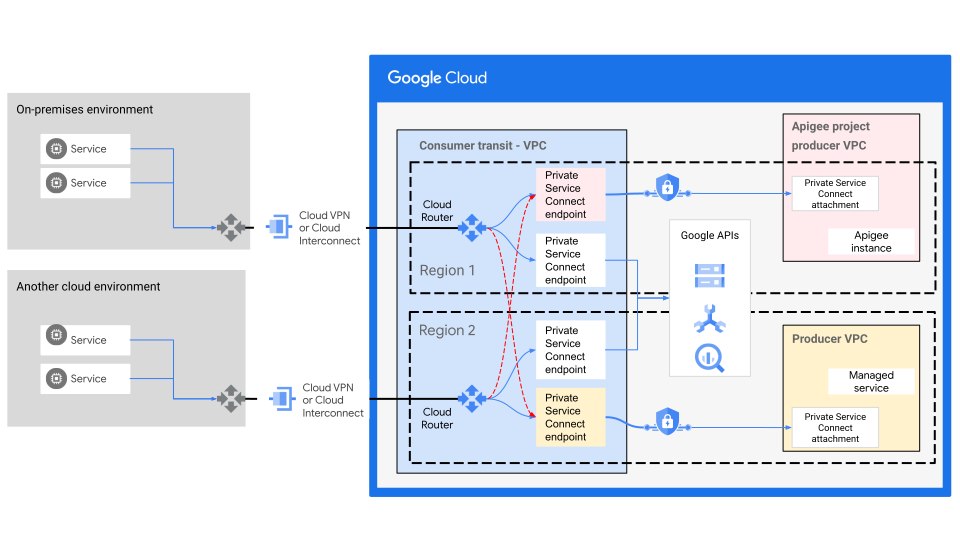
You can provision several endpoints in the same VPC network, as shown in the
following diagram. To cover different
[use cases](https://docs.cloud.google.com/vpc/docs/about-accessing-google-apis-endpoints#use-cases),
you can control the different possible network paths using Cloud Router and
VPC firewall rules. For example, If you're connecting your on-premises network
to Google Cloud using multiple hybrid networking connections, you could
send some traffic from on-premises to specific Google APIs or published services
over one connection and the rest over another connection. Also, you can use
[Private Service Connect global access](https://docs.cloud.google.com/vpc/docs/about-accessing-vpc-hosted-services-endpoints#global-access)
to provide failover options.
## Variations
The *gated ingress* architecture pattern can be combined with other approaches
to meet different design requirements, while still considering the communication
requirements of the pattern. The pattern offers the following options:
- [Access Google APIs from other environments](https://docs.cloud.google.com/architecture/hybrid-multicloud-secure-networking-patterns/one-page-view#access_google_apis_from_other_environments)
- [Expose application backends to other environments using Private Service Connect](https://docs.cloud.google.com/architecture/hybrid-multicloud-secure-networking-patterns/one-page-view#expose-application-backends-to-other-environments-using-private-service-connect)
- [Use a hub and spoke architecture to expose application backends to other environments](https://docs.cloud.google.com/architecture/hybrid-multicloud-secure-networking-patterns/one-page-view#use-a-hub)
### Access Google APIs from other environments
For scenarios requiring access to Google services, like Cloud Storage or
BigQuery, without sending traffic over the public internet,
Private Service Connect offers a solution. As shown in the
following diagram, it
[enables reachability](https://docs.cloud.google.com/vpc/docs/configure-private-service-connect-services#on-premises)
to the
[supported Google APIs](https://docs.cloud.google.com/vpc/docs/about-accessing-google-apis-endpoints#supported-apis)
and services (including Google Maps, Google Ads, and
Google Cloud) from on-premises or other cloud environments
through a hybrid network connection using the IP address of the Private Service Connect endpoint. For more information about
accessing Google APIs through Private Service Connect endpoints,
see
[About accessing Google APIs through endpoints](https://docs.cloud.google.com/vpc/docs/about-accessing-google-apis-endpoints#use-cases).

In the preceding diagram, your on-premises network must be connected to the
transit (consumer) VPC network using either Cloud VPN tunnels or a
Cloud Interconnect VLAN attachment.
[Google APIs](https://docs.cloud.google.com/vpc/docs/private-service-connect#google-apis)
can be accessed by using
[endpoints](https://docs.cloud.google.com/vpc/docs/about-accessing-google-apis-endpoints)
or
[backends](https://docs.cloud.google.com/vpc/docs/private-service-connect-backends).
Endpoints let you target a
[bundle of Google APIs](https://docs.cloud.google.com/vpc/docs/about-accessing-google-apis-endpoints#supported-apis).
Backends let you target a specific
[regional Google API](https://docs.cloud.google.com/vpc/docs/regional-service-endpoints).
> [!NOTE]
> **Note:** Private Service Connect endpoints are registered with [Service Directory](https://docs.cloud.google.com/service-directory) for Google APIs where you can store, manage, and publish services.
### Expose application backends to other environments using Private Service Connect
In specific scenarios, as highlighted by the *tiered hybrid* pattern, you might
need to deploy backends in Google Cloud while maintaining frontends in
private computing environments. While less common, this approach is applicable
when dealing with heavyweight, monolithic frontends that might rely on legacy
components. Or, more commonly, when managing distributed applications across
multiple environments, including on-premises and other clouds, that require
connectivity to backends hosted in Google Cloud over a hybrid network.
In such an architecture, you can use a local API gateway or load balancer in the
private on-premises environment, or other cloud environments, to directly expose
the application frontend to the public internet. Using
Private Service Connect in Google Cloud facilitates private
connectivity to the backends that are exposed through a
Private Service Connect endpoint, ideally using predefined APIs,
as illustrated in the following diagram:
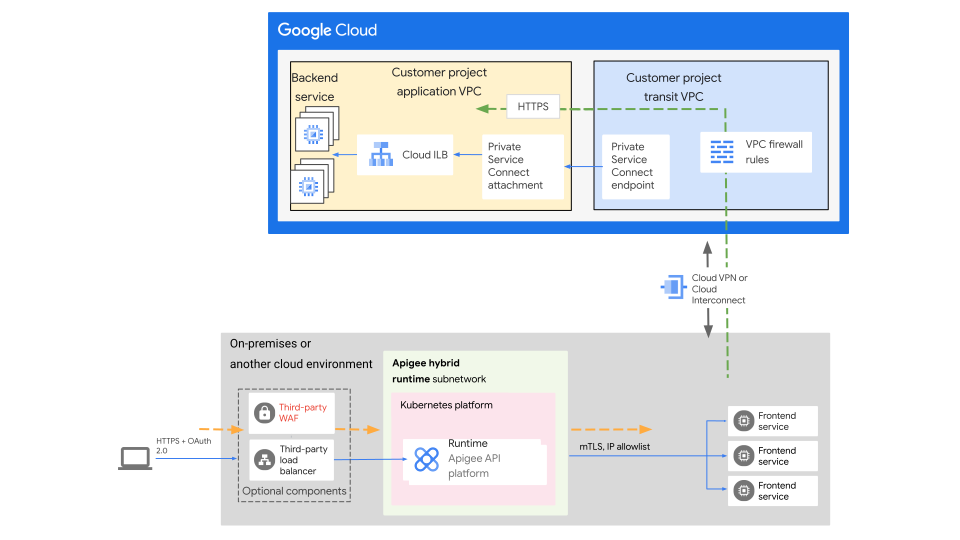
The design in the preceding diagram uses an
[Apigee Hybrid](https://docs.cloud.google.com/apigee/docs/hybrid/v1.11/what-is-hybrid)
deployment consisting of a management plane in Google Cloud and a runtime
plane hosted in your other environment. You can install and manage the runtime
plane on a distributed API gateway on one of the supported
[Kubernetes platforms](https://docs.cloud.google.com/apigee/docs/hybrid/supported-platforms)
in your on-premises environment or in other cloud environments. Based on your
requirements for distributed workloads across Google Cloud and other
environments, you can use Apigee on Google Cloud with
Apigee Hybrid. For more information, see
[Distributed API gateways](https://docs.cloud.google.com/architecture/hybrid-multicloud-secure-networking-patterns/gated-egress-ingress#distributed_api_gateways).
### Use a hub and spoke architecture to expose application backends to other environments
Exposing APIs from application backends hosted in Google Cloud across
different VPC networks might be required in certain scenarios. As illustrated in
the following diagram, a hub VPC serves as a central point of interconnection
for the various VPCs (spokes), enabling secure communication over private hybrid
connectivity. Optionally, local API gateway capabilities in other environments,
such as
[Apigee Hybrid](https://docs.cloud.google.com/apigee/docs/hybrid/v1.11/what-is-hybrid),
can be used to terminate client requests locally where the application frontend
is hosted.
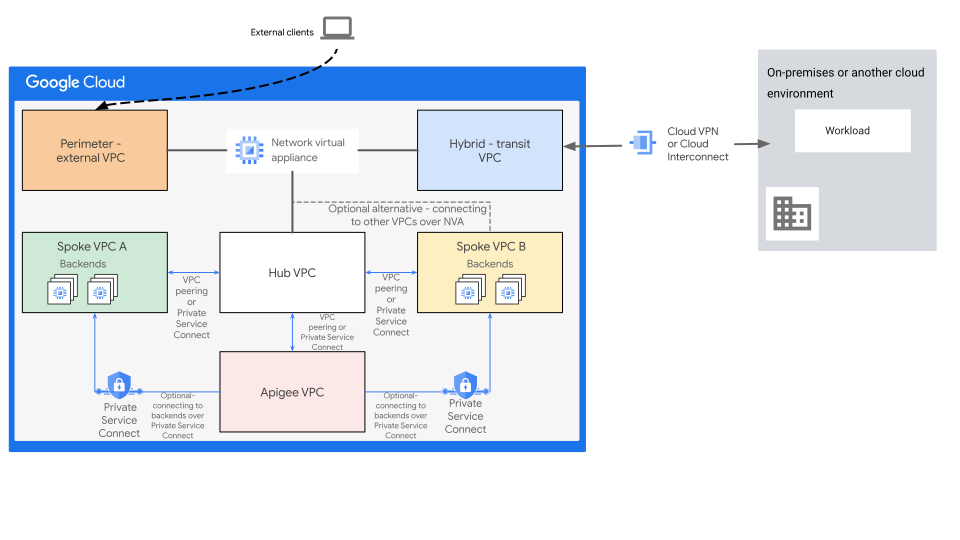
As illustrated in the preceding diagram:
- To provide additional NGFW Layer 7 inspection abilities, the NVA with NGFW capabilities is optionally integrated with the design. You might require these abilities to comply with specific security requirements and the security policy standards of your organization.
- This design assumes that spoke VPCs don't require direct VPC to VPC
communication.
- If spoke-to-spoke communication is required, you can use the NVA to facilitate such communication.
- If you have different backends in different VPCs, you can use Private Service Connect to expose these backends to the Apigee VPC.
- If VPC peering is used for the northbound and southbound connectivity between spoke VPCs and hub VPC, you need to consider the [transitivity limitation](https://docs.cloud.google.com/vpc/docs/vpc-peering#specifications) of VPC networking over VPC peering. To overcome this limitation, you can use any of the following options:
- To interconnect the VPCs, use [an NVA](https://www.googlecloudcommunity.com/gc/Cloud-Product-Articles/Using-network-appliances-to-overcome-the-transitive-VPC-peering/ta-p/76070).
- Where applicable, consider the Private Service Connect model.
- To establish connectivity between the Apigee VPC and backends that are located in other Google Cloud projects in the same organization without additional networking components, use [Shared VPC](https://docs.cloud.google.com/apigee/docs/api-platform/system-administration/shared-vpcs#benefit-of-shared-vpc).
- If NVAs are required for traffic inspection---including traffic from your
other environments---the hybrid connectivity to on-premises or other cloud
environments should be terminated on the hybrid-transit VPC.
- If the design doesn't include the NVA, you can terminate the hybrid
connectivity at the hub VPC.
- If certain load-balancing functionalities or security capabilities are
required, like adding Google Cloud Armor DDoS protection or WAF, you can
optionally deploy an external Application Load Balancer at the perimeter through an external
VPC before routing external client requests to the backends.
## Best practices
- For situations where client requests from the internet need to be received locally by a frontend hosted in a private on-premises or other cloud environment, consider using Apigee Hybrid as an API gateway solution. This approach also facilitates a seamless migration of the solution to a completely Google Cloud-hosted environment while maintaining the consistency of the API platform (Apigee).
- Use Apigee Adapter for Envoy with an [Apigee Hybrid deployment with Kubernetes](https://docs.cloud.google.com/apigee/docs/api-platform/envoy-adapter/v2.0.x/example-hybrid) architecture where applicable to your requirements and the architecture.
- The design of VPCs and projects in Google Cloud should follow the resource hierarchy and secure communication model requirements, as described in this guide.
- Incorporating a transit VPC into this design provides the flexibility to provision additional perimeter security measures and hybrid connectivity outside the workload VPC.
- Use Private Service Connect to access Google APIs and services from on-premises environments or other cloud environments using the internal IP address of the endpoint over a hybrid connectivity network. For more information, see [Access the endpoint from on-premises hosts](https://docs.cloud.google.com/vpc/docs/configure-private-service-connect-apis#on-premises).
- To help protect Google Cloud services in your projects and help mitigate the risk of data exfiltration, use VPC Service Controls to specify service perimeters at the project or VPC network level.
- When needed, you can [extend service perimeters](https://docs.cloud.google.com/vpc-service-controls/docs/overview#hybrid_access) to a hybrid environment over a VPN or Cloud Interconnect. For more information about the benefits of service perimeters, see [Overview of VPC Service Controls](https://docs.cloud.google.com/vpc-service-controls/docs/overview).
- Use [VPC firewall rules](https://docs.cloud.google.com/firewall/docs/firewalls) or [firewall policies](https://docs.cloud.google.com/firewall/docs/firewall-policies-overview) to control network-level access to Private Service Connect resources through the Private Service Connect endpoint. For example, [outbound firewall rules](https://docs.cloud.google.com/vpc/docs/manage-security-private-service-connect-consumers#firewall-rules) at the application (consumer) VPC can restrict access from VM instances to the IP address or subnet of your endpoints. For more information about VPC firewall rules in general, see [VPC firewall rules](https://docs.cloud.google.com/firewall/docs/firewalls).
- When designing a solution that includes NVAs, it's important to consider the high availability (HA) of the NVAs to avoid a single point of failure that could block all communication. Follow the HA and redundancy design and implementation guidance provided by your NVA vendor.
- To strengthen perimeter security and secure your API gateway that's deployed in the respective environment, you can optionally implement load balancing and web application firewall mechanisms in your other computing environment (hybrid or other cloud). Implement these options at the perimeter network that's directly connected to the internet.
- If instances require internet access, use [Cloud NAT](https://docs.cloud.google.com/nat/docs) in the application VPC to allow workloads to access the internet. Doing so lets you avoid assigning VM instances with external public IP addresses in systems that are deployed behind an API gateway or a load balancer.
- For outbound web traffic, use [Secure Web Proxy](https://docs.cloud.google.com/secure-web-proxy/docs/overview). The proxy offers [several benefits](https://docs.cloud.google.com/secure-web-proxy/docs/overview#benefits).
- Review the [general best practices](https://docs.cloud.google.com/architecture/hybrid-multicloud-secure-networking-patterns/general-best-practices) for hybrid and multicloud networking patterns.
# Gated egress and gated ingress
The *gated egress and gated ingress* pattern uses a combination of gated egress
and gated ingress for scenarios that demand bidirectional usage of selected APIs
between workloads. Workloads can run in Google Cloud, in private on-premises
environments, or in other cloud environments. In this pattern, you can use API
gateways, Private Service Connect endpoints, or load balancers to
expose specific APIs and optionally provide authentication, authorization, and
API call audits.
The key distinction between this pattern and the
[*meshed* pattern](https://docs.cloud.google.com/architecture/hybrid-multicloud-secure-networking-patterns/meshed-pattern)
lies in its application to scenarios that solely require bidirectional API usage
or communication with specific IP address sources and destinations---for example,
an application published through a Private Service Connect
endpoint. Because communication
is restricted to the exposed APIs or specific IP addresses, the networks across
the environments don't need to align in your design. Common applicable scenarios
include, but aren't limited to, the following:
- Mergers and acquisitions.
- Application integrations with partners.
- Integrations between applications and services of an organization with different organizational units that manage their own applications and host them in different environments.
The communication works as follows:
- Workloads that you deploy in Google Cloud can communicate with the API gateway (or specific destination IP addresses) by using internal IP addresses. Other systems deployed in the private computing environment can't be reached.
- Conversely, workloads that you deploy in other computing environments can communicate with the Google Cloud-side API gateway (or a specific published endpoint IP address) by using internal IP addresses. Other systems deployed in Google Cloud can't be reached.
## Architecture
The following diagram shows a reference architecture for the gated egress and
gated ingress pattern:
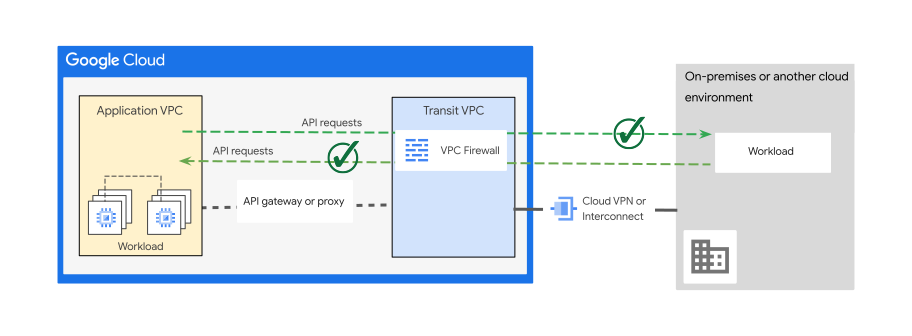
The design approach in the preceding diagram has the following elements:
- On the Google Cloud side, you deploy workloads in a VPC (or shared VPC) without exposing them directly to the internet.
- The Google Cloud environment network is extended to other computing environments. That environment can be on-premises or on another cloud. To extend the environment, use a suitable [hybrid and multicloud connectivity communication pattern](https://docs.cloud.google.com/architecture/hybrid-multicloud-secure-networking-patterns/design-considerations#hybrid_and_multicloud_activity) to facilitate the communication between environments so they can use internal IP addresses.
- Optionally, by enabling access to specific target IP addresses, you can use a transit VPC to help add a perimeter security layer outside of your application VPC.
- You can use Cloud Next Generation Firewall or network virtual appliances (NVAs) with next generation firewalls (NGFWs) at the transit VPC to inspect traffic and to allow or prohibit access to certain APIs from specific sources before reaching your application VPC.
- APIs should be accessed through an API gateway or a load balancer to provide a proxy layer, and an abstraction or facade for your service APIs.
- For applications consumed as APIs, you can also use Private Service Connect to provide an internal IP address for the published application.
- All environments use overlap-free RFC 1918 IP address space.
A common application of this pattern involves deploying application backends
(or a subset of application backends) in Google Cloud while hosting other
backend and frontend components in on-premises environments or in other clouds
([*tiered hybrid* pattern](https://docs.cloud.google.com/architecture/hybrid-multicloud-patterns-and-practices/tiered-hybrid-pattern)
or
[*partitioned multicloud* pattern](https://docs.cloud.google.com/architecture/hybrid-multicloud-patterns-and-practices/partitioned-multicloud-pattern)).
As applications evolve and migrate to the cloud, dependencies and
preferences for specific cloud services often emerge.
Sometimes these dependencies and preferences lead to the distribution of
applications and backends across different cloud providers. Also, some
applications might be built with a combination of resources and services
distributed across on-premises environments and multiple cloud environments.
For distributed applications, the capabilities of
[external Cloud Load Balancing hybrid and multicloud connectivity](https://docs.cloud.google.com/load-balancing/docs/negs/hybrid-neg-concepts#public_clients)
can be used to terminate user requests and route them to frontends or backends
in other environments. This routing occurs over a hybrid network connection, as
illustrated in the following diagram. This integration enables the gradual
distribution of application components across different environments. Requests
from the frontend to backend services hosted in Google Cloud communicate
securely over the established hybrid network connection facilitated by an
internal load balancer (ILB in the diagram).
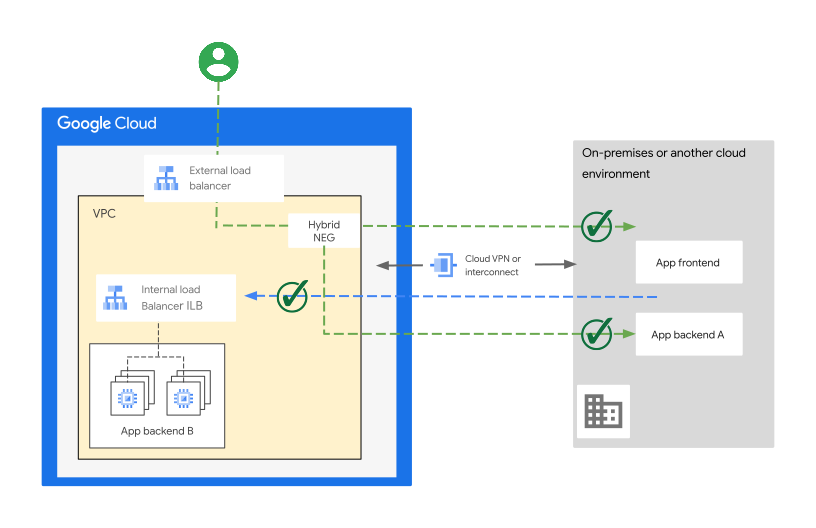
Using the Google Cloud design in the preceding diagram helps with the
following:
- Facilitates two-way communication between Google Cloud, on-premises, and other cloud environments using predefined APIs on both sides that align with the communication model of this pattern.
- To provide [global frontends for internet-facing applications](https://docs.cloud.google.com/solutions/cross-cloud-network#deliver-internet-facing-apps-and-content) with distributed application components (frontends or backends), and to accomplish the following goals, you can use the advanced load balancing and security capabilities of Google Cloud distributed at [points of presence (PoPs)](https://peering.google.com/#/infrastructure):
- Reduce capital expenses and simplify operations by using serverless managed services.
- Optimize connections to application backends globally for speed and latency.
- Google Cloud [Cross-Cloud Network](https://docs.cloud.google.com/solutions/cross-cloud-network#how-it-works) enables multicloud communication between application components over optimal private connections.
- Cache high demand static content and improve application performance for applications using global Cloud Load Balancing by providing access to Cloud CDN.
- Secure the global frontends of the internet facing applications by using Google Cloud Armor capabilities that provide [globally distributed](https://docs.cloud.google.com/armor/docs/security-policy-overview#edge-security) web application firewall (WAF) and DDoS mitigation services.
- Optionally, you can incorporate Private Service Connect into your design. Doing so enables private, fine-grained access to Google Cloud service APIs or your published services from other environments without traversing the public internet.
## Variations
The *gated egress and gated ingress* architecture patterns can be combined with
other approaches to meet different design requirements, while still considering
the communication requirements of this pattern. The patterns offer the following
options:
- [Distributed API gateways](https://docs.cloud.google.com/architecture/hybrid-multicloud-secure-networking-patterns/one-page-view#distributed_api_gateways)
- [Bidirectional API communication using Private Service Connect](https://docs.cloud.google.com/architecture/hybrid-multicloud-secure-networking-patterns/one-page-view#bidirectional-api-communication-using-private-service-connect)
- [Bidirectional communication using Private Service Connect endpoints and interfaces](https://docs.cloud.google.com/architecture/hybrid-multicloud-secure-networking-patterns/one-page-view#bidirectional-communication-using-private-service-connect-endpoints-and-interfaces)
### Distributed API gateways
In scenarios like the one based on the
[*partitioned multicloud* pattern](https://docs.cloud.google.com/architecture/hybrid-multicloud-patterns-and-practices/partitioned-multicloud-pattern),
applications (or application components) can be built in different cloud
environments---including a private on-premises environment. The common requirement
is to route client requests to the application frontend directly to the
environment where the application (or the frontend component) is hosted. This
kind of communication requires a local load balancer or an API gateway.
These applications and their components might also require specific API platform
capabilities for integration.
The following diagram illustrates how Apigee and
[Apigee Hybrid](https://docs.cloud.google.com/apigee/docs/hybrid/v1.11/what-is-hybrid)
are designed to address such requirements with a localized API gateway in each
environment. API platform management is centralized in Google Cloud. This
design helps to enforce strict access control measures where only pre-approved
IP addresses (target and destination APIs or
Private Service Connect endpoint IP addresses) can communicate
between Google Cloud and the other environments.
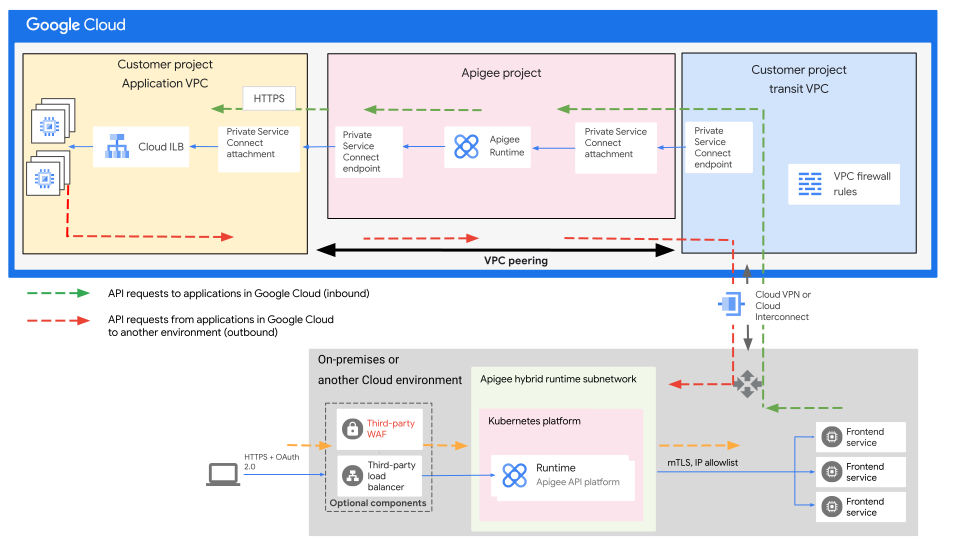
The following list describes the two distinct
communication paths in the preceding diagram that use Apigee
API gateway:
- Client requests arrive at the application frontend directly in the environment that hosts the application (or the frontend component).
- API gateways and proxies within each environment handle client and application API requests in different directions across multiple environments.
- The API gateway functionality in Google Cloud (Apigee) exposes the application (frontend or backend) components that are hosted in Google Cloud.
- The API gateway functionality in another environment (Hybrid) exposes the application frontend (or backend) components that are hosted in that environment.
Optionally, you can consider using a transit VPC. A transit VPC can provide
flexibility to separate concerns and to perform security inspection and hybrid
connectivity in a separate VPC network. From an IP address reachability
standpoint, a transit VPC (where the hybrid connectivity is attached)
facilitates the following requirements to maintain end-to-end reachability:
- The IP addresses for target APIs need to be advertised to the other environments where clients/requesters are hosted.
- The IP addresses for the hosts that need to communicate with the target APIs have to be advertised to the environment where the target API resides---for example, the IP addresses of the API requester (the client). The exception is when communication occurs through a load balancer, proxy, Private Service Connect endpoint, or NAT instance.
To extend connectivity to the remote environment, this design uses direct VPC
peering with
[customer route exchange](https://docs.cloud.google.com/vpc/docs/vpc-peering#custom-route-exchange)
capability. The design lets specific API requests that originate from workloads
hosted within the Google Cloud application VPC to route through the transit VPC.
Alternatively, you can use a Private Service Connect endpoint in
the application VPC that's associated with a load
balancer with a hybrid network endpoint group backend in the transit VPC. That
setup is described in the next section: Bidirectional API communication using
Private Service Connect.
### Bidirectional API communication using Private Service Connect
Sometimes, enterprises might not need to use an API gateway (like
Apigee) immediately, or might want to add it later.
However, there might be business requirements to
enable communication and integration between certain applications in different
environments. For example, if your company acquired another company, you might
need to expose certain applications to that company. They might need to expose
applications to your company. Both companies might each have their own workloads
hosted in different environments (Google Cloud, on-premises, or in other
clouds), and must avoid IP address overlap. In such cases, you can use
Private Service Connect to facilitate effective communication.
For applications consumed as APIs, you can also use
Private Service Connect to provide a private address
for the published applications, enabling secure access within the private
network across [regions](https://docs.cloud.google.com/docs/geography-and-regions#regions_and_zones) and
over hybrid connectivity. This abstraction
facilitates the integration of resources from diverse clouds and on-premises
environments over a hybrid and multicloud connectivity model. It also enables
the assembly of applications across multicloud and on-premises environments.
This can satisfy different communication requirements, like integrating secure
applications where an API gateway isn't used or isn't planned to be used.
By using Private Service Connect with Cloud Load Balancing, as shown in the following
diagram, you can achieve two distinct communication paths. Each path is
initiated from a different direction for a separate connectivity purpose,
ideally through API calls.
- All the design considerations and recommendations of Private Service Connect discussed in this guide apply to this design.
- If additional Layer 7 inspection is required, you can integrate NVAs with this design (at the transit VPC).
- This design can be used with or without API gateways.
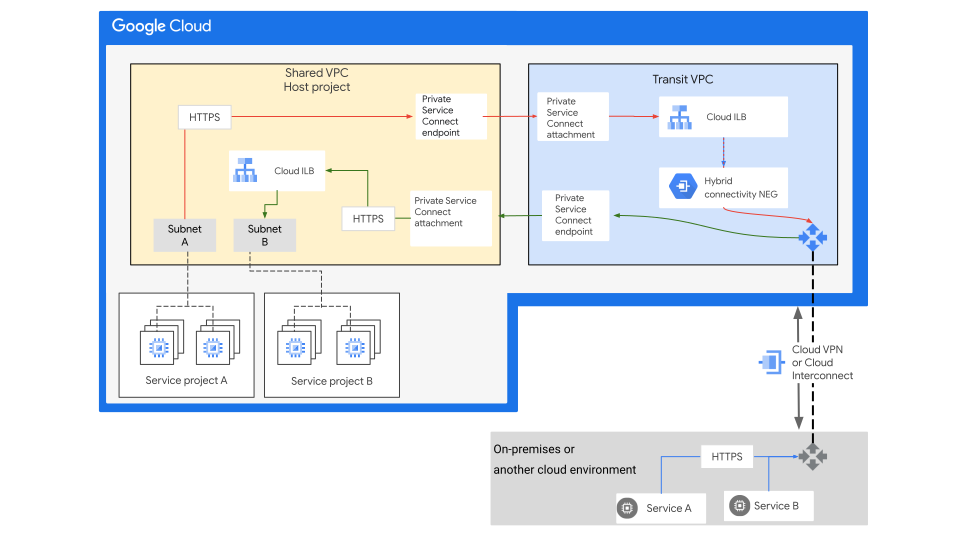
The two connectivity paths depicted in the preceding diagram represent
independent connections and don't illustrate two-way communication of a single
connection or flow.
### Bidirectional communication using Private Service Connect endpoints and interfaces
As discussed in the
[*gated ingress* pattern](https://docs.cloud.google.com/architecture/hybrid-multicloud-secure-networking-patterns/gated-ingress),
one of the options to enable client-service communication is by using a
Private Service Connect endpoint to expose a service in a producer
VPC to a consumer VPC. That
connectivity can be extended to an on-premises environment or even another cloud
provider environment over a hybrid connectivity. However, in some scenarios, the
hosted service can also require private communication.
To access a certain service, like retrieving data from data sources that can be
hosted within the consumer VPC or outside it, this private communication can be
between the application (producer) VPC and a remote environment, such as an
on-premises environment.
In such a scenario,
[Private Service Connect interfaces](https://docs.cloud.google.com/vpc/docs/about-private-service-connect-interfaces)
enable a service producer VM instance to access a consumer's network.
It does so by sharing a network interface, while still maintaining the
separation of producer and consumer roles. With this network interface in the
consumer VPC, the application VM can access consumer resources as if they
resided locally in the producer VPC.
A Private Service Connect interface is a network interface
attached to the consumer (transit) VPC. It's possible to reach external
destinations that are reachable from the consumer (transit) VPC where the
Private Service Connect interface is attached.
Therefore, this connection can be extended to an external environment over a
hybrid connectivity such as an on-premises environment, as illustrated in the
following diagram:
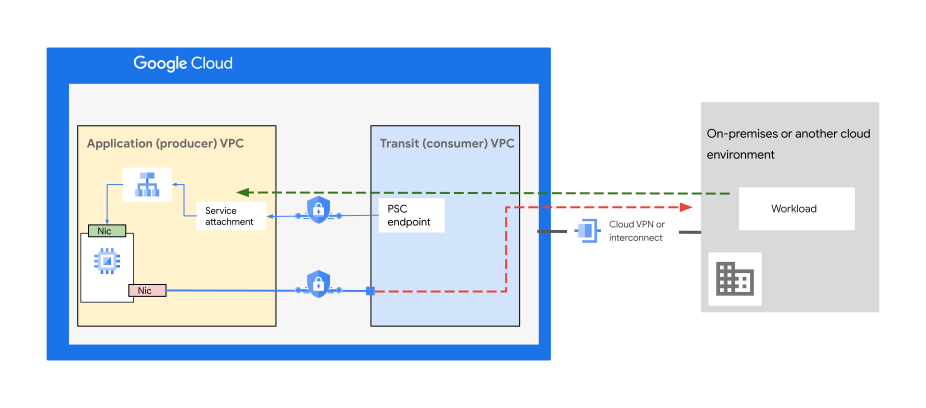
If the consumer VPC is an external organization or entity, like a third-party
organization, typically you won't have the ability to secure the communication
to the Private Service Connect interface in the consumer VPC. In
such a scenario, you can define security policies in the guest OS of the
Private Service Connect interface VM. For more information,
see
[Configure security for Private Service Connect interfaces](https://docs.cloud.google.com/vpc/docs/configure-security-private-service-connect-interfaces).
Or, you might consider an alternative approach if it doesn't comply with the
security compliance or standards of your organization.
### Best practices
- For situations where client requests from the internet need to be
received locally by a frontend hosted in a private on-premises or other
cloud environment, consider using Hybrid as an API
gateway solution.
- This approach also facilitates a migration of the solution to a fully Google Cloud-hosted environment while maintaining the consistency of the API platform (Apigee).
- To minimize latency and optimize costs for high volumes of outbound data
transfers to your other environments when those environments are in
long-term or permanent hybrid or multicloud setups, consider the following:
- Use Cloud Interconnect or Cross-Cloud Interconnect.
- To terminate user connections at the targeted frontend in the appropriate environment, use [Hybrid](https://docs.cloud.google.com/apigee/docs/hybrid/v1.11/what-is-hybrid).
- Where applicable to your requirements and the architecture, use
Apigee Adapter for Envoy with a
[Hybrid deployment with Kubernetes](https://docs.cloud.google.com/apigee/docs/api-platform/envoy-adapter/v2.0.x/example-hybrid).
- Before designing the connectivity and routing paths, you first need to
identify what traffic or API requests need to be directed to a local or
remote API gateway, along with the source and destination environments.
- Use VPC Service Controls to protect Google Cloud services in your
projects and to mitigate the risk of data exfiltration, by specifying
service perimeters at the project or VPC network level.
- You can [extend service perimeters](https://docs.cloud.google.com/vpc-service-controls/docs/overview#hybrid_access) to a hybrid environment over an authorized VPN or Cloud Interconnect. For more information about the benefits of service perimeters, see [Overview of VPC Service Controls](https://docs.cloud.google.com/vpc-service-controls/docs/overview).
- Use
[Virtual Private Cloud (VPC) firewall rules](https://docs.cloud.google.com/firewall/docs/firewalls)
or
[firewall policies](https://docs.cloud.google.com/firewall/docs/firewall-policies-overview)
to control network-level access to Private Service Connect
resources through the Private Service Connect endpoint.
For example,
[outbound firewall rules](https://docs.cloud.google.com/vpc/docs/manage-security-private-service-connect-consumers#firewall-rules)
at the application (consumer) VPC can restrict access from VM instances to
the IP address or subnet of your endpoints.
- When using a Private Service Connect interface, you must
protect the communication to the
interface by configuring security for the
Private Service Connect interface.
- If a workload in a private subnet requires internet access, use
[Cloud NAT](https://docs.cloud.google.com/nat/docs)
to avoid assigning an external IP address to the workload and exposing it to
the public internet.
- For outbound web traffic, use [Secure Web Proxy](https://docs.cloud.google.com/secure-web-proxy/docs/overview). The proxy offers [several benefits](https://docs.cloud.google.com/secure-web-proxy/docs/overview#benefits).
- Review the
[general best practices](https://docs.cloud.google.com/architecture/hybrid-multicloud-secure-networking-patterns/general-best-practices)
for hybrid and multicloud networking patterns.
# Handover patterns
With the *handover* pattern, the architecture is based on using
Google Cloud-provided storage services to connect a private computing
environment to projects in Google Cloud. This pattern applies primarily to
setups that follow the
[*analytics hybrid multicloud* architecture pattern](https://docs.cloud.google.com/architecture/hybrid-multicloud-patterns#analytics-hybrid-multicloud-patterns),
where:
- Workloads that are running in a private computing environment or in another cloud upload data to shared storage locations. Depending on use cases, uploads might happen in bulk or in smaller increments.
- Google Cloud-hosted workloads or other Google services (data analytics and artificial intelligence services, for example) consume data from the shared storage locations and process it in a streaming or batch fashion.
## Architecture
The following diagram shows a reference architecture for the handover
pattern.
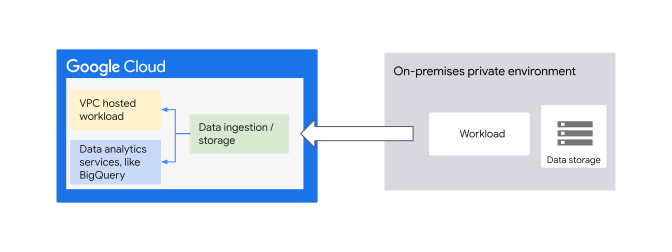
The preceding architecture diagram shows the following workflows:
- On the Google Cloud side, you deploy workloads into an application VPC. These workloads can include data processing, analytics, and analytics-related frontend applications.
- To securely expose frontend applications to users, you can use Cloud Load Balancing or API Gateway.
- A set of Cloud Storage buckets or Pub/Sub queues uploads data from the private computing environment and makes it available for further processing by workloads deployed in Google Cloud. Using Identity and Access Management (IAM) policies, you can restrict access to trusted workloads.
- Use [VPC Service Controls](https://docs.cloud.google.com/vpc-service-controls) to restrict access to services and to minimize unwarranted data exfiltration risks from Google Cloud services.
- In this architecture, communication with Cloud Storage buckets, or Pub/Sub, is conducted over public networks, or through private connectivity using VPN, Cloud Interconnect, or Cross-Cloud Interconnect. Typically, the decision on how to connect depends on several aspects, such as the following:
- Expected traffic volume
- Whether it's a temporary or permanent setup
- Security and compliance requirements
## Variation
The design options outlined in the
[*gated ingress* pattern](https://docs.cloud.google.com/architecture/hybrid-multicloud-secure-networking-patterns/gated-ingress),
which uses Private Service Connect endpoints for Google APIs, can also
be applied to this pattern.
Specifically, it provides access to Cloud Storage, BigQuery,
and other Google Service APIs. This approach requires private IP addressing over
a hybrid and multicloud network connection such as VPN, Cloud Interconnect
and Cross-Cloud Interconnect.
## Best practices
- Lock down access to Cloud Storage buckets and Pub/Sub topics.
- When applicable, use cloud-first, integrated data movement solutions like the Google Cloud [suite of solutions](https://cloud.google.com/data-movement). To meet your use case needs, these solutions are designed to efficiently move, integrate, and transform data.
- Assess the different factors that influence the data transfer options,
such as cost, expected transfer time, and security. For more
information, see
[Evaluating your transfer options](https://docs.cloud.google.com/architecture/migration-to-google-cloud-transferring-your-large-datasets#step_3_evaluating_your_transfer_options).
- To minimize latency and prevent high-volume data transfer and movement over
the public internet, consider using Cloud Interconnect or
Cross-Cloud Interconnect, including accessing
Private Service Connect endpoints within your Virtual Private Cloud for
Google APIs.
- To protect Google Cloud services in your projects and to mitigate
the risk of data exfiltration, use VPC Service Controls. These service
controls can specify service perimeters at the project or VPC network level.
- You can [extend service perimeters](https://docs.cloud.google.com/vpc-service-controls/docs/overview#hybrid_access) to a hybrid environment over an authorized VPN or Cloud Interconnect. For more information about the benefits of service perimeters, see [Overview of VPC Service Controls](https://docs.cloud.google.com/vpc-service-controls/docs/overview).
- Communicate with publicly published data analytics workloads that are
hosted on VM instances through an API gateway, a load balancer, or a
virtual network appliance. Use one of these communication methods for added
security and to avoid making these instances directly reachable from the
internet.
- If internet access is required,
[Cloud NAT](https://docs.cloud.google.com/nat/docs)
can be used in the same VPC to handle outbound traffic from the instances
to the public internet.
- Review the
[general best practices](https://docs.cloud.google.com/architecture/hybrid-multicloud-secure-networking-patterns/general-best-practices)
for hybrid and multicloud networking topologies.
# General best practices
When designing and onboarding cloud identities, resource hierarchy, and landing
zone networks, consider the design recommendations in
[Landing zone design in Google Cloud](https://docs.cloud.google.com/architecture/landing-zones)
and the Google Cloud security best practices covered in the
[enterprise foundations blueprint](https://docs.cloud.google.com/architecture/blueprints/security-foundations).
Validate your selected design against the following documents:
- [Best practices and reference architectures for VPC design](https://docs.cloud.google.com/architecture/best-practices-vpc-design)
- [Decide a resource hierarchy for your Google Cloud landing zone](https://docs.cloud.google.com/architecture/landing-zones/decide-network-design)
- [Google Cloud Well-Architected Framework: Security, privacy, and compliance](https://docs.cloud.google.com/architecture/framework/security)
Also, consider the following general best practices:
- When choosing a hybrid or multicloud network connectivity option,
consider business and application requirements such as SLAs, performance,
security, cost, reliability, and bandwidth. For more information, see
[Choosing a Network Connectivity product](https://docs.cloud.google.com/network-connectivity/docs/how-to/choose-product)
and
[Patterns for connecting other cloud service providers with Google Cloud](https://docs.cloud.google.com/architecture/patterns-for-connecting-other-csps-with-gcp).
- Use shared VPC networks on Google Cloud instead of multiple VPC networks when
appropriate and aligned with your
[resource hierarchy design](https://docs.cloud.google.com/architecture/landing-zones/decide-resource-hierarchy)
requirements. For more information, see
[Deciding whether to create multiple VPC networks](https://docs.cloud.google.com/architecture/best-practices-vpc-design#decide-whether-to-create-multiple-vpcs).
- Follow the best practices for
[planning accounts and organizations](https://docs.cloud.google.com/architecture/identity/best-practices-for-planning).
- Where applicable,
[establish a common identity](https://docs.cloud.google.com/architecture/landing-zones/decide-how-to-onboard-identities)
between environments so that systems can authenticate securely across
environment boundaries.
- To securely expose applications to corporate users in a hybrid setup,
and to choose the approach that best fits your requirements, you should
follow the recommended ways to
[integrate Google Cloud with your identity management system](https://docs.cloud.google.com/architecture/authenticating-corporate-users-in-a-hybrid-environment).
- Also, see [Patterns for authenticating workforce users in a hybrid environment](https://docs.cloud.google.com/architecture/patterns-for-authenticating-corporate-users-in-a-hybrid-environment).
- When designing your on-premises and cloud environments, consider IPv6
addressing early on, and account for which services support it. For more
information, see
[An Introduction to IPv6 on Google Cloud](https://cloud.google.com/blog/products/networking/getting-started-with-ipv6-on-google-cloud).
It summarizes the services that were supported when the blog was written.
- When designing, deploying, and managing your VPC firewall rules, you can:
- Use [service-account-based filtering over network-tag-based filtering](https://docs.cloud.google.com/vpc/docs/firewalls#service-accounts-vs-tags) if you need strict control over how firewall rules are applied to VMs.
- Use [firewall policies](https://docs.cloud.google.com/firewall/docs/firewall-policies-overview) when you group several firewall rules, so that you can update them all at once. You can also make the policy hierarchical. For hierarchical firewall policy specifications and details, see [Hierarchical firewall policies](https://docs.cloud.google.com/firewall/docs/firewall-policies).
- Use [geo-location objects](https://docs.cloud.google.com/firewall/docs/geolocation-objects-overview) in firewall policy when you need to filter external IPv4 and external IPv6 traffic based on specific geographic locations or regions.
- Use [Threat Intelligence for firewall policy rules](https://docs.cloud.google.com/firewall/docs/threat-intelligence-overview) if you need to secure your network by allowing or blocking traffic based on Threat Intelligence data, such as known malicious IP addresses or based on public cloud IP address ranges. For example, you can allow traffic from specific public cloud IP address ranges if your services need to communicate with that public cloud only. For more information, see [Best practices for firewall rules](https://docs.cloud.google.com/firewall/docs/firewalls#best_practices_for_firewall_rules).
- You should always design your cloud and network security using a
multilayer security approach by considering additional security layers,
like the following:
- [Google Cloud Armor](https://docs.cloud.google.com/armor)
- [Cloud Intrusion Detection System](https://docs.cloud.google.com/intrusion-detection-system/docs/overview)
- [Cloud Next Generation Firewall IPS](https://docs.cloud.google.com/firewall/docs/about-intrusion-prevention#how-ips-works)
- [Threat Intelligence for firewall policy rules](https://docs.cloud.google.com/firewall/docs/threat-intelligence-overview)
These additional layers can help you filter, inspect, and monitor a wide variety of threats at the network and application layers for analysis and prevention.
- When deciding where DNS resolution should be performed in a hybrid
setup, we recommend using two authoritative DNS systems for your private
Google Cloud environment and for your on-premises resources that are
hosted by existing DNS servers in your on-premises environment. For more
information see,
[Choose where DNS resolution is performed](https://docs.cloud.google.com/dns/docs/best-practices#choose_where_dns_resolution_is_performed).
- Where possible, always expose applications through APIs using an API
gateway or load balancer. We recommend that you consider an API
platform like Apigee. Apigee acts as an abstraction or facade
for your backend service APIs, combined with security capabilities, rate
limiting, quotas, and analytics.
- An API platform (gateway or proxy) and
[Application Load Balancer](https://docs.cloud.google.com/load-balancing/docs/application-load-balancer)
aren't mutually exclusive. Sometimes, using both API gateways and load
balancers together can provide a more robust and secure solution for
managing and distributing API traffic at scale. Using
[Cloud Load Balancing API gateways](https://docs.cloud.google.com/api-gateway/docs/gateway-serverless-neg)
lets you accomplish the following:
- Deliver high-performing APIs with Apigee and
Cloud CDN, to:
- Reduce latency
- Host APIs globally
- Increase availability for peak traffic seasons
For more information, watch [Delivering high-performing APIs with Apigee and Cloud CDN](https://www.youtube.com/watch?v=lwiJUaGPCK4)
on YouTube.
- Implement advanced traffic management.
- Use Cloud Armor as DDoS protection, WAF, and network security
service to protect your APIs.
- Manage efficient load balancing across gateways in multiple
[regions](https://docs.cloud.google.com/docs/geography-and-regions#regions_and_zones). For more information, watch
[Securing APIs and Implementing multi-region failover with PSC and Apigee](https://www.youtube.com/watch?v=AatzC4ct7co).
- To determine which Cloud Load Balancing product to use, you must first
determine what traffic type your load balancers must handle. For more
information, see
[Choose a load balancer](https://docs.cloud.google.com/load-balancing/docs/choosing-load-balancer).
- When Cloud Load Balancing is used, you should use its
[application capacity optimization abilities](https://docs.cloud.google.com/load-balancing/docs/tutorials/about-capacity-optimization-with-global-lb)
where applicable. Doing so can help you address some of the capacity
challenges that can occur in globally distributed applications.
- For a deep dive on latency, see [Optimize application latency with load balancing](https://docs.cloud.google.com/load-balancing/docs/tutorials/optimize-app-latency).
- While Cloud VPN encrypts traffic between environments, with
Cloud Interconnect you need to use either MACsec or
HA VPN over Cloud Interconnect to
[encrypt traffic in transit](https://docs.cloud.google.com/docs/security/encryption-in-transit)
at the connectivity layer. For more information, see
[How can I encrypt my traffic over Cloud Interconnect](https://docs.cloud.google.com/network-connectivity/docs/interconnect/support/faq#encryption).
- You can also consider service layer encryption using TLS. For more information, see [Decide how to meet compliance requirements for encryption in transit](https://docs.cloud.google.com/architecture/landing-zones/decide-security#encrypt-transit).
- If you need more traffic volume over a VPN hybrid connectivity than a
single VPN tunnel can support, you can consider using
[active/active HA VPN routing](https://docs.cloud.google.com/network-connectivity/docs/vpn/concepts/overview#active)
option.
- For long-term hybrid or multicloud setups with high outbound data transfer volumes, consider Cloud Interconnect or Cross-Cloud Interconnect. Those connectivity options help to optimize connectivity performance and might reduce outbound data transfer charges for traffic that meets certain conditions. For more information, see [Cloud Interconnect pricing](https://cloud.google.com/network-connectivity/docs/interconnect/pricing).
- When
[connecting to Google Cloud](https://docs.cloud.google.com/network-connectivity/docs/how-to/choose-product#google-cloud)
resources and trying to choose between Cloud Interconnect,
Direct Peering, or Carrier Peering, we recommend using
Cloud Interconnect, unless you need to access Google Workspace
applications. For more information, you can compare the features of
[Direct Peering with Cloud Interconnect](https://docs.cloud.google.com/network-connectivity/docs/how-to/choose-product#dp-compare)
and
[Carrier Peering with Cloud Interconnect](https://docs.cloud.google.com/network-connectivity/docs/how-to/choose-product#cp-compare).
- Allow enough IP address space from your existing RFC 1918 IP address
space to accommodate your cloud-hosted systems.
- If you have technical restrictions that require you to keep your IP
address range, you can:
- Use the same internal IP addresses for your on-premises
workloads while migrating them to Google Cloud, using
[hybrid subnets](https://docs.cloud.google.com/vpc/docs/hybrid-subnets).
- Provision and use your own public IPv4 addresses for
Google Cloud resources using
[bring your own IP (BYOIP)](https://docs.cloud.google.com/vpc/docs/bring-your-own-ip)
to Google.
- If the design of your solution requires exposing a
Google Cloud-based application to the public internet, consider the
design recommendations discussed in
[Networking for internet-facing application delivery](https://docs.cloud.google.com/architecture/network-application-delivery).
- Where applicable, use
[Private Service Connect endpoints](https://docs.cloud.google.com/vpc/docs/private-service-connect)
to allow workloads in Google Cloud, on-premises, or in another cloud
environment with hybrid connectivity, to privately access Google APIs or
published services, using internal IP addresses in a fine-grained fashion.
- When using Private Service Connect, you must control the
following:
- Who can deploy Private Service Connect resources.
- Whether connections can be established between consumers and producers.
- Which network traffic is allowed to access those connections.
For more information, see
[Private Service Connect security](https://docs.cloud.google.com/vpc/docs/private-service-connect-security).
- To achieve a robust cloud setup in the context of hybrid and multicloud
architecture:
- Perform a comprehensive assessment of the required levels of reliability of the different applications across environments. Doing so can help you meet your objectives for availability and resilience.
- Understand the reliability capabilities and [design principles](https://docs.cloud.google.com/architecture/framework/reliability#core_principles) of your cloud provider. For more information, see [Google Cloud infrastructure reliability](https://docs.cloud.google.com/architecture/infra-reliability-guide).
- Cloud network visibility and monitoring are essential to maintain
reliable communications.
[Network Intelligence Center](https://docs.cloud.google.com/network-intelligence-center/docs)
provides a single console for managing network visibility, monitoring, and
troubleshooting.
# Hybrid and multicloud secure networking architecture patterns: What's next
- Learn more about the common [architecture patterns](https://docs.cloud.google.com/architecture/hybrid-and-multi-cloud-architecture-patterns) that you can realize by using the networking patterns discussed in this document.
- Learn [how to approach hybrid and multicloud and how to choose suitable workloads](https://docs.cloud.google.com/architecture/hybrid-multicloud-patterns).
- Learn more about Google Cloud [Cross-Cloud Network](https://services.google.com/fh/files/misc/cross_cloud_network_solution_brief.pdf) a global network platform that is open, secure, and optimized for applications and users across on-premises and other clouds.
- [Design reliable infrastructure for your workloads in Google Cloud](https://docs.cloud.google.com/architecture/infra-reliability-guide/design): Design guidance to help to protect your applications against failures at the resource, zone, and region level.
- To learn more about designing highly available architectures in Google Cloud, check out [patterns for resilient and scalable apps](https://docs.cloud.google.com/solutions/scalable-and-resilient-apps).
- Learn more about [the possible connectivity options](https://docs.cloud.google.com/anthos/clusters/docs/bare-metal/latest/concepts/connect-on-prem-gcp) to connect a GKE cluster running in your on-premises/edge environment, to Google Cloud network along with the [Impact of temporary disconnection from Google Cloud](https://docs.cloud.google.com/anthos/docs/concepts/anthos-connectivity).